Almost every framework that touches your security or resilience program expects you to know what your critical business processes are, plan how you’d recover them, and prove you’ve tested those plans. ISO 22301 is built entirely around it; SOC 2 calls it out in A1.2/A1.3 (recovery infrastructure and recovery-plan testing); NIST SP 800-34 lays out the contingency-planning lifecycle; and for EU financial firms, DORA Article 11 makes operational-resilience testing a regulatory obligation. Auditors don’t want a binder — they want a current Business Impact Analysis, a recovery plan tied to it, a record of the last test, and the gaps you’re working.
Most teams keep this in a spreadsheet and a folder of Word documents that age out the moment they’re saved. Talarity treats business continuity as a connected, living workflow: one place where the impact analysis feeds the recovery plan, the recovery plan gets tested, a coordinated exercise checks the actual assets, and a program dashboard tells you what’s covered and what’s overdue. This article is the map — a tour of the whole loop. Each stop has its own deep-dive guide; here you’ll see how the pieces fit.
Who’s involved
- Business continuity owner — stands up the program: owns the BIAs, writes the recovery plans, schedules the tests.
- Process / system owner — knows a specific business process or asset, and is on the hook for recovering it.
- DR coordinator — runs the coordinated, asset-level DR exercises and chases the results.
- Executive / auditor — reads the program dashboard and pulls the attestation report. Wants coverage, cadence, and evidence — at a glance.
What’s on the page
Open the Business Continuity & DR command center (/app/grc/bcdr).
- The Dashboard — counts of BIAs, recovery plans, and tests; plans trending by latest test outcome; your dependency mix; and the two gap tiles — active BIAs without a recovery plan and overdue tests.
- The tabs — BIAs, Recovery Plans, Continuity Tests, DR Exercises, and Program.
Step 1 — Start at the command center
Everything lives under Business Continuity & DR (/app/grc/bcdr). The Dashboard opens on the state of your whole program: how many BIAs, recovery plans, and tests you have; how plans are trending by their latest test outcome; your dependency mix; and — the two that earn their place — active BIAs without a recovery plan and overdue tests, the gaps that quietly accumulate.
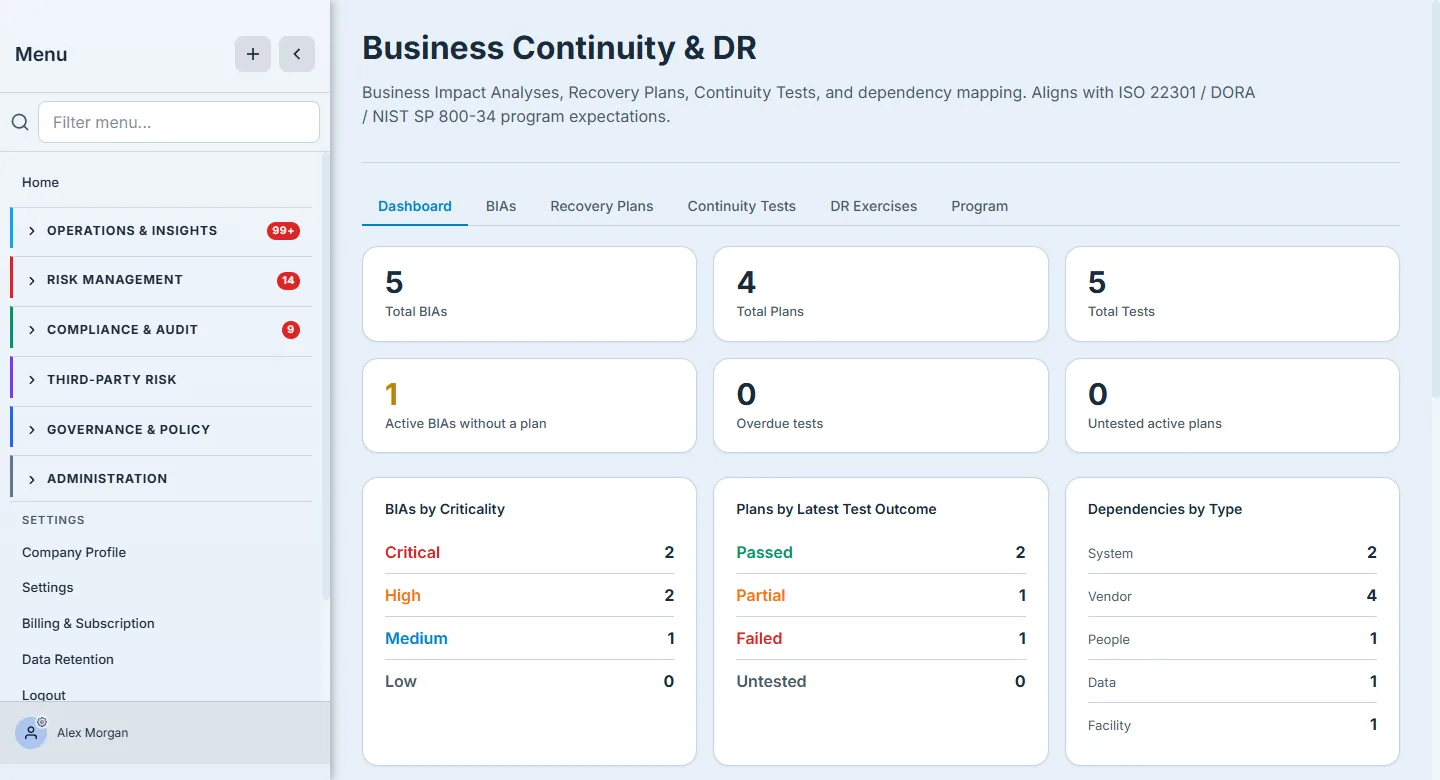
The six tabs across the top are the loop in order: BIAs → Recovery Plans → Continuity Tests → DR Exercises → Program. The dashboard is the scoreboard; the rest of this tour walks the tabs left to right.
Step 2 — Rank what matters: the Business Impact Analysis
A continuity program is only as good as its prioritization, and that’s what a Business Impact Analysis is for. Each BIA names a business process, sets its criticality, and records the numbers that drive every downstream decision: Maximum Tolerable Downtime, Recovery Time Objective (how fast you must be back), Recovery Point Objective (how much data you can afford to lose), and the financial impact per day of outage. You link the assets, vendors, and controls the process depends on, and set a review cadence so the analysis doesn’t rot.
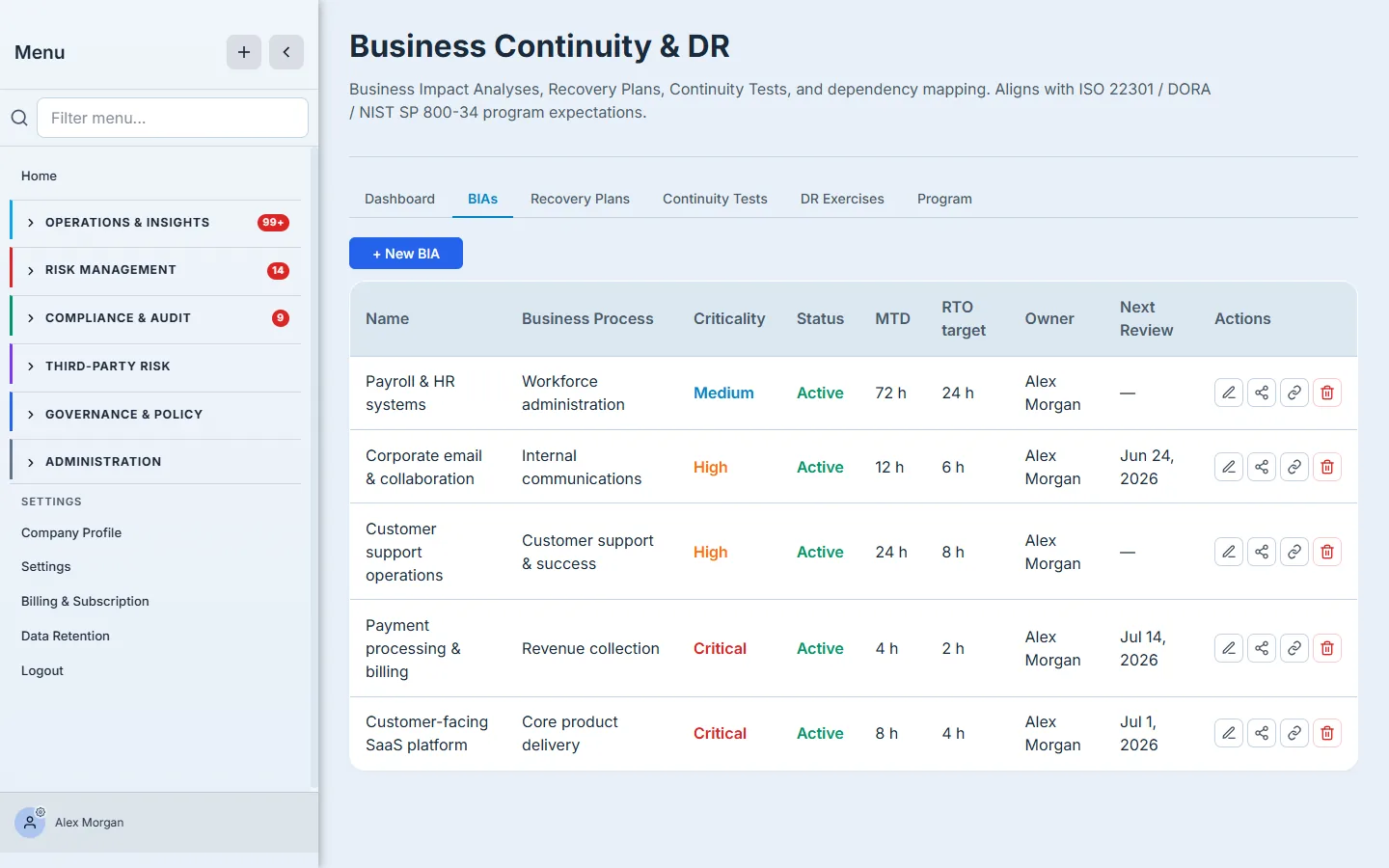
The distinction that trips most teams up is MTD vs RTO vs RPO — how long you can survive without the process, how fast you’ll restore it, and how much data loss is acceptable on restore. Getting those three numbers honest is the whole point; everything else is bookkeeping. (Full walkthrough: “Run your first Business Impact Analysis.”)
Step 3 — Write the recovery plan against it
A BIA says what matters and how fast; a Recovery Plan says how you’ll actually do it. You pick the disaster scenario (datacenter outage, cyber incident, natural disaster, pandemic, supply-chain), set the plan’s RTO/RPO, capture the alternate site and activation criteria, author the ordered recovery steps, and assign RACI owners so there’s no ambiguity about who does what at 3 a.m. Each plan links back to a BIA and carries its own test cadence.
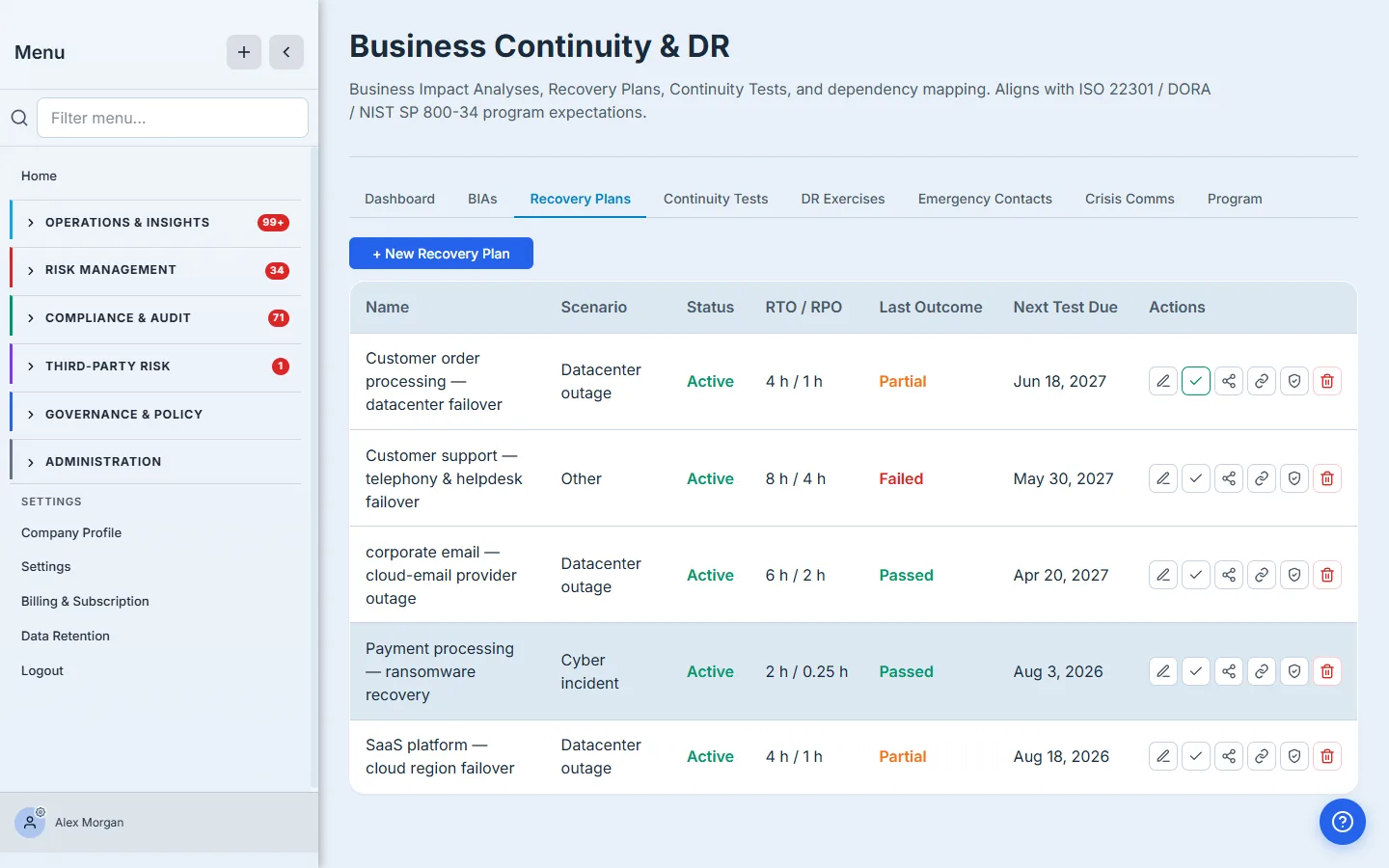
A plan with no owner and no test date is a liability, not an asset — which is exactly why the dashboard counts “active BIAs without a plan” and “untested active plans.” (Full walkthrough: “Write a recovery plan that survives an audit.”)
Step 4 — Test it: tabletop to full interruption
An untested plan is a hope. The Continuity Tests tab is where you schedule and record exercises against a plan — tabletop, walkthrough, simulation, parallel, or full-interruption — and capture what actually happened: the observed RTO and RPO, whether objectives were met, the issues you found, and the lessons learned. The outcome (passed / partial / failed) rolls straight up to the plan and the dashboard.
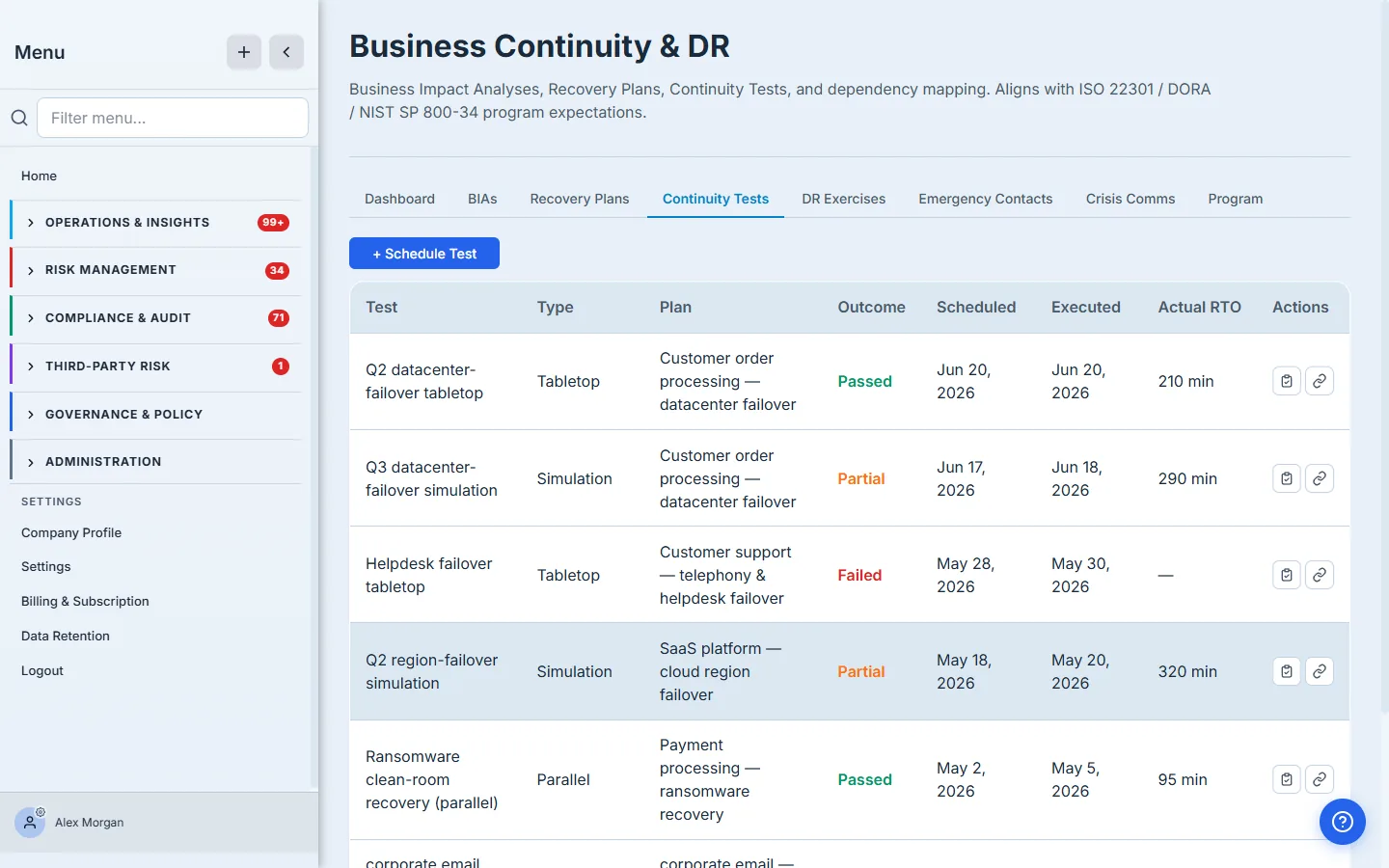
The decision here is which test type, when: a tabletop is cheap and frequent; a full-interruption is expensive and proves the most. Match the rigor to the criticality. (Full walkthrough: “Testing recovery plans: tabletop to full-interruption.”)
Step 5 — Coordinate an asset-level DR exercise
Plan-level tests prove the playbook; a DR Exercise proves the fleet. This is the program’s heavy machinery: you scope an exercise by asset criticality, location, category, or vendor; Talarity resolves the in-scope assets and assigns each one a tester (defaulting to its custodian); you launch, and every tester gets a task. As results come back, a failed test automatically opens a remediation work item — and, above a severity threshold you set, a risk — scaled by the asset’s criticality. The whole exercise closes into a signed attestation report.
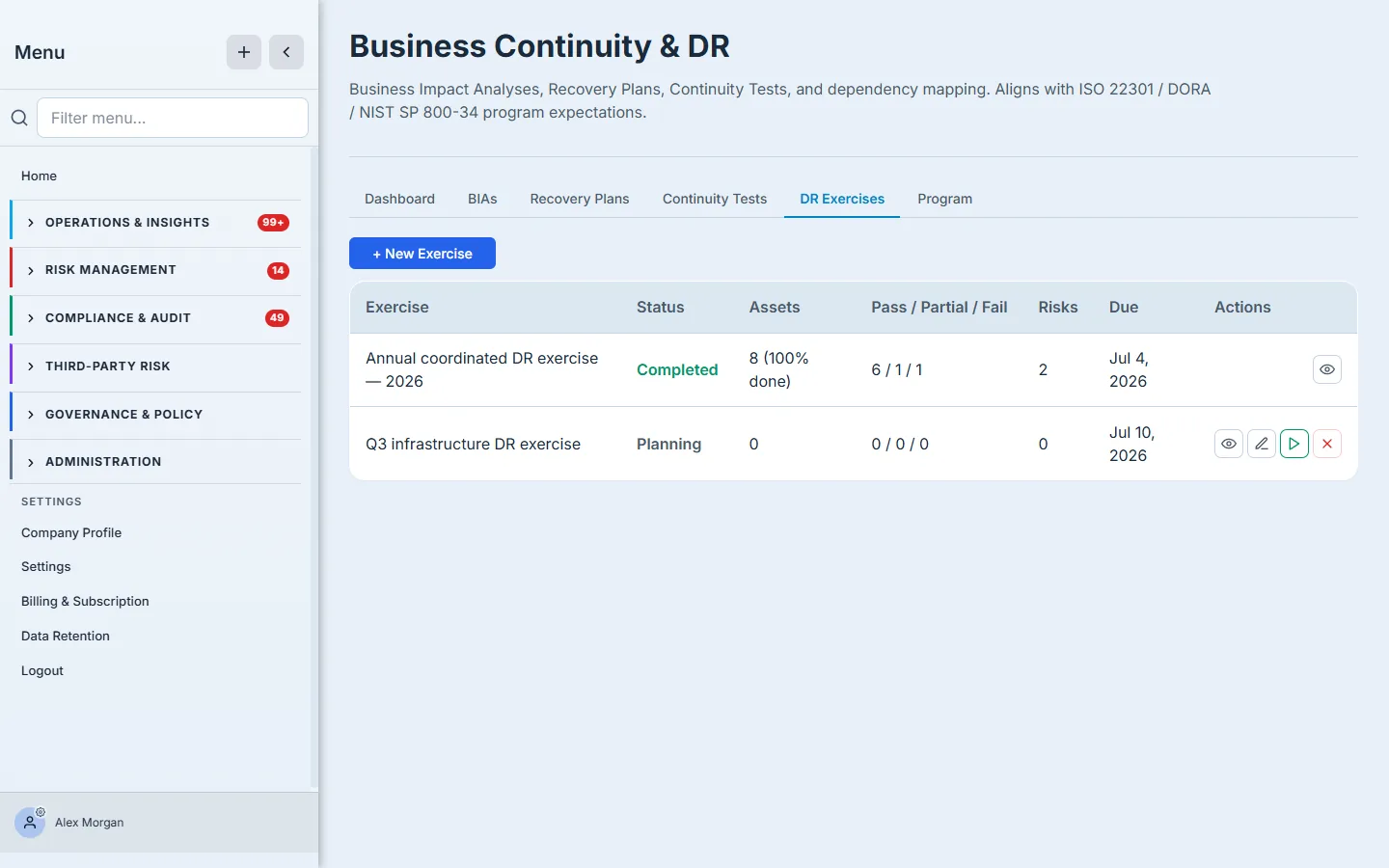
This is where continuity stops being a document exercise and starts touching real infrastructure with real sign-off. (Full walkthroughs: “Run a coordinated DR exercise” and “Completing a DR test as a tester or custodian.”)
Step 6 — Run it as a program
Individual plans and tests are the work; the Program tab is the management view. It applies your scope policy — which criticality tiers are in scope and how often each must be tested — and shows coverage: what fraction of in-scope assets (and vendors) have a current, fresh test, what’s overdue, and the open risks and remediation the exercises have generated. From here you scaffold a fresh exercise straight from the overdue queue and generate the annual program report.
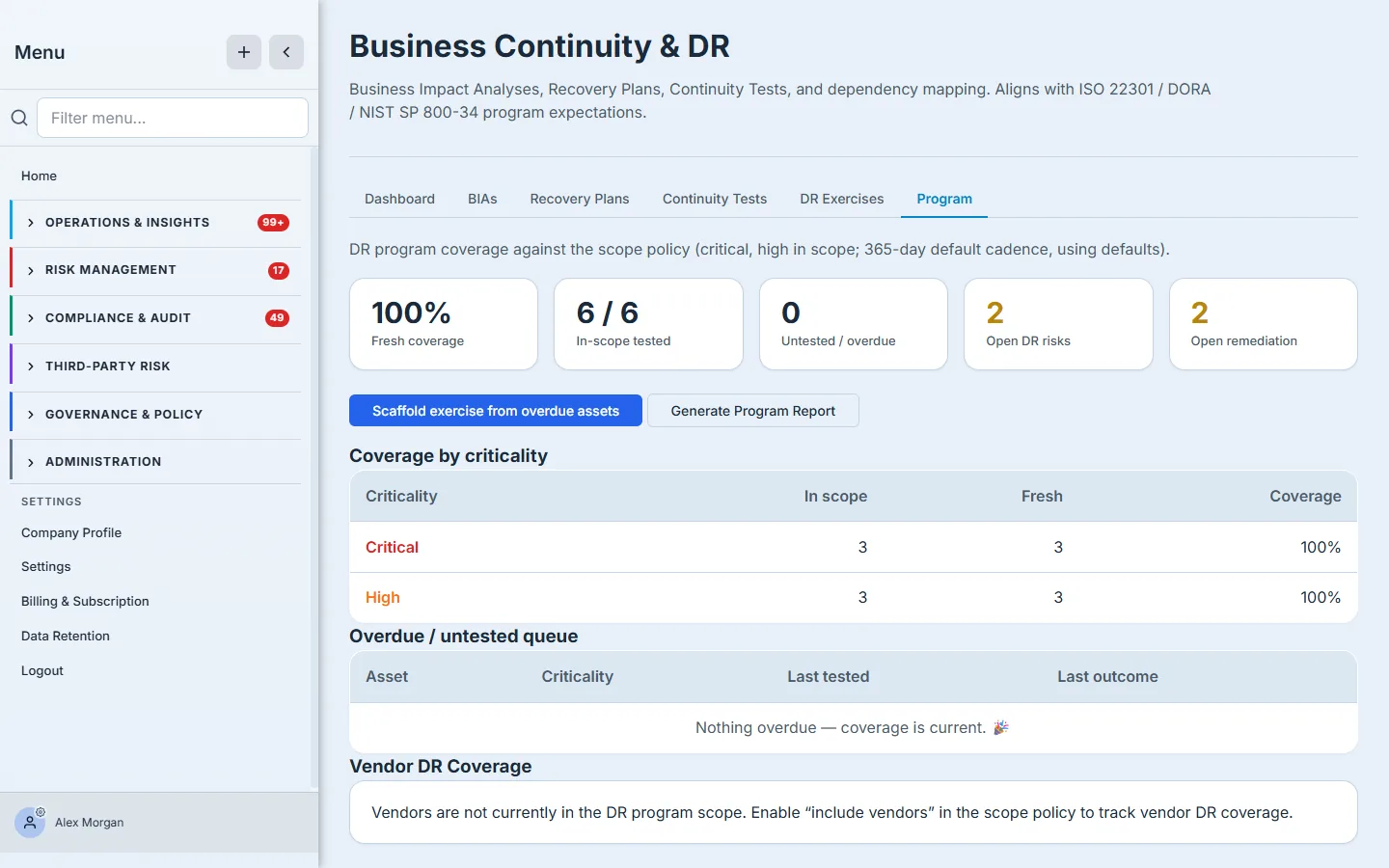
Coverage and cadence are what an auditor actually asks for — “show me you test the critical systems on a schedule, and show me the gaps you’re closing.” This tab answers both. (Full walkthroughs: “Set your DR program scope & cadence” and “Running the DR program.”)
What you walk away with
- A ranked inventory of critical processes — each BIA carrying honest MTD / RTO / RPO numbers and the dependencies it rests on.
- Recovery plans tied to those BIAs by scenario, with RACI owners, ordered steps, and a test cadence.
- A test record per plan — type, outcome, observed RTO/RPO, lessons — that rolls up automatically.
- Coordinated DR exercises that touch real assets, route to custodians, and turn failures into tracked remediation and risk.
- A program dashboard that shows coverage, overdue tests, and the gaps — the exact view an auditor (and your board) wants.
Open /app/grc/bcdr and start at the BIAs tab — name your most critical process and give it honest recovery objectives. The first BIA takes about five minutes; from there the loop builds itself, plan by plan, test by test, and the dashboard keeps the score.