The fastest way to lose track of GRC work isn’t having too much of it — it’s having work that belongs to no one. A control test nobody scheduled, a remediation a departing employee left behind, a vendor reassessment that slipped between two analysts. It sits, unassigned, until an audit finds it. Talarity gives that orphaned work a single home — a claimable pool — and a single verb: claim. Anyone with access can see what’s unassigned across the org, grab what they can run with, and watch it move into their own queue.
Work also arrives from outside your team. When someone files a Service request through the guest request portal — or when any portal request needs a person to finish it — Talarity opens a staff work item carrying the full request detail, so it lands in a queue and is never dropped. See From request to fulfillment for that hand-off.
Who’s involved
- Anyone on the team — opens the pool, filters to what they can do, and claims it. No manager hand-off required.
- The team lead — leaves work unassigned on purpose, knowing it surfaces in the pool for whoever has capacity, and watches the pool drain.
- The departing owner — releases their in-flight work back to the pool on the way out, so nothing goes dark.
What’s on the page
This walkthrough spans two pages:
- The claimable pool (
/app/claimable-work) — every unassigned item across the platform in one list (control tests, remediations, findings, vendor assessments, acknowledgements, equipment receipts), with a banner reading count / overdue / critical / oldest-age, and a Claim action (one or many). - The Work Items command center (
/app/work-items) — flip My Items and each claimed item moves along a visible lifecycle: Create → Assign → Execute → Review → Verify & Close.
Step 1 — The claimable pool: every unassigned task, one place
Open /app/claimable-work. The pool aggregates unassigned work from across the platform into one list — control tests, remediation plans, findings, vendor assessments, policy acknowledgements, equipment receipts — anything with no owner yet. The banner reads the pool at a glance: how many items, how many overdue, how many critical, and how stale the oldest one is.
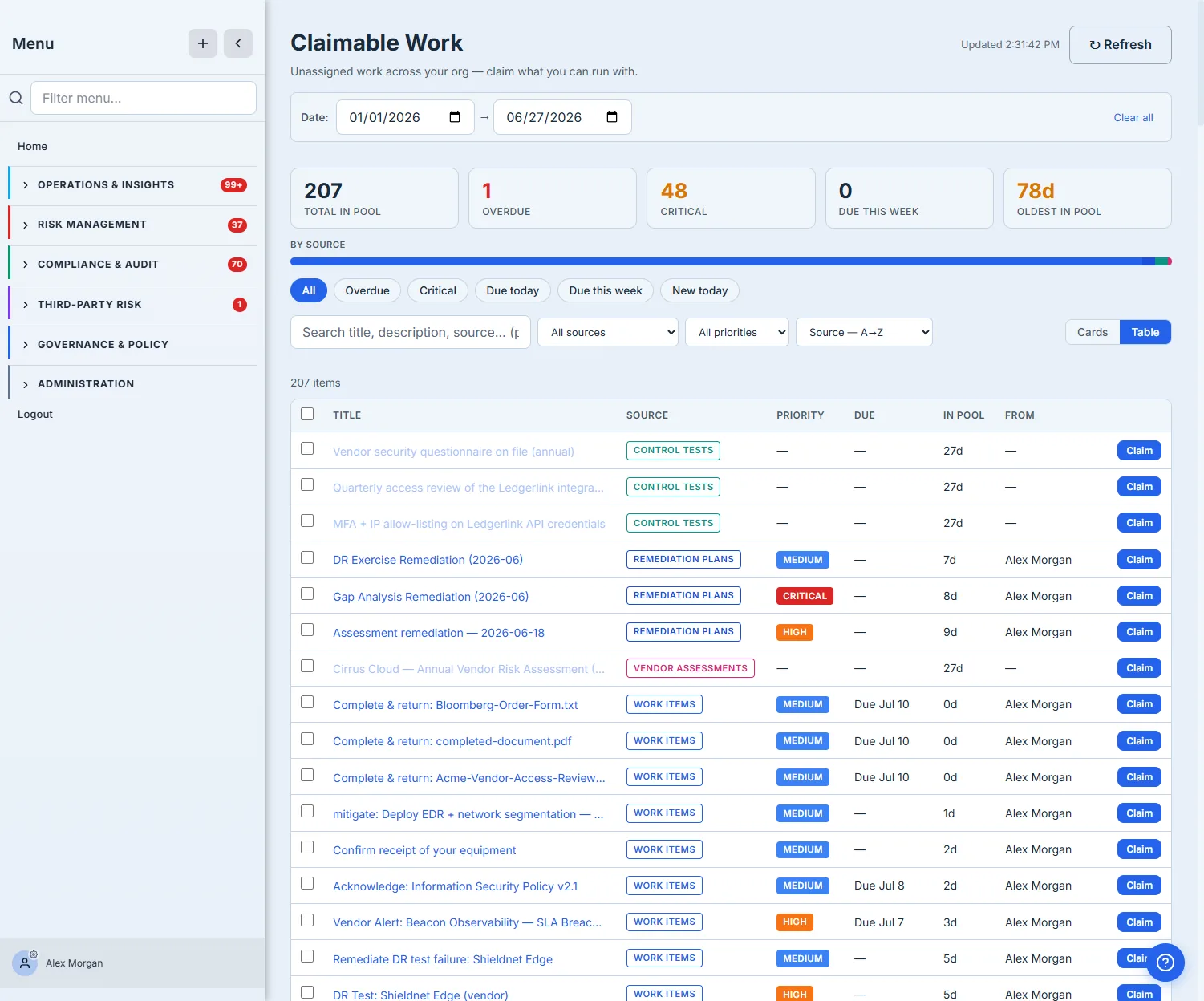
The pool is built to scale past a handful of items, and it genuinely spans domains: the SOURCE column and the by-source bar show the same pool holding control tests, remediation plans, vendor assessments, and work items side by side. The quick-filter chips (Overdue, Critical, Due today, Due this week, New today) pivot the list instantly; the toolbar adds full-text search, source and priority filters, sort (recommended, due-date, priority, pool age, source), and a Cards/Table toggle. The point is that “78 days oldest in pool” is a number you can act on, not just stare at — filter to it, sort by pool age, and clear the backlog from the top.
Step 2 — Claim what you can run with — one or many
Each row has a Claim button; that’s the whole interaction for a single item. When you’ve got capacity for a batch, tick the checkboxes and a bulk action bar appears — claim everything you selected in one move.
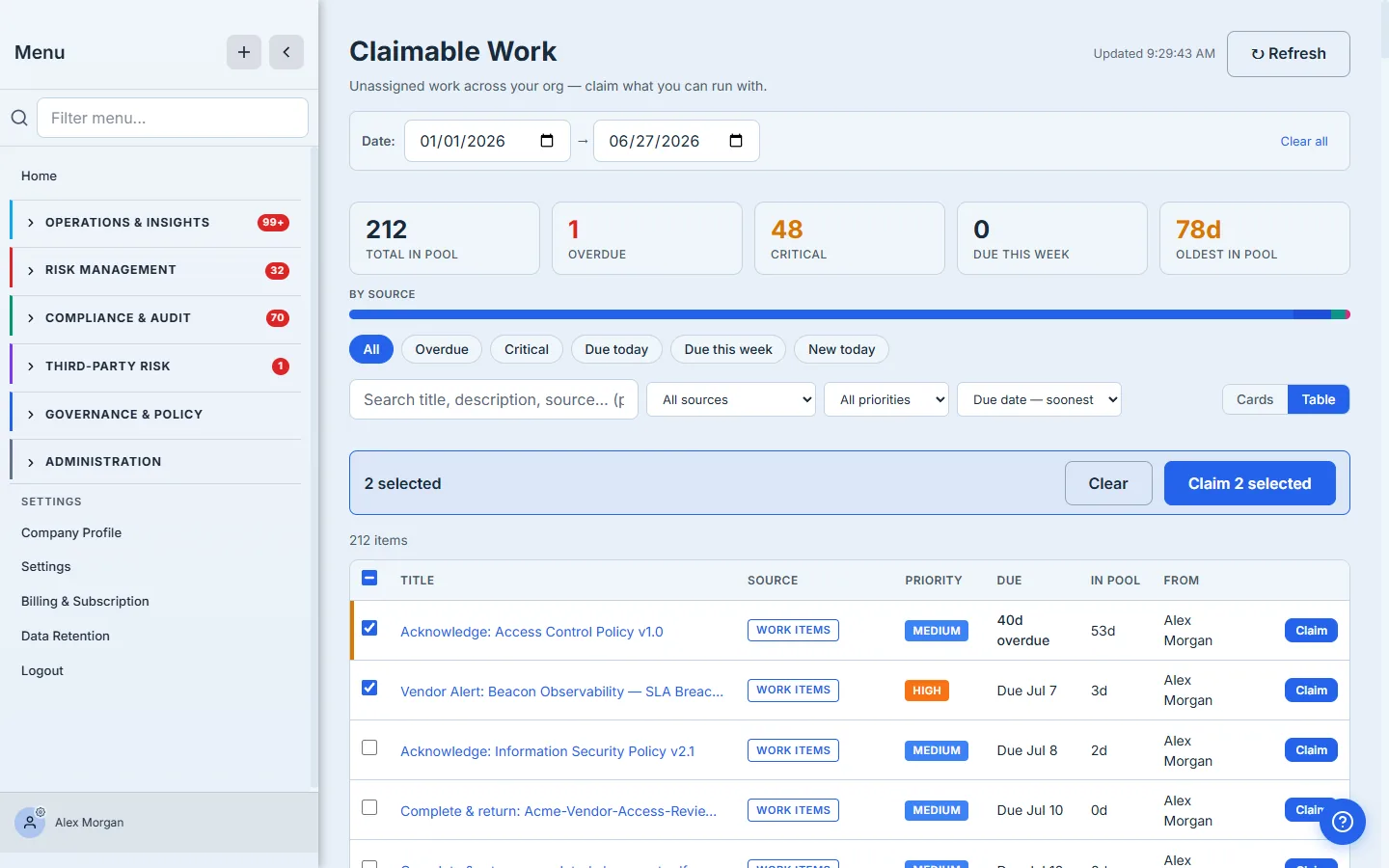
Claiming is atomic and race-safe under the hood: the backend assigns the item to you only if it’s still unassigned, so if a teammate grabs it a split second before you, you get a clean “already claimed” message instead of a double-assignment. The item drops out of the pool the moment it’s yours, and the by-source counts and nav badge update so the next person sees an accurate pool. No status meeting required to divide the work — the pool is the division.
Step 3 — It’s now yours, tracked through a workflow
The moment you claim an item it’s assigned to you, and it shows up in the Work Items command center (/app/work-items) — flip the My Items toggle and the list narrows to exactly what’s yours. This is where the doing happens: every item moves along a visible lifecycle — Create → Assign → Execute → Review → Verify & Close — so a claimed task isn’t just “yours,” it has a next step.
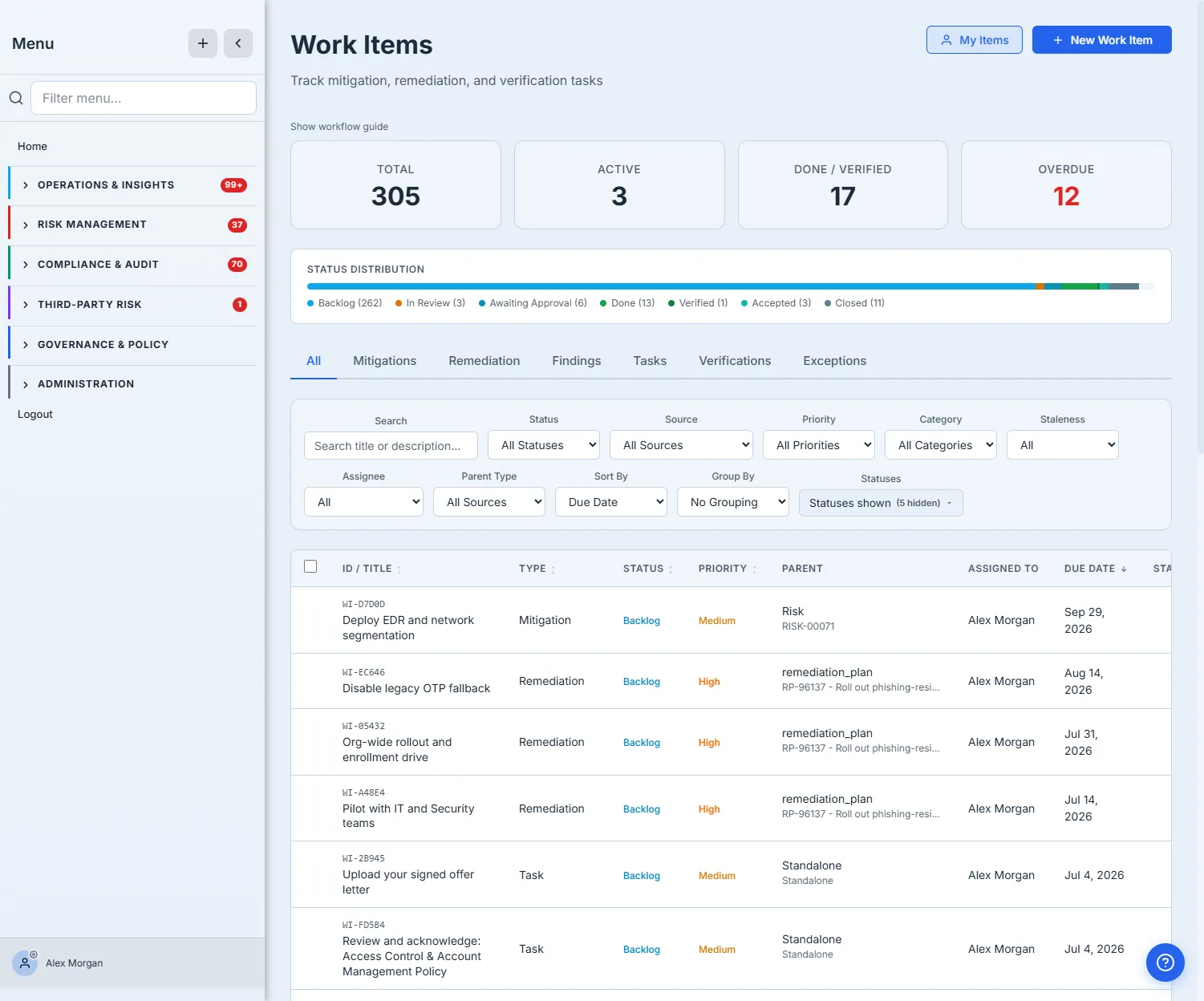
From here the work is yours to run. The stat cards and status-distribution bar show how your queue is spread across backlog, in-review, and done, so nothing stalls silently. The type tabs (Mitigations, Remediation, Findings, Tasks, Verifications) and the filter row (status, priority, source, staleness, assignee) let you cut a long queue down to the three things you should do next. And if you claimed something you can’t get to, the same work item carries a Release action — assignment isn’t a one-way commitment; it drops straight back into the claimable pool for the next person.
How the page works
Two pages, one shared piece of state — an item’s assignee — and the rules around it are what keep the pool honest:
- The pool is a query, not a list someone curates. It aggregates every owner-less item across the platform — control tests, remediation plans, findings, vendor assessments, acknowledgements, equipment receipts — by the single fact that none of them has an assignee yet. Nothing is filed into the pool; items fall into it the moment they’re created without an owner and leave it the moment one is set.
- Claiming is atomic and race-safe. The claim assigns the item to you only if it’s still unassigned — so if a teammate grabs it a split second first, you get a clean “already claimed” message instead of a double-assignment. That guarantee is what lets the whole team work the same pool without a coordination meeting.
- Claiming and releasing are the same toggle, opposite directions. Claim sets the assignee (the item leaves the pool, your queue and the nav badges update); Release clears it (the item drops back into the pool for the next person). Assignment is never a trap.
- A claimed item carries a lifecycle, not just an owner. Once it’s yours it sits in the Work Items command center on the Create → Assign → Execute → Review → Verify & Close track, so “mine” always implies a defined next step rather than an open-ended to-do.
What you walk away with
- Unassigned work has one home — the claimable pool aggregates every owner-less task across the platform (control tests, remediations, vendor assessments, work items) into a single, filterable, scalable list.
- Claiming is one click, single or bulk — and it’s race-safe, so two people can never end up owning the same item.
- Claimed work becomes tracked work — it lands in your Work Items command center and moves through a visible Create → Assign → Execute → Review → Verify lifecycle.
- Release reverses it — anything you can’t run with goes back to the pool, so work never goes dark when plans change.
Open /app/claimable-work this afternoon, filter to your team’s source, and claim the oldest thing in the pool. It’s the fastest way to make sure the work nobody owned becomes work that’s getting done.