Compliance and risk programs rarely live inside a single org chart. A holding company needs its subsidiary’s CIS assessment for the consolidated report. An MSSP needs evidence of each tenant’s patch posture for their managed-service review. A prime contractor needs CMMC artifacts from every sub before the audit window. SOC 2 calls this out in CC2.3 (communicating information to external parties) and CC9.2 (vendor risk). ISO 27001:2022 lays it down in A.5.19 and A.5.20 — supplier relationships and the information-security clauses inside supplier agreements. NIST SP 800-53 dedicates an entire SR family to it.
Most teams handle this with email threads, shared drives, and a quarterly chase. Talarity treats it as a structured, bidirectional workflow with two complementary primitives — ad-hoc requests for one-shot data pulls, and standing subscriptions for continuous feeds — both driven from the same hub at /app/data-sharing, both producing the same immutable consent log.
Who’s involved
- Parent admin — initiates the request, sets the scope, reviews what comes back. Lives on the Outbound, Subscriptions, and Files Shared With Me tabs.
- Child admin — sees the inbound request, reviews the cascade, decides to accept or decline. Lives on the Inbox and Shared Data tabs.
- Recipient compliance lead — consumes the shared data in their normal views (assessments, policies, evidence library) once a share is released.
- Auditor — pulls the consent log at audit time. Sees exactly who consented to what, when, with which disclosure text — on both sides of the relationship.
What’s on the page
Everything runs from the Data Sharing hub (/app/data-sharing) — one URL that drives every share in both directions:
- Role-aware tabs — a parent admin sees Outbound · Subscriptions · Files Shared With Me · Audit Log; a child admin sees Inbox · Subscriptions · Shared Data · Audit Log.
- Acting as dropdown — if your account sits on both sides of a relationship, swap the visible tabs without leaving the page.
- Two share primitives — ad-hoc requests (one-shot pulls) and standing subscriptions (continuous feeds), both writing the same immutable consent log.
- Audit Log — every request, accept, and fired entity, both sides, immutable.
Step 1 — Linked accounts and trust are the prerequisite
Data sharing rides on top of two underlying primitives: a linked-account relationship between the two orgs (parent and child are joined under a single enterprise relationship), and a cross-org trust grant in each direction. When a parent enterprise links a child account, Talarity auto-grants trust both ways and stamps the source as linked_account_auto. That’s what lets either side initiate a share without an additional handshake.
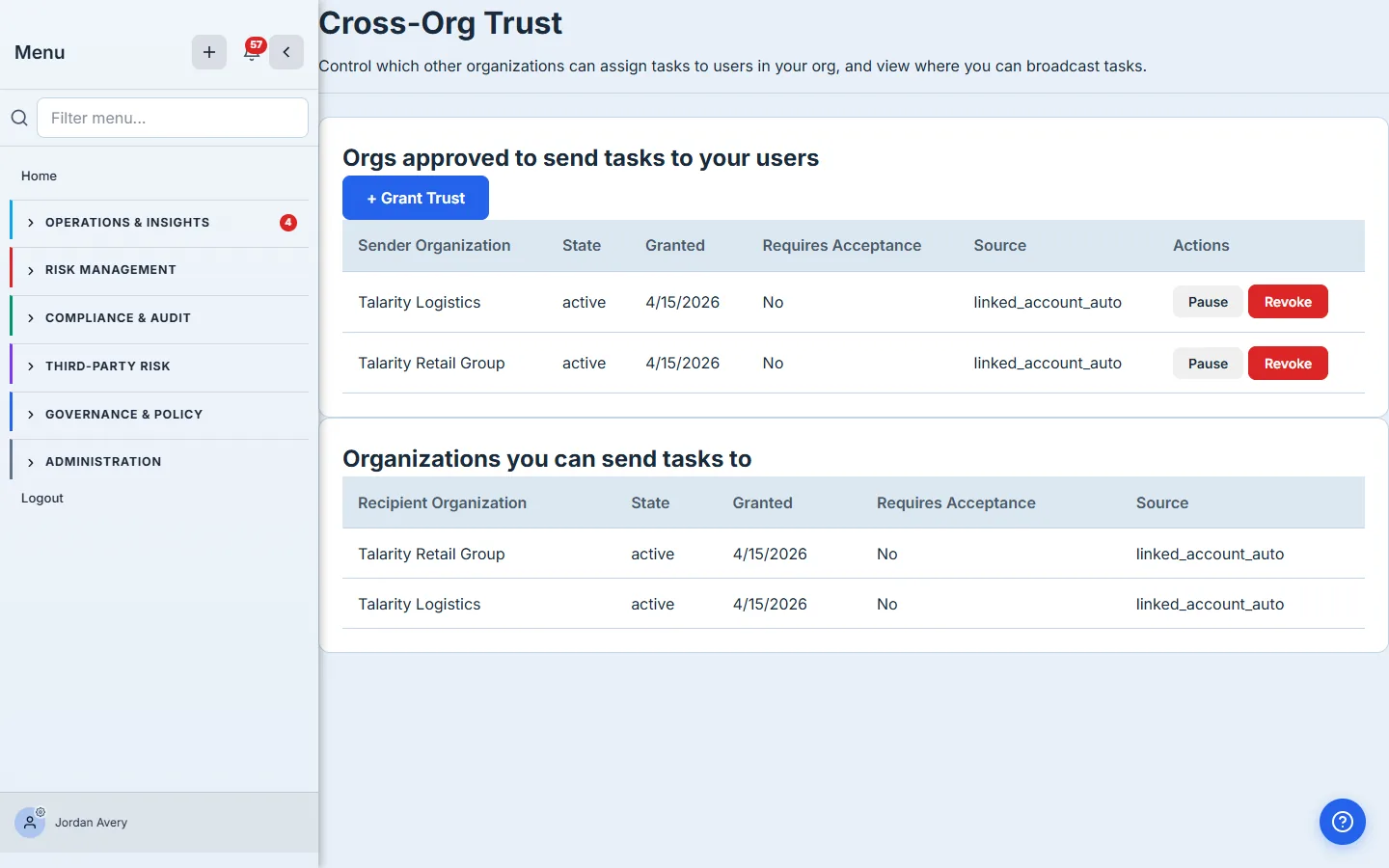
Two things to notice. First, the trust grants are per-direction: parent → child and child → parent are independent entries. You can pause or revoke one without affecting the other. Second, the Source column tells you whether the grant was auto-created from a linked-account relationship or manually granted by an admin. Manual grants get a Require acceptance? toggle the recipient can switch on so that nothing flows through until they explicitly approve it.
Step 2 — Open the hub: two perspectives, one URL
/app/data-sharing is the single page that drives every share, both directions. The tabs are role-aware: a parent admin sees Outbound · Subscriptions · Files Shared With Me · Audit Log; a child admin sees Inbox · Subscriptions · Shared Data · Audit Log. If your account belongs to both sides of the relationship, an Acting as dropdown lets you swap the visible tabs without leaving the page.
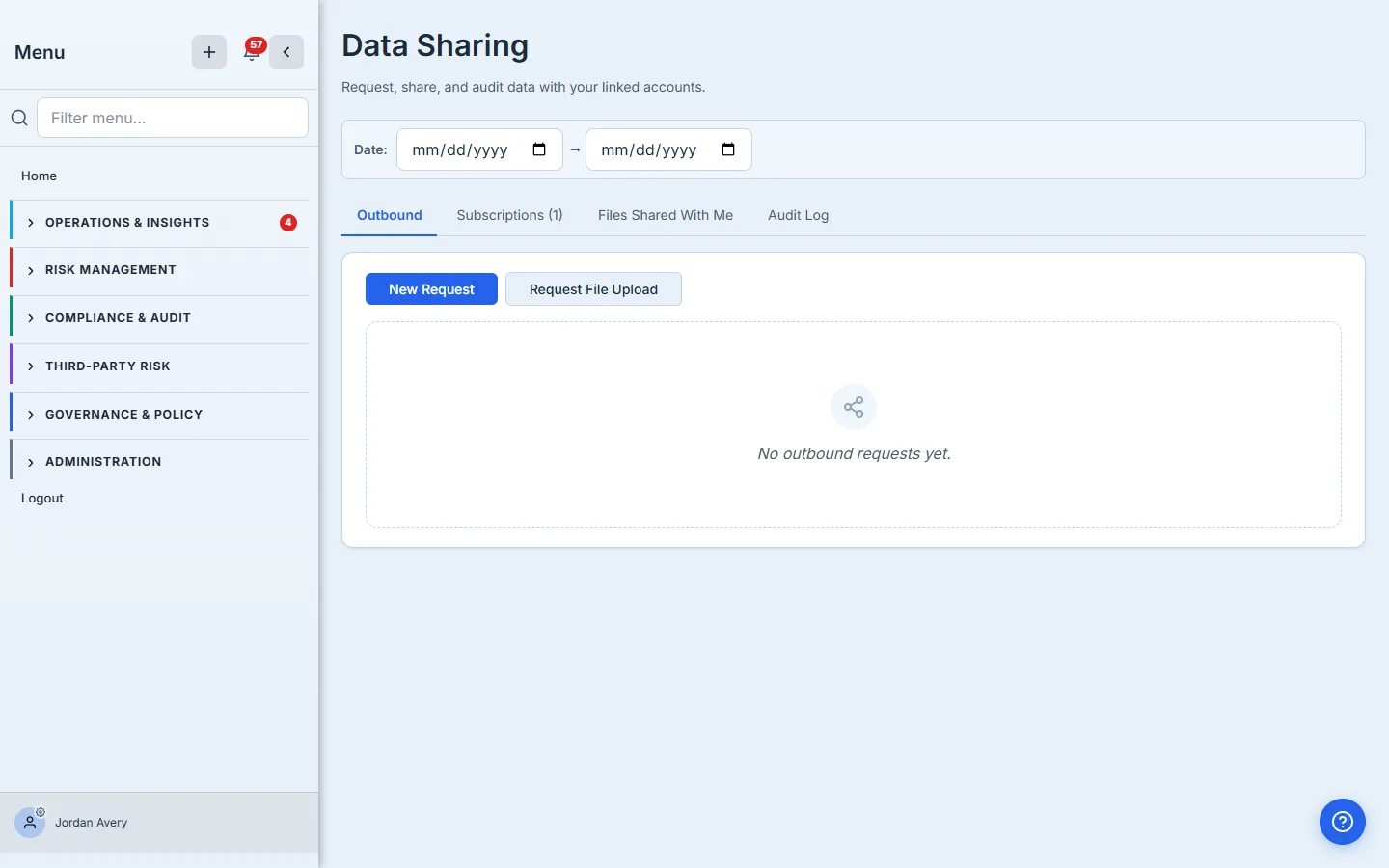
The two top-level actions on the parent side are New Request (pull data the child already has) and Request File Upload (ask the child to upload a file the parent doesn’t have yet — for example, a SOC 2 attestation letter or a vendor security questionnaire). The rest of this walkthrough follows the first path; the upload-request flow is a thin variant.
Step 3 — Build the request — who, what, when, and what to include
Click New Request and Talarity opens a two-pane tree picker. On the left, every linked account you have an active trust grant with. On the right, the seven shareable data domains: Assessments, Supporting files, Policies, Key Risk Indicators, Risk Register, Controls, and Work Items. Below the tree, a time window and an optional message to the recipient. Below that, the Include associated items row — the cascade.
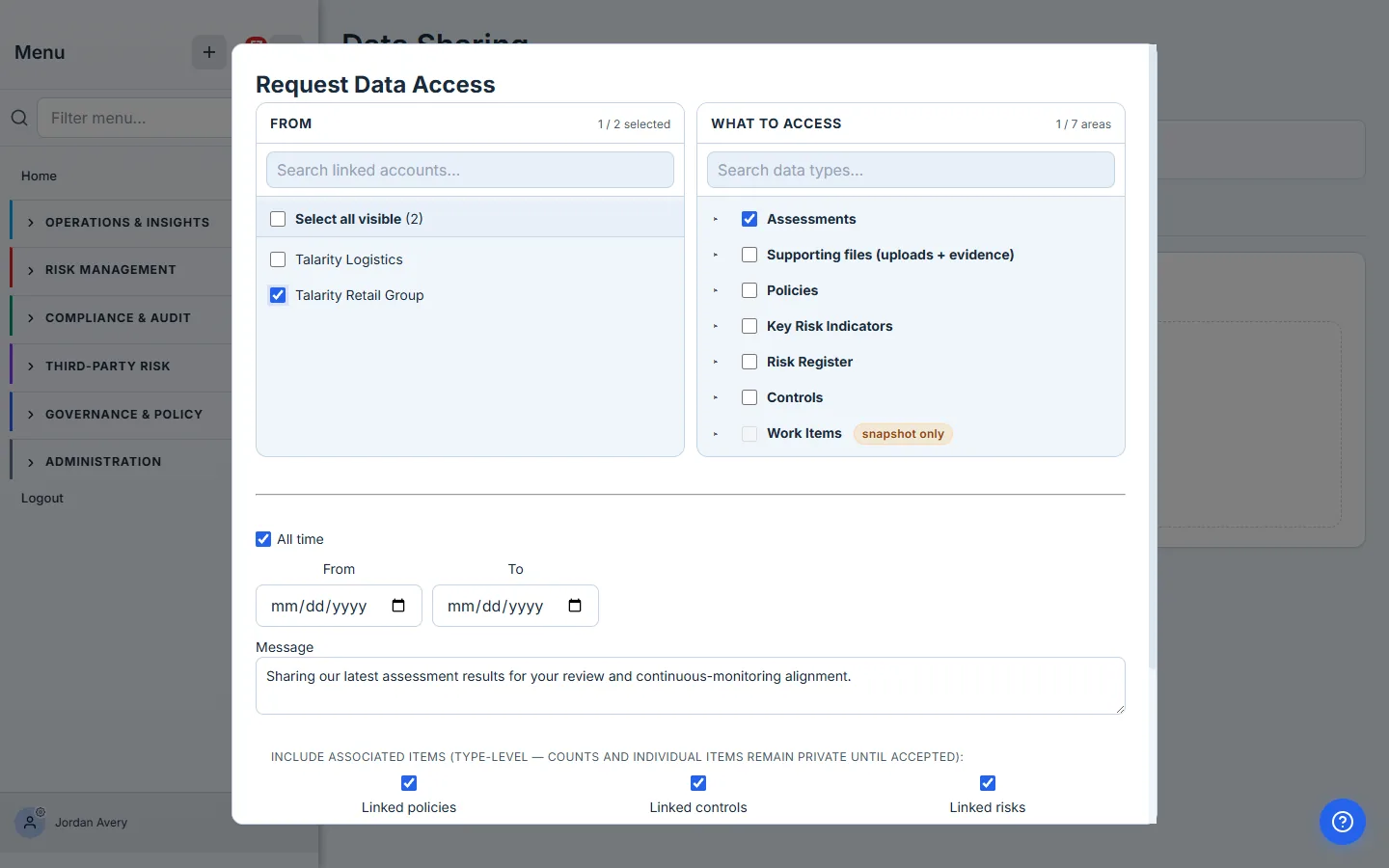
The cascade is the most under-used field in this form. Picking Assessments alone gets you assessment scores and answers. Picking Assessments + the cascade checkboxes gets you everything attached to each assessment — the policies it cites, the controls it scores, the risks it informs, the evidence files that back it up. For a compliance review the cascade is usually what you actually want; for a quick stat-pull, leave it off.
The cascade selection is type-level, not item-level. The parent picks the types of associated items to include (“linked policies”, “linked controls”, “files uploaded for each assessment”) — the per-entity counts and the actual item identifiers stay private until the child accepts. The child then sees the full cascade payload disclosed before their accept click, which matters because their consent is what licenses the flow.
Step 4 — Review before you send
Hit Send Request and Talarity shows a Review step before anything goes out. Each linked account in the request gets a card showing the action that’ll be taken — fresh subscription, top-up of an existing subscription, or a one-shot request — plus a note if your scope overlaps with something already active.
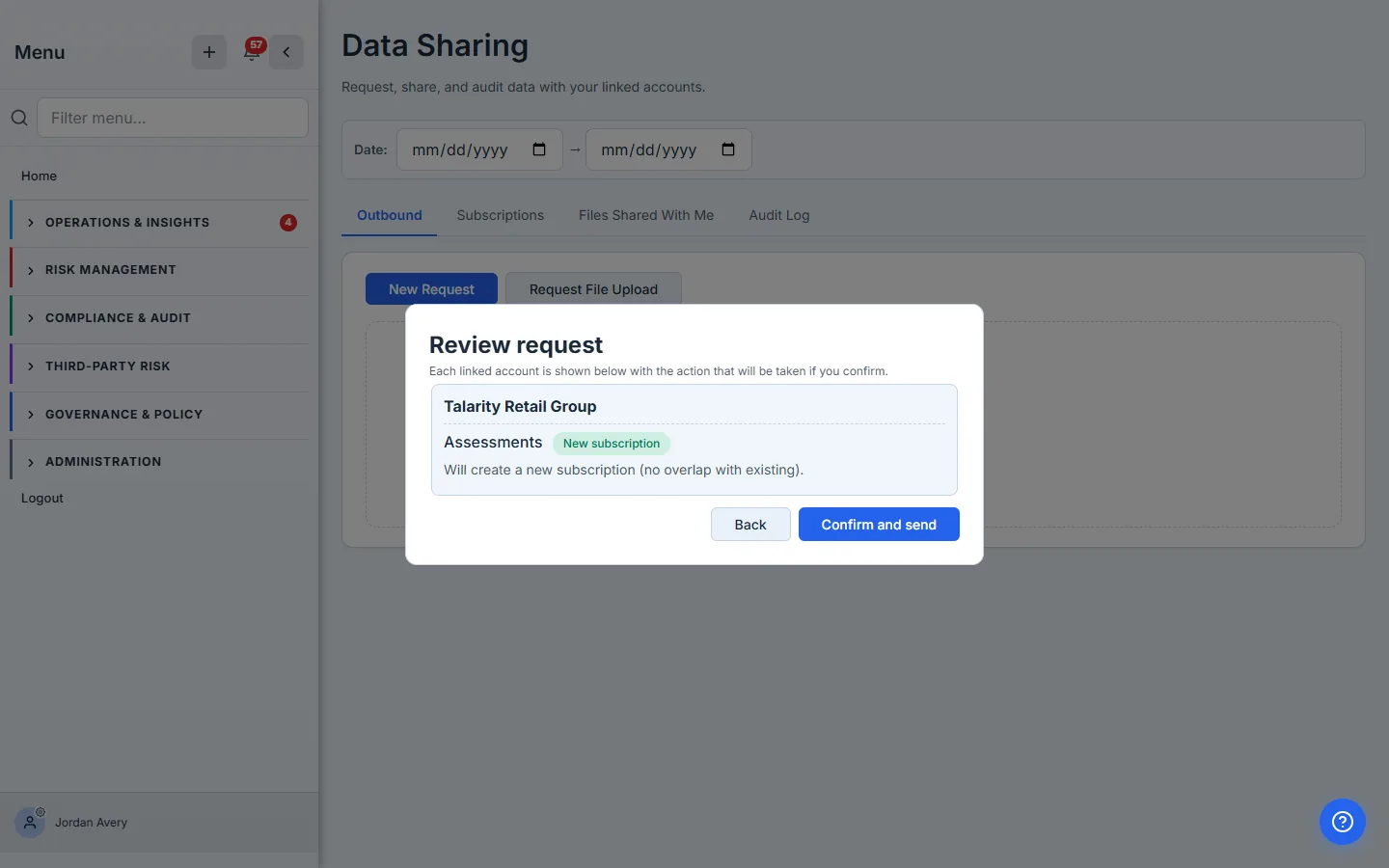
If the same recipient already has an active subscription that covers what you’re asking for, the Review step says so and offers to merge instead of duplicating. That’s important — the data-sharing hub doesn’t let you stack three overlapping subscriptions with the same linked account; it consolidates intent into one entry per (recipient, domain, scope) tuple so the audit log stays legible.
Step 5 — One-shot request vs. standing subscription — the date field decides
Click Confirm and send and the request lands on the parent’s Outbound tab. The row carries the recipient name, the domain, the cascade chips, the scope summary, the status pill, the timestamp, and two actions: Send Reminder and Cancel.
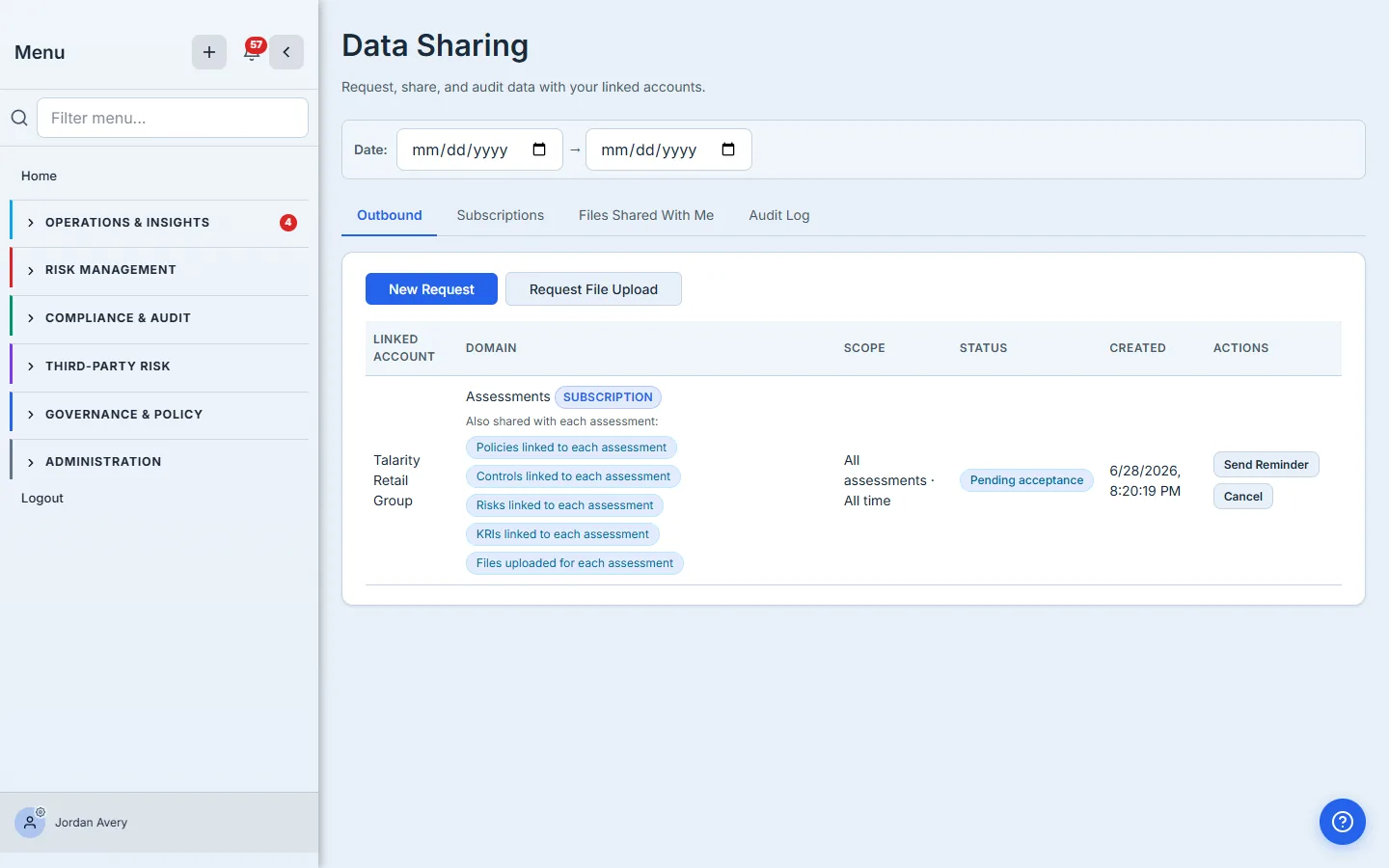
The pill on the left says SUBSCRIPTION because the request left the All time date checkbox on. This is the load-bearing distinction between the two primitives in the hub: a date window that closes in the past (or is omitted with no future intent) becomes a one-shot request — a single snapshot of whatever matches the scope when the child accepts. A date window that’s open-ended or extends into the future becomes a subscription — every new matching entity the child completes from now until you revoke gets auto-shared. Same form, same picker, same consent flow; the date field is what flips the toggle.
Pick “All time” for compliance programs that recur. Annual SOC 2 reviews, quarterly vendor risk attestations, monthly KRI tracking — these want the subscription primitive, because the parent shouldn’t have to remember to re-request every cycle. Pick a specific window when you’re pulling a snapshot for a one-off engagement.
Step 6 — Recipient’s inbox — full cascade disclosure, no surprises
Switch to the child admin’s account and open /app/data-sharing. The Inbox tab carries the pending request. The row mirrors what the parent built — same domain, same scope, same cascade chips — plus a From column resolving to the requesting org and the user who initiated.
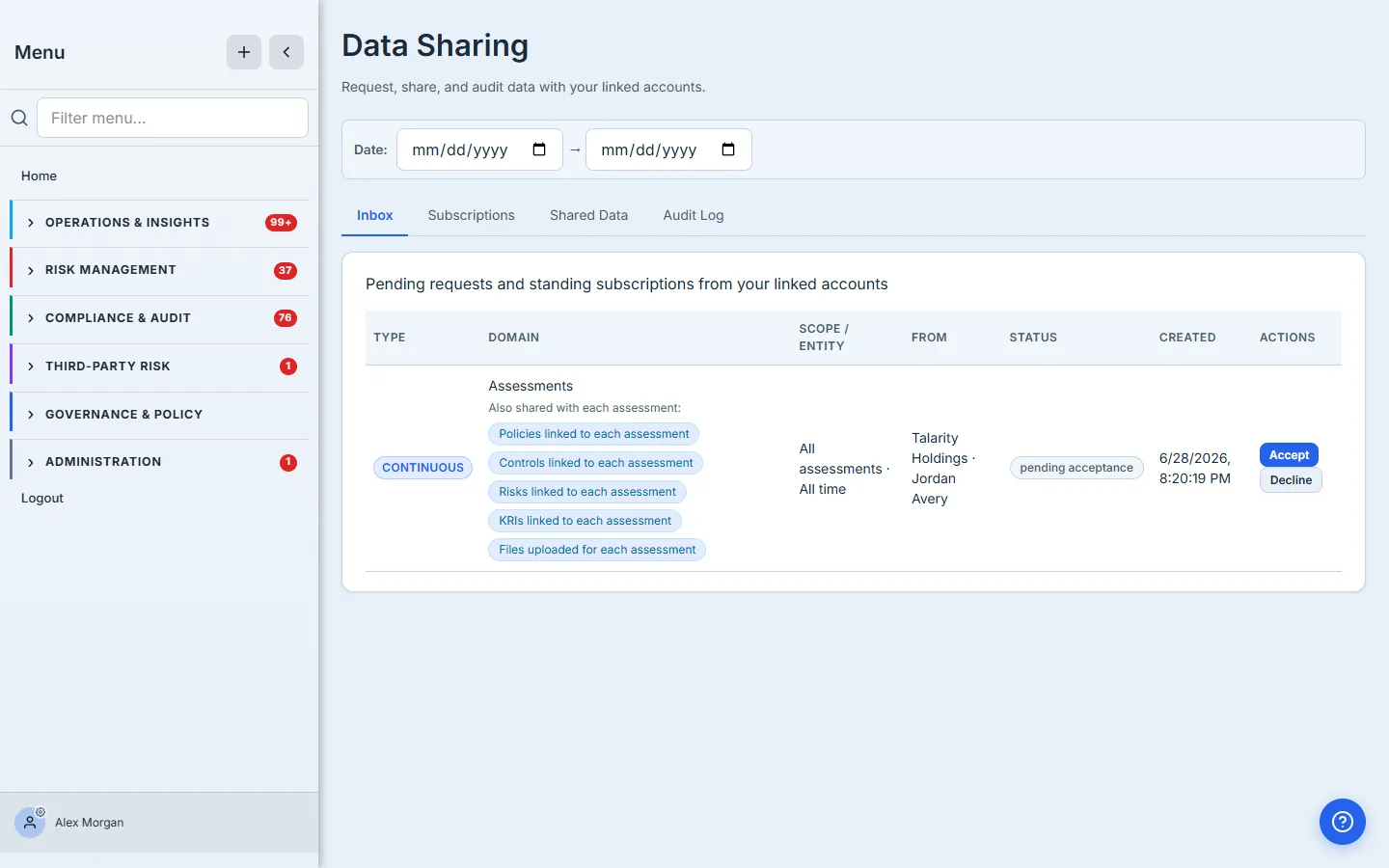
This is the spot the whole consent model rests on. The chip strip showing “Policies linked to each assessment, Controls linked to each assessment, Risks linked to each assessment, KRIs linked to each assessment, Files uploaded for each assessment” is rendered before the recipient can click Accept, not after. The recipient never lands on a subscription wondering what they signed up for.
Step 7 — Accept — the disclosure text is the audit receipt
Click Accept and a confirmation dialog spells the cascade out one more time in plain prose: “Accept this subscription? Each matching assessment (All assessments · All time) will be auto-shared with the requesting org, plus the linked policies, linked controls, linked risks, linked KRIs, and uploaded files attached to each assessment, until you revoke.”
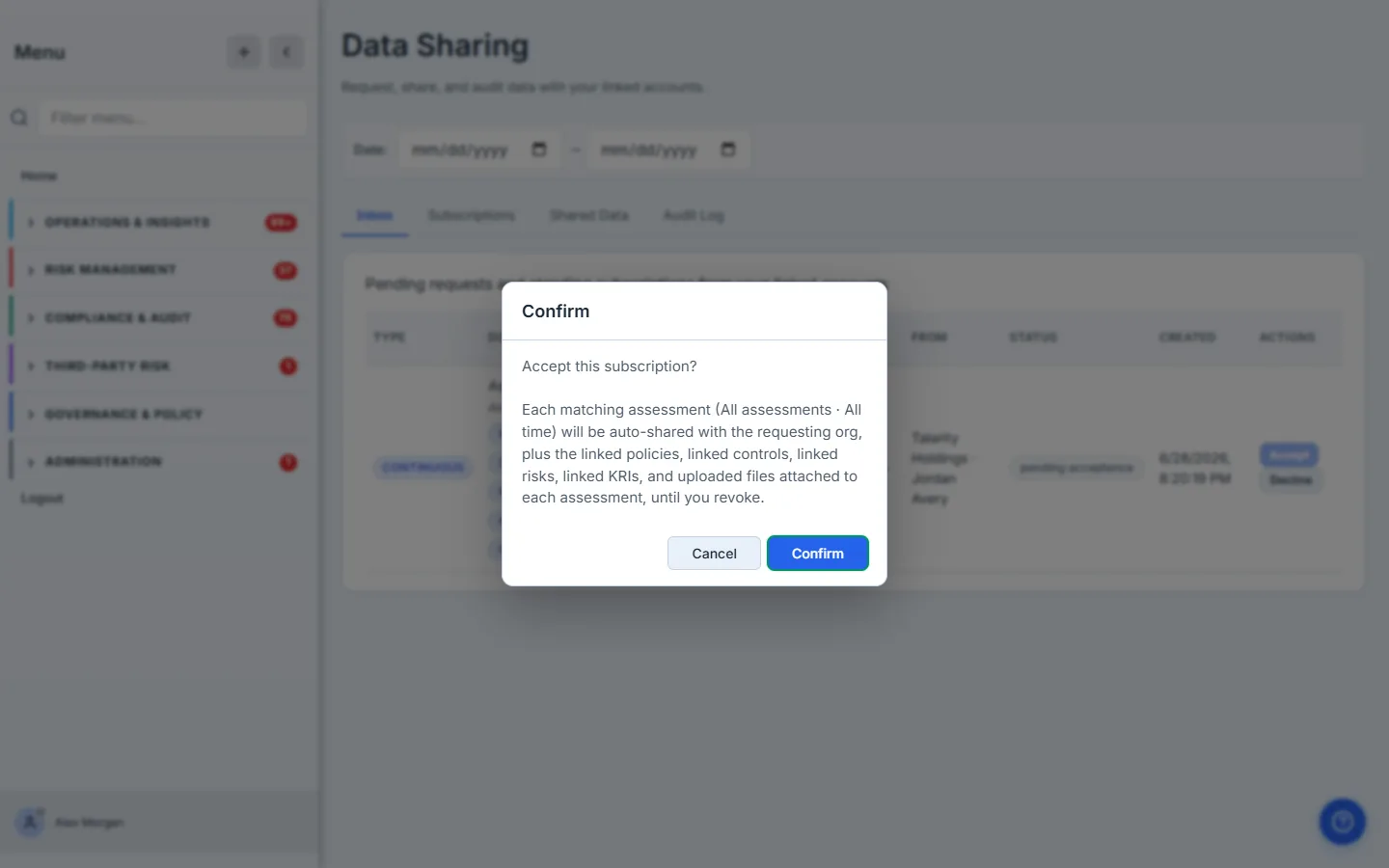
That string is not just for the human. The disclosure prose is persisted into the data_sharing_consent_log table when they hit Confirm. The audit row carries the disclosure prose, the consenting user’s identity, the timestamp, and the recipient org name — frozen in a snapshot so an org rename later doesn’t change what the auditor sees.
Step 8 — Subscription is live — every new entity flows automatically
Once accepted, the subscription moves to Active on both sides. The child’s Subscriptions tab now leads with a Per-Org Sharing Summary card that consolidates every active subscription with the requesting parent into a single human-readable line — handy when a single relationship covers multiple domains.
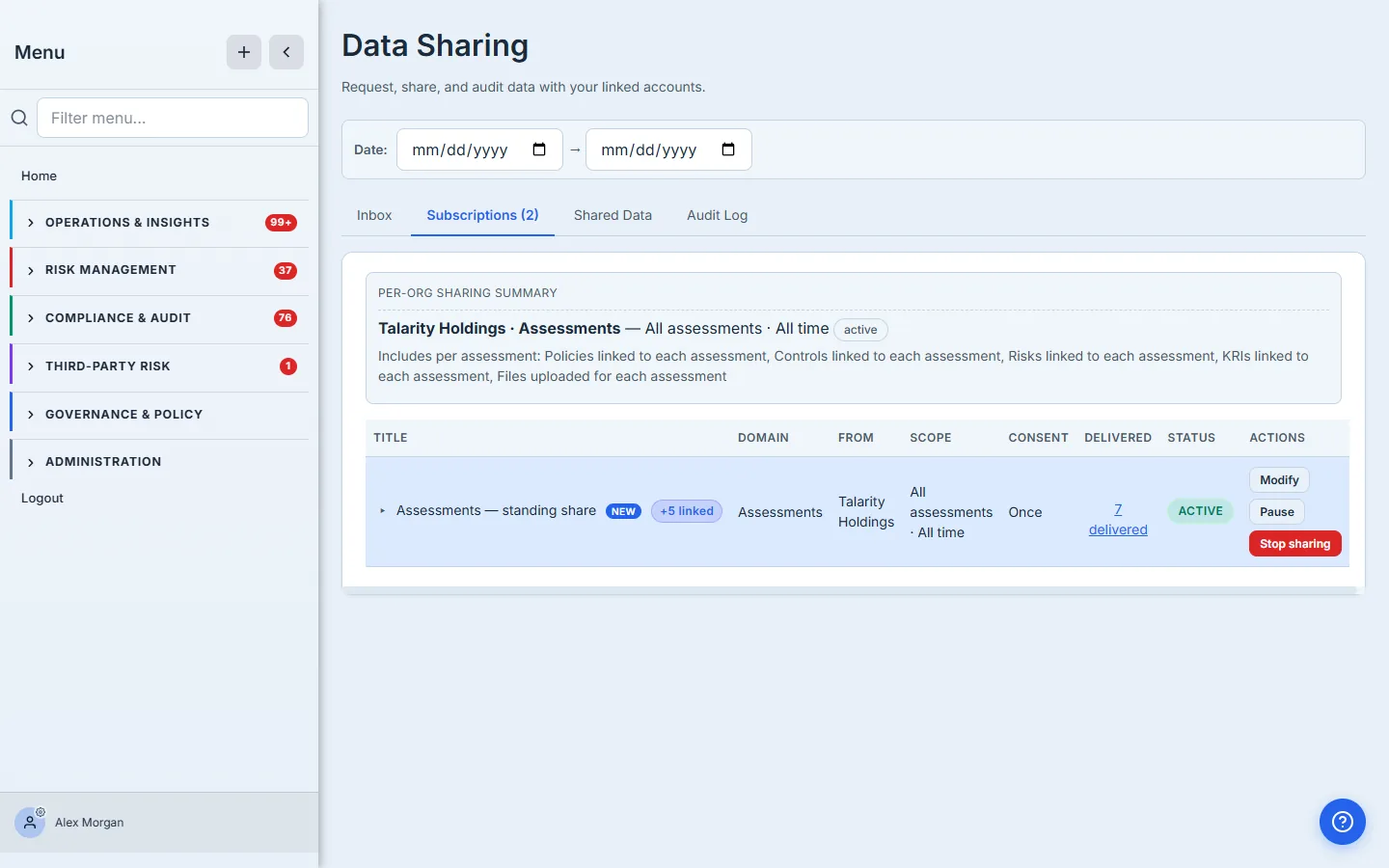
The Delivered column on the row is a count of matching entities that have actually flowed under this subscription. Clicking it opens the materialized-entities drawer (we’ll see that from the sender’s side in step 10). Under the hood, every entity the child has already completed at acceptance time fires immediately; from then on, the subscription listens for new completions and fans them out automatically.
Step 9 — Recipient’s controls — Reduce, Pause, Cancel
The Actions column on an active subscription row gives the recipient three buttons: Modify, Pause, and Cancel. For the child — the data owner — Modify opens a Reduce modal: turn cascade items off, narrow the time window, or both.
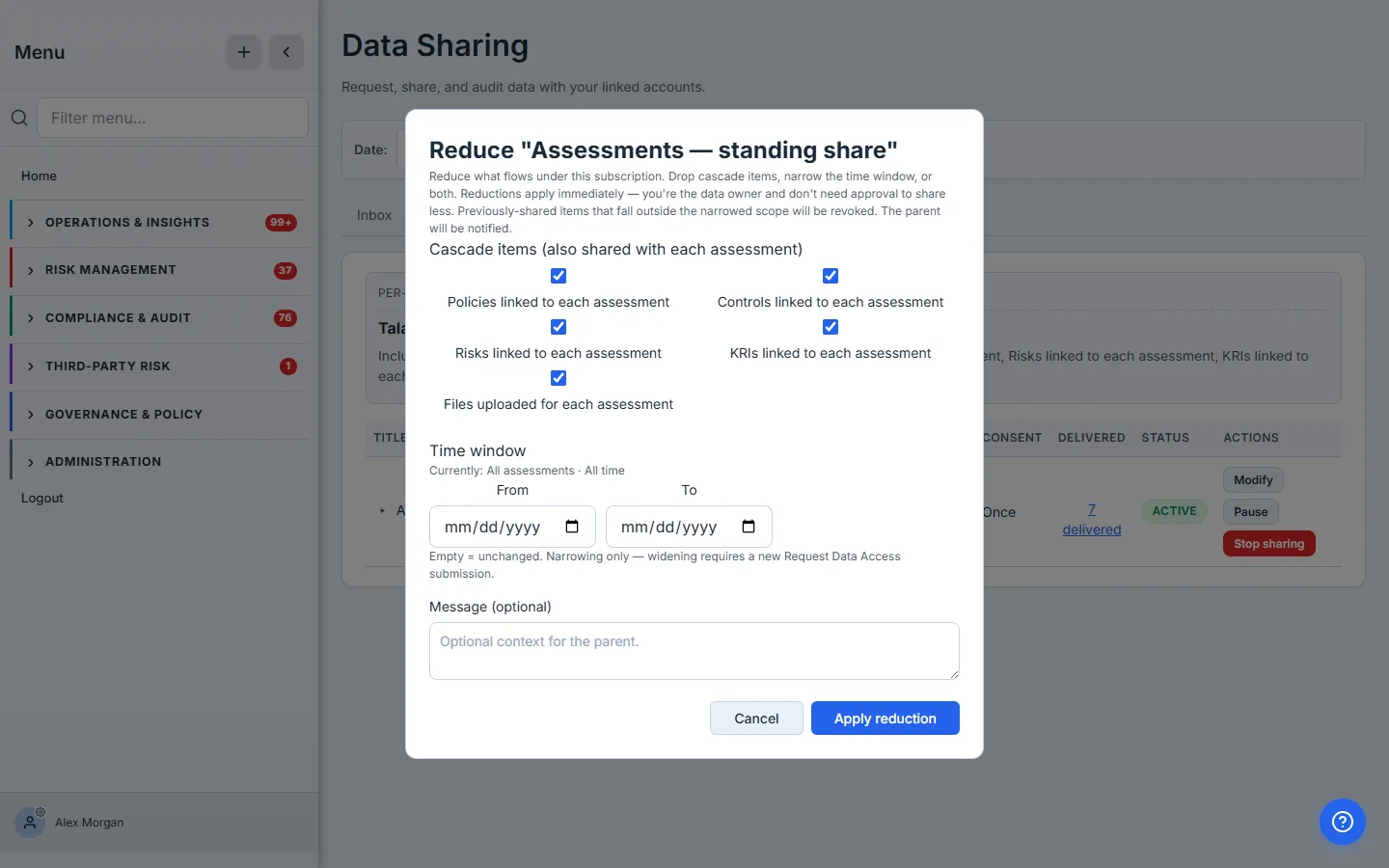
Reductions apply immediately. The child is the data owner — they don’t need parent approval to share less. The hub takes the symmetric stance for the parent side: a parent who wants to widen an existing subscription (adding a cascade type, extending a window) has to file a Modification request that the child sees in their Inbox and approves explicitly. Subtraction is unilateral; addition is consented.
Pause halts new fan-outs without revoking anything already shared — useful for compliance freezes or audit windows where the recipient wants the relationship intact but new entities held back temporarily. Resume picks it back up. Cancel terminates the subscription and (optionally) revokes every entity already shared through it.
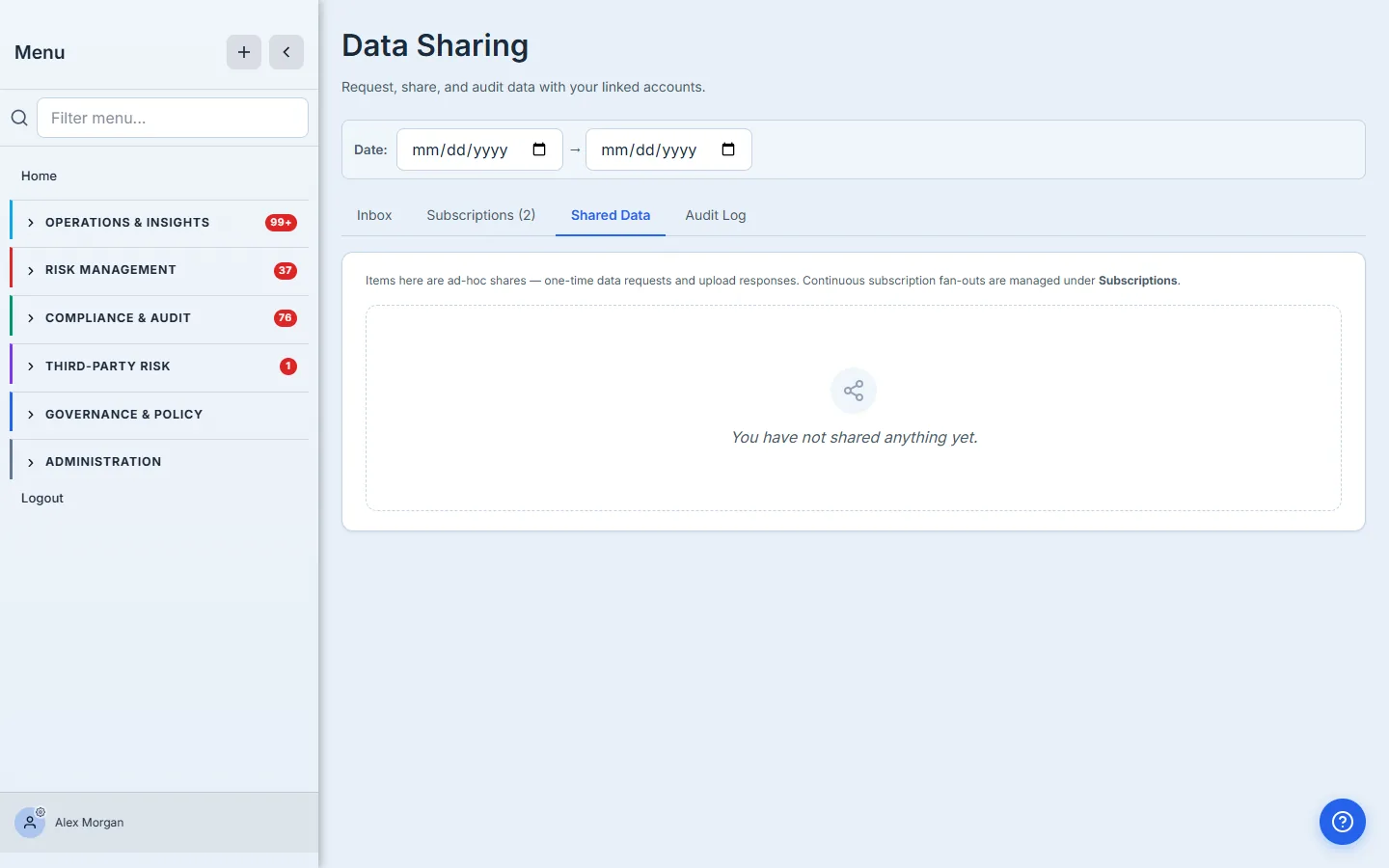
The fourth tab the child sees, Shared Data, is where ad-hoc share results land (one-time data requests and upload responses) — subscription fan-outs live under the Subscriptions tab so the two concepts don’t blur.
Step 10 — Sender’s view — delivered counts, fired entities, modify
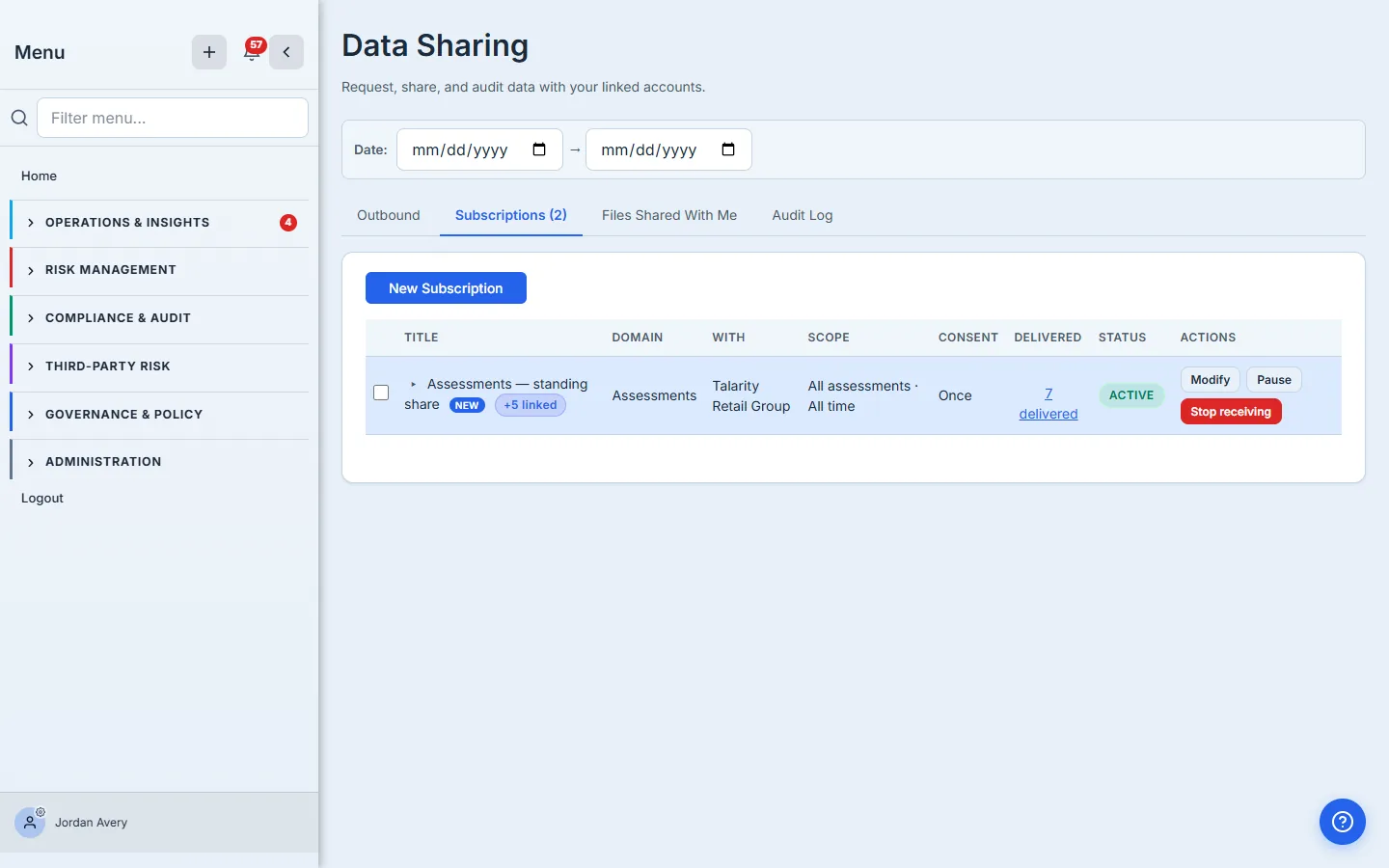
Back on the parent side, the same subscription now appears on the Subscriptions tab — active, with a live delivered count.
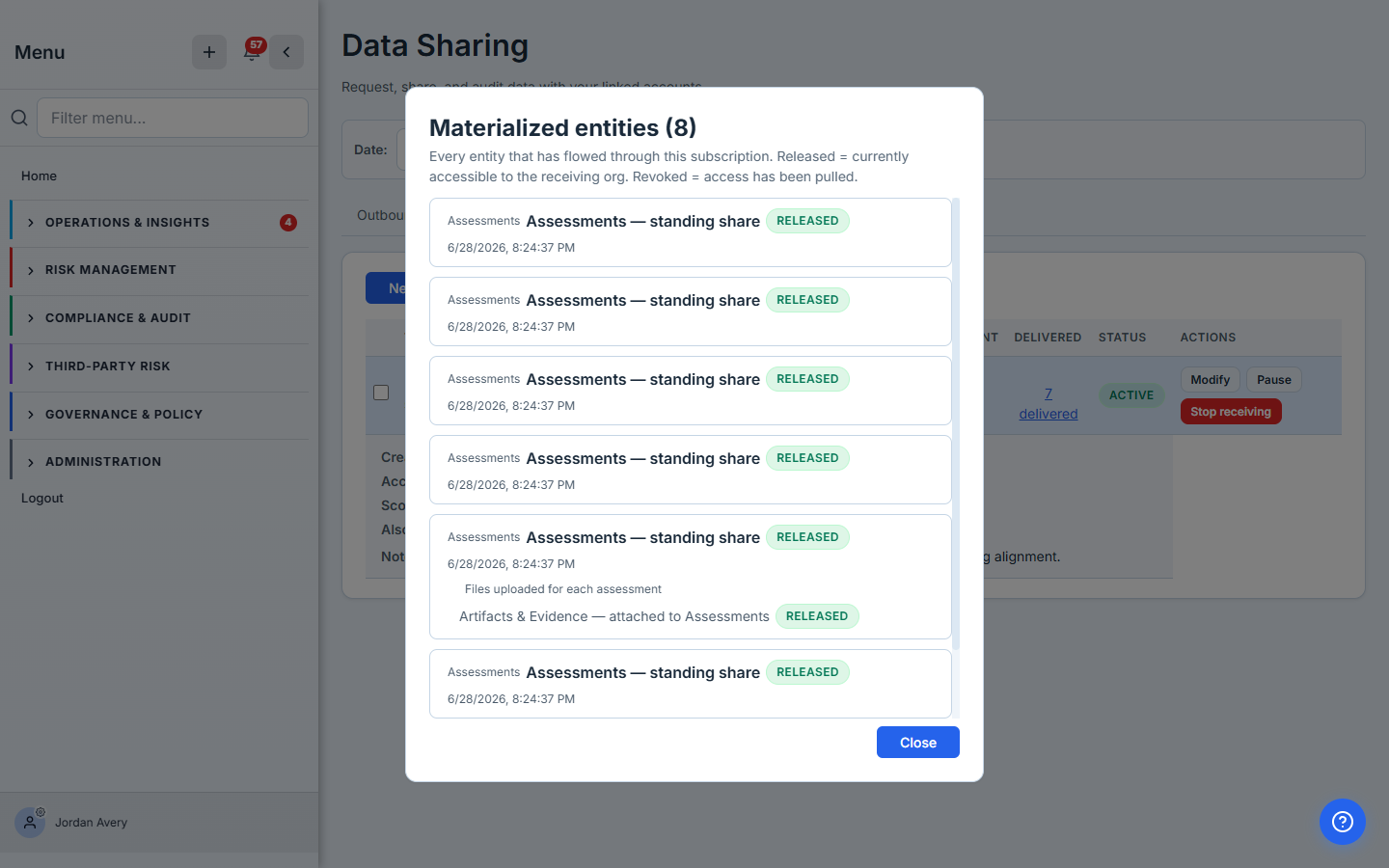
Click the delivered link and a drawer opens listing every entity that’s flowed through the subscription. Each row carries a status badge: Released for entities currently accessible, Revoked for entities that have had access pulled.
The parent’s actions mirror the child’s: Modify to file a scope-change request, Pause to halt new fan-outs, Cancel to terminate. Cancel from the parent side has the same effect as from the child side — the relationship ends and the parent loses access to anything that was flowing through it.
Step 11 — The audit log — both sides, immutable
Every consent decision — accept, decline, release, revoke, modify, upload — is written to the data_sharing_consent_log table the moment it happens. The Audit Log tab on each side shows the entries that org’s users either made or were the counterparty for. The rows are immutable: there is no UPDATE or DELETE path on the table; a database trigger refuses both operations.
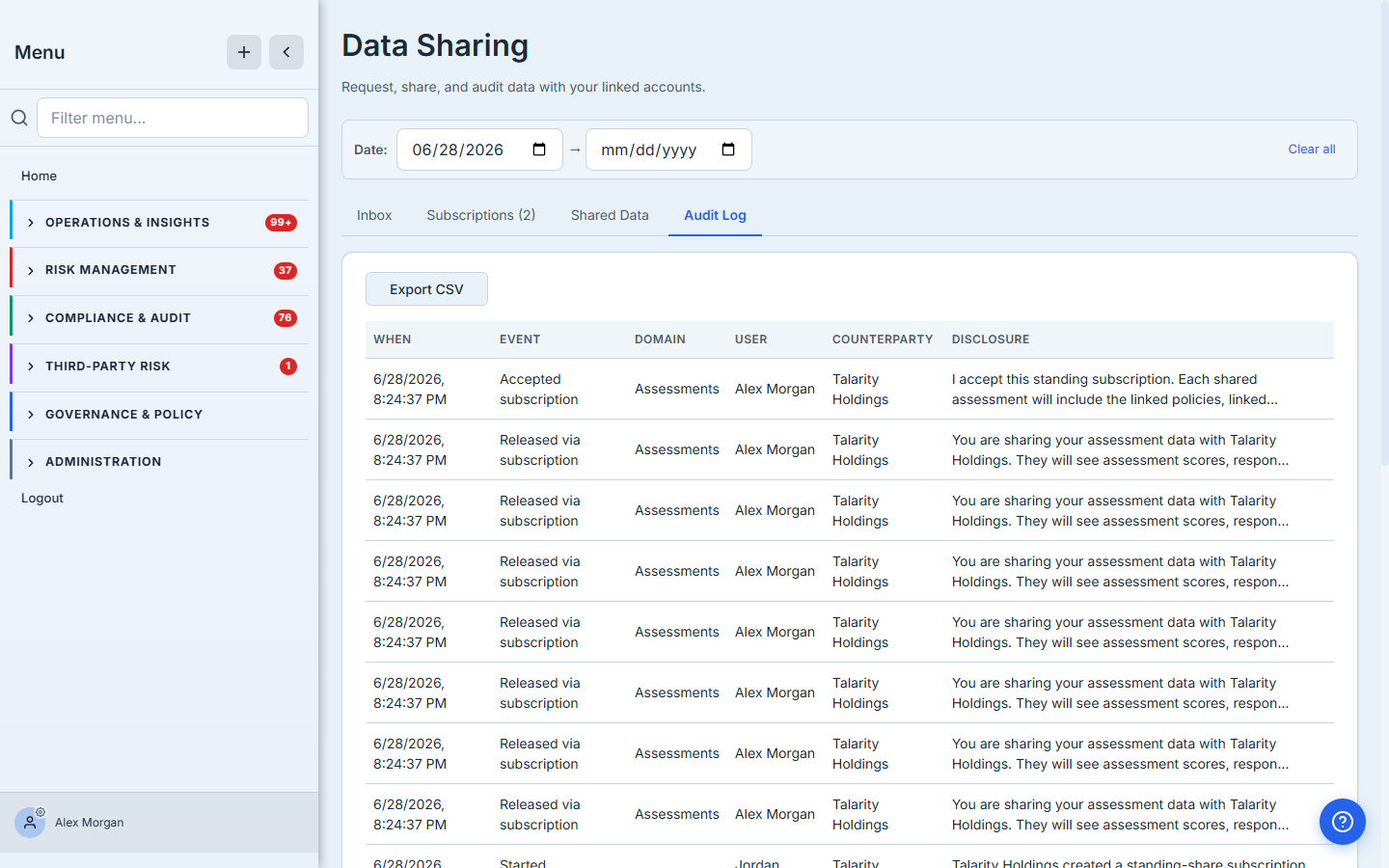
The parent’s audit log mirrors the child’s, with the counterparty resolved to the other side of the relationship.
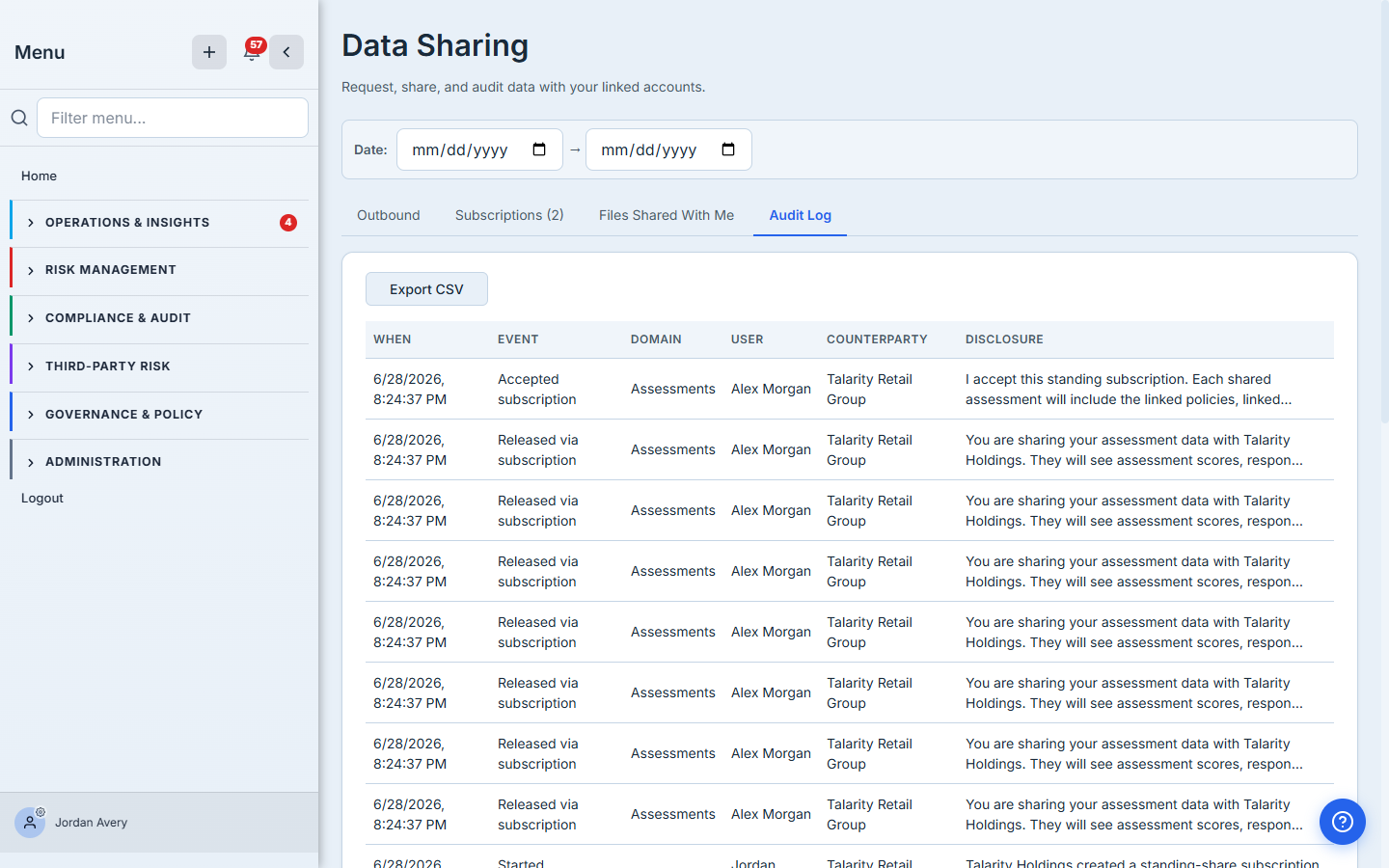
The Disclosure column carries the exact prose the consenting user saw at decision time, frozen forever even if the product copy changes later. The Export CSV button at the top dumps the full log for handoff to an auditor or for parking in a compliance vault.
Step 12 — Revoking access — three paths
Three different actions revoke a share, each appropriate to a different scenario:
- Sender-side Cancel — the parent decides they no longer need the data. Cancel on a subscription row terminates the relationship and revokes every released entity that flowed through it. Use this when the engagement is over or the requirement has shifted.
- Recipient-side Cancel / Reduce — the child decides to stop sharing (or share less). Cancel terminates the whole subscription; Reduce narrows the scope and revokes anything that falls outside the new window. Use Reduce when the relationship continues but a specific type or time-period should no longer flow.
- Linked-account lifecycle teardown — when a linked account is disabled or deleted (for example, after a subsidiary divestiture or a contract termination), Talarity’s lifecycle helper sweeps through every open share between the pair and revokes them in a best-effort, idempotent sequence — each step is independent, so a retry can’t double-revoke or miss one. The trust grants in both directions are revoked too; every non-terminal request and subscription gets a
share_revokedrow in the consent log; the child org’s users have their claims version bumped so any cached linked-relationship claim is invalidated on the next request. This is the path that matters most for audit: a clean break, automatically captured.
In all three cases the recipient loses access immediately — there’s no grace window. The audit log carries an entry for each revoked entity so the trail is intact regardless of how the revocation happened.
What you walk away with
- Two primitives, one form — ad-hoc requests for snapshots and standing subscriptions for continuous feeds, both built from the same New Request modal with the date field as the toggle.
- Cascade-aware scope — the parent declares which types of associated items should flow alongside the primary entity (policies linked to an assessment, files uploaded against a control, risks tied to a KRI). The child sees the full cascade before consenting.
- Symmetric controls — the recipient can always reduce or revoke unilaterally; the requester can only widen by filing a modification request the recipient approves explicitly.
- An immutable consent log on both sides — every accept, decline, release, modify, and revoke is a row that survives org renames, user departures, and product copy changes, with the exact disclosure prose preserved.
- Lifecycle-clean revocation — disabling a linked account sweeps every open share, revokes every trust grant, and writes a
share_revokedrow for every flowed entity in a best-effort, idempotent sweep. No orphans, no stale claims, no manual cleanup.
Run yours this quarter. Open /app/data-sharing, click New Request, pick a linked account, pick the data type, leave the date as “All time” if the relationship is recurring. The first request takes about three minutes. Every renewal cycle after that, Talarity does the fan-out for you — and the audit log writes itself.