Every compliance team eventually hits the same wall: you’ve done the work for one framework, and now someone wants a different one. The instinct — and what most tools force — is to start the new framework from a blank questionnaire, re-answering questions you’ve already answered in different words. Talarity’s crosswalk projection refuses that. It takes the assessments you’ve already completed and projects them onto whatever framework you now need, telling you the score you’d likely land, what’s already covered, and exactly what’s left.
What’s on the page
Open Framework Crosswalk Projection (/app/dashboard-compare):
- Source — which assessment answers to project from (e.g. All completed assessments).
- Target Framework — the framework to project onto (e.g. FFIEC IT Handbook).
- “When assessments disagree” policy — how overlapping answers are reconciled (Balanced weighted average / Optimistic best-answer-wins / Conservative lowest-answer-wins).
- Requirement-by-requirement crosswalk — one row per target requirement, sorted weakest-first so the lowest-coverage items surface, each showing the projected coverage and the source answers behind it.
Project your answers onto a target framework
Open Framework Crosswalk Projection (under Compliance). Pick a source (the assessments you’ve completed) and a target framework, and Talarity computes the projection — a likely score and the share of the target’s requirements your existing answers already cover.
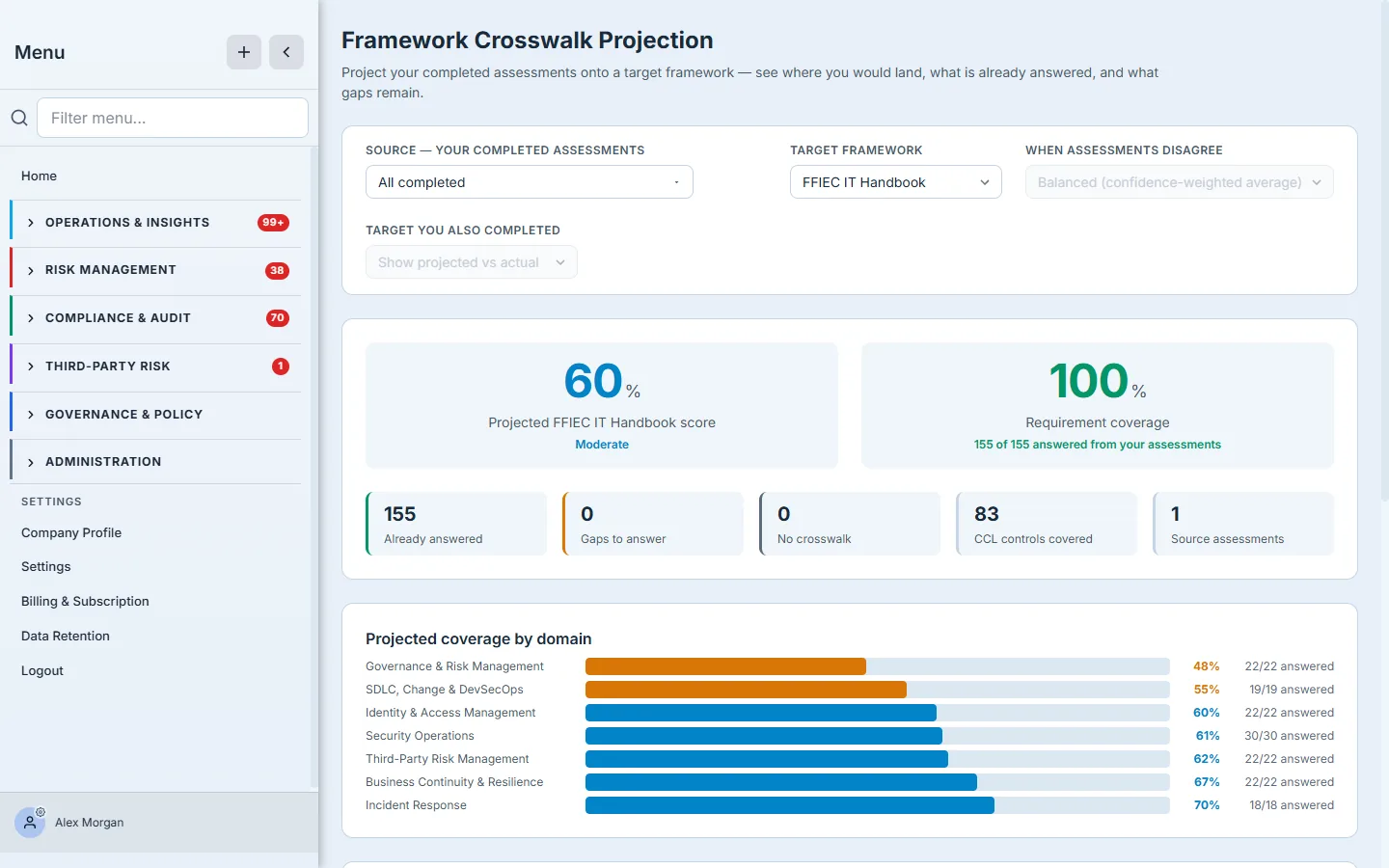
The headline numbers are the projection: a likely score on the target framework and the requirement coverage your existing answers reach (“155 of 155 answered from your assessments”). The tiles break that down — what’s already answered, how many genuine gaps remain, how many requirements have no crosswalk (and so can’t be inferred), and how many of your controls map across. The coverage-by-domain bars show where you’re strong and where the gaps cluster, so a “60%” isn’t a mystery — it’s Governance at 48%, Incident Response at 70%, and you can see why. A “when assessments disagree” policy lets you choose how overlapping answers are reconciled (Balanced, Optimistic, Conservative).
See it requirement by requirement
A projected score you can’t audit is just a guess. The requirement-by-requirement view shows the receipts: for each requirement in the target framework, whether it’s already answered (and projected from which of your assessments) or still open.
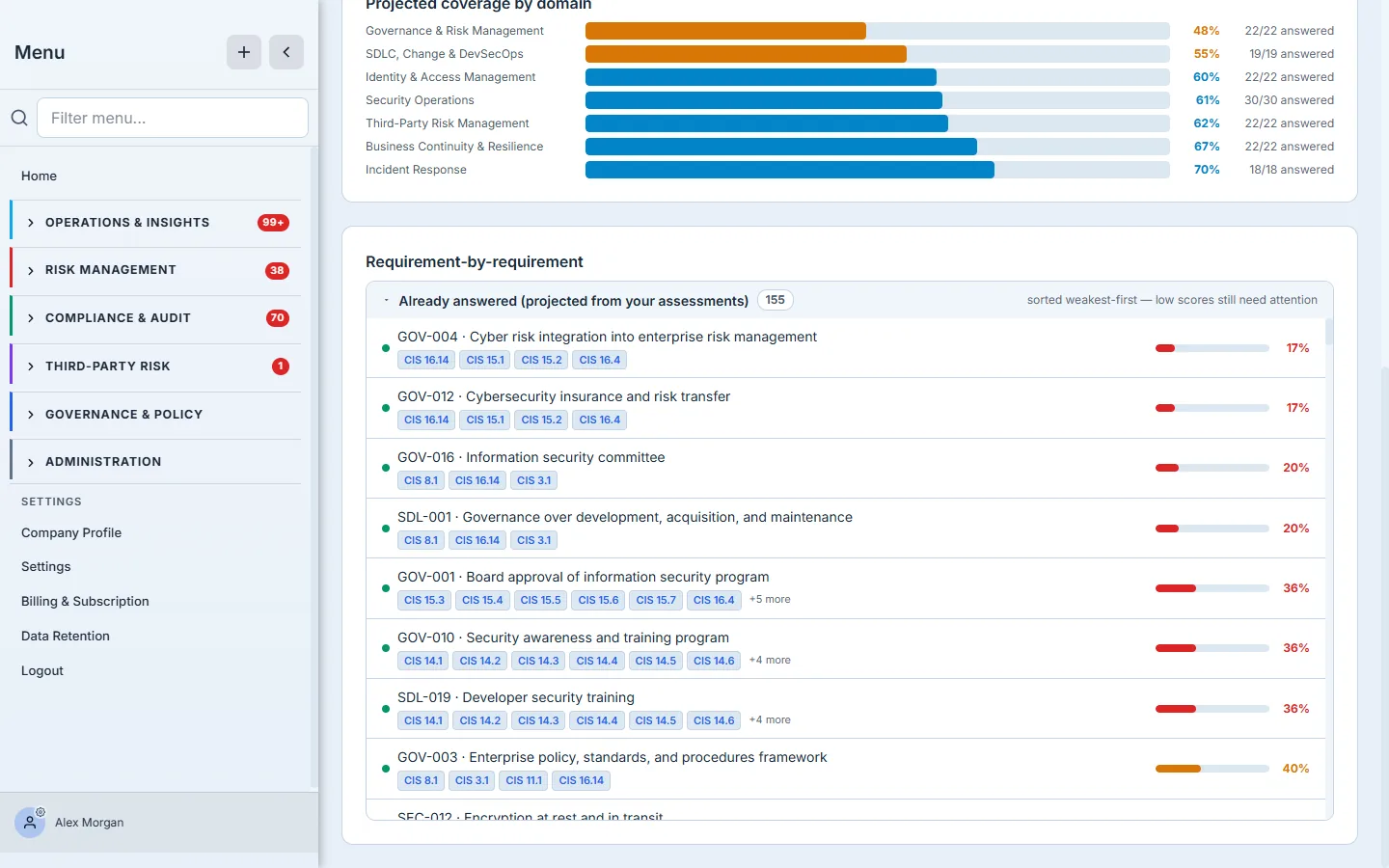
This is what turns the projection from a marketing number into a working plan. Every target requirement is listed with its mapped source answer, so you can trace exactly why the projection says you’re covered — and the handful that remain open become your to-do list for that framework, not a re-do of the whole thing.
The same work, onto any framework
The point isn’t one crosswalk — it’s that the same completed assessments project onto whichever framework the moment demands. Switch the target and the whole projection recomputes against the new framework’s structure.
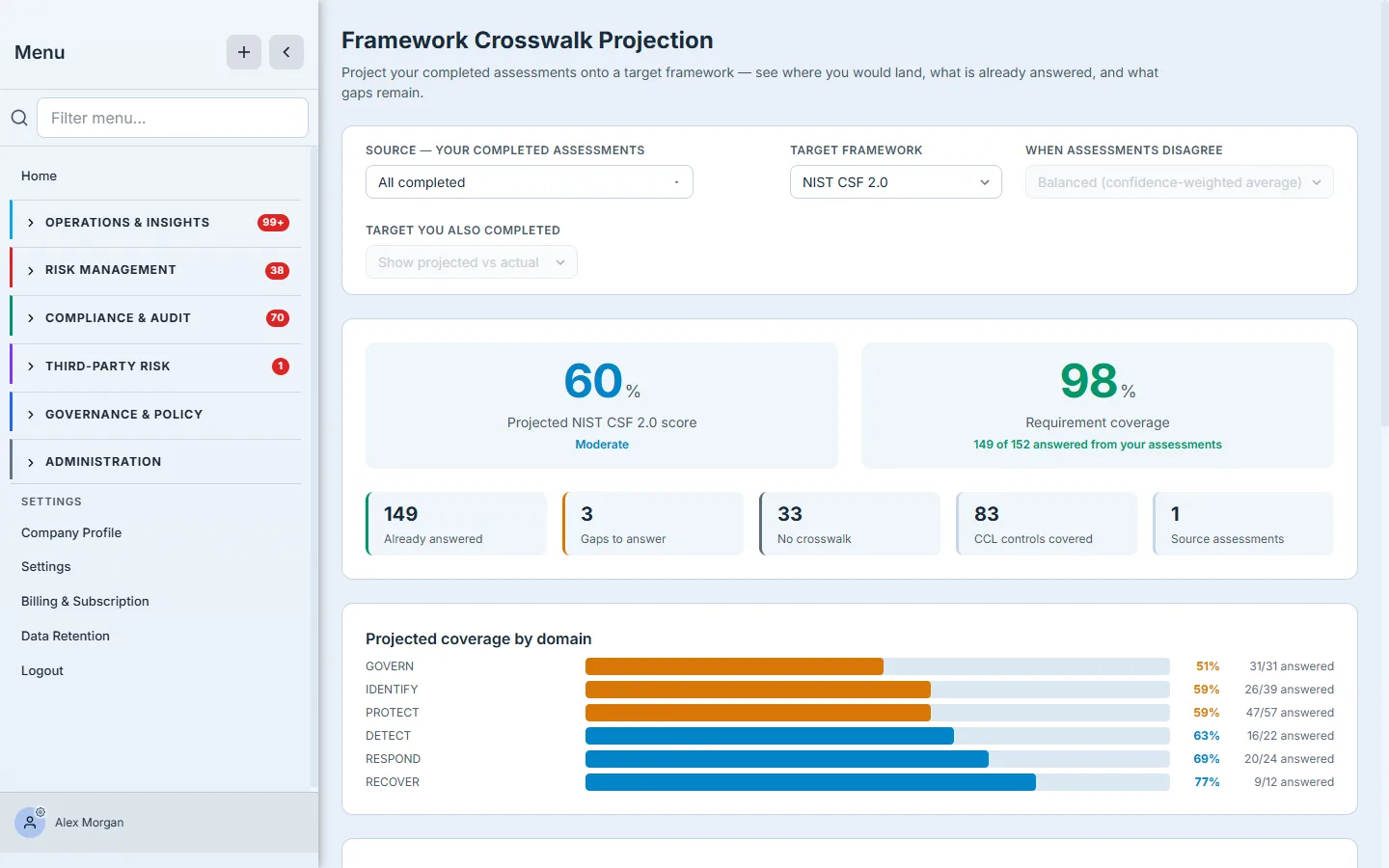
Here the very same answers are projected onto NIST CSF 2.0 instead — and the domain breakdown shifts to the CSF functions (Govern, Identify, Protect, Detect, Respond, Recover). The target list is deep: CIS Controls v8.1, NIST CSF 2.0, ISO 27001:2022, SOC 2, PCI DSS v4.0, HIPAA, CMMC 2.0, SOX ITGC, GDPR, SEC Cybersecurity, NIST AI RMF, and more. Whatever a customer, auditor, or regulator asks for next, you start from where your existing work already puts you.
How the page works
The projection is mechanical, not magic — which is exactly what makes it defensible:
- Three controls drive everything at the top: the Source (which completed assessments feed the projection), the Target Framework, and the “when assessments disagree” policy. Change any of them and the whole projection — score, tiles, domain bars, requirement list — recomputes against the new inputs.
- Coverage is a count, the score is its weighting. Requirement coverage is literally answered ÷ (answered + gaps) for the target framework — “155 of 155 answered.” The projected score then weights those answers into a 0–100 with a maturity label, so coverage and score can differ (you can have every requirement touched but at a low projected score).
- “No crosswalk” is an honest third state, not a gap. A target requirement with no mapping to anything you’ve answered can’t be inferred either way — so it’s separated out, rather than silently counted as a gap or a pass. Your real to-do list is the gaps, not the no-crosswalks.
- The conflict policy only arbitrates overlap. When two of your source assessments both map to the same target requirement and disagree, the policy (Balanced / Optimistic / Conservative) decides which answer wins. It changes nothing where your assessments agree — it only resolves genuine conflicts.
- Everything sorts weakest-first. Both the coverage-by-domain bars and the requirement list are ordered lowest-score-first, so the page always surfaces the work, not the wins — the gaps float to the top where you’ll act on them.
What you walk away with
- A head start on every new framework. Your completed assessments project onto any target — a likely score and the coverage you already have — instead of a blank questionnaire.
- Gaps you can actually work. The projection separates already answered from genuine gaps and no-crosswalk, so the remaining work is a short, specific list.
- Auditable, not hand-wavy. Requirement-by-requirement mapping shows which of your answers cover each target requirement — you can defend the projected score line by line.
- One body of work, many frameworks. The same answers reproject onto CIS, NIST CSF, ISO 27001, SOC 2, FFIEC, and a dozen more — answer once, report everywhere.