Every audit starts the same way: someone builds a spreadsheet. Which controls does this framework need, which ones do we have evidence for, what’s expired since last year, where are the holes. It’s weeks of cross-referencing — and it’s stale the moment it’s finished. Talarity keeps that picture live — for SOC 2, ISO 27001, CIS Controls, NIST CSF, PCI DSS, and the rest — and turns it into a packaged, auditor-ready export on demand.
Who’s involved
- Compliance lead — owns framework readiness; needs to answer “are we audit-ready?” at any moment.
- Control owner — closes the gaps and refreshes the evidence the dashboard surfaces.
- Auditor-facing admin — generates the package the assessor actually reviews.
What’s on the page
Open Frameworks (/app/compliance/frameworks):
- Frameworks landing — a card per framework with live readiness KPIs (% mapped, controls, open gaps, expired evidence).
- Per-framework readiness dashboard — KPI cards (% mapped, control count, score, open gaps, expired evidence), the per-control Coverage table, and tabs for Policies / Procedures / Runs / Approvals / Exceptions.
- Gaps and Evidence views — the named gaps from your latest assessment, and the evidence backing each control with its freshness state.
- Generate Package — compiles Coverage / Gaps / Evidence / posture into a retained draft capstone in your Capstone Library (
/app/capstones).
Step 1 — Every framework, readiness at a glance
Open Compliance → Frameworks. Each framework you track is a card showing its live readiness: percent mapped, control count, open gaps, expired evidence — across cross-industry (CIS, ISO 27001, NIST CSF), sector (HIPAA, PCI DSS, FFIEC), and emerging (NIST AI RMF) standards.
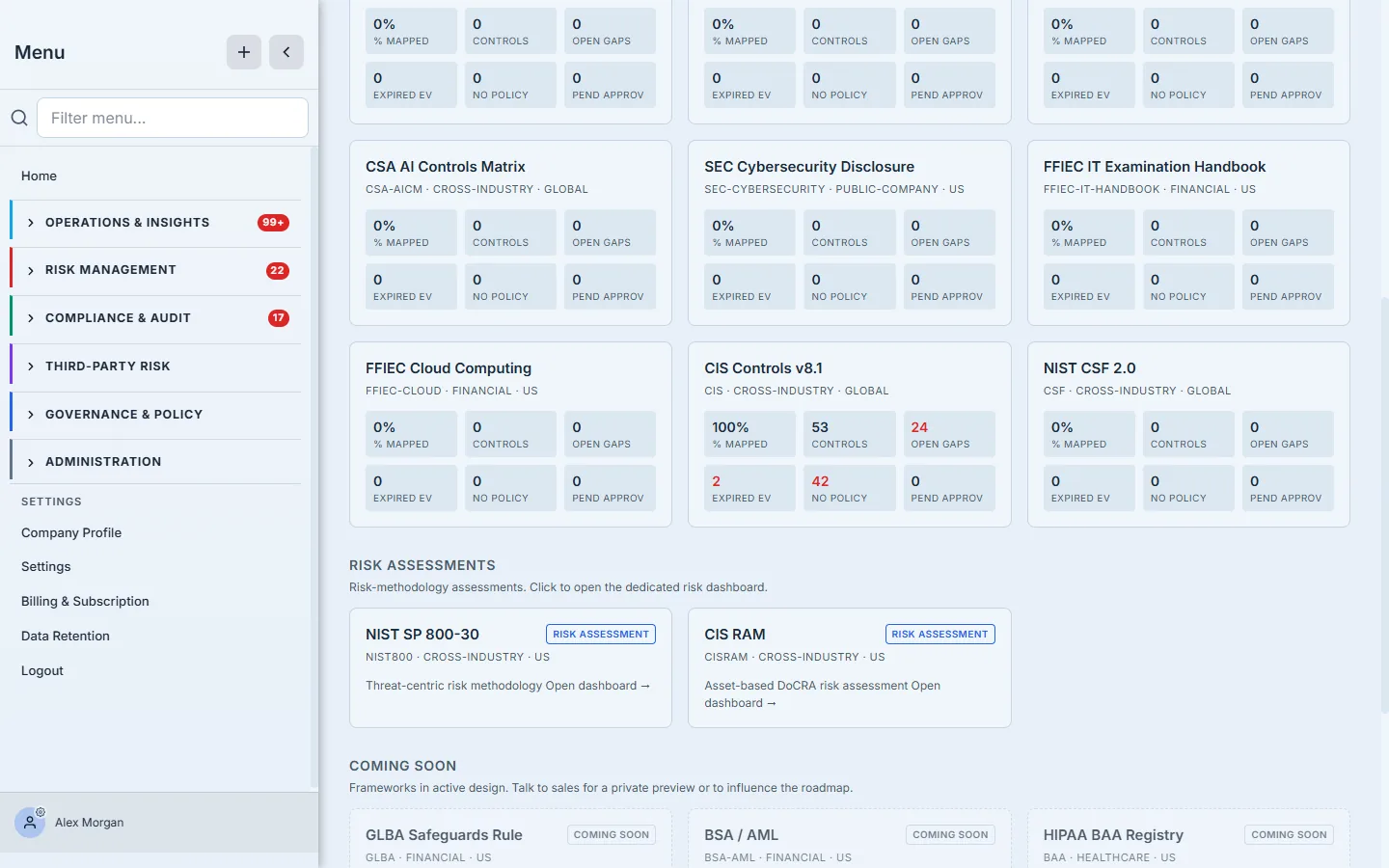
You don’t open a spreadsheet to find out where SOC 2 stands — it’s on the card.
Step 2 — One framework, the full readiness picture
Open a framework — here, CIS Controls v8.1 — and you land on its readiness dashboard: % mapped, total controls, latest assessment score, open gaps, expired evidence, and pending approvals across the top. Below, the Coverage table maps your control library to the framework — every adopted control with its status, evidence, policy, procedure, and last test (your controls keep their own canonical names, shown here against the framework’s requirements).
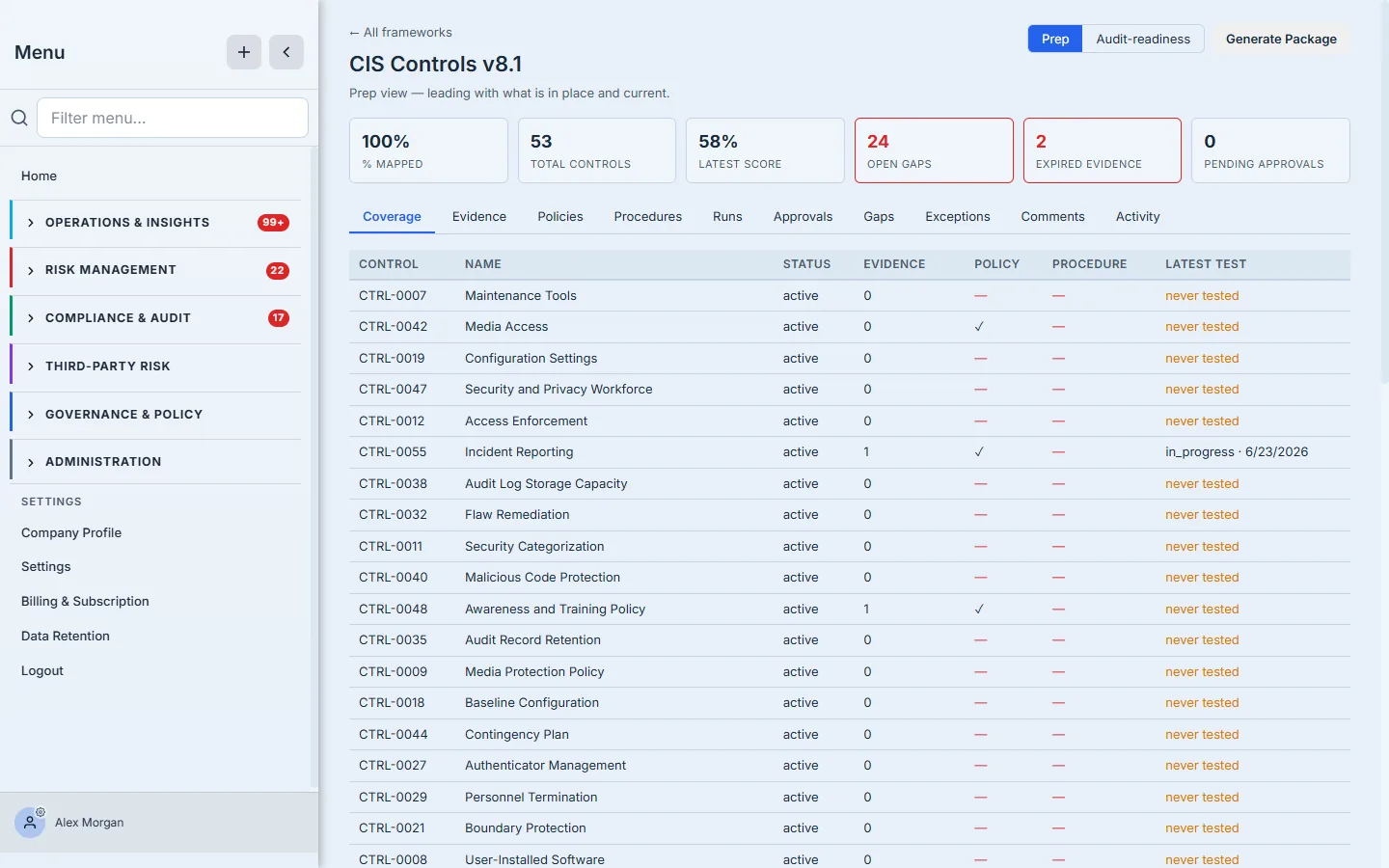
The Prep ⇄ Audit-readiness toggle (top right) re-sorts the whole view: Prep leads with what’s in place and current; Audit-readiness leads with what an assessor will question first.
Step 3 — The gaps, named
The Gaps tab is the to-do list. Every open gap — a control without sufficient coverage — is listed with its severity, so you work the high-severity ones first.
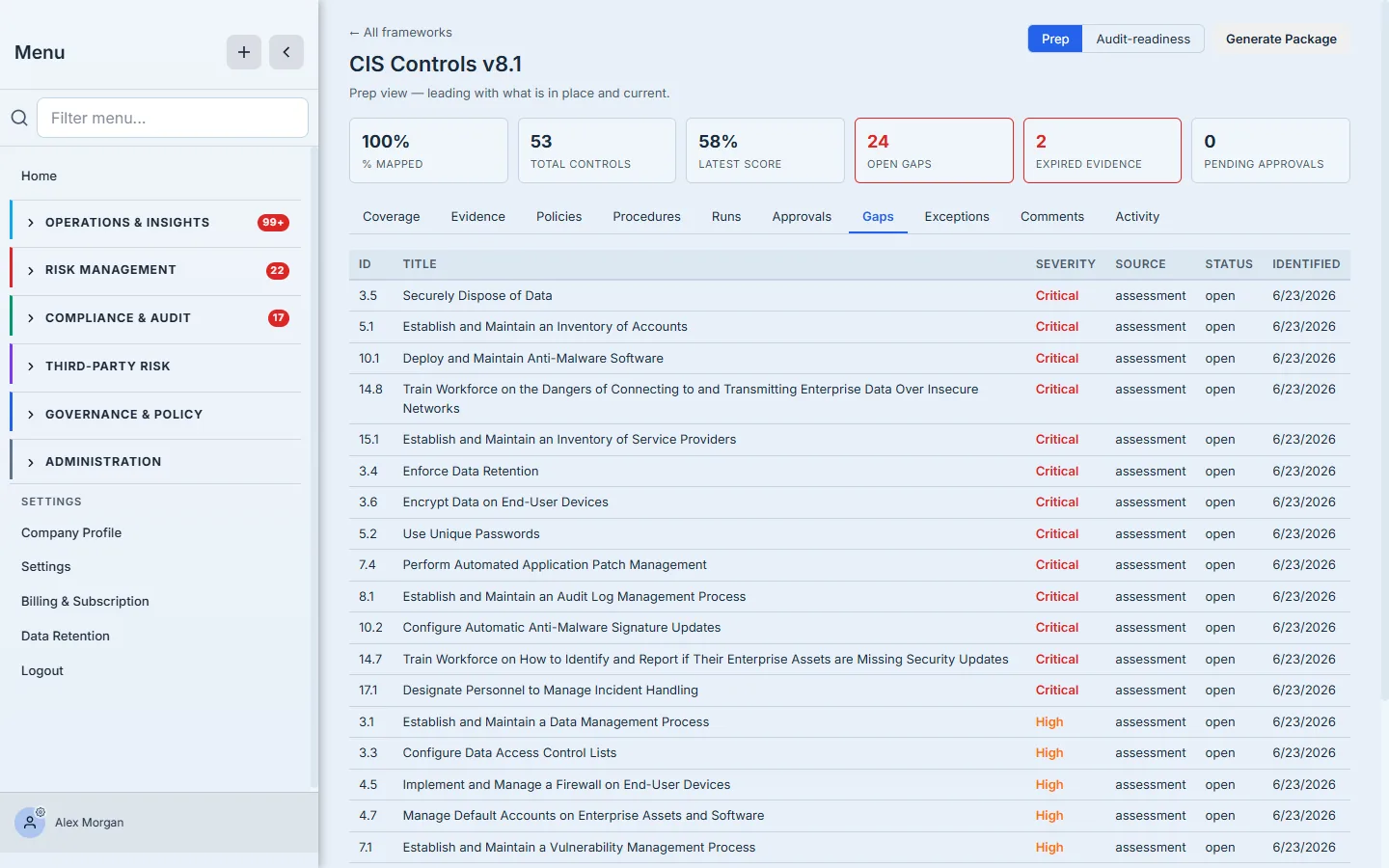
These aren’t typed by hand; they fall out of your latest assessment against the framework. Close them in the work tracker and they clear here.
Step 4 — Evidence, with a shelf life
Evidence isn’t “attached once and forever.” The Evidence tab tracks every artifact’s freshness — fresh, warning, stale, expired — alongside its expiry date.
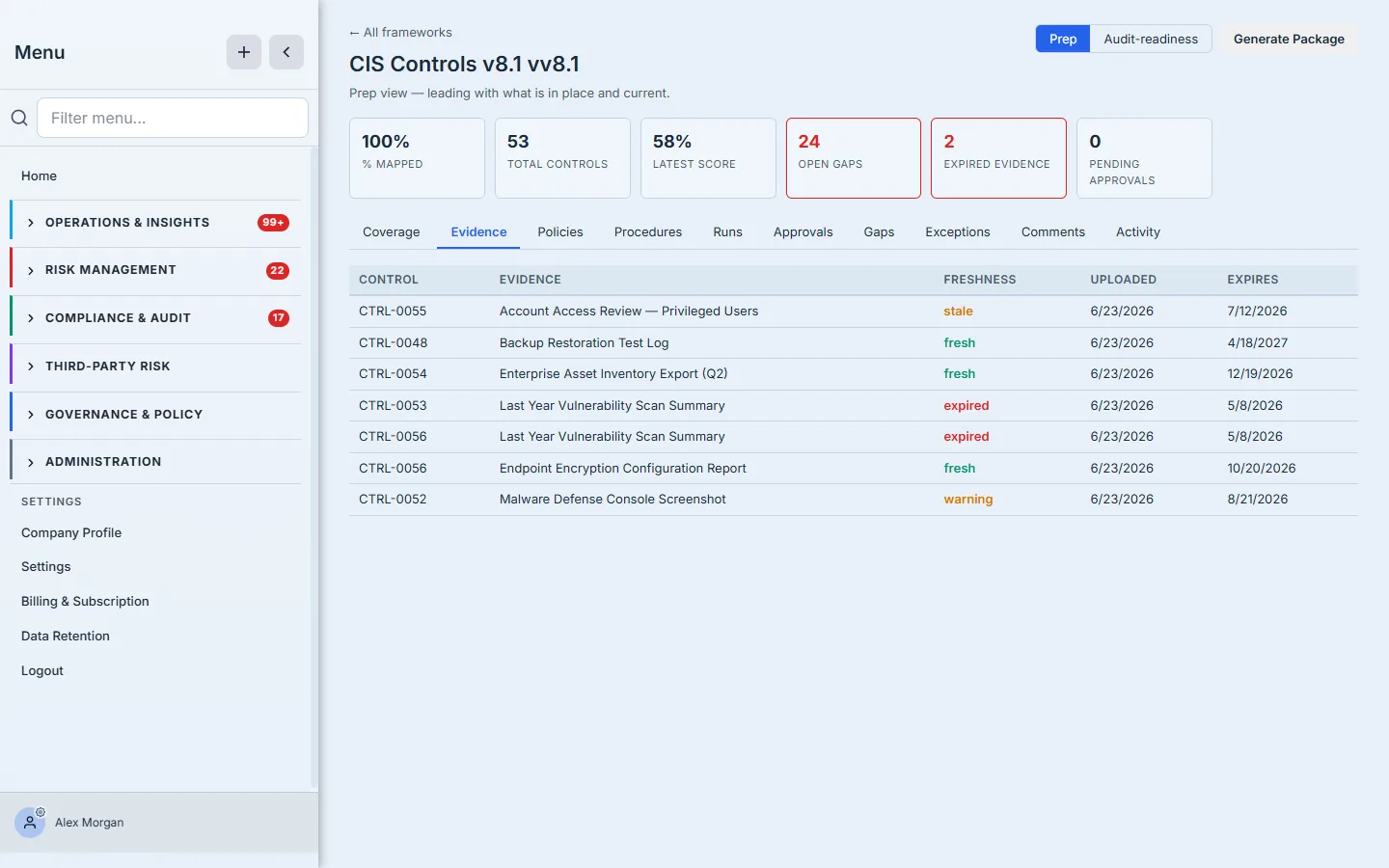
An expired penetration test or a stale access review is exactly what an auditor finds — here you find it first. The dashboard’s expired evidence KPI is your refresh queue.
Step 5 — Package it
When you’re ready, click Generate Package. Talarity compiles the framework’s coverage, gaps, evidence, and posture into a single capstone artifact in your Capstone Library — the thing you actually hand the assessor.
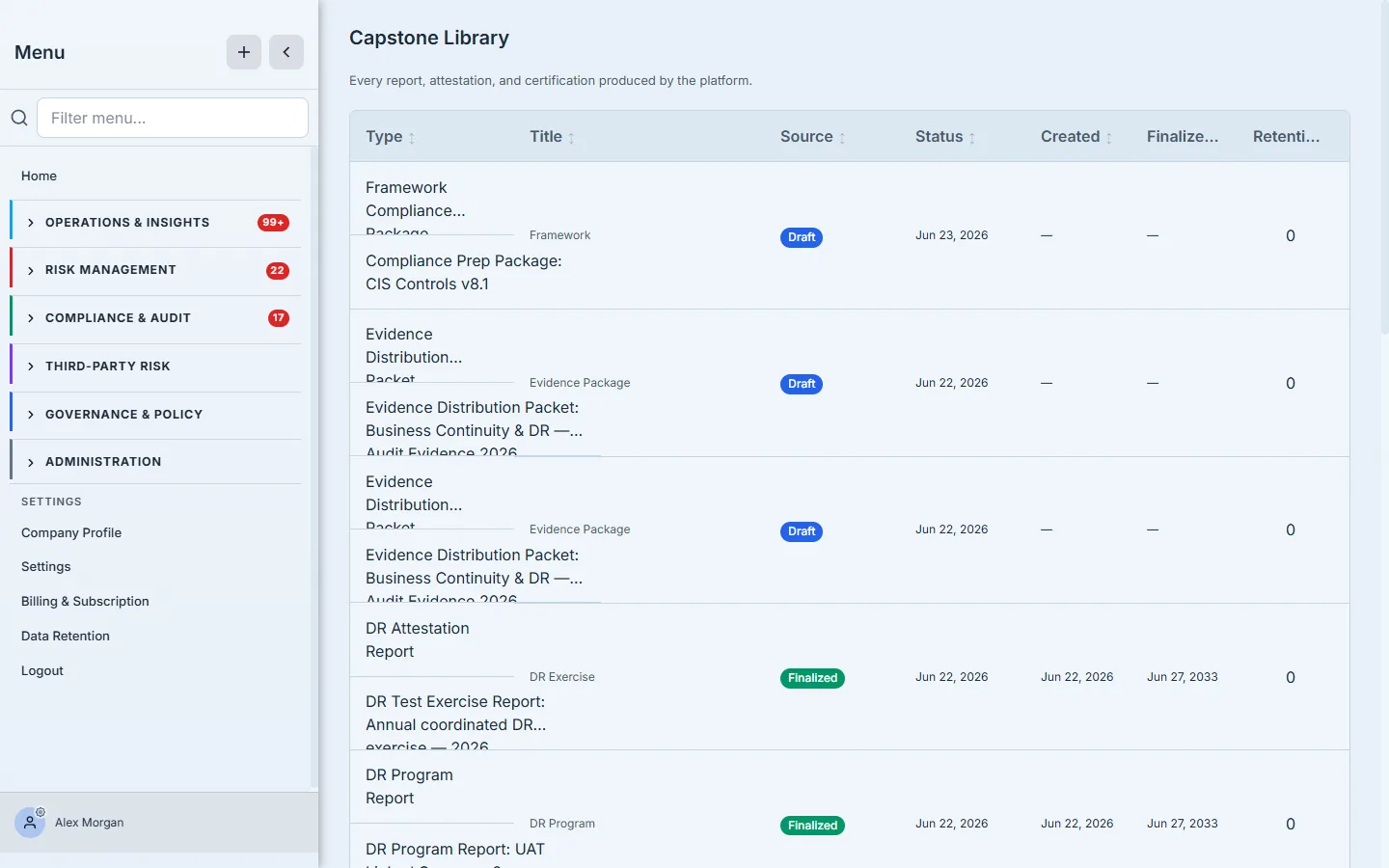
It’s a point-in-time, retained record: what your program looked like on the day you packaged it. No assembling a binder the night before.
How the page works
The readiness view is more than the three tabs this walkthrough leans on — it carries the full audit story across Coverage, Evidence, Policies, Procedures, Runs, Approvals, Gaps, and Exceptions — and every number on it is derived, never hand-maintained:
- The whole dashboard is a live preview. It renders from a single
getPreviewcall against your real data, so % mapped, score, open gaps, and expired-evidence counts are recomputed each time you open it — there’s nothing to “refresh” or keep in sync. - Gaps come from your latest assessment run, not a checklist. A control shows up on the Gaps tab because the most recent assessment against this framework didn’t find sufficient coverage for it. Close it in the work tracker and it clears here on the next read — you never tick a box on this page.
- Evidence freshness is a computed state, color-coded. Each artifact is fresh, warning, stale, or expired based on its expiry date against your cadence — an artifact silently slides from fresh to expired as time passes, which is why the expired evidence KPI is a live refresh queue, not a static list.
- Prep vs Audit-readiness re-sorts the same data. The toggle doesn’t change what’s shown — Prep leads green-first (what’s in place and current), Audit-readiness leads red-first (gaps, expired, missing, and unsigned items an assessor questions first). Same facts, ordered for the job you’re doing.
- Generate Package writes a retained draft. The button calls the framework-compliance-package generator, which compiles Coverage / Gaps / Evidence / posture into a draft capstone report artifact that lands in your Capstone Library (
/app/capstones) — a point-in-time record you keep, separate from the live dashboard that keeps moving.
What you walk away with
- A live readiness picture per framework — no spreadsheet, never stale.
- Gaps and expiring evidence surfaced before the auditor finds them — the dashboard is your prep queue.
- A one-click, retained audit package — the export the assessor reviews, generated from the same data you manage every day.
Audit coming up? Open your framework, read the dashboard, work the gaps and the expired-evidence queue, then Generate Package. The scramble becomes a checklist.