A completed assessment gives you a number. “We’re at 23%.” Useful for a board slide, useless for a Monday morning — because a score doesn’t tell you what to do first, how much each fix is worth, or who owns it. Most teams export the gaps to a spreadsheet, rank them by gut feel, and lose the thread by the next quarter.
Talarity’s Gap Analysis closes that loop. It reads your latest completed assessment, scores every safeguard against a target maturity, and turns the shortfall into a prioritized, quantified remediation plan — separating the quick wins from the critical work, projecting the score impact of each tier, and letting you spin any gap into a tracked, owned work item in one click. The line from “we scored 23%” to “here is the owned work that gets us to 89%” is unbroken.
This is the part auditors actually press on: SOC 2 CC4.2 (evaluating and communicating deficiencies), ISO 27001 Clause 6.1/10.1 (treatment of risks and nonconformities), and the NIST RMF Assess → Authorize step all assume the gaps drive a plan of action. Here is how it works.
Who this is for
- Compliance lead — turns an assessment score into a defensible, prioritized program of work.
- Security owner — gets the gaps quantified by impact so the team fixes the highest-value things first.
- Auditor — sees an unbroken line from assessment shortfall to remediation work item to closure.
What’s on the page
Open Gap Analysis (/app/gap-analysis):
- Framework + account selector — picks which latest completed assessment to read; no re-keying or export.
- Executive KPIs — Overall Score, Total Gaps, the Critical count, available Quick Wins, and Target Coverage.
- Priority gap list — gaps ordered by severity, each drillable to the requirement, current state, and recommended action.
- One-click “create work item” — turns a gap into tracked remediation that lands in a real remediation plan (
/app/remediation-plans/:id).
Step 1 — Open Gap Analysis
Gap Analysis (/app/gap-analysis) reads the latest completed assessment for the framework and account you select — no re-keying, no export. The top of the page is the executive read: an Overall Score, Total Gaps, the Critical count, available Quick Wins, and Target Coverage.
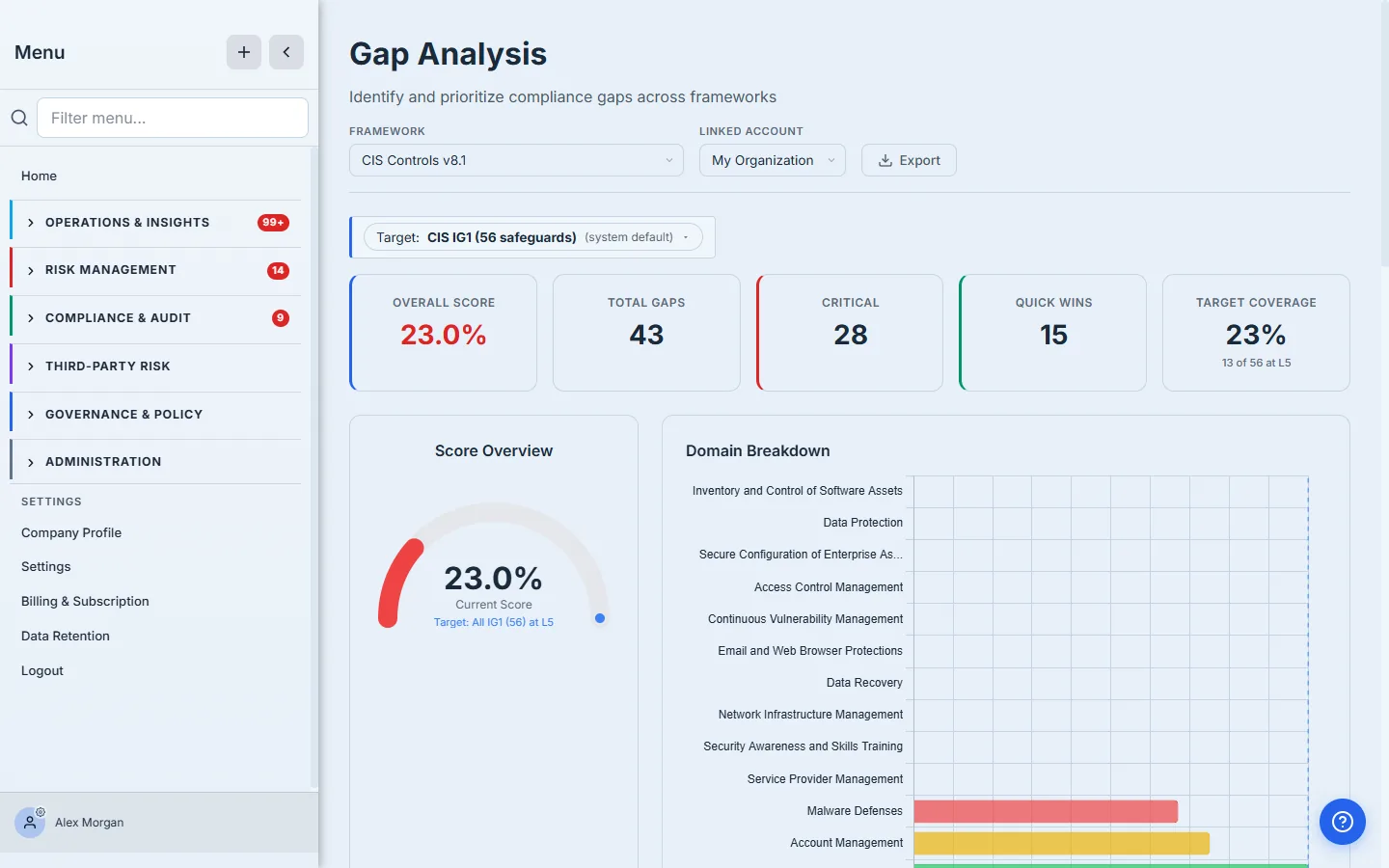
The bar everything is measured against is explicit: Target: CIS IG1 (56 safeguards) at Level 5, the system default. The Domain Breakdown on the right ranks the 18 CIS control domains so you can see at a glance which areas — Malware Defenses, Account Management — are pulling the score down.
The target is the whole game. A gap is a distance from a bar, so the bar decides what counts. Talarity defaults to the framework’s own implementation group (IG1) and full maturity, but you set the realistic target for your organization — measure against the maturity you’re actually committing to, not an aspirational one you’ll never staff.
Step 2 — Read the projections before you touch anything
Before you assign a single task, the Score Projections answer the question every remediation effort should start with: what is each tier of work actually worth? Talarity models three scenarios off your current gaps.
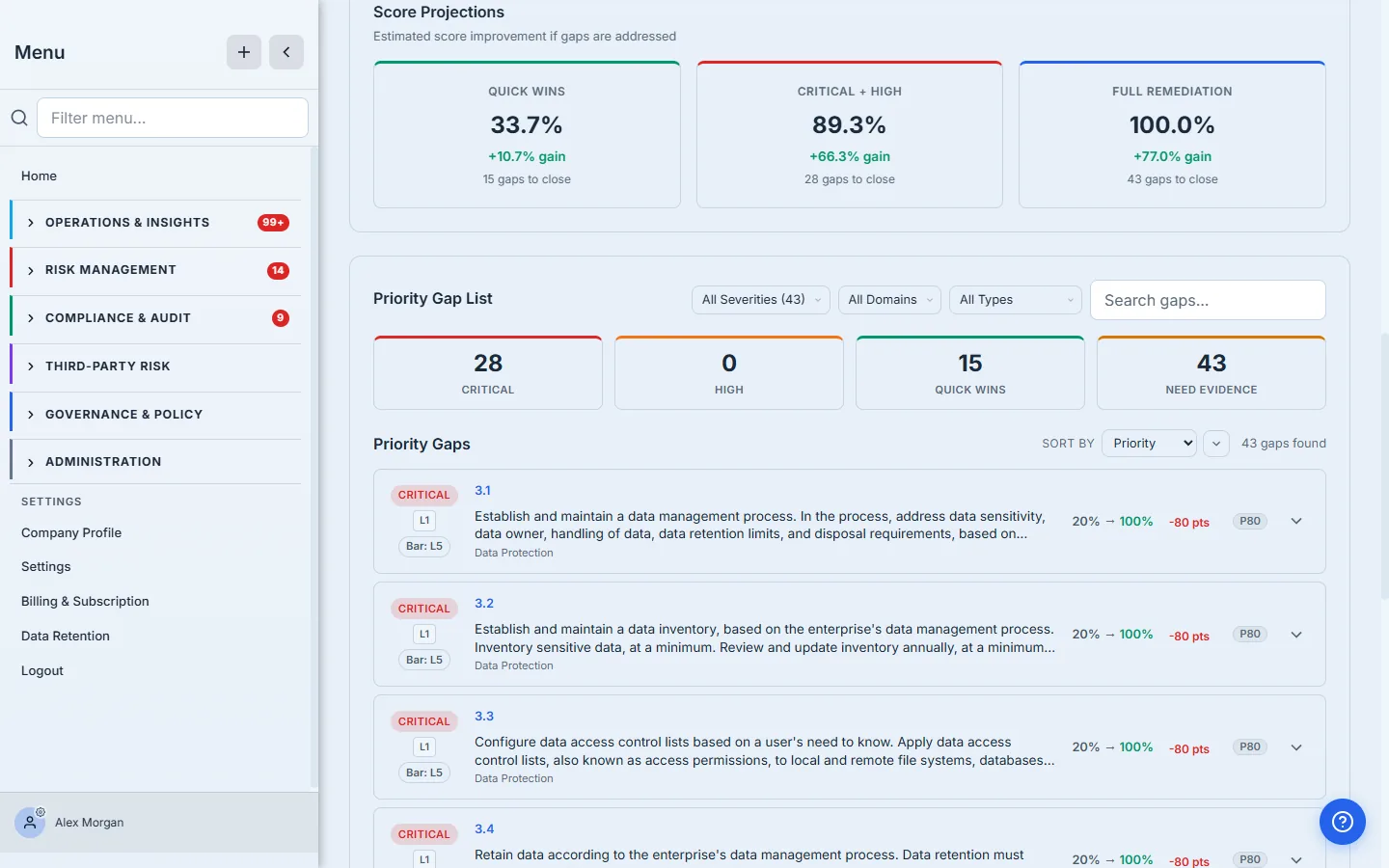
- Quick Wins → 33.7%. The low-effort, already-mostly-there safeguards. Closing just these lifts the score by more than ten points.
- Critical + High → 89.3%. The work that moves the needle — the gaps that are both severe and far from target.
- Full Remediation → 100%. Everything, for when the target is non-negotiable.
This is what turns “we have 43 gaps” into a sequencing decision. The quick wins are cheap score; the critical-and-high tier is where the real coverage lives. You plan the order before you spend anyone’s week on it.
Step 3 — Work the priority gap list
Below the projections is the Priority Gap List — every gap, ranked, with the levers to slice it. The summary chips break the 43 gaps down: 28 Critical, 3 Medium, 12 Low, and 15 Quick Wins flagged across them.
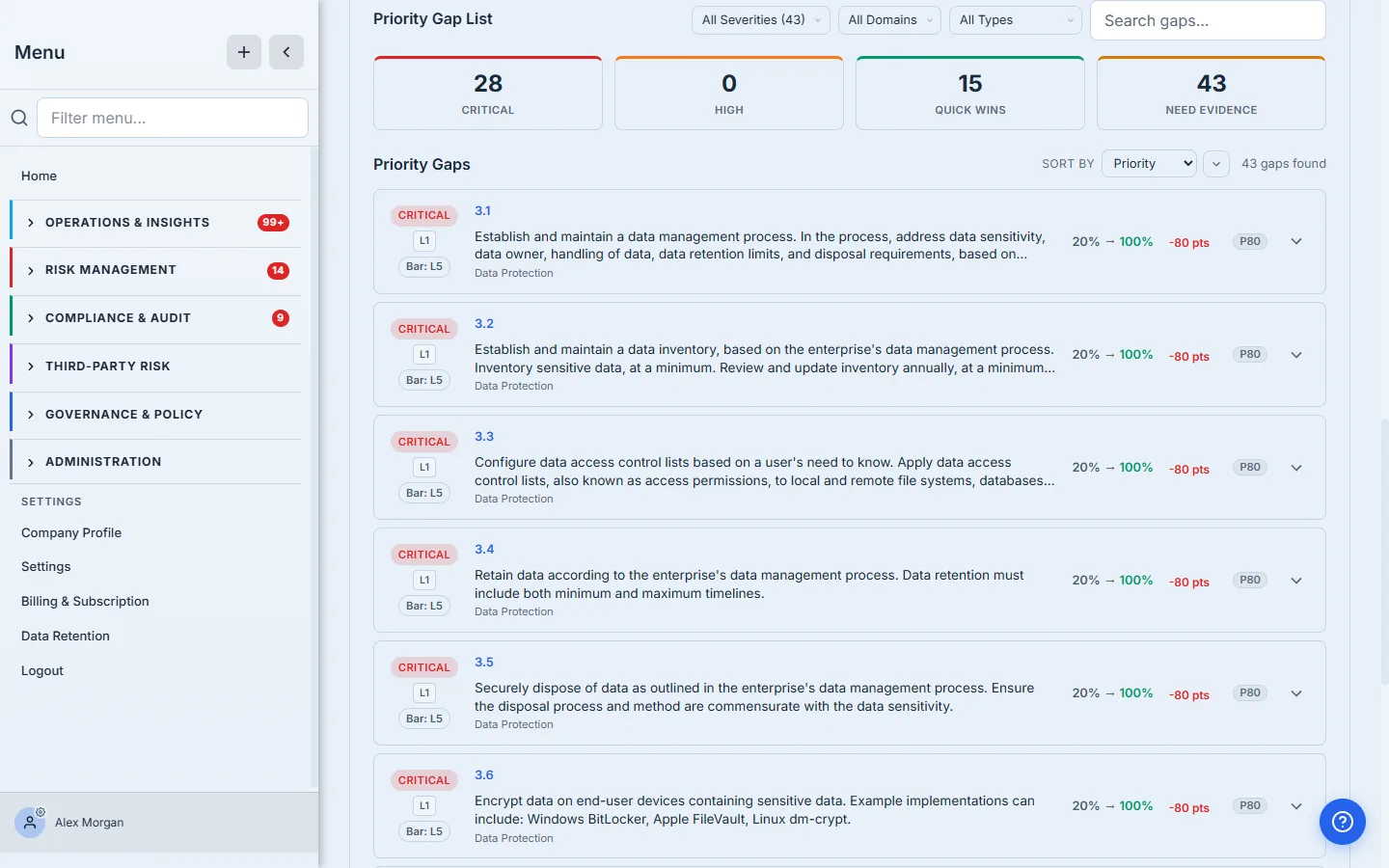
The filters are how a real remediation sprint gets scoped:
- Severity — pull just the Critical gaps for the must-fix list.
- Domain — hand the Account Management gaps to the team that owns identity.
- Type —
Below Threshold(answered but short of target),Unanswered(never assessed), or Quick Wins Only to build a fast-confidence first sprint.
Each row leads with its control ID and severity badge, the current score, and the distance to target — sorted by a priority that blends severity with how far the gap sits from the bar.
Step 4 — Drill into a gap
Click any gap and it expands in place — no context switch. You get the safeguard’s Implementation Guidance and a row of actions that are the actual exits from analysis into work.
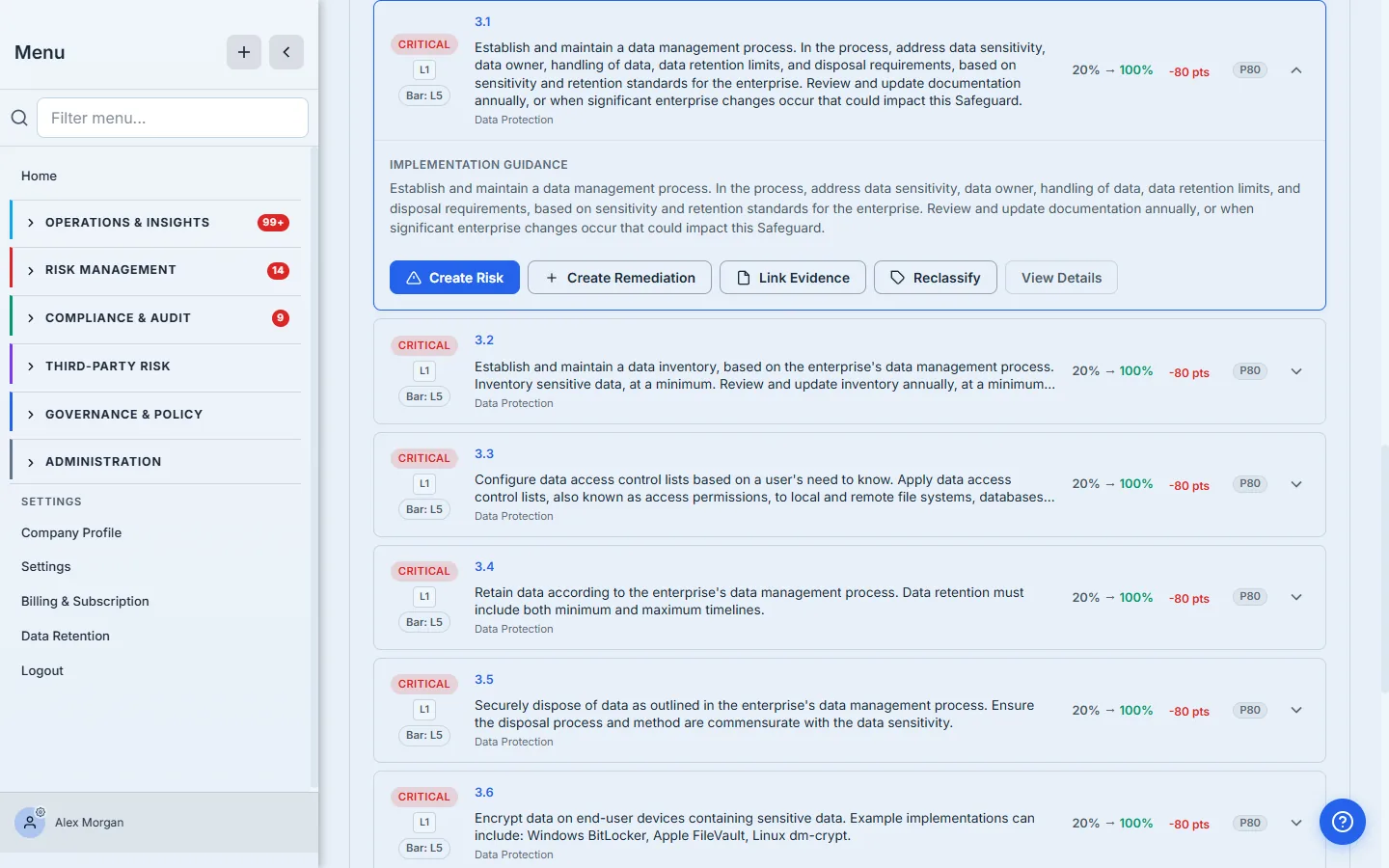
The guidance is the framework’s own language for what “done” looks like — for safeguard 3.1 that’s establishing a data management process covering sensitivity, ownership, handling, retention, and disposal. The action row is where you decide what this gap becomes:
- Create Risk — register it as a tracked risk when the gap is really an exposure to manage.
- Create Remediation — spin it into a work item your team owns and closes.
- Link Evidence — attach the artifact that proves the safeguard is met (and may re-score it).
- Reclassify — mark it Not Applicable with a justification, or adjust its bar.
- View Case File — open the gap’s own record, where its severity, score history, close history and links to risks, controls and remediation plans live. The modal is a quick look; the case file is the durable record.
Don’t treat every gap the same. A quick win wants a remediation work item and a due date. A structural gap you can’t close this quarter wants to become a risk you’re consciously accepting and monitoring. The action row lets you make that call gap by gap, instead of dumping all 43 into one undifferentiated backlog.
Step 5 — Turn a gap into tracked work, in one click
Pick Create Remediation on a gap and Talarity does the bookkeeping: it mints a remediation work item, pre-titled and described from the gap, and offers to open it so you can put an owner and a due date on it.
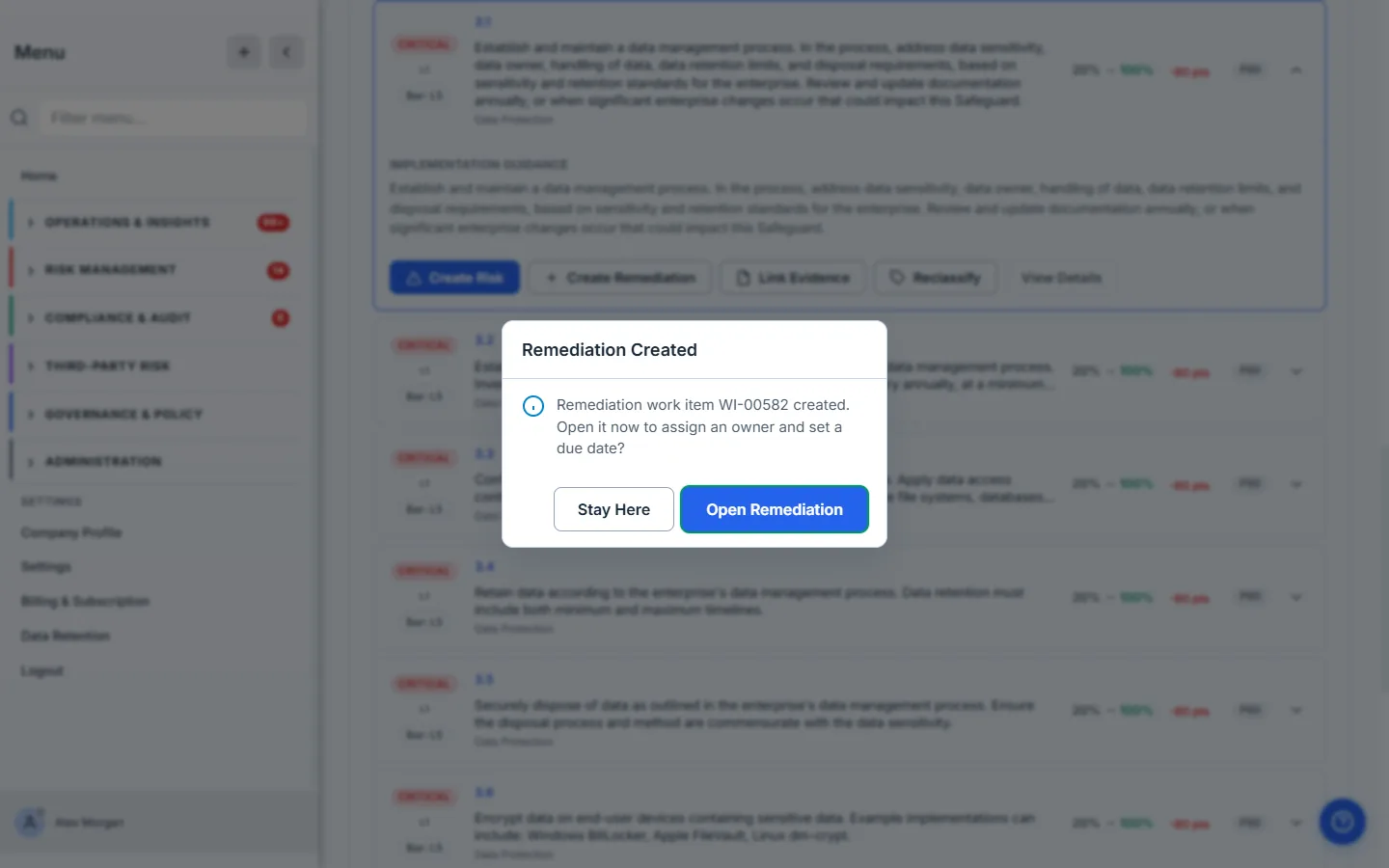
Behind that one click, the work item is created at the right priority inherited from the gap’s severity, carries a description built from the gap’s domain and current-versus-target scores, and is attached to a remediation plan for its source — so a run of gap-driven fixes organizes itself into a plan rather than scattering loose tickets.
Step 6 — The work item lives in a real plan
Open the remediation and you land on a full work item, not a checkbox. It sits inside a remediation plan — gap-driven fixes group themselves into one plan rather than scattering as loose tickets — carries the gap’s text as its objective, and runs a real status pipeline: Backlog → In Progress → In Review → Done → Verified → Closed. The platform enforces the basics, like refusing to move an item to In Progress without an assignee.
That work item is where the fix becomes defensible. Its tabs carry a Checklist of the steps, Linked Entities back to the gap and assessment that produced it, Artifacts for the evidence, and a Verification step plus a full Audit Trail. When the item reaches Closed, you have a provable line from “we scored a gap on safeguard 3.1” to “here is the owned work, the evidence, and the sign-off that closed it” — which is exactly the thread CC4.2 and Clause 10.1 ask you to produce.
Where it ends
This workflow covers the assessment-score → gap → prioritized → remediation loop. A few adjacent doors, deliberately out of scope here:
- The remediation plan workspace (
/app/remediation-plans/:id) — milestones, approval chain, and progress rollup across many work items — has its own depth; the gap flow drops you a link to it. - Generating the whole GRC program from a completed assessment — the risks, work items, and KRIs a set of gaps implies, in one bulk review — is its own guide (the assessment that builds your GRC program for you).
- Evidence gating — requiring an artifact before a high-maturity claim counts — is covered in the gated-assessment guide.
What you walk away with
- An assessment score turned into a prioritized, quantified plan — quick wins, critical work, and the projected score impact of each.
- Gaps that became owned, tracked remediation work items with a status pipeline, not spreadsheet rows.
- A defensible CC4.2 / Clause 10.1 story: deficiency identified → prioritized → remediated → verified, with nothing lost between the score and the work.
Open Gap Analysis this afternoon, sort by Quick Wins, and turn the first one into a work item. The fastest points on the board are usually one click away — and the thread from gap to closure stays intact the whole way.