A board member asks: “Are we governing this program, or just running it?” The honest answer lives in a dozen places — who owns which control, which frameworks you align to, which policies are attested, which exceptions are open, what’s pending approval. Most teams assemble that story by hand for every board meeting and every audit. The Governance Hub assembles it continuously: one screen that aggregates your entire governance posture, and a single button that turns it into a signed artifact your board or auditor can actually rely on.
Who’s involved
- Governance lead / CISO — lives in the posture view, watches the KPIs, and generates the board package.
- Board / audit committee — receives the signed governance package as the quarter’s evidence of governance.
- Auditors — get a single, attested artifact instead of a scavenger hunt across modules.
What’s on the page
Open the Governance Hub (/app/governance):
- Posture summary — nine KPI cards spanning every governance domain: frameworks aligned, RACI assignments, entity types covered, required and total attestations, active control and policy exceptions, pending approvals, and active workflows. Cards that should never be ignored (open exceptions, pending approvals) flag red when non-zero.
- Per-domain tabs — drill into any signal (e.g. the RACI coverage-by-entity-type rollup).
- Ready-to-generate strip — names the governance lead and CEO/board-chair signers required before you can produce the package.
- Generate Package — compiles the posture into a signed governance document.
Step 1 — One posture view, nine signals
Open /app/governance. The hub opens on a posture summary: nine KPI cards spanning every governance domain — frameworks aligned, RACI assignments, entity types covered, required and total attestations, active control and policy exceptions, pending approvals, and active workflows. Cards that should never be ignored (open exceptions, pending approvals) flag in red when non-zero.
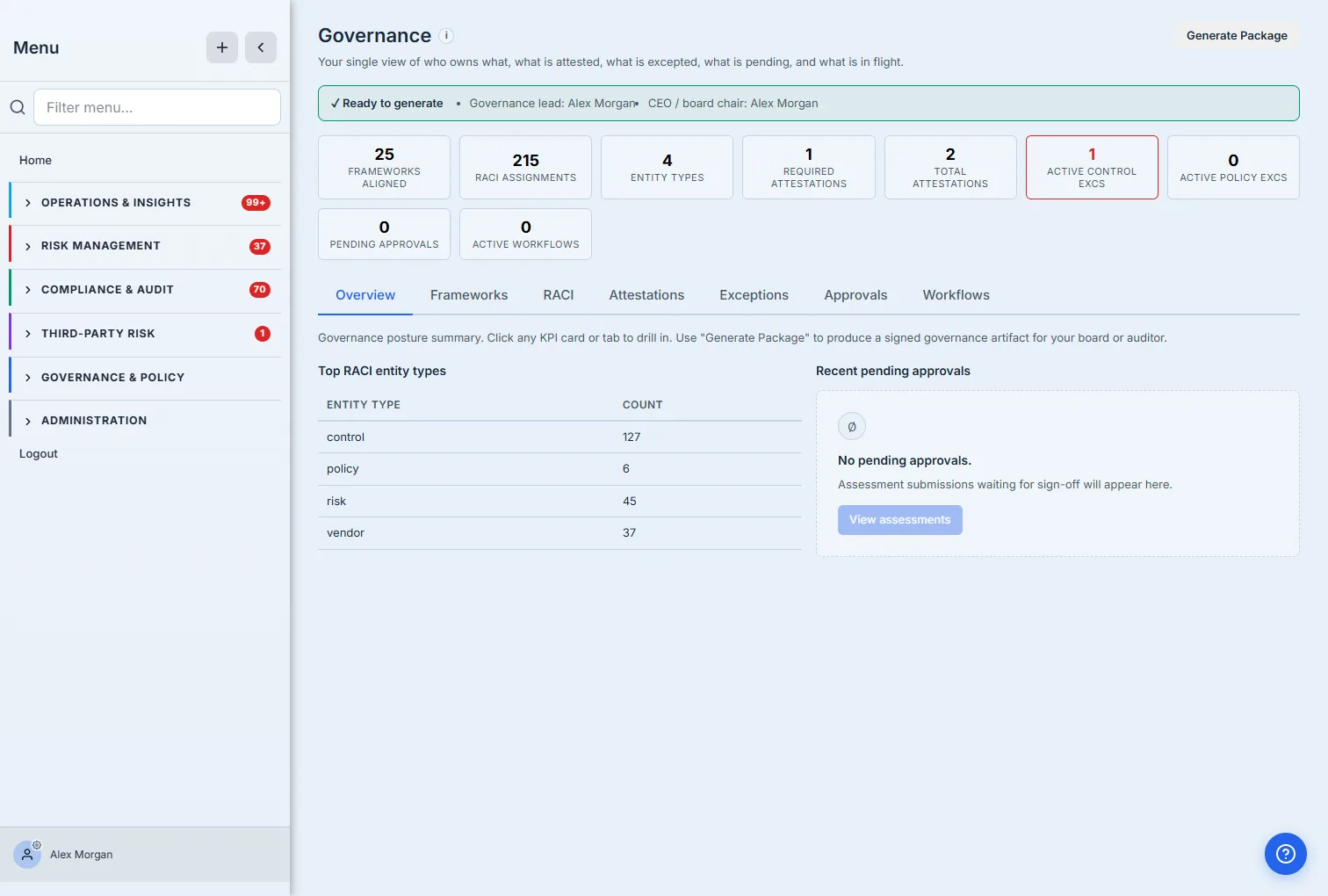
The green “Ready to generate” strip is the tell that this isn’t just a dashboard. It confirms the two signers a governance package requires — the governance lead and the CEO or board chair — are assigned, so the package can be produced and signed. Every card and tab is a drill-down; the whole posture is one click deep.
Step 2 — Drill into any domain
Click a KPI card or a tab and the hub expands that domain in place. The RACI tab, for example, rolls up ownership coverage across every governance object — not a list of cells, but a by-type summary of who is Responsible, Accountable, Consulted, and Informed.
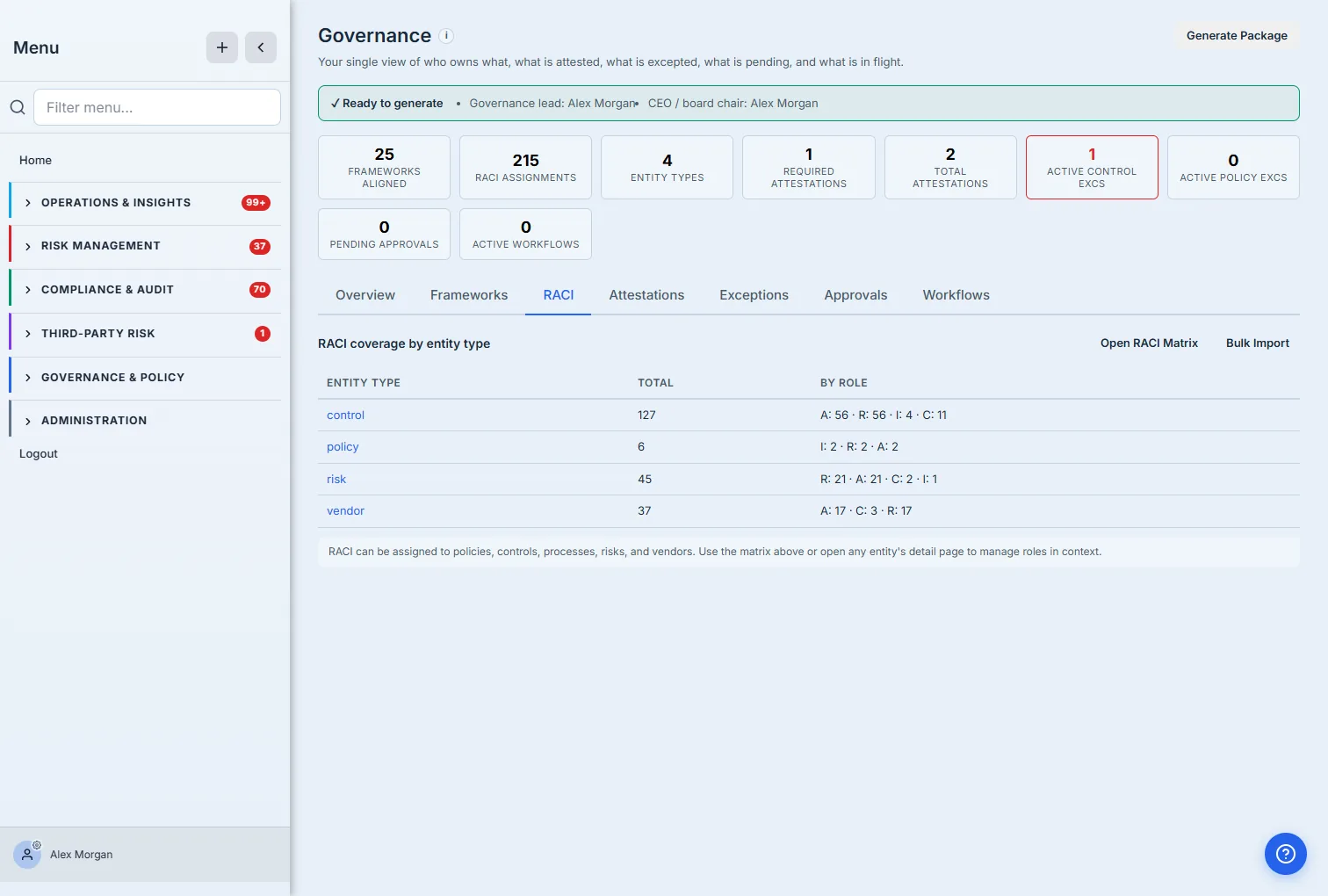
Each tab works the same way: Frameworks shows alignment coverage by standard, Attestations rolls up policy acknowledgements, Exceptions lists active control and policy deviations with their reviewers and expiry, Approvals shows what’s waiting for sign-off, and Workflows shows what’s in flight. The hub doesn’t replace those modules — it gives you the one-screen posture across all of them, with a deep link into each.
Step 3 — Generate the signed package
This is the payoff. Generate Package produces a governance capstone — a point-in-time, signed snapshot of your entire posture — and files it in your Capstone Library alongside every other attested artifact the platform produces (access-review sign-offs, evidence distribution packets, vendor risk attestations). The package lands as a draft, ready to be finalized and signed for distribution: not a screenshot of a dashboard, but a chain-of-custody document that says “as of this date, here is who owned what, what was attested, and what was excepted — signed.”
That is the difference between running a governance program and governing one. The day-to-day work happens in the individual modules; the Governance Hub is where you prove, on one screen and in one signed artifact, that the program is actually being governed.
How the page works
A few mechanics explain why the hub is trustworthy rather than just tidy:
- The KPIs are aggregated live, not stored. Each card counts the real objects in its module — frameworks aligned, RACI assignments, attestations required vs total, active control and policy exceptions, pending approvals, in-flight workflows — read on load from the same data the underlying modules use. The hub is a view over those modules, so the posture can’t drift from the source of truth.
- Red is reserved for what can’t wait. The cards that flag red when non-zero are the ones that represent unfinished governance — open exceptions and pending approvals. A green zero there means nothing is hanging; a red number is a worklist, and clicking it deep-links into that module to clear it.
- “Ready to generate” is a gate, not a label. The strip turns green only when the two required signers — the governance lead and the CEO / board chair — are assigned. Until then the package can’t be produced, because a signed governance snapshot with no signers isn’t evidence of anything.
- Generate Package writes a chain-of-custody capstone. It produces a point-in-time, retention-stamped governance capstone as a draft in your Capstone Library (the same place access-review sign-offs and vendor attestations land), ready to finalize and sign. It snapshots the posture as of that moment — so a package generated today and one generated next quarter are two distinct, dated, signed records, not one mutable dashboard.
What you walk away with
- The whole posture on one screen — nine governance domains aggregated, red-flagged where it matters, one click from the detail.
- No more manual board prep — the quarter’s governance story is assembled continuously, not the night before the meeting.
- A signed artifact, not a slide — the package is produced, signed, retention-stamped, and filed in the Capstone Library for the board and the auditor.
- One hub, every module — RACI, frameworks, attestations, exceptions, approvals, and workflows, each a deep link from the posture view.
Open /app/governance, check that your two signers are assigned, and generate the package. The next time someone asks whether you’re governing the program, the answer is a signed document — not a shrug.