Most incidents end the same way: someone flips the ticket to “Resolved,” everyone exhales, and the why never gets written down. Three months later the same phishing email lands a second mailbox, and nobody can point to what changed after the first one. The incident was handled, but the loop never closed.
Talarity treats an incident as a case file, not a ticket. From the moment it’s reported it carries a lifecycle, a timeline, and a set of tabs that pull in the assets, risks, and evidence involved — and the case can’t really be put to bed until it produces a root-cause analysis: a structured 5-whys investigation, corrective and preventive actions your team owns, and a post-mortem that doubles as audit evidence. The thread from “an alert fired” to “here’s the fix, the owner, and what we learned” stays intact.
This is the loop auditors are checking for. NIST SP 800-61’s incident-handling lifecycle (detection → containment → eradication → recovery → post-incident activity), SOC 2 CC7.3–CC7.5 (respond to, analyze, and mitigate incidents), and ISO 27001:2022 A.5.24–A.5.27 (incident response and learning from incidents) all assume the analysis and the lessons are part of closing — not an optional afterthought. Here’s how it works.
Who this is for
- Incident responder — runs the case from alert to resolution and records what happened, when.
- Security lead / CISO — needs the root cause and the corrective actions, not just a closed ticket.
- Auditor — wants an unbroken line from incident → analysis → remediation → lessons learned.
What’s on the page
The walkthrough runs in the Incident Management hub (/app/incidents):
- Register — program KPIs (Total Incidents, Open, Critical, Average MTTR), status/severity/category filters, and a Report Incident button.
- Incident case file — the tabs you work an incident through: details/timeline, investigation, root-cause analysis (5-Whys), the actions the root cause spawns, and the post-mortem that closes it.
- Cross-links — the work items, risks, and evidence an incident generates, each a live link back to the case.
Step 1 — Report the incident
The Incident Management hub (/app/incidents) opens on the register: program KPIs across the top — Total Incidents, Open, Critical, Average MTTR — a row of filters (status, severity, category), and Report Incident to start a new one.
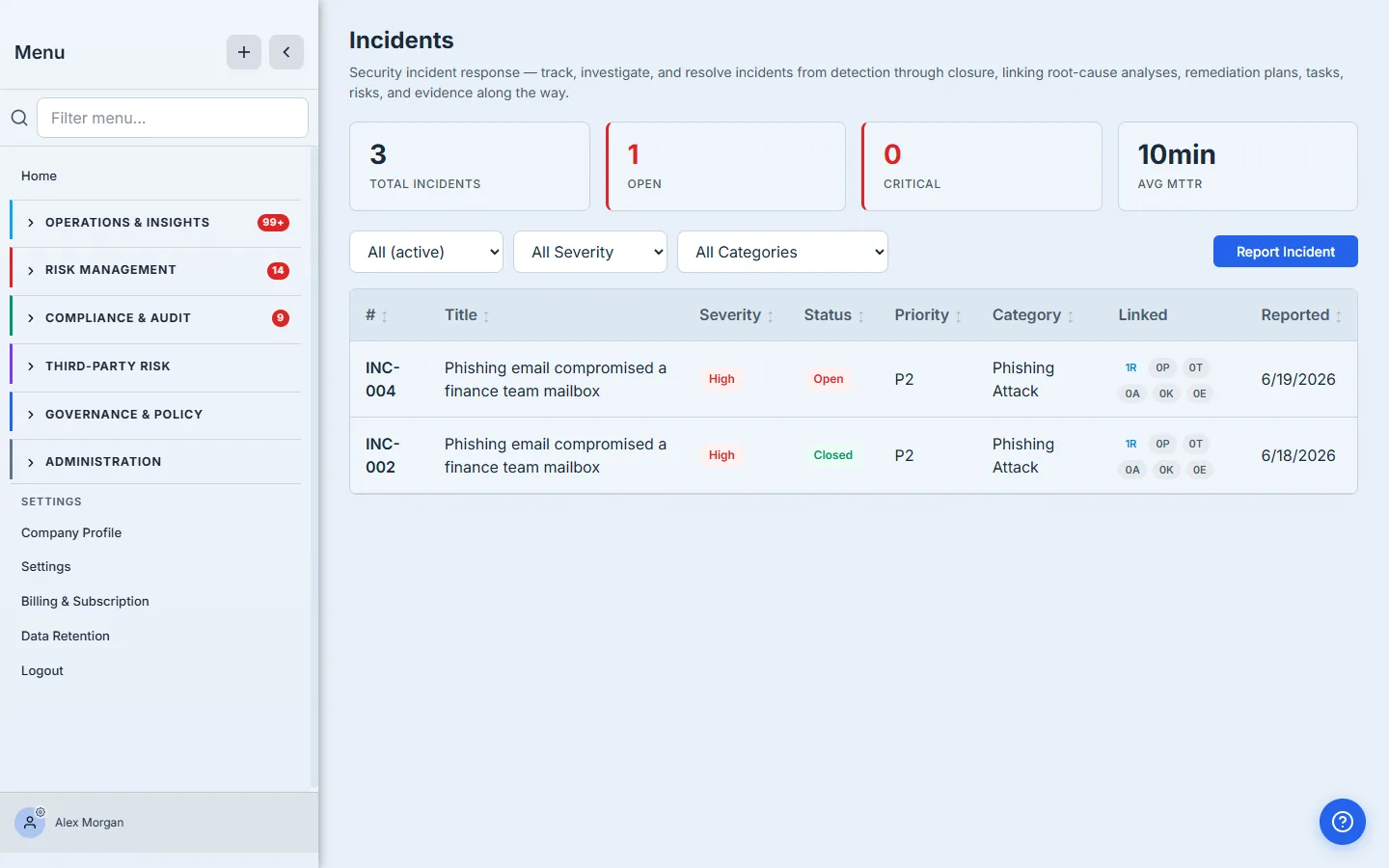
Reporting an incident captures the essentials — title, description, severity (Critical / High / Medium / Low), category (phishing, data exposure, unauthorized access, malware, insider threat, and more), and priority (P1–P4) — and stamps it with an auto-generated number (INC-004 here). Every incident gets an owner; the assignee is validated against your org so the case file always shows a real name, never a raw account ID.
Step 2 — Work the case file
Open the incident and you land on the case file — the single surface the whole response runs from.
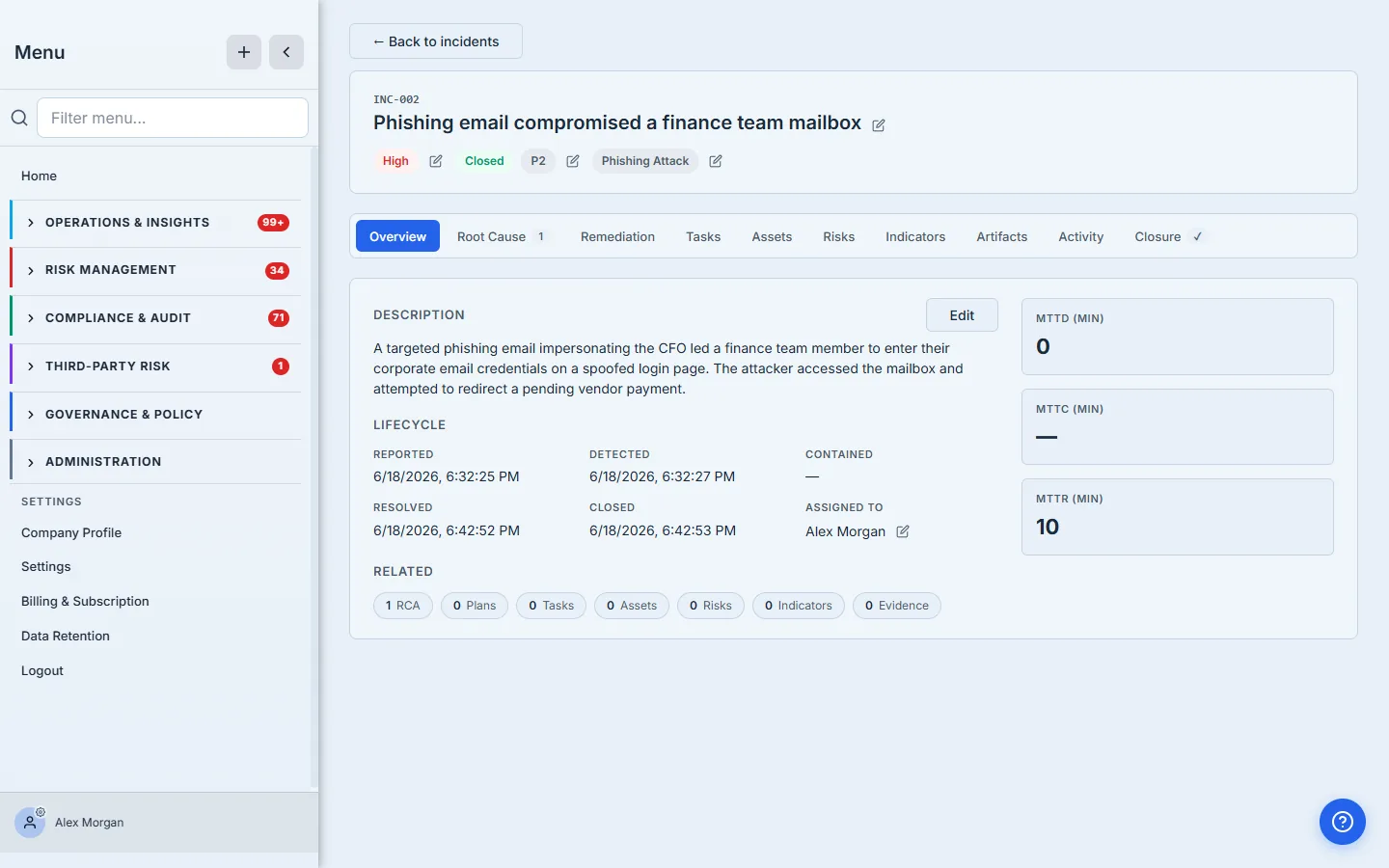
Three things make this more than a detail page:
- The lifecycle is explicit. The transition bar walks the incident through its lifecycle — open → investigating → contained → remediation → resolved → closed, the NIST 800-61 arc — surfacing the next valid step at each stage. Every transition timestamps the case (Reported, Detected, Contained, Resolved, Closed), and those stamps drive the MTTD / MTTC / MTTR metric cards automatically, so your mean-time-to-respond is a by-product of working the case, not a spreadsheet you maintain later.
- The tabs pull the whole picture into one place. Root Cause, Remediation, Tasks, Assets (what was impacted), Risks (what this exposes), Indicators (KRIs that fired), Artifacts (evidence), and Activity (the running log and comment thread). An investigator links the affected mailbox, the related risk, and the supporting evidence without leaving the case.
- Triage is inline. Severity, priority, category, and assignee are all edit-in-place — as you learn more, the case reflects it.
Severity and category aren’t cosmetic. They drive the register’s filters, the program KPIs, and — for material incidents — the SEC 8-K disclosure-readiness path the Closure tab exposes. Set them honestly; downstream reporting reads them.
Step 3 — Investigate
Investigation is the work between detection and resolution, and the case file is built to hold it. As you confirm what happened — the anomalous login, the credential theft, the malicious inbox rule, the containment steps — you record each move on the Activity timeline, building a chronological, attributed account of the response.
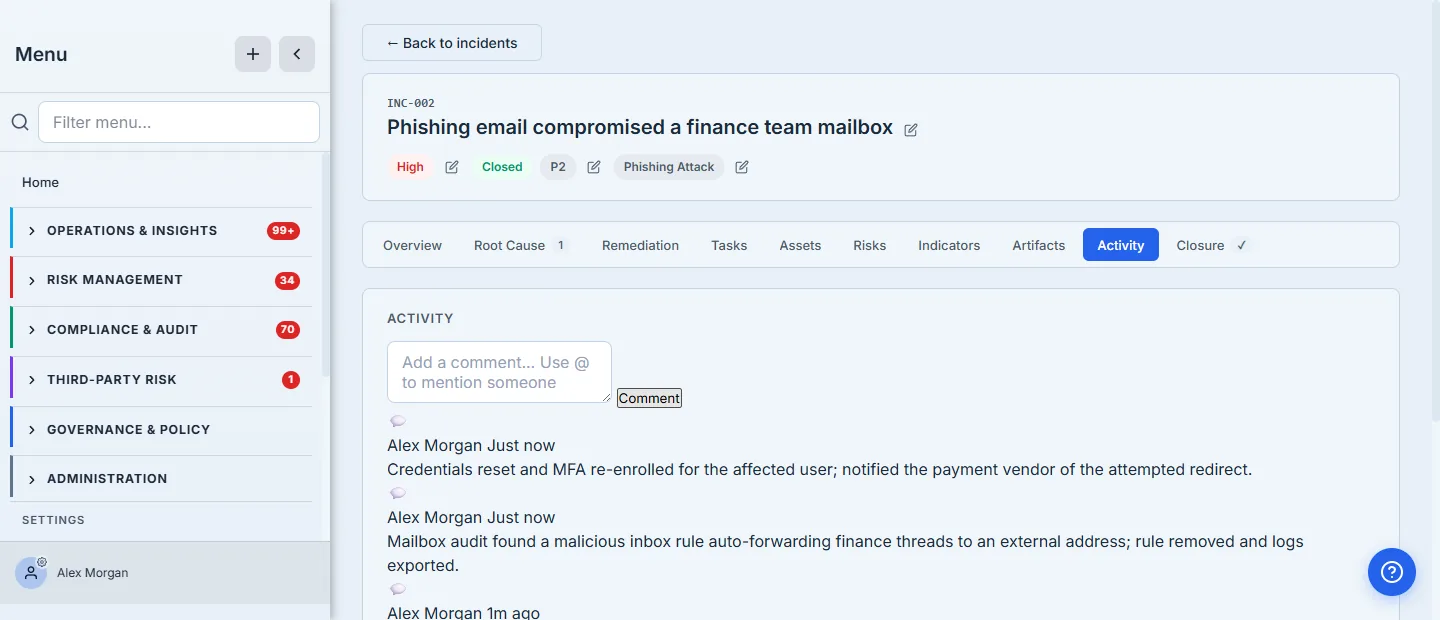
Every entry is attributed to a real responder and timestamped, so the timeline doubles as the incident’s audit record — who did what, and when. The Detected and Contained stamps you set as you transition the case are what make the MTTD/MTTC numbers real. You’re not working in isolation either: the Assets, Risks, and Indicators tabs let you attach the entities the incident touched, and the Artifacts tab holds the evidence — the audit-log export, the screenshots, the vendor notification — so the case is self-documenting by the time you reach the analysis.
Step 4 — Run the root-cause analysis
This is where Talarity diverges from a ticketing tool. The Root Cause tab spins up a structured 5-Whys analysis linked back to the incident — and the case file shows a count on the tab so an open incident without an RCA is visible at a glance.
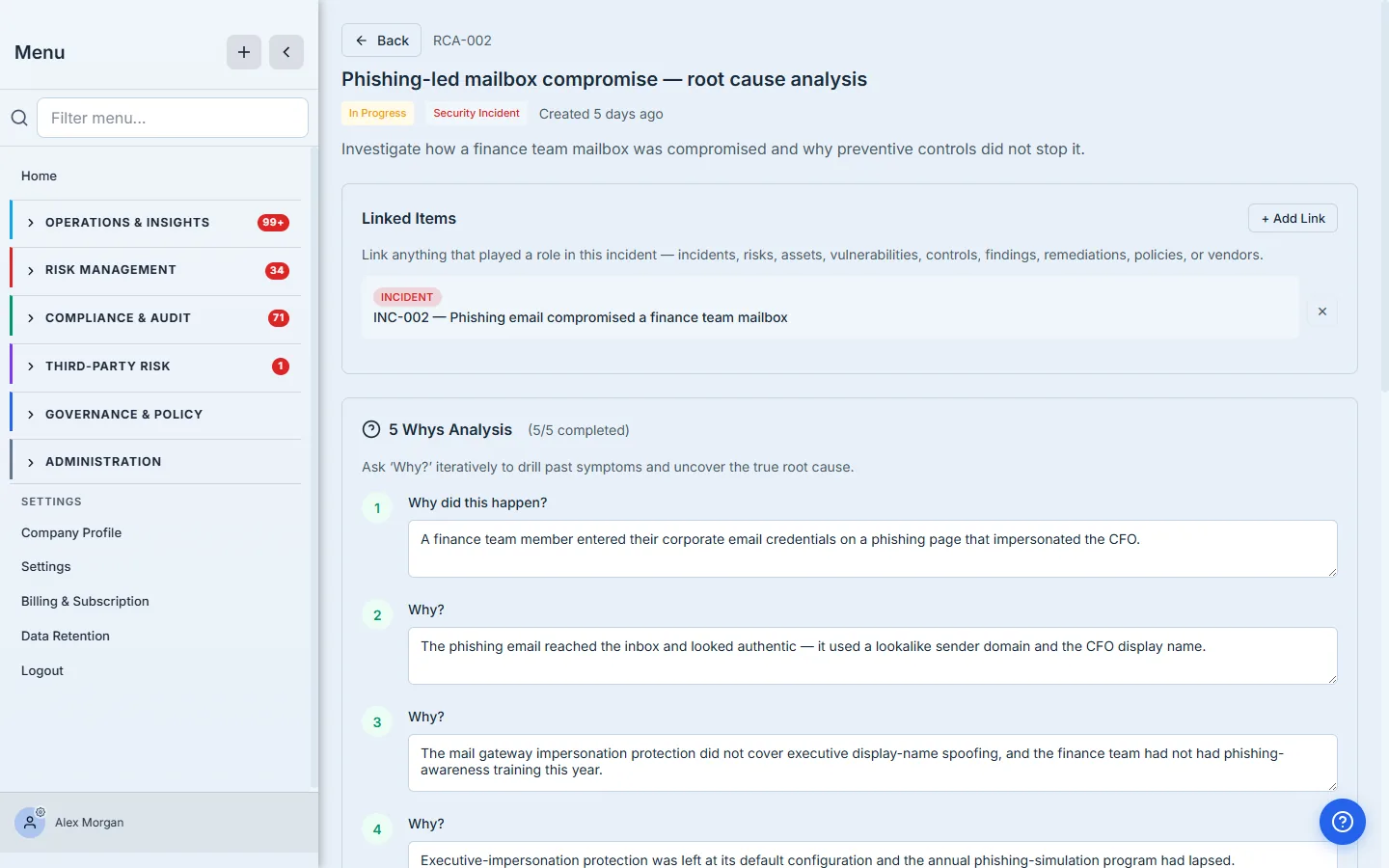
Each why is answered in turn, and each answer is attributed and timestamped — so the analysis is itself an audit record of who concluded what. The discipline of the method is the point: the first answer (“someone clicked a phishing link”) is rarely the root cause. Five whys later you arrive at the real one — no named owner for email-gateway hardening or security-awareness training, so both quietly lapsed — which is something you can actually fix. The Root Cause Identified box synthesizes the chain into the statement everything downstream hangs off.
Step 5 — Turn the root cause into action
A root cause with no follow-through is just a paragraph. The RCA captures two kinds of action directly beneath it: Corrective Actions (immediate fixes that address this specific root cause) and Preventive Actions (systemic changes so the conditions can’t recur).
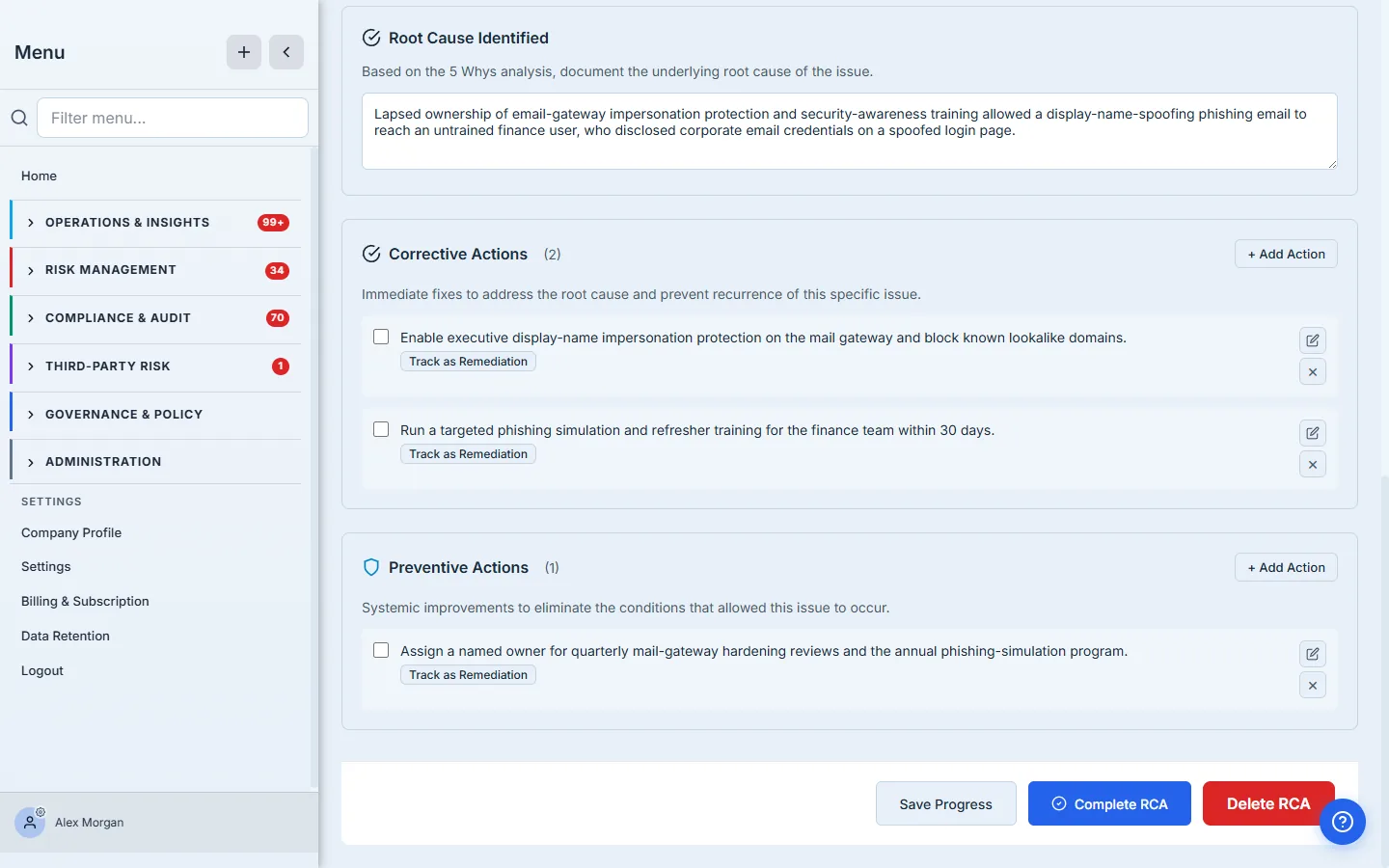
Each action carries an owner and a due date, and — this is the load-bearing part — a Track as Remediation button. One click promotes the action into a tracked remediation work item inside a plan, exactly like the gap-analysis flow, so “rotate the credentials” and “run a phishing simulation” stop being bullet points in a doc and become owned work with a status. The corrective actions close this incident; the preventive actions (“assign a named owner for quarterly mail-gateway hardening”) close the class of incident.
Corrective vs. preventive is the distinction that prevents repeats. Corrective answers “how do we recover from this one?” Preventive answers “what made this possible, and how do we remove it?” An RCA that only lists corrective actions fixes the symptom and waits for the next occurrence.
Step 6 — Close with a post-mortem
With the analysis done and the actions tracked, you walk the case to Resolved and then Closed. Closing isn’t a status flip — the Closure tab requires a structured post-mortem: a summary, a root-cause summary, lessons learned, and preventive measures, alongside an optional business-impact estimate and (for material incidents) an SEC 8-K disclosure path.
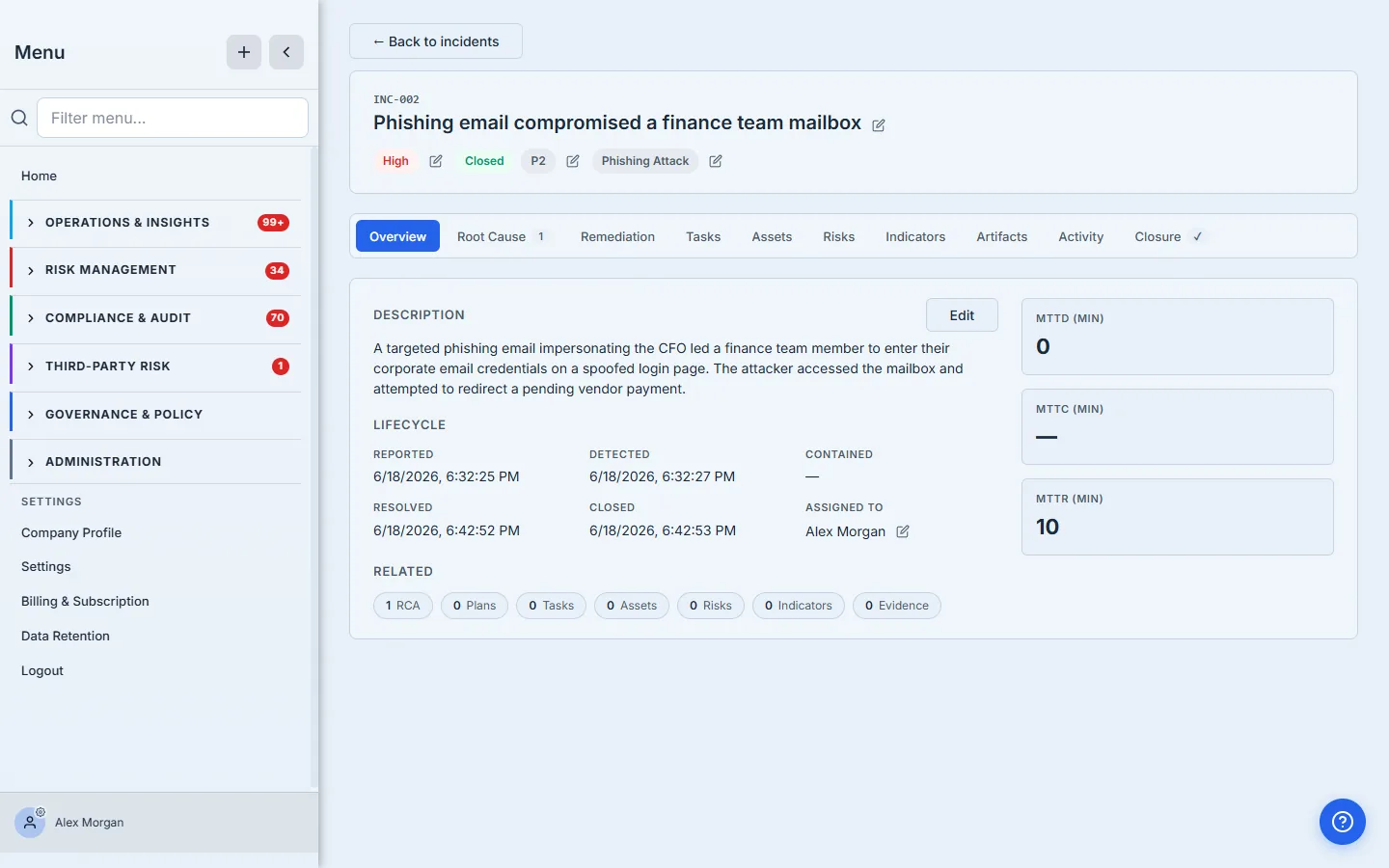
The closed case file is the evidence package: a complete lifecycle (Reported → Detected → Resolved → Closed), a computed MTTR, the linked root-cause analysis, and the post-mortem text. That’s the unbroken line CC7.4/CC7.5 and ISO A.5.27 ask for — incident, analysis, remediation, and lessons learned, all in one record you can hand an auditor without assembling anything.
Where it ends
This workflow covers report → investigate → analyze → act → close. A few adjacent doors, deliberately out of scope here:
- Materiality and SEC 8-K disclosure — the Closure tab can capture a business-impact estimate and drive an 8-K cyber-disclosure readiness path; that’s an enterprise compliance flow with its own depth.
- Capstone reporting — the post-mortem and 8-K can be generated as formal reports from the closed case; report generation is its own guide.
- Threat intelligence — incidents can be enriched from and linked to threat-intel indicators; that integration lives in its own surface.
What you walk away with
- An incident handled as a case file with an explicit lifecycle and automatic MTTD/MTTC/MTTR — not a ticket with a status.
- A root cause you can act on — a 5-whys analysis whose corrective and preventive actions become tracked, owned remediation work.
- A closed-incident evidence package — lifecycle, root cause, remediation, and lessons learned in one record that maps straight to NIST 800-61, SOC 2 CC7.x, and ISO 27001 A.5.24–A.5.27.
Open Incident Management, report the next thing that goes bump, and take it all the way to a root cause. The five whys take about ten minutes — and they’re the difference between closing a ticket and closing the loop.