Onboarding a new hire is three jobs wearing one trenchcoat: get them their equipment, get them to acknowledge the policies they’re now subject to, and prove both happened. SOC 2 CC6.1 wants logical and physical access provisioned and tracked; ISO 27001:2022 expects an inventory of assets (A.5.9), an acceptable-use posture (A.5.10), and a clean record of what each person holds; HIPAA’s workforce rules want documented policy acknowledgement for everyone. Most teams run these in three disconnected places — an IT ticket queue for the laptop, a separate tool for the policy PDF, and a spreadsheet to reconcile it all on the new hire’s first day.
Talarity runs them as one gated workflow. You build a bundle once, apply it to the hire, and the platform sequences the rest: equipment routes to its custodian to issue, the employee’s policy acknowledgements and equipment-receipt confirmation stay locked until every item is provisioned, and the person who applied the bundle watches each stage from a single tab.
Who’s involved
- HR / People ops — applies the joiner bundle to the new hire and owns the outcome.
- Equipment custodian — issues each device, records its serial and asset tag, and marks it provisioned.
- New hire — confirms they received the equipment and acknowledges the assigned policies.
- Auditor — pulls the record: who got which serial-numbered device, who signed which policy version, and the date each step completed.
What’s on the page
Where this lives. Onboarding runs out of Talarity’s Workforce category — Joiner Bundles sits in the Onboarding & Lifecycle section, alongside Onboarding Rules, Assignments, and the Provisioning Queue. Workforce is in Early Access.
Onboarding isn’t one screen — it’s a gated flow across four surfaces. Here’s what you’ll touch:
- Bundle editor (
/app/workforce/bundles) — under the Workforce category — build the reusable kit: equipment line items (real assets or placeholders) plus policies, each with an optional per-item note. - The employee’s Onboarding tab — the live status of an applied bundle, stage by stage (Provisioning equipment → Awaiting employee → Complete), exposing the Issue Asset… and Confirm receipt actions as each unlocks.
- The Issue Asset modal — where the custodian records the device’s serial number, asset tag, and notes, then marks it issued.
- The recipient portal — the token-authenticated, no-login page where the new hire acknowledges policies and (for fill-and-return documents) downloads the source and uploads their completed copy.
Step 1 — Build the bundle once
A joiner bundle lives in /app/workforce/bundles. It’s a reusable kit: equipment line items (real assets, or placeholders that materialise a fresh “Pending Laptop” per hire so two new starters never share one row) plus the policies the role is subject to. Each line item takes an optional note — a free-text instruction the custodian and the employee both see later.
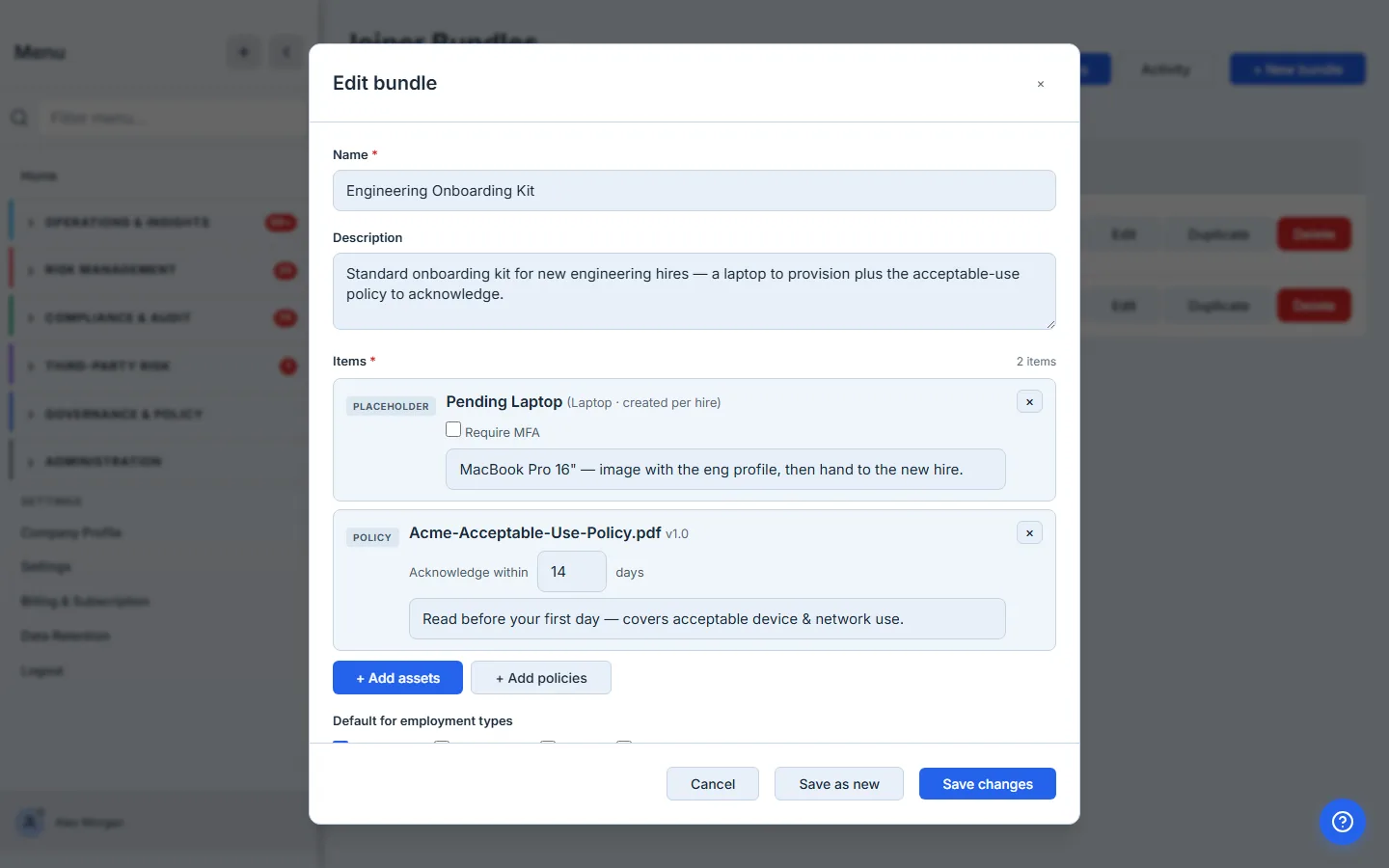
The per-item note is the handoff instruction you’d otherwise put in a chat message and lose. “Image with the eng profile before handover” rides with the laptop to the custodian; “read this before your first day” rides with the policy to the new hire. Write it once on the bundle and every hire who gets the kit gets the context.
Step 2 — Apply it to the new hire
Open the employee and click Apply joiner bundle. Talarity fans the bundle out, but — and this is the part that’s different — it holds the policies back. Equipment line items become pending_provision assignments and raise a work item for each one’s custodian. The policy acknowledgements are stashed on a new bundle-application record, not sent. The new Onboarding tab on the employee shows the whole thing at a glance.
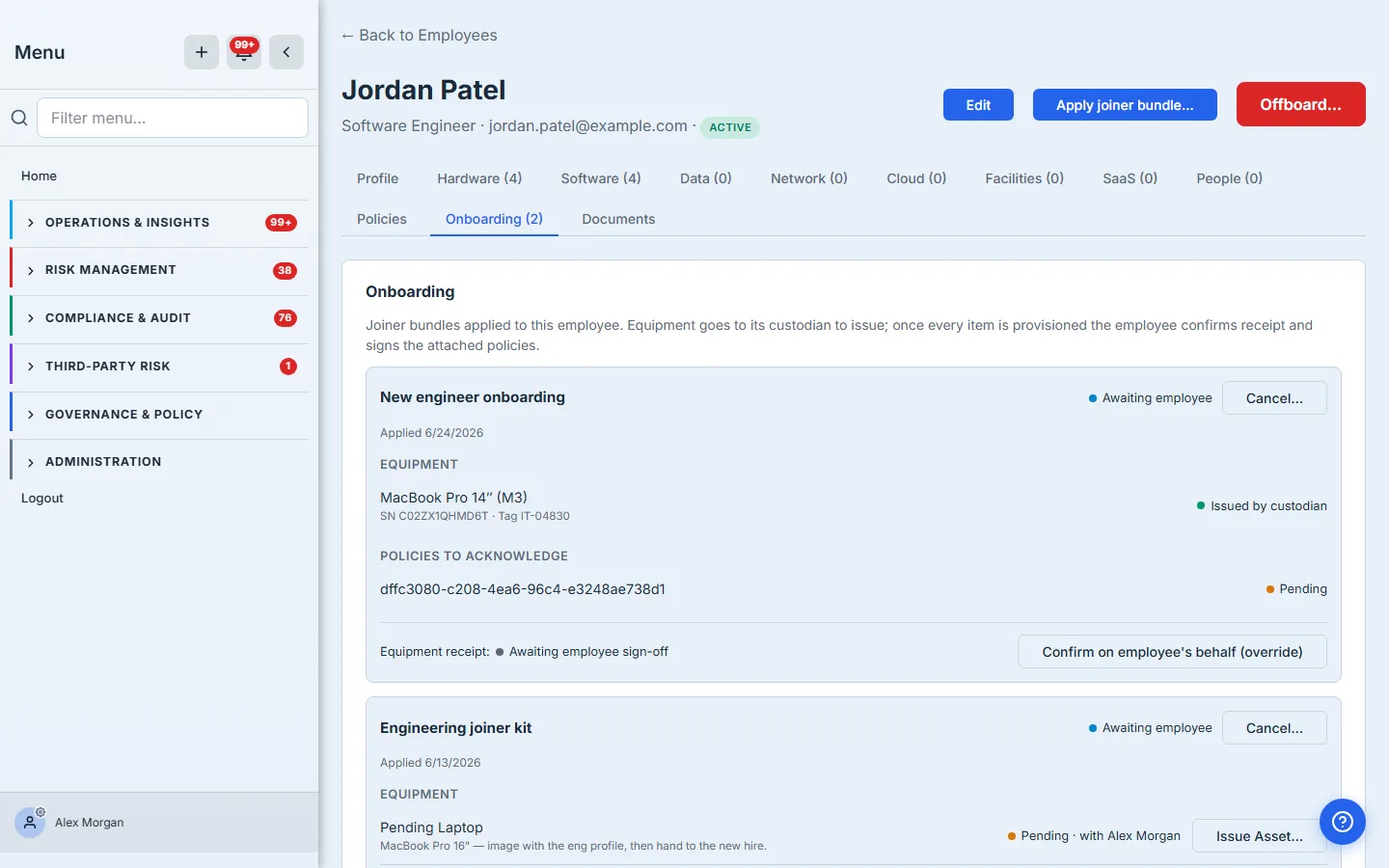
Behind the scenes Talarity writes one bundle_applications row stamped with the policy items it’s deferring, and stamps that application id onto each equipment assignment — that’s the thread it follows to know when the prerequisites are done. A policy-only bundle (no equipment to wait on) releases immediately; a bundle with gear waits.
Step 3 — The custodian issues each item
The custodian opens the pending item and records the concrete details — serial number, asset tag, an optional note — and marks it issued. This is the inventory record an auditor asks for: not “a laptop,” but this laptop, by serial, handed to this person, on this date.
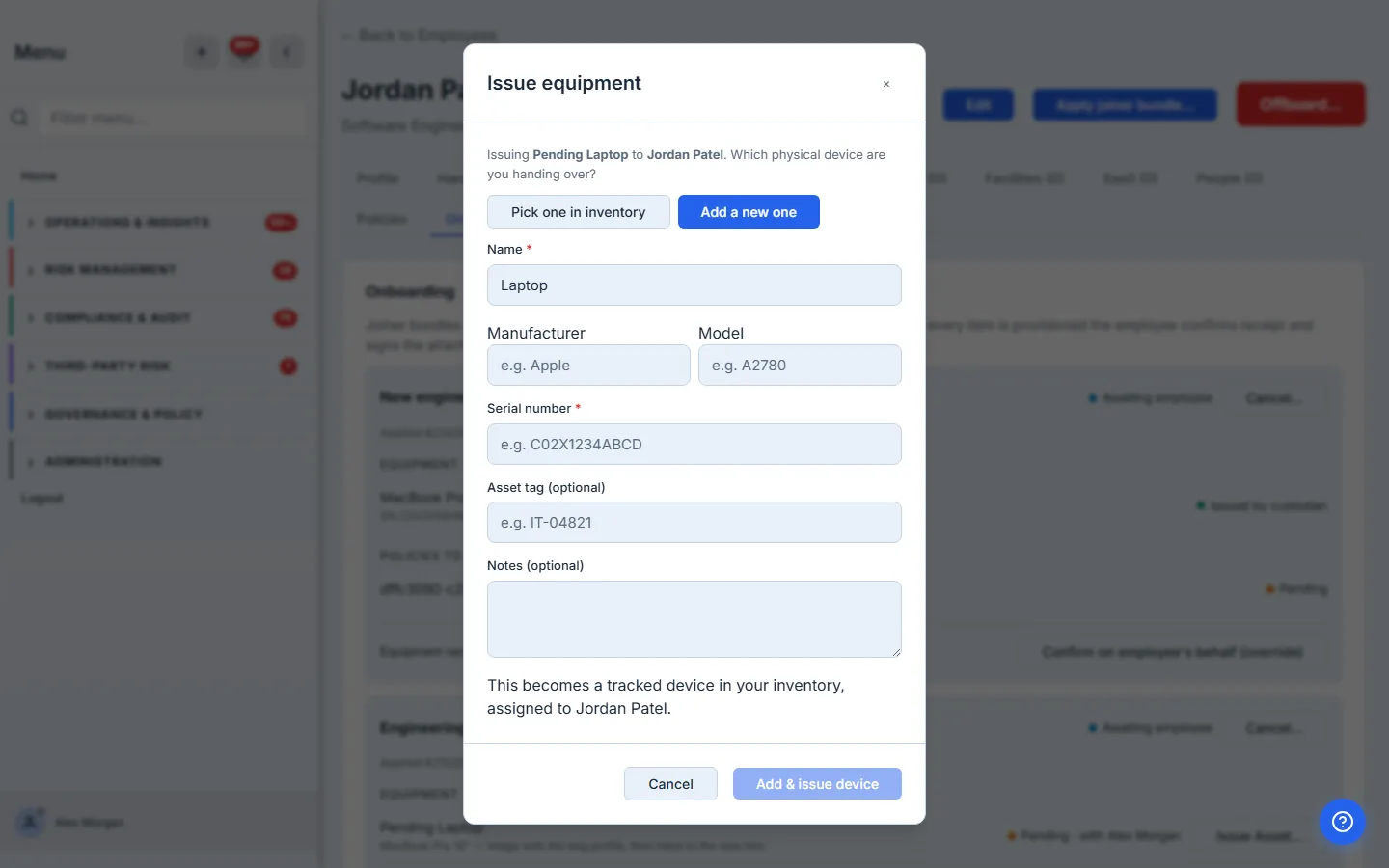
Marking it issued flips the assignment to active, completes the custodian’s work item, and — the load-bearing move — re-checks the bundle application: is anything still outstanding?
Step 4 — The gate opens
When the last equipment item is provisioned, the application releases. Only now do the policy acknowledgement campaigns go out, and only now is the employee asked to confirm receipt. The stage flips to Awaiting employee, the laptop shows its serial and tag, and a Confirm receipt action appears.
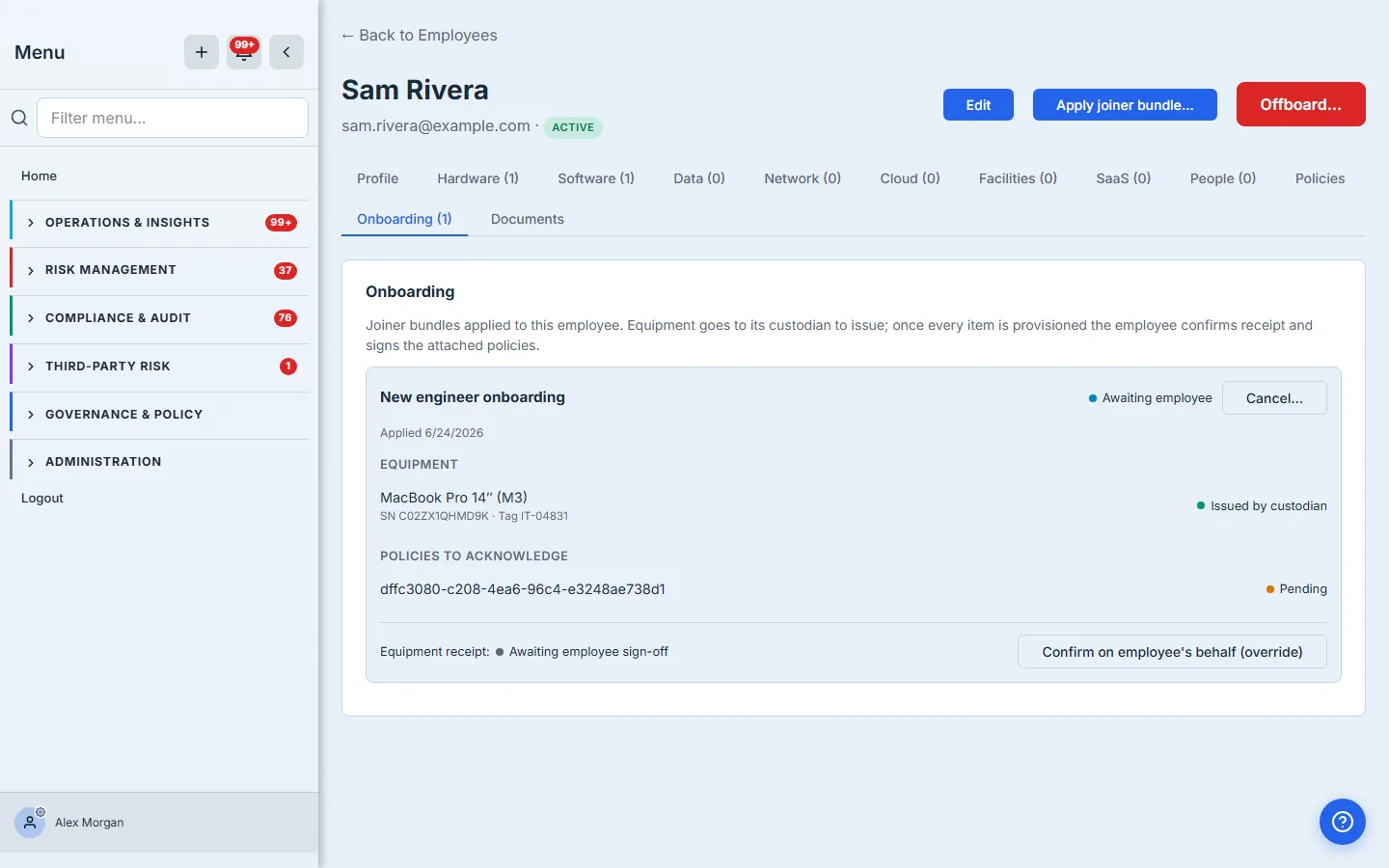
This is the sequencing the whole feature exists for: a new hire is never asked to confirm receipt of equipment that hasn’t been issued, and a policy acknowledgement never fires into the void before the kit is ready. The release is all-or-nothing — every prerequisite, then the employee’s part, in one step.
Step 5 — The employee finishes, and it closes itself
The employee confirms they received the equipment and acknowledges the policies from their My Work queue. For a brand-new hire who doesn’t have a login yet, the admin confirms receipt on their behalf, and the policy acknowledgements are emailed via the standard attestation campaign. When receipt is confirmed and every attached policy is signed, the application marks itself Complete and notifies the person who applied it.
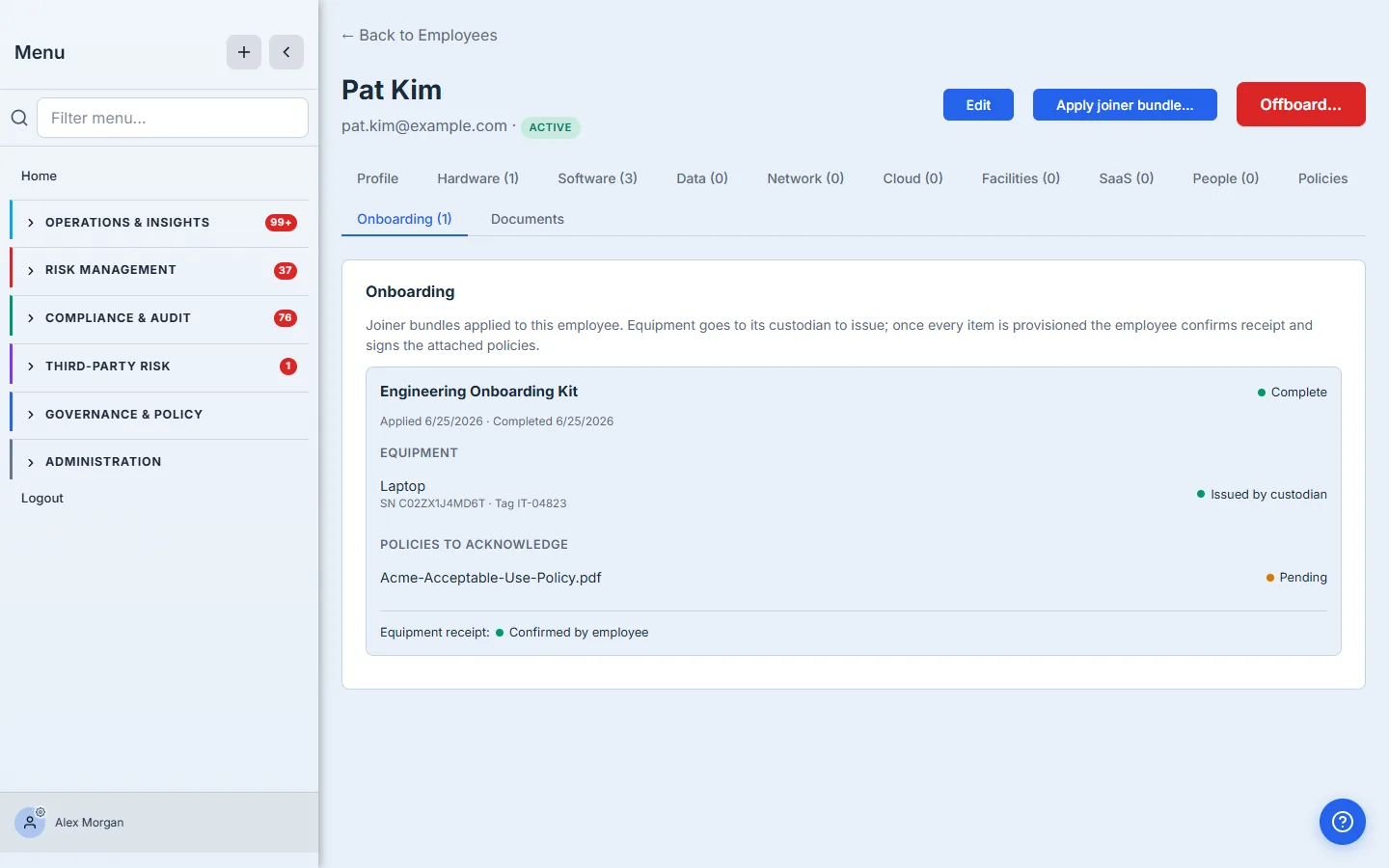
No one has to remember to close it out. The completion is computed from the underlying facts — the active assignment, the receipt flag, the immutable policy_attestations rows — so the green “Complete” is a derived truth, not a box someone ticked.
Send a document to complete and return
Policies are read-and-acknowledge: the hire reviews a fixed document and attests. But onboarding is full of the reverse shape — a document you hand someone to fill in and send back: a signed equipment-use agreement, a direct-deposit form, an emergency-contact sheet, a countersigned BAA for a workforce member who’ll touch PHI. The acknowledgement flow can’t carry these, because the proof isn’t a signature on your document — it’s their completed copy coming back.
Talarity now sends any document for completion through the same secure portal the policy acks and receipt confirmation already use. Pick Send a document for completion in the workforce area, choose a document from your library (or upload a new one), add the recipients and a due date — or drop it into a joiner bundle as a document item, alongside the equipment and policies, so it rides the same gated release. Either way the recipient gets one token-authenticated link; no login required.
What they see is a two-step task that makes the job unmistakable. Step 1 downloads the document. Step 2 uploads their completed copy — and Submit stays disabled until a file is actually returned, so “I read it” can never be mistaken for “I did it.”
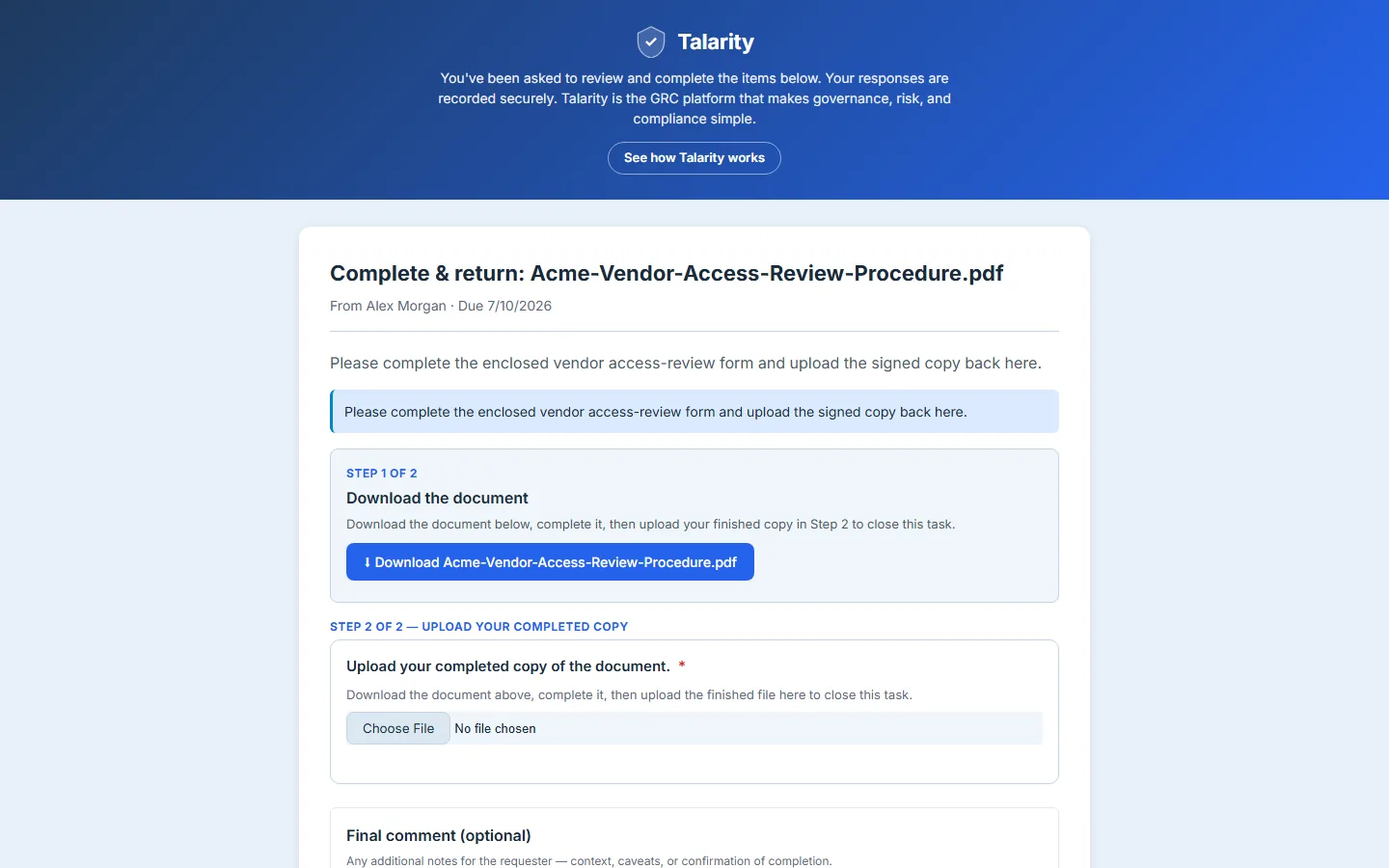
When they upload and submit, the finished file is ingested into your evidence library, linked to the task, and the task closes — the same derived-truth completion the rest of the bundle uses. The returned copy is the auditable artifact: not “we sent the form,” but the specific completed document this person sent back, on this date, captured where your evidence already lives.
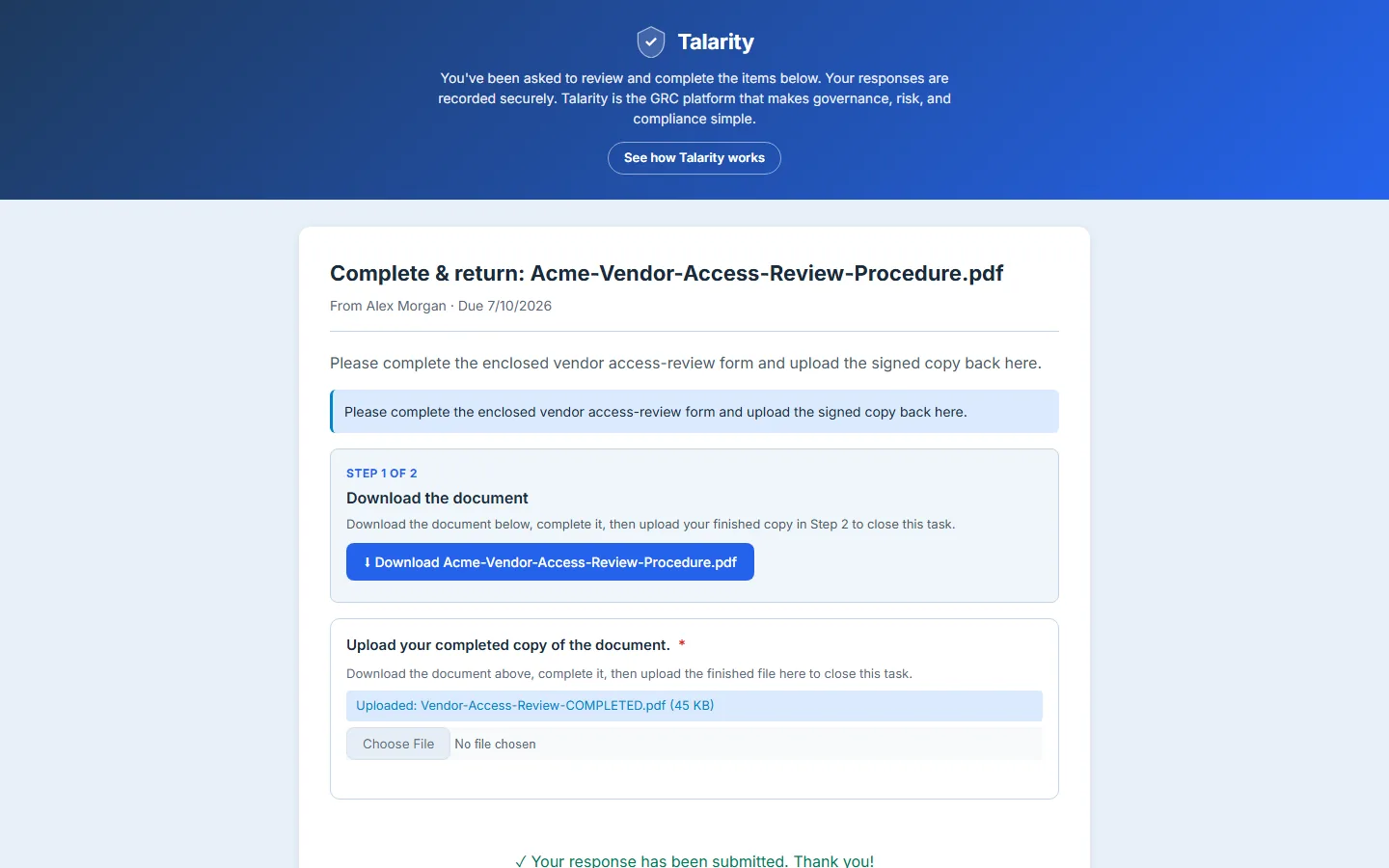
For the sender it tracks exactly like a policy send — a campaign you can watch, remind on, and reconcile — except the thing you get back is a file, not a checkbox. SOC 2 and ISO 27001 evidence collection, HIPAA’s signed-agreement trail, any “fill this in and return it” step a role requires: one send, one portal, one place the completed document lands.
What you walk away with
- One reusable bundle of equipment and policies, with per-item handoff notes — built once, applied to every hire of that role.
- A gated sequence — equipment is provisioned by its custodian before the employee is asked to confirm receipt or sign policies. No out-of-order asks.
- A serial-level equipment record — which device, by serial and asset tag, went to which person, on which date.
- Version-locked policy acknowledgements tied to the onboarding — the same immutable proof an auditor reads for any acknowledgement.
- Documents the hire completes and returns — sent standalone or as a bundle item, downloaded and re-uploaded through the same portal, with the finished copy captured in your evidence library.
- A single Onboarding tab the sender watches from apply through complete, plus an email when the hire’s part is ready and when it’s done.
Build your standard kit this afternoon. Open /app/workforce/bundles, add the laptop (or a placeholder), add the policies, drop a note on each. The next new hire is one Apply joiner bundle click — and Talarity walks the rest, in order, until it closes itself.