Most “procedures” are PDFs that rot in a shared drive. They were written once, approved once, and then nobody knows whether the access-recovery runbook still works until the night someone is locked out. Operational procedures in Talarity are different: a procedure isn’t just a document, it’s something you execute — a step-by-step run where each step is kept, skipped, or failed with a reason, and the whole run is recorded. The result is the thing an auditor actually asks for: proof the procedure was followed, when, by whom, and where it deviated.
Who’s involved
- Procedure owner — authors the SOP (from a template or upload) and owns its review cadence.
- The operator — executes the procedure when the event happens (an MFA recovery, an incident, an access review) and records each step.
- Auditors — ask “show me a run of this procedure,” and get a dated, step-by-step record with deviations.
What’s on the page
Open Operational Procedures (/app/procedures):
- Stat cards — Total · Active · Draft · Due for Review · Expired, computed from each procedure’s status and next-review date.
- Search + filters — by status and category, across the procedure cards.
- Procedure cards — one per SOP, each with its number (PROC-####), status, category, and next-review date; plus the upload and author from a template entry points.
- The execution screen — a step-by-step run with a live progress bar, Completed / Skipped / Failed counts, a Deviation tally, and per-step Complete / Skip / Fail buttons (skip and fail each capture a reason).
Step 1 — A library of SOPs, not a folder of PDFs
Open /app/procedures. Each procedure is a managed object with a number, a status, a category, and a next-review date — so SOPs are renewed on a cadence instead of silently going stale. You can upload an existing document or author from a template (Talarity ships a large catalog of operational-procedure templates across every control family).
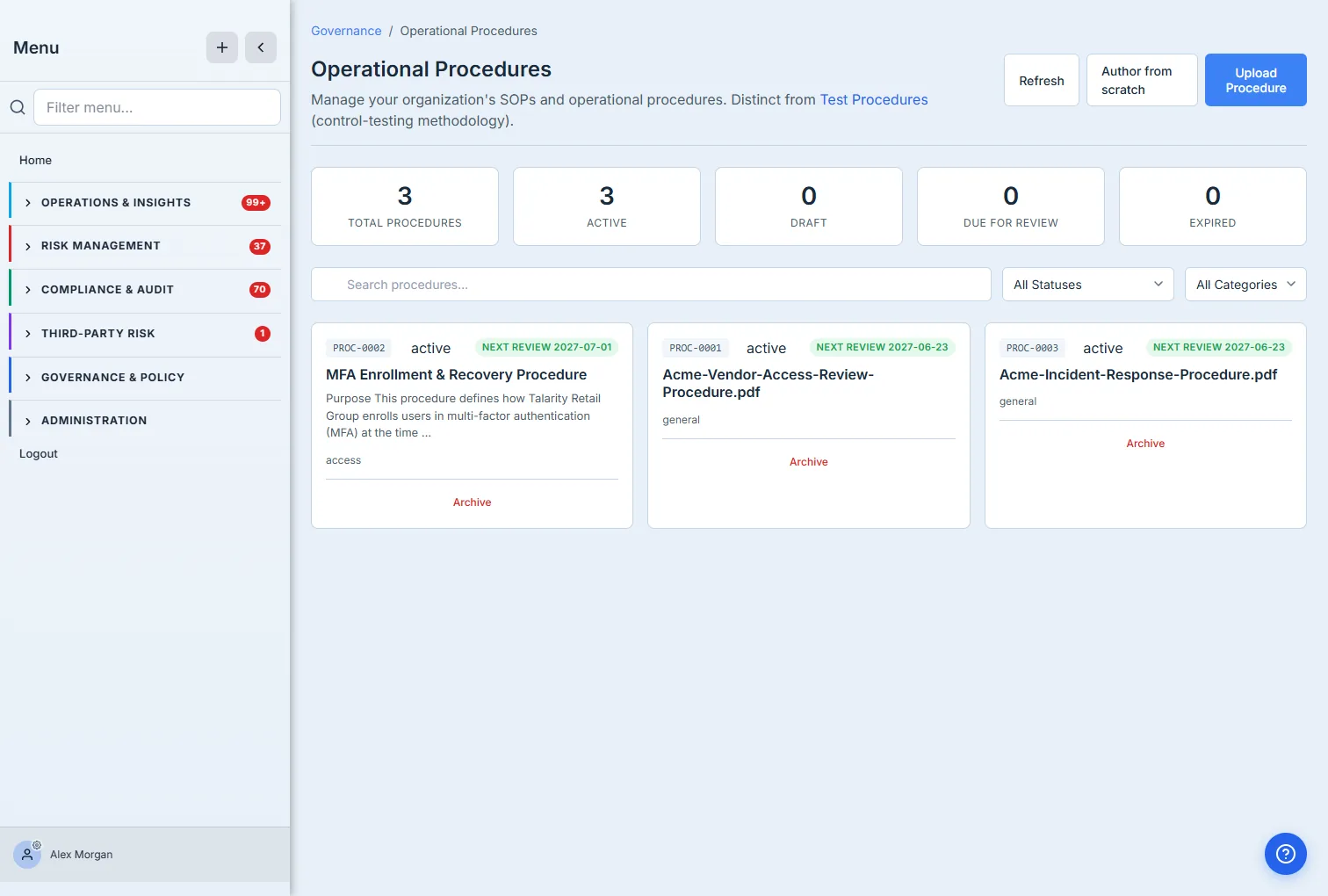
Authoring from a template is the fast path: pick a template, fill its variables (the owner, the ticketing system, the identity platform), and you have a tailored, step-by-step procedure ready to run — not a blank page.
Step 2 — Execute it, step by step
When the event actually happens, you run the procedure. Each step is a decision: Complete it, Skip it, or mark it Failed — and skips and failures capture a reason, so a deviation is a recorded fact, not an undocumented shortcut.
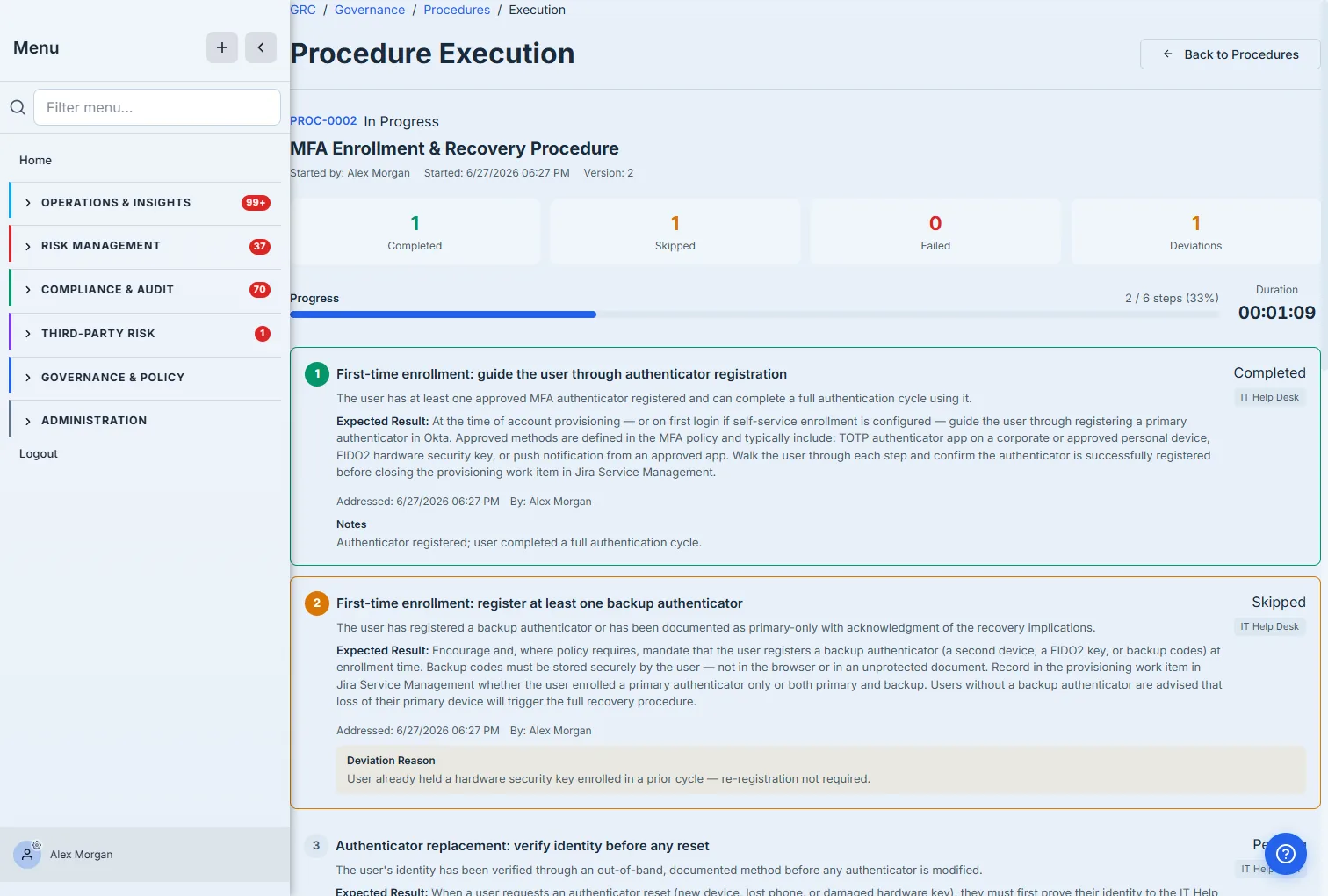
The checklist keeps the operator honest under pressure: the progress bar and completed/skipped/failed counts update live, the run can’t be marked complete while steps are still pending, and every decision is stamped with who made it and when. A skipped step isn’t a gap in the record — it’s a documented decision with a reason attached.
Step 3 — A run you can hand to an auditor
When every step is addressed, the execution completes — and what you’re left with is a chain-of-custody record of the run.
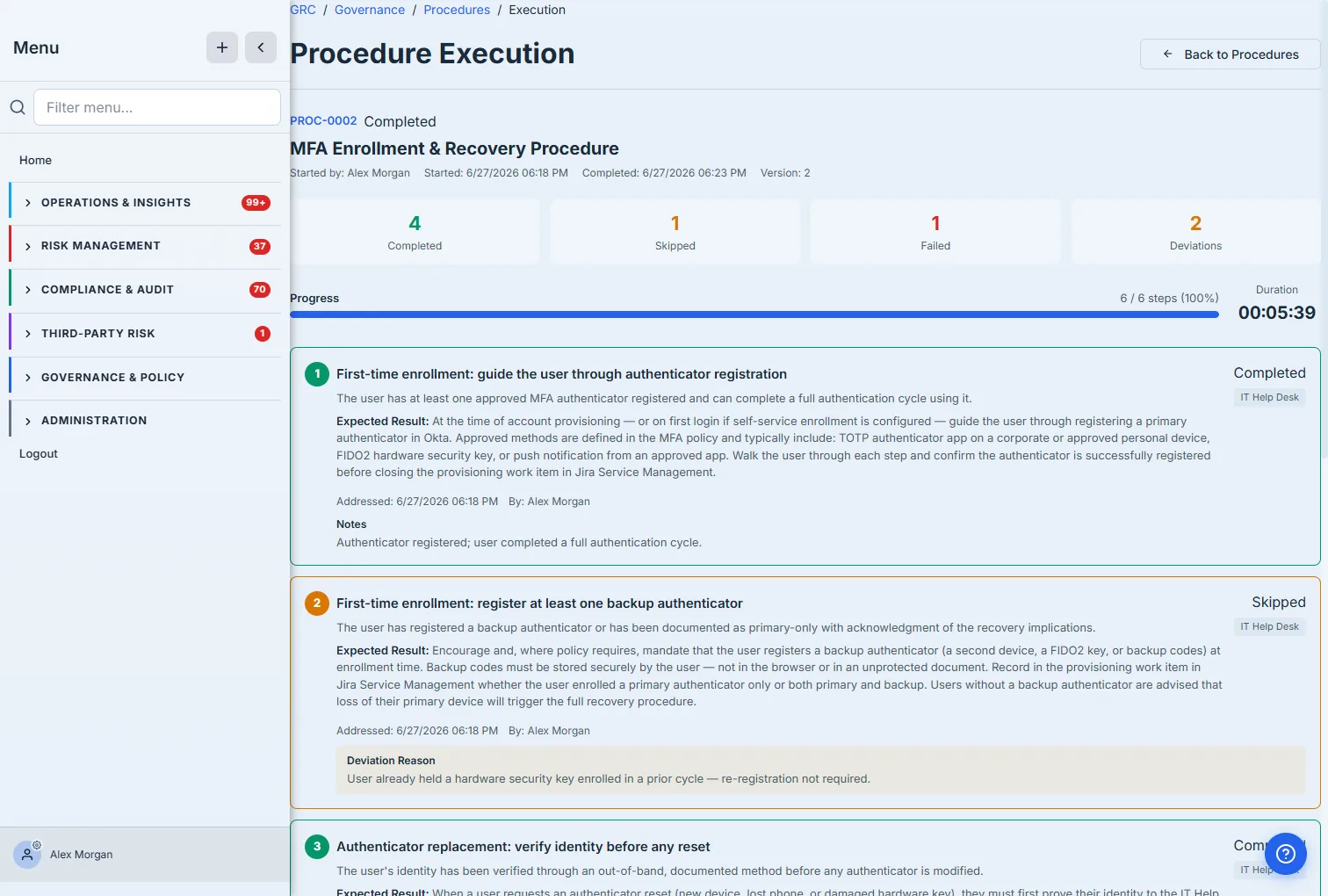
This is the difference between having a procedure and running one. The record shows exactly what happened: four steps completed, one skipped because the control was already satisfied, one failed with a documented workaround and a follow-up ticket. Completing the run also stamps the procedure’s last-executed date and computes its next one, so execution cadence is tracked the same way review cadence is — and “we have a runbook” becomes “here’s the last time we ran it, and here’s what we found.”
How the page works
The list and the execution screen each enforce a few rules that make the record trustworthy:
- The stat cards are cadence-derived, not manual. Total / Active / Draft / Due for Review / Expired are computed from each procedure’s status and its next-review date — a procedure rolls itself into Due for Review (and then Expired) as that date passes, so a stale SOP raises its own hand instead of waiting for someone to notice.
- An execution is a guarded run, not a checkbox list. While a run is In Progress, each step is a three-way decision — Complete / Skip / Fail — and the progress bar and the Completed / Skipped / Failed counts update live off those decisions.
- A skip or a fail forces a reason. Choosing Skip or Fail opens a deviation prompt you have to confirm with text; the reason is stored against that step. That’s why a deviation is a documented decision, not a silent gap — the system won’t let you skip a step invisibly.
- You can’t complete a run with steps still pending. The run stays open until every step is addressed; only then can it be marked complete — so a half-run can never masquerade as a finished one.
- Completing stamps the cadence both ways. Finishing a run records who ran it and when, sets the procedure’s last-executed date, and computes the next one — so execution recency is tracked exactly like review recency, and both show up on the procedure’s card.
What you walk away with
- SOPs as managed objects — numbered, categorized, status-tracked, with review cadence, not PDFs in a drive.
- A template library — author a tailored, step-by-step procedure in minutes instead of from a blank page.
- Execution, not just storage — run a procedure step-by-step with keep/skip/fail decisions and captured deviation reasons.
- An auditable record — every run is dated, attributed, and deviation-stamped, with the procedure’s execution cadence tracked automatically.
Open /app/procedures, author one from a template, and run it once. The next time an auditor asks whether your access-recovery runbook actually works, the answer is a completed execution — with the one failed step, its reason, and its follow-up ticket, all on the record.