Unclear ownership is the root cause of most governance failures. A control goes untested, a policy lapses, a vendor’s SLA breach sits unactioned — and the post-mortem always finds the same thing: everyone assumed someone else owned it. RACI fixes that by making ownership explicit. For every governance object — each control, policy, risk, and vendor — you name who is Responsible (does the work), Accountable (owns the outcome, one person), Consulted (weighs in), and Informed (kept in the loop). Talarity’s RACI Matrix turns that from a stale spreadsheet into a live, gap-aware view of who-owns-what across your entire program.
Who’s involved
- Governance lead — builds the matrix, sets accountability, and watches the Coverage Report for gaps.
- Control / policy / risk owners — the people who land in the R and A cells and inherit the work.
- Auditors — ask “who is accountable for this control?” and expect a name, not a shrug.
What’s on the page
Open RACI (/app/raci) — one scrollable grid plus a coverage panel:
- The matrix — one row per governance entity (control, policy, risk…) and one column per person; each filled cell is the Responsible / Accountable / Consulted / Informed role that person holds on that entity.
- Coverage Report — tiles that grade how complete your ownership is and surface the gaps (entities with no Accountable, unassigned rows).
- Assign modal — click any cell to set or change who holds that role, in one click.
Step 1 — One grid, every owner
Open /app/raci. The matrix puts your governance objects down the rows and your people across the columns; each cell is one person’s role on one object. The header tiles keep the score honest — total entities, how many have a Responsible, how many have an Accountable, and how many are still missing RACI entirely.
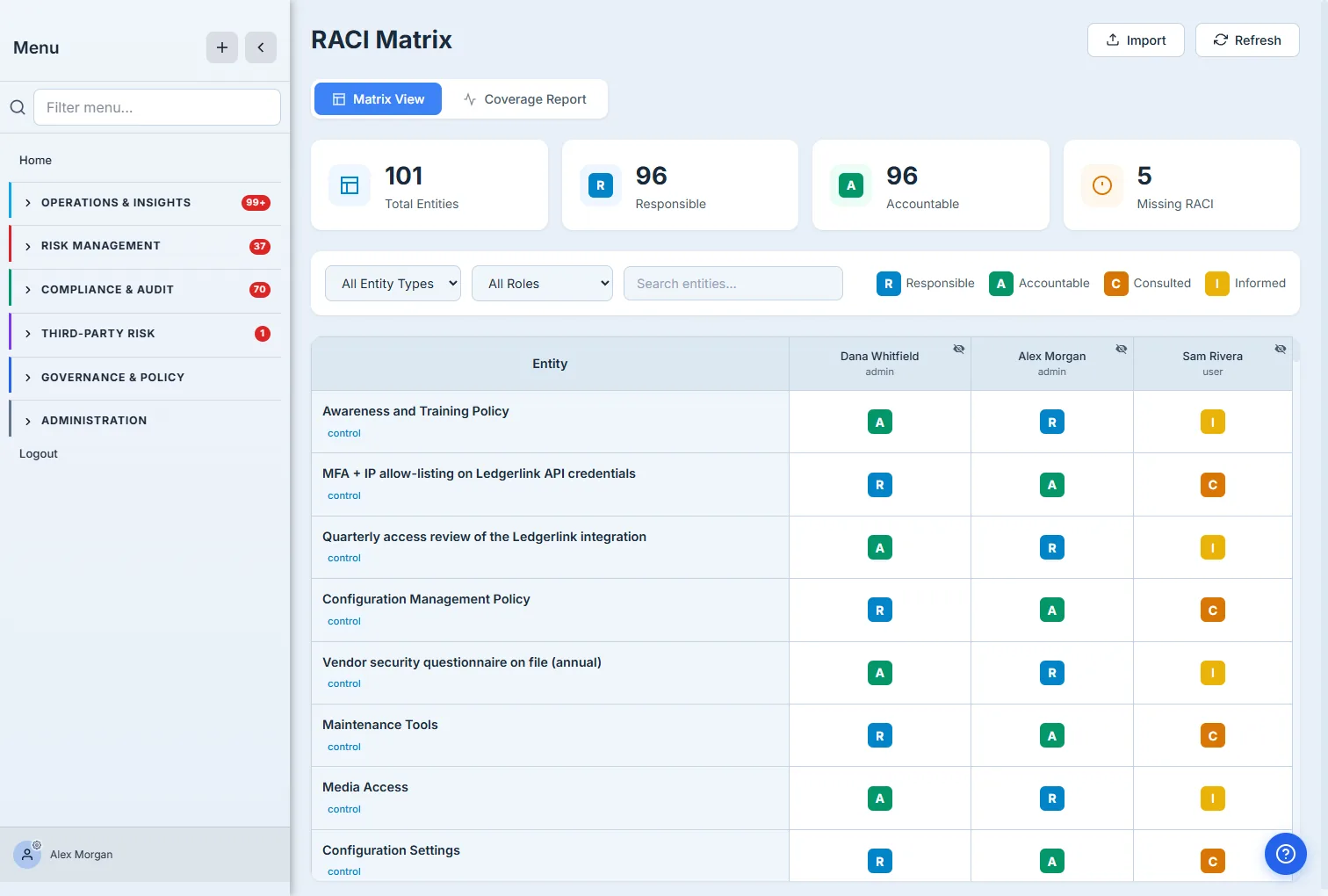
The colour-coded badges (blue R, green A, orange C, yellow I) make ownership scannable at a glance — and the filters above (entity type, role, search) let you cut a 100-entity matrix down to “show me every control with no Accountable” in two clicks. The matrix scales: it spans controls, policies, processes, risks, and vendors in one grid, so ownership isn’t fragmented across five tools.
Step 2 — Assign a role in one click
Click any cell and the assignment modal asks the only question that matters: what is this person’s role on this object?
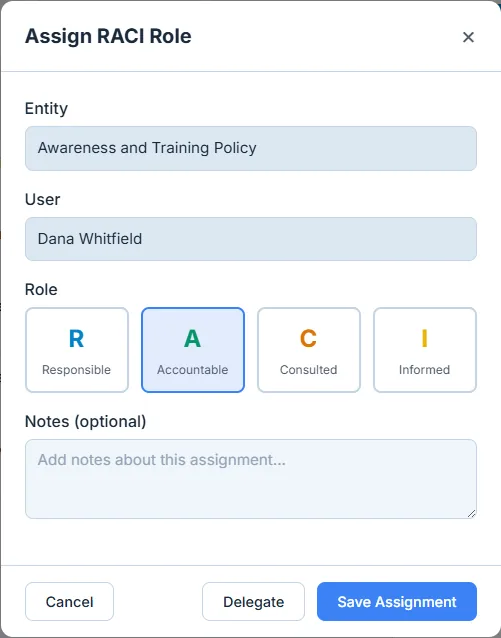
Pick one of the four roles, add a note if the assignment needs context, and save. Guest accounts can’t be assigned — RACI is for accountable members, not one-off external collaborators — and the Delegate action hands a role to a backup with an expiration (and an optional reason), so coverage survives someone going on leave (and you can’t delegate a role to yourself — the segregation-of-duties check blocks it).
Step 3 — Let the Coverage Report find your gaps
A matrix you have to eyeball for holes is a matrix that hides them. The Coverage Report does the gap-finding for you.
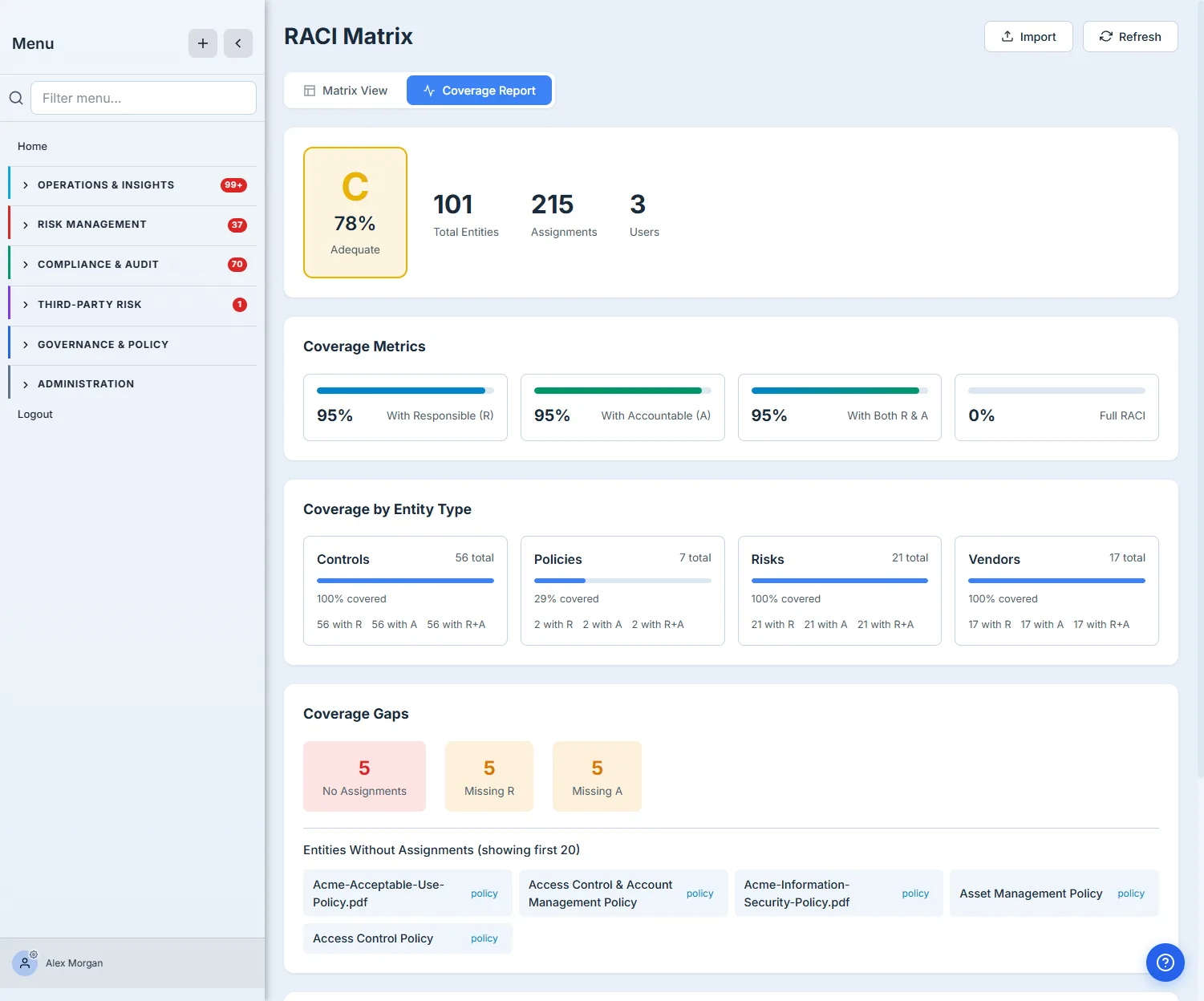
This is the payoff. A single coverage grade tells you where you stand; the by-type breakdown tells you where to look — here, controls, risks, and vendors are fully owned, but policies sit at 29%, and the report names the exact policies with no assignment. That’s a punch-list, not a vibe: a governance lead can work straight down the “Entities Without Assignments” list and close every gap. The report also surfaces per-person workload, so accountability doesn’t quietly pile onto one overloaded owner.
How the page works
The grid looks simple, but a few rules keep the ownership data honest:
- A cell is one person’s role on one object. Rows are governance objects (controls, policies, risks, vendors); columns are people; each filled cell is a single R / A / C / I assignment. The header tiles and the Coverage grade are computed live from those assignments — total entities, how many carry a Responsible, an Accountable, and both — so the score moves the instant you assign or delete a cell, never on a manual recount.
- The grade is coverage, not opinion. The Coverage Report’s letter grade is derived from the percentage of in-scope entities that have the ownership they need (R, A, and both), and the by-type breakdown is the same math sliced per entity type — which is why one lagging type (policies at 29%) can drag a B-looking program to a C.
- Guests can’t be assigned. Only accountable members appear as assignable people; one-off external collaborators are excluded by design, so accountability can never land on someone who isn’t really on the hook.
- Delegation preserves coverage without breaking SoD. You can only delegate a role that already exists (save the assignment first), and a delegation requires a delegate-to person and an expiry date (a reason is optional) — and you can’t delegate to yourself. So coverage survives someone going on leave, but the segregation-of-duties trail stays intact.
How to close your ownership gaps
- Open the matrix at
/app/raciand use the entity-type / role / search filters to narrow to what you’re working — e.g. “Controls with no Accountable.” - Assign a role: click the cell at the intersection of the object and the person, pick Responsible / Accountable / Consulted / Informed, add a note if it needs context, and Save.
- Switch to the Coverage Report and read the grade + the by-type breakdown to find the lagging entity type; work straight down the “Entities Without Assignments” list.
- Cover for absences with Delegate — on an existing assignment, hand the role to a backup with an expiry and a reason so the cell never silently goes unowned.
Matrix vs. the Responsibility Ledger
The RACI Matrix covers entity-level ownership (this control, that vendor). Talarity also keeps a Responsibility Ledger for governance capstone slots — org-wide roles like policy owner, governance lead, CISO, or risk lead — where the assignment is a signed, time-bounded commitment rather than a grid cell. Use the Matrix for “who owns this object”; use the Ledger for “who holds this office.”
What you walk away with
- Explicit ownership on every object — R, A, C, and I for each control, policy, risk, and vendor, in one grid instead of five spreadsheets.
- One Accountable, no ambiguity — the post-mortem question “who owned this?” always has a name.
- Gap-finding that’s automatic — a coverage grade, a by-type breakdown, and a named list of unowned objects, so you fix gaps instead of discovering them in an audit.
- Continuity built in — delegation with expiration and segregation-of-duties, so coverage doesn’t lapse when someone’s out.
Open /app/raci, switch to the Coverage Report, and find the one entity type that’s lagging. That’s where your next governance failure is hiding — and now you can assign it away before it happens.