Most teams treat a regulatory filing as a date: the SEC cybersecurity disclosure is due, the DORA ICT report is due, the HIPAA risk analysis is due. The date is the easy part. The hard part is everything the regulator actually receives — the right supporting materials, an authorized-officer attestation, a jurisdiction-specific cover letter, and a defensible record of exactly what you transmitted and when. Talarity’s Regulatory Submissions treats each filing as a case file: you assemble it, finalize it, generate a sealed dossier, and mark it submitted — with a lifecycle and an audit trail an examiner will accept.
Who’s involved
- Compliance / legal — own the filing calendar and the obligation: which authority, which filing type, which deadline.
- CISO / risk — supply the substance: the program controls, incident history, and evidence the filing has to stand on.
- The authorized officer — attests to the completeness and authenticity of what’s transmitted, in a statement they write themselves under the rules of the authority the filing goes to.
What’s on the page
Two screens: a register of all filings, and a case file behind each one.
- The register (
/app/regulatory-submissions) lists each filing with its jurisdiction & authority, filing type, deadline, lifecycle status (Draft / Finalized / Submitted / Acknowledged), and counts of attached capstones and evidence — sorted by urgency, soonest deadline on top. - The case file (open any row) is a six-tab record: Overview, Capstones, Evidence, Timeline, Submission Status, History (the Capstones and Evidence tabs carry a count badge). Its toolbar holds the actions that move the filing forward — Add / Remove Capstone, Add Evidence, Finalize, Mark Submitted — and which buttons are even present depends on where the filing is in its lifecycle (see below).
Step 1 — One register for every filing
Open Regulatory Submissions (/app/regulatory-submissions). Every filing is tracked with its jurisdiction and authority, filing type, a deadline, a lifecycle status, and counts of the capstones and evidence attached — sorted by urgency so the next thing due is on top.
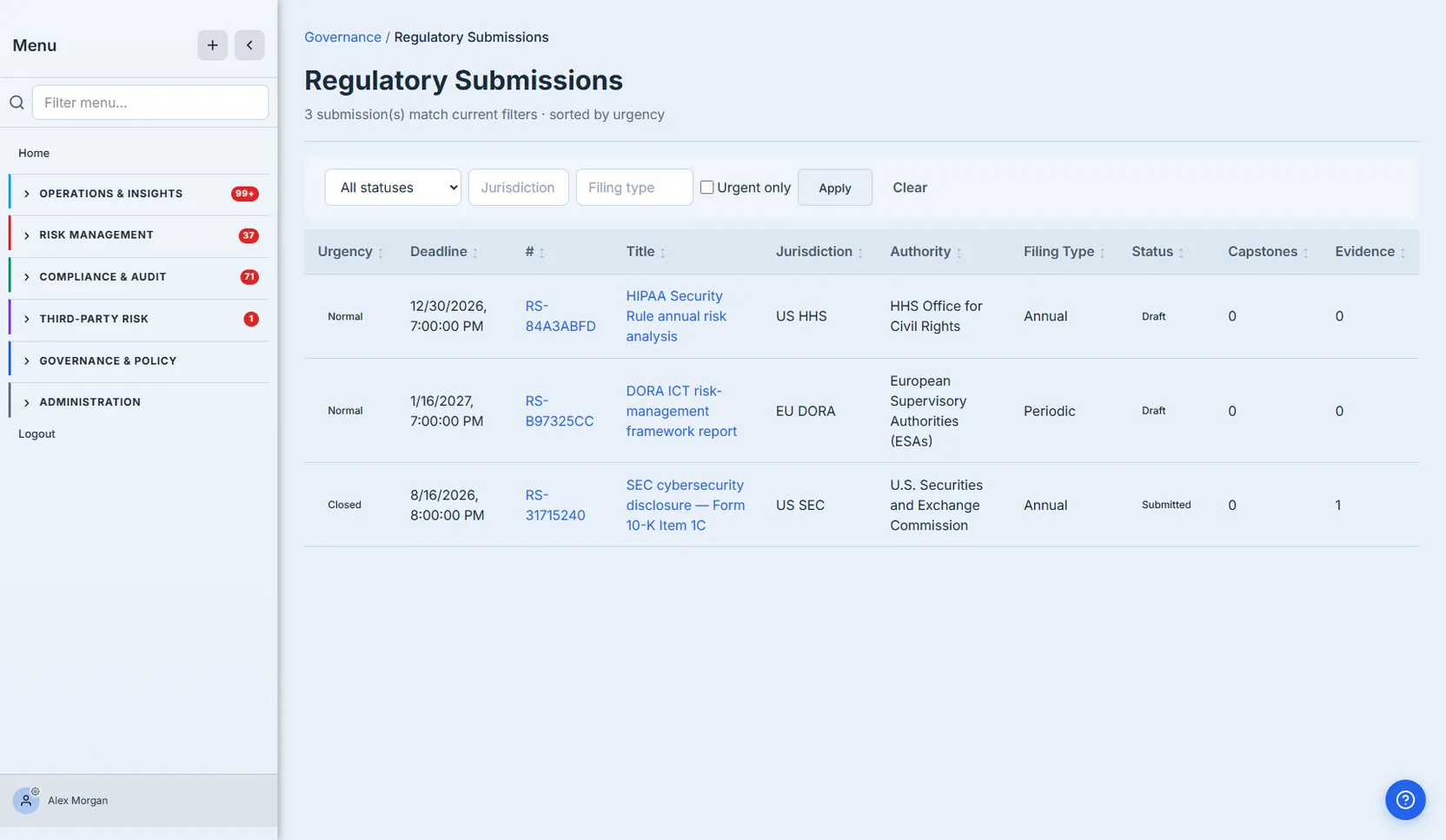
The point: this isn’t a spreadsheet of due dates. Each row is a live case file with a status (Draft, Finalized, Submitted, Acknowledged) and the materials attached to it. You can see at a glance which filings are assembled and which are still a deadline with nothing behind them.
Step 2 — A submission is a case file, not a form
Open a submission and you get its full record: the description of what’s being filed, the deadline, the dossier artifact, the regulator and submission identifiers, and a tab strip tying the filing to everything it’s built from — Capstones, Evidence, a Timeline, the Submission Status lifecycle, and a full History.
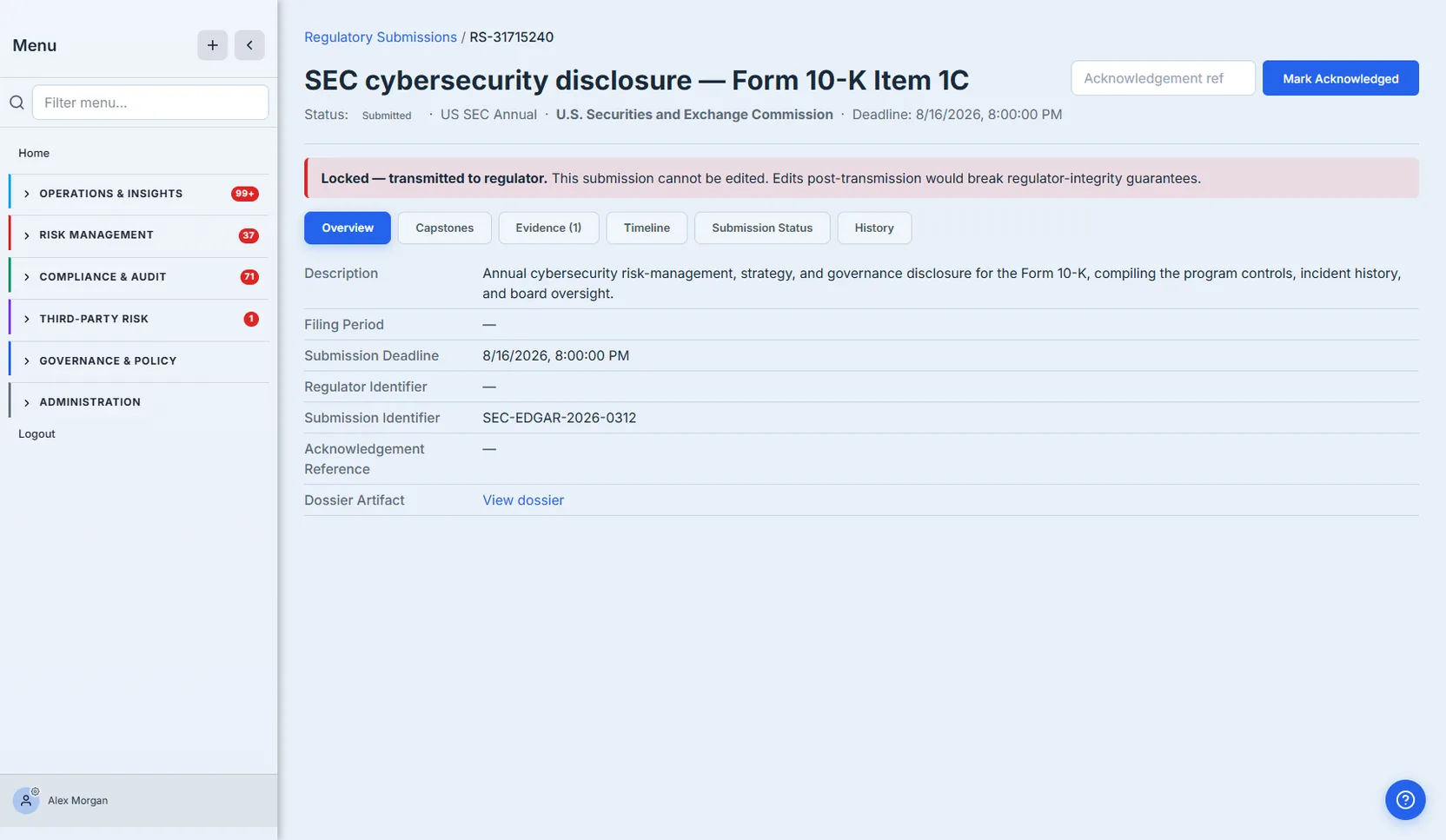
This is the difference between a filing and a form. The Evidence tab carries the supporting material (here, the incident the disclosure references); the Capstones tab carries the generated reports; the Timeline and History tabs give you the chronology an examiner asks for. And once a submission is transmitted it locks — the banner spells out that edits post-transmission would break the regulator-integrity guarantee. Nothing about the filing lives in a scattered folder — it all hangs off the submission record.
Step 3 — Finalize, seal the dossier, and submit
A filing moves through a deliberate lifecycle: Draft (assemble it), Finalized (lock the contents), Submitted (transmitted to the regulator), Acknowledged (the regulator confirmed receipt). When you finalize, Talarity generates the Regulatory Submission Dossier — a regulator-addressed cover letter, an authorized-officer attestation aligned to the jurisdiction’s standard, and a jurisdiction-compliance section — then records a SHA-256 of exactly what was transmitted.
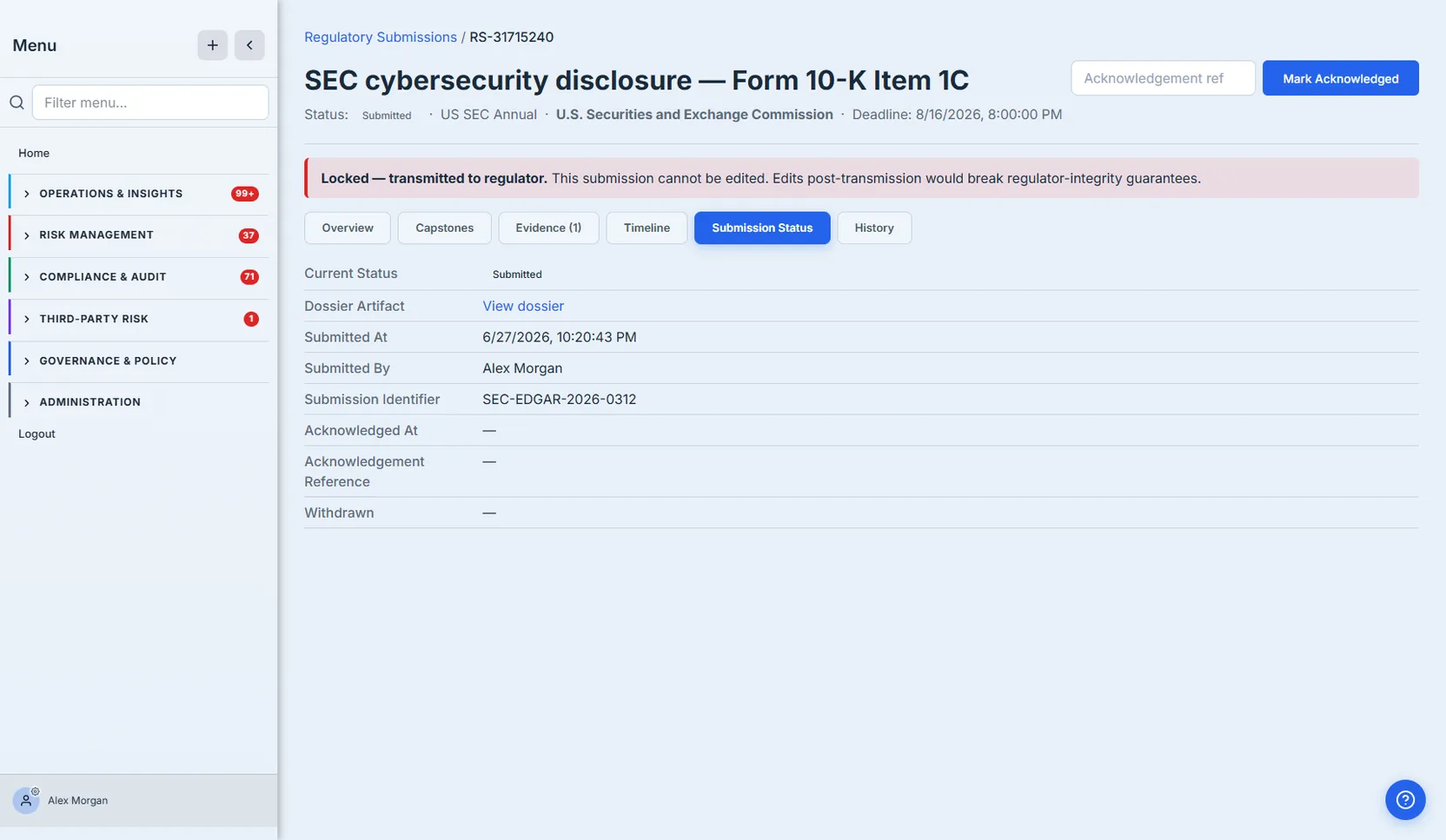
That dossier hash is the whole point: months later, when an examiner asks “what exactly did you file?”, you don’t reconstruct it from email — you have the sealed artifact and a hash that proves it hasn’t changed. The submission identifier and timestamps record the transmission; the Acknowledged step closes the loop when the regulator confirms receipt.
How the page works
The lifecycle isn’t decorative — each transition is gated, so a filing can’t skip a step:
- Finalize only runs from Draft, and only when the package is complete. When you click Finalize, Talarity checks the submission’s required inputs first; if any carry blocker severity (a missing mandatory capstone or attestation), finalize is refused with the blockers named — you can’t seal an incomplete filing by accident.
- Generate Dossier comes after Finalize. Once the submission is finalized, Generate Dossier produces the Regulatory Submission Dossier — a regulator-addressed cover letter, the authorized officer’s attestation, and a jurisdiction-compliance section, each written by a person rather than drafted by AI — and records a SHA-256 of exactly what was transmitted. If you tick Include frameworks this pack supports (and confirm the warning that appears), the dossier closes with the provisions for this filing’s jurisdiction and filing type — for example Form 8-K Item 1.05 for an SEC incident filing, or 45 CFR §164.408 for a breach notification to HHS — each linked to its primary source and marked as Talarity’s reference crosswalk, not legal advice.
- Mark Submitted needs a finalized status and a generated dossier. The button doesn’t appear until both are true, so you can’t record a transmission for a filing that has nothing sealed behind it.
- Submitted (or Acknowledged) locks the case file. Post-transmission edits would break the regulator-integrity guarantee, so the record freezes and the red Locked — transmitted to regulator banner explains why. The Acknowledged step then closes the loop when the regulator confirms receipt.
How to assemble and file a submission
- Create the filing and set its authority, type, and deadline — it starts in Draft.
- Attach the substance on the case file: Add Capstone for the generated reports the filing is built on, Add Evidence for the supporting material (the incident a disclosure references, the risk analysis behind a HIPAA filing).
- Finalize — clear any blockers it names, then let it seal the dossier and stamp the hash.
- Mark Submitted once you’ve transmitted, and record the regulator’s Submission Identifier; the filing locks.
- Mark Acknowledged when the regulator confirms receipt — the case file now holds the sealed dossier, the hash, the identifiers, and the full timeline an examiner will ask for.
What you walk away with
- A register of every filing — jurisdiction, authority, filing type, deadline, and lifecycle status, sorted by urgency.
- A case file per submission — capstones, evidence, a timeline, and a full history hung off the filing, not scattered in a folder.
- A sealed dossier — a generated cover letter, an authorized-officer attestation aligned to the jurisdiction’s standard, and a SHA-256 of exactly what was transmitted.
- A defensible lifecycle — Draft → Finalized → Submitted → Acknowledged, with timestamps and identifiers at each step.
Open /app/regulatory-submissions, open a filing, and walk it from Draft to Submitted. The next time an examiner asks what you filed and when, the answer is a sealed dossier with a hash and a timeline — not a scramble through last quarter’s email.