Every framework that takes documentation seriously draws the same line between a policy and a procedure. The policy is the commitment — what the organisation does and why, approved at a level that can actually commit it. The procedure is the operational detail — the steps someone follows on a Tuesday to make the policy true. ISO 27001:2022 splits them deliberately: A.5.1 governs policies for information security (approved, communicated, reviewed), while A.5.37 is documented operating procedures — the how. SOC 2 CC2.2/CC2.3 expect both the commitment and the operating detail to be communicated to the people who carry them out. PCI DSS is blunter still: nearly every requirement asks for a policy and the procedures that operationalise it. The auditor’s question is rarely “do you have an access-control policy?” — it’s “show me the policy, then show me the procedure your team actually follows, and show me they’re connected.”
Most teams keep these in two unrelated places: the policy is a PDF in one folder, the procedure is a runbook in a wiki, and the only thing connecting them is that a human remembers they’re related. Talarity makes the connection a first-class, queryable edge. This article works the relationship from the policy’s side — attaching and detaching procedures from a policy, and keeping the policy’s own metadata current. Editing what’s inside a procedure — its steps, its RACI, its execution cadence — is the procedure’s own surface, and gets its own article. Here we stay on the policy.
Who’s involved
- Policy owner / compliance lead — decides which procedures support a given policy and wires the links. Also the person whose name should be in the policy’s Owner field, because that’s who the renewal reminders chase.
- Procedure author / process owner — owns the procedure’s internal content. From the policy lens you only link to their work; you don’t edit it.
- Auditor — opens a policy, clicks Procedures, and expects to see the operating documents that make the policy real — each one a live link, not a filename in a paragraph.
What’s on the page
This article works a policy from its detail page (/app/policies/:policyId). The tab strip — Overview, Content, Procedures, Controls, Attestations, History, Artifacts, Activity — is the whole surface; we stay on two:
- Procedures tab — the linked-procedures table (#, Title, Type, Status, Last Executed) with a Link Procedure button and a per-row Unlink.
- Overview tab — the policy’s own metadata (Owner, Approver, Category, Attestation Cadence…), each with an inline pencil edit.
Where the relationship lives — the Procedures tab
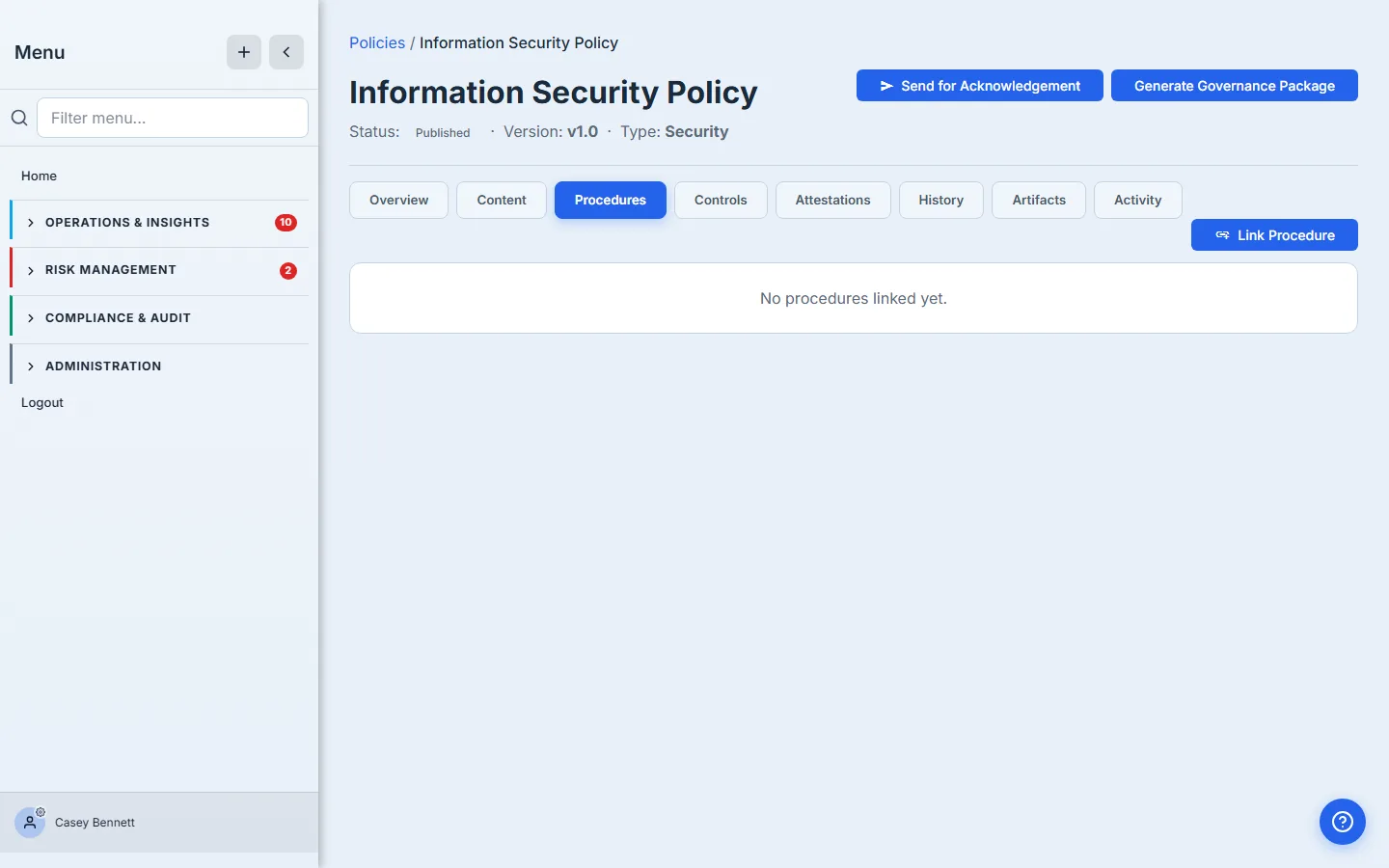
Open any policy at /app/policies/:policyId and look at the tab strip: Overview, Content, Procedures, Controls, Attestations, History, Artifacts, Activity — and, while a policy is mid-review, an extra Approvals tab. Once procedures are attached, the Procedures tab shows a running count — Procedures (3) — so you can see at a glance whether a policy has any operating detail behind it.
The tab is a sortable table with one row per linked procedure and five columns:
- # — the procedure number (e.g.
PROC-0001), linking through to the procedure’s own detail page. - Title — also a link into the procedure.
- Type — the procedure’s classification (its
procedureType— Incident Response, Access Management, BC/DR, and so on), distinct from its free-text category. - Status — the procedure’s own lifecycle state (draft / active / under review / retired), as a badge.
- Last Executed — the last time the procedure was run, denormalised from its execution history. A procedure that’s linked but never executed shows blank here — a useful tell during an audit.
Before any procedures are attached, the tab reads “No procedures linked yet.” That empty state is itself a finding: a published policy with zero supporting procedures is the gap most readiness reviews flag first.
Linking a procedure to a policy
Click Link Procedure (top-right of the Procedures tab). Talarity opens the universal Link Picker — the same browse-and-search modal used elsewhere for evidence — scoped to procedures. Procedures already linked to this policy are pre-selected, so you’re only ever adding the difference.
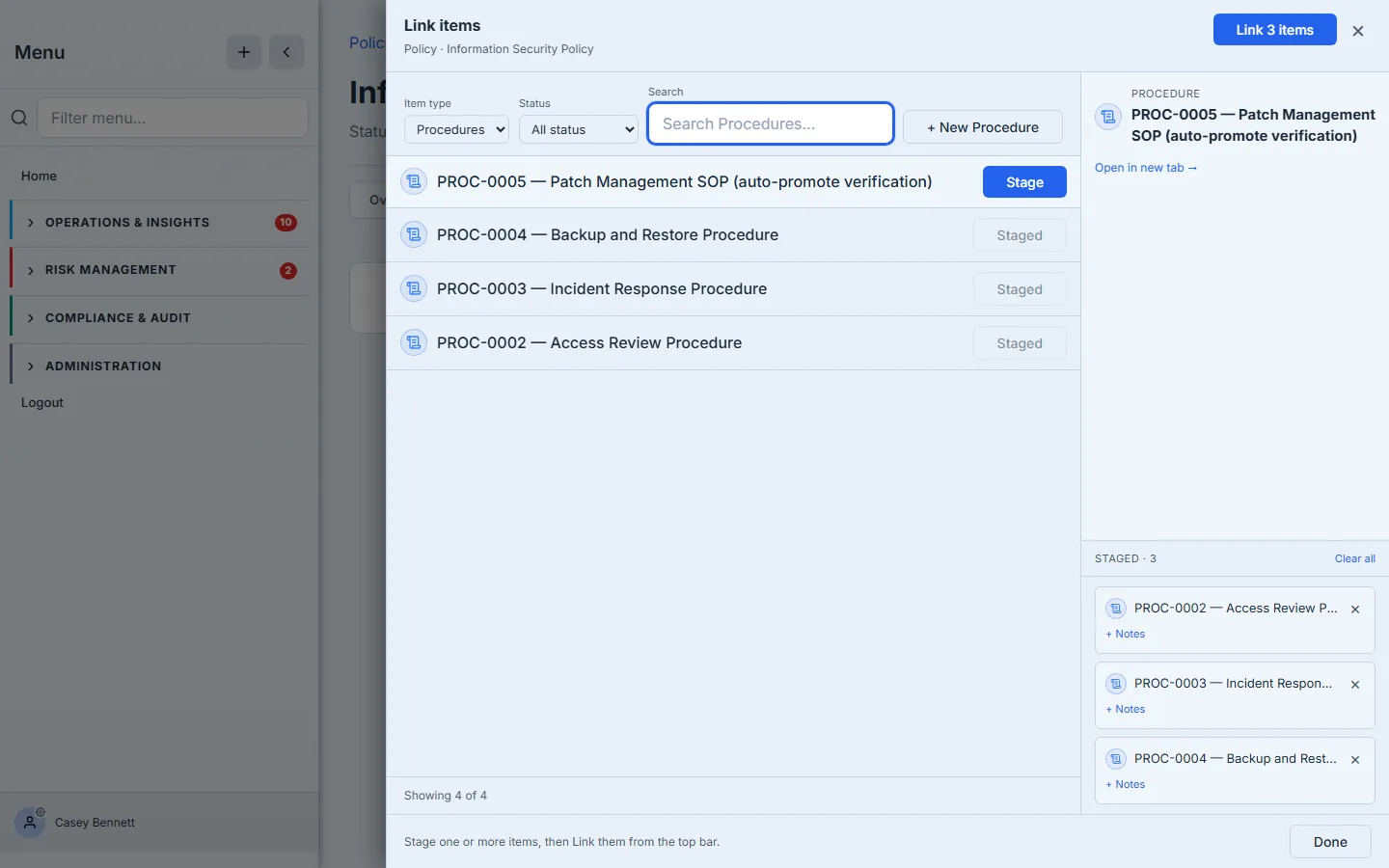
Stage the procedures that support this policy and click Link N items. Talarity writes one edge per newly staged procedure through the governance.procedure.linkToPolicy action. A few properties of that write are worth knowing from the policy seat:
- It’s many-to-many. One policy can have many supporting procedures, and — just as importantly — one procedure can support many policies. Your Incident Response Procedure can sit under both the Information Security Policy and the Business Continuity Policy without being duplicated. The link is a relationship, not a copy.
- It’s idempotent. Linking a procedure that’s already linked doesn’t create a second edge — the action reports
already-existsfor that one and moves on. If you link five procedures and one was already attached, the other four still succeed; Talarity reports the partial result honestly rather than failing the whole batch. - The link records an “implements” relationship. Under the hood the data model distinguishes three relationship types — implements, supports, references — but the link picker today records every link as implements. If you need a different relationship type recorded, that’s a known gap, not a setting you’ve missed.
Once the write lands, the tab reloads and the new rows appear — now you can see the five columns doing their job.
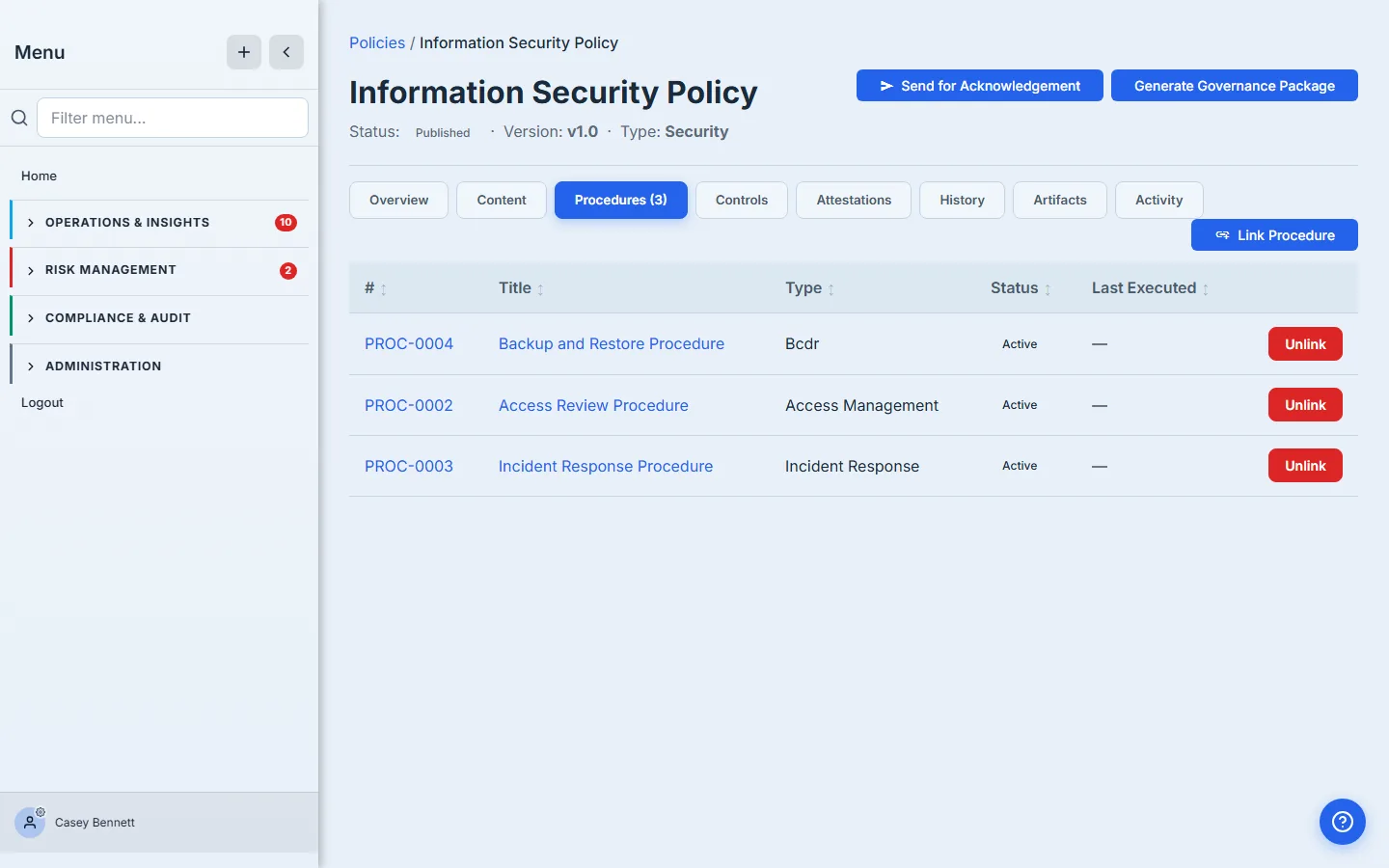
Notice the Last Executed column reads ”—” for all three: they’re linked but have never been run. The edge is also written to the audit log (policy_procedure_linked), so the act of connecting the two documents is itself evidence.
Unlinking — and what it does not do
Each row carries an Unlink button. Click it, confirm the prompt — “Unlink procedure ’…’ from this policy?” — and Talarity removes the edge.
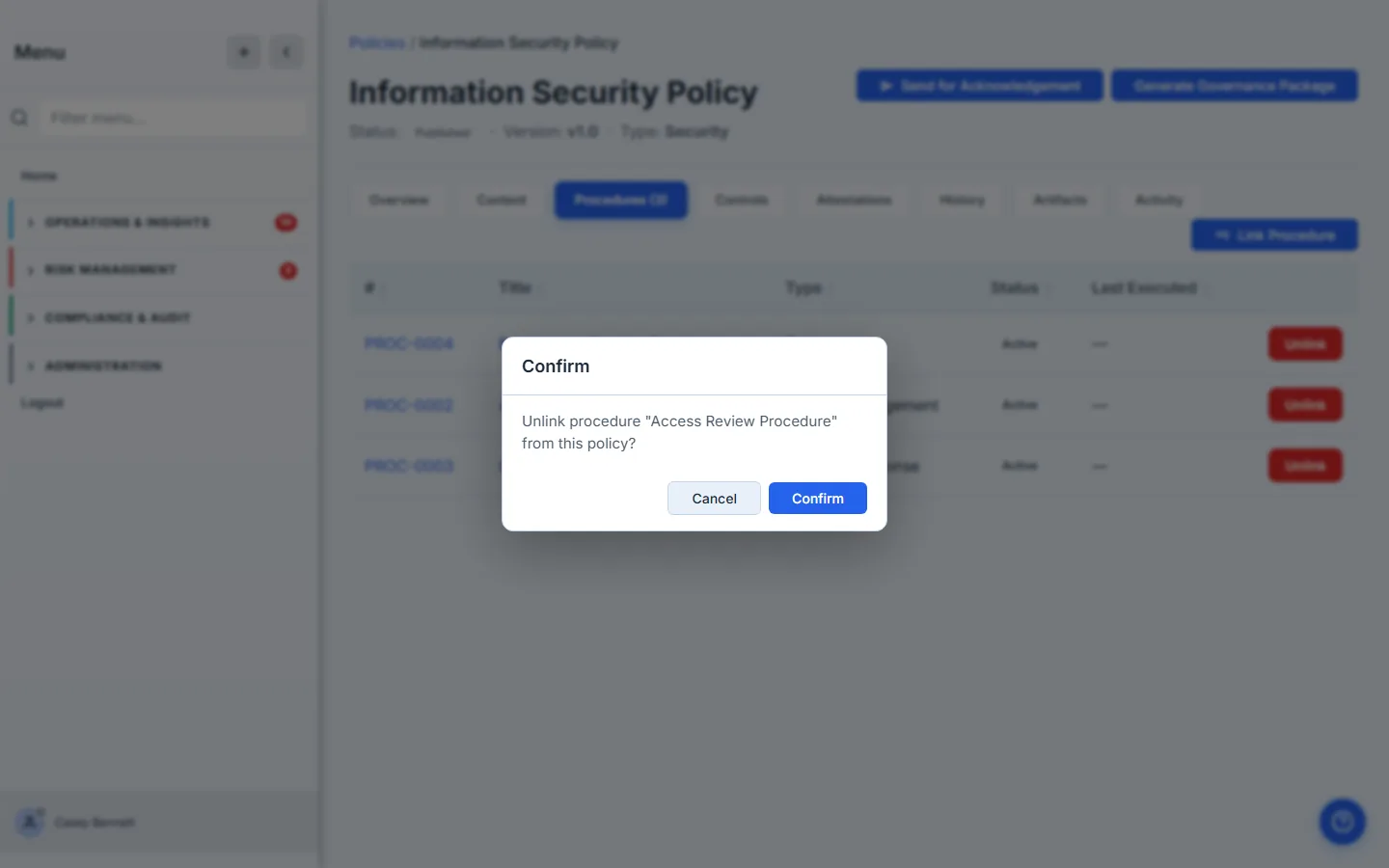
The single most important thing to understand about unlinking: it severs the relationship only — it does not delete, archive, or change the procedure. The procedure lives on at its own detail page, with its own owner, status, and history fully intact. If that procedure also supports three other policies, those three links are untouched — you’ve only cut this one. Unlinking is the safe, reversible act of saying “this procedure no longer belongs under this policy”; if you change your mind, you re-link it and the edge comes back (the procedure’s own content never went anywhere).
This is deliberate. Because the relationship is a true many-to-many edge rather than ownership, removing a policy’s claim on a procedure can’t orphan or destroy work that other policies still depend on. The unlink is recorded in the audit log (policy_procedure_unlinked) the same way the link was — so “we detached the legacy procedure from the WISP in Q2” is a fact you can produce, not a memory.
Unlinking ≠ retiring. If a procedure is genuinely obsolete, unlinking it from a policy doesn’t retire it — it just hides it from this policy’s tab. Retiring the procedure is a separate action on the procedure itself (covered in the procedure-lens article). Keep the two ideas apart: one is about this relationship, the other is about that document’s lifecycle.
Keeping the policy’s own metadata honest
Linking procedures is only half of working a policy well; the other half is keeping the policy’s own fields current, because those fields drive who gets chased and when. On the Overview tab, several fields carry an inline pencil — click it to edit in place. Each save goes through risk.governance.policy.update and reloads the record.
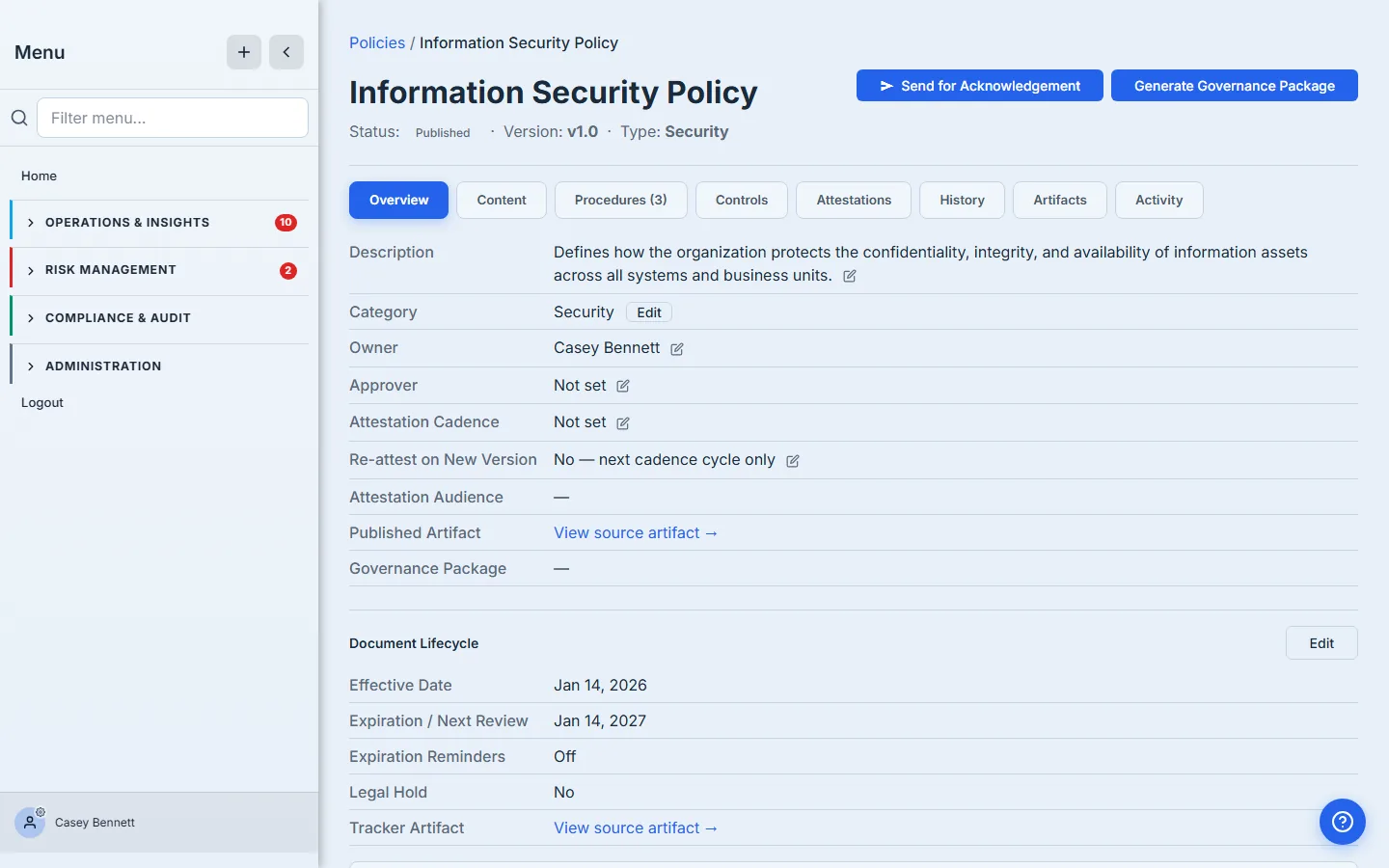
From the policy lens, these are the fields you maintain:
- Owner — the person on the hook for keeping this policy current. Renewal and review reminders fire to this user, so a stale owner means reminders going to the wrong inbox (or nobody’s). Talarity renders the resolved display name, never a raw user ID; if it ever shows “Unassigned,” the owner needs setting.
- Approver — who re-approves the policy when a major version ships. Worth confirming before you kick off a review cycle, not during.
- Category — the policy’s classification, edited through its own picker on the Overview tab. Category is independent metadata you can change at any point in the policy’s life; it doesn’t trigger re-approval. (We cover what categories are for in the Policy categories article.)
- Description and Attestation Cadence — the human summary, and how often the workforce must re-attest. Both edit in place.
A couple of fields stay deliberately read-only here: Attestation Audience is coupled to the role and user-ID arrays that the acknowledgement flow sets, so it isn’t a free-text pencil edit, and the Published Artifact / Governance Package links point at generated, immutable outputs rather than editable fields. Two more constraints worth knowing: a draft policy that lives at the /app/policies/draft/:draftId route, and any cross-org shared policy, are read-only from this view — no inline edits, and no Link/Unlink buttons either. If the pencils and the Link Procedure button are missing, that’s why.
The policy lens vs. the procedure lens
It’s worth being explicit about the boundary, because it’s the thing customers most often trip on:
| You’re changing… | Where you do it | This article? |
|---|---|---|
| Which procedures support this policy | Policy → Procedures tab → Link / Unlink | ✅ Yes |
| The policy’s owner, approver, category, cadence, description | Policy → Overview tab → inline pencils | ✅ Yes |
| The policy’s content or version | Policy → Content tab (see Edit it, version it, or write a new one) | Related |
| A procedure’s steps, RACI, owner, review frequency, status | The procedure’s own detail page (/app/procedures/:id) | ⏭️ Procedure-lens article |
| Retiring an obsolete procedure entirely | The procedure itself | ⏭️ Procedure-lens article |
The rule of thumb: from a policy you manage the relationship and the policy’s own metadata; you never reach through the link to edit the procedure’s insides. Click a procedure’s title or number and you leave the policy entirely — you’re now on the procedure’s turf, which is the subject of the companion article.
What you walk away with
- A policy’s Procedures tab is the explicit, auditor-ready answer to “which operating documents make this policy real?” — each one a live link with status and last-executed date, not a filename buried in prose.
- Linking is a many-to-many, idempotent edge written via
governance.procedure.linkToPolicy; one procedure can support many policies, and re-linking is harmless. - Unlinking severs only the relationship — it never deletes, archives, or alters the procedure, and it never touches that procedure’s links to other policies. Both link and unlink are written to the audit log.
- Policy metadata — owner, approver, category, cadence, description — edits in place on the Overview tab and drives who gets reminded; keeping it current is as much a part of supporting the policy as attaching procedures.
- The procedure’s own fields are out of scope here by design — that’s the next article, written from the procedure’s seat.
Open a published policy from the policy library (/app/grc/governance) and click into its Procedures tab. If it reads “No procedures linked yet,” you’ve found this quarter’s first piece of work — and now you know it takes about a minute to fix.