You can write a beautiful recovery plan — ordered steps, named owners, a target RTO — and still have no idea whether it works. The plan is a hypothesis. The test is the experiment that confirms or refutes it, and it’s the artifact an auditor actually trusts. ISO 22301 §8.5 requires you to exercise and test your continuity arrangements; NIST SP 800-34 §3.5 expects regular plan testing and training; SOC 2 A1.3 wants evidence the recovery plans were tested, not just written.
The number that matters from any test is simple: did your actual recovery time match the target you committed to? Talarity puts that comparison right in the form, then turns each result into a recurring schedule so testing never quietly lapses. This guide runs one end to end.
Who’s involved
- Business continuity owner — schedules the test, sets the cadence, owns the result.
- Facilitator — runs the exercise and records what actually happened.
- Auditor — opens the test record and checks the outcome, the actual-vs-target RTO, and the date.
What’s on the page
This all lives in Business Continuity & DR (/app/grc/bcdr) → the Continuity Tests tab, with one form to schedule and one to record:
- The Continuity Tests register — one row per test: its type, the recovery plan it exercises, outcome (pending until recorded), the scheduled/run dates, the actual RTO achieved, and a Record Outcome action (it reads Update Outcome once a result is in).
- Schedule Test form — name, recovery plan, test type (the five below), date, scenario summary, and facilitator.
- Record Outcome form — passed / partial / failed, actual RTO (minutes) and actual RPO, and lessons learned — with the plan’s target RTO/RPO shown right beside each field.
- Over on the Recovery Plans tab, each plan row carries RTO / RPO, Last Outcome, and Next Test Due — the rollup this testing keeps current — plus a DR Test Attestation Report generator that turns a plan’s test history into a signed SOC 2 A1.2 / ISO 22301 artifact filed in the Evidence Repository.
Step 1 — The Continuity Tests register
Open Business Continuity & DR (/app/grc/bcdr) → the Continuity Tests tab. Every test is here by type, the plan it exercises, its outcome, when it was scheduled and run, and the actual RTO it achieved.
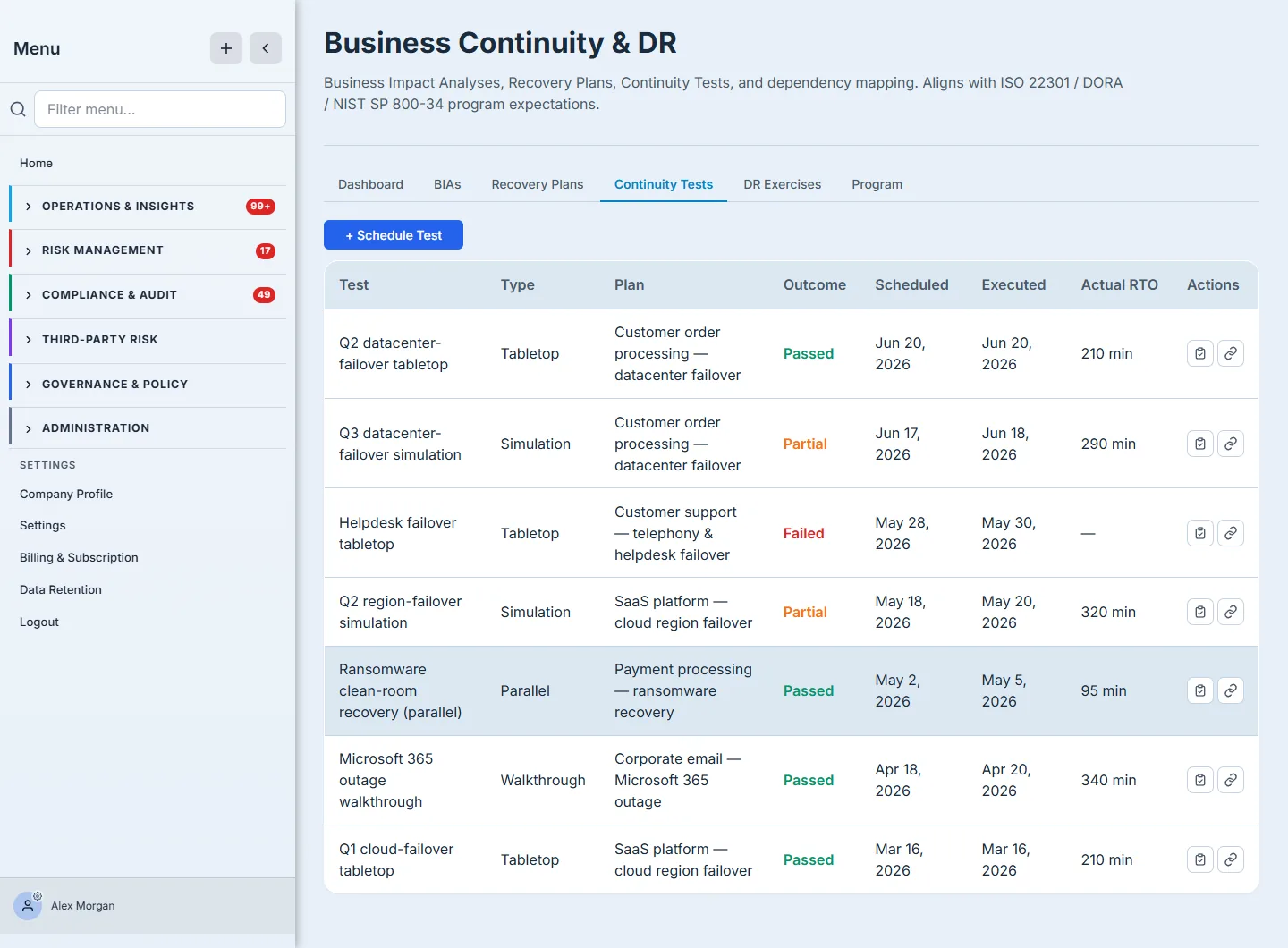
The type column matters: a test is anything from a low-cost discussion to a real cutover. Talarity supports the full spectrum — tabletop (talk through the plan), walkthrough (step-by-step review), simulation (run the steps against a stand-in), parallel (recover alongside production), and full interruption (take production down and run on the recovered stack). Start cheap and climb; you don’t earn a full-interruption test until the tabletops are clean.
Step 2 — Schedule a test
Click + Schedule Test. Name it, pick the recovery plan it exercises and the test type, set a date, summarize the scenario, and assign a facilitator — the person who’ll run it and record what happened.
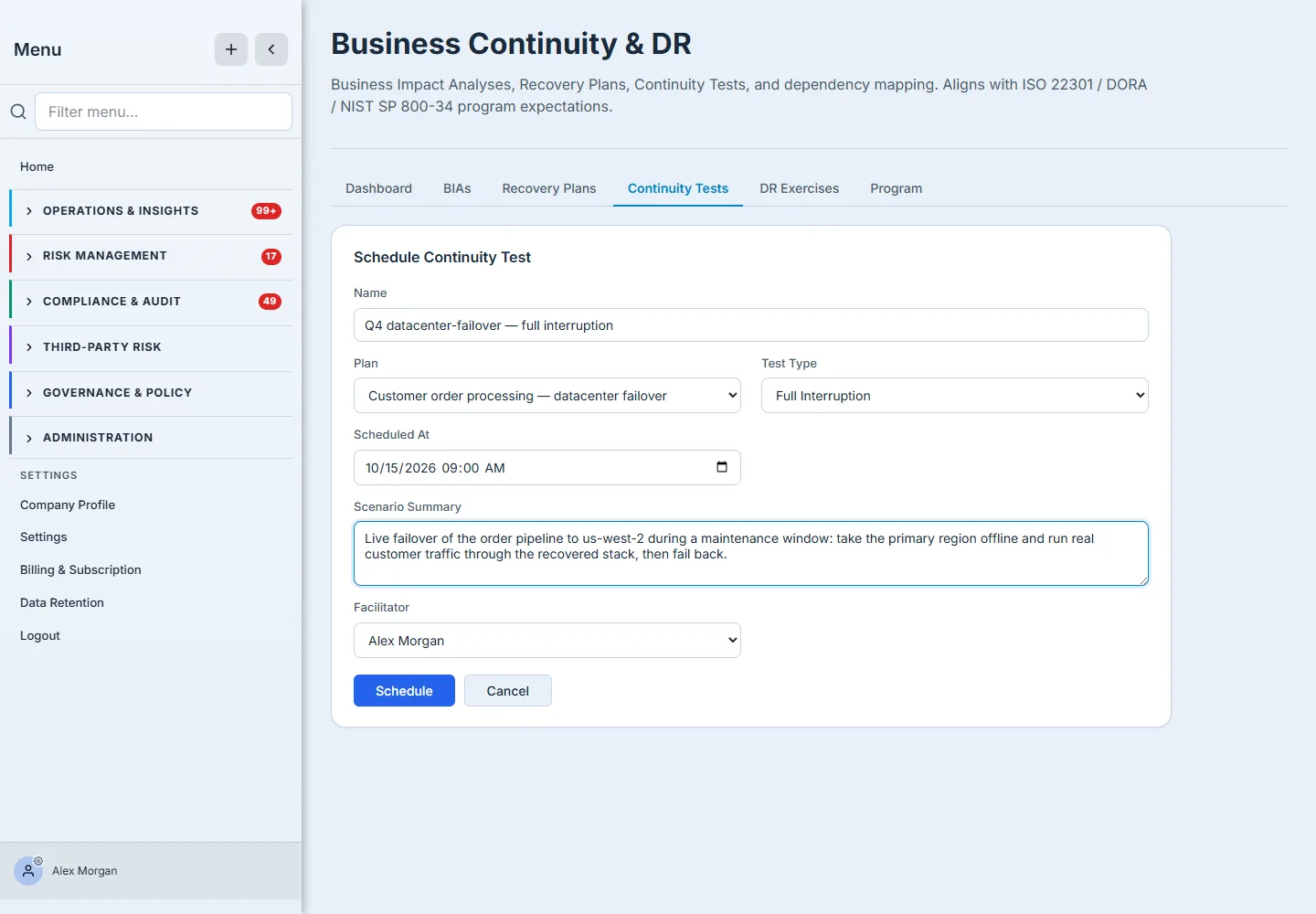
The test starts life as pending. It becomes evidence the moment someone records what actually happened.
Step 3 — Record the outcome against the target
This is the step that makes a test worth running. After the exercise, open Record Outcome and capture the result: passed, partial, or failed, the actual RTO and RPO you observed, and the lessons learned. Talarity shows the plan’s target RTO/RPO right next to each field and tells you immediately whether you met it.
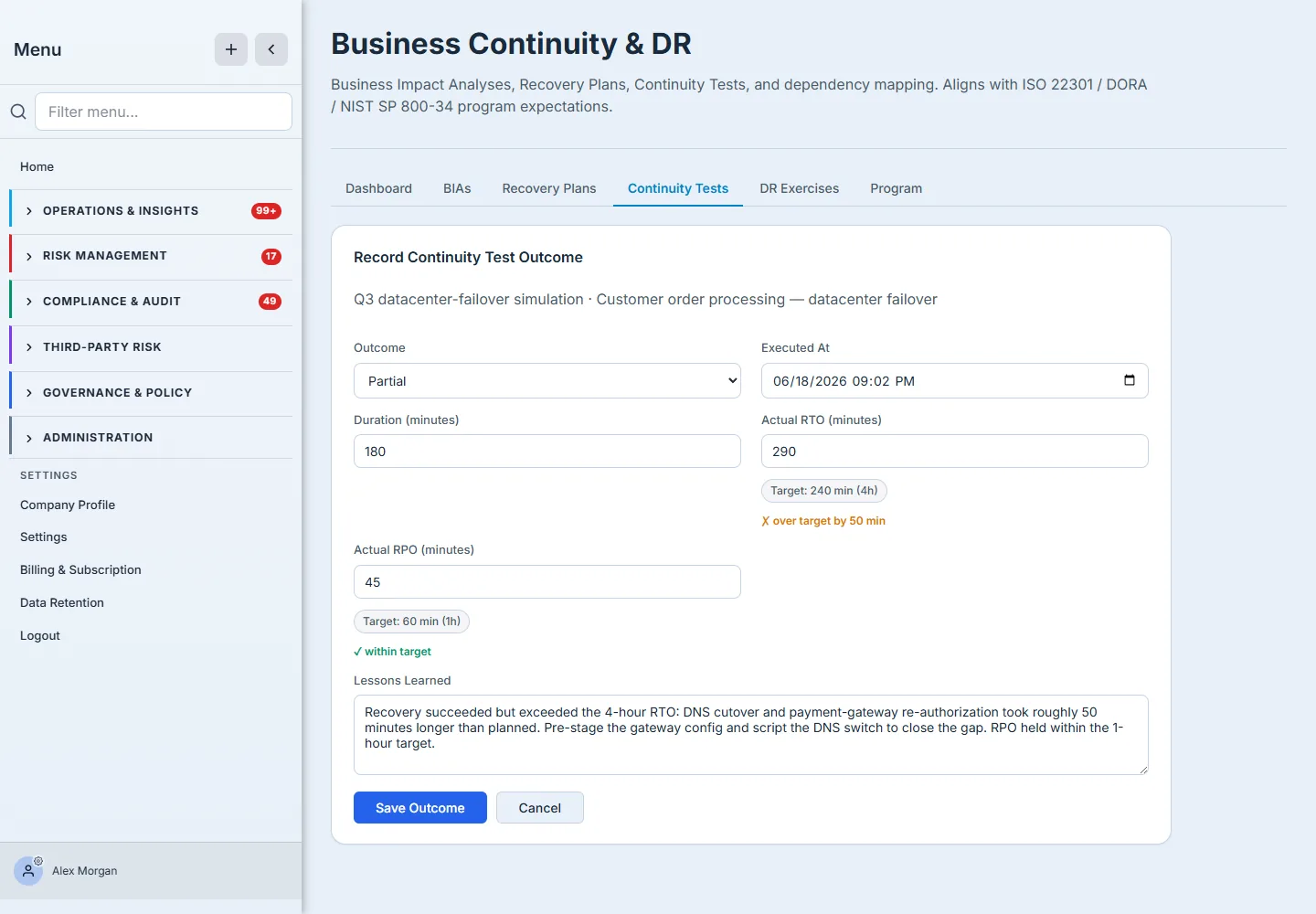
The number that matters is actual vs target. Here the team recovered, but the actual RTO of 290 minutes ran 50 minutes past the 4-hour target — so the outcome is honestly partial, not a green checkmark. The recovery point held inside the 1-hour target. That gap, with its lesson (“pre-stage the gateway config, script the DNS switch”), is the entire reason you test before an outage forces you to.
Step 4 — The result rolls up, and the next test schedules itself
Saving the outcome does two things automatically. The parent recovery plan’s Last Outcome updates, and — because the plan carries a test cadence — its Next Test Due date is set from the date you just ran. Testing becomes a standing schedule, not a thing you remember to do.
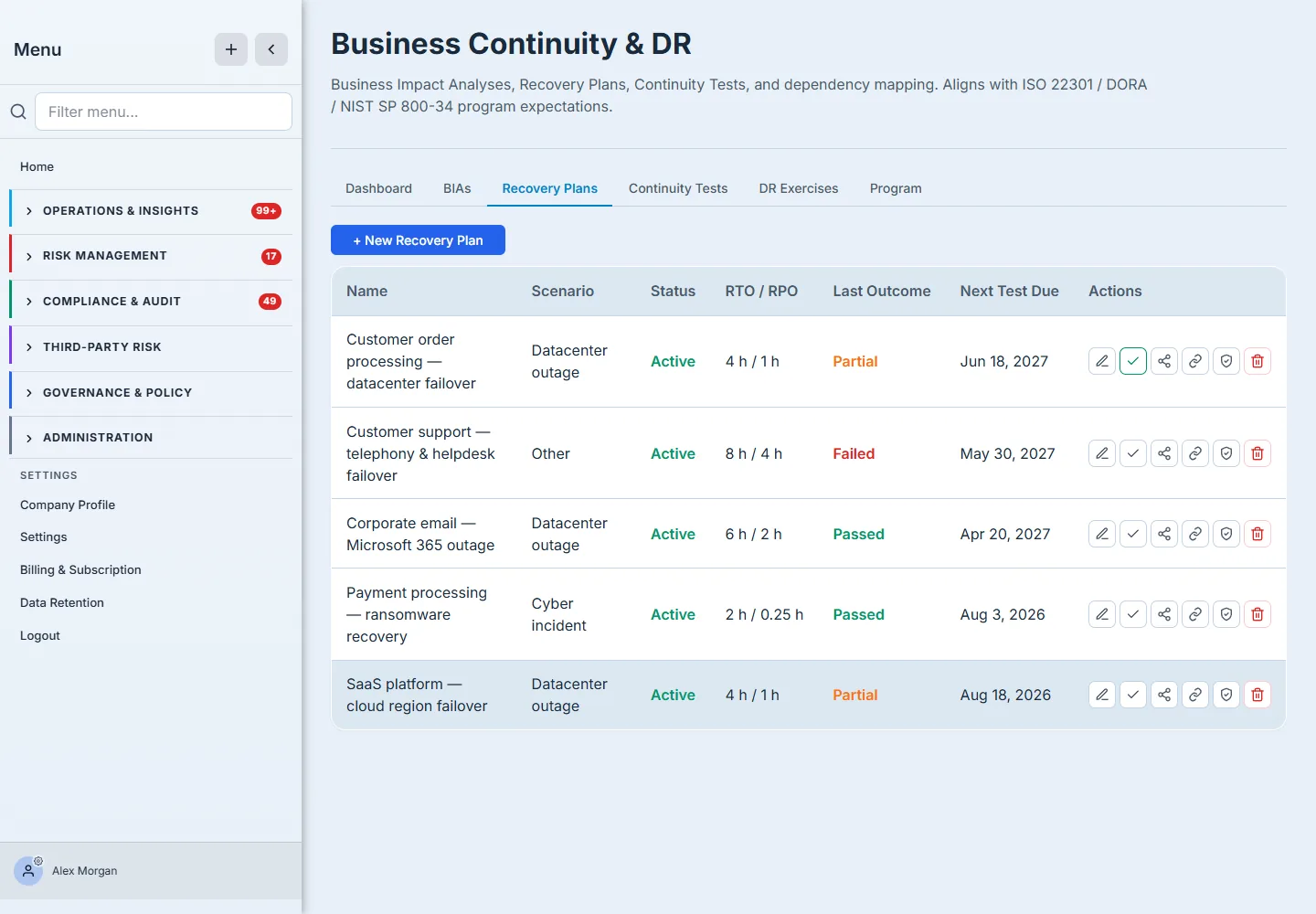
Across the Recovery Plans tab you can now read your whole program at a glance: which plans passed, which came back partial or failed, and which are coming due — the BC/DR Dashboard surfaces the overdue ones so nothing lapses silently.
How the rollup works: the outcome you record is compared inline against the plan’s committed RTO/RPO (so “over target by 50 minutes” is computed for you, not eyeballed), then written back to the plan as its Last Outcome; the plan’s Next Test Due is recomputed from its test cadence starting at the date you ran, which is what makes testing a standing schedule rather than a reminder. When you need the auditor-facing artifact, the Recovery Plans tab’s DR Test Attestation Report rolls a plan’s test history into a signed SOC 2 A1.2 / ISO 22301 report and files it in the Evidence Repository — evidence generated from the record, not re-typed from memory.
Where this ends (and what comes next)
A continuity test records what happened. It does not automatically open remediation work — that’s the job of a DR exercise, which turns failures into tracked work items and risks per asset. If a test surfaces real gaps you need to drive to closure, capture them as a recovery-plan revision or run the scenario as a DR exercise. (That’s the next guide.)
What you walk away with
- A tested recovery plan with a real outcome — passed, partial, or failed — not an untested hope.
- The actual vs target RTO/RPO on the record, so “we recover in four hours” is a measured fact, not a claim.
- A recurring test schedule driven by the plan’s cadence, with overdue tests surfaced before they lapse.
- The exact evidence SOC 2 A1.3 and ISO 22301 §8.5 auditors ask for: a dated test, an honest outcome, and a lesson.
Open the Continuity Tests tab and schedule a tabletop against your most critical plan this week. It costs an hour and a conference room, and it will tell you more about your real recovery time than the plan document ever could.