A Business Impact Analysis tells you what to recover and how fast. A recovery plan is the part an auditor actually reads at 3 a.m.: the ordered playbook for getting a critical process back. And the plans that survive an audit are never just a pair of RTO/RPO numbers — they have the steps, the owners, and a record that you tested them. ISO 22301 §8.4 requires documented business-continuity procedures; NIST SP 800-34 §3.4 expects recovery strategies broken into executable steps; SOC 2 A1.3 wants evidence those plans are tested, not just written.
Most teams stop at a one-page Word document with a target time and a vague “fail over to the DR site.” Talarity makes the plan executable and provable: a scenario, an ordered set of recovery steps each with an owner and a duration, RACI accountability, a test cadence — and a one-click attestation report that files the evidence. This guide builds one end to end.
Who’s involved
- Business continuity owner — authors the plan, sequences the steps, sets the test cadence.
- Process / system owner — the Accountable party; their process, their recovery.
- Auditor — opens the plan, checks for steps + owners + a recorded test, and pulls the attestation report.
What’s on the page
Open Business Continuity & DR (/app/grc/bcdr). It’s a multi-tab workspace — Dashboard, BIAs, Recovery Plans, Continuity Tests, DR Exercises, and dependency mapping — and this guide lives on the Recovery Plans tab. The register is one row per plan, with these columns:
- Disaster Scenario — the scenario the plan recovers from (datacenter outage, cyber incident, natural disaster, pandemic, supply-chain).
- RTO / RPO — the plan’s recovery-time and recovery-point targets, in hours.
- Last Outcome — the result of the most recent continuity test, as a badge: untested, passed, partial, or failed. A plan that’s never been tested reads untested — itself an audit finding.
- Next Test Due — the date the cadence says this plan must be re-tested.
- Actions — per-row controls: edit, approve (a toggle), link dependencies, and run a DR attestation.
Read top to bottom, the register answers one question at a glance: which plans are current, and which are overdue or never tested?
Step 1 — Start at the register
Open Business Continuity & DR (/app/grc/bcdr) → the Recovery Plans tab. Each plan shows its disaster scenario, status, RTO/RPO, the latest test outcome, and when the next test is due — so you can see at a glance which plans are current and which are overdue.
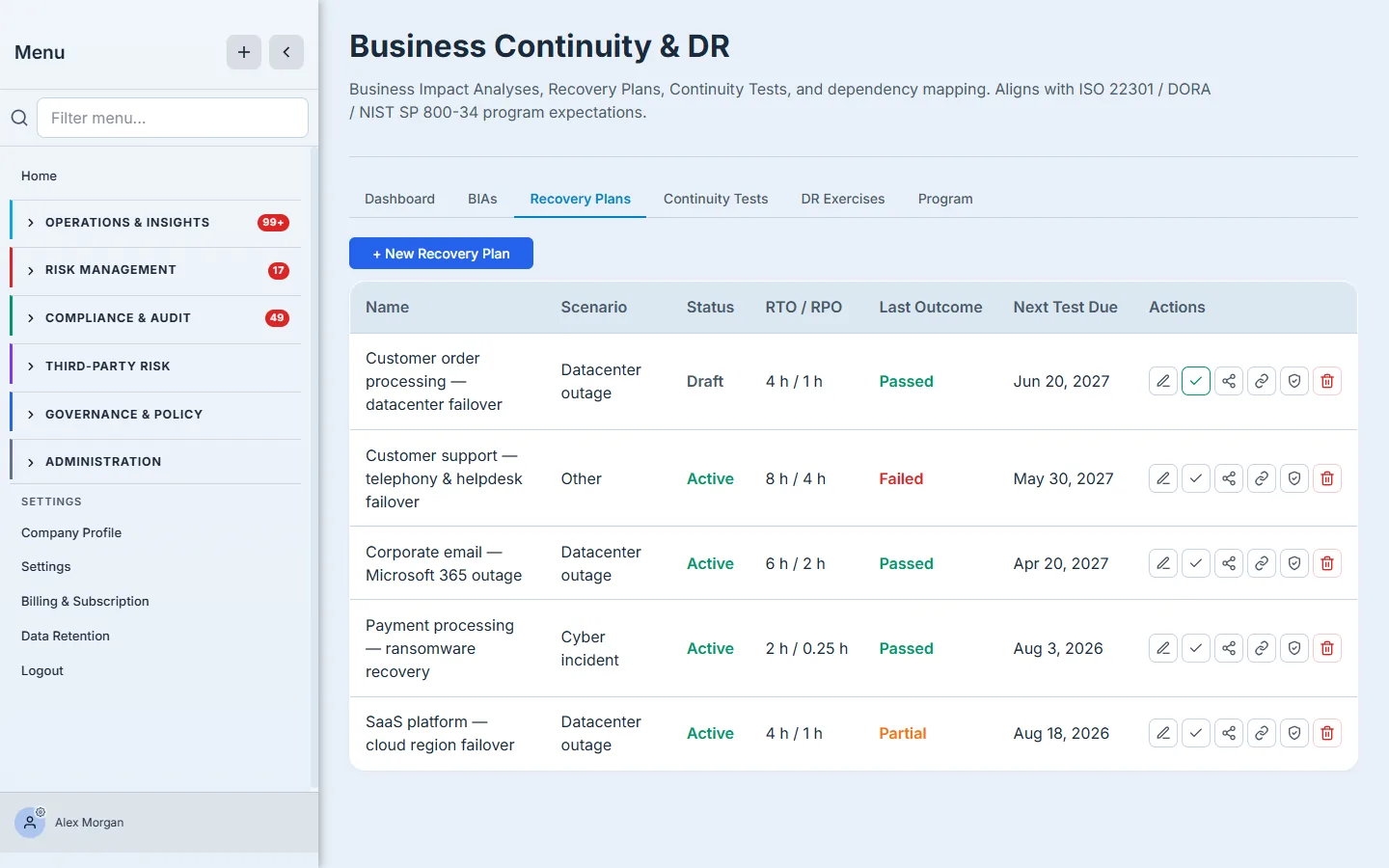
Click + New Recovery Plan to start one.
Step 2 — Tie it to a BIA and pick the scenario
The form opens on the plan’s frame: a name, the BIA it recovers (so the plan inherits the right RTO/RPO targets), the disaster scenario (datacenter outage, cyber incident, natural disaster, pandemic, supply-chain), the plan’s own RTO/RPO, the alternate site, the activation criteria (when do you actually invoke this?), and the communication plan (who gets told, how).
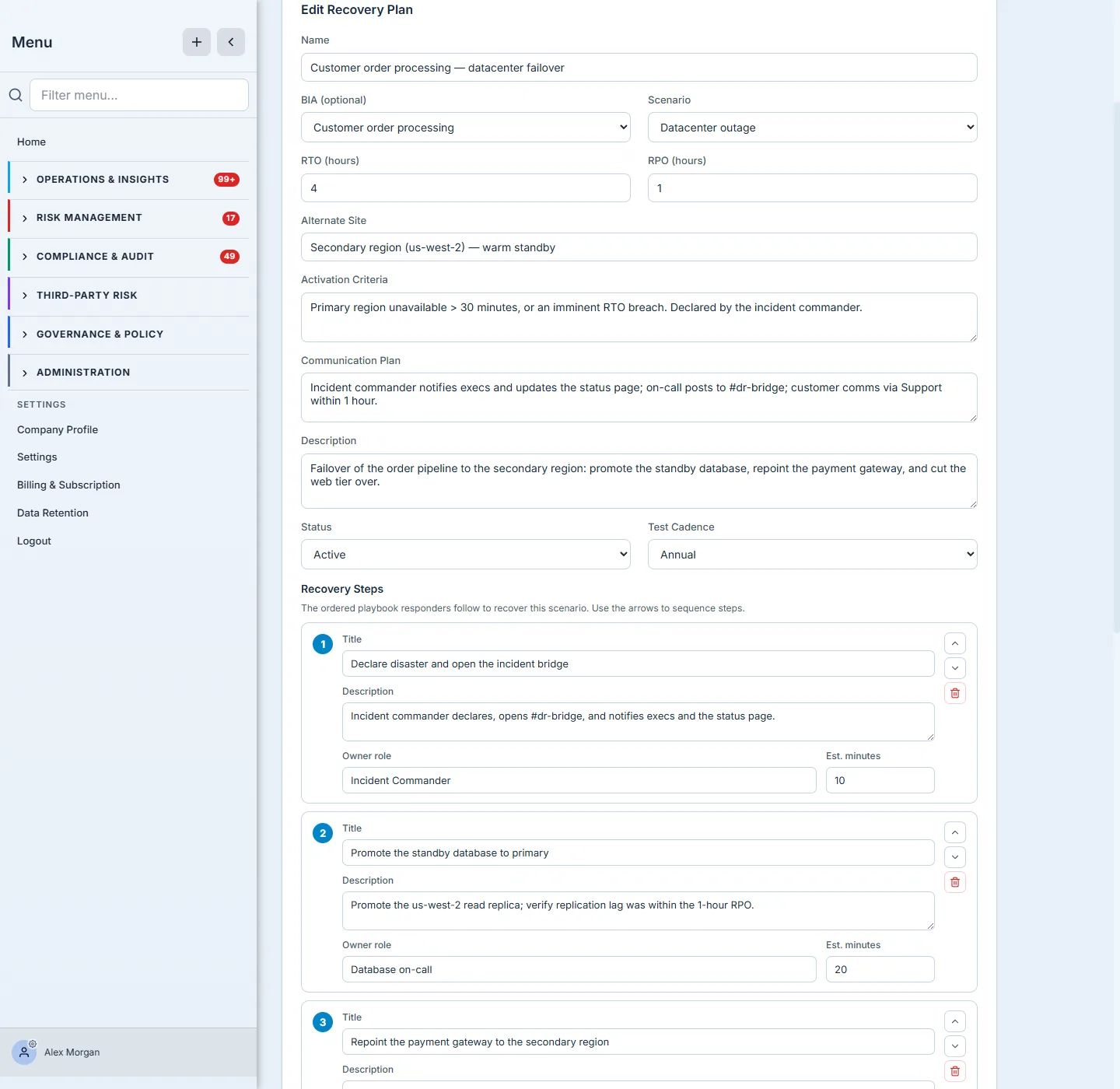
Linking the plan to its BIA is what keeps the program honest — a Critical process with a 4-hour RTO can’t have a recovery plan that takes a day.
Step 3 — Write the ordered recovery steps
This is the part that separates a plan that survives an audit from one that doesn’t. Add the ordered recovery steps — each with a title, what to do and how to confirm it worked, the owner role, and an estimated duration. Sequence them with the arrows into the exact order responders will follow.
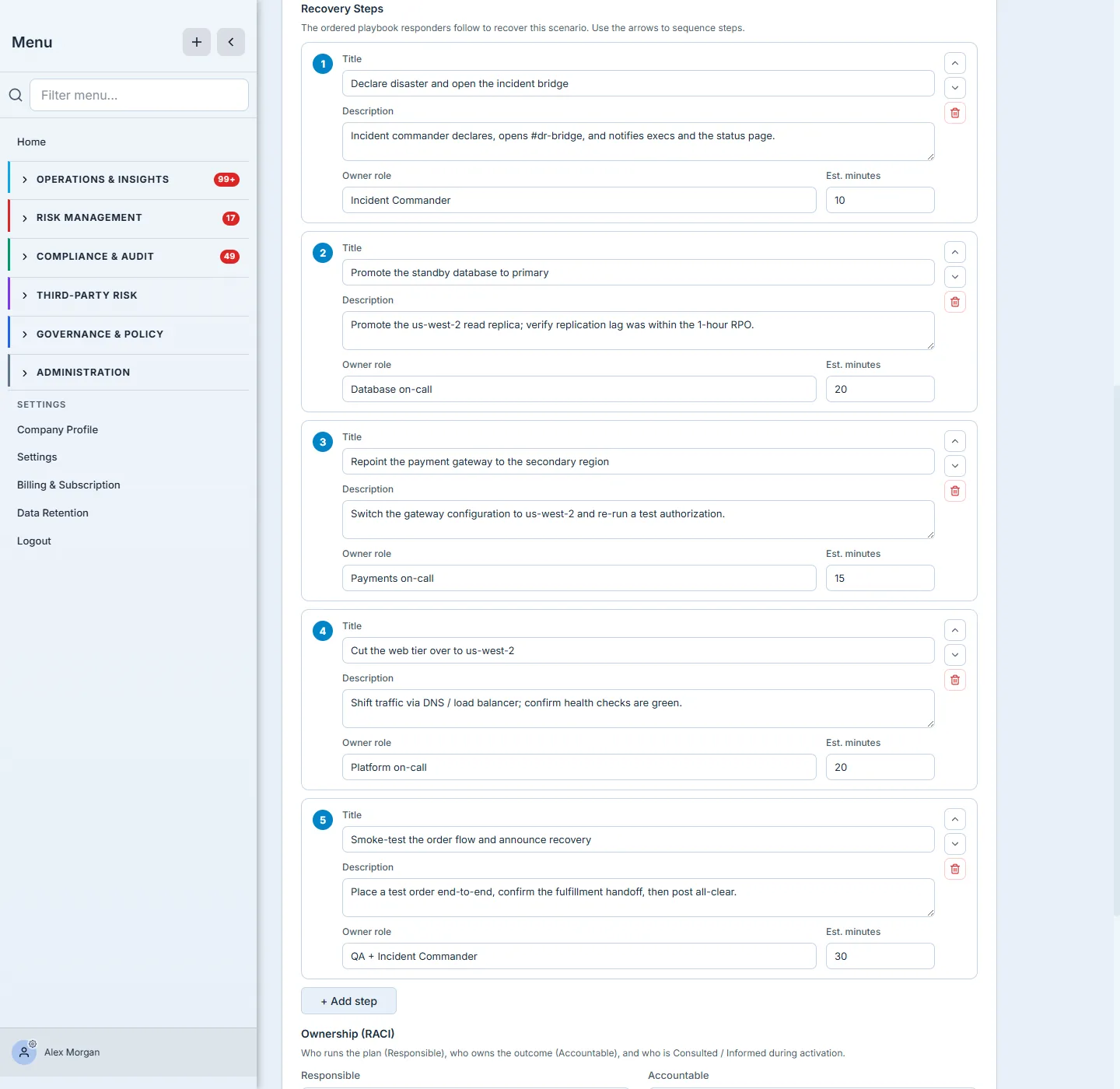
The recovery steps are the plan; everything else is metadata. A target RTO with no steps is a wish. Steps with owners and durations are a runbook someone can execute under pressure — and the thing an auditor can actually evaluate.
Step 4 — Assign RACI ownership
A plan with no owner is nobody’s job at 3 a.m. Assign RACI: who’s Responsible (does the work), Accountable (owns the outcome), Consulted (weighs in), and Informed (kept in the loop). Accountability is the difference between a plan that gets executed and one that gets argued about during the outage.
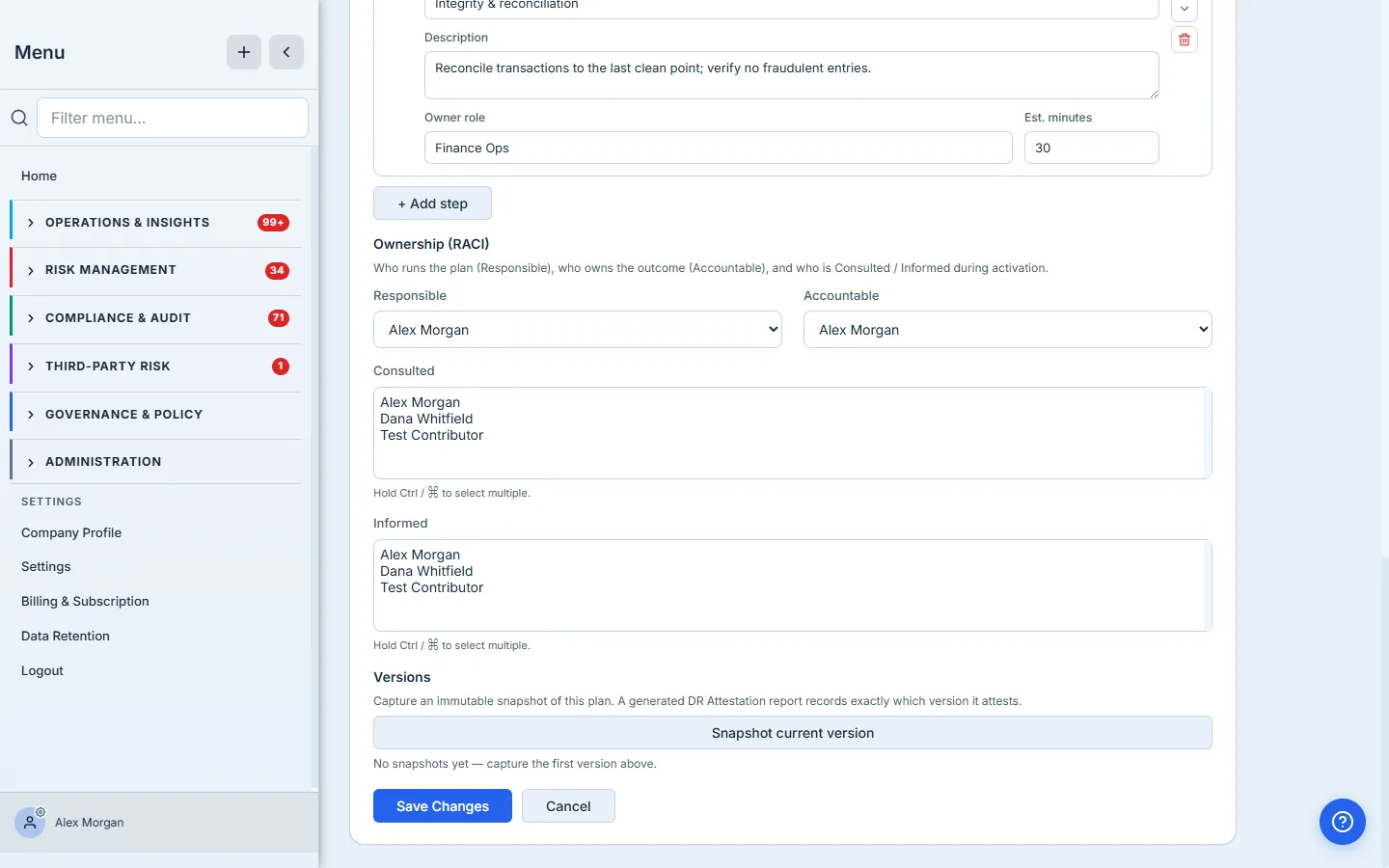
Step 5 — Test it, then attest
A plan you haven’t tested is a hope, and an auditor knows it. Schedule a continuity test against the plan (tabletop through full-interruption), record the outcome, then approve the plan. Now open DR Attestation: Talarity runs a readiness gate — a recorded test outcome is the hard requirement; generation is blocked until the plan has one. (An unapproved plan still generates, but the gate flags the missing approval as a warning, so you can see it before you sign.) Once it passes, Talarity produces a signed DR Test Attestation Report (SOC 2 A1.2 / ISO 22301) and files it in the Evidence Repository.
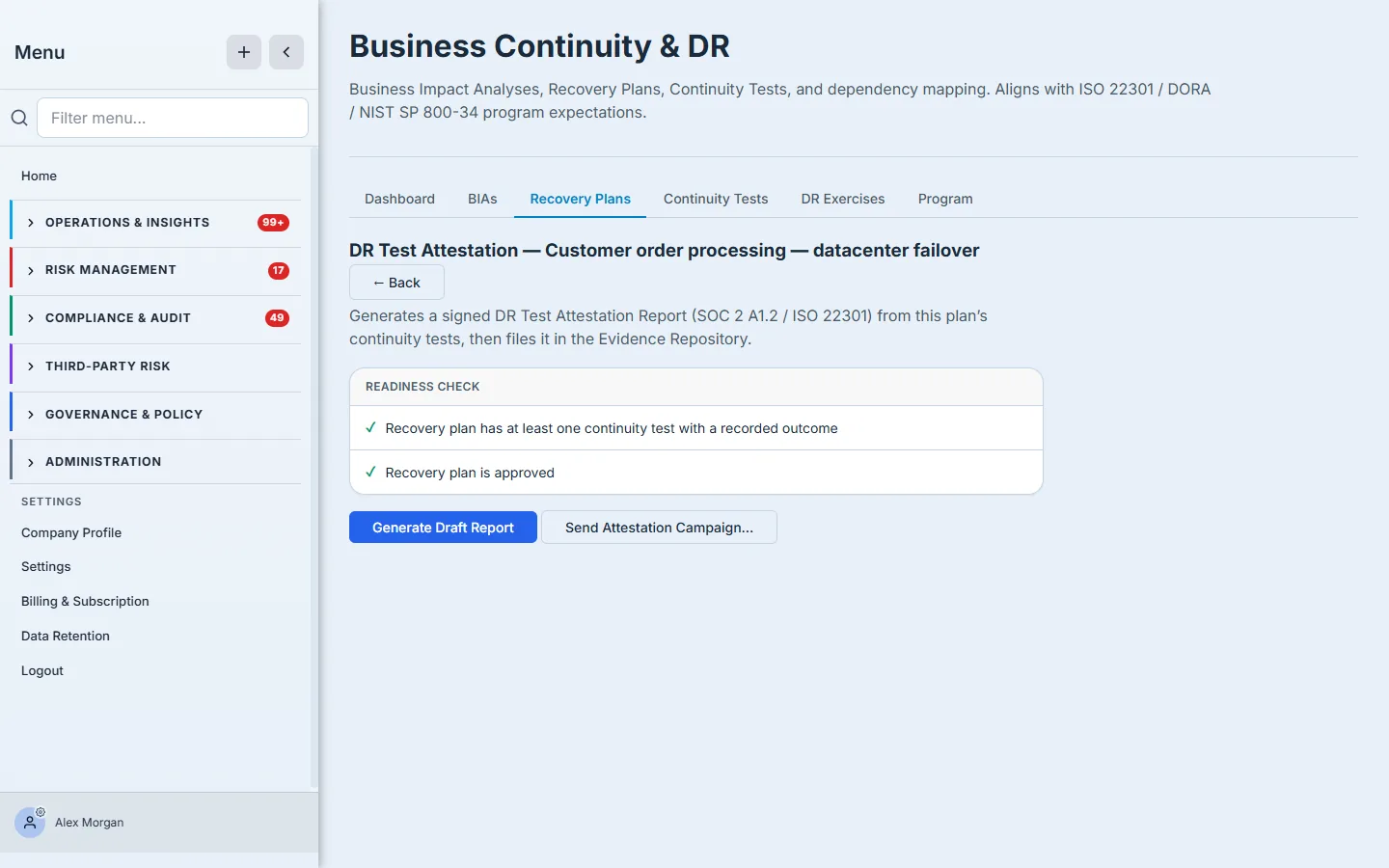
That readiness gate is the whole point: it won’t let you produce an attestation for a plan that hasn’t been tested or approved — so the evidence you hand an auditor is real.
How the page works
A few mechanics make the register trustworthy rather than decorative:
- RTO/RPO is anchored to the BIA. Tying a plan to its BIA is what lets the program catch a plan that promises a slower recovery than the impact analysis demands — the targets aren’t a free-text aspiration sitting next to an unrelated number.
- Approve is a state, not a stamp. The approve action is a toggle — it sets the plan’s approved state and can be revoked (“Approved — click to revoke”). Revoking approval immediately makes the plan ineligible for a fresh attestation.
- Next Test Due decays on its own. It’s computed from the plan’s test cadence against the last test date, so a plan that passed a year ago slides toward overdue by itself — the register tells you today’s truth, not the day-you-tested truth.
- The attestation is gated, in code. The DR Attestation panel runs a readiness check — two rows that must both be green: a recorded test outcome and an approved plan. Only then will it generate the signed DR Test Attestation Report (SOC 2 A1.2 / ISO 22301) and file it in the Evidence Repository. There is no way to produce an attestation for an untested or unapproved plan, which is exactly why the resulting evidence holds up.
What you walk away with
- A recovery plan tied to its BIA and a disaster scenario, with honest RTO/RPO.
- An ordered, owned runbook — steps with what-to-do, an owner role, and a duration — not a paragraph of intent.
- RACI accountability so there’s no ambiguity under pressure.
- A tested, approved plan and a signed attestation report filed as evidence — the exact artifact SOC 2 and ISO 22301 auditors ask for.
Open the Recovery Plans tab and write the plan for your most critical process — the one whose BIA scared you most. Give it real steps, real owners, and a test date. The plan that survives an audit is the one you can actually execute; build that one first.