Most teams build their controls one framework at a time: a SOC 2 set, an ISO set, a CIS set — three spreadsheets describing the same multi-factor-authentication safeguard three different ways. Every new framework means re-documenting controls you already have. Talarity does it once. The Common Control Library is a single canonical set of controls, each mapped to the requirements of many frameworks — so the access-control work you do for CIS already counts toward NIST 800-53, PCI DSS, SOC 2, and HIPAA. Assess once, comply many.
Who’s involved
- Compliance lead — owns the control set across every framework the org pursues.
- Control owner — implements and tests the controls.
- Auditor — wants one defensible control inventory, not a pile of per-framework spreadsheets.
What’s on the page
The Control Library (under Compliance → Frameworks & Control Library) is a six-tab workspace over one canonical control set:
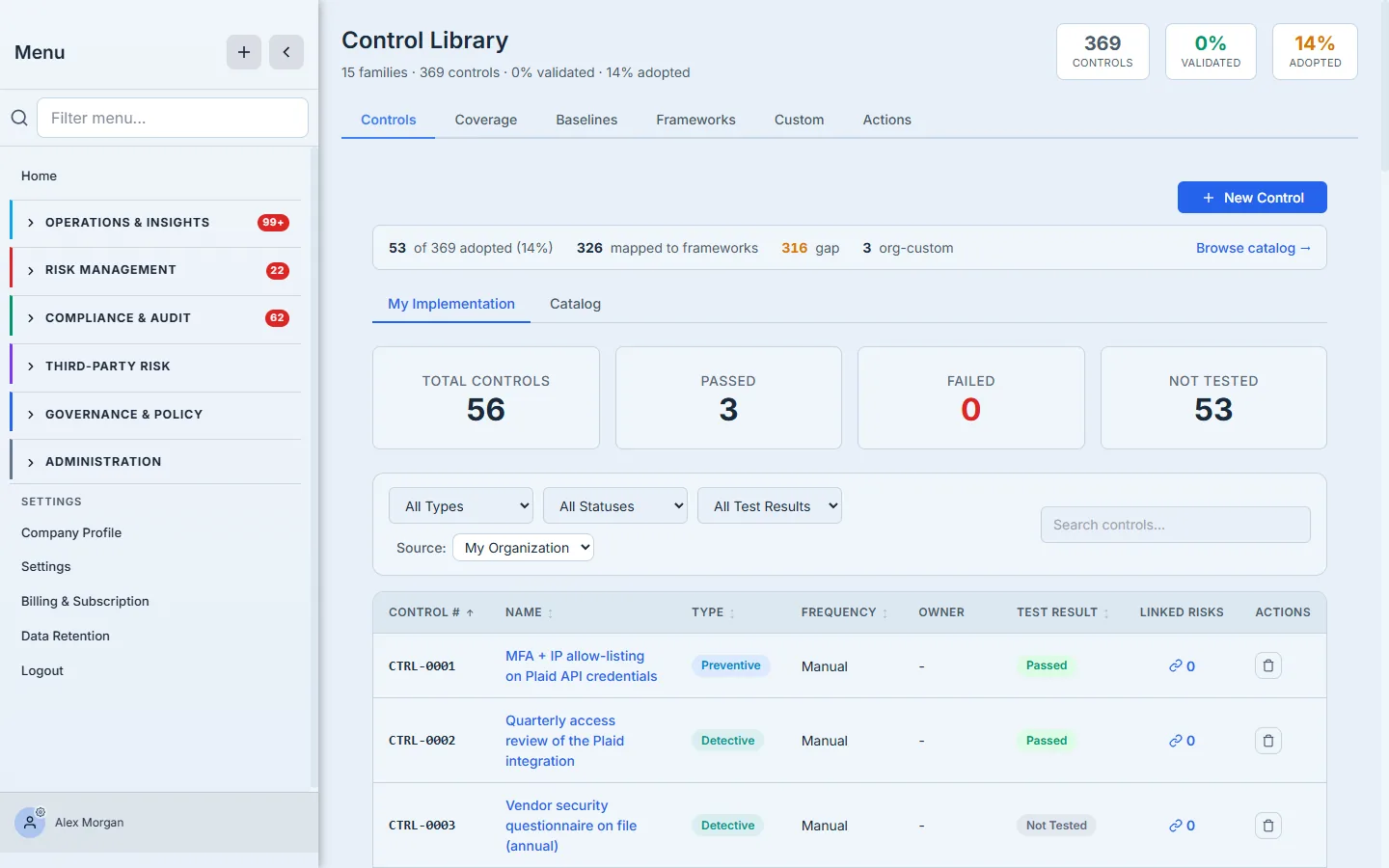
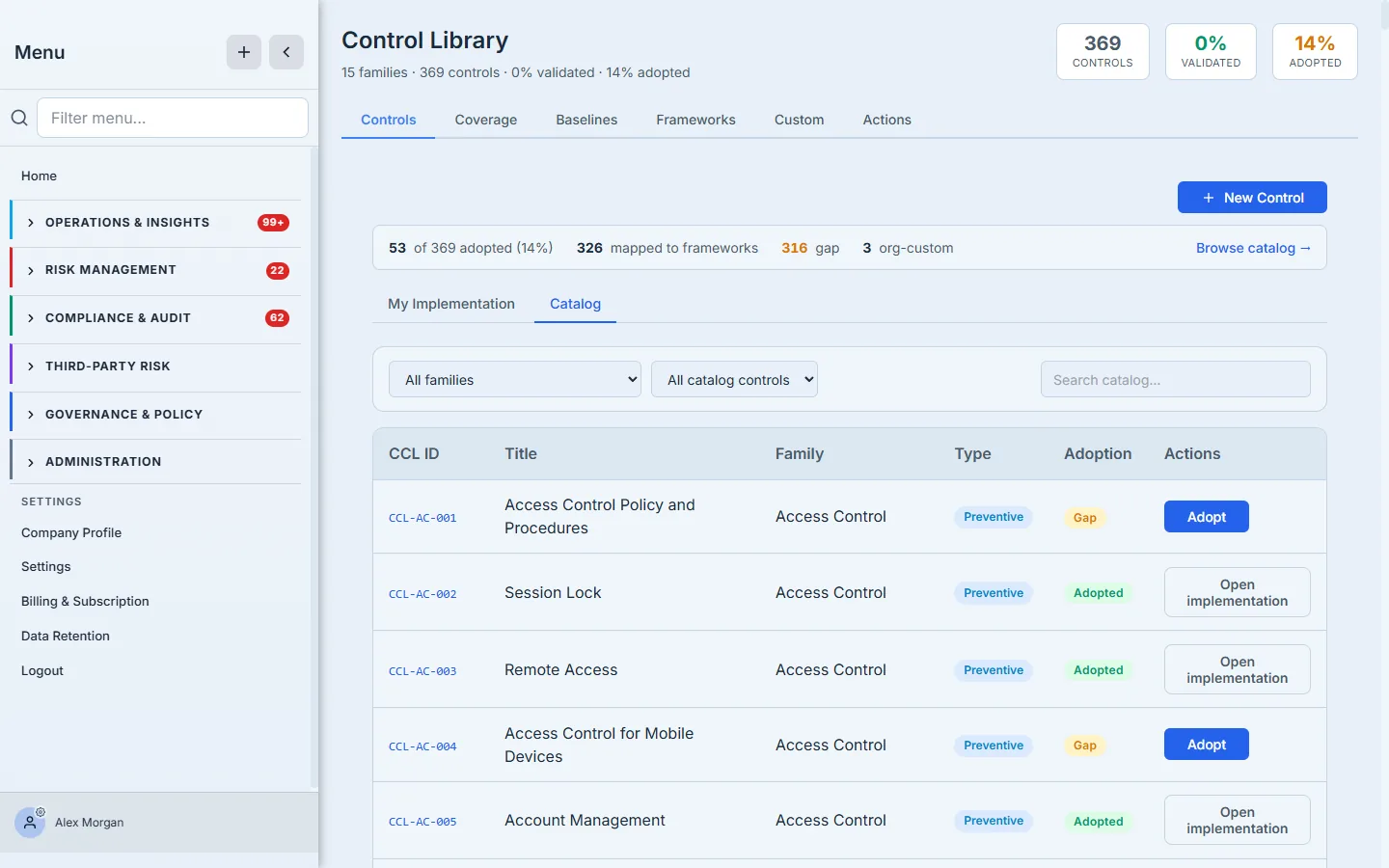
- Controls — your control inventory, with a Library / Catalog toggle. Library is your org’s adopted controls, each row showing type (preventive / detective / corrective), frequency, owner, test result, and linked risks. Catalog is the 369 canonical CCL controls across 15 families, each marked Adopted or Gap with a one-click Adopt.
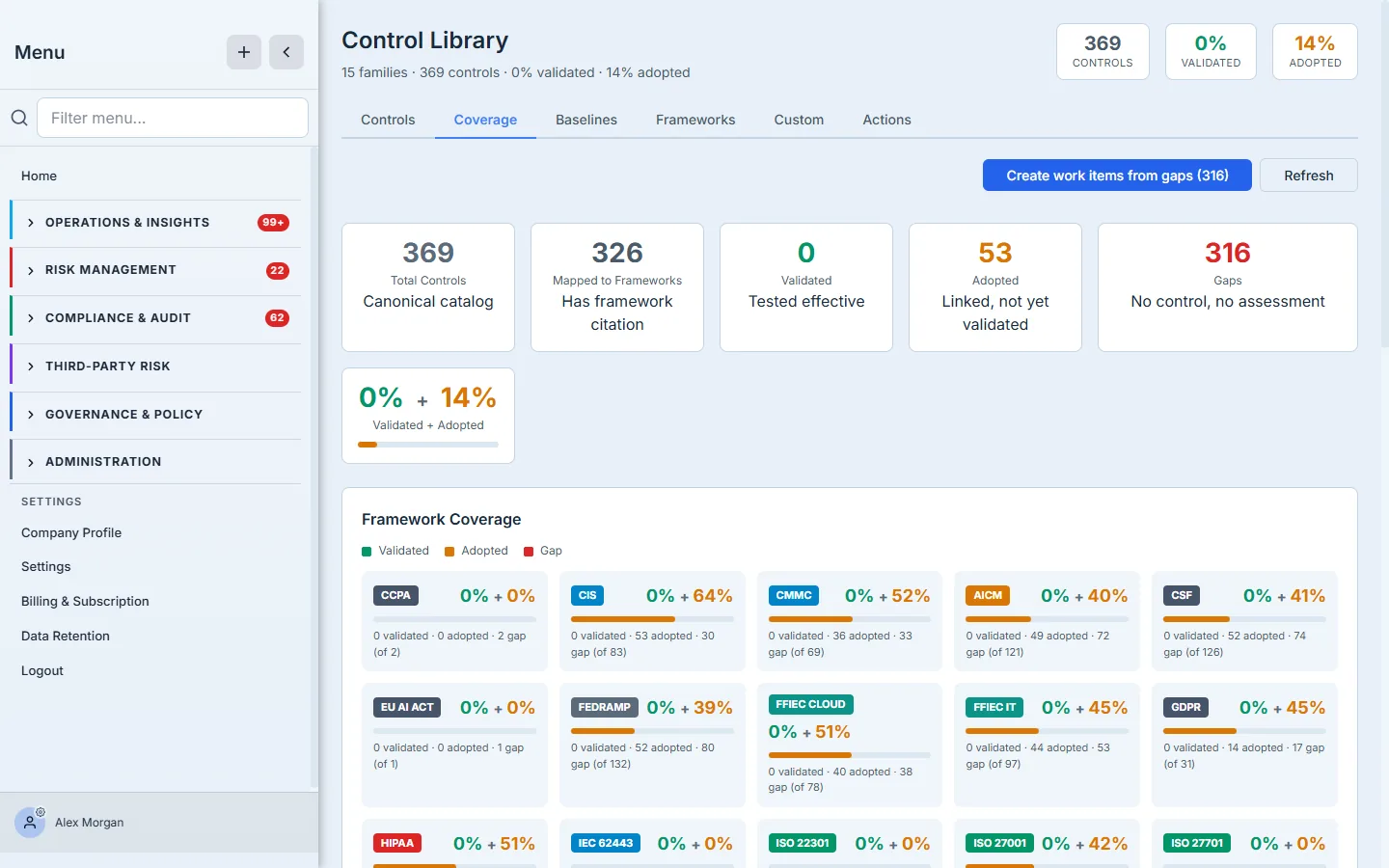
- Coverage — the scoreboard: adopted / validated / gap against the 369-control set, with per-framework bars.
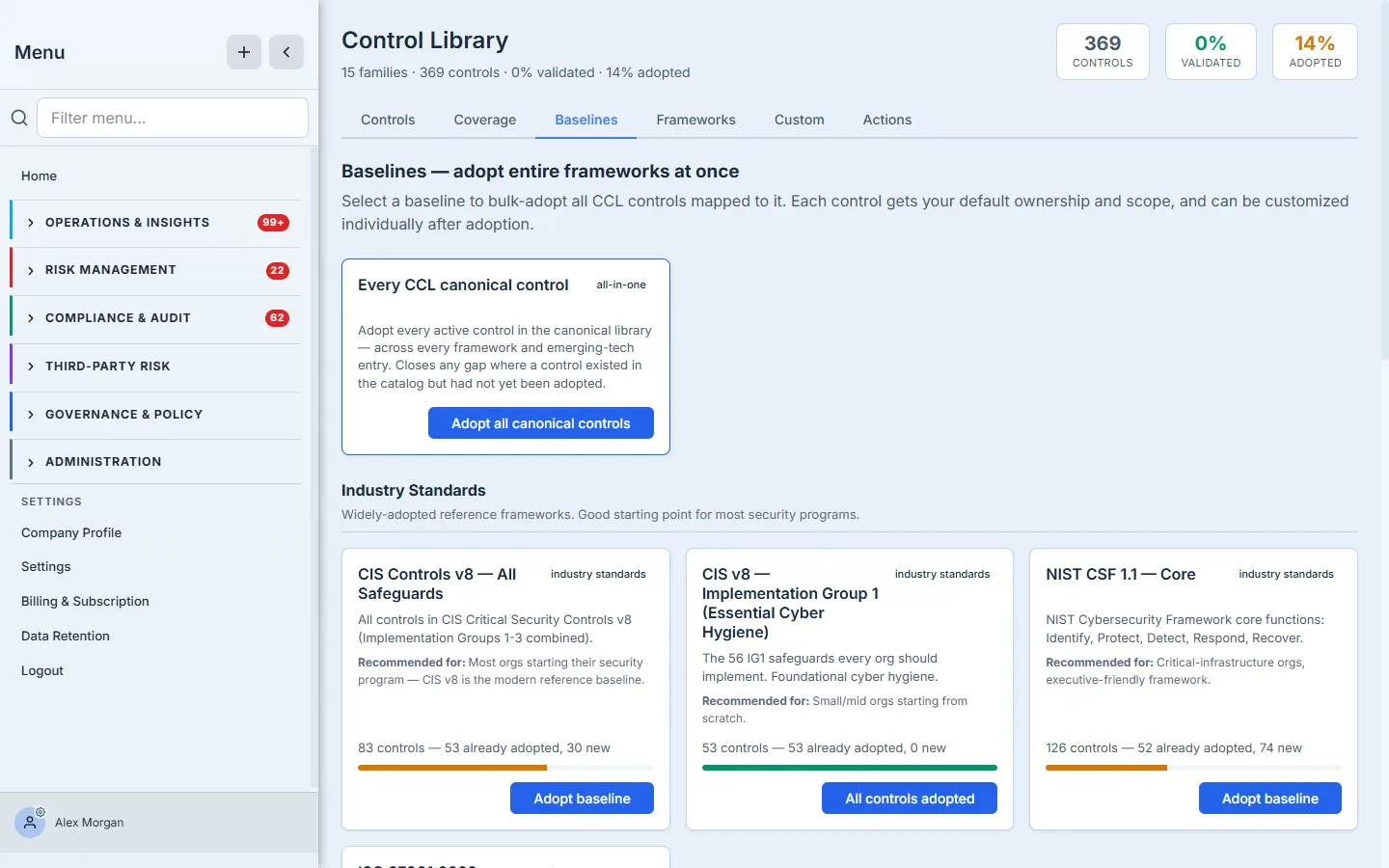
- Baselines — bulk-adopt cards (CIS v8, CIS v8 IG1, NIST CSF Core…), each adopting every canonical control mapped to that framework at once.
- Frameworks — the Cross-Framework Coverage matrix showing how one framework’s adopted controls imply coverage across the rest.
- Custom — frameworks and controls your org has authored beyond the canonical set.
- Actions — the review queues that keep the library honest: mapping Conflicts to resolve and CCL Suggestions to accept or dismiss.
Step 1 — Your control library
Open the Control Library. This is your org’s single inventory — here, 56 controls: a few org-specific ones (MFA + IP allow-listing on the payment API, a quarterly access review of the integration) plus the ~53 adopted from a CIS baseline. Each row shows its type (preventive / detective / corrective), frequency, owner, test result, and linked risks.
Step 2 — A catalog of 369 pre-built controls
You don’t write controls from scratch. The Catalog is the Common Control Library itself — 369 canonical controls across 15 families (Access Control, Data Protection, Vulnerability Management, and more). Each is either Adopted (already in your library) or a Gap you can adopt in one click.
Step 3 — Adopt a whole framework at once
The fastest way to stand up a control set is Baselines. Pick one — CIS v8 (All Safeguards), CIS v8 IG1 (Essential Cyber Hygiene), NIST CSF Core — and bulk-adopt every canonical control mapped to it, each pre-filled with your default owner and scope. Minutes, not weeks; customize individual controls afterward.
Step 4 — One control, every framework
Here’s why a common library matters. Because each control is mapped to the requirements of many standards, the Cross-Framework Coverage matrix shows how progress in one framework implies coverage of the rest. The access-control controls you adopted for CIS already satisfy the matching NIST 800-53, PCI DSS, SOC 2, and HIPAA requirements — no re-documentation.
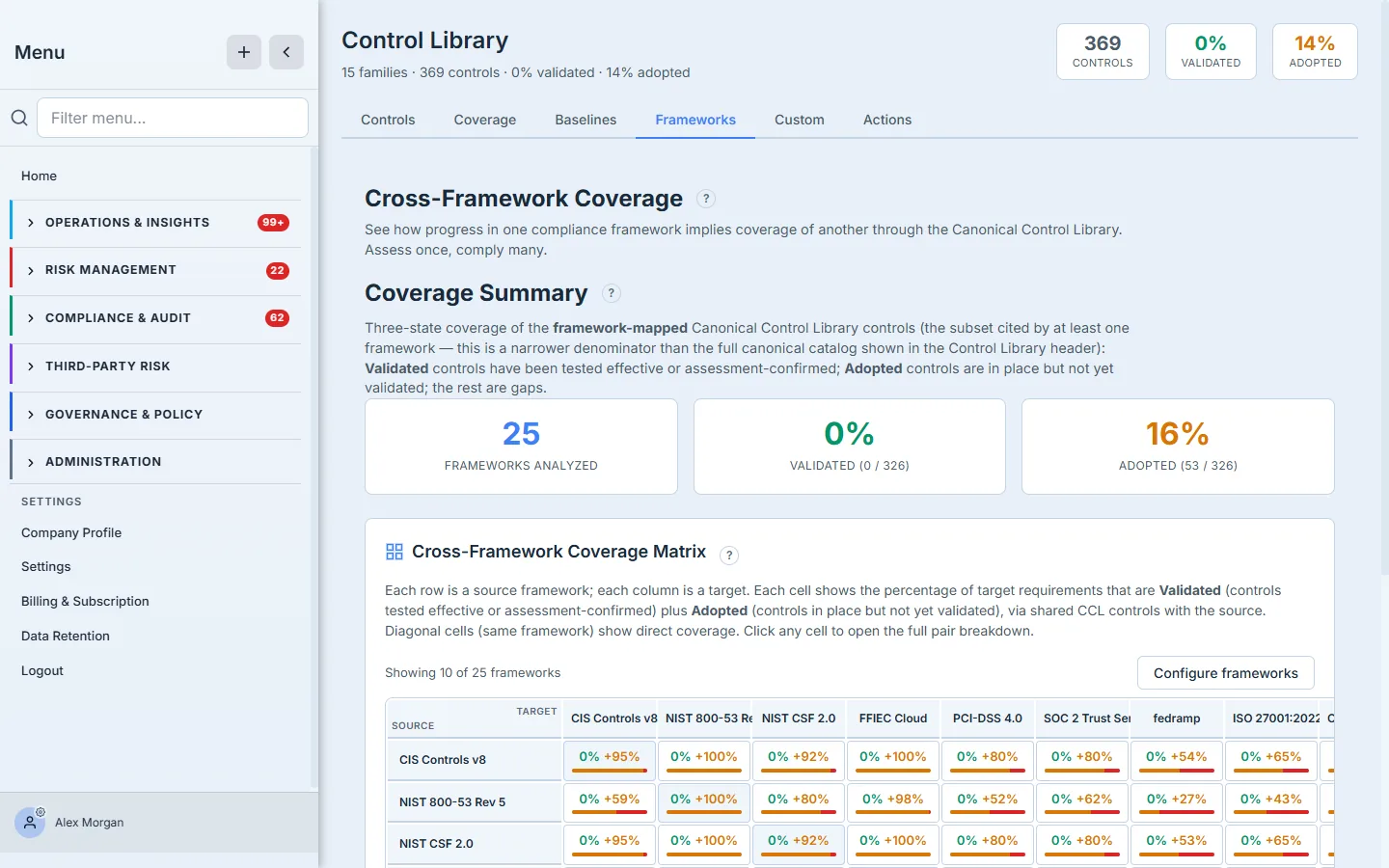
This is the whole point of a common control library: you maintain one set of controls, and the crosswalk does the per-framework accounting for you.
Step 5 — Where you stand
The Coverage tab is the scoreboard. Of the 369 canonical controls, it shows how many you’ve adopted, how many are validated (tested effective), and how many remain gaps — with a per-framework breakdown so you can see exactly where each standard stands.
How the page works
The five tabs are views over one shared model, and a few mechanics make the “assess once, comply many” promise real:
- Each canonical control carries its framework mappings. A CCL control isn’t tied to a single standard — it ships with mappings to the matching requirements across CIS, NIST 800-53, PCI DSS, SOC 2, HIPAA, and the rest. Adopting the control once is what credits every mapped requirement; the Cross-Framework Coverage matrix is derived from those mappings, not maintained by hand, so it can’t drift from your library.
- Adoption is a previewed, bulk operation. Baselines runs a three-step wizard — list the baselines, preview exactly which controls it will add, then commit — so you see the blast radius before you adopt. Every control it adds lands pre-filled with your default ownership and scope, and stays individually customizable afterward. The Catalog’s one-click Adopt is the same operation for a single control.
- A control lives in one of three states. Adopted (in your library), Validated (adopted and tested effective), or Gap (canonical but not yet adopted). The Coverage tab tallies those three against the 369-control canonical set and per framework — which is why “53 adopted / 316 gaps” and the per-framework bars always reconcile to the same inventory.
- Org-specific controls coexist with adopted ones. Your library can hold controls you wrote (the payment-API MFA rule, the quarterly integration review) alongside the baseline-adopted ones — the canonical catalog is a starting point, not a cage.
What you walk away with
- One control inventory, not one per framework — adopt from a canonical catalog of 369.
- A baseline in minutes — bulk-adopt CIS, NIST CSF, and more with your defaults applied.
- Assess once, comply many — the crosswalk turns one framework’s progress into coverage across the rest.
Open the Control Library, go to Baselines, adopt CIS IG1, and watch your cross-framework coverage light up. The spreadsheet-per-framework era is over.