A signed vendor contract is a stack of promises: an uptime SLA, a 72-hour breach-notification window, an audit right, an encryption clause, a data-return-on-exit term. On signing day everyone knows them. Eighteen months later, nobody’s re-read them — and the contract quietly auto-renews for another year, carrying security terms that were written for a smaller, lower-risk version of the relationship.
That’s the part auditors push on. ISO 27001:2022 A.5.20 expects information-security requirements to be addressed in supplier agreements, and A.5.22 expects you to monitor and manage changes to supplier services across the relationship. SOC 2 CC9.2 expects ongoing management of vendor commitments. None of that survives a contract you signed and filed.
The two failure modes are mirror images. One: an obligation the vendor agreed to (notify us of a breach in 72 hours, hold SOC 2, let us audit) is never tracked, so you find out at incident time that it was never enforceable. Two: a contract auto-renews on a date nobody was watching, locking in another term before you could renegotiate the security addendum or walk away. Talarity closes both — it tracks what each vendor committed to and it queues every renewal 90 days out so the renew-or-walk decision is deliberate and recorded.
Who’s involved
- Vendor manager — records the contract and makes the renewal call when it comes due.
- Security & privacy leads — track the obligations that matter to them (the DPA, the breach window, the encryption clause).
- Procurement / legal — work the renewal queue: renegotiate, sunset, or continue, with the rationale on the record.
- Auditor — reads the obligation list, the renewal decisions, and the exit plan, each timestamped and attributed.
What’s on the page
This cluster lives under Third-Party Risk → Contracts & Obligations — here’s what you’ll touch:
- Contracts (
/app/contracts) — the contract register: every vendor agreement with its type, value, effective/expiration dates and auto-renew flag, filterable by vendor, type and status, with an expiring-soon lens. This walkthrough adds contracts from the Renewals queue in Step 1; the Contracts hub is those same records viewed as one list. - Renewals (
/app/vendor-renewals) — the renewal queue bucketed by urgency (Imminent ≤30d / Approaching 31–60 / Upcoming 61–90), each card showing days-remaining, the auto-renew flag, and Renew / Sunset / Continue actions, plus a Decided view. - Obligations (
/app/contract-obligations) — a multi-tab hub: Dashboard (counts by status + obligation type), All Obligations (the filterable register — type, vendor, contract, status, review/expiry), Renewals (a fuller negotiation pipeline), Exit Plans (four-category transition checklists), and SLAs — plus a Clause Library of framework-tagged templates and an AI Extraction tab.
Step 1 — Put the contract on the record
Everything keys off the contract, so it goes in first. Open Third-Party Risk → Contracts & Obligations, on the Renewals tab (/app/vendor-renewals), and click Add Contract. You pick the vendor, give it a title, choose the type (MSA, SOW, DPA, NDA, SLA), set the effective and expiration dates, optionally record the annual value, and flag whether it auto-renews.
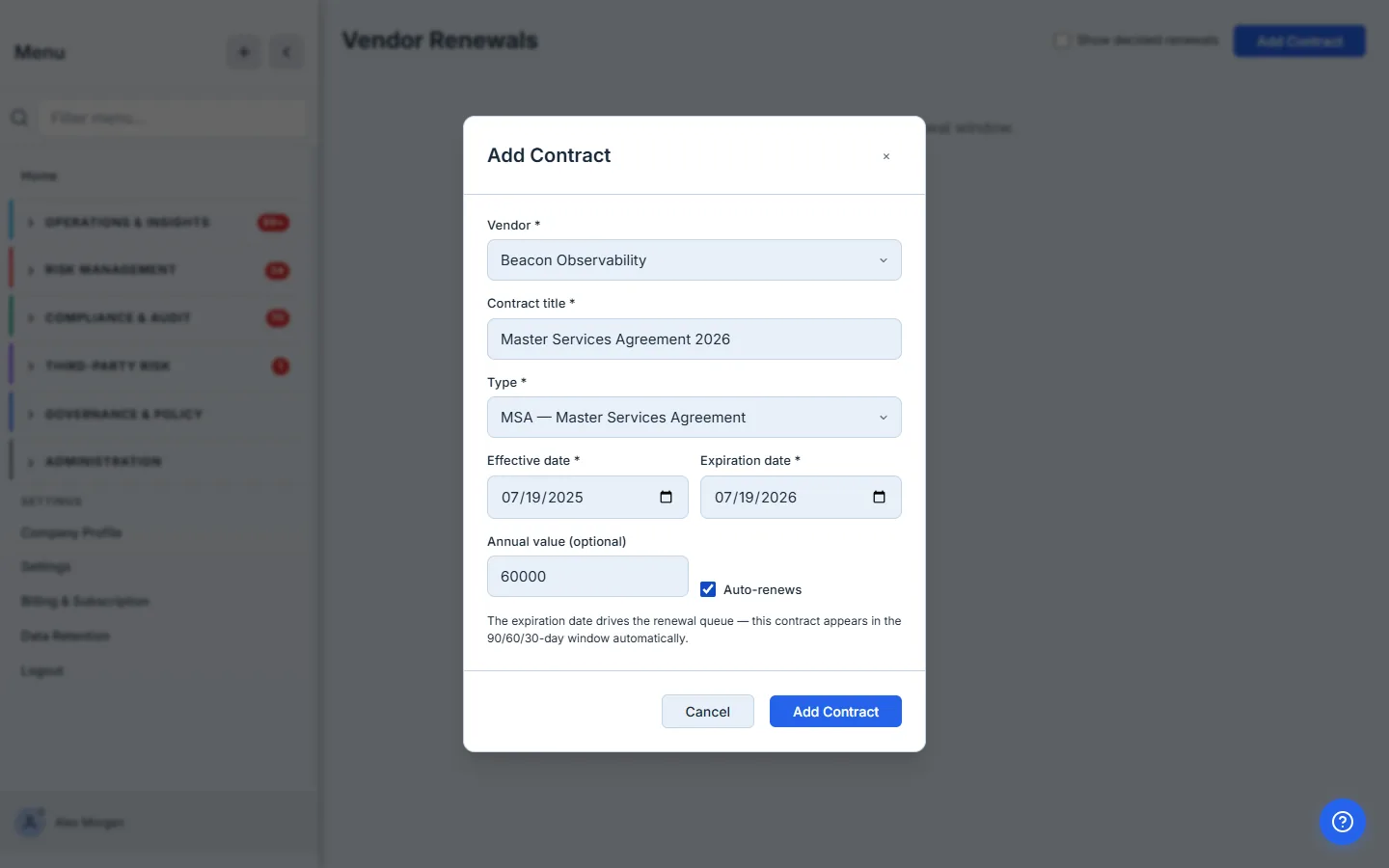
The expiration date is the load-bearing field. It’s not just metadata — it’s what puts the contract into the renewal queue. Talarity treats the expiration as the renewal-decision deadline and starts surfacing the contract 90 days ahead, so “when does this come up for renewal?” stops being a date buried in a PDF and becomes a dated obligation the platform tracks.
Step 2 — The renewal queue, 90 / 60 / 30 days out
The moment it’s saved, the contract lands in the renewal queue, bucketed by urgency: Imminent (≤30 days), Approaching (31–60), and Upcoming (61–90). Each card shows the days remaining, the vendor, the expiry, and — critically — whether it auto-renews.
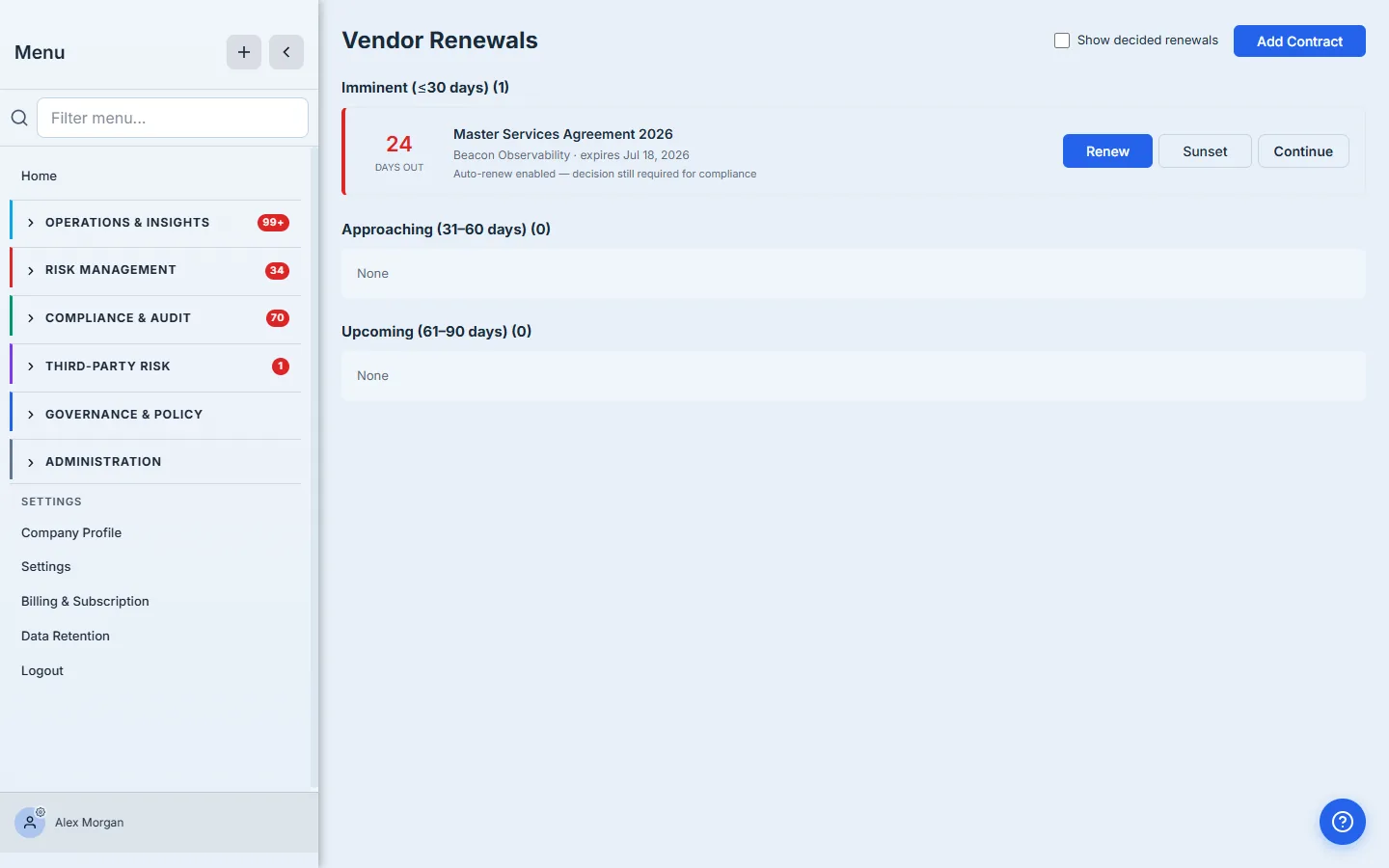
The line that earns its place is “Auto-renew enabled — decision still required for compliance.” An auto-renewing contract is exactly the one most likely to slip through: it renews itself, so nobody acts, and the stale terms ride along. Talarity surfaces it anyway and asks for an explicit decision, because “we let it auto-renew” and “we reviewed it and chose to renew” are very different answers at audit time.
A restricted vendor can’t be renewed. If a vendor is in a restricted lifecycle state — because monitoring flagged something serious — the Renew button is disabled with a warning. You don’t get to quietly extend a contract with a vendor your own program has flagged; clear the restriction first.
Step 3 — Make the call, and record it
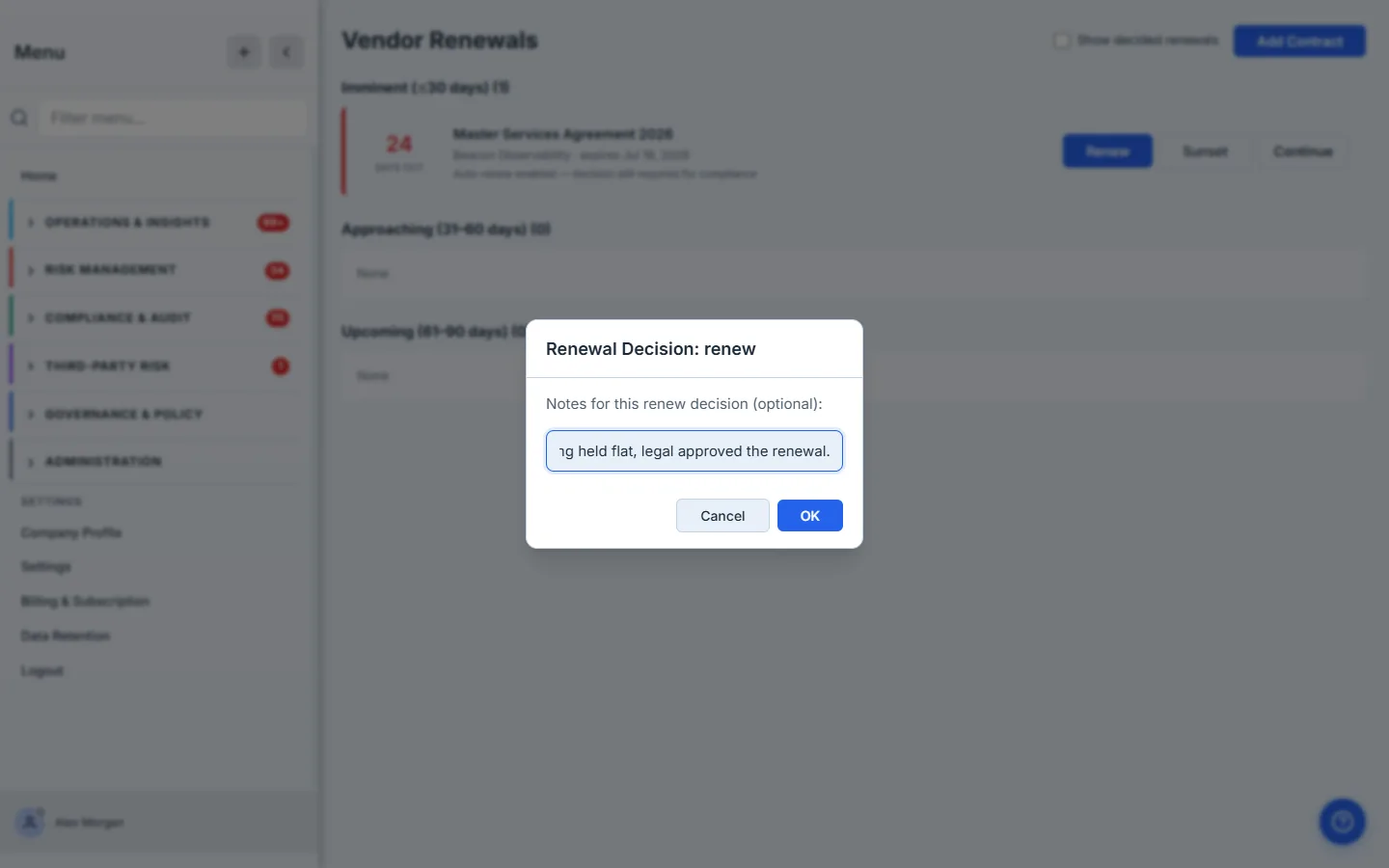
Click Renew, Sunset, or Continue and you’re asked for a note. This is the whole point of the queue: the decision becomes a recorded event, not a non-event.
The three choices aren’t interchangeable:
- Renew — you’re extending the relationship; the note is where the rationale lives (“security addendum re-confirmed, SOC 2 + DPA current, pricing held”).
- Sunset — you’re ending it; the note becomes the paper trail for why, and the exit plan (Step 7) is how you execute it.
- Continue — you’re keeping the service without a formal renewal (month-to-month, evergreen), which is a real choice that should be logged rather than defaulted into.
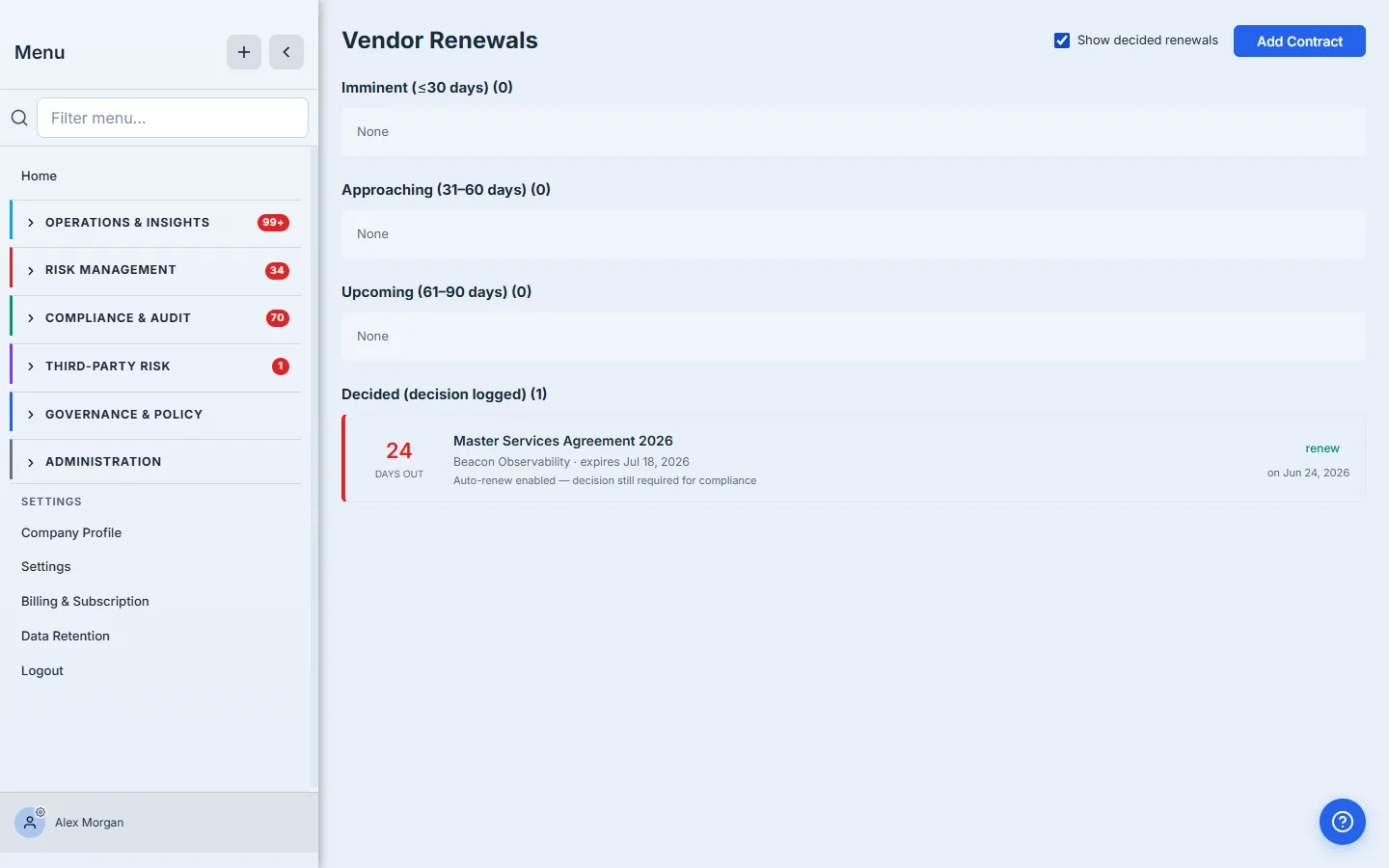
Once decided, the contract moves to the Decided view with its decision and date — toggle Show decided renewals to see it. The active buckets clear, so the queue always shows only what still needs a human.
Step 4 — Track what the vendor actually committed to
Renewals are the calendar half; obligations are the substance. Open Third-Party Risk → Contracts & Obligations, on the Obligations tab (/app/contract-obligations). The dashboard counts your obligations by status and by type — Data Processing Agreement, SLA, Security Clause, Compliance Requirement, Exit/Transition Plan — over a five-step workflow guide (Dashboard → Manage → Renewals → Exit Plans → SLAs).
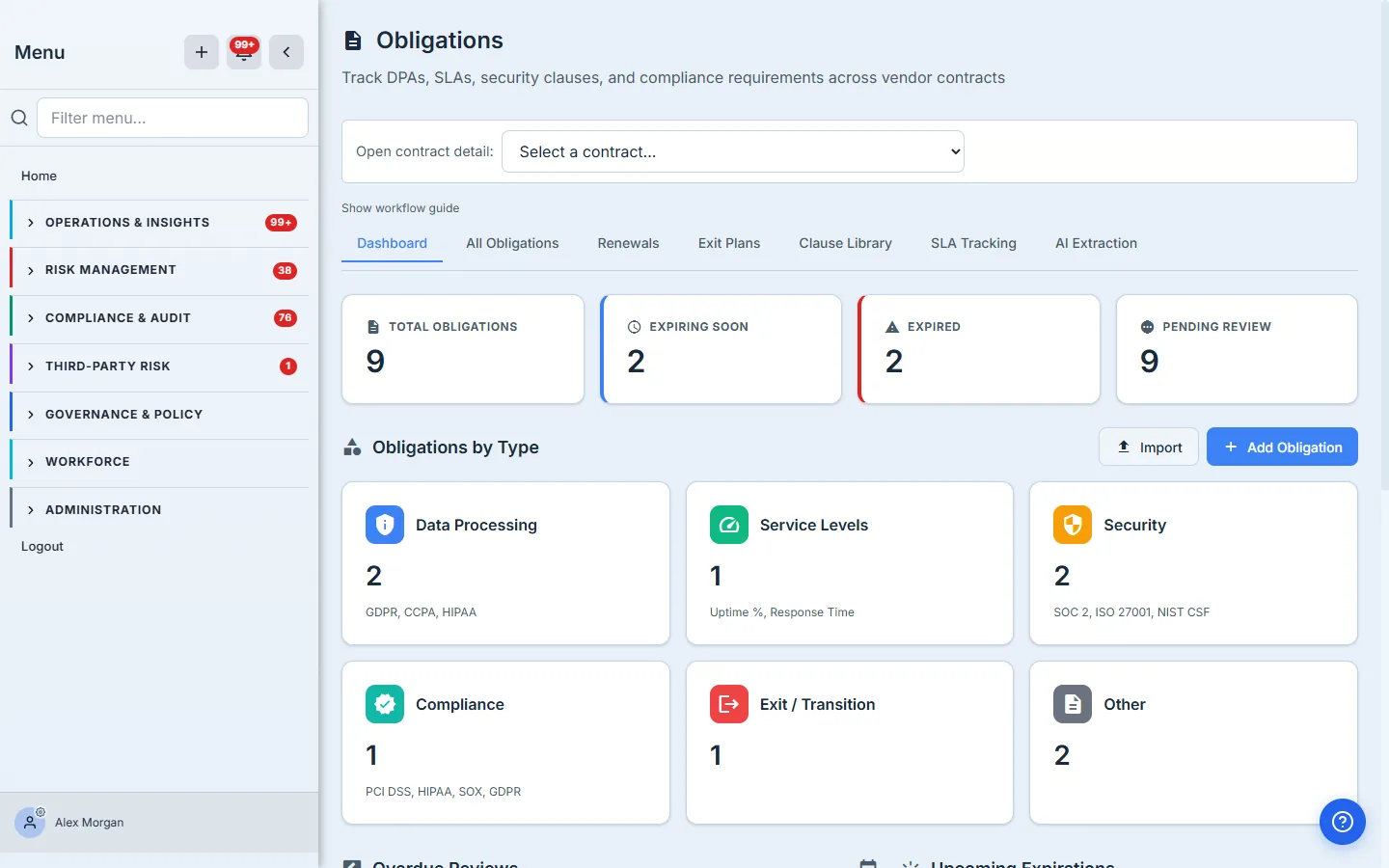
Click Add Obligation to record one: pick the vendor, the type, the contract it lives under, a description of the actual commitment, and the date it needs reviewing or expires.
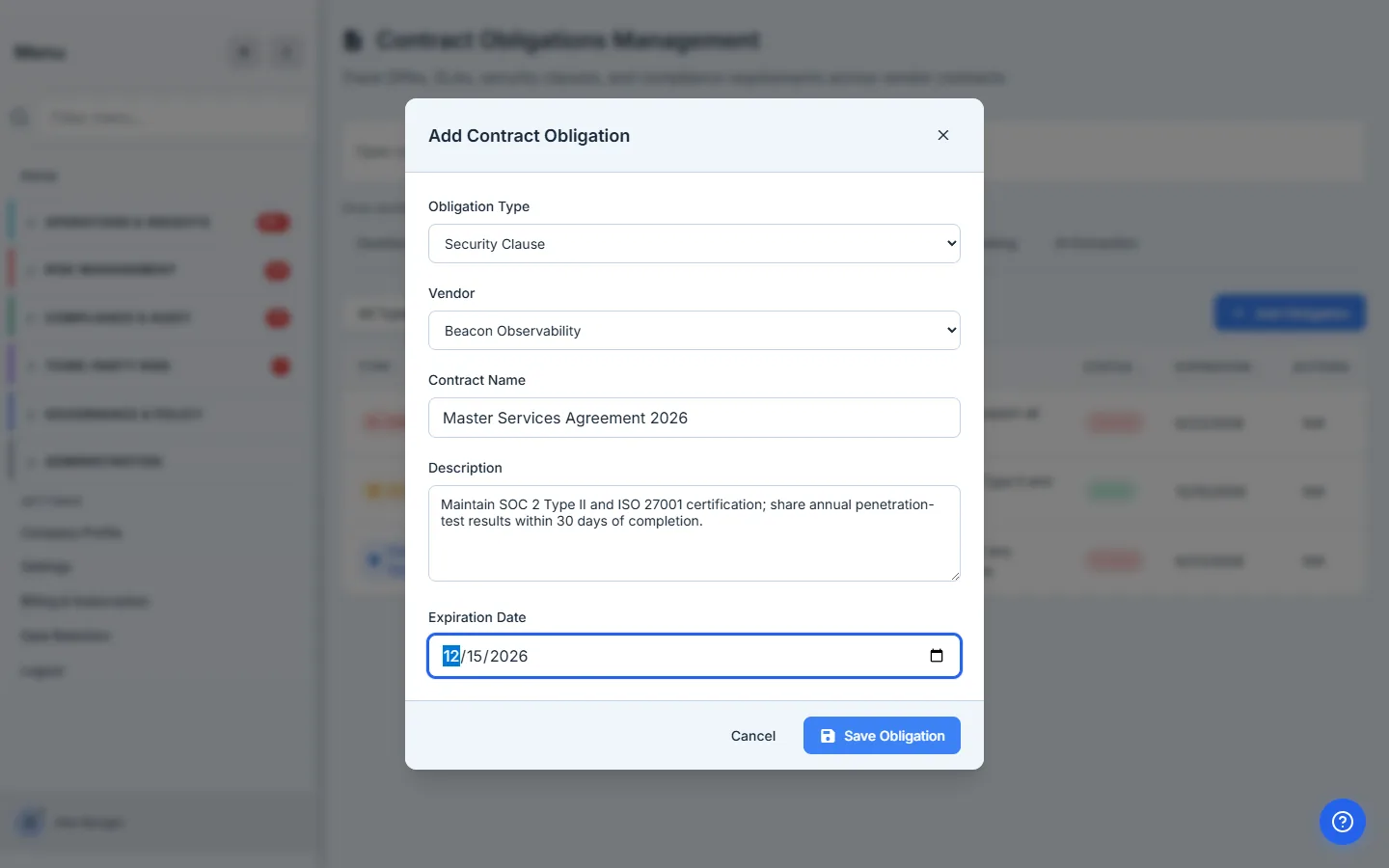
An obligation is only useful if it’s specific. “Security clause” is a category; “maintain SOC 2 Type II and ISO 27001 for the term, provide the annual report within 30 days of issuance, encrypt at rest with AES-256” is something you can actually check, hold the vendor to, and hand an auditor. The description field is where the contract’s prose becomes a trackable commitment.
Step 5 — One list, every promise, with status
The All Obligations tab is the working register — every commitment across every contract, with its type, vendor, contract, status, and review/expiry date, filterable by type.
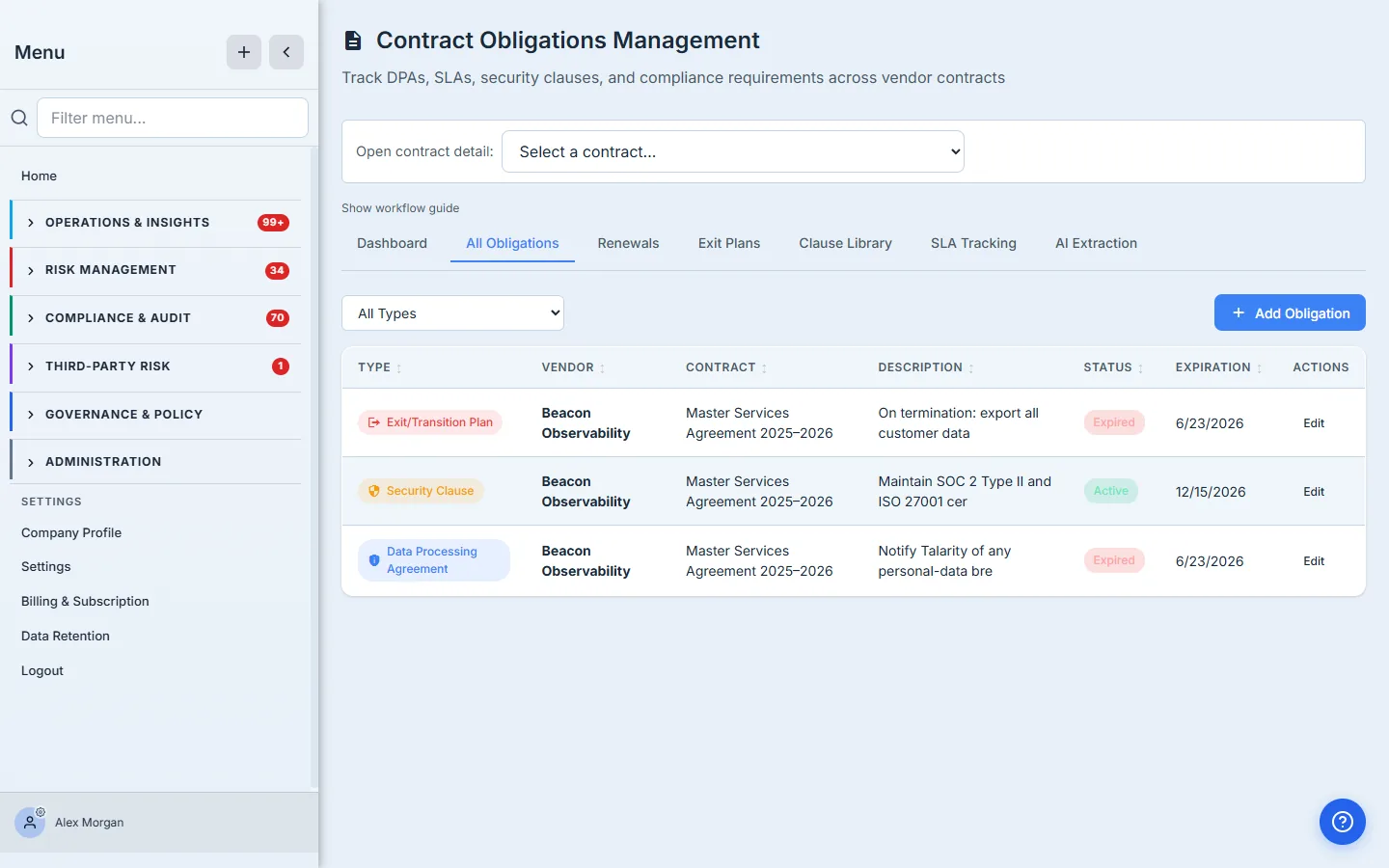
The status and expiring-soon flags are what turn a static list into a work queue: a breach-notification clause whose annual review is 25 days out surfaces as Expiring Soon, the same way a contract does. Obligations get the same time-based attention contracts do — because an audit right you forgot to exercise is as much a gap as a contract you forgot to renew.
Step 6 — Plan the exit before you need it
The obligation type that pays for itself is Exit/Transition Plan. The Exit Plans tab turns each one into a structured transition checklist across four categories — Data Management, Access Control, Infrastructure, Documentation — with a progress bar.
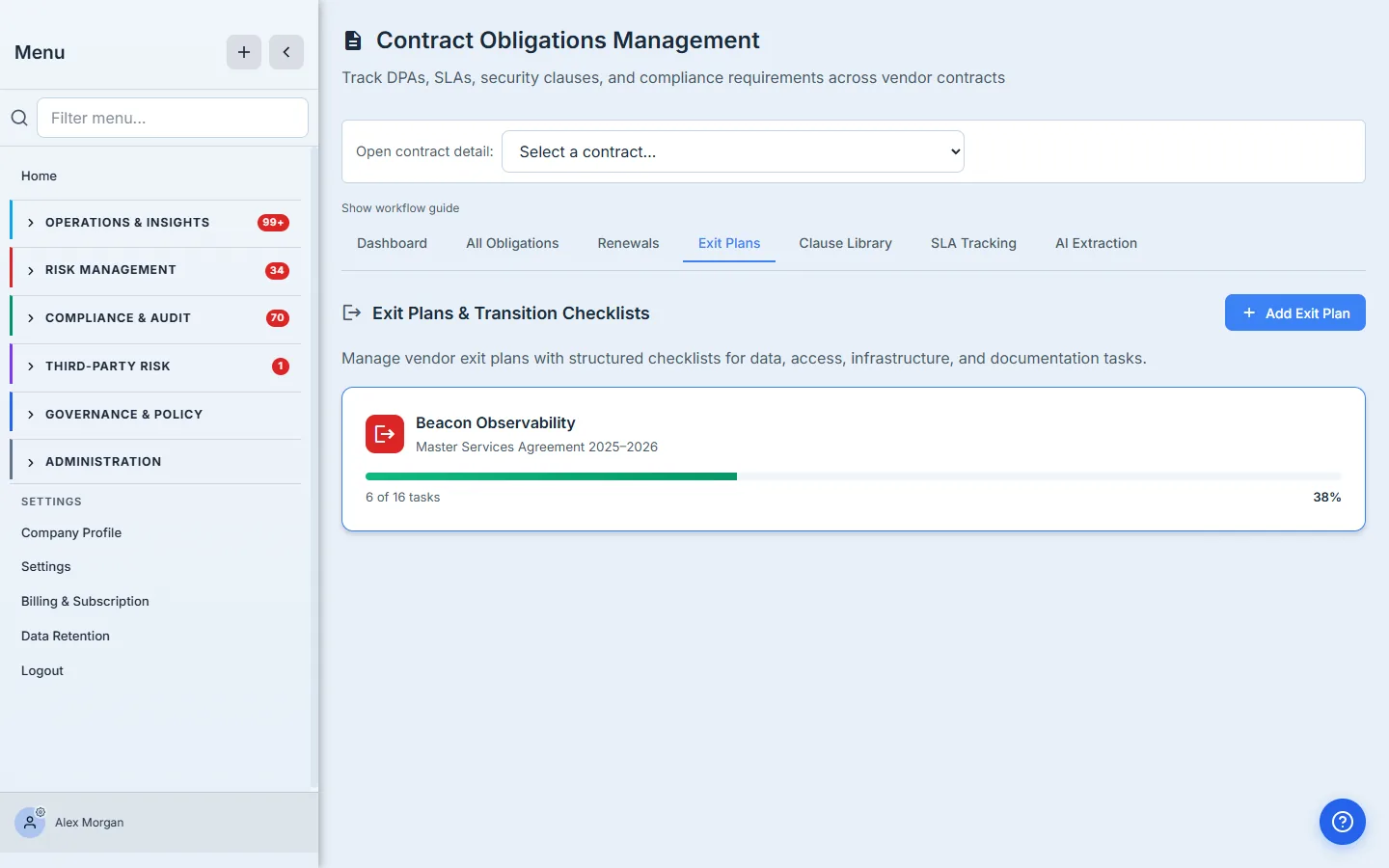
Open one and you get the 16-point checklist: export and verify data, confirm deletion, revoke API keys and SSO, rotate shared secrets, update DNS and firewall rules, retrieve documentation. Work it like a runbook.
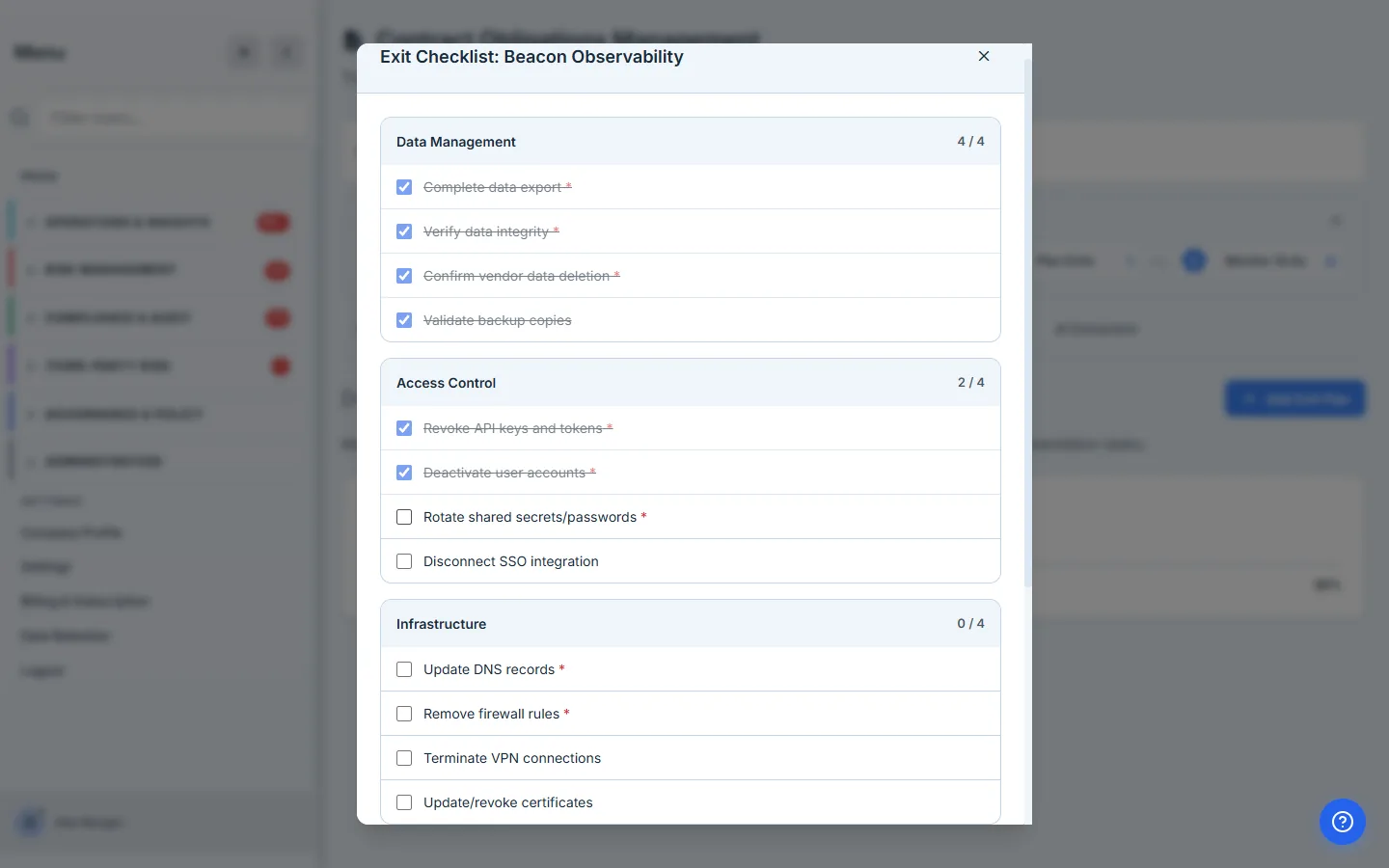
The exit plan is written on a good day so it can be used on a bad one. Vendor exits happen under pressure — a sunset decision, a breach, an acquisition. Having the data-return, access-revocation, and key-rotation steps already enumerated is the difference between a controlled offboarding and a frantic one where someone’s API key is still live three weeks later.
Step 7 — Reference clauses for the next contract
The Clause Library is the forward-looking half: pre-built security and DPA clause templates — encryption, access control, audit rights, breach notification, subprocessor management, data return/deletion — mapped to the frameworks they satisfy.
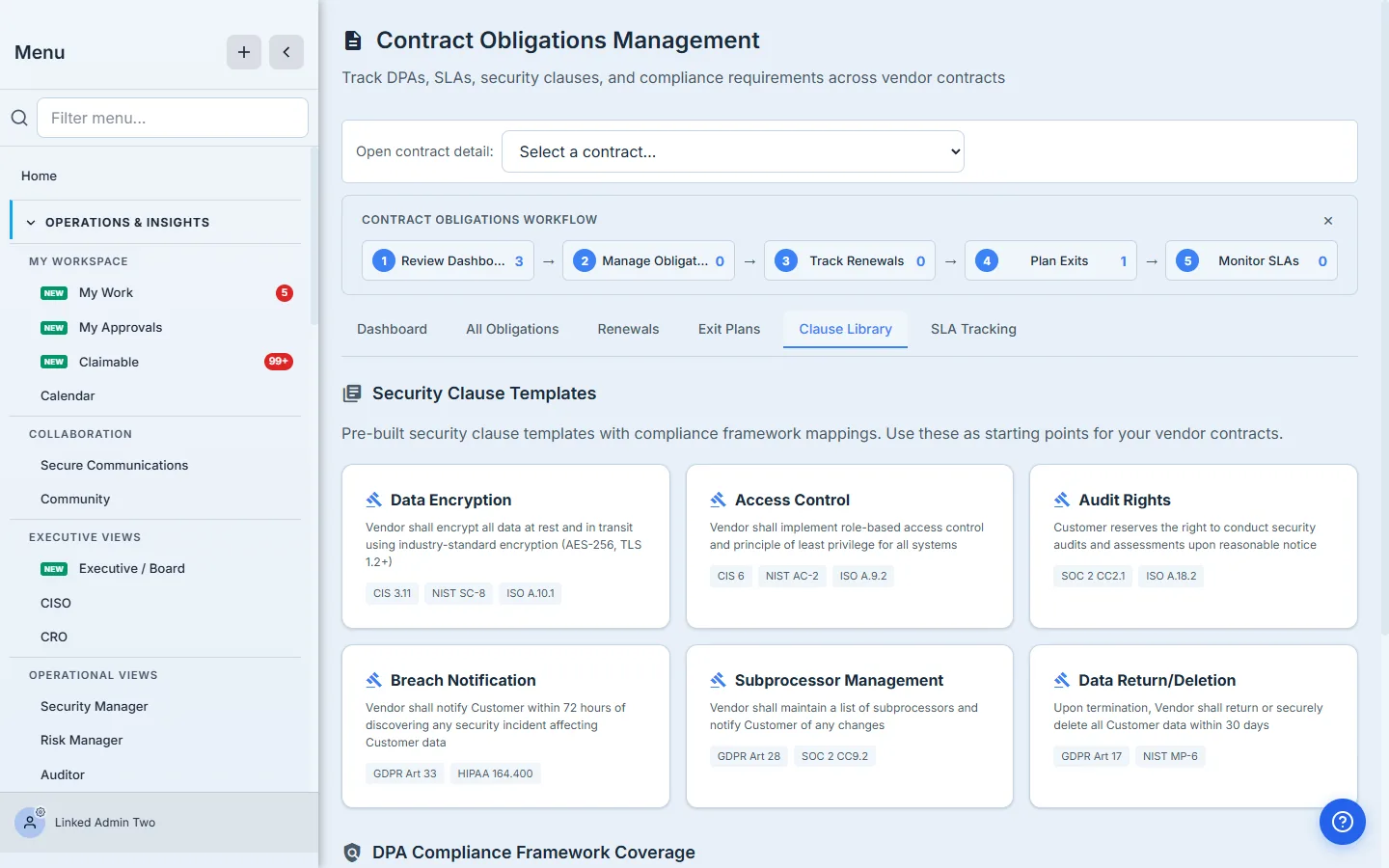
It’s a starting point for the next negotiation, so the security terms you wished the last contract had are the ones you ask for in the next one.
Where this ends, and what’s next door
This cluster has a couple of surfaces deliberately just outside the walkthrough:
- AI obligation extraction — the AI Extraction tab on the Obligations hub reads pasted contract text and proposes obligations (12 types across privacy / security / financial / comprehensive profiles) into a review queue, where you Accept or Reject each (or Accept all) and accepted items become tracked obligations. It uses an AI model with an honest keyword fallback that flags when it’s running degraded. Document-URL/file extraction isn’t supported yet — paste the contract text. (Manual entry, Step 4, is still the simplest path for one or two obligations.)
- SLA tracking — the Obligations hub’s SLAs tab lists your SLA clauses as obligations (vendor, clause, priority, status, expiry) and links straight to the dedicated SLA Management dashboards; the live SLA numbers — uptime, response time, breaches — are tracked there, not here. An SLA clause is an obligation you track on this hub; the SLA performance is measured in SLA Management.
- Bulk import — obligations can be imported from CSV; rows are matched to your vendor list by name, and any that don’t match are reported rather than silently dropped.
- Two complementary renewal surfaces — the 90 / 60 / 30 decision queue in Step 2 (
/app/vendor-renewals) is the at-a-glance “what’s coming due” view; the Obligations hub also carries its own Renewals tab with a fuller status pipeline (Initiated → Negotiating → Pending Approval → Approved / Declined) for working a single renewal through to close.
What you walk away with
- A contract record with the dates and auto-renew flag that feed everything else — no more renewal date buried in a PDF.
- A renewal queue at 90 / 60 / 30 days that surfaces every contract, including the auto-renewing ones, and a recorded renew / sunset / continue decision instead of a silent lapse.
- An obligation register — the specific promises each vendor made, with status and review dates, so an audit right or breach window doesn’t go untracked until you need it.
- A structured exit plan written before the exit, and a clause library to make the next contract better than the last.
Open /app/vendor-renewals, add the contract for your most critical vendor with its real expiration date, and watch it land in the queue. Then record the three obligations you’d most regret forgetting — the breach window, the audit right, the data-return-on-exit term. You’ve just turned a filed PDF into something the platform will hold you, and your vendor, to.
Related: the renewal date is the natural reassessment trigger that monitoring otherwise has to infer, and the contract is where the SLA you later enforce is actually written. Overview: vendor risk management.