Every vendor relationship generates findings. The penetration test flags a legacy endpoint still negotiating TLS 1.0. The annual review turns up no current SOC 2 Type II report. The DPA review notices the subprocessor list was never delivered. Individually each one is small; collectively they’re the actual state of your third-party risk — and they live, in most programs, in a spreadsheet that nobody re-opens until the auditor asks.
That’s the gap auditors push on. SOC 2 CC9.2 expects you to assess and manage risks from vendors on an ongoing basis; ISO 27001:2022 A.5.22 expects you to monitor, review, and manage change in supplier services across the relationship, not just at onboarding. “We found it” isn’t the control — “we found it, assigned it, fixed it, and someone independent confirmed the fix” is. A finding you can’t show resolved, with a trail, is a finding the auditor treats as still open.
Talarity tracks each vendor finding as a work item with an owner, a severity, and a due date, moves it through a remediation lifecycle, and builds in the one thing spreadsheets can’t: separation of duties. The person who remediates a finding cannot be the person who signs it off. And when a finding genuinely can’t be fixed right now, the platform turns “we’ll live with it” into a time-bounded, justified, auto-expiring risk acceptance instead of a silent shrug.
Who’s involved
- Vendor manager — raises the finding, sets its severity and due date, and assigns a remediation owner.
- Remediation owner — does the work and moves the finding through to Remediated. Cannot sign off on their own work.
- Reviewer / verifier — an independent second person who confirms the remediation and records the verification.
- Risk owner — when a fix isn’t feasible, records a time-bounded risk acceptance with a residual rating and a business justification.
- Auditor — reads the register: every finding, its severity, its owner, its disposition, and the timestamps that prove the control ran.
(These are workflow roles, not separate permission tiers — anyone with vendor-write access can raise, advance, and verify findings; the one hard separation Talarity enforces is that you can’t sign off a finding you’re assigned to. Recording a risk acceptance additionally needs exception-write permission.)
What’s on the page
The findings register lives on each vendor’s Risk tab (below the risk trend):
- Findings register — one row per finding, each with a severity badge, title, lifecycle status, owner, and due date (overdue flagged); severity sets the reading order.
- Raise Finding form — title, description, severity, recommended action, due date, owner.
- Manage Finding modal — a next-valid-status dropdown that walks the lifecycle (Open → In Progress → In Review → Remediated → Verified → Closed), owner reassignment, and a history note — plus Risk-accept instead (residual level, expiry date, business justification).
Step 1 — The findings register lives on the vendor
Open any vendor and go to the Risk tab. Below the risk trend sits Findings — the working register for that vendor. Each row carries a severity badge, the finding title, its current lifecycle status, the owner, and the due date, with overdue dates flagged.
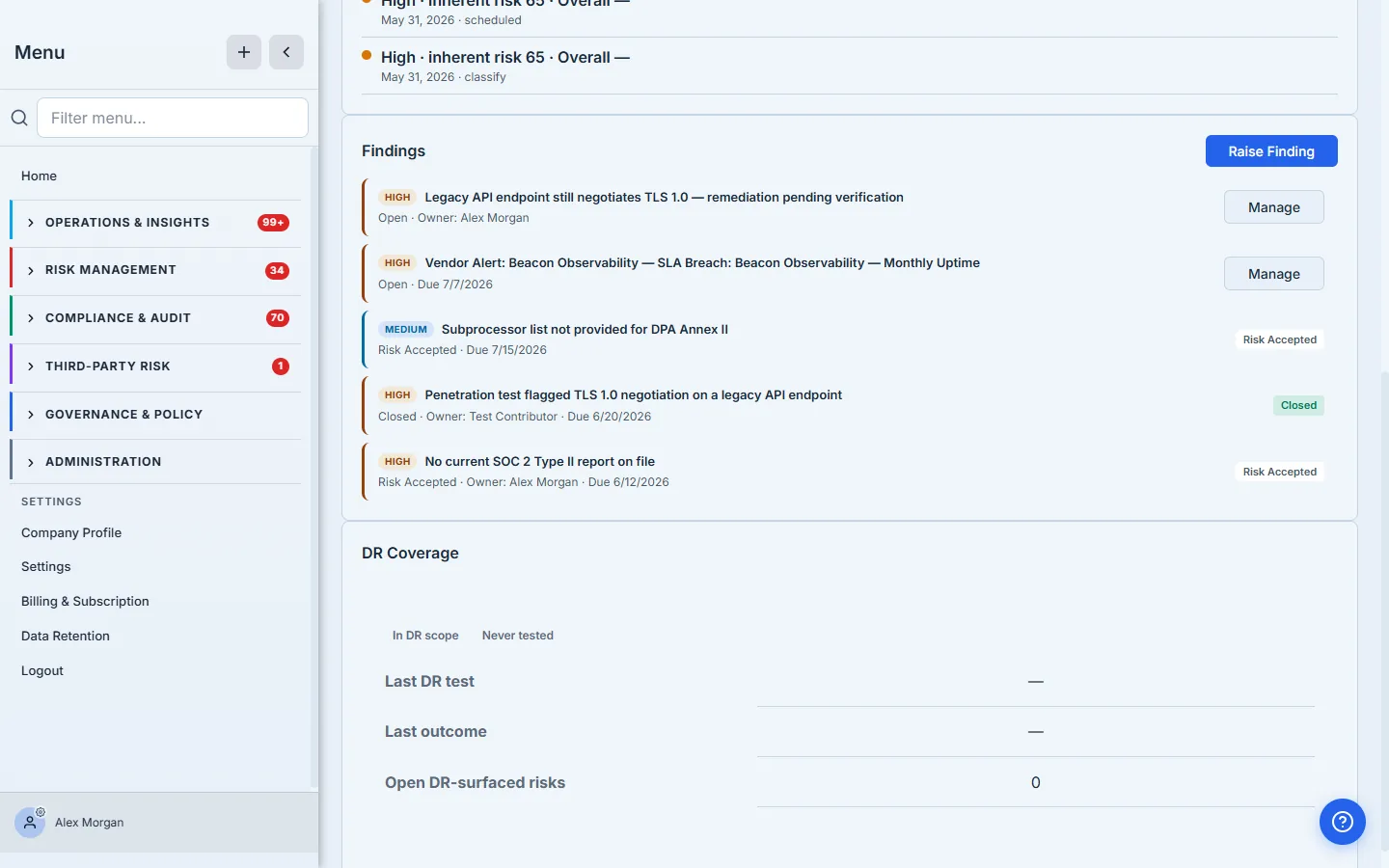
The register is deliberately per-vendor rather than a global queue. When you’re reviewing Beacon Observability, you want Beacon Observability’s open items in front of you — the missing SOC 2 that’s mid-review, the TLS finding that’s already closed, the subprocessor gap still waiting on a decision. The severity badge sets the reading order; the status word tells you whether it needs a human right now.
Step 2 — Raise a finding
Click Raise Finding. The form is small on purpose: a title, an optional description of why it matters, a severity, a recommended action, a due date, and an owner.
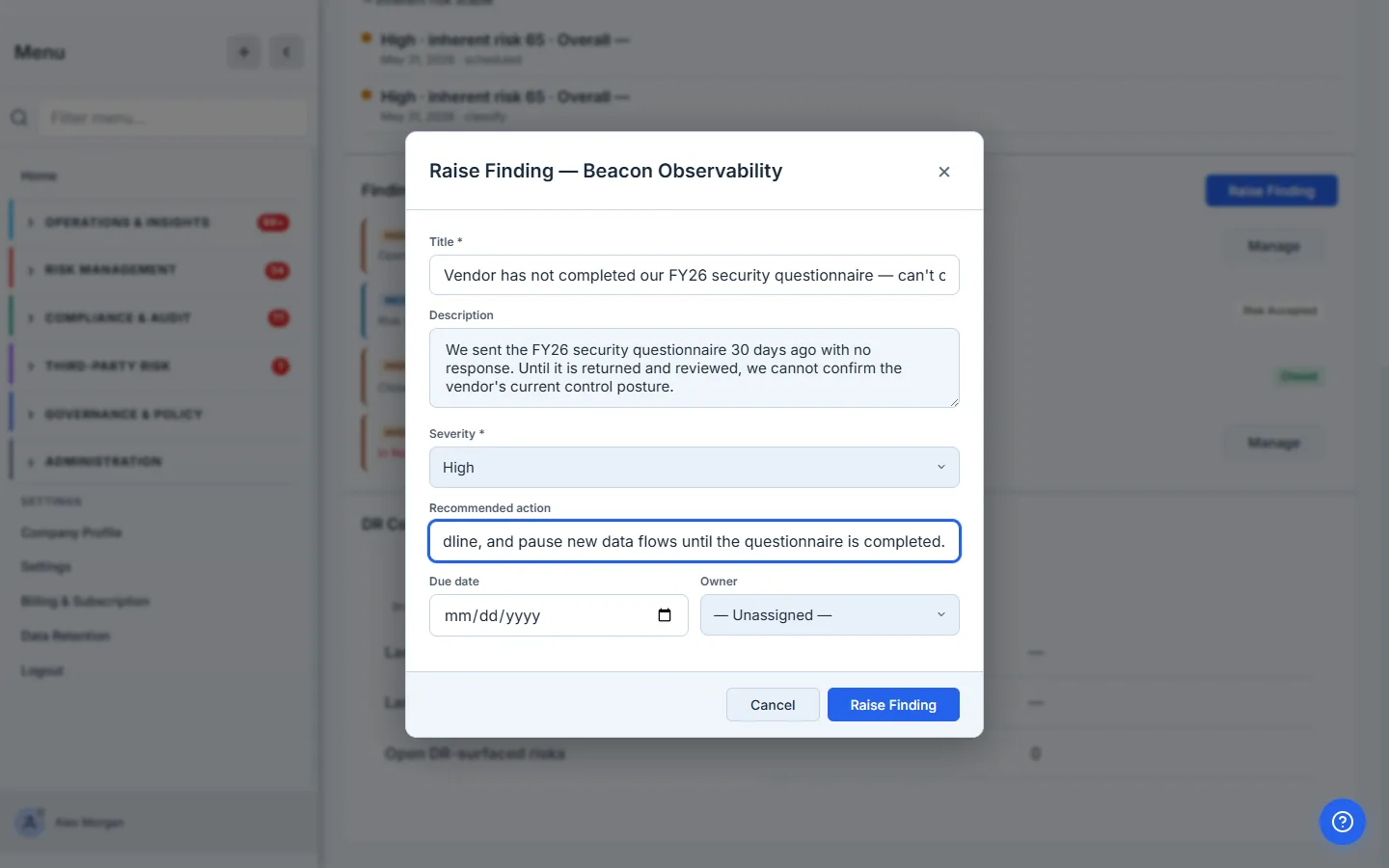
The owner and due date are what make it a finding rather than a note. A title alone is a sticky note. A title with an owner who’s accountable and a date it’s due by is a tracked commitment — it shows up overdue if it slips, it carries through to the register, and it gives the auditor a name and a deadline instead of “we were aware of it.” The recommended action is where you write what good looks like, so whoever picks it up isn’t guessing at the fix.
Behind the scenes, the finding is created as a work item parented to the vendor (type: 'finding', parent: vendor) — the same primitive that powers tasks and remediations elsewhere in the platform, which is why a vendor finding can carry evidence, history, and an assignee the same way a control-test remediation can.
Step 3 — Work it through the lifecycle
Click Manage on a finding and you get its remediation controls: advance the status, reassign the owner, and add a note that lands on the finding’s history.
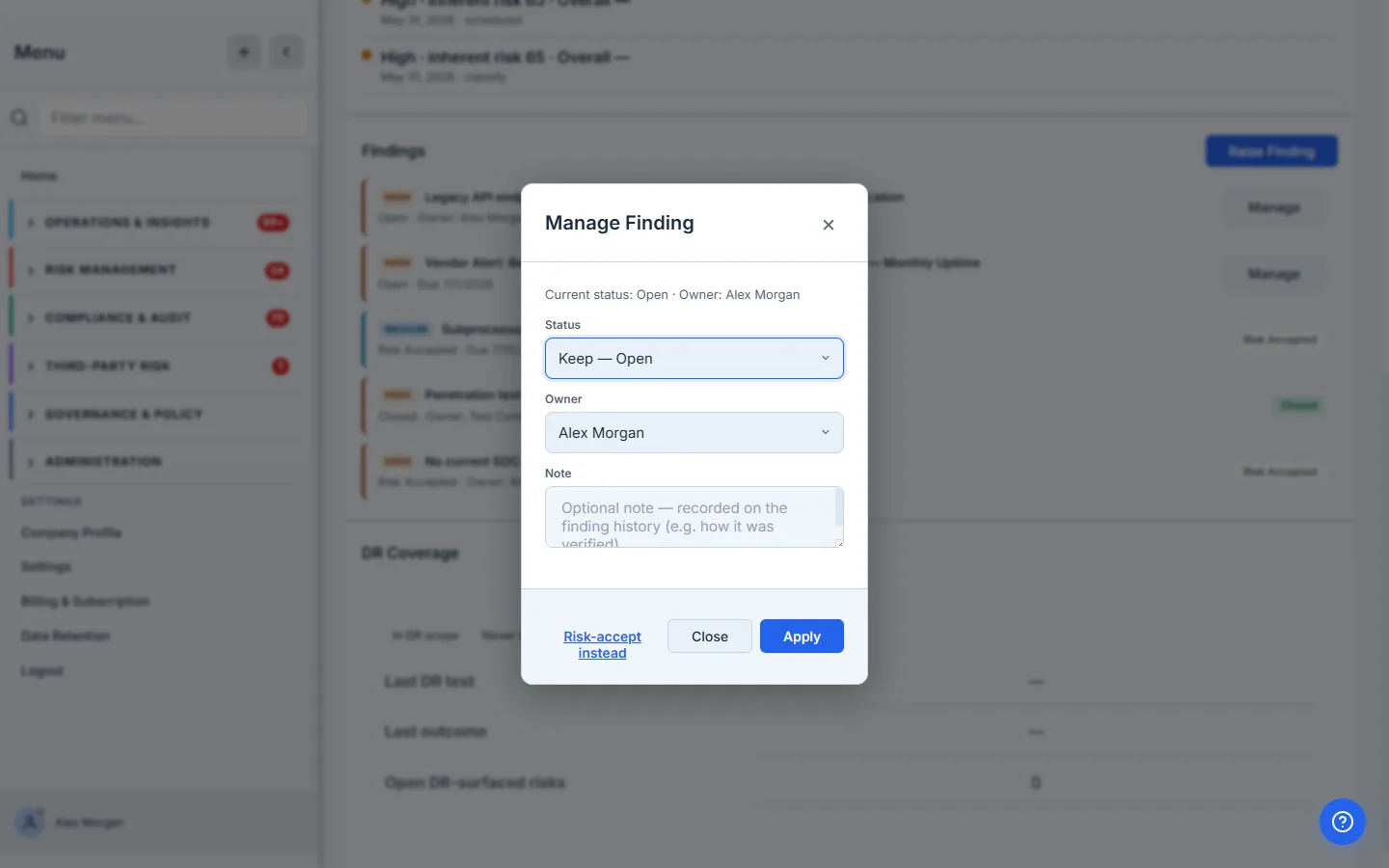
The status dropdown only ever offers the next valid steps, because the lifecycle is a state machine, not a free-for-all:
- Open → In Progress — someone’s actively working it.
- In Progress → In Review — the work is done and ready for a check.
- In Review → Remediated — the reviewer accepts the fix. (Or sends it back to In Progress if it’s not there yet.)
- Remediated → Verified — an independent verification is recorded.
- Verified → Closed — the finding is done.
Each transition is recorded with who moved it and when, and the optional note becomes the rationale on the record (“confirmed via re-scan: endpoint now rejects TLS 1.0”). You’re not just changing a status field — you’re writing the history an auditor reads back.
Step 4 — The fix is not signed off by the person who fixed it
This is the part a spreadsheet can’t enforce. When the remediation owner tries to move their own finding to Remediated, the platform stops them:
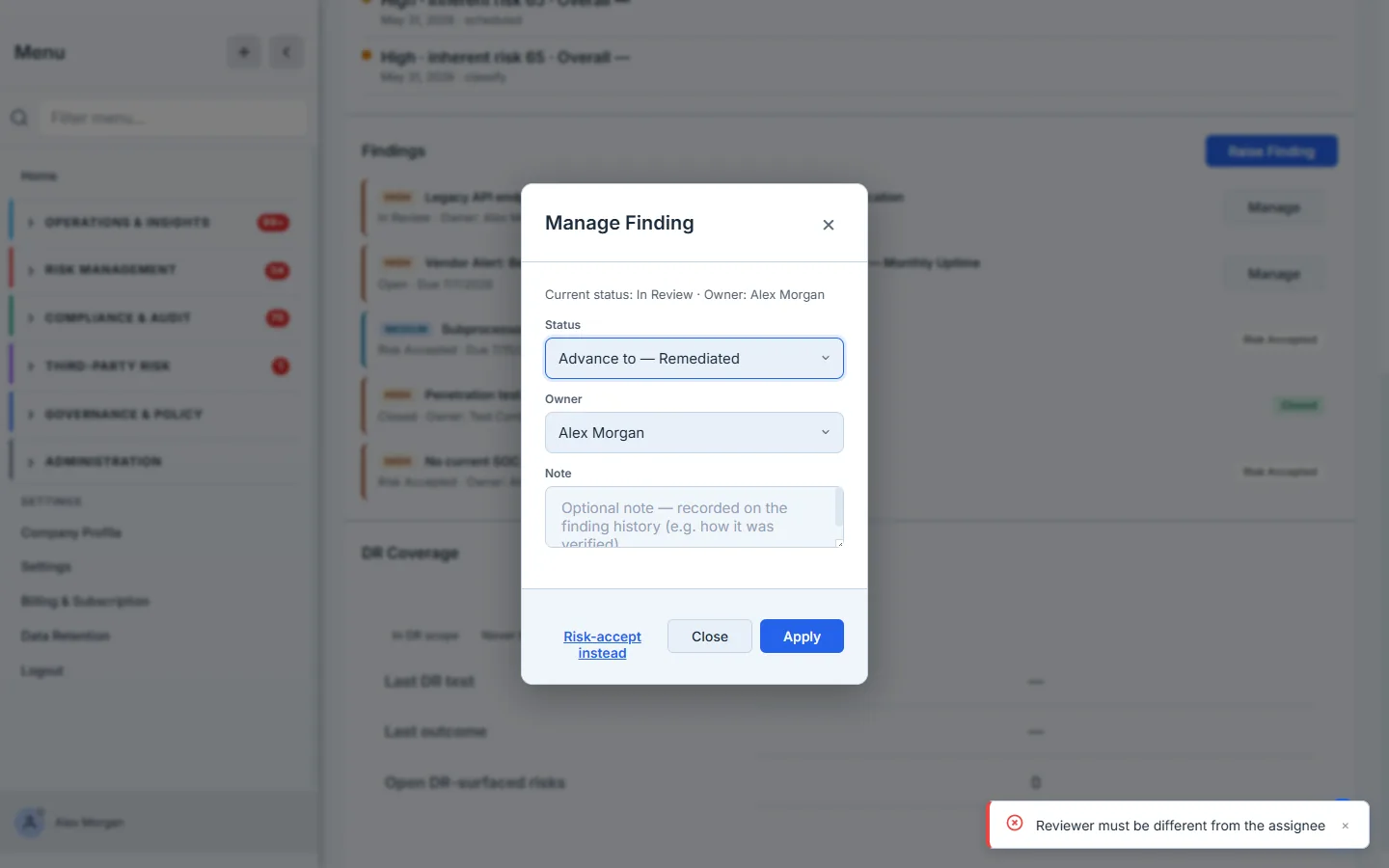
“Reviewer must be different from the assignee.” This is separation of duties — the four-eyes principle — enforced at the moment it matters. The person who did the work has every incentive to call it done; an independent reviewer is the control that catches the fix that wasn’t really a fix. The platform applies it twice: once when a finding is accepted as Remediated (the reviewer can’t be the assignee), and again when it’s Verified (the verifier can’t be the assignee either). To advance a finding you own, hand it to someone else — or have someone else verify it. That’s not friction; that’s the control working.
The verification step is more than a status flip. Recording a verification writes who verified it, captures their note, and only then moves the finding to Verified — so the audit trail shows an independent confirmation, not a self-attestation. Because each gate blocks the current assignee from signing off, closing a finding in the normal flow takes a second person: hand it off, and the reviewer who confirms it isn’t the one who was working it.
Step 5 — When you can’t fix it, accept it on the record
Not every finding gets remediated. Sometimes the risk is genuinely acceptable — a low-sensitivity vendor, a compensating control already in place, a fix that costs more than the exposure. The wrong move is to quietly close it; the right move is to accept it, formally, with an expiry. From the Manage modal, choose Risk-accept instead.
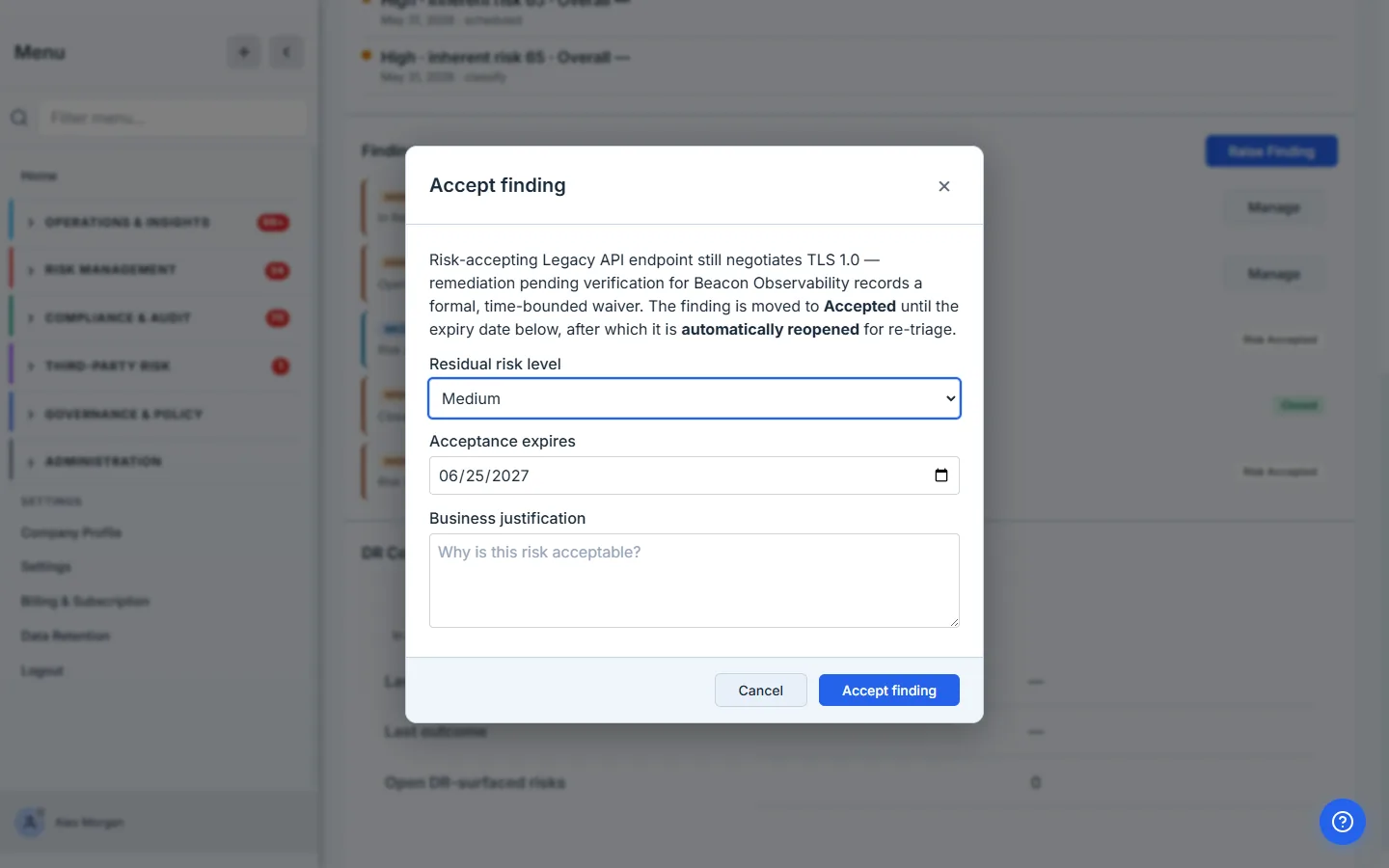
A risk acceptance here is not a delete. It’s a time-bounded waiver that captures three things an auditor will ask for:
- Residual risk level — what you’re knowingly carrying (Low / Medium / High / Critical) after accepting.
- An expiry date — the acceptance is not permanent. When it lapses, the finding automatically reopens for re-triage, so “accepted last year” can’t silently become “ignored forever.”
- A business justification — why this is acceptable, in writing, attributed to the person who decided it.
That’s the difference between “we let it slide” and “we made a documented, time-boxed risk decision with a named owner.” One fails an audit; the other is exactly what the audit is looking for.
Step 6 — The register is the audit answer
Back on the Risk tab, the register now shows the full disposition of every finding: the questionnaire gap Risk Accepted until its expiry, the TLS finding Closed after independent verification, the SOC 2 gap still In Review awaiting sign-off.
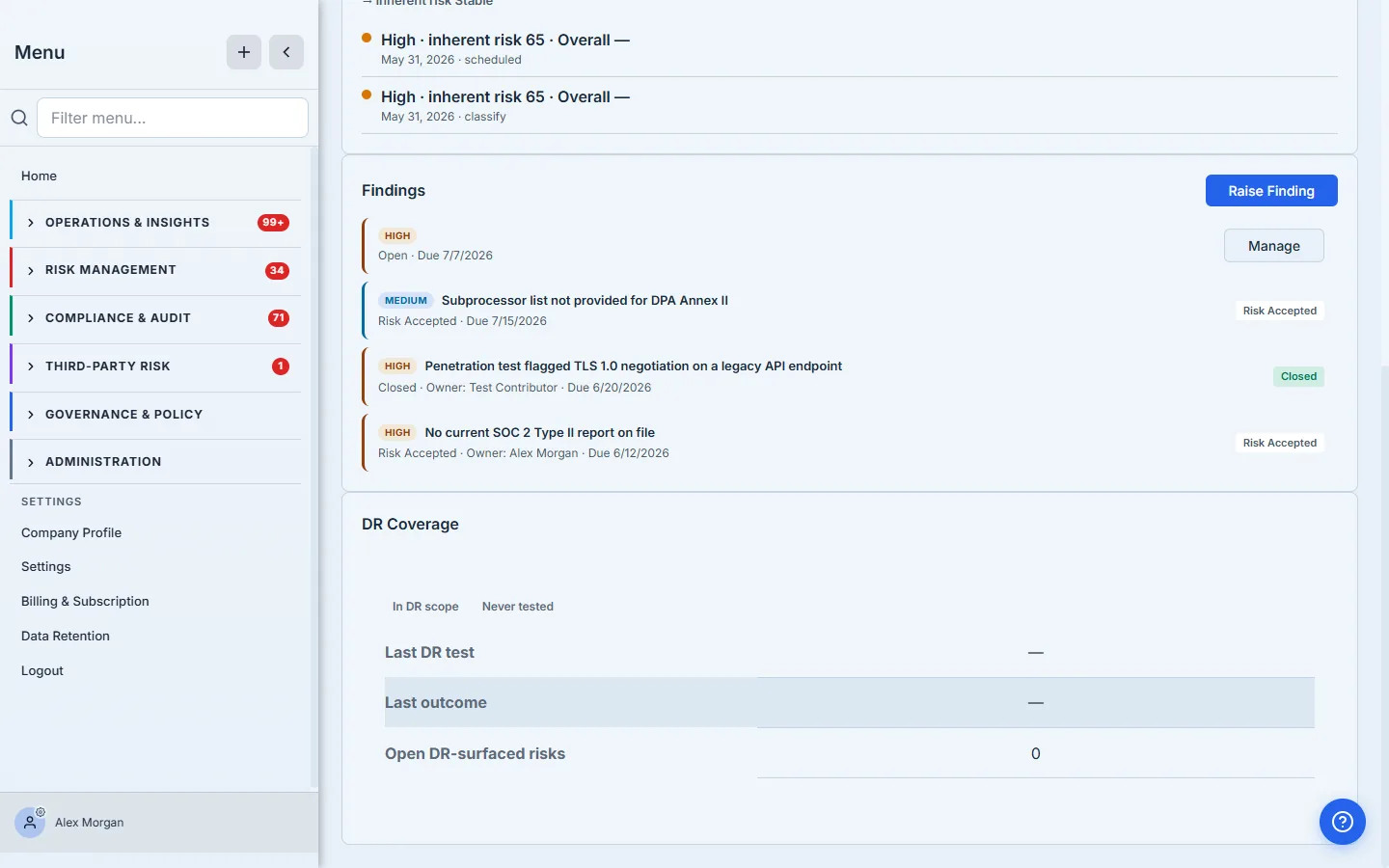
When an auditor asks “what did you find on this vendor, and what did you do about it?”, this single view is the answer — every finding, its severity, its owner, and its outcome, each with the timestamps and the second signature behind it.
Where this sits next to the rest of the program
- Findings can come from anywhere. You can raise one by hand here, but findings also flow in from assessment results, control tests, monitoring alerts, and questionnaire reviews — all landing as the same work-item primitive, all worked through the same lifecycle. This article covers the manual path and the lifecycle; the automated sources feed the same register.
- Risk acceptance is a first-class record, not a status. The acceptance you create here is tracked as an exception with its own expiry sweep — which is why it can reopen the finding when it lapses. It shows up in your exceptions view alongside other accepted risks, not just buried on the vendor.
- Severity is your reading order, not a score. The badge orders the register so the Critical and High items lead; it isn’t the vendor’s inherent-risk tier (that lives on the vendor’s classification) — it’s the urgency of this finding.
What you walk away with
- A per-vendor findings register where every gap is a tracked work item with an owner, a severity, and a due date — not a line in a spreadsheet.
- A remediation lifecycle (Open → In Progress → In Review → Remediated → Verified → Closed) where every move is recorded with who and when.
- Separation of duties, enforced — the person who remediates a finding can’t sign it off, and the person who’s assigned it can’t verify it. Two signatures by construction.
- A time-bounded risk acceptance for the findings you can’t fix — with a residual rating, a justification, and an expiry that reopens the finding instead of letting it disappear.
Open a vendor, go to the Risk tab, and raise the finding you’d least like to explain at your next audit — the missing report, the overdue questionnaire, the control gap you’ve been meaning to chase. Assign it, set a date, and watch it become something the platform tracks to closure, with a second set of eyes built into the sign-off.
Related: findings mostly arrive from questionnaires and monitoring, and their severity should follow the vendor’s tier. Overview: vendor risk management.