The day you stop using a vendor is the day your risk with them is highest — and least watched. The contract’s winding down, the relationship’s attention has moved on, and somewhere a service account still has a live API key, a copy of your customer data still sits in their database, and nobody’s holding the certificate that says it was deleted. Offboarding is where third-party risk programs quietly leak.
Auditors know it, which is why the frameworks are specific about the exit. ISO 27001:2022 A.5.22 expects you to manage supplier services across the whole relationship, termination included; A.8.10 expects information to be deleted when no longer required; A.5.11 expects the return of assets on termination. SOC 2 CC6.x expects logical access to be revoked when it’s no longer needed. GDPR Article 28 obliges a processor to delete or return personal data at the end of the engagement. None of that is satisfied by deleting a row in your vendor list.
Talarity treats offboarding as what it actually is: a gated, evidenced wind-down. Starting it cancels the in-flight work so nothing dangles. Finishing it is blocked until you’ve recorded the destruction certificates and access-revocation proof you declared as required — each one wrapped in a tamper-evident chain of custody. Only then does the vendor go to terminated, with its portal access cut and its open requests closed. The exit becomes a thing you can hand an auditor, not a gap you hope they don’t ask about.
Who’s involved
- Vendor manager — initiates offboarding with a reason, and makes the final termination call.
- Security / IT — revoke the credentials, confirm the data deletion, and produce the evidence (the API-key revocation screenshot, the vendor’s signed destruction certificate).
- Privacy / legal — confirm the data-return-or-delete obligation under the DPA is met before the relationship closes.
- Auditor — reads the offboarding record: the reason, the cascade, the required evidence, and the timestamped termination.
What’s on the page
Offboarding runs from the vendor’s detail page and unfolds in place:
- Begin Offboarding — the destructive exit action (alongside Re-classify Vendor), which prompts for a reason and runs the cancellation cascade.
- Offboarding Evidence section — appears once the vendor enters the offboarding state: Set required evidence (declare exit-checklist items + the artifact types each demands), Record evidence per item (each item flips Outstanding → Satisfied, wrapped in a chain-of-custody hash).
- Complete Offboarding — the gated terminal action: blocked until every required item is satisfied, then revokes portal access, archives open requests, and moves the vendor to terminated.
Step 1 — Start from the vendor, in its steady state
A vendor you’re winding down is in an active lifecycle state. Open it and, alongside Re-classify Vendor, you’ll find the destructive exit action: Begin Offboarding.
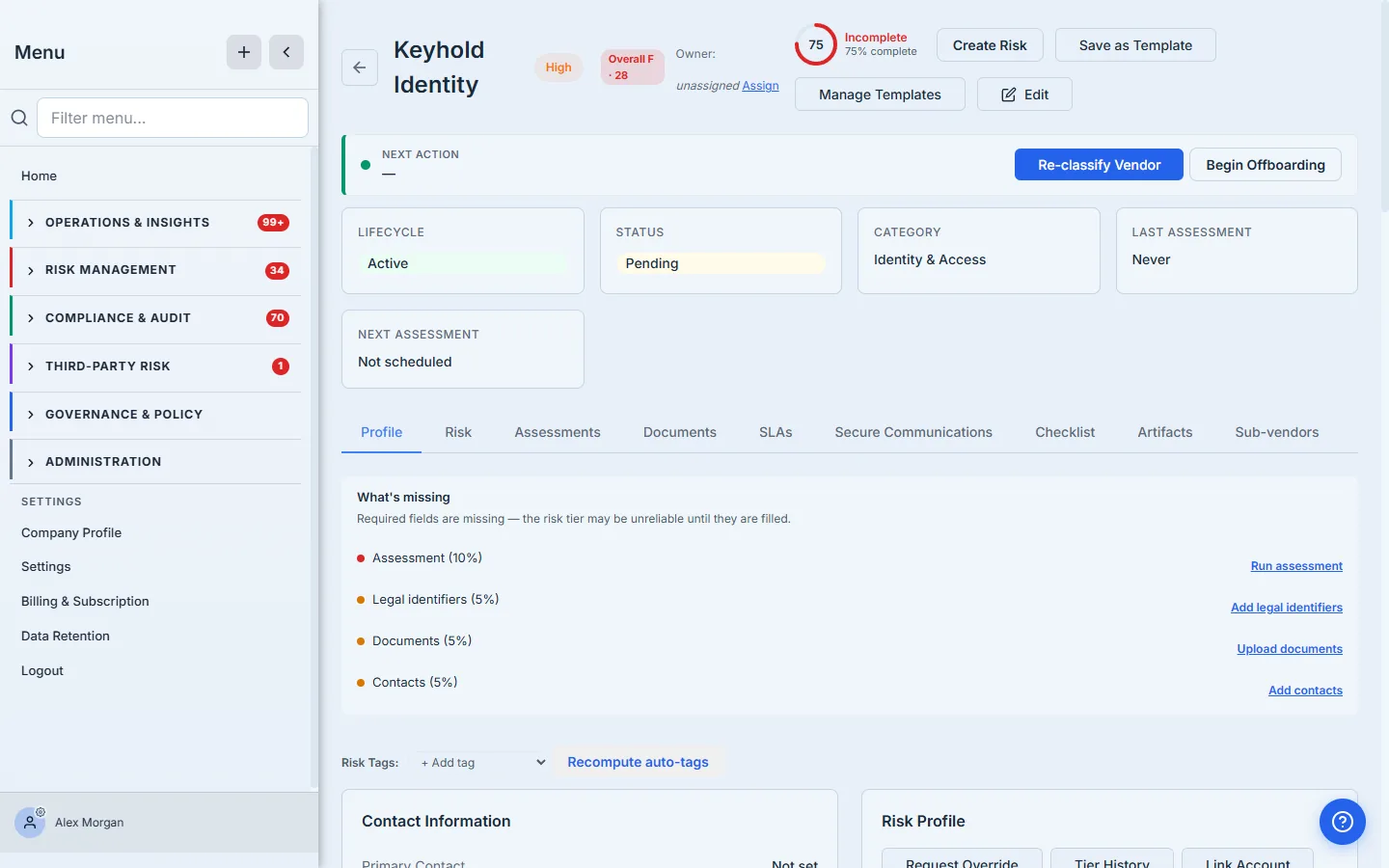
Offboarding is a one-way street with one deliberate door. The lifecycle state machine only lets a vendor enter offboarding from a steady state (active, under-review, or restricted), and the only way out of offboarding is terminated. That’s by design — once you’ve started cancelling assessments and revoking access, “never mind” isn’t a clean state to land in. Begin Offboarding is styled as the outlined, secondary action precisely because it’s the consequential one.
Step 2 — Name the reason
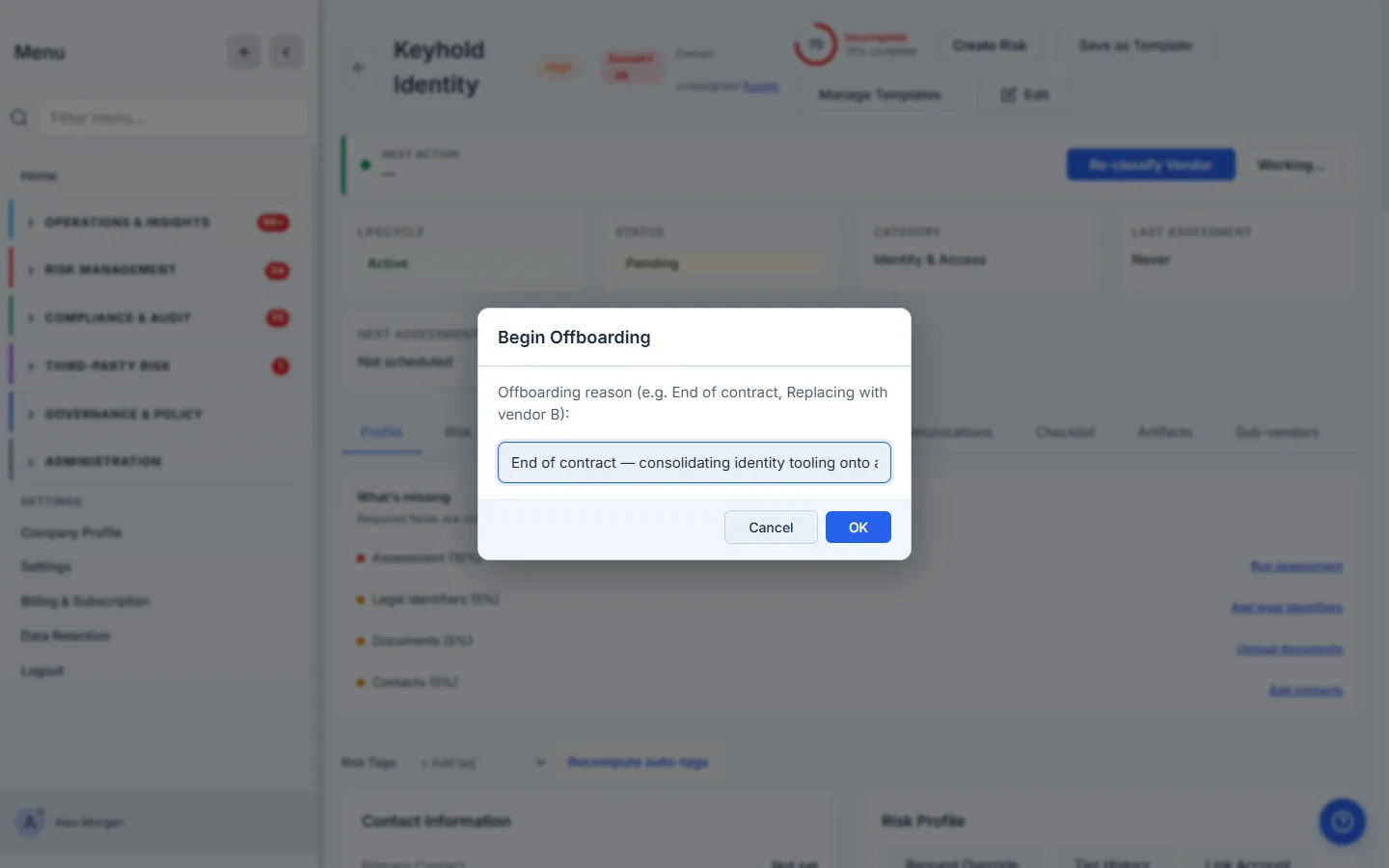
Click Begin Offboarding and the first thing it asks for is why. This isn’t bureaucracy — the reason is the first line of the offboarding record, and “End of contract” reads very differently from “Security incident” or “Replaced after failed reassessment” when someone reviews the decision a year later.
Step 3 — The cascade: nothing left dangling
The moment offboarding starts, Talarity runs a cascade so the vendor’s in-flight work doesn’t outlive the relationship:
- In-flight assessments are cancelled — any draft, pending, in-progress, submitted, or in-review vendor assessment is marked cancelled with the reason “Vendor offboarded.” No more chasing a questionnaire for a vendor you’re leaving.
- Pending document requests are waived — outstanding required-artifact requests (the SOC 2 you were waiting on, the insurance cert) are waived rather than left perpetually overdue.
The cascade result is reported back to you (e.g. “3 assessments cancelled, 2 artifacts waived”), and the vendor moves into the offboarding lifecycle state — which surfaces the part that actually matters: the exit-evidence section.
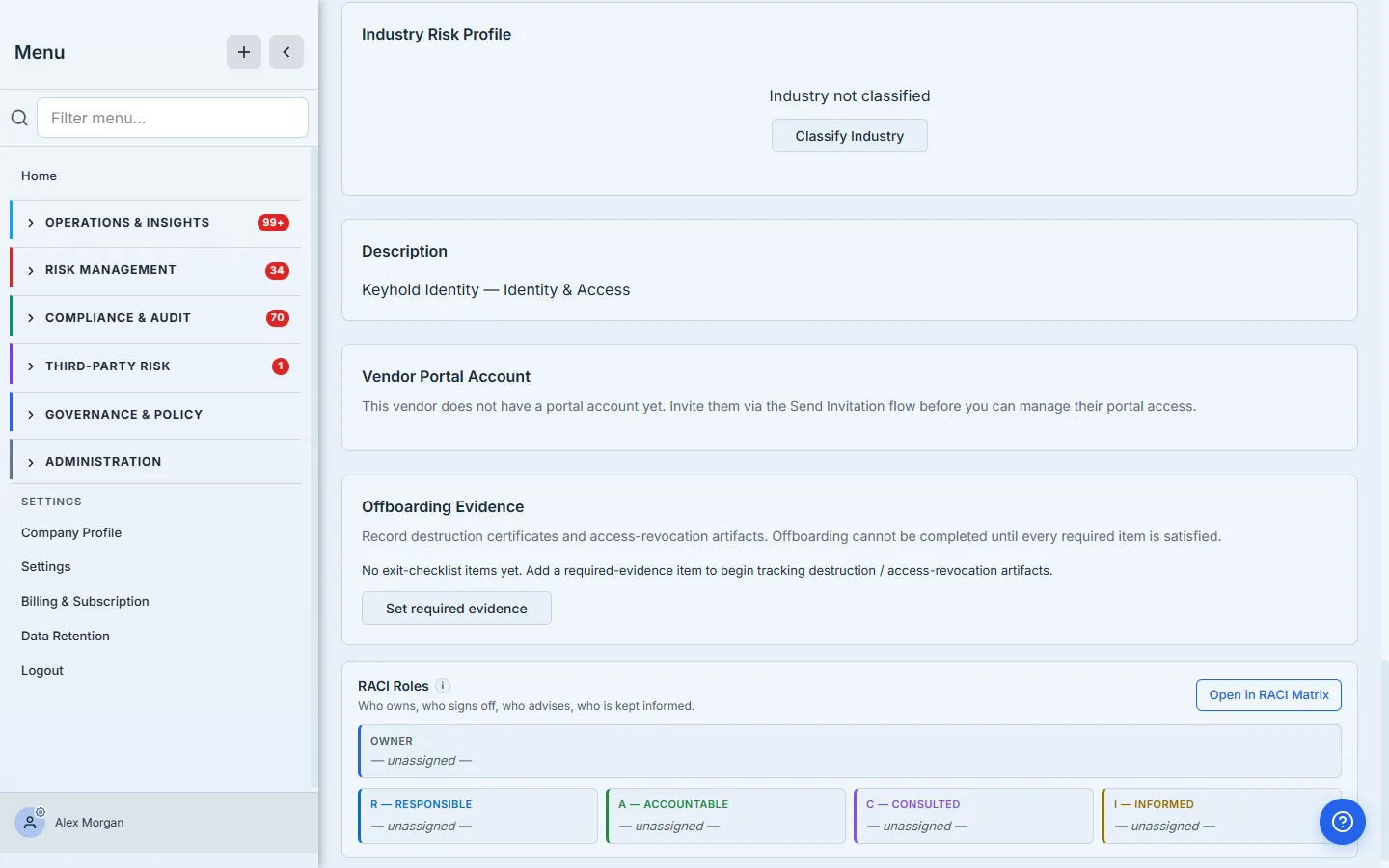
The line that earns its place: “Offboarding cannot be completed until every required item is satisfied.” This is the control. Everything up to here was administrative; from here on, the platform won’t let you finish until you’ve proven the exit was done properly.
Step 4 — Declare what the exit requires
Click Set required evidence and declare the exit-checklist items this vendor’s termination demands — and which artifacts each one requires before the vendor can be terminated.
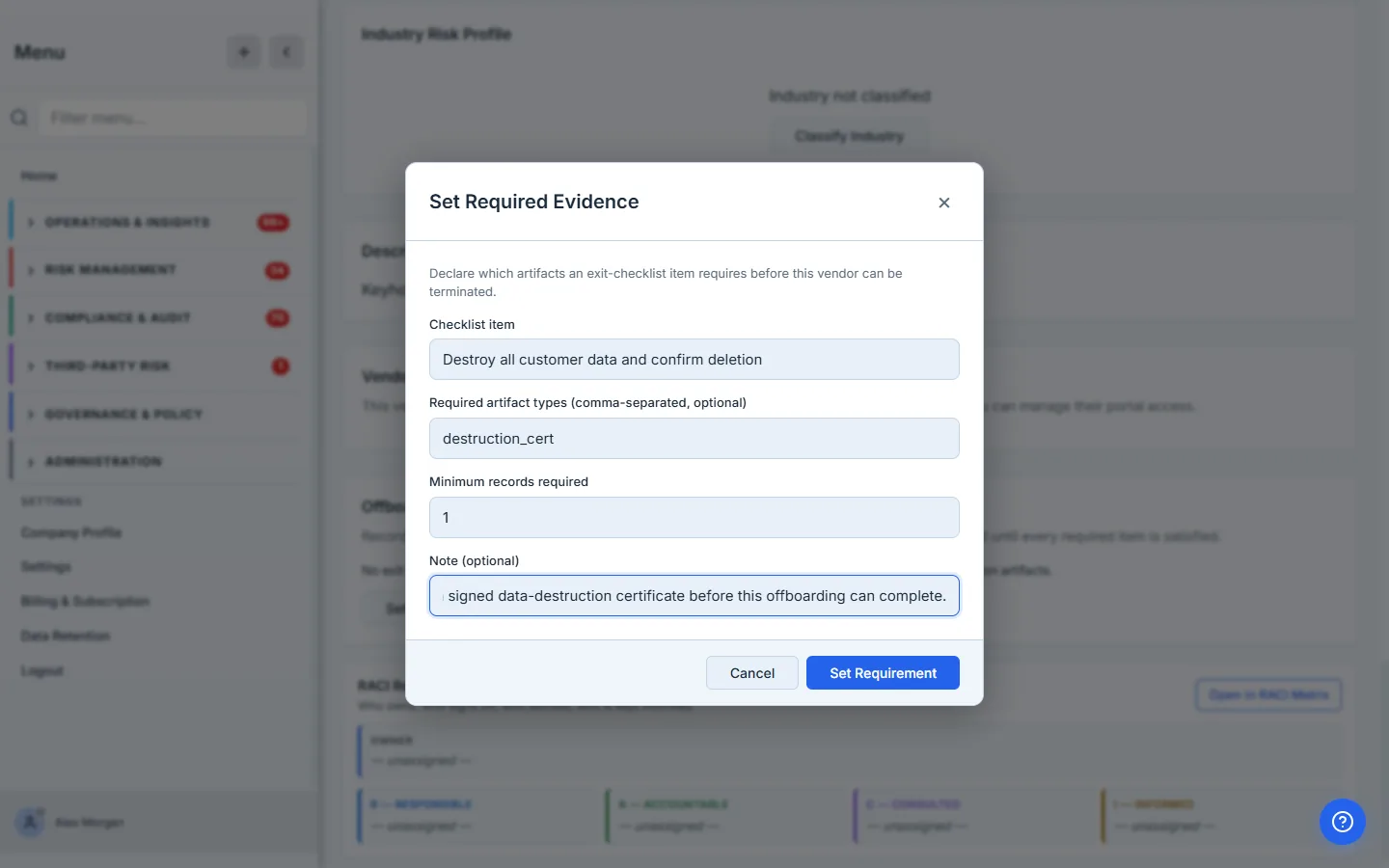
This is where your offboarding policy becomes enforceable. “Confirm vendor data deletion” requiring a destruction_cert; “Revoke production access” requiring an access_revocation artifact. You’re not writing a checklist on a wiki that nobody reads at exit time — you’re declaring a gate that the platform will hold the termination against.
Require the artifact, not just the checkbox. A checklist item that’s satisfied by ticking a box proves nothing. An item that requires a named artifact type — a destruction certificate, a revocation screenshot — means termination can’t complete until the actual proof exists in the system. The difference is whether your offboarding record survives an auditor asking “show me.”
Step 5 — Record the evidence, with chain of custody
For each required item, click Record evidence and attach the artifact — the vendor’s signed destruction certificate, the screenshot of the access console showing the keys revoked.
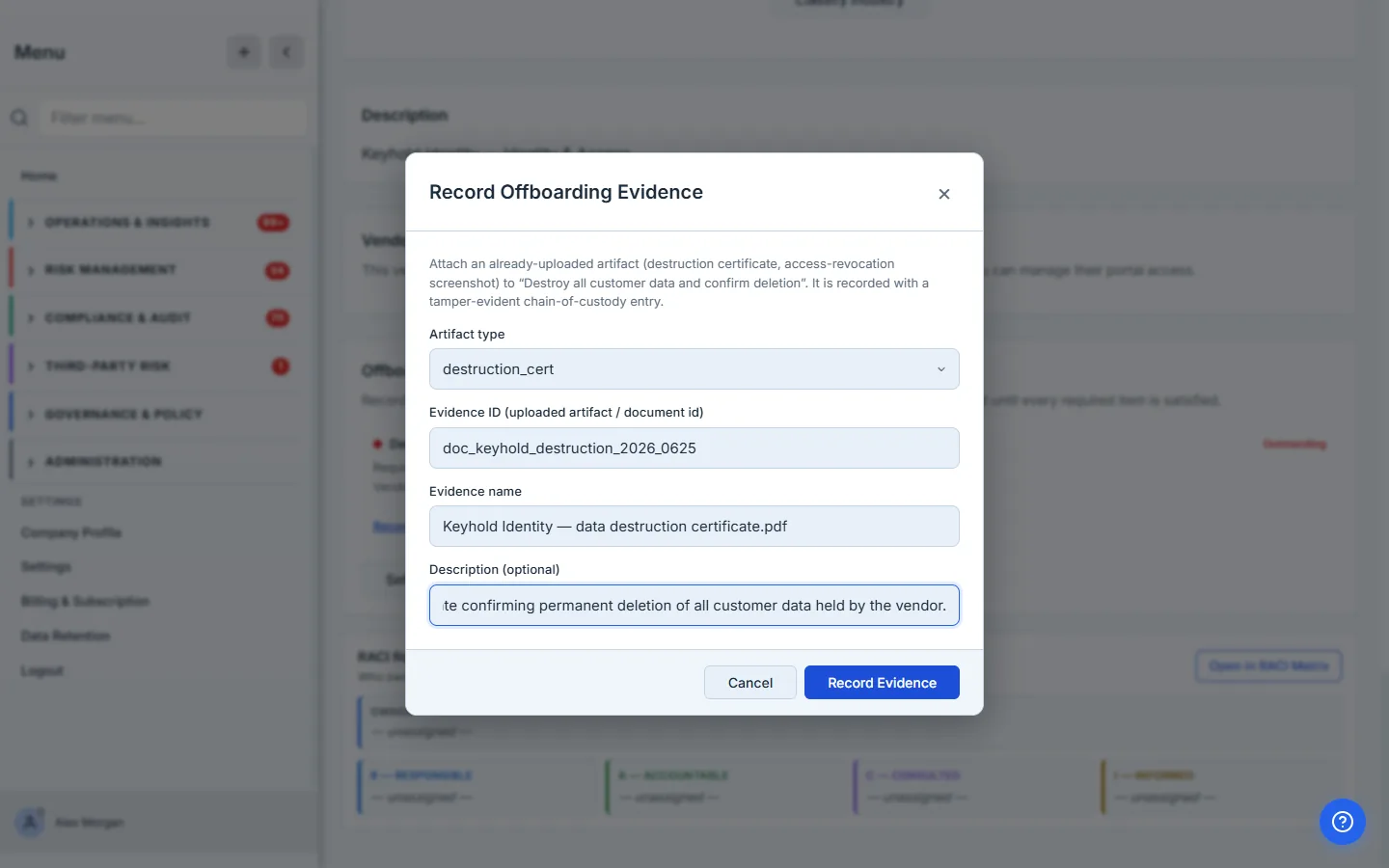
Recording evidence here doesn’t just store a filename. The artifact is wrapped in a chain-of-custody record — a cryptographically signed, tamper-evident entry with a SHA-256 integrity hash of the file, capturing what was recorded, by whom, and when, so the evidence can be verified later rather than just trusted. An offboarding certificate that can be silently swapped is worth little at audit time; one with an integrity signature is evidence.
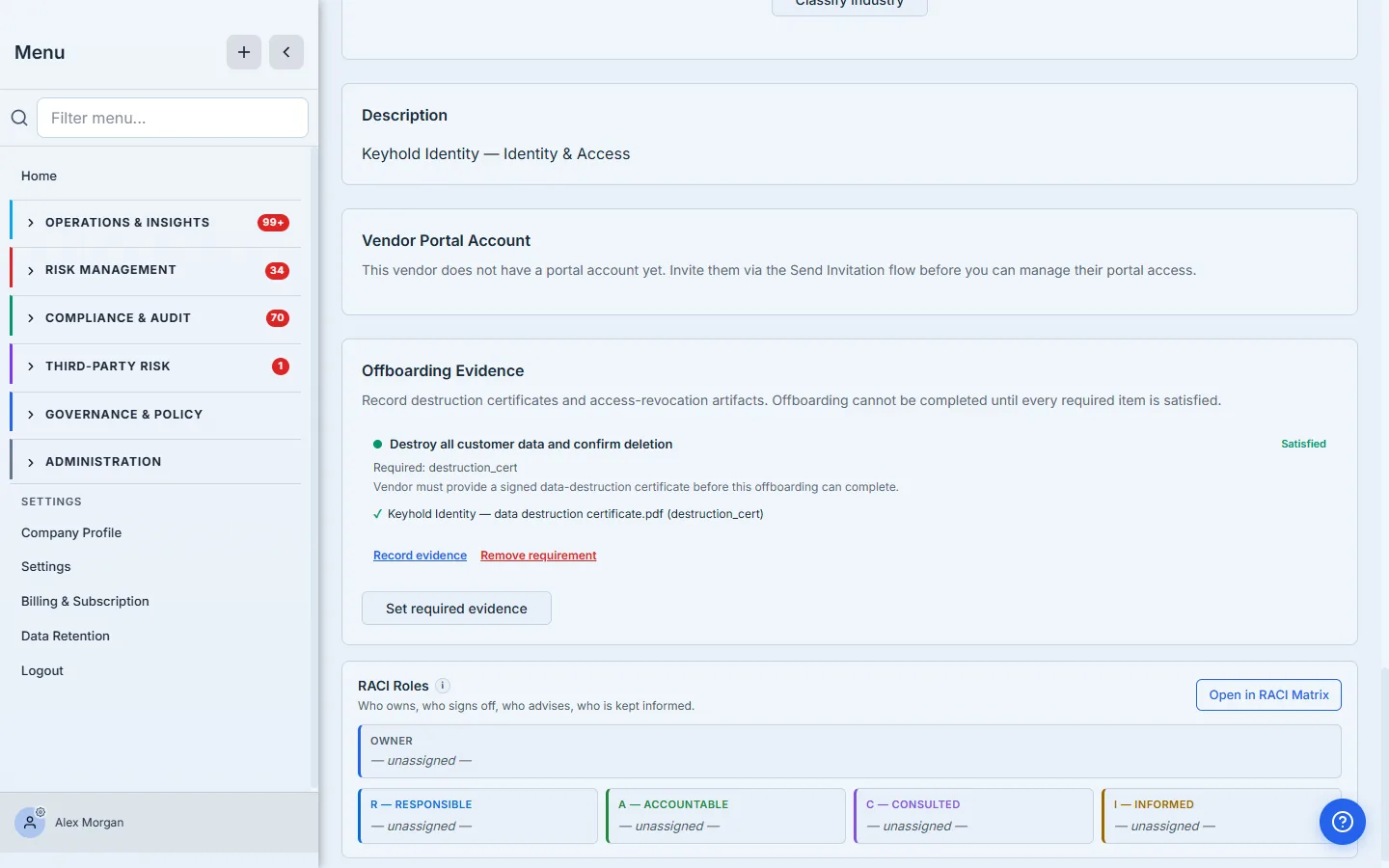
Once the artifact is recorded, the checklist item flips from Outstanding to Satisfied.
Step 6 — The gate holds the line
Here’s the control doing its job. Try to Complete Offboarding while a required item is still outstanding, and the platform refuses — naming exactly what’s missing:
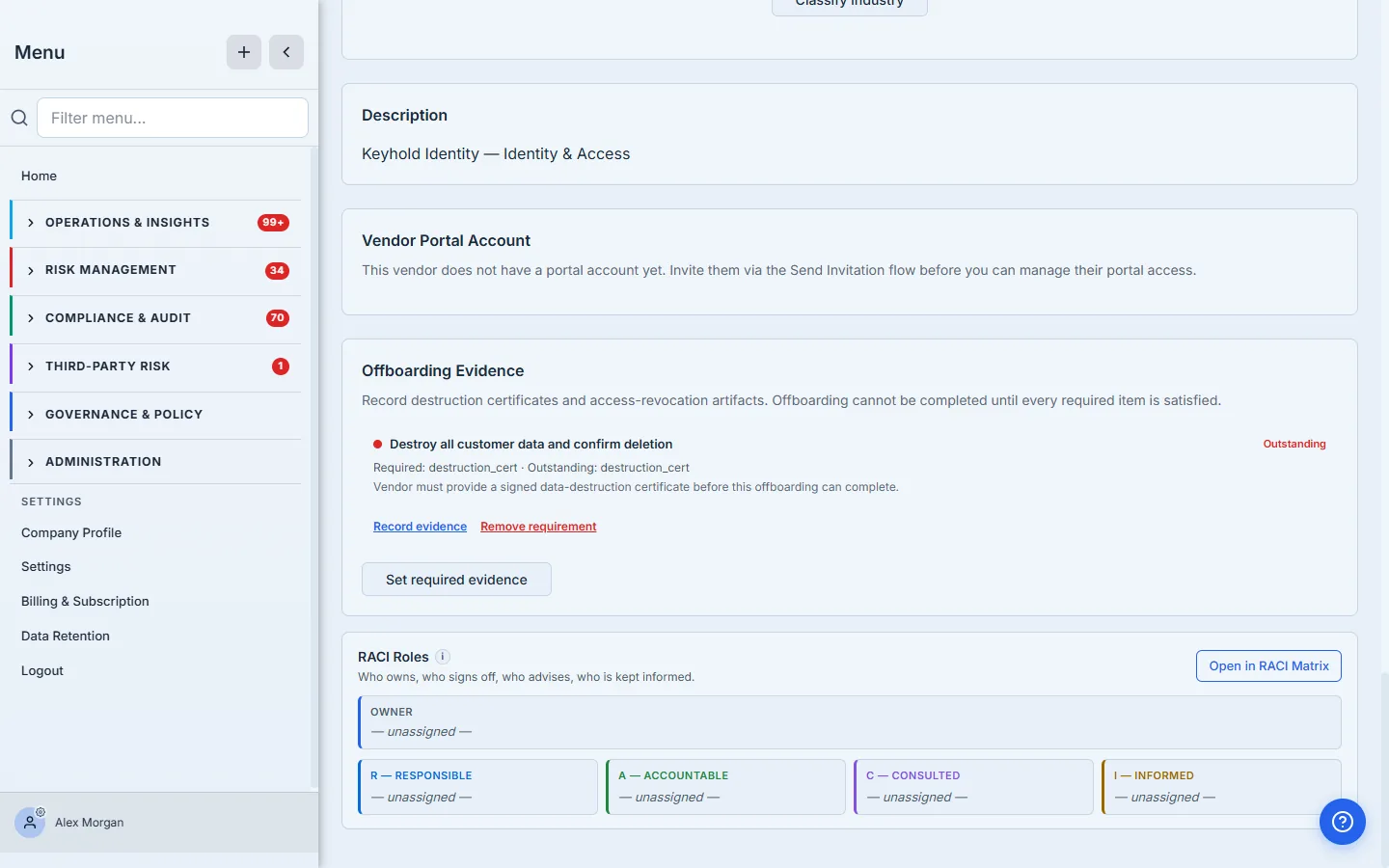
“Offboarding cannot be completed — required destruction / access-revocation evidence is missing for: ‘Confirm vendor data deletion’ (missing: destruction_cert).” This is the difference between an offboarding process and an offboarding control. A process is a checklist someone can skip under deadline pressure. A control is the platform declining to mark a vendor terminated until the proof of a clean exit actually exists. You can’t accidentally close out a vendor with your data still on their servers.
Step 7 — Complete the offboarding
With every required item satisfied, click Complete Offboarding. You’re warned that this revokes access and closes open requests — confirm, and the final cascade runs:
- Portal access is revoked — every active vendor-portal token is revoked immediately. If the vendor still had a login to your portal, it stops working now.
- Open requests are archived — any sent / viewed / in-progress request is archived, not left hanging.
- The vendor transitions to terminated — the terminal lifecycle state, recorded with the completion timestamp and the person who closed it out.
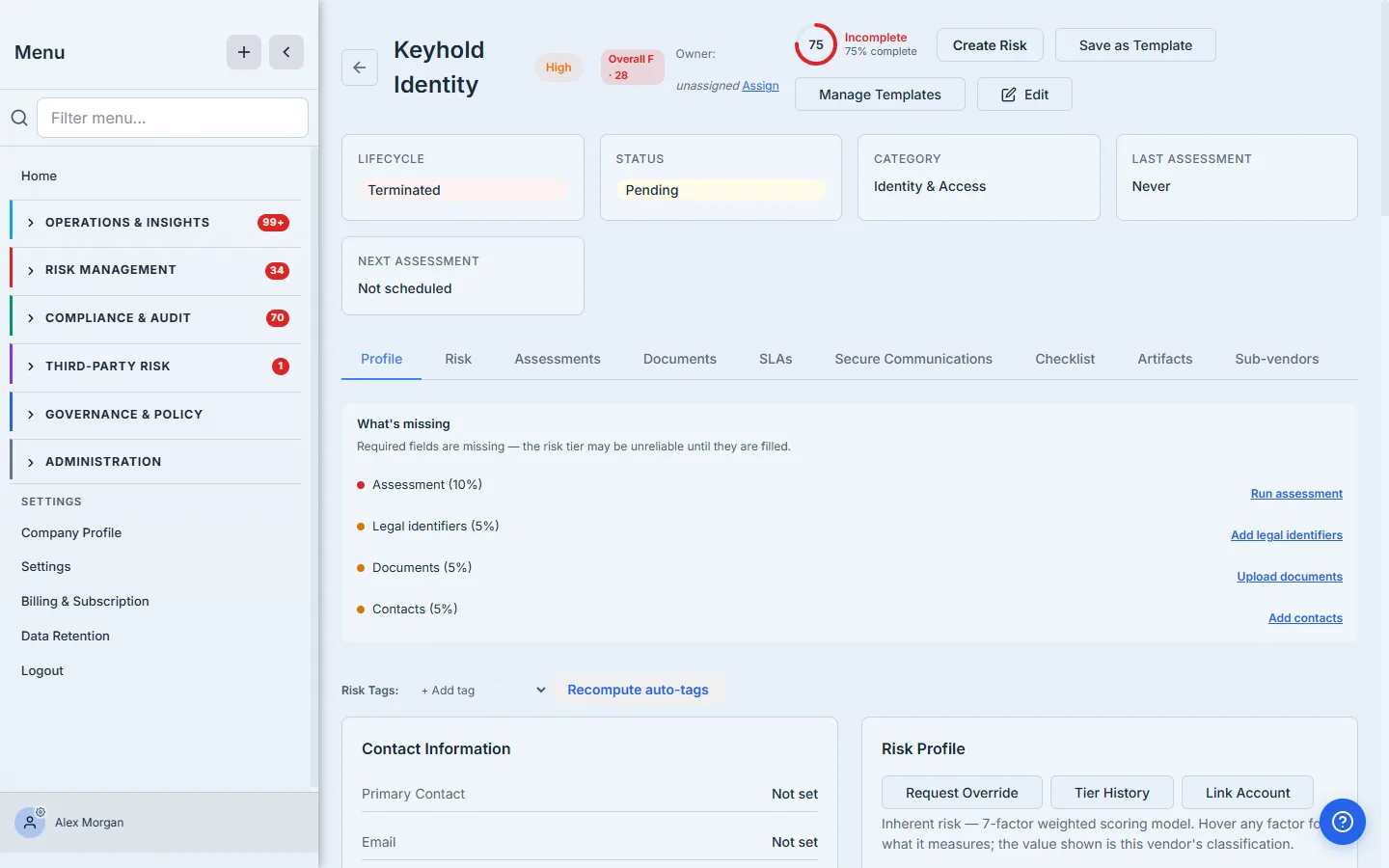
A terminated vendor doesn’t vanish — it drops out of your active vendor list but its record, its offboarding reason, its required-evidence trail, and its termination timestamp remain. That retained record is the audit answer: not “we stopped using them,” but “we wound them down on this date, for this reason, having confirmed data deletion and access revocation, with the certificates to prove it.”
Where this ends, and what’s next door
- The exit checklist here is the enforced one. A separate, lighter exit-plan template lives under the Obligations hub as a planning aid (the 16-point data / access / infrastructure / documentation runbook). That one’s for planning the exit; the offboarding-evidence section on the vendor is the one that gates termination. Plan in the former; prove in the latter.
- Offboarding is reversible only by intent, not by accident. There’s deliberately no one-click “undo” from offboarding back to active — if a wind-down is called off, re-classifying and re-activating the vendor is a conscious decision, not a slip.
- The cascade is best-effort and reported. Cancelling assessments and waiving artifacts won’t block the offboarding if one item hiccups; the cascade reports what it did so nothing is silently skipped.
What you walk away with
- A vendor wind-down that’s a control, not a status flip — started with a recorded reason, not a quiet deletion.
- A cascade that cancels in-flight assessments and waives pending requests, so nothing dangles after the relationship ends.
- An exit-evidence gate — termination is blocked until the destruction certificates and access-revocation proof you declared as required are recorded, each wrapped in a tamper-evident chain of custody.
- A clean termination — portal access revoked, open requests archived, and a retained offboarding record (reason, evidence, timestamp) that answers the auditor’s “show me.”
Open the vendor you’re least confident you offboarded cleanly last time. Click Begin Offboarding, declare the one piece of evidence you’d most want to have if that vendor were breached after you left — the data-deletion certificate — and watch the platform refuse to close them out until it’s on the record. That refusal is the control you were missing.
Related: offboarding is where data mapping earns its keep, and a termination triggered by repeated SLA breaches should carry that history with it. Overview: vendor risk management.