Every SaaS tool your company pays for is a third party holding your data, your access, and a slice of your operational risk — but that’s almost never how the subscription is filed. It lives in a licenses spreadsheet as a line item with a seat count and an annual price, disconnected from the vendor record that tracks the risk and the contract that carries the promises. So when a security review asks “what did we agree to with the vendor behind this tool, and when does it renew?”, the answer takes three systems and an afternoon.
That gap is exactly what the frameworks warn about. ISO 27001:2022 A.5.9 expects an inventory of information and associated assets — software included — with an owner; A.5.19–A.5.22 expect information-security requirements to be agreed with each supplier and monitored across the relationship. SOC 2 CC9.2 expects ongoing management of vendor commitments. A subscription you track only as a cost line satisfies none of it. Talarity closes the gap by looking at the same software subscriptions through the vendor lens: grouped by the vendor behind them, rolled up by seats and spend, and each one linkable to the contract that governs it.
Who’s involved
- IT / procurement — owns the software licenses in the catalog: the seat counts, the annual cost, the renewal date.
- Vendor manager — cares that each tool maps to a real vendor record with a risk tier, and that the contract behind it is on file.
- Security & privacy leads — need to reach the DPA, the SLA, and the breach-notification clause that govern the tool, not just its price.
- Auditor — pulls the software inventory and asks, per tool, “who’s the vendor, what’s the contract, and when does it renew?” — and expects one answer, not a scavenger hunt.
What’s on the page
The Vendor Subscriptions page (/app/subscriptions, under Third-Party Risk → Contracts & Obligations) is a read-through lens over your software licenses — the licenses themselves are still managed under Workforce → Assets & Licenses, on the Licenses & Subscriptions tab, the single source of truth. Here they’re reorganized around vendor risk:
- Grouped by vendor — every software subscription sits under the vendor that provides it, with a per-vendor rollup: subscription count, seats used of seats owned, annual spend, and the next renewal date across the group.
- Per-subscription rows — name, seats (allocated / total), available (the unused seats you’re paying for), annual cost, renewal date, and the contract it’s linked to.
- Search and sort — filter the register by subscription or vendor name, and sort by vendor, annual spend, or soonest renewal, so a hundred-app software estate stays navigable instead of an unbounded scroll.
- Link contract — the action that ties a subscription to the vendor contract governing it.
Step 1 — Read the register: subscriptions, by the vendor behind them
Open Third-Party Risk → Contracts & Obligations → Vendor Subscriptions. Instead of a flat license list, you get your software organized by vendor, each group carrying its own rollup.
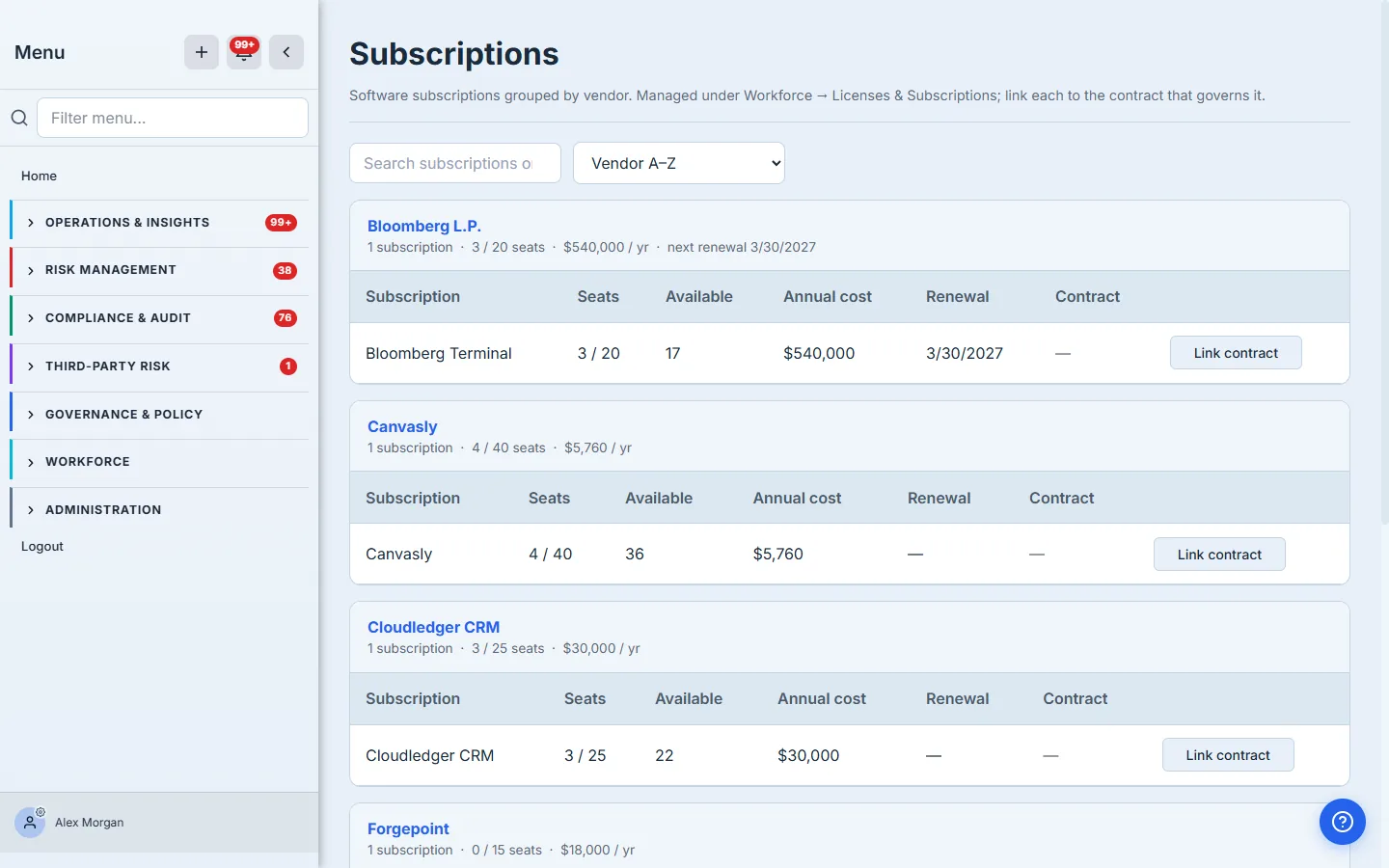
The rollups are computed live from the license catalog, not stored counters: seats are the quantity pool (assigned of owned), available is what’s left unused, annual cost is the pool’s spend, and next renewal is the earliest expiry in the group. Read left to right and the register answers the two questions a cost review and a risk review ask at once — are we over-provisioned? (a vendor showing 3 / 20 seats is paying for seventeen empty ones) and what’s coming due? The search box and the sort control — vendor, annual spend, or soonest renewal — keep a large software estate navigable, and the Contract column starts empty (—) — that’s the connection Step 2 makes.
Step 2 — Link a subscription to the contract that governs it
A subscription with no contract behind it is an orphan: you know what you pay, not what the vendor promised. Click Link contract on any subscription to open the link picker, then stage the contract that governs it and link them.
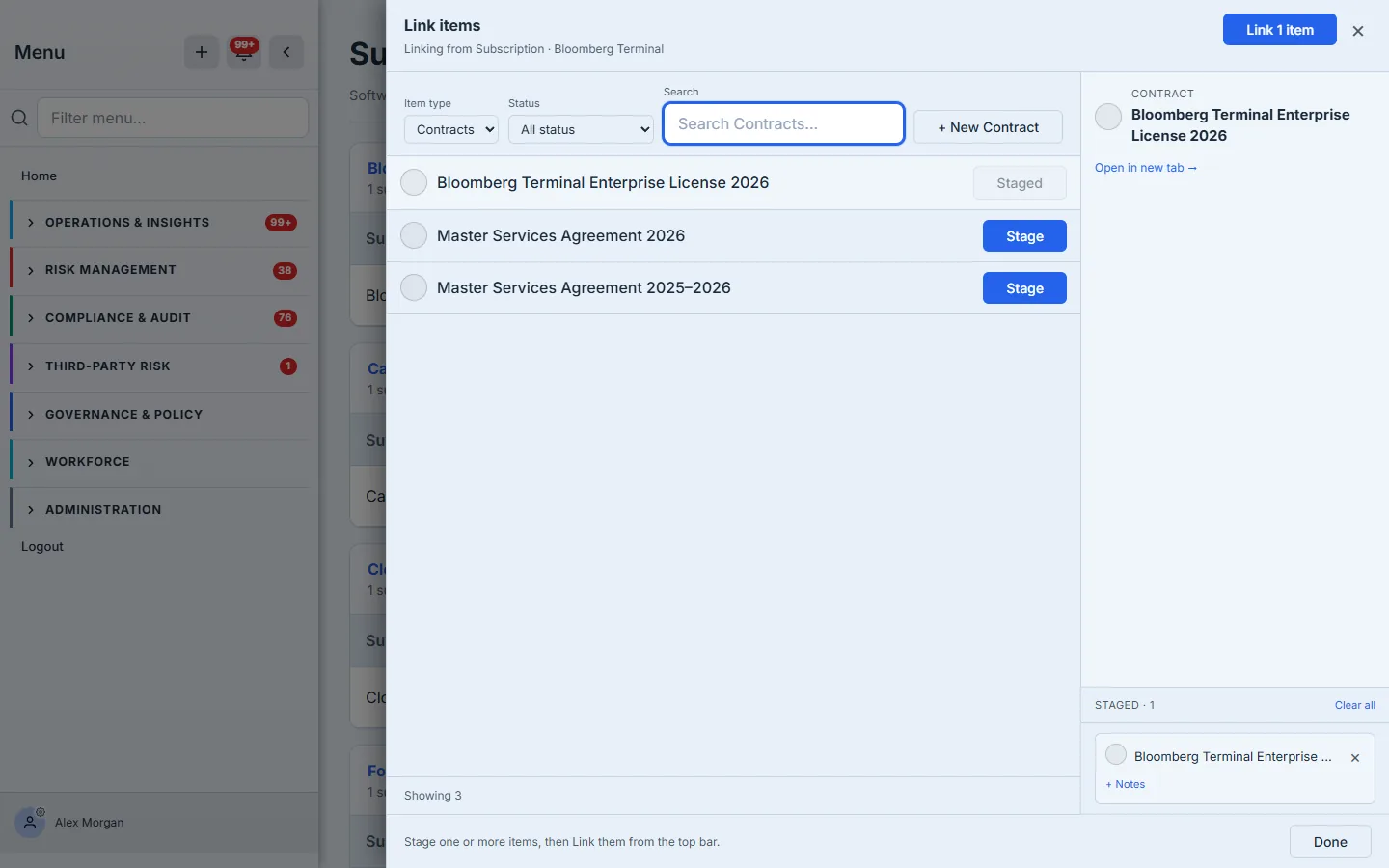
The picker is scoped to contracts and searchable, so the right agreement is one keystroke away even in a large register; if the governing contract isn’t on file yet, + New Contract creates it inline without leaving the flow. Staging one or more, then Link, writes a subscription→contract relationship into Talarity’s universal entity-link graph — the same graph that connects vendors, risks, and evidence — so the connection is a first-class, navigable edge, not a note in a description field.
Step 3 — The subscription stops being an orphan
Once linked, the contract appears in the subscription’s Contract column as a link straight through to the agreement — and from there to its obligations, SLAs, and renewal terms.
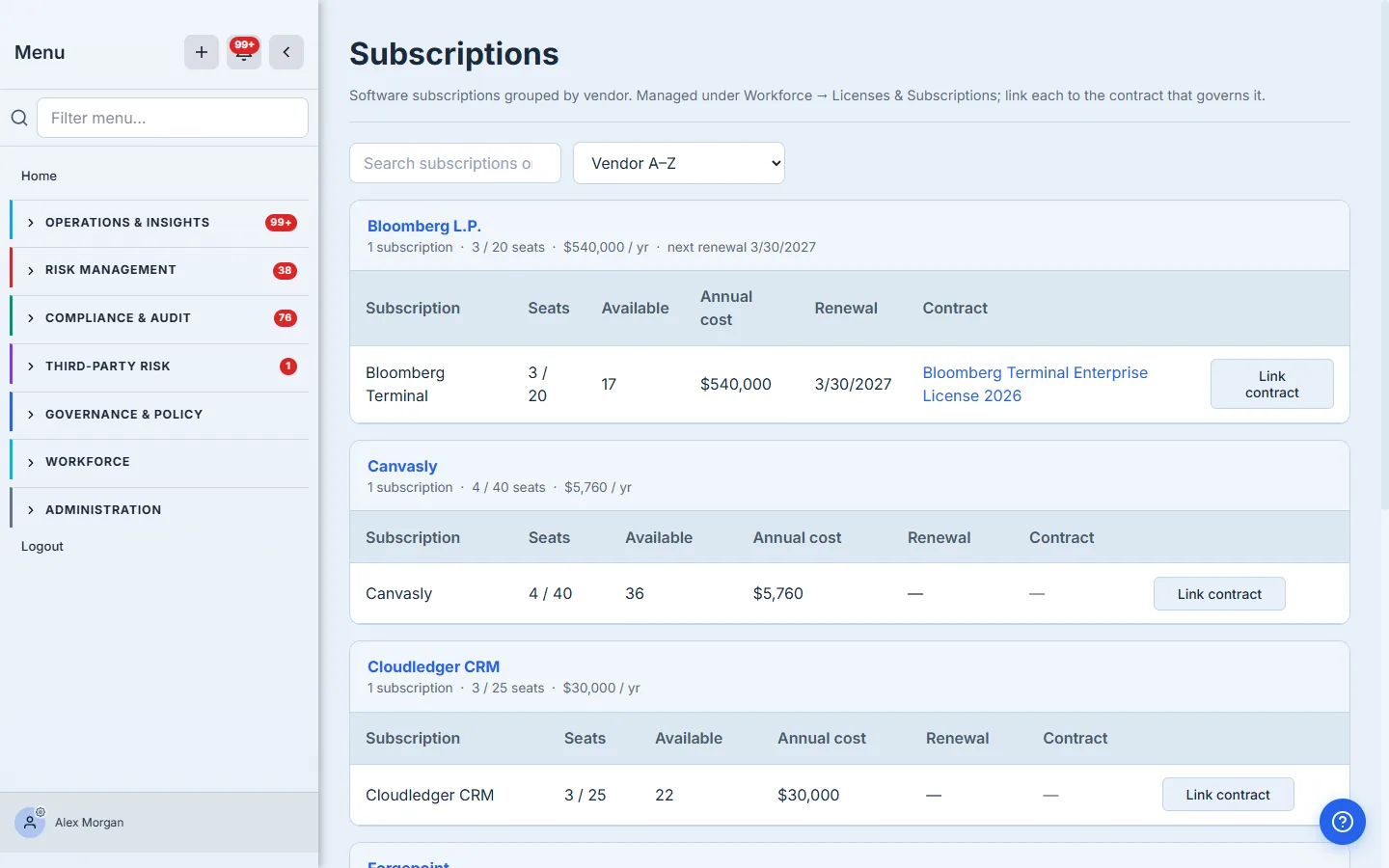
Now the tool, the vendor, and the paper are one chain. The security lead who needs the DPA clicks through from the subscription to the contract that carries it. The procurement owner working the renewal sees the seats and spend the renewal is really buying. And the auditor asking “what governs this tool?” gets a link, not a shrug. The link is bidirectional in the graph, so it’s equally reachable from the contract and the vendor — assign it once, and every surface that reads the vendor’s relationships sees it.
Where this connects
- Workforce → Assets & Licenses, on the Licenses & Subscriptions tab, is the source of truth. Seat counts, cost, and renewal dates are edited there; the Subscriptions page reflects them through the vendor lens. Change a seat count in the catalog and it re-rolls up here.
- The Contracts hub (
/app/contracts) is the same contracts as one register — link from a subscription here, or open the contract there to see everything it governs. - The vendor record ties it together: click a vendor’s name to open its detail page, where the subscription, its contract, the risk tier, and the assessments all hang off the one vendor.
What you walk away with
- A software inventory organized by vendor — every SaaS tool under the third party behind it, satisfying the “inventory of assets, with an owner” control instead of a disconnected cost list.
- Seats, available seats, and spend rolled up per vendor — the over-provisioning and the renewal exposure visible in one read.
- A subscription→contract link per tool, written into the universal entity-link graph — the navigable connection from the tool you pay for to the promises the vendor made.
- One answer to “what governs this tool, and when does it renew?” — a link an auditor can follow, not three systems to reconcile.
Open /app/subscriptions, find your most expensive tool, and click Link contract. Ninety seconds later the subscription you only knew the price of is tied to the agreement that governs it — and the next person who asks “what did we agree to with this vendor?” clicks through instead of hunting.
Related: a subscription is a vendor relationship with a renewal date — see contracts and renewals — and the access it grants belongs in data mapping. Overview: vendor risk management.