A vulnerability scanner is very good at producing a list. What it can’t do is tell you which of those findings actually threatens a control you claim to have, which one belongs in your risk register, or which one an auditor will want evidence you remediated. That connective work — finding → control → risk → evidence — is where vulnerabilities stop being an IT spreadsheet and become part of your governance program. Talarity is built to do exactly that.
What’s on the page
Open Vulnerability Management (under Risk):
- KPI tiles — Total, Critical, High, Open, Overdue, and Avg CVSS.
- The register — a sortable, filterable table (Severity, Title, CVE, CVSS, State, Category, Source, Assets, Discovered) with filters for severity / state / category / source.
- Finding detail panel — the CVE, CVSS vector, description, remediation, and affected assets, over an Actions row (Move to Triaged / False Positive, Edit, Attach as Evidence, Create Work Item, Delete), a Linked Entities section (Create Risk / Link Risk / Link Control), and an activity log.
- Import — bulk-load scanner exports (Tenable, Qualys, Rapid7, OpenVAS, SAST/DAST/SCA) as CSV / XML / JSON.
The register — every finding, prioritized
Open Vulnerability Management (under Risk). The page opens on the register: KPI tiles across the top — total, critical, high, open, overdue, and average CVSS — over a sortable, filterable table of every finding.
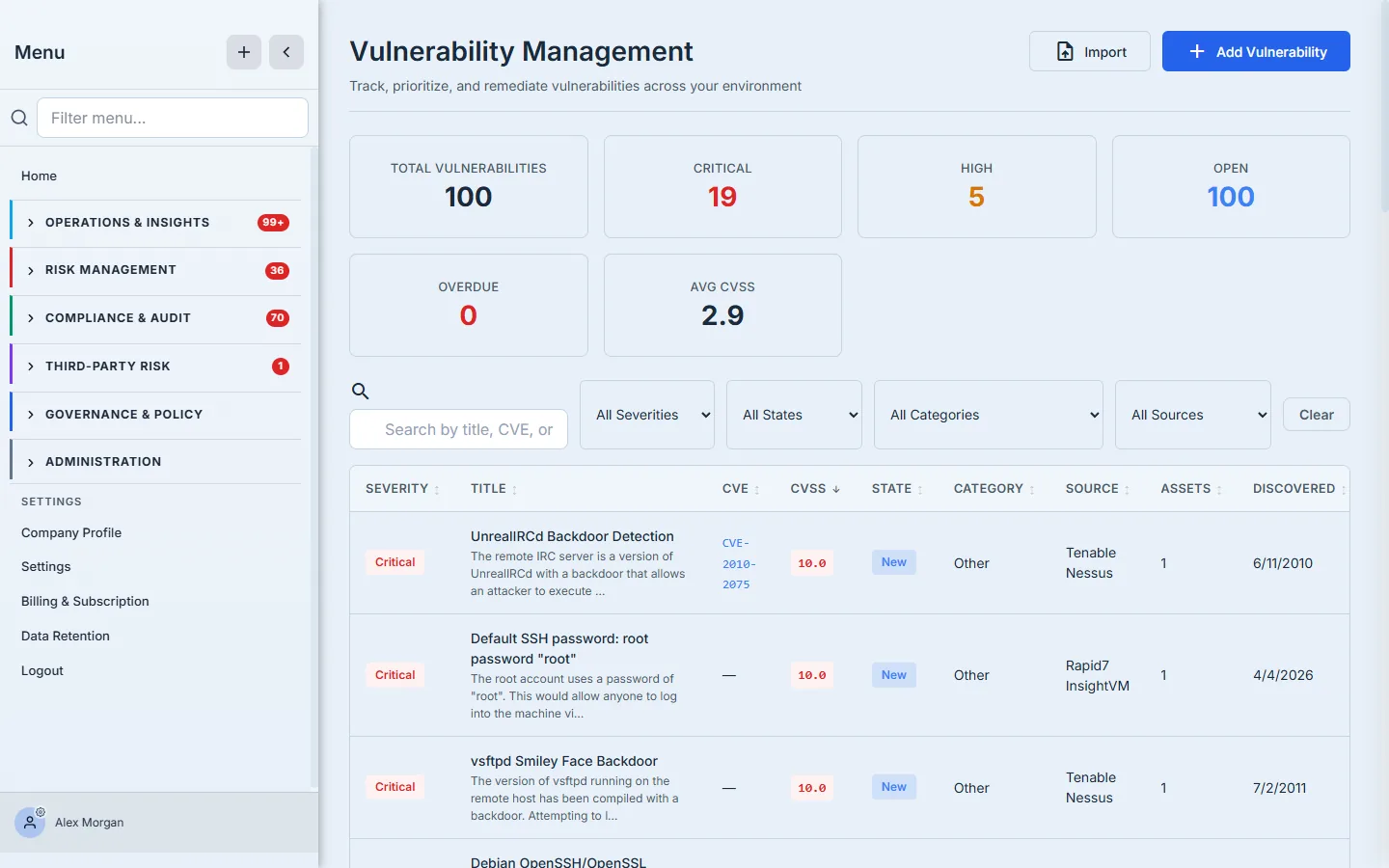
Each row carries what triage needs: a severity badge, the CVE (linked to the NVD), the CVSS score, the workflow state, the category, and the source scanner that found it. Filter by severity to work the criticals first, by state to see what’s untriaged, by source to audit a single scanner’s output — and sort by CVSS to put the most dangerous findings at the top. The tiles turn the pile into a posture you can report: 100 open, 19 critical, average CVSS 2.9.
Triage — a finding moves through states, not a checkbox
Click any finding and its detail panel slides in. This is where a raw CVE becomes a managed item.
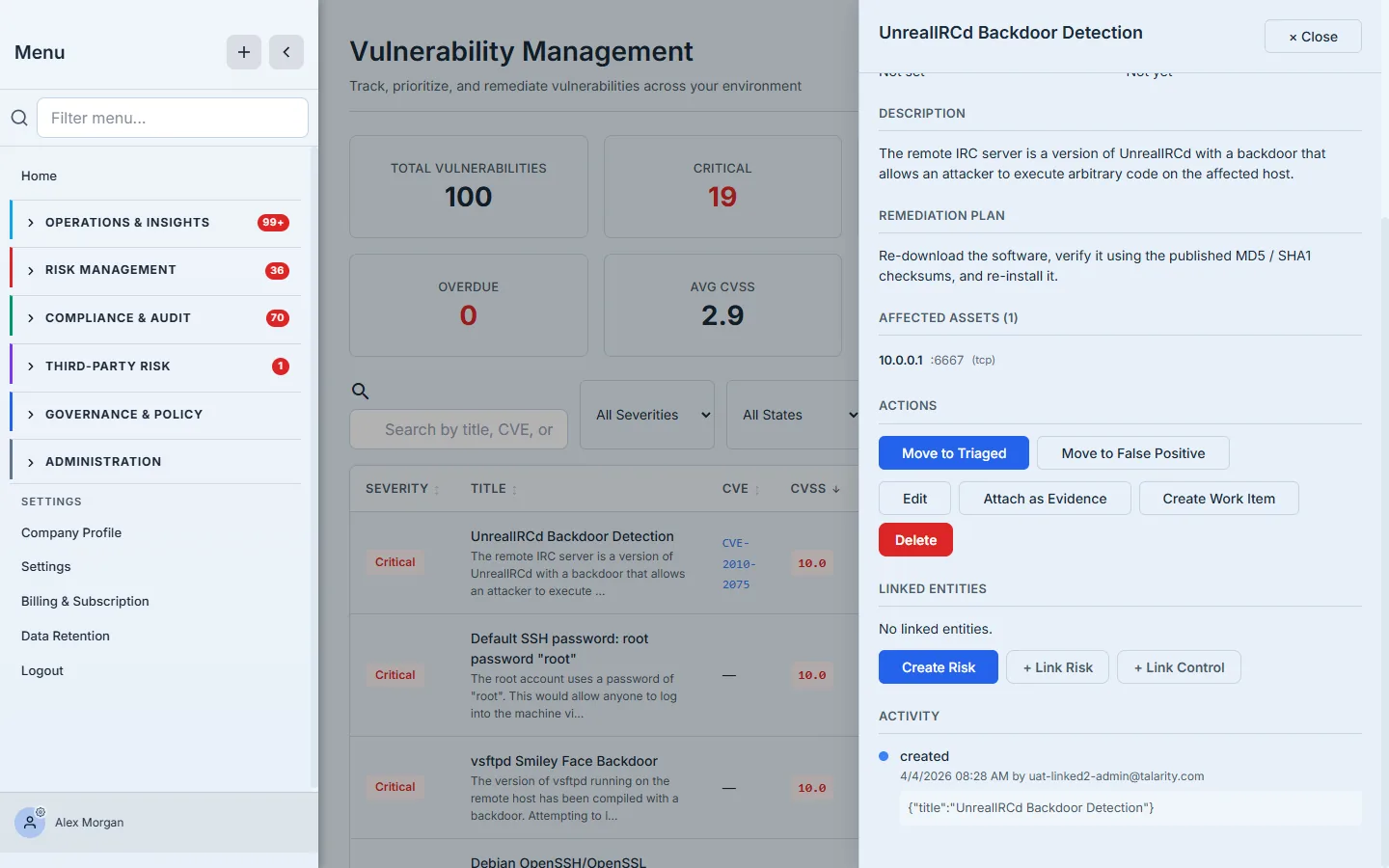
The panel shows the CVE, CVSS vector, description, remediation guidance, and the affected assets the scanner reported (host, port, protocol). Crucially, the state is a workflow, not a flag: a finding moves new → triaged → in progress → mitigated → remediated, with accepted and false positive as deliberate off-ramps — and every transition is logged to the activity timeline. You’re not ticking “done”; you’re recording a defensible lifecycle an auditor can follow.
Where findings come from — import a scan
You can add a finding by hand, but most arrive in bulk from your scanner. Import accepts exports from the tools you already run — Tenable, Qualys, Rapid7, OpenVAS, and SAST/DAST/SCA pipelines — as CSV, XML, or JSON.
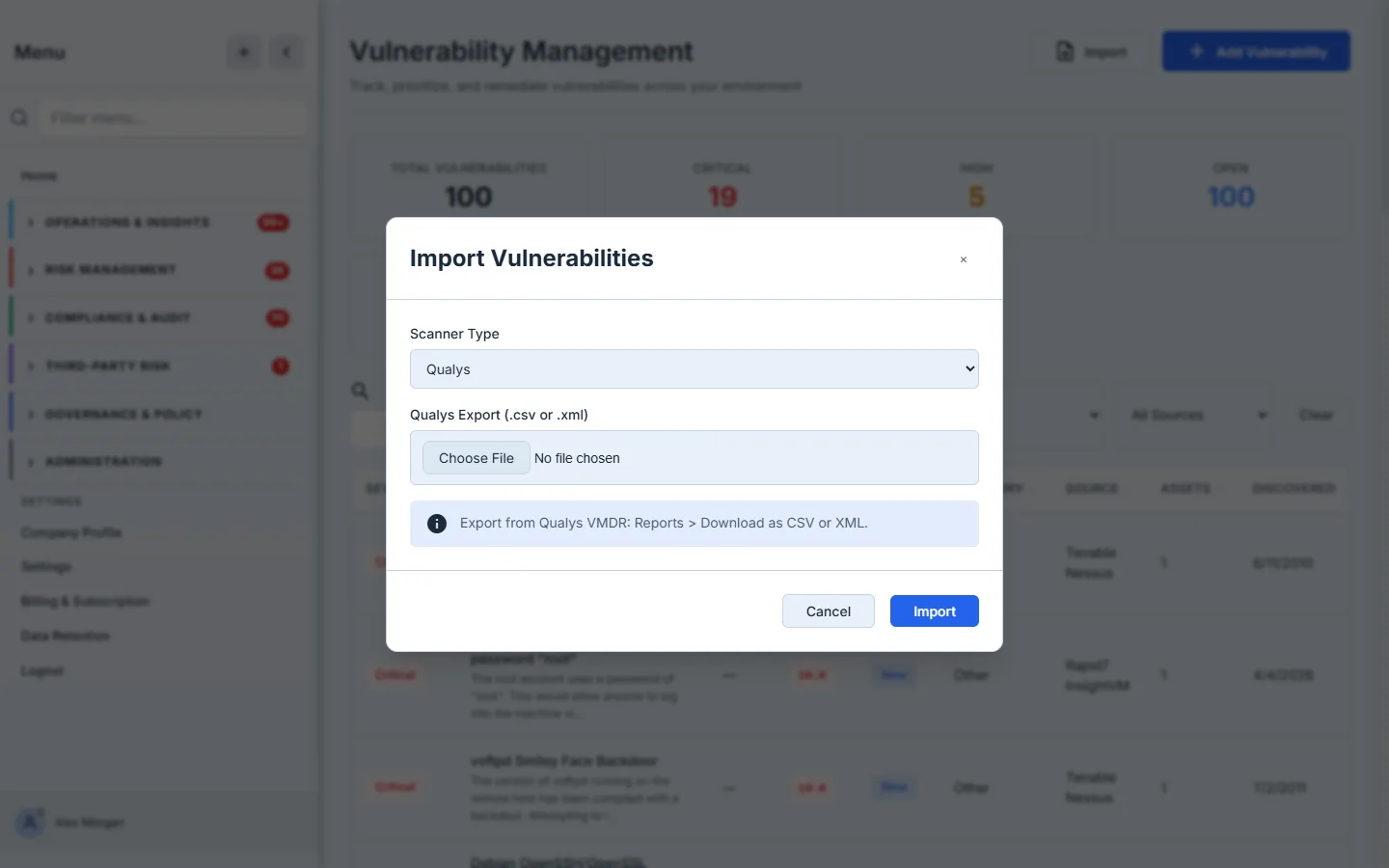
Pick your scanner, upload the export, and Talarity parses it into findings — deduplicating, mapping severities, and bringing the affected-host detail across. The per-tool hint (“Export from Qualys VMDR: Reports > Download as CSV or XML”) means you don’t have to guess the format. From here on, those findings live in the same register, triaged the same way, regardless of which scanner produced them.
The part that matters — connect it to your program
A triaged finding still isn’t doing governance work until it’s linked. The detail panel makes that a click or two — its Linked Entities section and Actions row are where it happens:
- Create Risk turns the finding into a register entry automatically, mapping its CVSS into likelihood and impact so the risk lands pre-scored — no re-keying the severity by hand.
- Link Risk / Link Control connect the finding to an existing risk or to the control it threatens, so the relationship is queryable both ways: open a control and see the live vulnerabilities against it; open a finding and see what it endangers.
- Attach as Evidence takes the finding — its CVE, CVSS, scanner, and remediation detail — and files it as an evidence artifact against the linked control, so the remediation trail is already assembled when the audit asks for it.
- Create Work Item routes the actual fix to an owner with an SLA, so remediation is tracked, not hoped for.
That’s the throughline: a scanner emits CVE-2010-2075, and a few clicks later it’s a triaged finding, a scored risk, a control with a known gap, an evidence artifact, and an assigned work item — all linked, all logged.
How the page works
The behaviour underneath the buttons is what makes the register defensible:
- The state machine is enforced, not advisory. The transitions allowed from each state are fixed in code: a
newfinding can only move to triaged or false positive;triagedopens up in progress, accepted, or false positive;in progressleads to mitigated, remediated, or accepted. You can’t skip a finding straight from new to remediated — the Actions row only ever offers the legal next moves, so the lifecycle an auditor reads is one the system guaranteed, not one someone typed. - Create Risk is a scoring step, not a copy. It maps the finding’s CVSS into likelihood and impact so the new register entry lands pre-scored — the severity carries over as a calculated risk position, not a number you re-key.
- Links are bidirectional and queryable. Link a finding to a control and the relationship resolves both ways — open the control to see the live vulnerabilities against it, open the finding to see what it threatens. The same edge powers both views, so they can’t disagree.
- Import normalizes, then dedupes. Whatever scanner you export from, the parser maps severities and pulls the affected-host detail into one shape and deduplicates on the way in, so re-importing last week’s scan updates findings rather than doubling them.
What you walk away with
- A register, not a spreadsheet. Severity/CVE/CVSS/state with filters and KPI tiles — the most dangerous findings surface first, and posture is reportable at a glance.
- A defensible lifecycle. Findings move through a real state machine with a logged timeline, not a binary “fixed” checkbox.
- One pipeline for every scanner. Tenable, Qualys, Rapid7, OpenVAS, SAST/DAST/SCA all import into the same triage flow.
- Findings wired into governance. Create-Risk (CVSS-scored), link-to-control, attach-as-evidence, and create-work-item turn a CVE into a tracked part of your risk register, your control coverage, and your audit evidence.
Scanners will keep producing lists. Talarity is what turns the list into a program.