A DR exercise is only as good as the people who actually run the tests — and some of them don’t work for you. The recovery of your colocation cage, your backup target, your managed database — those are tested by your vendors, not your staff. Most GRC tools force an awkward choice: either give every vendor a login to your platform (a security and licensing headache), or chase them over email and paste their answers in by hand (a tracking headache that loses the evidence trail).
Talarity does neither. Every asset has a custodian — its owner — who becomes the default tester. When you scope an exercise, you reassign any subject to whoever actually runs that recovery, internal staff or an external vendor by email. External vendors get a one-time secure link to a clean portal — no account, no password — and what they submit lands back in your exercise as first-class evidence. ISO 22301 §8.4.4 expects defined roles and the involvement of relevant interested parties; NIST SP 800-34 §3.4 expects named recovery personnel including third-party points of contact. This is how you satisfy both without provisioning a single vendor account.
Who’s involved
- Business continuity owner — scopes the exercise and assigns a tester to each subject.
- Asset custodian — the named owner of an asset; the default tester for it (internal staff).
- External vendor contact — a third party who runs the recovery of an asset or vendor subject; responds via a secure no-login link.
- Auditor — confirms every in-scope asset had a named, accountable tester and a recorded result.
What’s on the page
The hand-off runs across three surfaces:
- Asset Inventory (
/app/grc/assets) — every asset categorized, typed, and rated by criticality, each carrying a custodian (its owner). That custodian field is what makes tester assignment near-automatic. - The DR-exercise assignment grid (Business Continuity & DR → DR Exercises) — one row per in-scope subject, with its criticality, its custodian / contact, a suggested tester (defaulting to the custodian), and a Reassign field to hand a subject to an internal colleague or an external vendor by email.
- The external vendor’s no-login portal — a clean, branded, single-task page (no account, no password) where a vendor records outcome (Passed / Partial / Failed), the actual RTO / RPO, issues + severity, and a recommended remediation, then submits.
Step 1 — Start from a classified asset inventory
Open Asset Inventory (/app/grc/assets). Every asset is categorized, typed, and — the part that matters for DR — rated by criticality. This is the estate you test: the Critical and High assets are the ones a coordinated DR exercise scopes first.
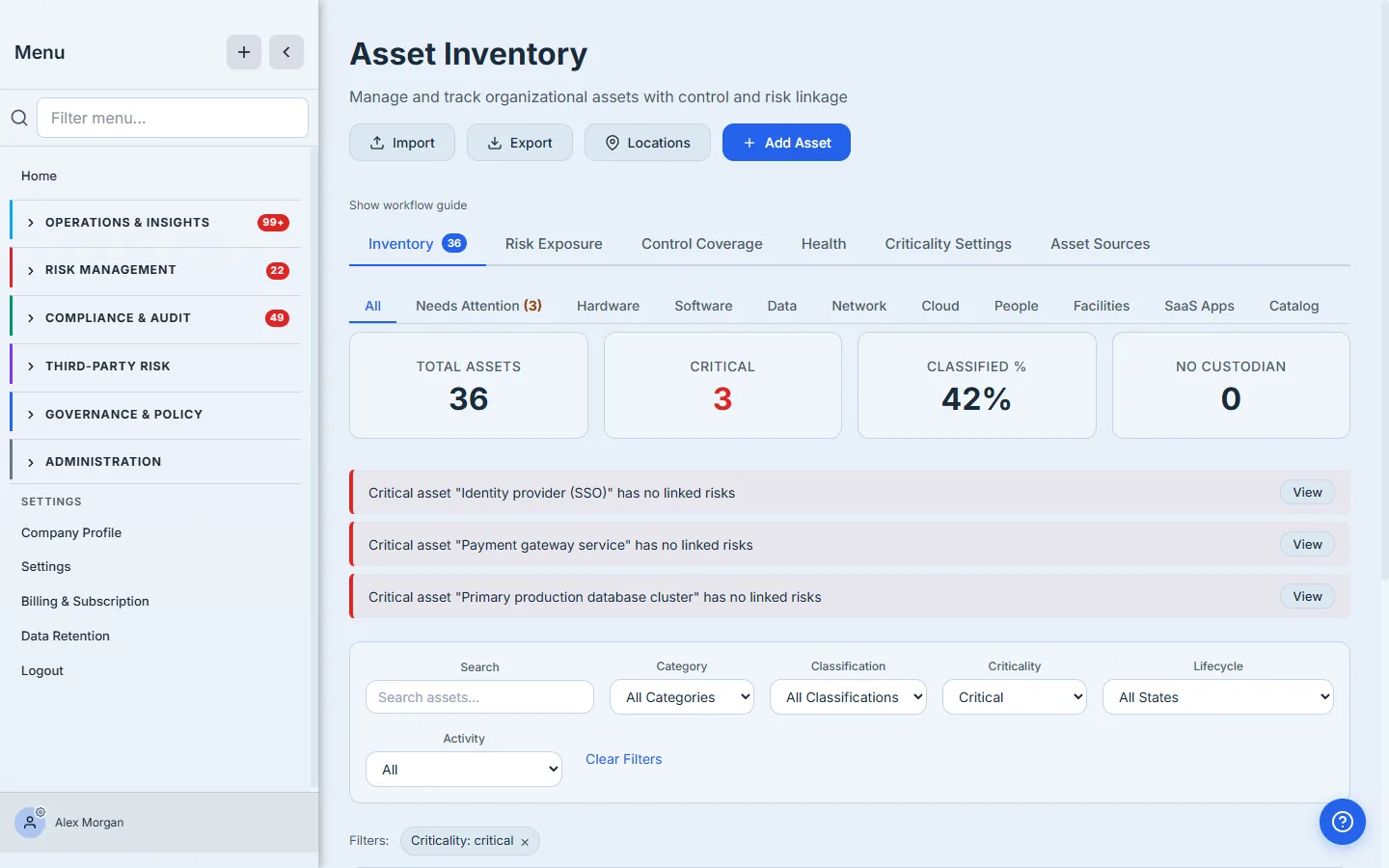
Each asset carries a custodian — the person accountable for it. That single field is what makes tester assignment almost automatic: the custodian is who Talarity suggests when the asset comes up for testing. Keep custodians current here and the rest of this workflow mostly fills itself in.
Step 2 — Scope the exercise and assign a tester to every subject
In Business Continuity & DR (/app/grc/bcdr) → DR Exercises, create an exercise and resolve its scope — by criticality, by location (site / datacenter), and by vendor for third-party DR. Talarity builds an assignment grid: every in-scope subject, its criticality, its custodian / contact, and a suggested tester defaulting to that custodian.
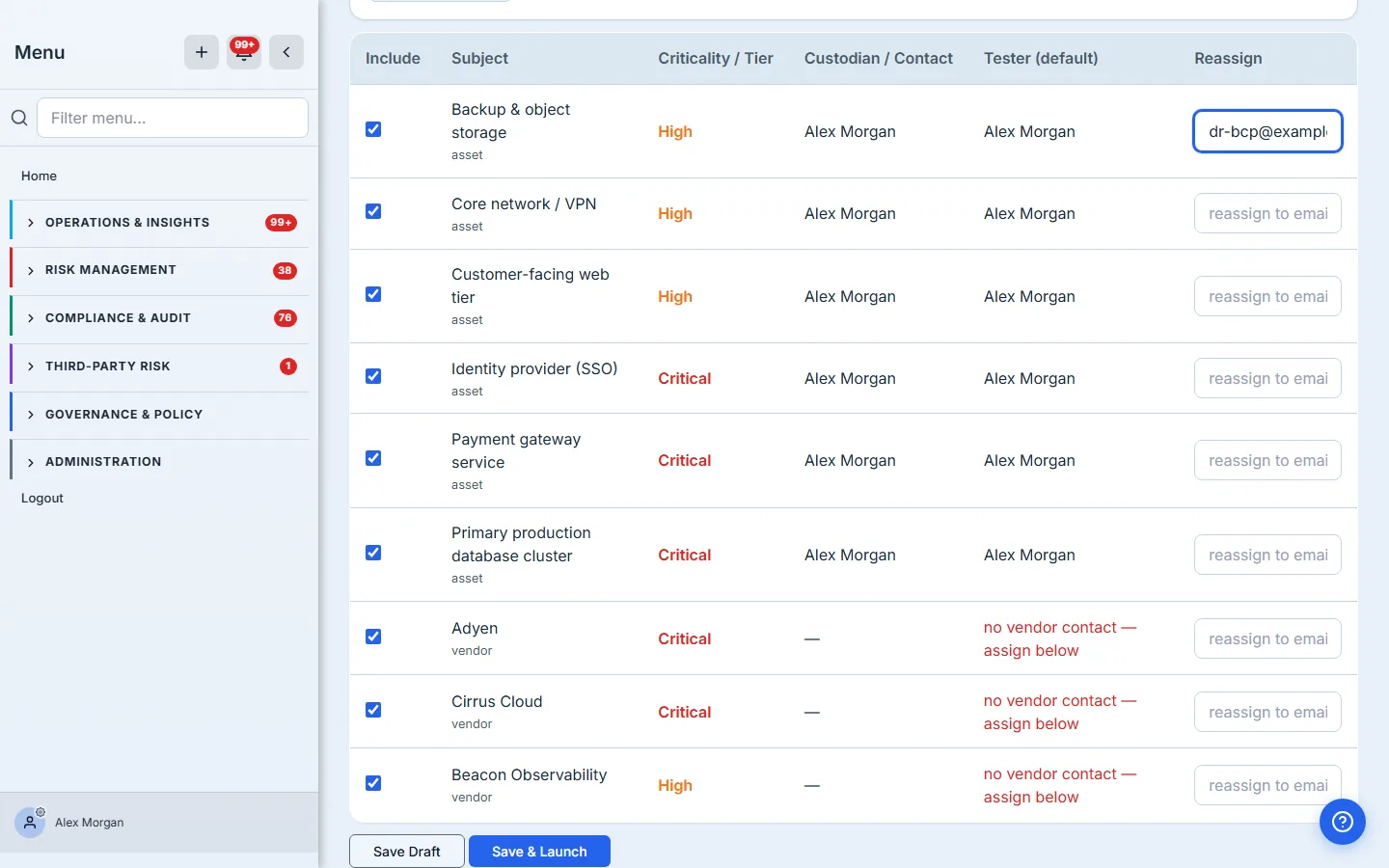
Now reassign anything that a different person actually runs. Leave the internal assets on their custodians; for the ones a vendor recovers, type the vendor’s DR contact into the Reassign field — here, Backup & object storage goes to dr-bcp@example.com. You can mix freely: most subjects tested by internal custodians, a few handed to external vendors, all in one exercise.
The custodian field is the quiet workhorse of this whole feature. Set it once on the asset, and every future exercise pre-assigns the right tester for free. Reassignment is the exception you reach for, not the rule you start from.
Save & Launch fans out a recovery-test task to every tester. Internal staff get it in their work queue. External vendors get a one-time secure link — which is the whole point of the next step.
Step 3 — The external vendor responds, with no login
The vendor opens their link and sees a clean, branded portal — no Talarity account, no password, just the one task assigned to them. They record the outcome (Passed / Partial / Failed), the actual RTO and RPO they achieved, any issues found, the severity, and a recommended remediation — and attach evidence. The form auto-saves as they go.
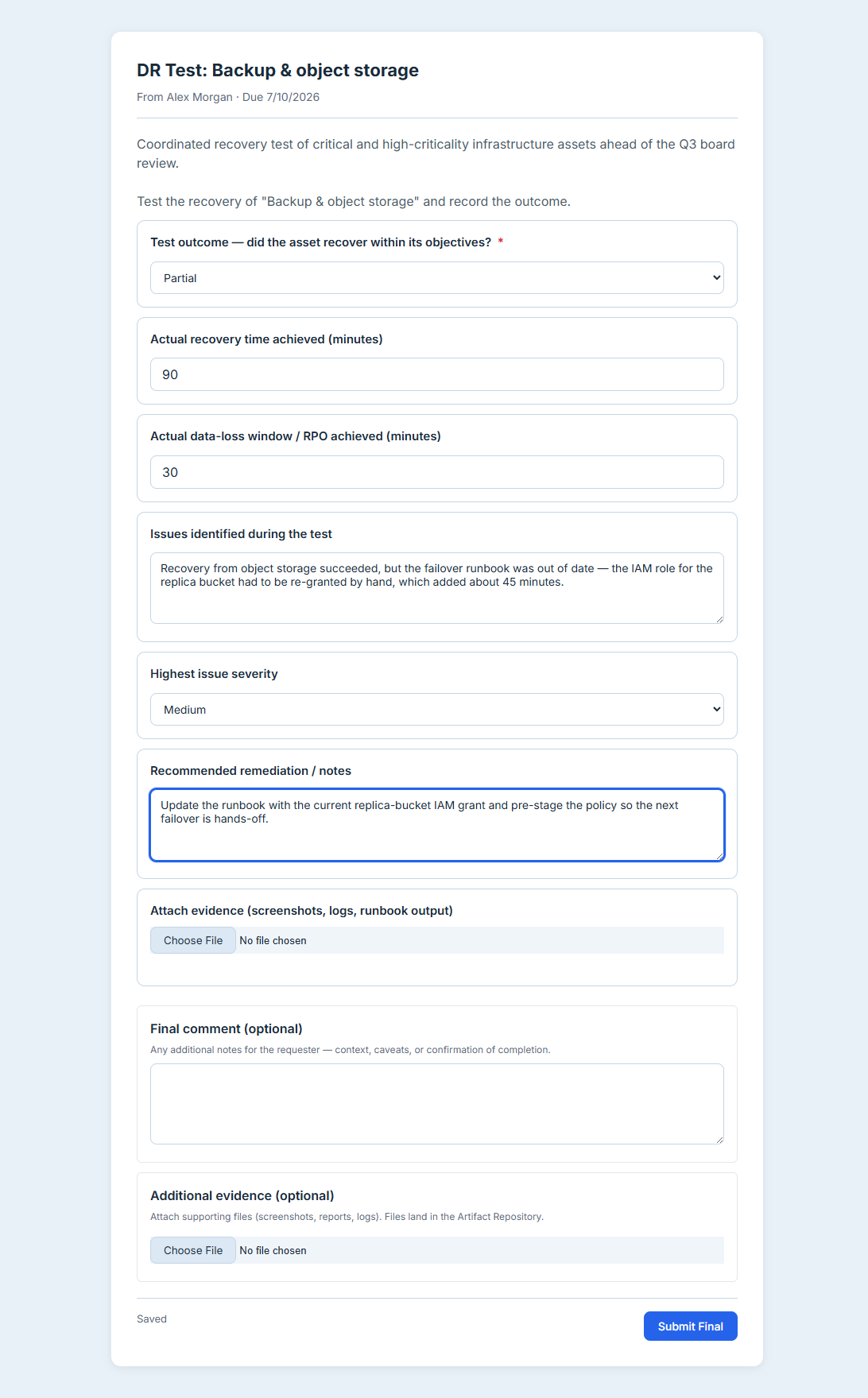
Notice what the form does: choosing Partial or Failed reveals the Issues and Highest issue severity fields, so the vendor is prompted for exactly the detail you need to act on a gap — and nothing more when the test passes clean. When they hit Submit Final, their response flows straight back into your exercise: the subject’s outcome and actual RTO/RPO appear on the board, and any Partial or Failed result opens a tracked remediation work-item — with a serious-enough failure also opening a scored risk — the same automatic loop every internal test triggers. The vendor never touched your GRC platform, but their result is now first-class evidence in it.
What you walk away with
- A named, accountable tester on every in-scope subject — defaulting to the asset’s custodian, reassignable to anyone, with no manual roster to maintain.
- External vendors in the loop without accounts — a secure one-time link instead of a provisioned login, so testing third-party recovery doesn’t mean expanding your platform’s attack surface.
- Their response captured as evidence, not email — outcome, actual RTO/RPO, issues, and remediation land back on the exercise board and feed the same auto-remediation as internal tests.
- A clean audit answer — every critical asset had an owner, that owner (or their delegate) ran the test, and the result is recorded and linked.
Open the DR Exercises tab, scope a small exercise over three or four critical assets, and reassign one of them to a vendor’s email. Launch it, click the link as the vendor would, and watch a no-login response become a line on your exercise board. That hand-off — from your asset inventory, to the right tester, to recorded evidence — is what turns a DR test from a fire drill into a record you can stand behind.