Writing a single business impact analysis is an afternoon’s work: name the process, estimate the downtime you can tolerate, set a recovery target. The hard part isn’t the first one — it’s the fortieth, and keeping all of them honest. A real BIA program answers questions a single document never can: How many of our critical processes still have no recovery plan? What’s overdue for review? Where is our recovery-time exposure concentrated?
ISO 22301 §8.2.2 and NIST SP 800-34 §3.2 both treat the BIA as the foundation of continuity planning — and DORA now expects regulated financial entities to maintain impact analyses with recovery objectives as living artifacts, not a once-a-year PDF. Most teams write a handful of BIAs, file them in a shared drive, and let them rot. Talarity treats your BIAs as a portfolio: one screen that tells you, at any moment, how resilient your business actually is.
Who’s involved
- Business continuity owner — maintains the portfolio, watches the coverage gap, schedules reviews.
- Process owners — own the impact analysis for the function they run (the custodian of that BIA).
- Auditor / regulator — confirms every critical process has a current BIA and a recovery plan behind it.
What’s on the page
Business Continuity & DR (/app/grc/bcdr) is one workspace with eight tabs — the BIA program is the front of it, the rest is everything a BIA feeds:
- Dashboard — the program on one screen (the tiles below).
- BIAs — the register of every analyzed process. This guide’s working surface.
- Recovery Plans — the plans that bring those processes back.
- Continuity Tests — tabletop and functional exercises of the plans.
- DR Exercises — the live recovery tests that turn a plan from paper into evidence.
- Emergency Contacts / Crisis Comms — who to reach and the message templates, for when it’s real.
- Program — the DR-lead coverage view (assets and vendors tested against the program’s scope policy).
The Dashboard tiles are the numbers that matter: total BIAs, recovery plans and tests backing them, BIAs by Criticality, plans by test outcome, dependencies by type, Upcoming BIA Reviews (next 30 days) — and the one nobody wants to look at: Active BIAs without a plan.
Step 1 — The portfolio at a glance
Open Business Continuity & DR (/app/grc/bcdr). The Dashboard is your BIA program on one screen. The tiles across the top are the numbers that matter: how many BIAs you maintain, how many recovery plans and tests back them — and the one nobody wants to look at: active BIAs with no recovery plan.
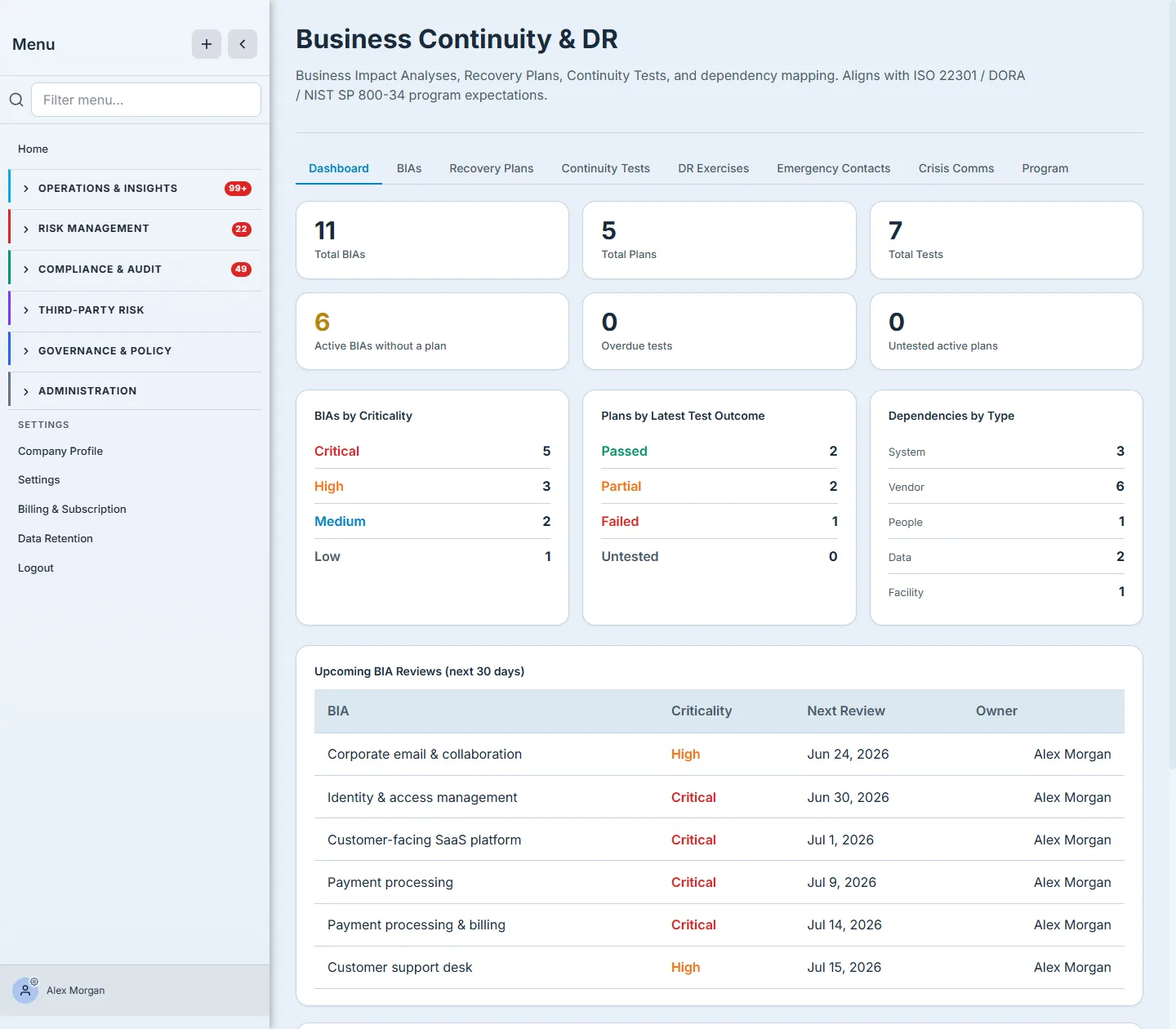
That “Active BIAs without a plan” tile is the whole point of running BIAs at scale. Six processes here have been analyzed — you know what they’d cost you — but no recovery plan exists yet to bring them back. The BIAs by Criticality breakdown tells you where to start: five of these are Critical. The Upcoming BIA Reviews table keeps the portfolio from going stale, surfacing every analysis due for review in the next 30 days so a BIA written eighteen months ago doesn’t quietly become fiction.
A BIA you wrote and forgot is worse than no BIA — it’s false confidence. The coverage gap and the review queue are the two numbers that keep a portfolio honest. Watch them, not the total count.
Step 2 — The register
The BIAs tab is the full portfolio — every analyzed business process in one table, with its criticality, status, maximum tolerable downtime, target RTO, owner, and next review date.
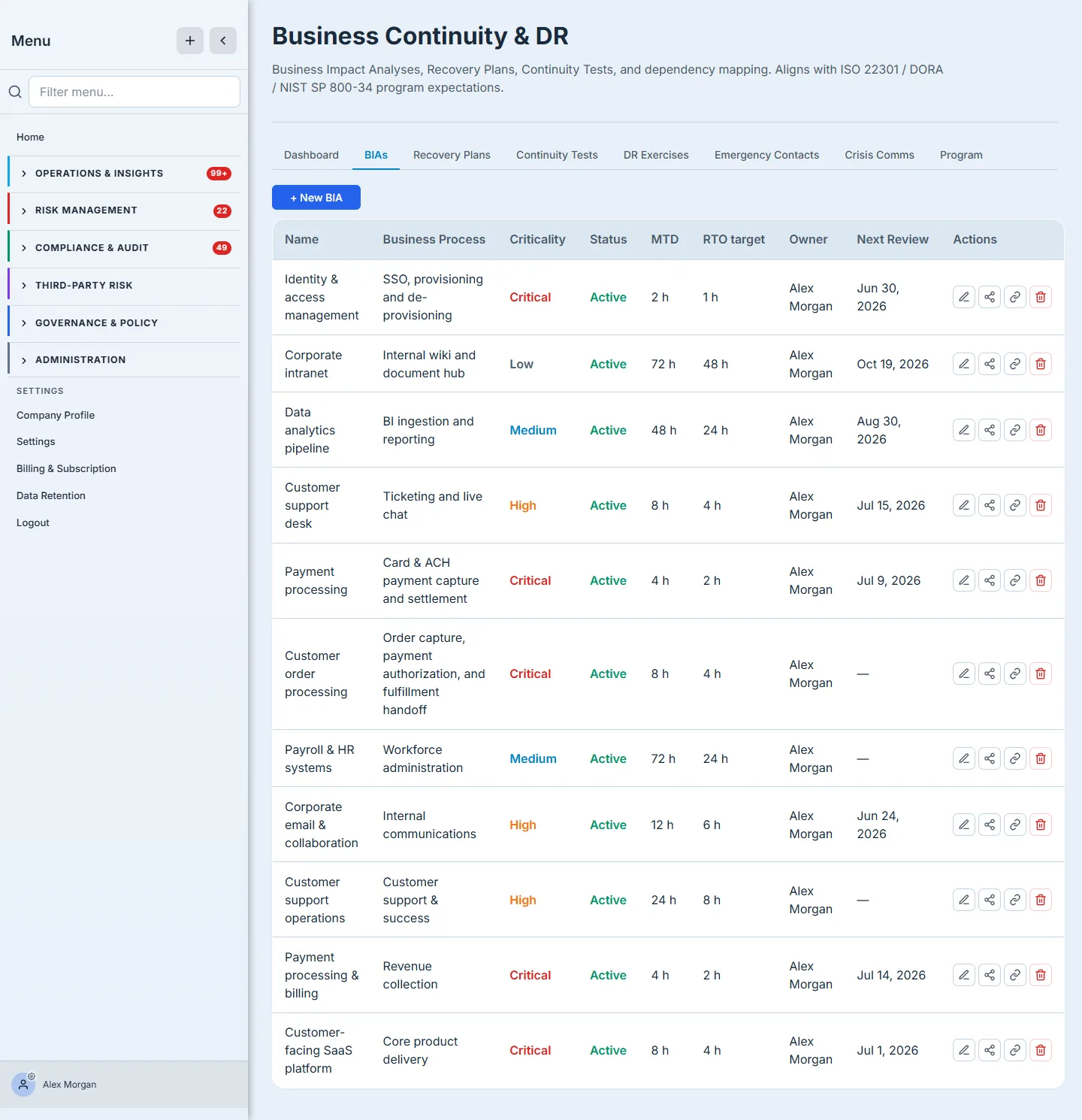
This is the working list. At a glance you can see that Identity & access management and Payment processing are Critical with a two-to-four-hour tolerance, while Corporate intranet can be down for three days without much harm — and each has a named owner accountable for keeping it current. New analyses start with + New BIA; each row carries the dependency and link panels that connect a process to the assets, vendors, and controls it relies on.
Step 3 — Behind each entry, a real analysis
A portfolio is only as trustworthy as the analyses inside it. Open any BIA and you get the actual impact assessment — not a label, a quantified case.
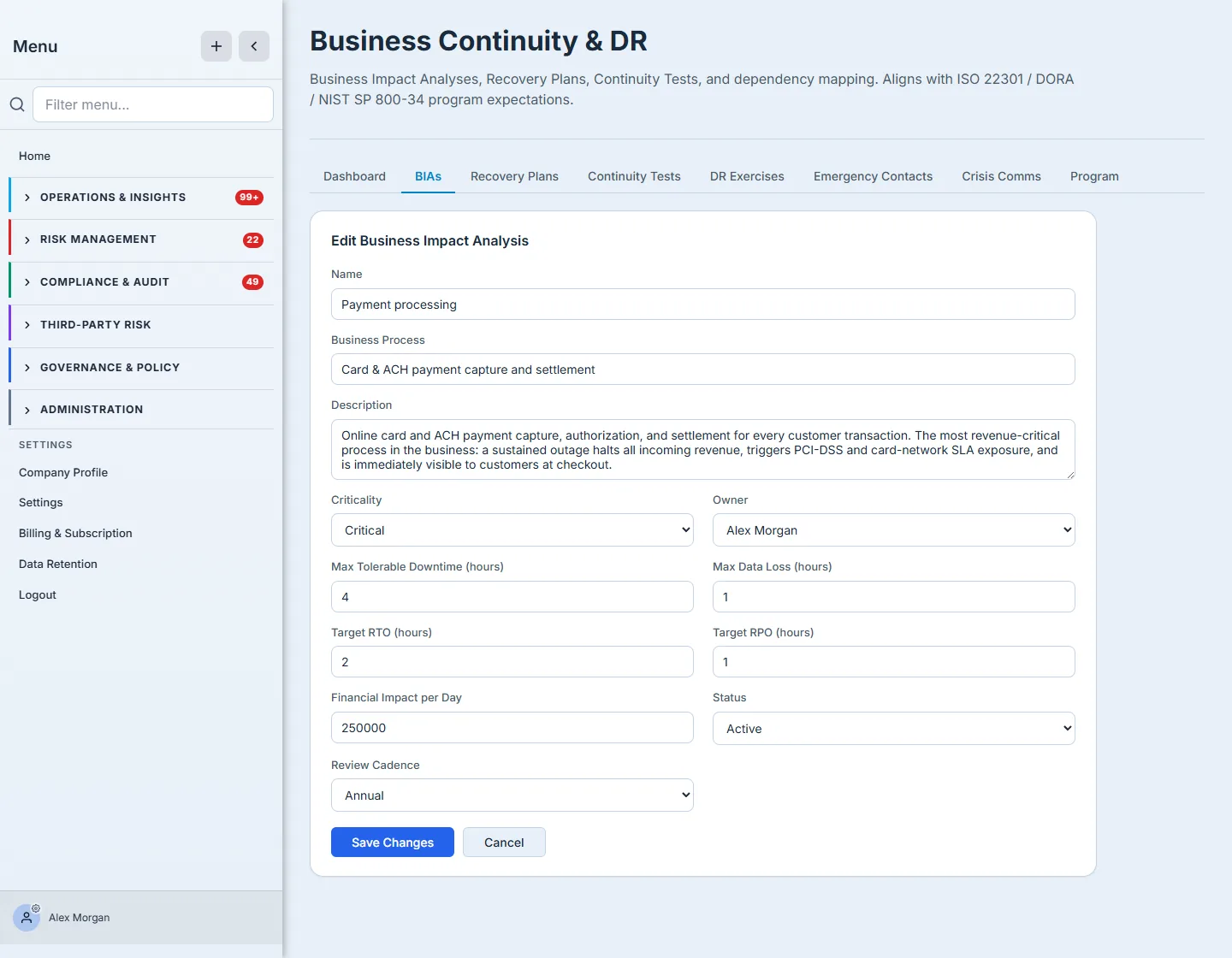
Payment processing isn’t Critical because someone clicked “Critical” — it’s Critical because a day down costs $250,000, the business can tolerate at most 4 hours of outage, and recovery must complete within 2 hours with no more than 1 hour of data loss. Those numbers are what justify the recovery investment, drive the plan’s targets, and — when a DR exercise finds the asset can’t actually recover that fast — scale the resulting risk. The annual review cadence is what keeps the dollar figure current as the business grows.
How the page works
The dashboard isn’t a static report — its two honest numbers are computed live, which is why they’re worth watching:
- The coverage gap counts BIAs with no linked recovery plan. “Active BIAs without a plan” is derived from the link between each BIA and a Recovery Plan — link a plan to a BIA and that BIA drops out of the gap automatically. It’s a relationship count, not a field someone maintains, so it can’t be wrong by neglect.
- Reviews surface from each BIA’s next-review date. Every BIA carries a
nextReviewDate; the Upcoming BIA Reviews table is just the ones falling due in the next 30 days, so a BIA written eighteen months ago resurfaces on its own before it goes stale. - Criticality is the impact numbers, rendered as a badge. A process reads Critical because its quantified impact (cost/day, maximum tolerable downtime, RTO) puts it there — the badge is a view of the analysis, not an independent label.
- The BIA numbers flow downstream. A BIA’s MTD and RTO set the targets a Recovery Plan must meet, and when a DR exercise finds an asset can’t recover within them, the resulting risk is scaled by the BIA’s impact — so the dollar figure you record here is what makes a missed recovery matter.
How to close the coverage gap
- Open the BIAs tab and sort by Criticality — the Critical, plan-less rows are your backlog, prioritized.
- Open a gapped BIA and check its MTD / RTO — those are the targets the plan has to hit.
- From the Recovery Plans tab, create a plan and link it to that BIA (or link an existing plan) — the dashboard’s coverage gap ticks down the moment the link lands.
- Set each BIA’s next-review date so it re-enters the review queue on cadence, and keep the impact numbers current as the business grows.
What you walk away with
- A portfolio view, not a folder — one dashboard answering “how resilient are we?” instead of forty documents nobody opens.
- The coverage gap, surfaced — you always know which analyzed processes still lack a recovery plan, and which of those are Critical.
- A review cadence that holds — every BIA carries a next-review date, and the dashboard surfaces what’s due, so the portfolio never silently goes stale.
- Quantified impact behind every entry — financial exposure, tolerable downtime, and recovery targets that justify the plan and feed the rest of your continuity program.
Open the BIAs tab and look at one number: how many active BIAs have no recovery plan. If it’s not zero, you’ve just found your continuity backlog — prioritized for you, Critical first. That’s the difference between having BIAs and running them.