A holding company doesn’t need its subsidiary’s CIS assessment once. It needs the current one every quarter, the policies behind it every time they change, and the evidence that backs them up the moment it’s uploaded — for the consolidated SOC 2 review, the annual ISO surveillance audit, the board’s quarterly risk pack. SOC 2 names this in CC2.3 (communicating information to external parties) and CC9.2 (vendor and subservice-organization risk); ISO 27001:2022 in A.5.19 and A.5.20 (supplier relationships and the security clauses inside supplier agreements).
Most teams meet that recurring need with a recurring chore — a quarterly email asking the child org to re-export and re-send. Talarity replaces the chore with a subscription: the parent sets the scope once, the child consents once, and from then on every matching entity the child completes flows automatically until either side revokes. This article is about that recurring primitive specifically — the standing subscription, what cascades with it, how it fires, and how the data owner keeps control. (For the one-shot side of data sharing — a single snapshot pulled on demand — see Sharing data across linked organizations.)
Who’s involved
- Parent admin — creates the subscription, sets the scope and cascade, consumes what flows in. Lives on the Outbound and Subscriptions tabs.
- Child admin (the data owner) — accepts the subscription once, then governs it: pause during a freeze, narrow the scope, or stop sharing entirely. Nothing flows without their consent.
- Auditor — pulls the immutable consent log to see exactly who shared what, when, and under which disclosure.
What’s on the page
Open Data Sharing (/app/data-sharing) — the hub for your standing cross-org subscriptions:
- Subscriptions / Outbound tabs — one row per active subscription: the counterparty org, what’s shared, the cascade scope, and delivered/fired counts.
- Cascade detail — the entity kinds that travel with each shared assessment (runs, evidence, findings…).
- Fired entities — the running list of everything that has auto-flowed under the subscription.
- Recipient controls — Reduce (narrow scope), Pause (compliance freeze), Cancel.
- Consent / audit log — both sides, immutable.
Step 1 — The standing subscription, in one row
Open /app/data-sharing and the Subscriptions tab. A subscription is a single contract row between two orgs, for one data domain, at one scope. The row below is the child’s view of a live standing share: Talarity Holdings is pulling Assessments, scope All assessments · All time, and it’s active.
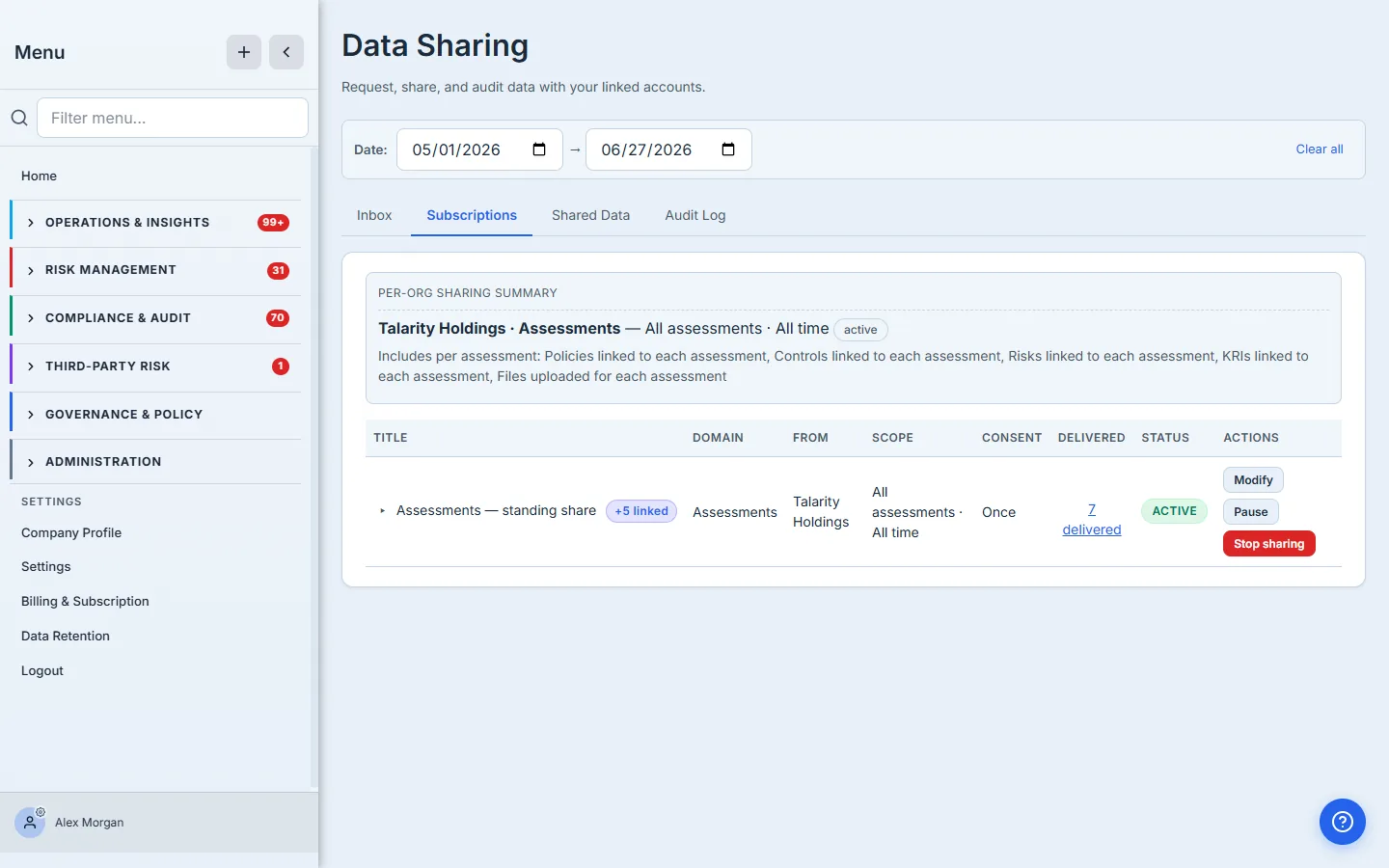
Two columns carry the recurring story. Scope reads All assessments · All time — an open-ended window, which is exactly what makes this a subscription rather than a one-shot pull: a date range that never closes means “everything matching, now and in the future.” Delivered reads 7 delivered — this standing share has already fanned seven entities across to the parent, and the count climbs on its own as the child completes more.
The date window is the load-bearing distinction. A scope that closes in the past is a one-shot snapshot. A scope that’s open-ended — All time — is a subscription. Same picker, same consent flow; the date is what flips a one-time pull into a standing feed. Pick All time for anything that recurs: annual framework reviews, quarterly attestations, monthly KRI tracking.
Step 2 — The cascade — what travels with each assessment
A subscription rarely shares a bare entity. Expand the row and the full contract is laid out: who created it, who accepted it, the scope, and the cascade — the linked items that ride along with every assessment that flows.
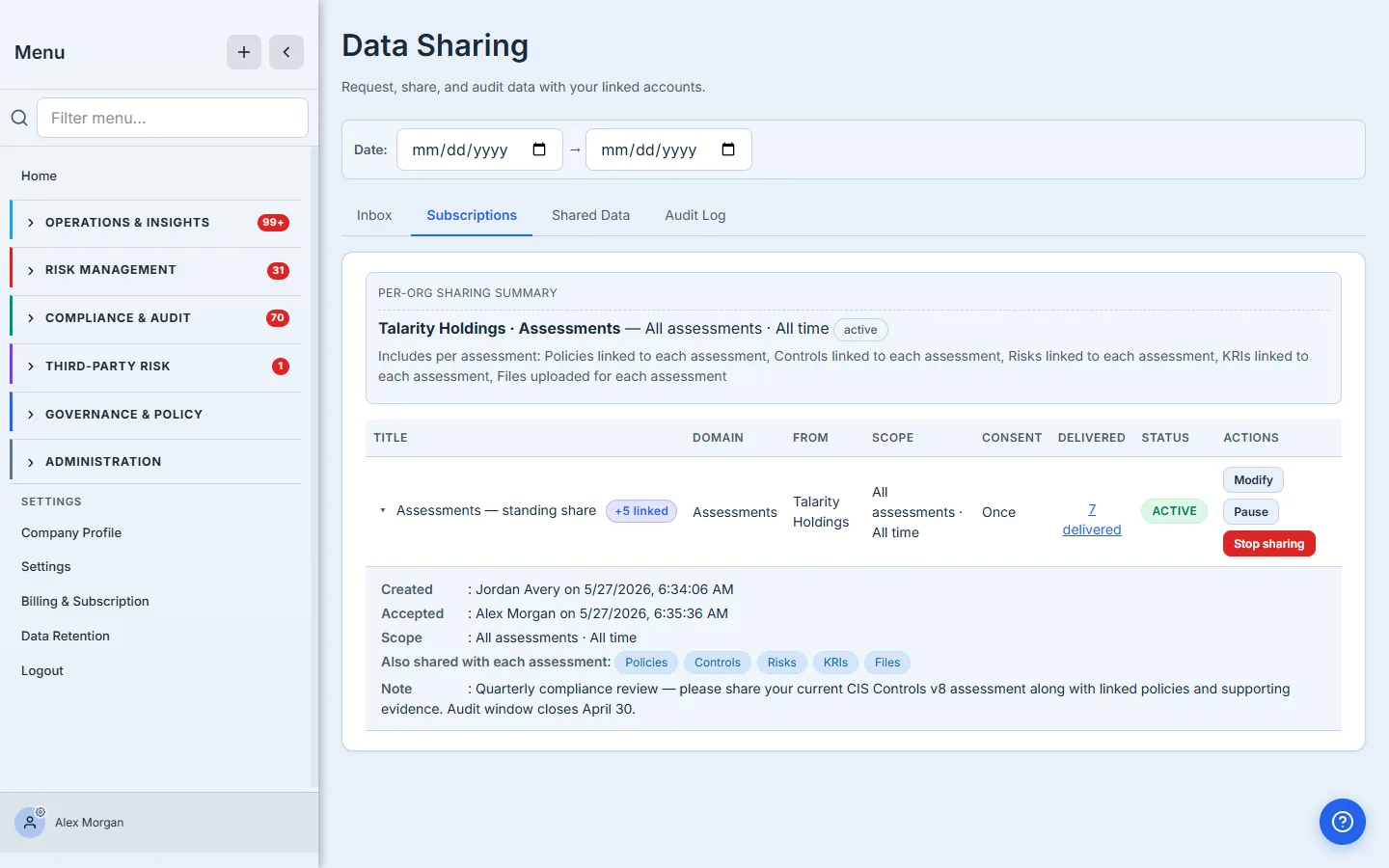
The cascade here is Policies, Controls, Risks, KRIs, and Files, each linked to every assessment. So when the child completes a CIS Controls v8 assessment, the parent doesn’t just get the score — they get the policies it cites, the controls it scores, the risks it informs, the KRIs it moves, and the evidence files attached to it, all in one fan-out. The cascade is type-level: the parent picks the kinds of associated items to include; the specific item identifiers stay private until the child accepts. That accept is the consent that licenses the whole cascade, which is why the disclosure is shown in full before the child clicks.
Step 3 — How it fires — automatically, on completion
The subscription doesn’t poll and it doesn’t run on a nightly cron. It’s event-driven: every domain’s completion path — an assessment run completing, a policy publishing, a KRI value being recorded, evidence being uploaded — calls the data-sharing fan-out inside the same database transaction that writes the entity. If an active subscription’s scope matches, a cross-org share is materialized atomically with the entity itself. The instant the child finishes an assessment that fits the scope, it’s already on its way to the parent.
Two moments matter. At acceptance, the subscription back-fills: every entity the child has already completed that matches the scope fires immediately, so the parent isn’t starting from empty. From then on, new completions fan out as they happen. A reconciliation sweep runs as a safety net to catch anything an inline hook missed, but the primary mechanism is immediate, not batched. The parent never has to remember to re-request, and the child never has to remember to re-send — that’s the whole point of the primitive.
Step 4 — Drill into everything that has flowed
The Delivered count on the row isn’t just a number — it’s a link into the full materialization history. Open it and you get every entity that has flowed through this subscription, each stamped with the moment it materialized and its current access state: Released (currently accessible to the receiving org) or Revoked (access pulled). Because the cascade rides along, the cascaded policies and evidence files appear nested under the assessment that carried them — so the data owner can see precisely what the parent can read right now, not just a count. That drill-in is the receipt that makes a standing subscription auditable instead of a black box.
Step 5 — Pause for a compliance freeze
A subscription is a standing relationship, and sometimes you want to hold it without tearing it down — an audit window, a legal hold, a quarter-end freeze. Pause stops new data from flowing without revoking anything already shared.
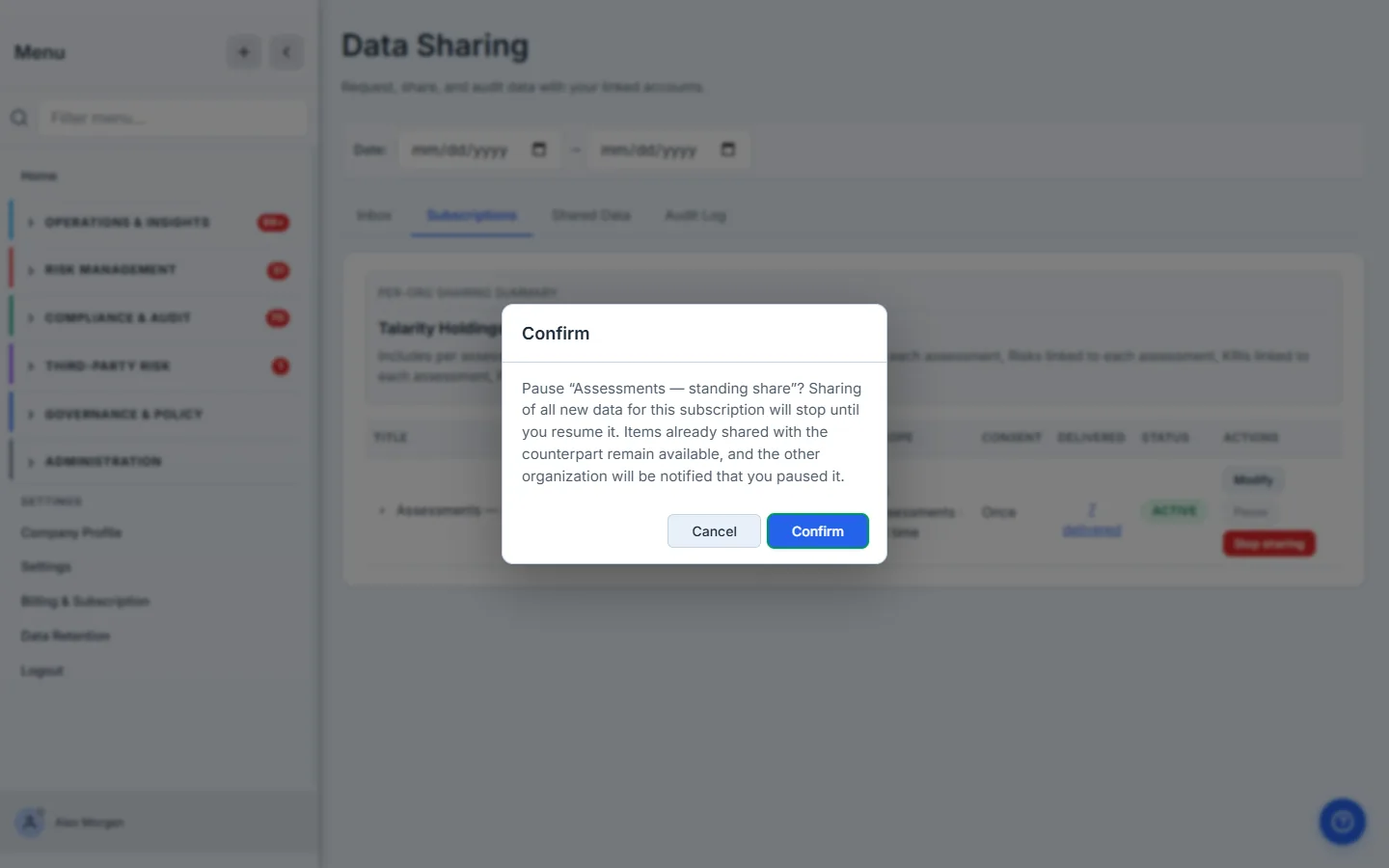
Paused subscriptions are skipped by the fan-out, so nothing new materializes, but everything already released stays released. Resume and the feed picks back up: new completions flow again, and the reconciliation sweep catches up anything the child completed during the freeze that still matches the scope — it scans recently-created entities that never materialized and fires the now-active subscription. Pause is a valve, not a delete.
Step 6 — The data owner can narrow the scope, unilaterally
The org that owns the data is always in control of how much of it flows. The child’s Modify opens a reduce-only editor: drop cascade items, narrow the time window, or both.
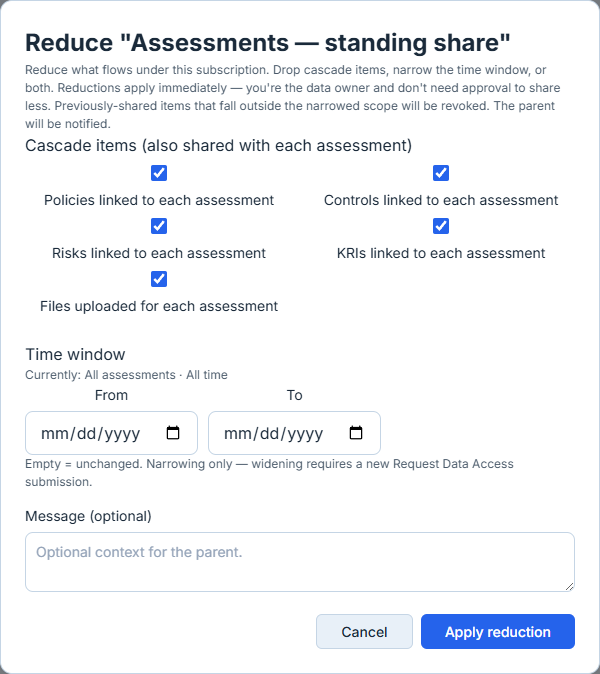
The asymmetry is deliberate. Reducing what you share is your call as the data owner — it applies immediately, and any previously-shared item that now falls outside the narrowed scope is revoked on the spot. Widening is not: adding a cascade type or extending the window would expose more of the child’s data, so that requires a fresh request the child accepts, not a unilateral change by the parent. Less is always the owner’s prerogative; more always needs consent.
Step 7 — Govern who can pause or resume
Pausing a subscription stops data the parent may be depending on for a live audit, so it’s a governed action. Under Administration → Data & Security Settings → Storage, on the Data Sharing Settings tab, an org can decide who’s allowed to pause or resume.
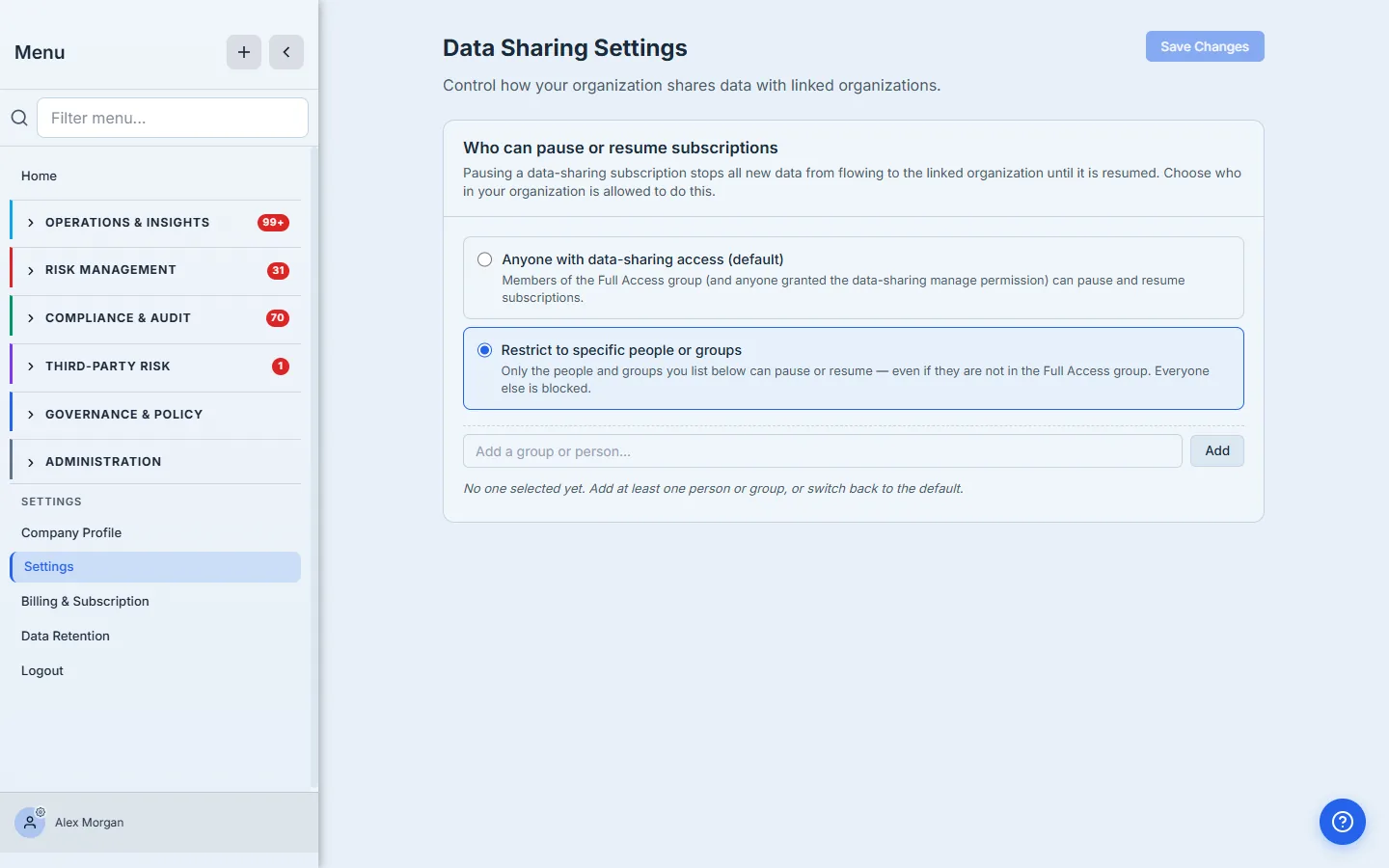
By default, anyone in the Full Access group (or anyone holding the data-sharing manage permission) can pause and resume. Switch to Restrict to specific people or groups and only the names you list can — a useful guardrail when a standing subscription underpins a contractual reporting obligation and you don’t want it paused by accident. A lockout guard stops you from saving a restricted list with nobody eligible.
What you walk away with
- A subscription is set-once, recurring sharing — open-ended scope plus a cascade, consented to once, fanning out on every matching completion until revoked.
- It fires event-driven, not on a schedule — entities flow the instant they’re completed, with a back-fill at acceptance and on resume so nothing is missed.
- The data owner stays in control — pause for a freeze without losing what’s shared, narrow scope unilaterally (widening needs fresh consent), and restrict who can pause or resume.
- Everything is auditable — the delivered drill-in shows exactly what’s released right now, and every consent decision is written to an immutable log.
Set up your first standing subscription this afternoon. Open /app/data-sharing, and the next time the child finishes an assessment, watch the delivered count climb on its own.