Almost every framework that touches your security program now expects you to inventory the software you depend on — and to control who has access to it. ISO 27001:2022 spells it out in A.5.9 (inventory of information and associated assets). SOC 2 splits the access question across CC6.1–CC6.3 (access is provisioned, authorized, and removed). NIST CSF 2.0 dedicates ID.AM-2 to a current software inventory. And finance leadership adds a question the frameworks don’t: “We pay for twenty Bloomberg seats — who actually has them, and are we using all twenty?”
Most teams answer with a spreadsheet that’s a renewal cycle behind. Someone buys twenty seats of a market-data terminal, ten people leave over two years, and nobody can say which seats are now idle — so the company renews twenty. Talarity treats each subscription as a finite pool of seats you assign to named people, the same allocation primitive that runs your hardware inventory and access reviews — so “who has the twenty Bloomberg seats” always has an answer, and so does “which three are we paying for and not using.”
This article covers adding a subscription from the catalog, declaring its seat count and cost, assigning seats to named employees, and reading utilization and spend across every subscription. Treating each SaaS app as an owned asset with a custodian is a companion topic — covered in Track every SaaS app as an asset.
Seats don’t only get assigned from here. When someone files a License Seat request through the guest request portal, approving it allocates a seat from the chosen pool to the requester — the same finite-pool allocation this article manages, just triggered by a request instead of a manual assignment. See From request to fulfillment.
Who’s involved
- IT / SaaS admin — adds the subscription, sets how many seats the company bought, assigns them to people, and revokes when someone leaves.
- Finance / procurement — reads the utilization and spend band before a renewal: are all twenty seats used, or are we paying for idle ones?
- GRC lead — uses the same seat ledger as the access-review record: every seat maps to a named person, so “prove who has access to Bloomberg” is one screen.
- Auditor — pulls “your software subscriptions, the seat count, and the holder of each seat” and gets a single list, not a reconciled spreadsheet.
What’s on the page
Open Software Licenses (under Workforce). The page is a utilization band over a subscription table:
- The utilization band — the at-a-glance program totals: Subscriptions, Seats, Assigned, Available, Utilization (%), Annual spend, a callout of spend on idle seats, and Renewals due. This is the row Finance reads before a renewal.
- The subscription table — one row per software subscription, each with a seat-allocation bar showing assigned-vs-purchased at a glance, plus its cost and renewal date.
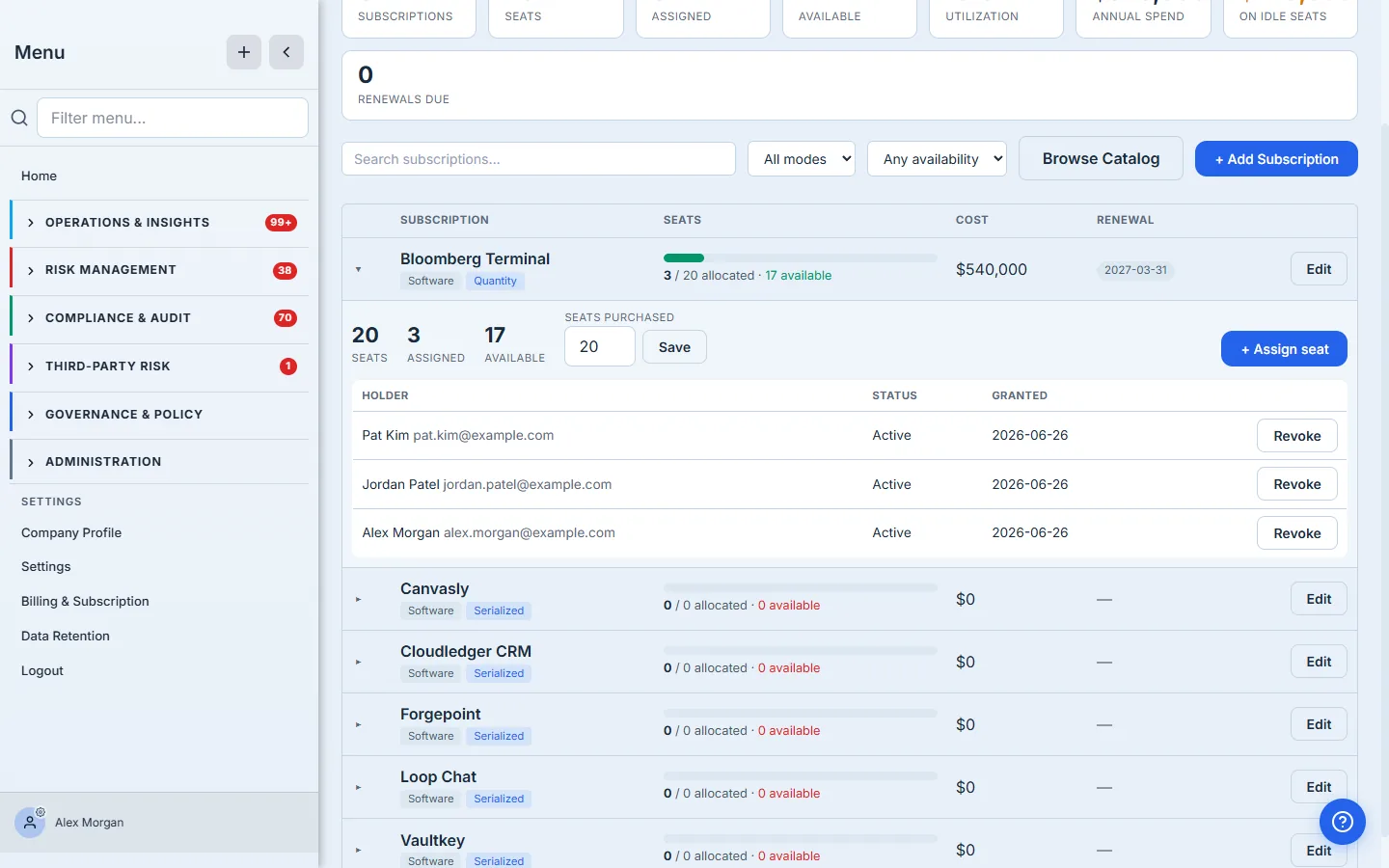
- A subscription’s detail — Seats / Assigned / Available and the holder list naming each person who has a seat, each with a Revoke action — the same ledger your access reviews read.
- The Add Subscription form — name the software, pick a tracking mode (e.g. Quantity — declared seats), set seats purchased, cost per seat, and renewal date.
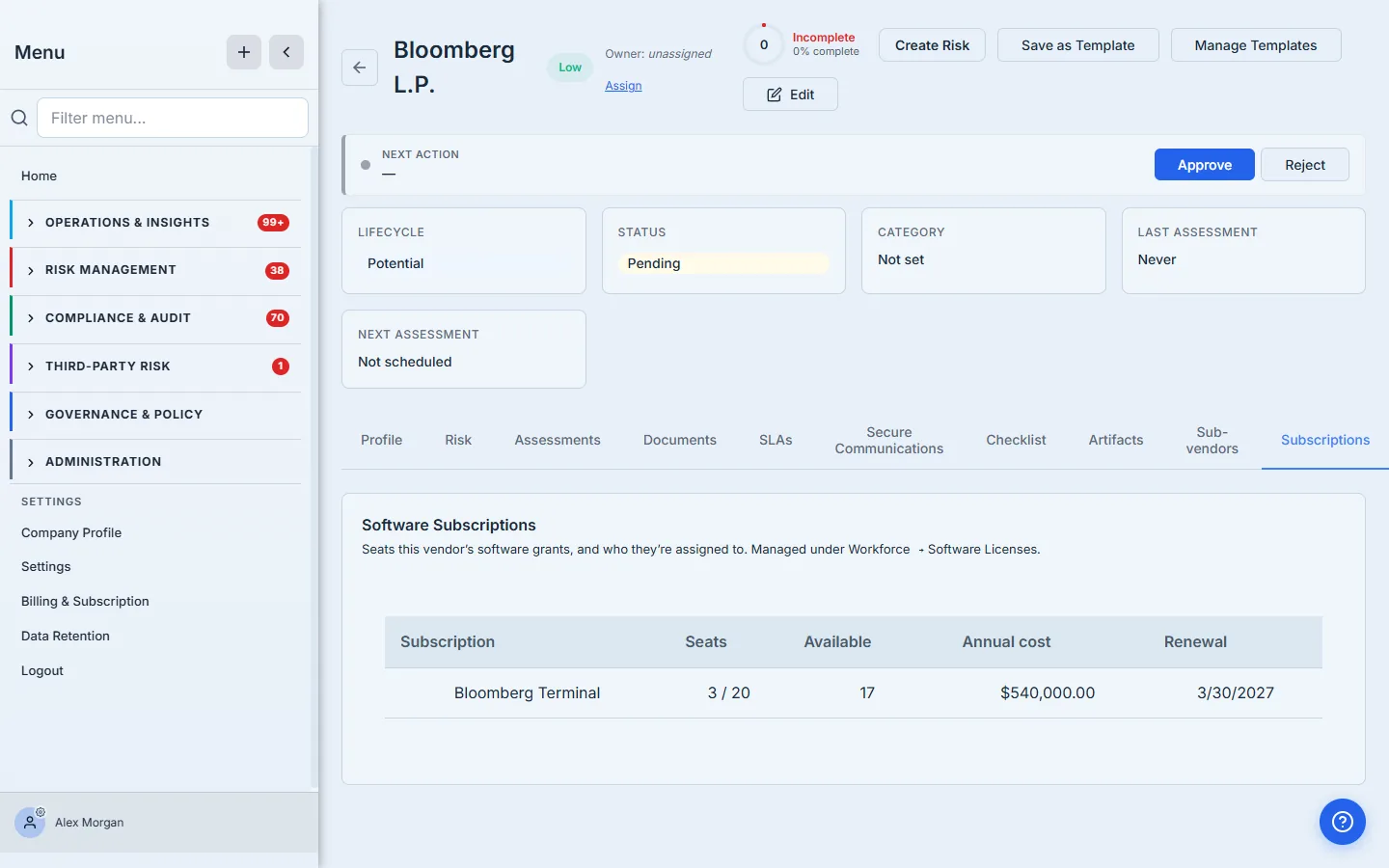
- The vendor record’s Subscriptions tab — the same data sliced by vendor: that vendor’s licensed software with seats assigned/total, annual cost, and renewal date, linking back here.
Step 1 — Open Software Licenses
Open Workforce → Assets & Licenses, on the Licenses & Subscriptions tab. This is the seat-allocation view of your software estate: every subscription shows its seats, how many are assigned, how many are free, the annual spend, and the renewal date. The band across the top is the program-level summary — the numbers a finance lead reads before renewal season.
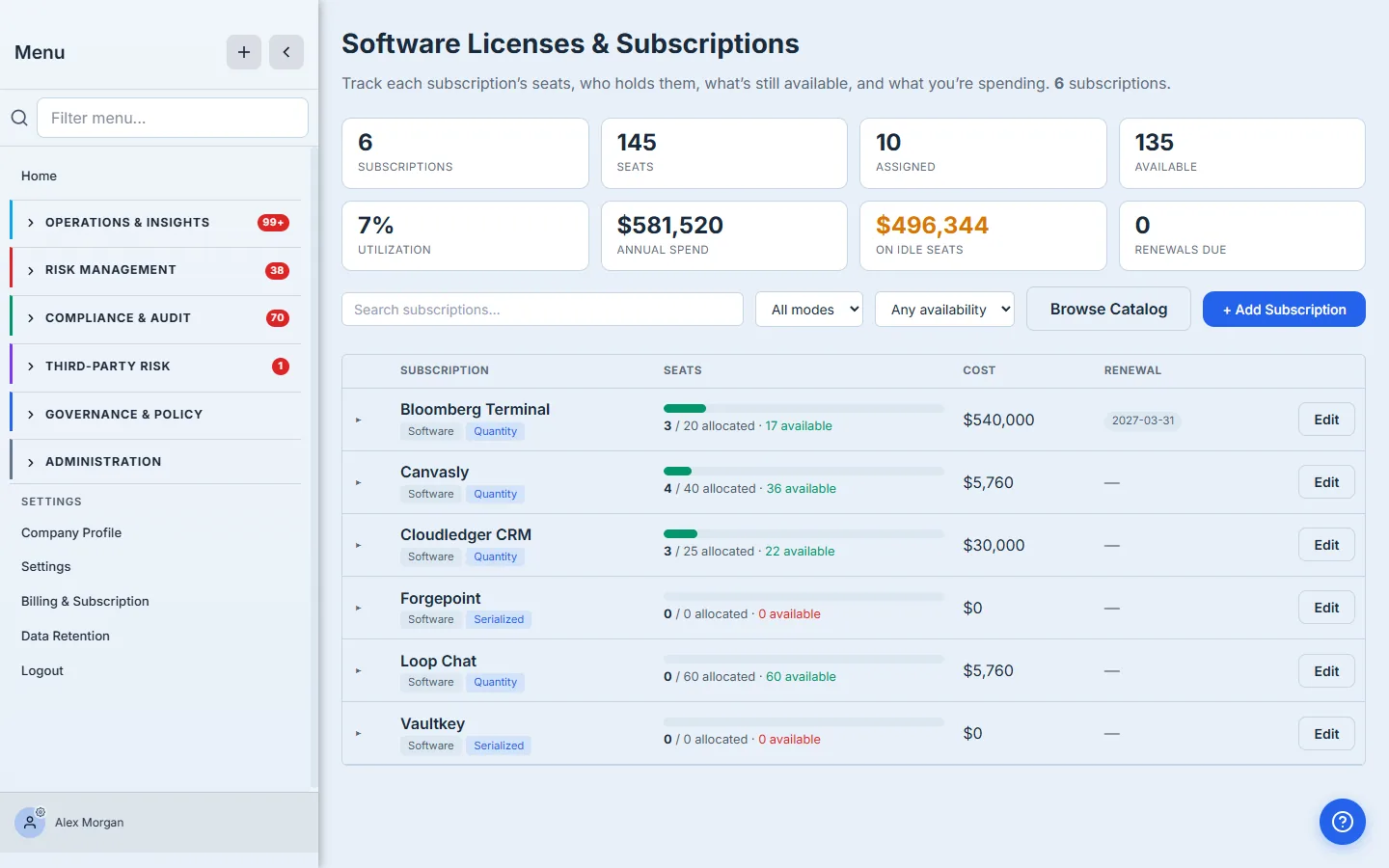
“On idle seats” is the number procurement never has at renewal time. It’s the annual spend attributable to seats you bought but nobody holds — paid-for capacity sitting unused. Drive it toward zero before you renew, not after.
Step 2 — Add a subscription from the catalog, with its seats and cost
Click + Add Subscription and Pick from Template. You start from a shared catalog of well-known products — search for the one you license. Talarity ships the mainstream business apps (Microsoft 365, Salesforce, Slack) and the data, finance, legal, and research subscriptions that usually fall through the cracks: Bloomberg Terminal, FactSet, S&P Capital IQ, Morningstar, PitchBook, Westlaw, LexisNexis, Gartner, and more. The catalog means the second person to add Bloomberg reuses the first person’s entry instead of creating a duplicate — and if your product genuinely isn’t listed, you fill the same form by hand.
Pick Bloomberg Terminal and the form prefills its name and vendor. Because it’s software, Talarity defaults it to a Quantity pool — a declared number of seats — and asks for the three numbers that turn a catalog entry into a managed subscription:
- Seats purchased — how many you bought. Twenty.
- Cost per seat — what each seat costs per year. This drives the annual-spend and idle-seat math.
- Renewal date — when the contract is up. This feeds the “Renewals due” counter and the renewal column.
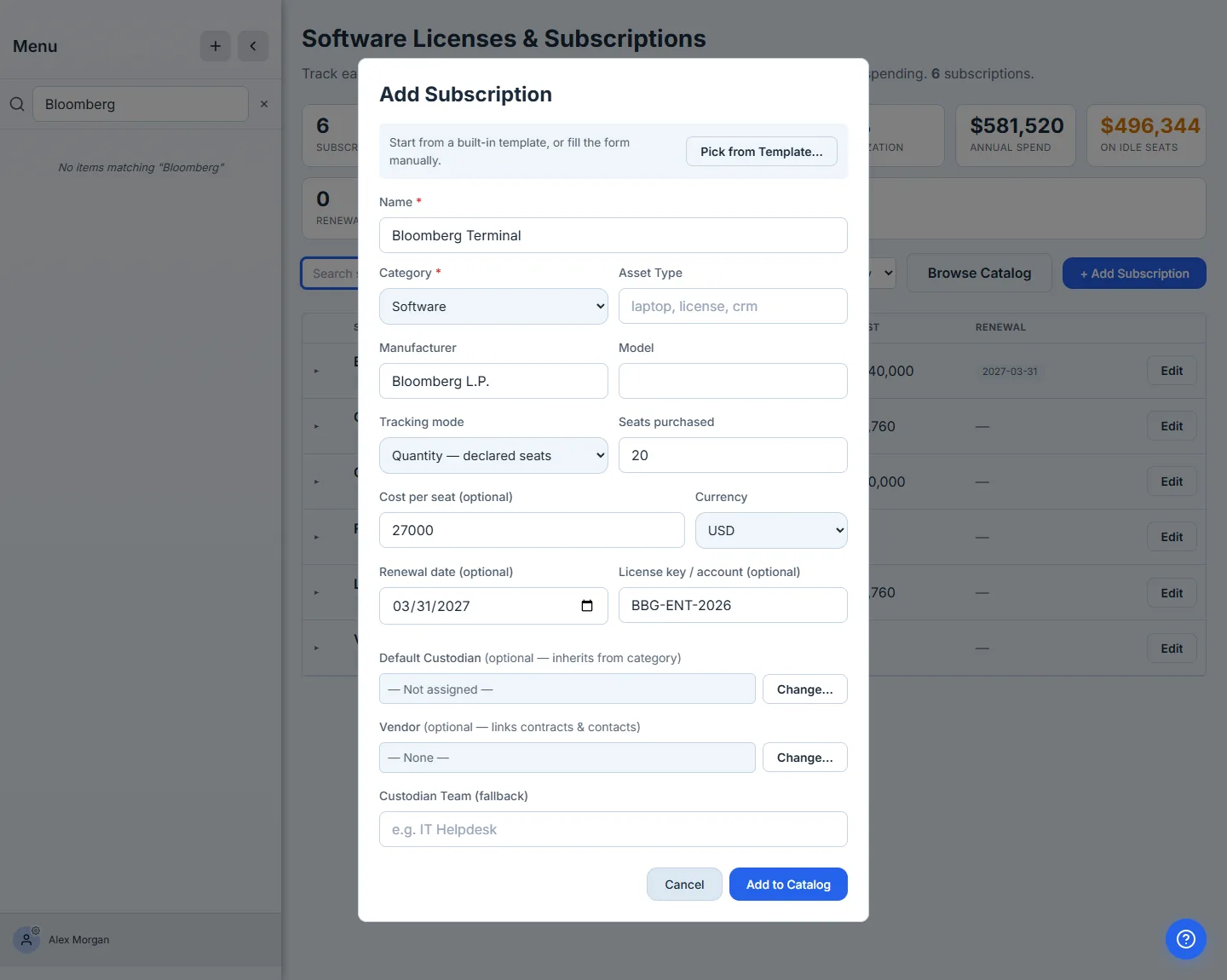
Setting all three here is the point. Previously you could pull a product from the catalog but the seat count, cost, and renewal were a separate edit afterward — so most entries never got them, and the inventory couldn’t answer the cost question. Now adding the subscription is declaring the pool. Submit, and Bloomberg lands in the list as a seat pool — twenty seats, the annual spend computed from cost × seats, and the renewal date in its own column.
Step 3 — Assign a seat to a named person
Click the row to expand it, then + Assign seat and pick the employee who gets it. Talarity checks the seat cap inside the assignment — it won’t let you hand out a twenty-first seat against a twenty-seat pool — and records the grant against that person.
Assign three people and the pool reads 3 / 20 · 17 available, with each holder listed by name. This is the “who has the twenty” answer the spreadsheet never kept current — and because each seat is a real assignment, removing access is one click: Revoke frees the seat back into the pool the moment someone leaves or changes roles.
Step 4 — Read utilization and spend across every subscription
That band across the top of Step 1 is the program-level picture, and it updates as you go: total seats across all subscriptions, how many are assigned, the overall utilization percentage, the annual spend, the spend sitting on idle seats, and how many renewals are coming due. Every number is derived from what you entered and who you assigned — there’s no usage telemetry guessing in the background, just the seats you bought and the people you gave them to.
Utilization is the renewal conversation, on one line. “We hold twenty Bloomberg seats, seventeen are assigned, three are idle at $X each” is the sentence that decides whether you renew twenty or nineteen. Talarity keeps it current as people come and go, so the number is right the day procurement asks.
Step 5 — See a vendor’s subscriptions from the vendor record
Subscriptions are software you license from a vendor — so they also surface on the vendor’s own page. Open a vendor and switch to the Subscriptions tab: it rolls up every software subscription linked to that vendor, with seats, annual cost, and renewal, cross-linked back to Software Licenses. The vendor’s contracts and contacts live on the same record’s other tabs, so the commercial picture and the seat ledger sit side by side.
What you walk away with
- A subscription inventory where every product is a finite pool of seats — pulled from a catalog that already knows Bloomberg, FactSet, Westlaw, and the rest, not typed from scratch.
- Seats assigned to named people, with a live “3 of 20 · 17 available” and a holder list — the answer to “who has access,” kept current by construction.
- One-click revoke that frees a seat back to the pool the moment someone leaves — the deprovisioning half of every access-control framework.
- Utilization and spend on one band — assigned vs purchased, annual cost, and the spend sitting on idle seats — the number procurement needs before a renewal.
- The same ledger surfaced on the vendor record, next to that vendor’s contracts and contacts.
Run yours this afternoon. Open Workforce → Assets & Licenses, on the Licenses & Subscriptions tab, click + Add Subscription, pull Bloomberg from the catalog, and set it to twenty seats. Assign the people who actually use it, and watch the “available” count — and the idle spend — tell you the truth before your next renewal does.