Every audit ends with the same request: “Show me the evidence.” For your business-continuity and disaster-recovery program, that’s never one document — it’s the DR program report, the exercise attestations, the recovery-plan tests, each one signed, dated, and living somewhere different. The usual answer is a hastily-assembled shared drive or a chain of email attachments: no version control, no redaction, no record of who you sent what, and no way to revoke access when the engagement ends.
That’s the gap Evidence Distribution Packages closes. You assemble the signed BC/DR artifacts you already produced into a single, immutable package, then hand it to your auditor as a redacted, watermarked copy behind a secure login link that expires on a date you choose. ISO 22301 §9 expects you to evidence that your continuity program is evaluated and maintained; a SOC 2 examiner needs the same proof for the availability criteria. This is how you deliver it once, cleanly, and move on.
Who’s involved
- Compliance / GRC lead — assembles the package, finalizes it, and shares it with the auditor.
- DR program owner — produces the signed evidence the package draws on (the program report, the exercise attestations).
- Auditor or regulator — receives a redacted, watermarked copy through a secure, time-limited link; no Talarity account to provision, no raw files floating in an inbox.
What’s on the page
Evidence Distribution Packages (in the sidebar as Evidence Distribution, under Audit & Evidence → Evidence Management) opens on a register of every package you’ve built — each row showing its package number, type, status (Draft / Finalized), and created date. Open one and you get a five-tab case file:
- Overview — the package’s identity and status, plus the status-driven action buttons (a Draft shows Finalize Package; once finalized, Generate Distribution Packet and Share with Auditor appear).
- Capstones — the signed reports and attestations you’ve added (the heart of a BC/DR package).
- Evidence — supporting evidence items attached alongside the capstones.
- Findings — any findings carried into the package.
- Recipients — the log of who you shared it with, under which redaction profile, and until when.
Which actions you can take is gated by the package’s status — that gating is the spine of the workflow below.
Step 1 — Your signed evidence already lives in one place
Open the Capstone Library (under Audit & Evidence → Evidence Management). Every report, attestation, and certification the platform produces lands here as an immutable artifact — signed, timestamped, and retained on a schedule. Reports generated today land under the type Report; artifacts produced earlier keep the specific type they were created under, and the library lists them side by side.
For a BC/DR audit, the rows that matter are the DR Program Report (your coverage, exercises, and compliance citations for the period) and the attestation from each completed exercise. These are the published, signed artifacts — not editable drafts. The package you’re about to build references these, so the auditor sees exactly what was signed, on the date it was signed.
Step 2 — Build the audit package
Open Evidence Distribution Packages, create a new package — give it a name, pick the package type (Audit Distribution for an external auditor) — and then add your evidence. Click Add capstones and the picker lists every finalized capstone in your library:
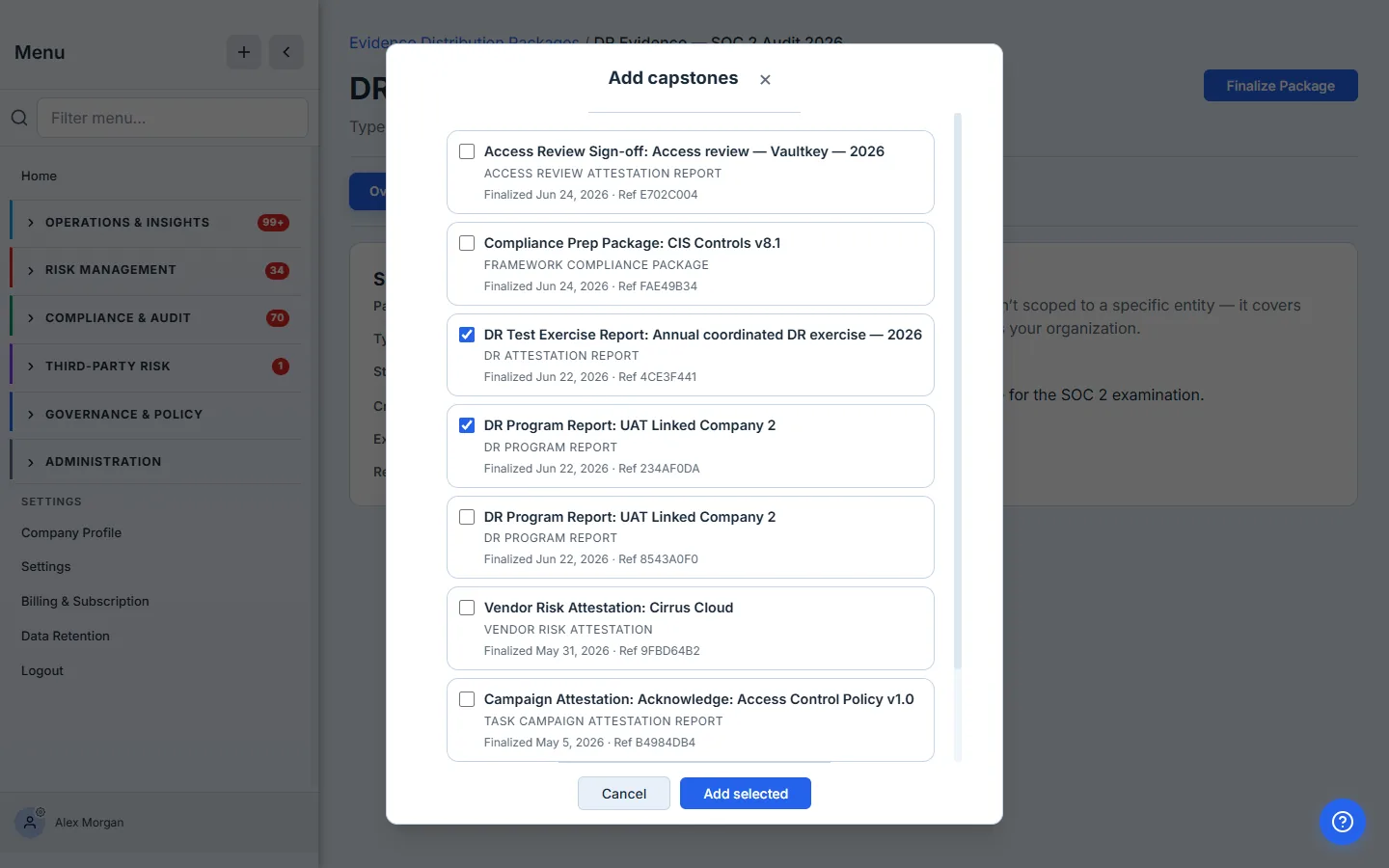
Tick the BC/DR evidence the auditor asked for — here, the annual DR Program Report and the DR exercise attestation — and add them. You’re not copying files or pasting IDs; you’re selecting from the signed artifacts you already produced. That’s the whole point: the package is a curated view of real evidence, assembled in seconds.
A capstone can sit in many packages at once. The same signed DR Program Report can go to your SOC 2 auditor, your ISO 22301 certification body, and your board — each as its own package, with its own redaction profile and expiry. You sign the evidence once; you distribute it as many times as you need.
Step 3 — The package, assembled
Your package now holds the evidence as a clean, reviewable set — each capstone with its type, its signed status, and the date it was finalized.
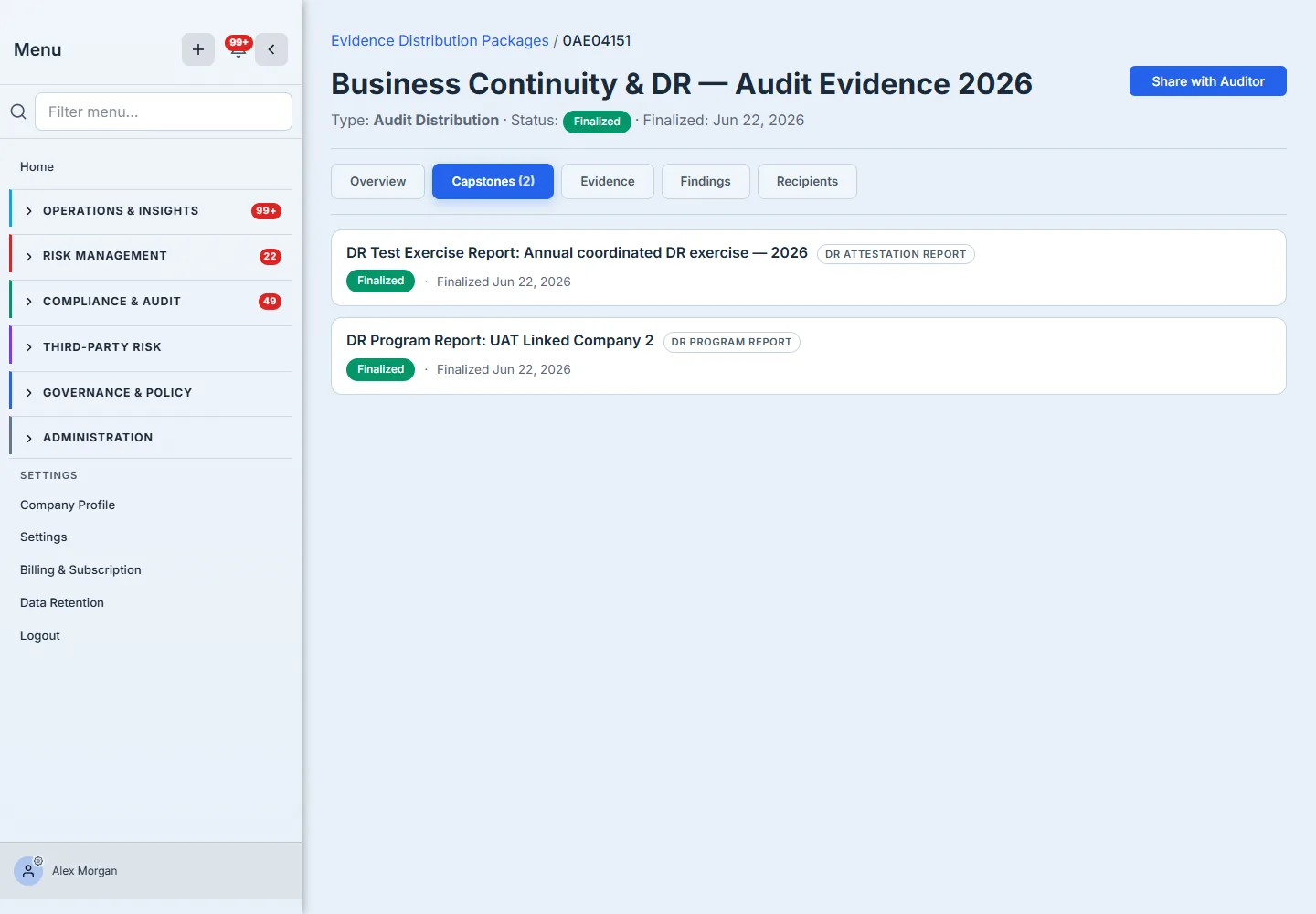
This is the difference between “here’s a folder” and “here’s a package”: every item is a signed artifact with provenance, not a loose PDF someone might have edited.
Step 4 — Finalize it
When the contents are right, finalize the package. Finalizing freezes it — the package becomes immutable, captures a point-in-time snapshot of exactly what it contained, and generates a Distribution Packet: the bundle your auditor receives, which is the cover plus the reports themselves plus every PDF document you included, merged into one watermarked file. Anything in the package that isn’t a PDF — a spreadsheet, a signed certificate image — travels alongside it as a separate file on the same link.
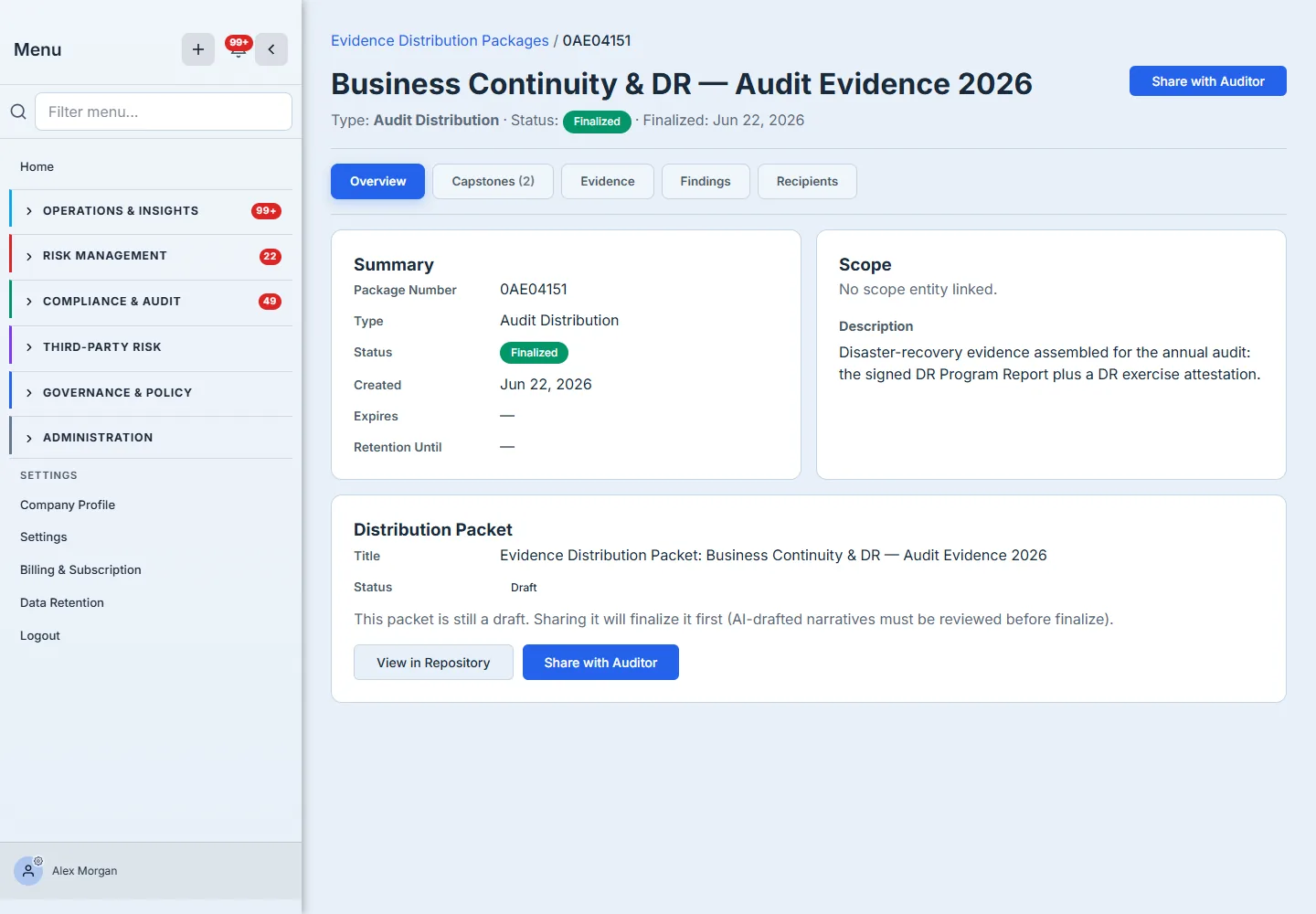
Immutability is the point. An auditor needs to trust that what they reviewed is what you attested to — a package that could be quietly edited after the fact is worthless as evidence. Once finalized, this package is a fixed record.
Step 5 — Share it with the auditor
Now hand it over. Share with Auditor opens one short form: the recipient’s email, a redaction profile, and an optional expiry.
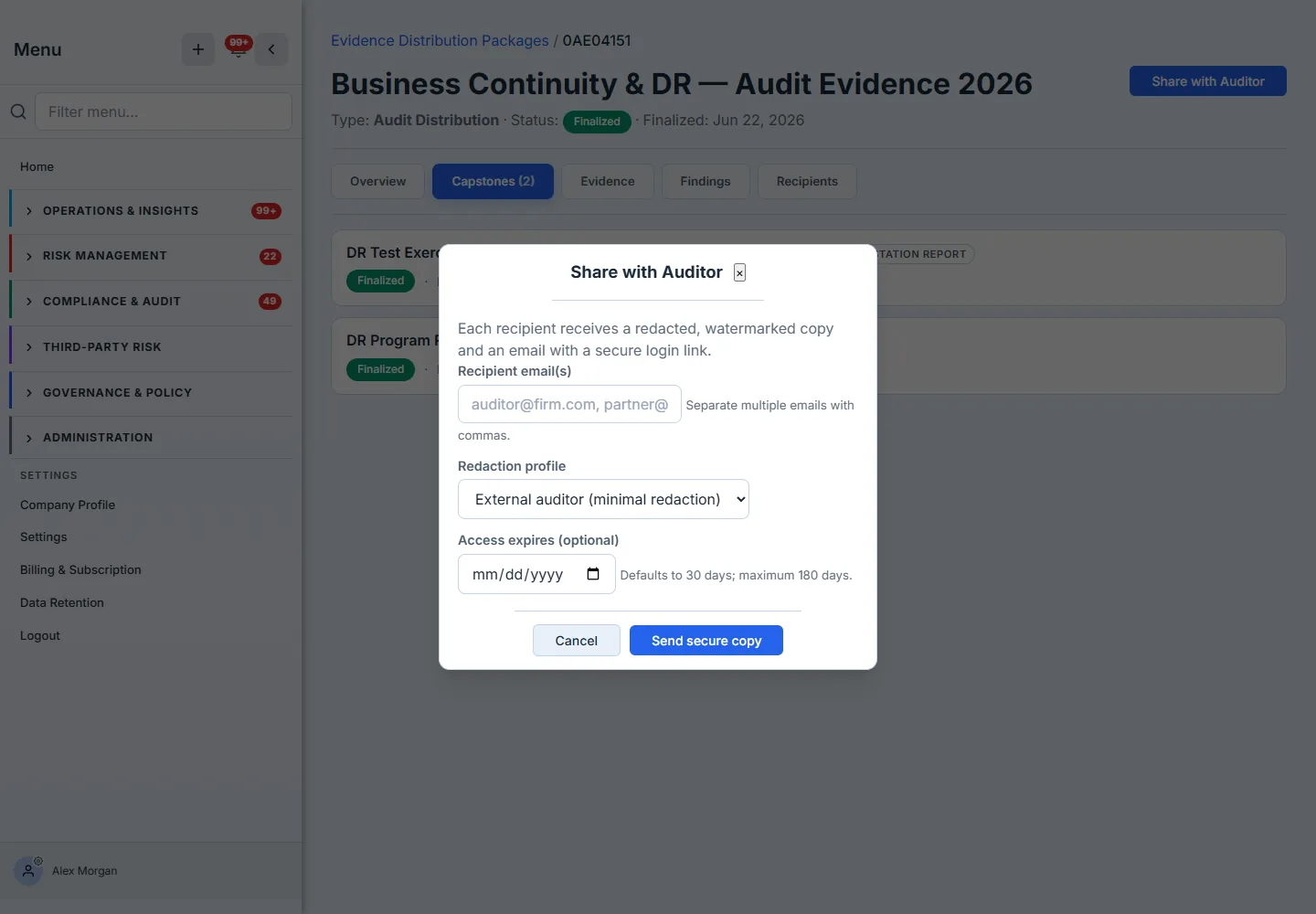
Each recipient gets a redacted, watermarked copy and an email with a secure login link — no Talarity account to create, no raw file to leak. The redaction profile controls how much they see: External auditor applies minimal redaction; External regulator, customer, and vendor profiles redact progressively more. Access defaults to 30 days and can run up to 180 — and the moment it expires, the link stops working. Every recipient and every acknowledgement is recorded on the package’s Recipients tab, so you have a defensible log of who received what, redacted how, and until when.
How the page works
The package moves through a deliberate state machine, and the available actions change with it:
- Draft is the only editable state. You add and remove capstones, evidence, and findings while the package is Draft. Finalize Package is the one-way gate: it freezes the contents, captures a point-in-time snapshot of exactly what the package held, and flips the status to Finalized.
- Finalized unlocks distribution, not editing. Only a finalized package can Generate Distribution Packet (the merged bundle) and Share with Auditor — because an auditor has to trust that what they receive can’t change after the fact.
- Redaction is per-recipient, applied at share time. You pick an audience — External auditor, regulator, customer, vendor — which seeds a checklist of the sensitive field groups actually present in this package’s reports (reviewer notes, staff identities, scores, the remediation and evidence registers), and you tick exactly what to remove. It redacts each recipient’s copy without touching the source, so one finalized package can go to three audiences with three different copies. The redaction applies to the reports in the bundle; a non-PDF file has no fields to mask and travels as you uploaded it.
- Access is login-gated and time-boxed. Each recipient gets a watermarked copy behind a secure login link that defaults to 30 days (up to 180); when it expires the link simply stops resolving, and every send and acknowledgement is written to the Recipients tab.
What you walk away with
- One package, not a scramble — the signed DR Program Report and exercise attestations the auditor needs, assembled into a single immutable artifact instead of a shared drive thrown together the night before.
- Evidence that holds up — finalized packages can’t be edited; the auditor reviews exactly what you attested to, with signatures and dates intact.
- A safe handoff — redacted, watermarked, login-gated, and time-limited, with a recorded trail of every recipient — instead of a PDF in an inbox you can never take back.
When the audit request comes in, open Evidence Distribution Packages, add the two reports your DR program already produced, finalize, and share. The first one takes about five minutes — and it’s the difference between scrambling for evidence and simply handing it over.