You can write a BIA, draft a recovery plan, and run a DR exercise — and still not have a DR program. The artifacts are the easy part. The program is the question an auditor actually asks: of everything that should be disaster-recovery-tested, how much is — and how do you know it stays that way? That’s a governance question, not a document, and it’s where most continuity efforts quietly fall apart: a pile of exercises with no shared definition of “in scope,” no cadence, and no single number anyone can defend.
ISO 22301 expects a managed BCMS with defined scope and a measured exercise program; NIST SP 800-34 expects recovery priorities maintained over time; DORA expects regulated financial entities to run ICT resilience as an ongoing program with testing obligations, not an annual scramble. Talarity gives you the governance layer to do that: a scope policy that defines the universe, a coverage number computed against it, the gaps surfaced automatically, and a signed program report for the auditor.
Who’s involved
- DR program owner — sets the scope policy, watches coverage, and signs the report.
- Asset & vendor owners — keep their subjects tested within the cadence the policy sets.
- Auditor / regulator — reads one report that proves scope, coverage, gaps, and the frameworks it satisfies.
What’s on the page
Open Business Continuity & DR (/app/grc/bcdr) and pick the Program tab. It’s a single posture screen built from four blocks:
- Coverage KPIs — the headline fresh-coverage figure (the share of your in-scope estate DR-tested within cadence) and the tested/overdue counts behind it.
- The overdue queue — the in-scope subjects that have fallen out of cadence, with a Create exercise from overdue assets action that pre-scopes the next exercise to exactly them.
- Open DR risks & remediation — the risks and remediation items the program is carrying, so coverage isn’t read in isolation from the work it generated.
- Coverage by criticality + the Vendor DR Coverage table — your internal coverage split by tier, and the third-party recovery posture (each vendor’s tier, last DR test, outcome, and current status) sitting in the same view.
Two controls drive the program itself: the scope policy editor (expandable from the dashboard) and Generate Program Report → Finalize.
Step 1 — Your DR posture on one screen
Open Business Continuity & DR (/app/grc/bcdr) → the Program tab. This is your whole DR posture measured against your scope policy: how much of your in-scope estate is freshly tested, how many subjects are overdue, and how many open risks and remediation items the program is carrying.
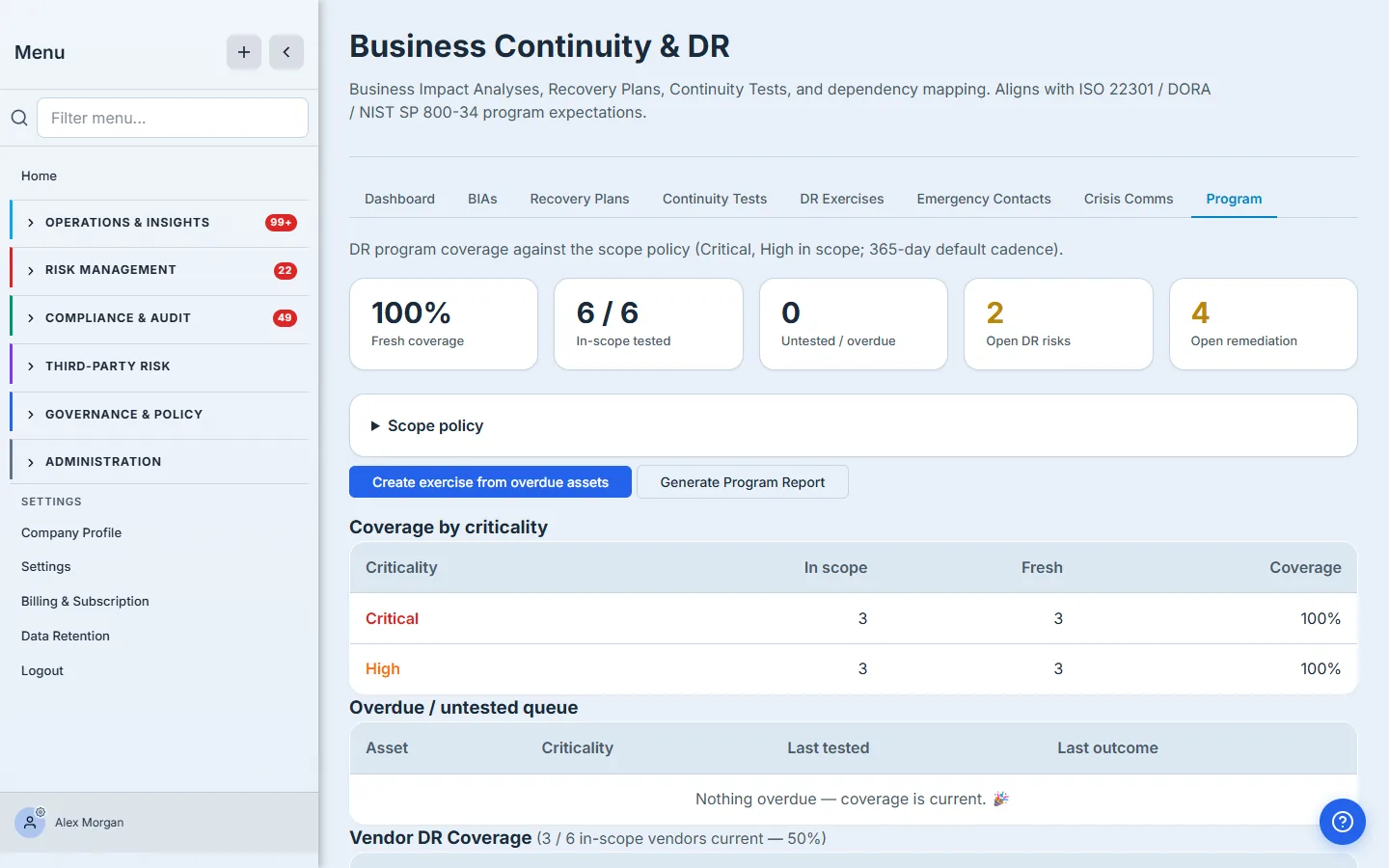
Look at what this org’s program is telling it: internal assets are at 100% fresh coverage — every Critical and High asset has been DR-tested within its cadence. But scroll to Vendor DR Coverage and the picture changes: 0 of 6 in-scope vendors — including Cirrus Cloud, Frostware Data, and Adyen — have ever had their disaster recovery verified. That’s the gap. Your own datacenter is rehearsed; the third parties your business actually runs on are an untested assumption. A DR program is what makes that gap impossible to ignore.
Step 2 — The scope policy is the whole game
Everything on that dashboard is measured against one thing: your scope policy. Expand it and you’re setting the rules that define “covered.”
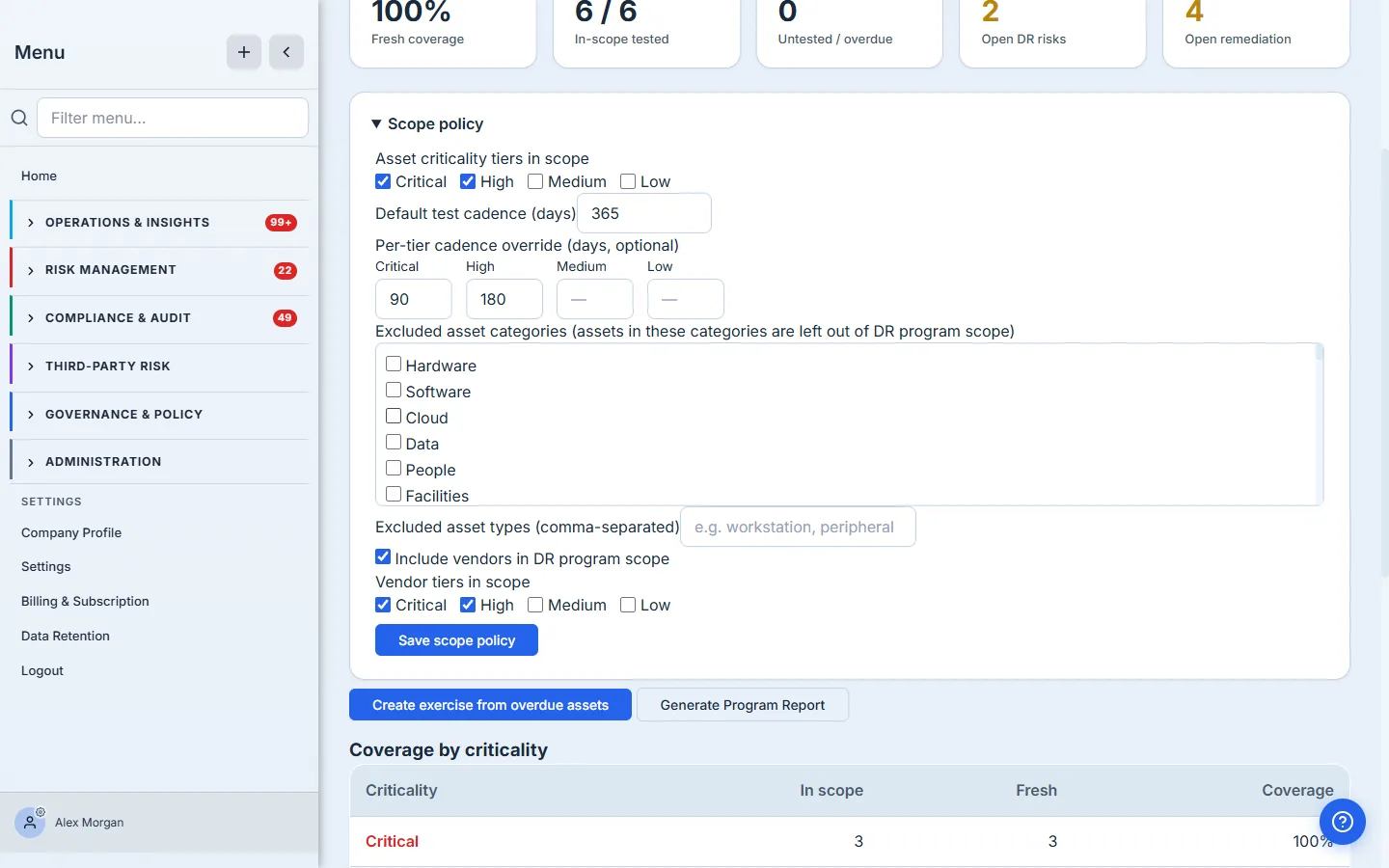
- Asset criticality tiers in scope — here, Critical and High. Medium and Low assets (laptops, monitors) aren’t disaster-recovery subjects, so they’re out of the denominator.
- Cadence — a 365-day default, tightened per tier: Critical every 90 days, High every 180. An asset tested 100 days ago is fresh if it’s High, overdue if it’s Critical. The cadence is what turns “tested once” into “tested recently enough.”
- Exclusions — drop whole categories or asset types (dev/lab/decommissioned) that would otherwise inflate the universe.
- Include vendors — pull your critical and high-tier vendors into the same coverage math, so third-party DR is measured, not assumed.
The scope policy is the denominator. Every coverage percentage, every overdue flag, every line in the report is computed against it — so getting the policy right is the single highest-leverage thing a program owner does. Set it once and the numbers mean something; leave it on defaults and they don’t.
When the policy surfaces overdue subjects, you don’t hand-build the next exercise — Create exercise from overdue assets pre-scopes a DR exercise to exactly the assets that have fallen out of cadence.
Step 3 — A report you can hand to an auditor
Click Generate Program Report and Talarity snapshots the live program into an immutable, signed PDF — then Finalize stamps it FINAL and sets a 7-year retention.
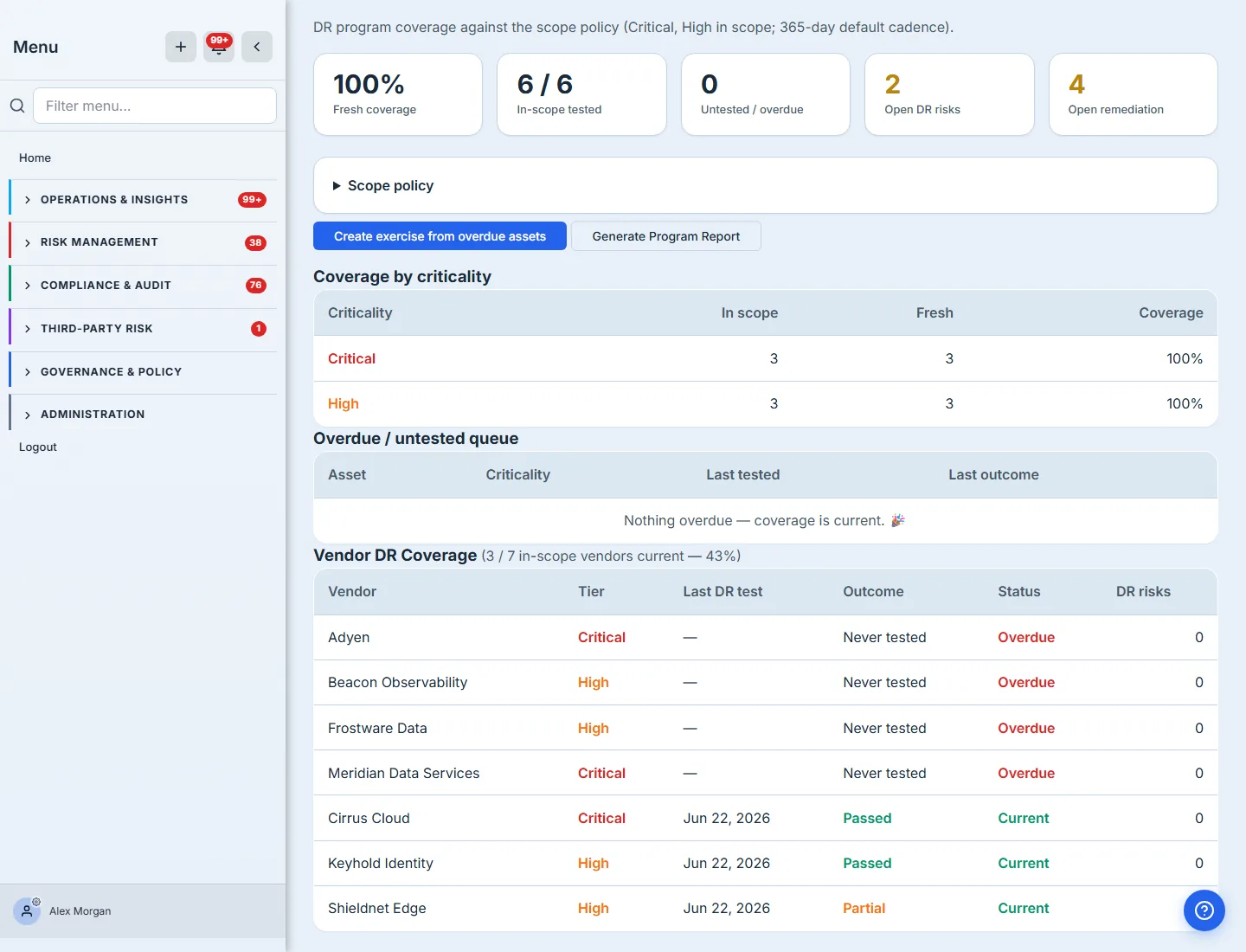
It’s the whole program in one artifact: the coverage KPIs and the by-criticality breakdown, the (empty, here) overdue list, every DR exercise with its outcomes, the vendor DR coverage gap, and — the part auditors care about — the compliance citations mapping it to SOC 2, ISO 22301, and the rest. Because it’s a point-in-time snapshot with a retention floor and a signature slot, it’s evidence, not a screenshot of a dashboard that’s already changed.
What you walk away with
- One defensible coverage number — “X% of our in-scope critical/high estate is freshly DR-tested” — computed against a policy you control, not a vibe.
- The gaps found for you — overdue assets queued for the next exercise, and the vendor DR coverage most programs never even measure.
- A cadence that holds — per-tier test frequencies that decide what counts as “current,” so coverage can’t silently rot.
- A signed, retained program report — the audit answer for ISO 22301 / NIST SP 800-34 / DORA / SOC 2 in one immutable artifact.
Open the Program tab and read your fresh-coverage number, then look at the vendor line underneath it. If the assets are green and the vendors are zero, you’ve just found the most important gap in your resilience posture — and the program that surfaced it is the difference between doing DR tests and running DR.