A vendor assessment is a photograph: accurate the day you take it, and slowly wrong after that. The vendor you scored as low-risk in January discloses a breach in March, replaces their CISO in April, and gets acquired in June — and your file still says “low risk, reviewed January.”
Every serious third-party framework treats this as the hard part. SOC 2 CC9.2 expects you to monitor vendor risk, not assess it once. ISO 27001:2022 A.5.22 is explicit about monitoring, review and change management of supplier services. NIST SP 800-161 and the 2023 Interagency Guidance both make ongoing monitoring its own lifecycle phase — because the risk that hurts you is almost always the risk that changed after the assessment.
The usual answer is a calendar reminder to “re-review vendors annually,” which means a critical vendor can carry a year-old picture through three material changes before anyone looks again. Talarity’s answer is a monitoring surface: a place where the events between assessments become alerts you triage and reassessment flags you act on, so the gap between “something changed” and “we looked at it” is hours, not quarters.
Who’s involved
- Vendor risk analyst — records material changes, triages the alerts they raise, and decides what needs a fresh look.
- Program owner — watches the “requiring attention” list and schedules reassessments off it.
- Auditor — reads the alert trail: what changed, when, who triaged it, and what they decided.
What’s on the page
Open Third-Party Risk → Monitoring (/app/vendor-monitoring) — a portfolio-wide, between-assessments view:
- Four counters — Critical Alerts, Active Alerts, Material Changes, Need Reassessment.
- Date selector (last 7 / 30 / 90 days) that scopes the two feeds.
- Three lists — Recent Alerts (severity-colored, newest first), Material Changes, and Vendors Requiring Attention (the always-on reassessment queue).
- Record Change modal — vendor, title, change type, impact level, source, and a “flag this vendor for reassessment” toggle.
- Alert triage — click any alert for Acknowledge / Resolve (notes required) / Dismiss.
Step 1 — The monitoring dashboard
Open Third-Party Risk → Monitoring (/app/vendor-monitoring). This is the between-assessments view: four counters across the top — Critical Alerts, Active Alerts, Material Changes, and Need Reassessment — over Recent Alerts, Material Changes, and Vendors Requiring Attention.
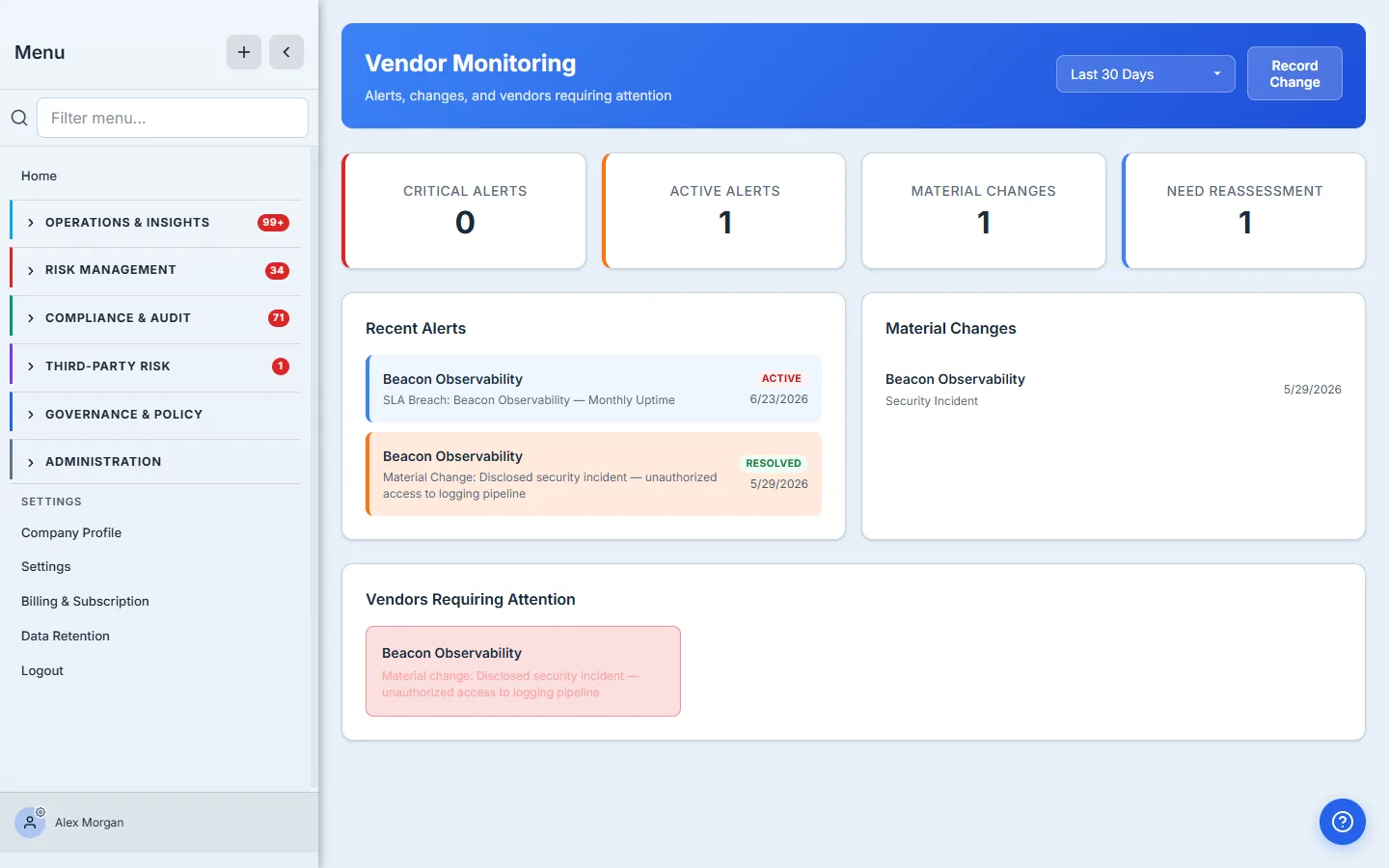
The date selector (last 7 / 30 / 90 days) scopes the alert and material-change feeds, so “what changed across the portfolio this quarter” and “what’s hit us this week” are one dropdown apart. (The Vendors Requiring Attention list isn’t date-scoped — it always shows every vendor currently flagged for reassessment.) Everything here is portfolio-wide — you’re not drilling into one vendor, you’re watching all of them at once.
The counter that matters most is “Need Reassessment.” Active alerts tell you what’s happening; Need Reassessment tells you what your monitoring has concluded needs a fresh assessment. That’s the number that turns monitoring from a news feed into a work queue.
Step 2 — Record the signal
Monitoring is only as good as the signals feeding it. The most common signal is a material change — the human-entered “something happened with this vendor” event. Click Record Change and you describe it: which vendor, a title, the change type (leadership, financial, security incident, M&A, service change, compliance, contract), an impact level, and where you heard it (internal discovery, vendor notification, news, regulatory filing, an audit, or an assessment).
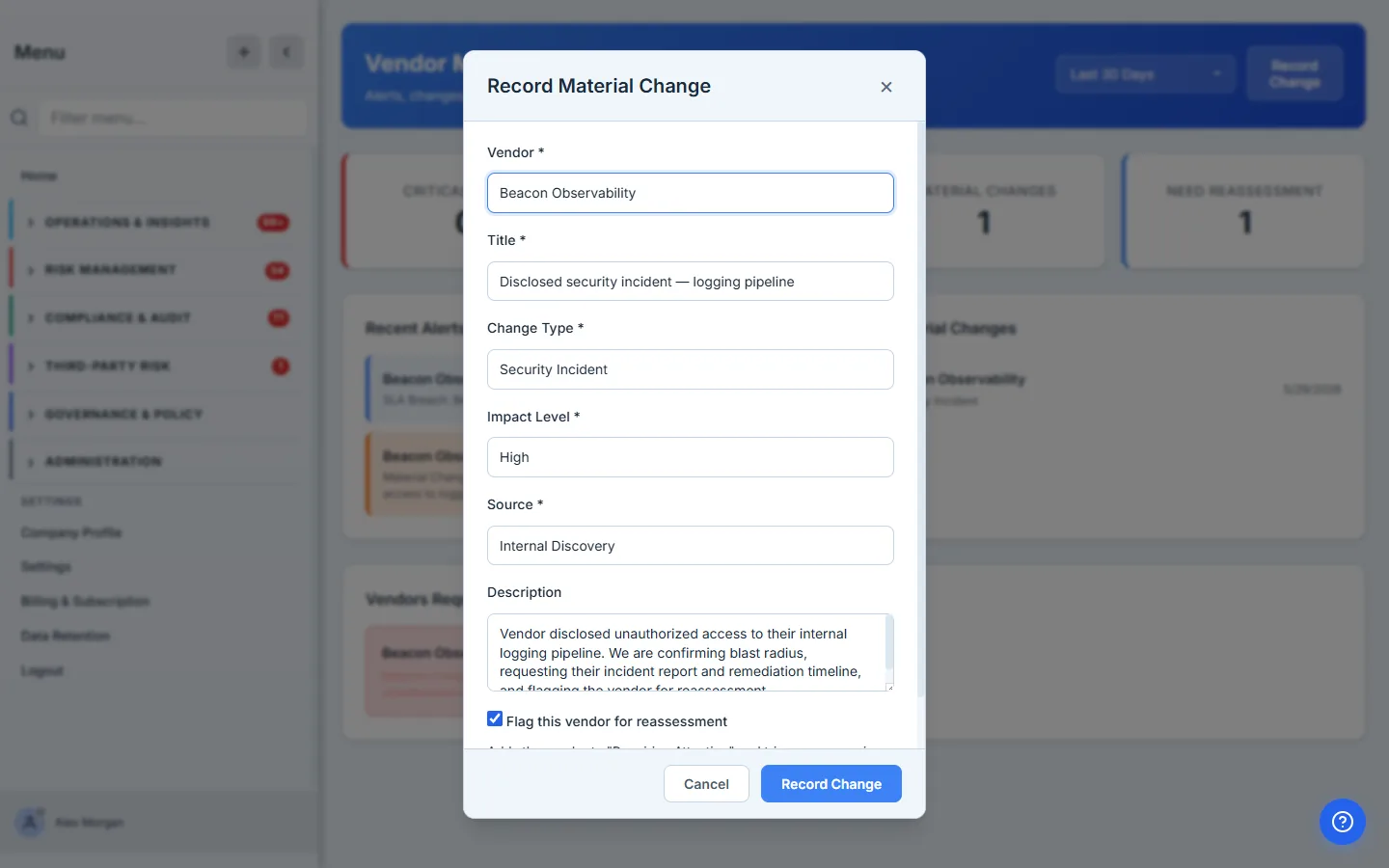
The two fields that do the real work are impact level and flag for reassessment. Impact level becomes the alert’s severity — a high-impact security incident raises a high-severity alert; a critical one escalates automatically. And the “flag this vendor for reassessment” checkbox is the bridge from “we noticed” to “we’ll re-review”: tick it and the vendor lands on the Requiring Attention list and is queued for a fresh look at its risk tier.
Source isn’t bookkeeping — it’s provenance. “Vendor notification” and “news/media” carry very different weight at audit time. Recording how you learned a vendor had an incident is the difference between “they told us” and “we found out”, and an auditor reviewing your program will care which one it was.
Step 3 — The signal becomes an alert
Recording the change does three things at once: it stores the change, it raises an alert at the matching severity, and — if you flagged it — it marks the vendor for reassessment. The dashboard reflects all three immediately: the counters tick up, the alert appears in Recent Alerts with an Active badge, the change shows in Material Changes, and the vendor drops into Requiring Attention. Critical- and high-impact changes also notify your admins right away, so a serious signal doesn’t wait for someone to refresh the dashboard.
The Recent Alerts feed is the org-wide signal stream — every vendor’s alerts in one place, color-coded by severity. A material change you recorded for one vendor and a critical alert raised on another sit in the same feed, newest first, so the analyst on duty has a single place to look.
Step 4 — Triage the alert
An alert you can’t act on is just noise, so every active alert is a button. Click one and you get a triage decision with three dispositions and a notes field.
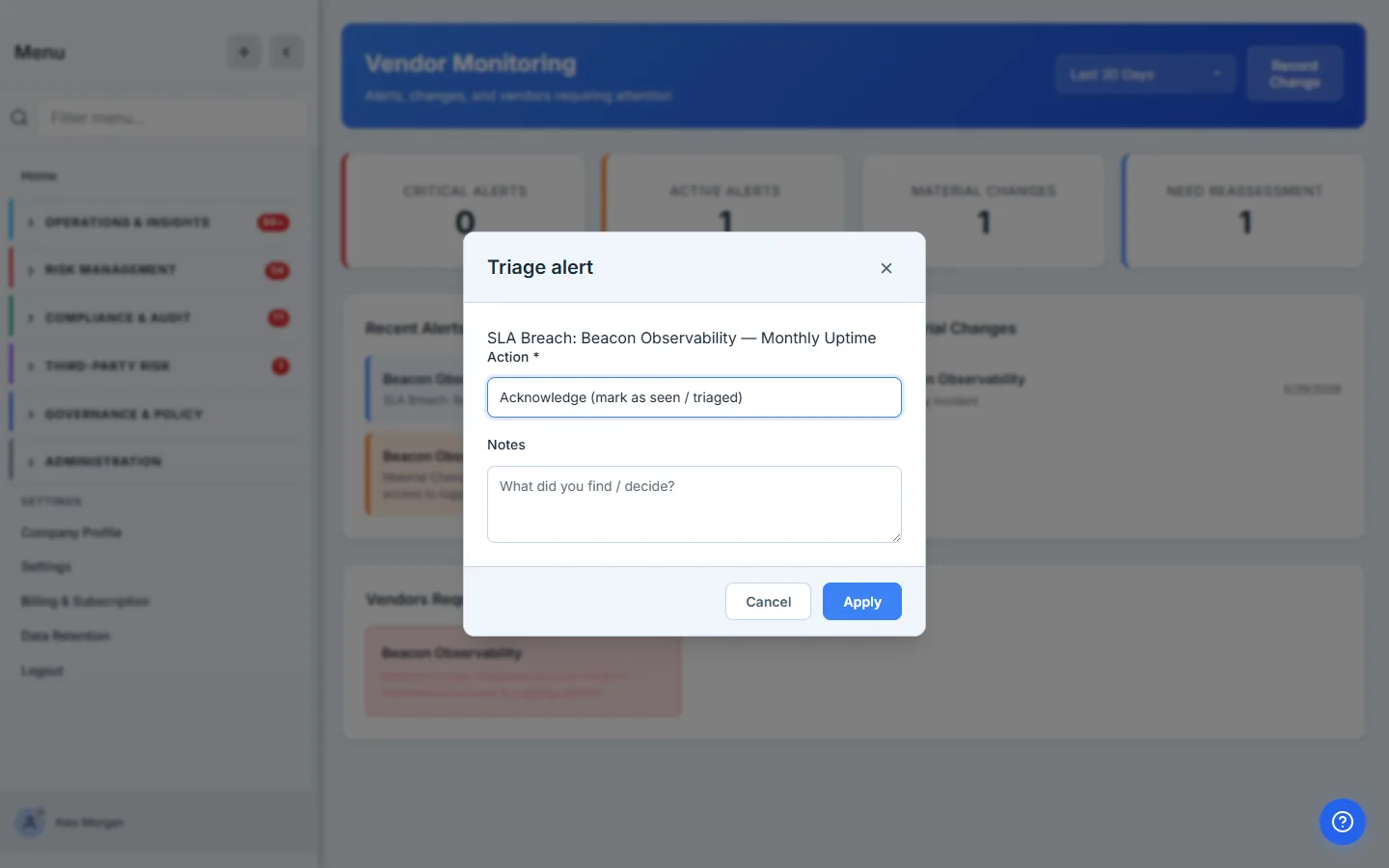
The three dispositions aren’t interchangeable — pick by what’s actually true:
- Acknowledge — “we’ve seen it and we’re working it.” The alert leaves the active count but stays open. Use this while an investigation is in flight.
- Resolve — “this is closed, and here’s why.” Resolution notes are required — you can’t quietly close an alert without saying what you concluded.
- Dismiss — “this didn’t warrant action.” Closes it without a full resolution, for false positives and duplicates.
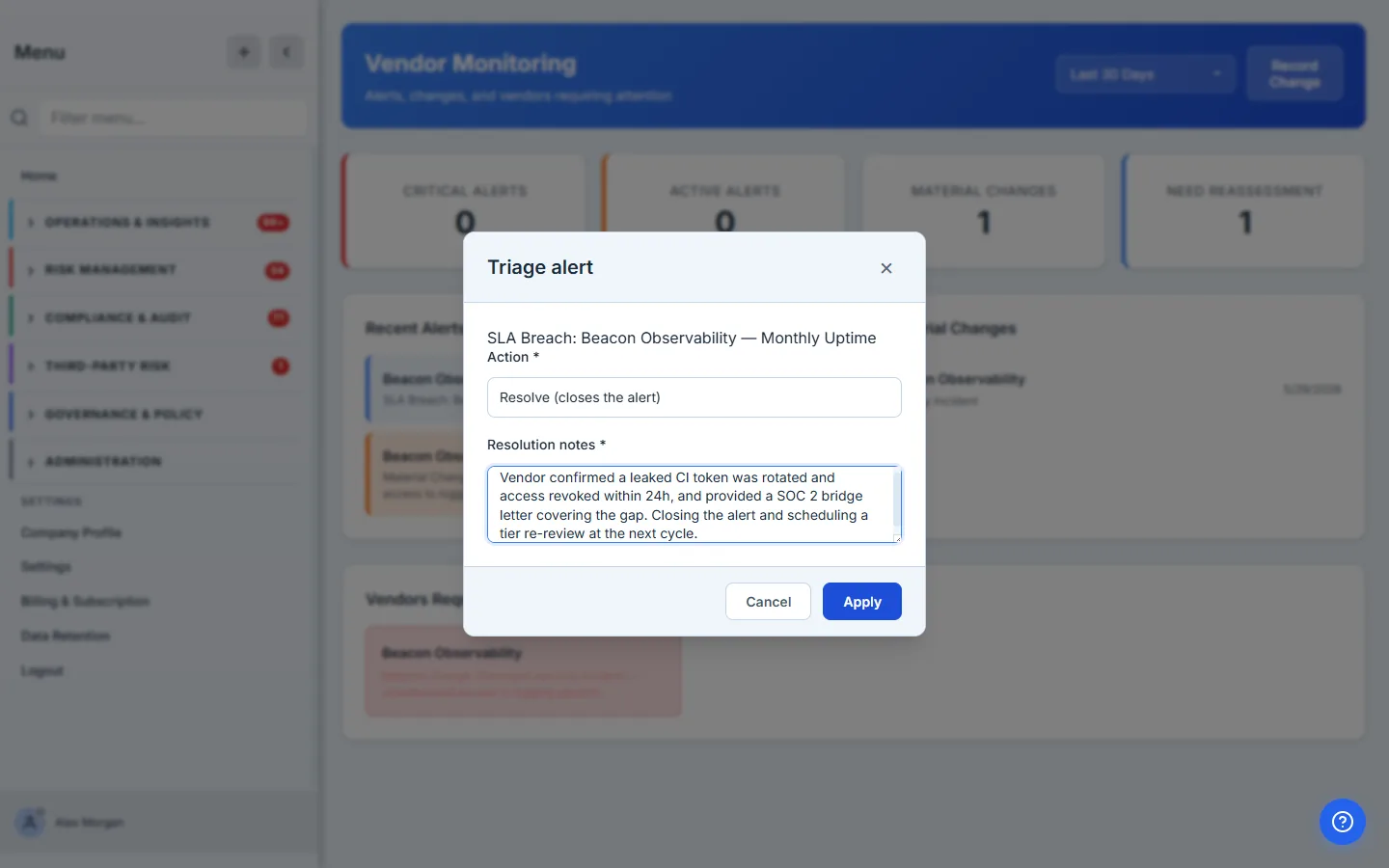
Acknowledge it and the dashboard updates on the spot — the alert keeps its place in the feed but its badge flips to Acknowledged and the Active Alerts counter drops. The alert is still there, still clickable; nothing was hidden, the queue just got shorter.
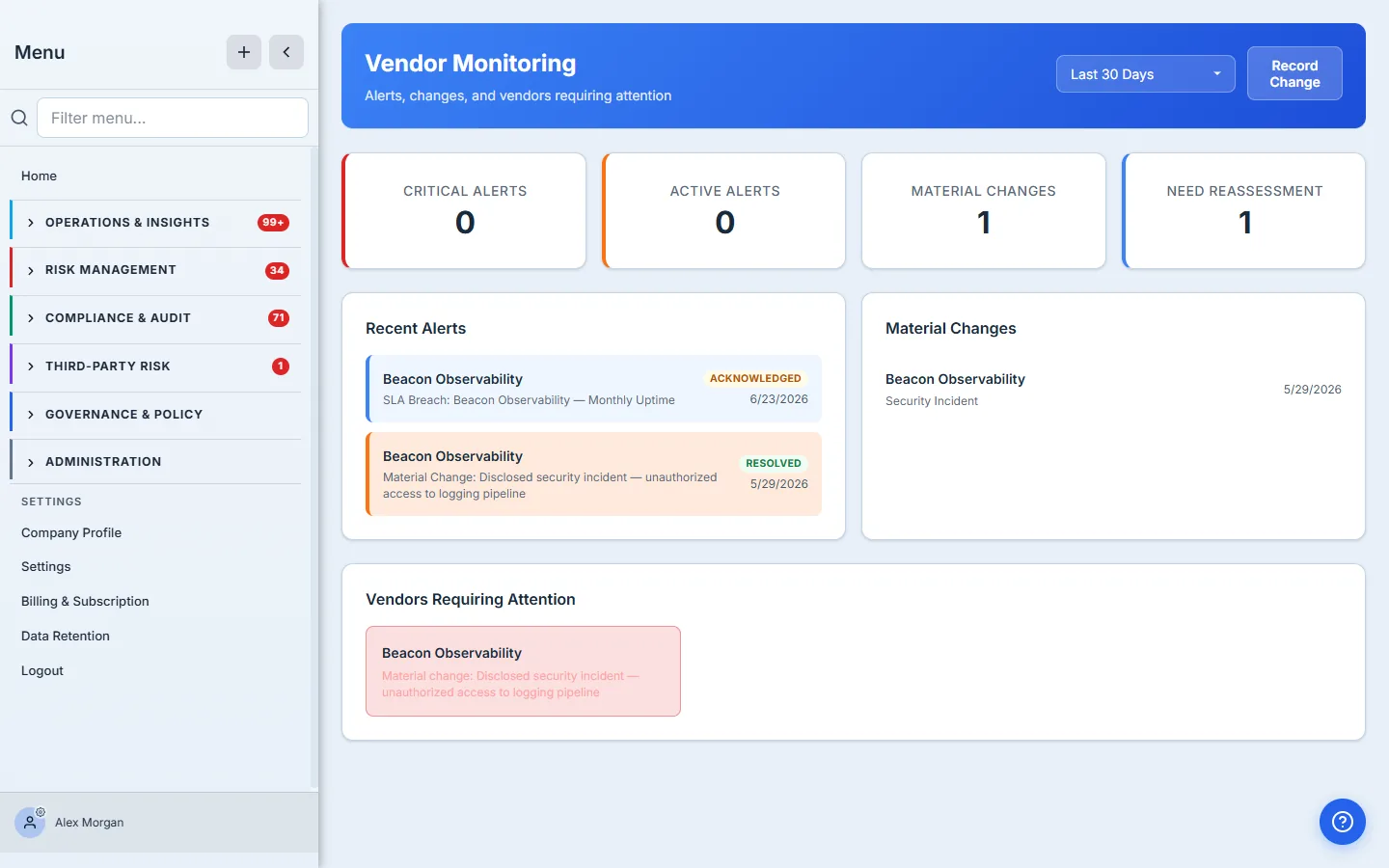
Resolving an alert is not the same as clearing the reassessment. Notice that after you acknowledge — or even resolve — the breach alert, Beacon Observability is still on the Requiring Attention list. That’s deliberate: triaging the event closes the alert, but the consequence (this vendor’s risk picture changed, so its tier needs re-checking) is a separate piece of work that survives until someone actually reassesses. Monitoring’s job is to make sure that second thing doesn’t get lost when the first one is handled.
Step 5 — Work the reassessment queue
Vendors Requiring Attention is the output of all of this — the short list of vendors whose risk picture has moved since their last assessment. It’s the bridge back to the rest of the program: a vendor here is a vendor to re-tier (see vendor risk tiering) and, usually, to send a fresh questionnaire. Monitoring detects the drift; those workflows close it.
Where this ends, and what’s next door
This page is the human-signal + triage core of monitoring. Several automated signals feed the same alert model from adjacent surfaces, and they’re deliberately out of scope here:
- External security ratings — the Vendor Cyber-Ratings page tracks each vendor’s security score and raises rating-drop alerts on its own Alerts tab (a separate feed from this dashboard). Today scores are entered manually; connectors for external providers (SecurityScorecard, Bitsight) are catalogued but not yet wired, so there’s no automatic external sync yet.
- Control drift — comparing a vendor’s two most recent assessments question-by-question flags degraded controls automatically; it rides on the assessment workflow, not this page.
- Regulatory-change checks — a vendor’s compliance profile (PII, GDPR exposure) is checked against framework requirements on the vendor’s own detail view.
- SLA performance — uptime and response-time breaches live in the dedicated SLA Management pages; this dashboard is about risk events, not contractual metrics.
Each of those raises alerts you triage exactly the way you just did — the dashboard is the one place they all land.
What you walk away with
- A portfolio-wide monitoring dashboard — every vendor’s alerts and material changes in one date-scoped view, instead of a once-a-year calendar reminder.
- A material-change recorder that turns “something happened” into a severity-rated alert and, when it matters, a reassessment flag.
- A triage workflow — acknowledge / resolve / dismiss with required notes on resolve — so closing an alert is an accountable, recorded decision.
- A reassessment queue that outlives the alert, so a handled event never quietly drops the re-review it should trigger.
Open /app/vendor-monitoring, record the last thing you heard about a vendor — a breach disclosure, an acquisition, a leadership change — and flag it for reassessment. You’ve just turned a hallway rumor into a tracked, triable, auditable signal, and put the vendor in the queue for a fresh look. That’s the whole job: never let a vendor’s risk picture go stale without anyone noticing.
Related: monitoring is only as good as the baseline it compares to — see questionnaires and the vendor portal — and an SLA breach arrives through the same stream. Overview: vendor risk management.