An access-review screenshot proves the review happened. It does not prove the review happens. The difference between those two sentences is the whole of evidence freshness, and it is the difference an auditor is trained to find.
Most control failures found in a second-year audit are not new failures. The control still exists, the process still runs, and the folder of evidence is still there — dated fourteen months ago. Nobody decided to stop collecting. The collection just had no deadline, so it quietly became a one-off.
Evidence Freshness is the page that puts a deadline on it.
What “stale” actually means here
Freshness is not a property a document declares about itself. It is a measurement, and a measurement needs three things: a clock, a starting point, and a threshold someone chose.
The starting point is the evidence’s own date — when it entered the platform, not when somebody got around to attaching it. That distinction matters more than it sounds, and it is the one most people guess wrong. An access review performed and uploaded in January does not become current because you linked it to a control in August; it is still a January review, and an auditor will date it in January. So the clock starts at the artifact’s upload date, and falls back to the moment it was linked only for evidence that carries no upload date of its own — a policy or a procedure attached in place of a file.
The consequence is worth stating plainly: attaching old evidence to a new question does not reset anything. The only thing that moves this page is collecting something new.
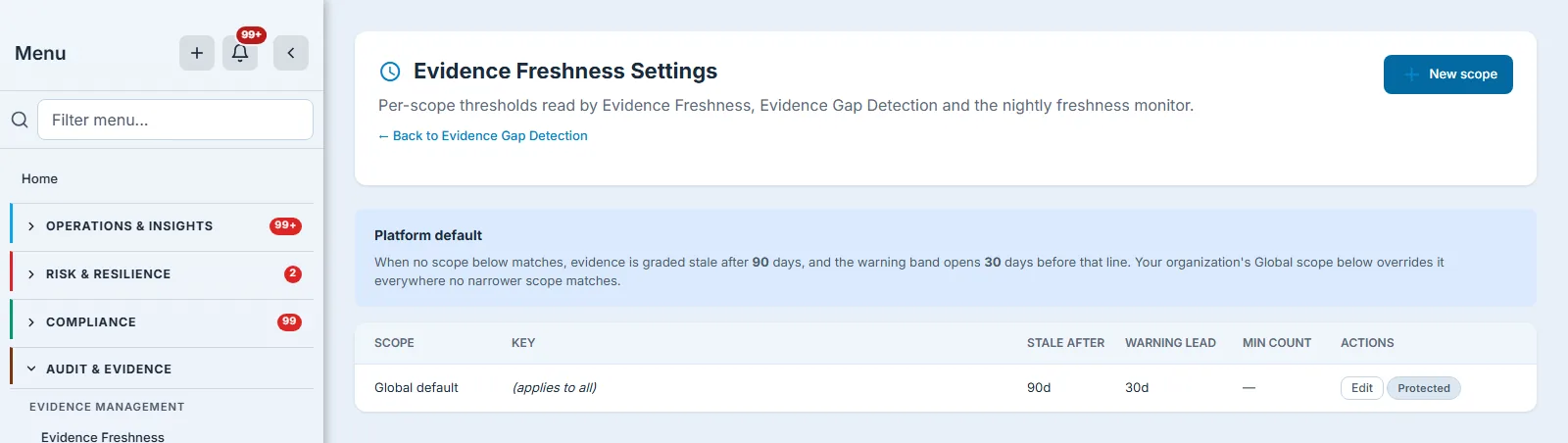
The threshold is yours. Evidence Freshness Settings holds the org’s policy, and the page reads it: if you set stale at thirty days, this dashboard buckets at thirty days and its cards say thirty. The warning band is derived from the same policy — it opens the configured number of days before the stale line, so “warn me a month early” means exactly that at any staleness setting.
The page says so out loud, under the counters: the staleness line it applied, the warning line it derived, and whether those came from your policy or the platform default. Two organisations can see this identical layout graded by different rules, so the page names the rules rather than leaving you to assume the defaults.
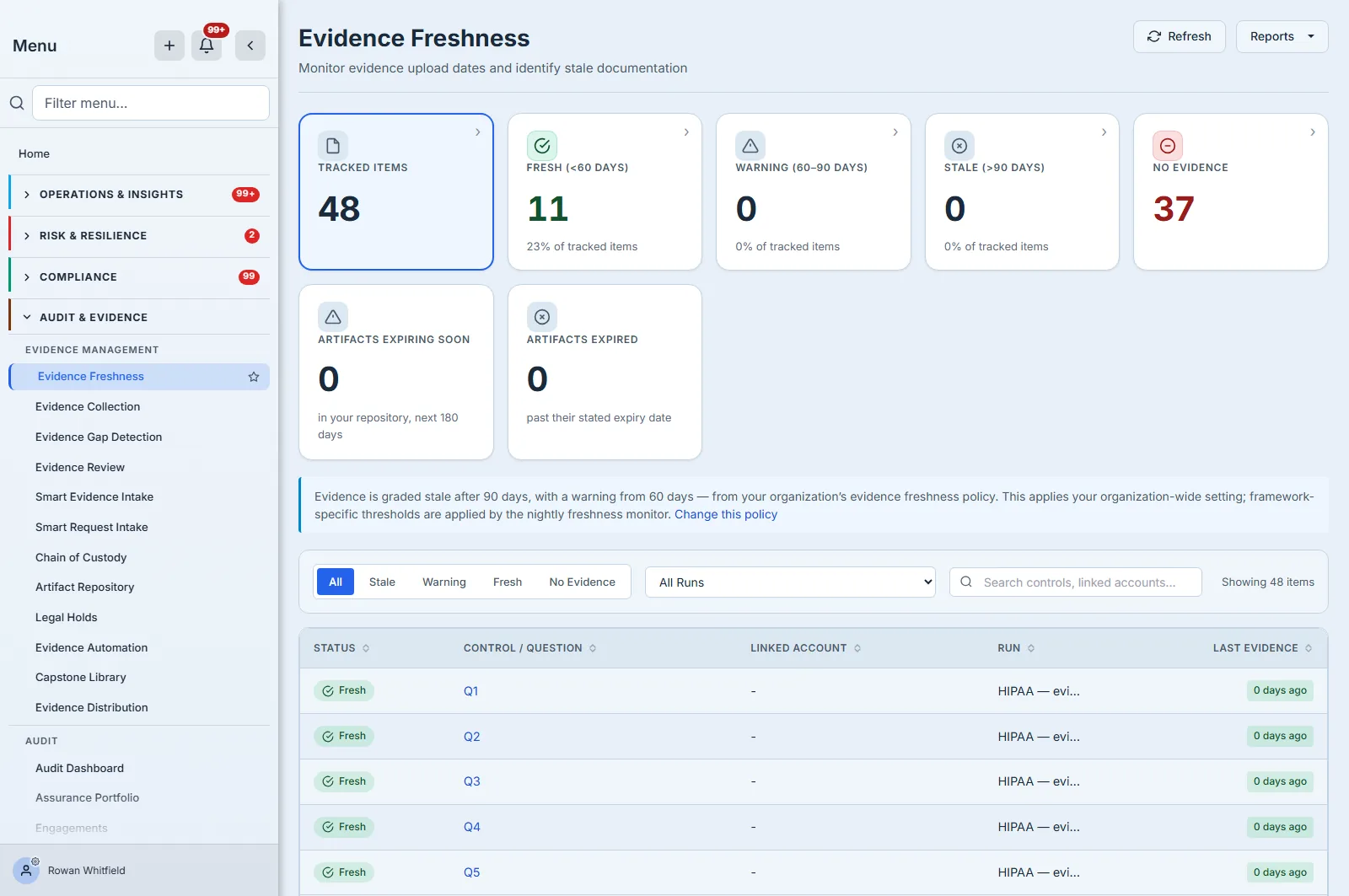
Four states, and the fourth is the one people forget:
- Fresh — evidence attached inside the window.
- Warning — inside the window, but close enough to the line that someone should act.
- Stale — past the line. The control may still be operating; the proof has expired.
- No evidence — nothing was ever attached. Not late. Absent.
A dashboard that shows only the first three flatters you. An item with no evidence at all is not “fresh” and it is not “0 days old” — it is unproven, and it is the state most likely to surprise you in fieldwork.
A young programme reads exactly the way you would expect: everything you have just collected is Fresh, Warning and Stale are empty, and the large number is No Evidence. That is not a misconfiguration and it is not a quiet period — it is the honest opening position of any programme that has started answering an assessment before it has finished proving one. The counters become interesting later, as the first cohort of evidence ages past the line you set.
Each of those five counters is also a control: click one and the table below narrows to it. That is worth knowing before you scroll — the fastest route to “what has no evidence at all” is the counter that says so.
Three more controls matter once the table is longer than a screen, which for most organisations is immediately. The run filter narrows everything to a single assessment, which is what you want when you are preparing for one audit rather than surveying the whole programme. The search box matches on the control or question identifier, the linked account, and the run name, so a framework name or an identifier narrows the table as you type. And the Last Evidence column sorts, which is the one-click answer to “what is my oldest proof” — a more useful opening question than “what is stale”, because it works even when nothing has crossed the line yet.
Evidence Freshness Settings is where the policy itself is set. Thresholds there can be pinned to your whole organisation or narrowed to a framework, a control type, or a single control — the most specific rule wins. Which of those rules a given surface applies is the subject of a boundary worth knowing, a couple of sections down.
The two numbers, and why they disagree
This is the part a reader most needs and is most often left to discover alone.
Talarity computes evidence freshness in two places, from two different sets of links, for two different questions. They are both correct. They will not match.
Evidence Freshness — this page — walks every answered question on your recent assessment runs and asks: is each answer backed by something current? An answer with nothing attached counts, loudly, as No evidence.
Evidence Health on Compliance Drift walks the evidence files attached to completed runs and asks: of the proof we actually hold, how old is it? An answer with nothing attached is invisible to it — there is no file to measure.
A naming collision worth knowing before it costs you an afternoon: the Compliance Dashboard also has a section called Evidence Health, and it is not the same computation. That one is fed by this page’s own figures alongside artifact expiry and evidence gaps, so it agrees with this dashboard and will differ from the Drift panel. Same name, two engines — check which page you are on before reconciling anything.
So the two numbers diverge by exactly the work you have not done yet: this page counts every answer that needs proof, Evidence Health counts the proof you hold. Neither figure is wrong, and the gap between them is the useful quantity. If you are preparing for fieldwork, this page is the one that tells you what an auditor will ask for and not receive.
One practical note on finding that second number: Evidence Health is written by the nightly freshness monitor, not computed when you open the page. On a programme in its first days the panel says so plainly — “evidence health data not yet available” — rather than showing you a zero you might mistake for a finding. It fills in after the first nightly pass.
There is a related boundary worth knowing, and it is larger than one page: this dashboard applies your organisation-wide freshness policy. Talarity also supports per-framework thresholds — a tighter clock for SOC 2 than for an internal standard — and those are honoured by the nightly monitor and the evidence-gap engine, not by this table. A single table spanning several frameworks cannot put one honest number in a column header, so the page states the policy it used rather than quietly mixing several. That much is a reasonable design choice.
What is worth checking in your own tenant is that “how old is too old” is answered in more than one place. Several surfaces compute it: this dashboard and the nightly monitor and the gap engine all read the policy you set, each over its own population, but the Data Quality dimension does not — it applies a fixed one-year rule regardless of what you configured. So an organisation that sets thirty days will see thirty honoured on the surfaces above and a year applied on that one. If a freshness number ever disagrees with this page, that is the first place to look, and the answer is usually the population and the clock rather than the data.
Expiry is a different clock
Staleness is about age. Expiry is about a date somebody wrote on the document itself — a penetration test valid for a year, a SOC 2 report covering a stated period, a certificate with an end date.
Two further counters track that clock instead, on a second row beneath the five: how many artifacts in your repository carry an expiry date inside the next 180 days, and how many are already past it. An artifact with no expiry date is in neither number — it is not “not expiring”, it simply never made a claim about its own validity.
They sit apart from the five for a reason worth stating plainly: they count a different population. The five describe answered questions on assessment runs; these two describe artifacts in your repository. And unlike the five, they do not filter the table — they open the repository, because that is where those records live.
Expiry is also the one clock in this feature that will actively contact a human — but only if you ask it to. Artifact reminders are opt-in per artifact: switch them on, choose your lead days and recipients, and the platform emails before the date and keeps reminding after it, optionally opening a renewal work item assigned to an owner. Left alone, an artifact expires silently and appears only in the counter.
Reminder behaviour has an org-level default per artifact type, so you are not setting lead days one document at a time: a penetration test can default to a different warning than a certificate, and an individual artifact overrides its type when it needs to.
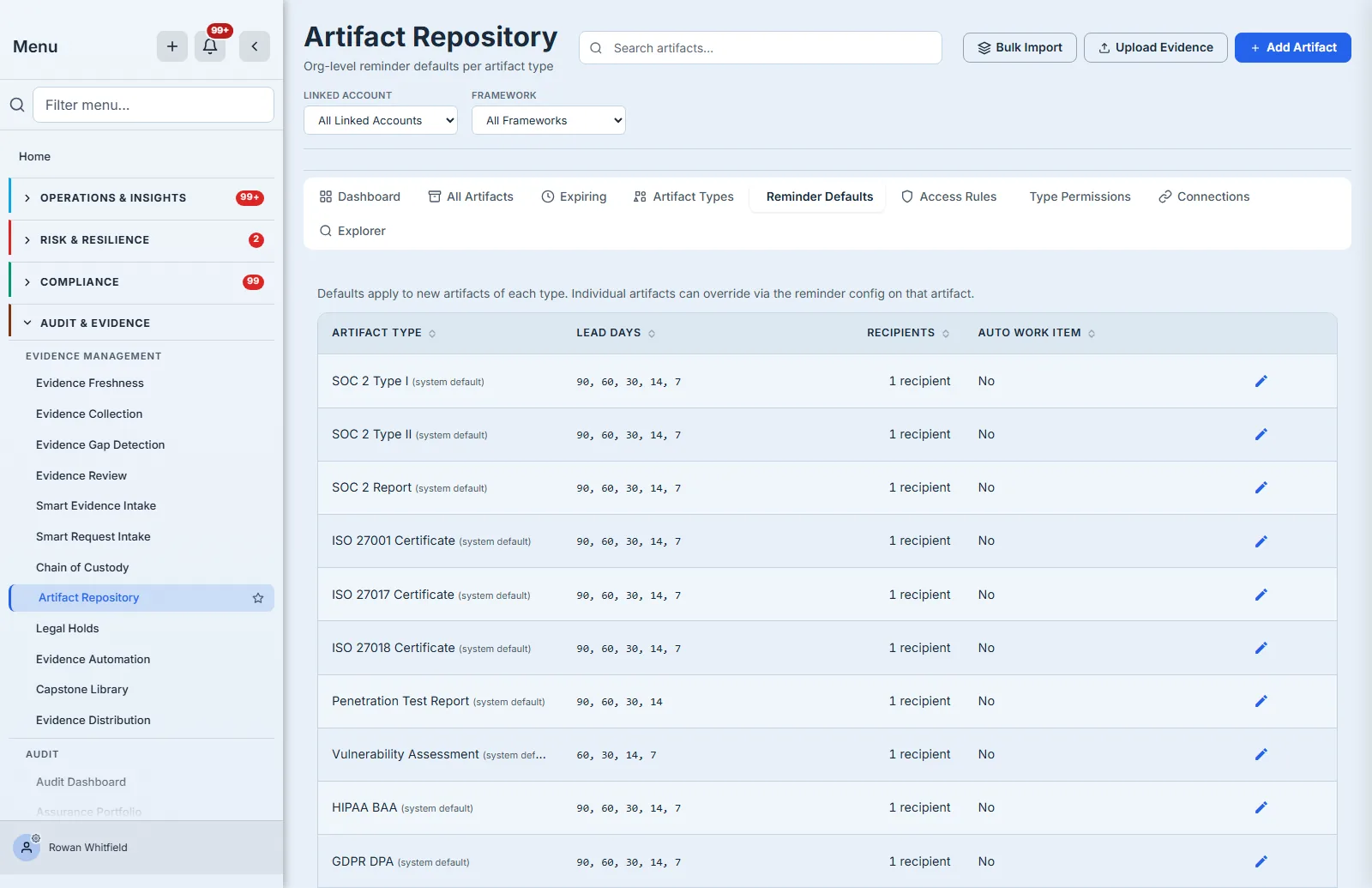
Note the shape of that 180-day window: an artifact that expires in ten months is in neither counter today and will appear in one of them later. “Nothing expiring soon” and “nothing with an expiry date” look identical from the counter alone, which is the reason to keep the dates on the artifacts themselves rather than in a spreadsheet beside them.
What runs without you
Freshness is checked nightly, per organisation. The sweep grades the evidence on completed runs
against your policy, writes an evidence-health record with per-framework and per-account
breakdowns, keeps a list of your oldest items, and raises an outbound evidence.stale webhook when
anything has crossed the line.
Be precise about what that last sentence promises, because it is easy to over-read. Staleness itself notifies nobody. Grading evidence stale raises a webhook and writes a record; it sends no email and opens no task. If you have nowhere to send the webhook, the finding waits on this page until somebody opens it.
Two things in the same nightly job do reach people, and it is worth knowing which, so you can place the email you receive: overdue evidence requests are chased with a digest to whoever the request is assigned to — falling back to your compliance recipients when nobody holds it — and control tests coming due or overdue are notified to their owners. Neither is the staleness sweep. The third path is the artifact expiry reminder described above — and only for artifacts where somebody switched it on.
Where this feature stops
Worth knowing before you rely on it, and none of it is hypothetical.
It needs GRC Professional. The Evidence area itself is open to every package, but the query behind this dashboard is not, so on a Starter plan you will reach the page and be shown an upgrade prompt rather than the table. Worth knowing before you plan a cadence around it.
The two artifact counters stop counting at two thousand. Above that they report the first two thousand artifacts rather than all of them. Most organisations are nowhere near it, and the five freshness counters beside them are not affected — but if your repository is large, treat those two numbers as a floor rather than a total.
You can reach the work from here, but you cannot delegate it from here. Every freshness counter filters the table to its own bucket, the two artifact counters open the repository, and each row’s Control / Question cell opens the assessment that answer belongs to — landing on the question itself, with the right linked account already selected, because that is where evidence attaches.
What this page does not offer is everything around that: no owner on a row, no assigning it to someone else, no snooze, no request-re-collection. Be precise about what that means, though, because it is a statement about this page and not about the product. Talarity has all four of those verbs — evidence gaps carry an owner, a due date and a resolve-or-accept decision, and overdue ones open a task with escalation. They are simply wired to the evidence-gap engine, which grades controls against per-framework thresholds, rather than to this dashboard, which grades answered questions against one organisation-wide policy. Two populations, two clocks, and only one of them has a workflow attached. If you need the chasing, that is where it lives.
There is no export button here either. A fuller Evidence Freshness export does exist, but it is on the Reports dashboard under Data Exports rather than behind this page’s own Reports menu — which offers a report about evidence requests over the artifact repository, not this table.
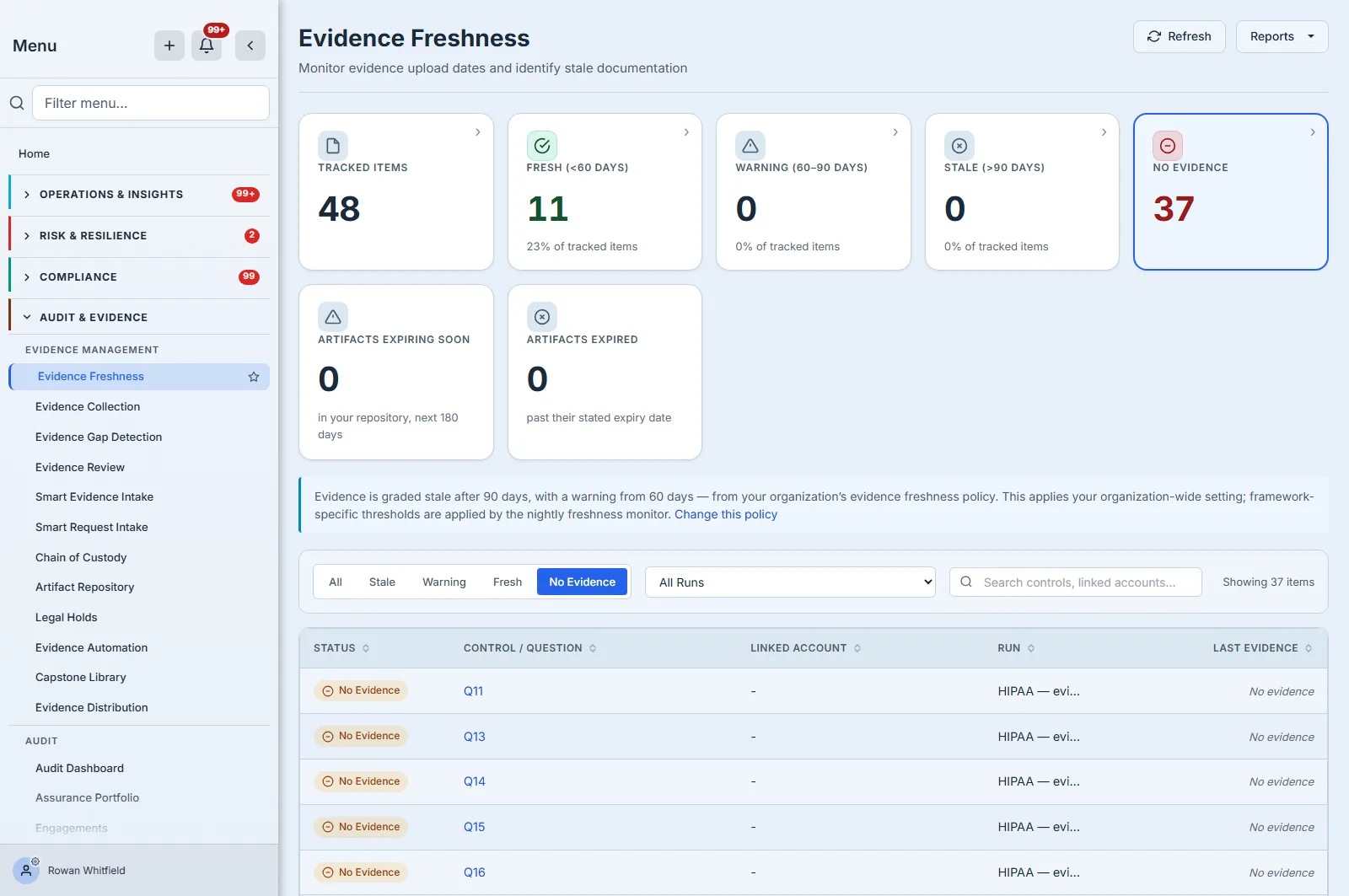
Tracked Items counts answered questions, not controls. One control can be covered by several questions and a question can sit under several controls, so this is a count of answers needing proof — not a count of your control library, and not a number to reconcile against one.
It reads your fifty most recent assessment runs. Past fifty, older runs drop out of every counter without a note on screen, so Tracked Items is a total across those fifty rather than across your whole history.
The artifact counters cover your repository, not just linked evidence, and they look forward 180 days. If you quote “artifacts expiring soon” to someone, quote the window with it.
Nothing here recomputes an artifact’s own stored freshness label. Files brought in through Smart Evidence Intake carry a status stamped when they arrived; no job revisits it. Age moves, the label does not.
None of that stops the workflow this article describes. All of it is the honest shape of the feature at the edges, which is what you want to know before you build a control around it.
What you walk away with
Evidence ages whether or not anyone is counting. A freshness dashboard is worth having only if it counts the absences as loudly as the antiques — an item with no evidence is a bigger problem than an item with old evidence, and it is the one a tidy-looking library hides best.
Set the policy to a number you would defend to an auditor. Then decide who is holding you to it — because the nightly sweep records and raises a webhook, and nothing about staleness will knock on your door unless you wired it to. And remember which of the two numbers you are reading.