Most preservation duties begin with an email. Counsel writes to a dozen people saying do not delete anything relating to the Ashworth matter, and everyone means it. Then someone’s mailbox hits quota, a retention job runs on schedule, an artifact is superseded and tidied away, and nine months later the only honest answer to “can you produce it?” is that you think so.
The problem is not that people ignore the email. It is that the email is not connected to anything. Retention rules keep running. Delete buttons keep working. The preservation duty lives in someone’s sent folder, and the systems that could act on it were never told.
A legal hold in Talarity is the same instruction expressed where it can be enforced: attached to the artifact itself, checked by every path that could destroy it, and carrying a record of who placed it, why, and under which case reference. Rule 37(e) of the US Federal Rules of Civil Procedure turns on whether you took reasonable steps to preserve; ISO 27001:2022 asks for the same thing in A.5.33, protection of records. “We sent an email” is a weaker answer than “the delete path refused, and here is the log.”
Where it lives
Legal Holds is a tab of the Artifact Repository hub, at /app/legal-holds, alongside Smart
Evidence Intake and Smart Request Intake — you reach it from the tab strip once you are on the hub,
and search finds it directly. It is not a row of its own in the sidebar, and that placement is the
mental model to hold on to: a hold is a property of a stored artifact, so it lives beside the
artifacts rather than in a separate compliance silo.
Its close relative is Chain of Custody, which answers a different question — who has been holding this? — about the same evidence.
The two are wired together, and it shows up immediately in this list. A hold can be placed here, on the artifact, or over in Chain of Custody, on the custody chain — and this register shows both, because a compliance officer asking “what is frozen?” should not have to ask it twice. Chain-sourced holds are labelled as such on the card, and both block destruction and appear in the counters. Where they differ is in what each one records. A custody hold must name a case reference and can name the authority that compelled it — you can see both on the cards below, in the line reading authorised by General Counsel. An artifact hold makes the case reference optional and has no authoriser field at all, offering a free-text notes field instead — you will see one of those a few steps below, once you have placed it. And releasing a hold that lives on a custody chain requires access to Chain of Custody, because it is a custody record.
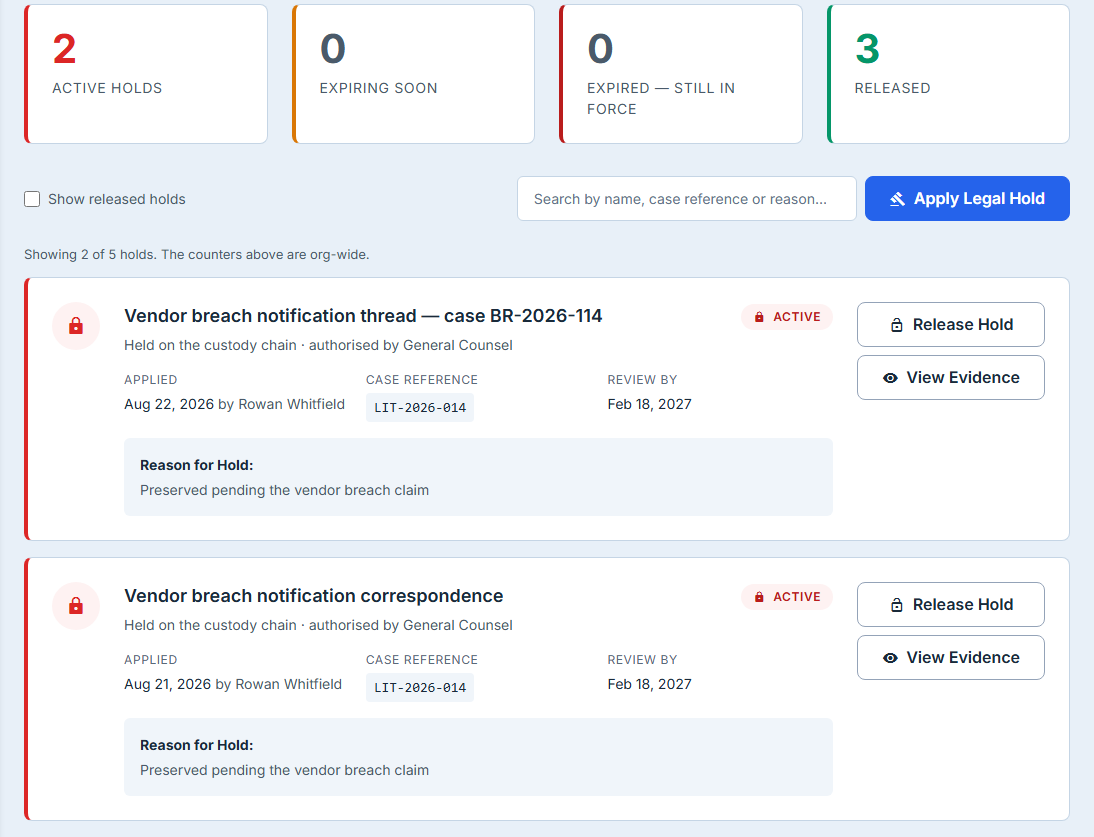
Four states, and why an expired hold is still in force
The four counters are not four stages of a workflow. They are four answers to “what needs your attention”, and the third one surprises people.
Active is every hold currently in force. Expiring Soon is the holds whose expiry date falls within the next thirty days — a prompt to go and ask counsel whether the matter is closed. Released is the holds somebody has deliberately ended.
Expired — still in force is the state worth understanding. When a hold’s expiry date passes, nothing happens. The hold is not lifted, the evidence is not unfrozen, and the delete paths go on refusing. An expiry date in Talarity is a review date, not a timer: it records when somebody expected the matter to be over, so the platform can tell you the date has arrived. Ending a hold is a deliberate act by a named person, and it is the only thing that ends one.
Which is why the hold card labels that date Review by rather than Expires. It used to say Expires, and that single word claimed the one behaviour this whole section exists to deny — on the card, in the largest population of pixels the feature has, directly beneath a counter named Expired — still in force. Three reviewers reading the screen cold all drew the same wrong conclusion, that preservation lapses on the date. A label that has to be corrected by a paragraph is a label, not a paragraph, that needs changing.
That is the right design, and the label says so out loud rather than leaving you to infer it. A system that silently released preservation duties on a date typed months earlier would be producing exactly the spoliation it exists to prevent.
Both of those counters read zero in the screenshots here, because the organisation in them has nothing lapsing — and the cards keep their labels anyway. That is deliberate and worth a sentence: you learn where the number lives before the number matters, so the first time Expired — still in force shows a one, you already know what it is telling you and where to look.
The expiry is a calendar date, and it behaves like one. A hold expiring on 30 June is in force for the whole of 30 June, in every timezone, and reads as 30 June to a reader in Sydney and a reader in Denver. That sounds too obvious to state; it is stated because dates that are really timestamps are the most common way a deadline moves by a day without anyone noticing, and a legal deadline that displays a day earlier than the one being enforced is a defect with consequences.
Placing a hold
Apply Legal Hold opens a picker over your artifact library.
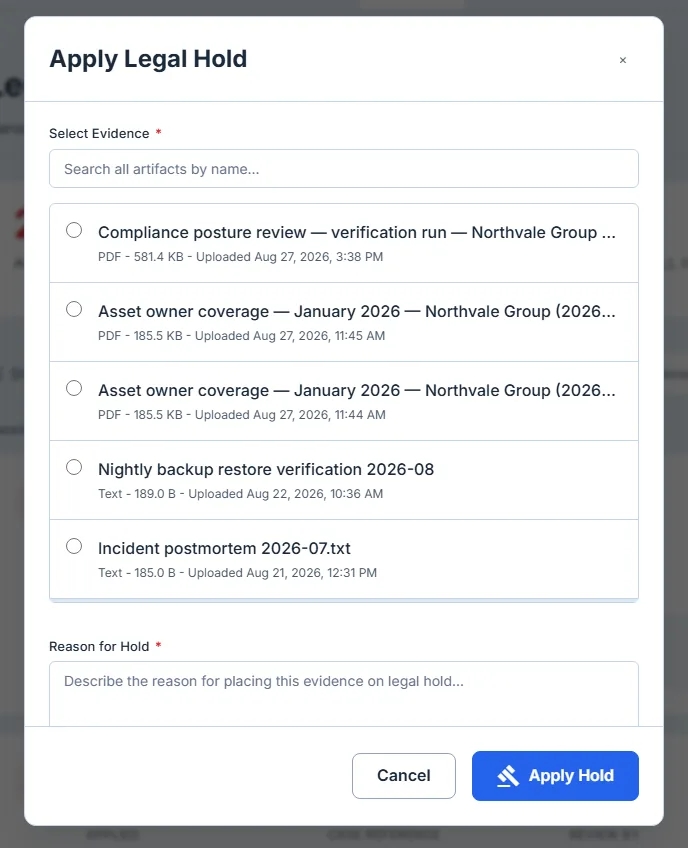
The picker loads the hundred most recently uploaded artifacts. If your library is larger than that, it says so above the list — a silent cap is worse than a stated one, because an artifact you cannot see reads as an artifact you do not have.
The search box above the list is the way past it, and it searches on the server — it queries your whole library, not the hundred rows already on screen. The distinction matters more than it sounds. A search that filters an already-fetched page can never return the artifact you are looking for if that artifact was not in the page, and it fails by returning nothing, which looks identical to not having the file.
That difference is invisible in a screenshot, and the one below is not offered as proof of it — a narrowed list looks the same whichever end of the wire did the narrowing. What the picture shows is the narrowing; where the query runs is a claim about the code, and the honest way to state it is plainly rather than by implication.
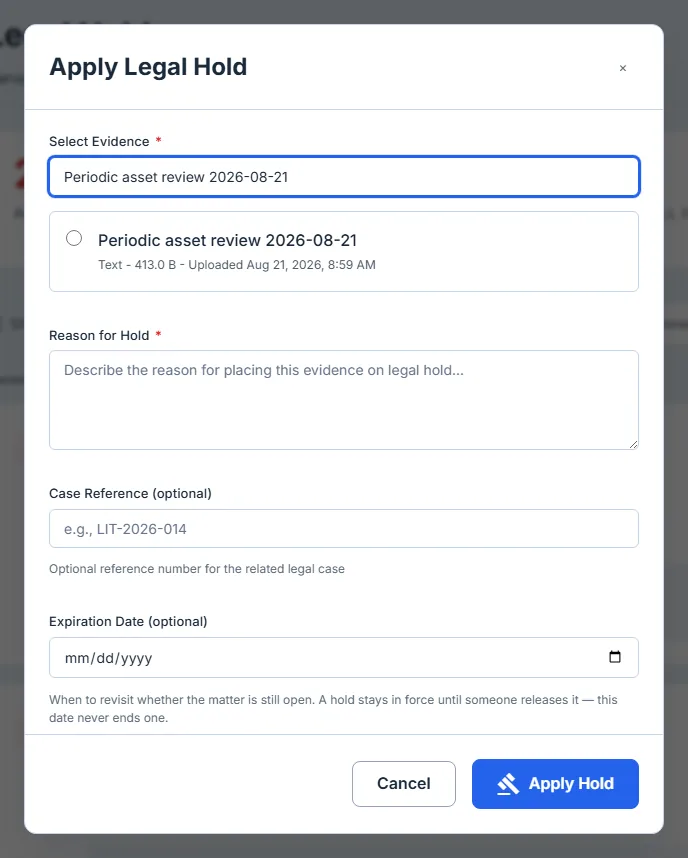
Artifacts are listed by the name you gave them. Where an artifact has a title, that is what you see — here and on the hold card and in the release confirmation — rather than the file name it happens to be stored under, which for anything Talarity generated is a storage key and means nothing to a lawyer.
What the form records
Four fields, one of them required, and the optional three are where a hold stops being a flag and starts being a record.
Reason is required. It is the only field you cannot skip, because it is the field that will be read back to you. Write what you would want to read in a year: the matter, the reason preservation was triggered, and who asked.
Case reference is optional and worth always filling in. It is the field that makes holds searchable as a group — one matter typically means several holds across several artifacts, and the case reference is the only thing that will gather them back up.
Expiration date is optional. Leave it blank and the hold runs until somebody ends it, which is the honest default for a matter with no known end. Set it and you get the review prompt described above. Since nothing releases a hold on a date, there is no risk in setting one — the worst case is that the counter reminds you to ask a question.
Notes is for the things that are not the reason: the custodian you spoke to, the scope counsel actually specified, the date of the preservation notice.
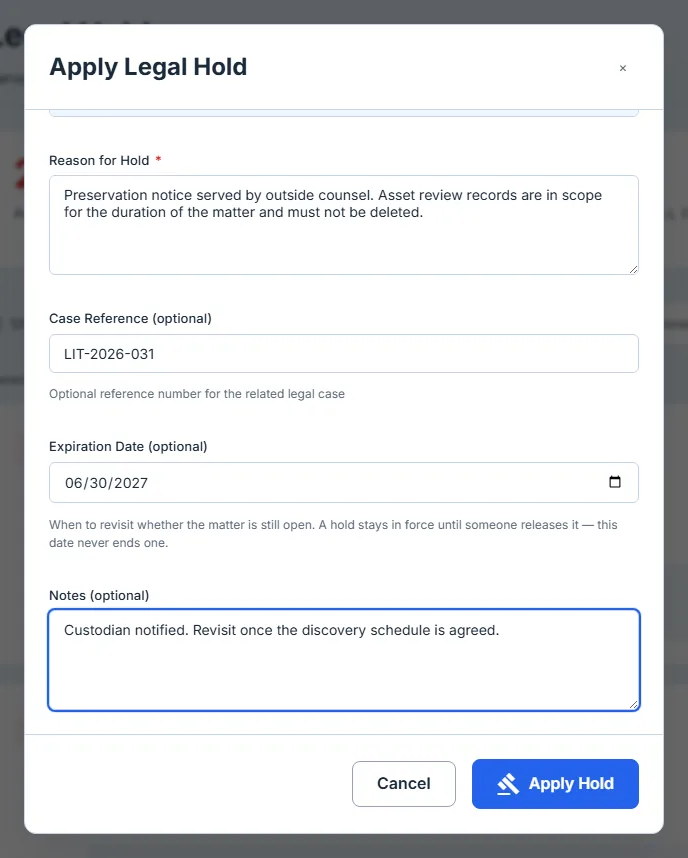
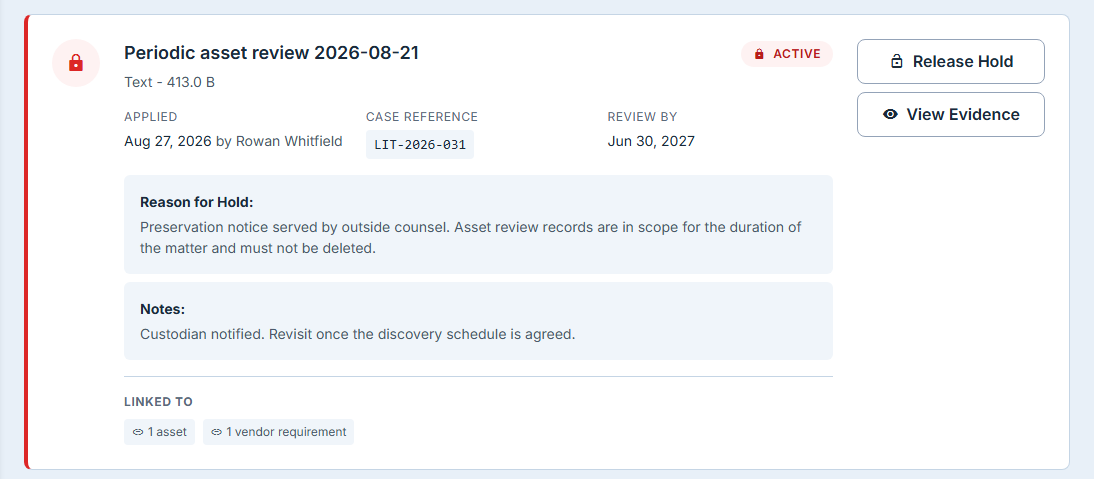
Confirm, and the hold appears in the list carrying everything you typed.
An artifact can only be held once
Go back into the picker and the artifact you just held sits on a tinted row with an On Hold badge, and cannot be selected.
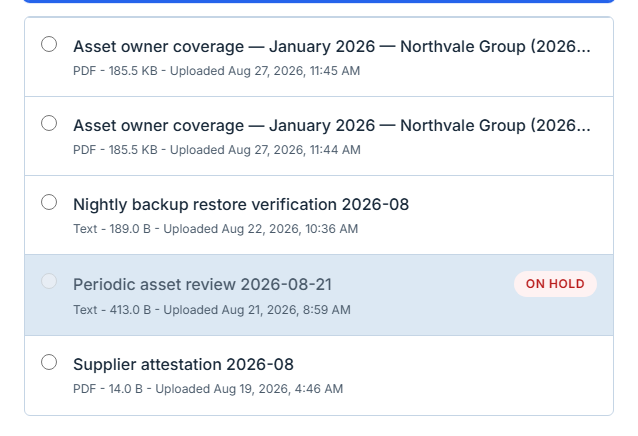
This is a genuine constraint rather than a UI courtesy: an artifact carries one hold, so a second matter needing the same evidence does not get a second hold on it. That is a real limitation and it is worth knowing before you plan around it — see What this does not do below.
Finding one hold among many
The search box on the toolbar matches the artifact name, the case reference and the reason, so typing a matter reference gathers every hold placed under it, and typing a word you remember from the reason works when you cannot remember the reference.
The frame below shows one of those three: a case reference typed into the box, and the list narrowed to the holds placed under that matter. A single still cannot demonstrate the other two — it would take three pictures of the same box to do that, which is three pictures of a search box.
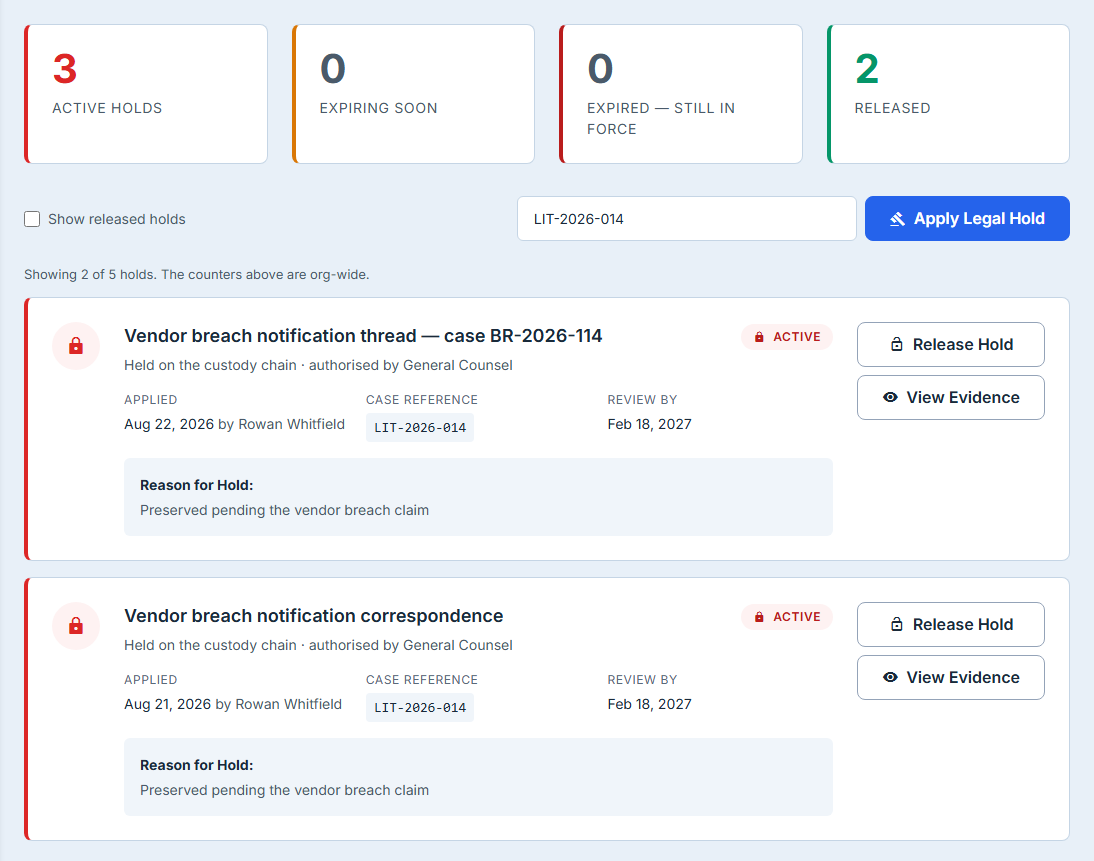
One thing to read carefully: the four counters are org-wide, while the list below them is whatever your search and the released toggle have left. When those disagree the page says so directly above the list, naming how many of the total are on screen — because a count and a list that look like they should match, and do not, is a discrepancy a compliance reader is right to stop at. Each counter is also a filter: click Expired — still in force and the list narrows to exactly those, click it again to clear. A number you cannot open is a number nobody checks.
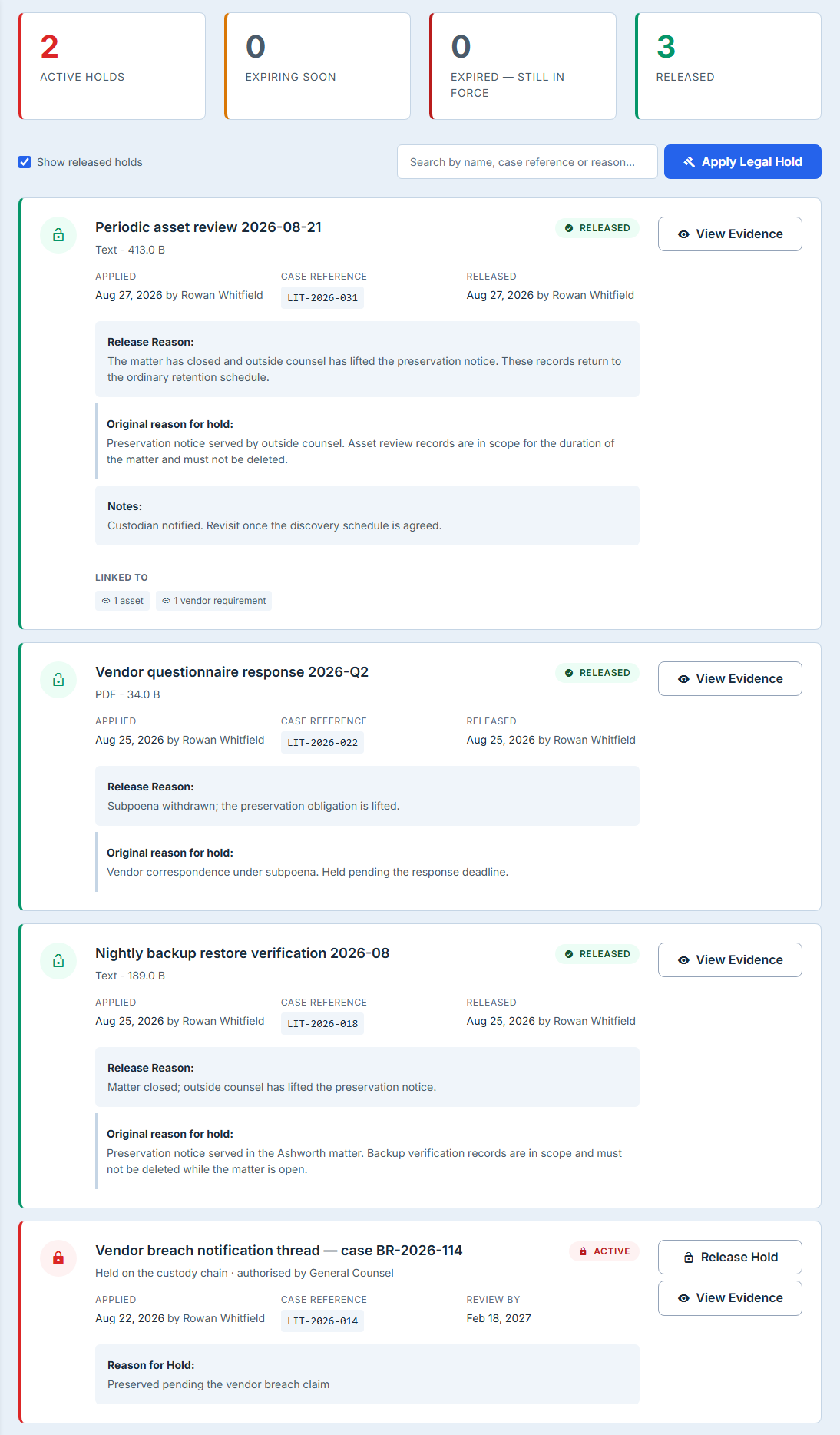
Show released holds brings ended holds back into the list. They are worth looking at: a released hold is the record that a preservation duty existed and was deliberately ended, which is a question you may be asked long after the matter closes.
What else the evidence touches
A hold placed on a stored artifact carries a Linked To panel summarising what else that artifact is connected to — the assessment questions it answers, the controls it evidences, the assets or vendor requirements it belongs to — counted by type. The hold card shown earlier carries one: 1 asset and 1 vendor requirement, which is the case the summary exists for — a hold on one file can freeze evidence that an asset review and a vendor requirement are both relying on.
A hold placed on a custody chain does not carry one, which is worth knowing if the two cards in the opening screenshot looked bare to you: the register resolves these links from the artifact record, and a chain-sourced hold does not go through it. The connections are still there; this panel simply cannot see them from that side.
It is a summary by type rather than a list of names, and deliberately so: the link records store an identifier and a kind, not a title, so listing them individually would print an identifier at you. A count by type answers the question a hold actually raises — what breaks if this evidence moves? — without inventing names the data does not hold. That is an argument against naming them, and worth being clear that it is not an argument against linking to them: an identifier is exactly what a link needs, and these badges could open. Today they do not.
Two things about that panel are worth knowing, and only one of them is a limit. The limit: it tells you how many and of what kind, never which ones — the badges do not open. Treat it as a prompt to go and look, not as an inventory.
The other is better than you would expect. The kinds are named in the customer’s language rather than the schema’s — controls, assessment questions, policies, procedures, work items, contracts, assets, risks, vendors, incidents, SBOM documents and privacy assessments each carry their own singular and plural — and a kind with no entry in that list is de-slugged and pluralised properly rather than printed raw. A new link type therefore reads as English the day it appears, instead of rendering as a schema name until somebody notices.
What a hold actually stops
This is the part worth being precise about, because it is where a hold’s promise is either kept or quietly isn’t.
A legal hold in Talarity blocks destruction. Nine paths that could destroy the evidence or its bytes consult the hold first and refuse while one is in force — the artifact delete, the file delete, bundle deletion, custody disposal, the scheduled retention sweep that runs unattended, the three vendor-side paths that can remove evidence a third party supplied, and one update that clears the stored file while keeping the row. That last pair is the point: the dangerous destruction is rarely the one a person clicks with a hold on screen. It is the automated sweep running at three in the morning against a retention policy that knows nothing about the matter, and it is the operation that does not call itself a delete.
Nine is not a scan result and does not pretend to be one. It is an explicit list, written down in a test, of every path we have found that can destroy evidence — and the test fails if any one of them stops consulting the hold, or is renamed, or is deleted. The list is maintained by hand on purpose, for a reason worth stating: a scan can only recognise doors built the way the ones you already found were built. So treat nine as the doors we know about and have closed, and not as proof that a tenth cannot be written.
The refusals are also fail-closed. If the check cannot determine whether a hold exists — a failed query rather than a negative answer — the destruction stops rather than proceeding. A failed lookup and “no hold on this evidence” produce the same silence, and only one of them is a reason to destroy something irreversibly.
A hold does not freeze modification. The hold check sits on the branch of the update handler that clears a file, and on no other — so no ordinary update path consults it, including the one that changes the artifact’s name. Tags, ownership, review status, description and title all remain editable while a hold is in force, and the title is the string that names the artifact in the release confirmation, the audit row and the compliance notification. That is a real gap between what “preserve this” means in a courtroom and what the platform enforces, and it is stated here rather than glossed: the destructive half is fully guarded, the editorial half is not.
Releasing a hold
Ending a hold is a deliberate, recorded act.
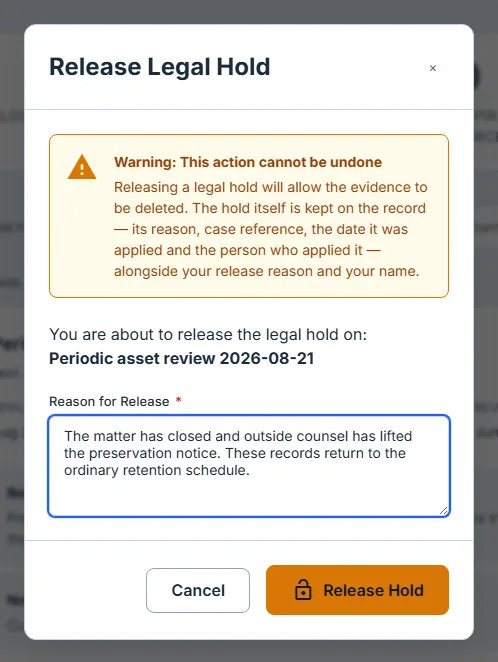
The dialog names the artifact it is about to unfreeze, warns that the action cannot be undone, and requires a reason. There is no un-release: re-applying creates a new hold with a new applied date, which is the correct behaviour — a hold that was lifted and re-placed is a different fact from a hold that ran continuously, and the record should not be able to pretend otherwise.
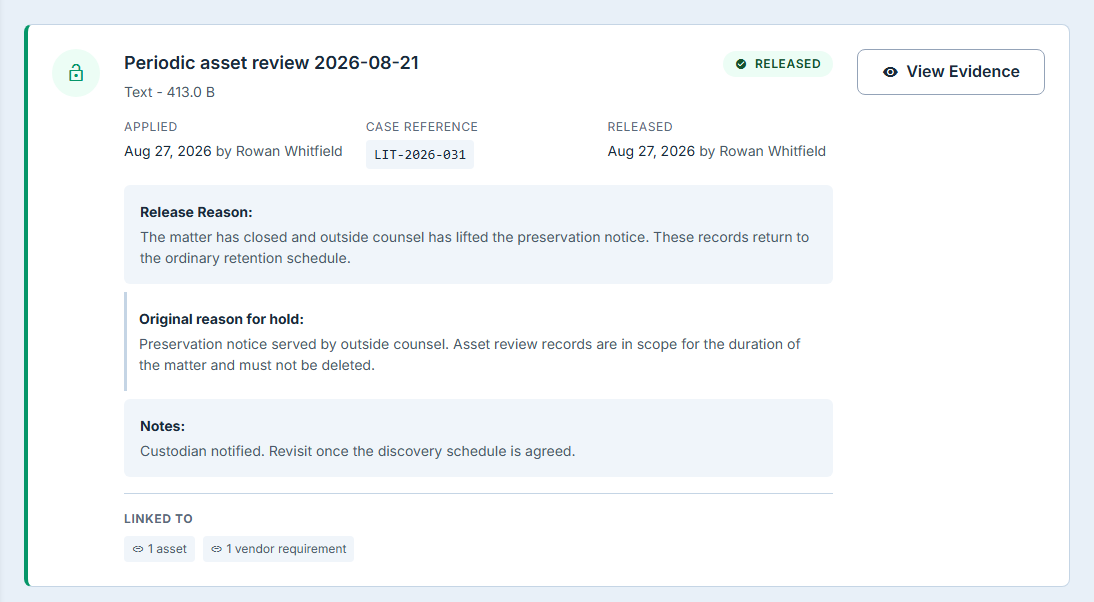
What survives the release is the point. The original reason, the case reference, the applied date and the person who applied it all remain on the record, and the original reason is displayed separately from the release reason so the two cannot be confused.
Both ends of the hold are named. The card says who placed it and who lifted it, on their own dates — which matters more for the second than the first, because lifting a preservation duty is the irreversible half and the one a court asks about. A record that says a duty ended on a Tuesday and does not say who ended it is not a chain of custody.
Both placing and releasing raise a compliance notification, so the people who need to know that a preservation duty started or ended are told without anyone remembering to tell them. It goes to your organisation’s compliance recipients and deliberately excludes whoever performed the action — which does mean that in a small team where the person placing holds is also the only compliance recipient, nobody is notified. Worth checking before you rely on it as the signal.
And the two stores enforce each other: the check every destruction path calls reads the evidence record and the custody chain, so a hold placed on either surface stops a deletion attempted from the other. A hold that only one surface can see is a hold that will be missed by the other.
Who can release one
Placing and releasing are deliberately asymmetric. Anyone who can manage holds can place one — preservation should never wait on an approval queue. Only an Organization Admin can release one.
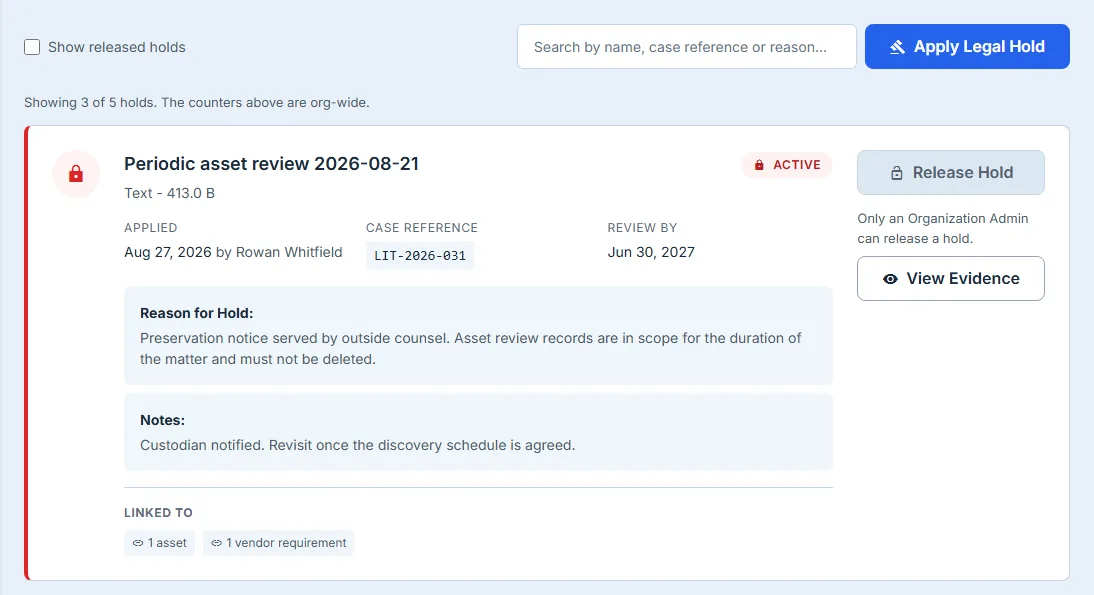
The admin gate is applied up front, with the reason on the control itself, rather than letting someone compose a release reason and then be refused. Note the direction of the asymmetry: the cheap action is open and the irreversible one is gated, which is the correct way round for anything whose failure mode is destroyed evidence.
When it cannot answer
If the holds list or the artifact picker fails to load, the page says so and offers a retry.
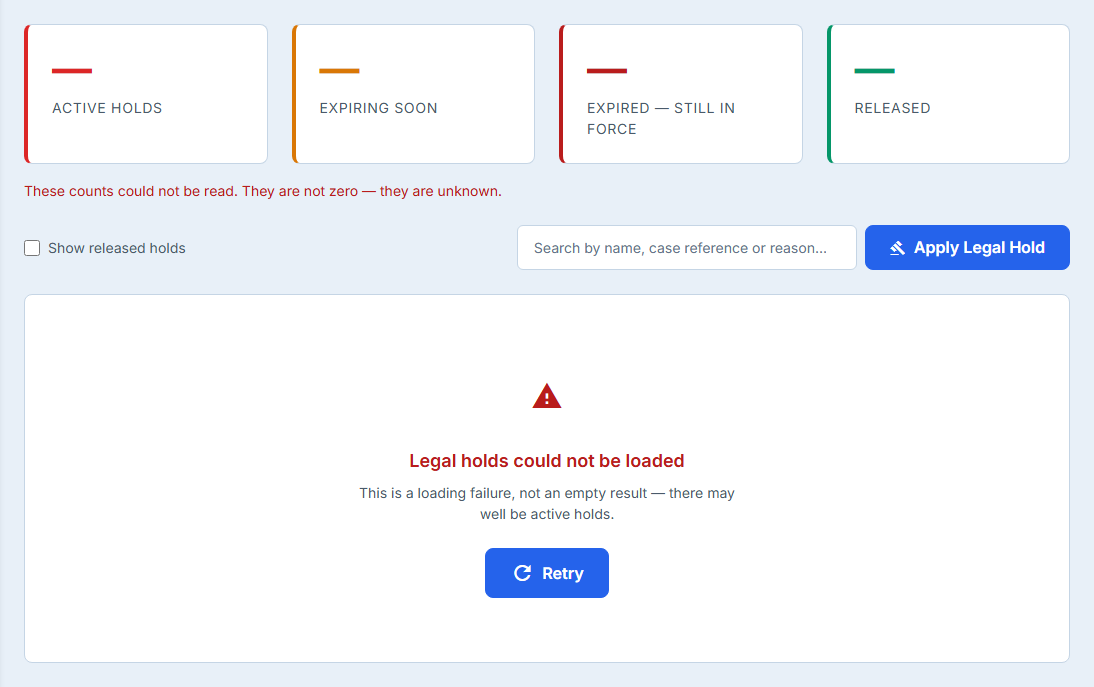
This is worth a paragraph because the alternative is genuinely dangerous. An empty list that means “nothing is on hold” and an empty list that means “we could not ask” look identical, and on this page the first one is a statement someone may act on. A screen that reports a failure as an all-clear is worse than one that reports nothing at all.
Which is why the counters go with it. They are the loudest thing on the page — four figures in display type — and a figure reads as a measurement where a sentence reads as chrome. A row of confident zeros above the words could not be loaded is a screen arguing with itself, and the numbers win. So an unread counter shows an em dash and says plainly that the count is unknown rather than zero, and it stops offering to filter, because there is nothing behind it to filter to.
What this does not do
Everything above is what Talarity enforces today. These are the things it does not, stated plainly because a feature that looks finished is harder to fix than one that admits where it stops.
- This page’s holds and Talarity’s matter ledger are two separate systems with the same name.
A hold placed here attaches to one artifact and carries a reason, an optional case reference and
an optional expiry. A separate
legal_holdsregister — reached through Settings → Data Retention — models the matter itself: a name, a hold type (litigation, regulatory, audit or internal), a description, a custodian list and a data-category scope, and it is what governed report documents and capstone artifacts point at. Note what neither register carries: a matter reference field. Ask the ledger to record one and it reaches the audit event and nothing else. And neither one can see the other. A matter spanning forty artifacts is forty holds here, sharing a case reference, with no link to the matter record you may already have created there. Which of the two becomes canonical is open work; until it closes, the case reference is the only join, and it is one you maintain by hand. - There is no bulk apply. Forty artifacts is forty passes through the dialog.
- No hold notices, and no acknowledgement tracking. Talarity does not send the custodian notice or record who confirmed receipt.
- A hold cannot be edited. Correcting a reason or extending an expiry means releasing and re-applying, which is recorded as exactly that.
- No export register on this page — but there is one next door, and it is worth knowing about. Chain of Custody’s register exports to CSV with a Legal Hold Only filter and carries Legal Hold, Hold Case Ref and Hold Expires as columns, resolved from both stores. What it cannot show you is a held artifact that has no custody chain, or any released hold — so it is a real one-click register for counsel with a real gap in it, rather than the nothing this bullet used to claim.
- The register is not paginated. Every hold is fetched on load, with no limit, and the toolbar search narrows what is already on screen rather than asking the server. That is what makes this search complete — it cannot miss a hold the way the artifact picker, which caps at a hundred rows and says so, can — and it is also the ceiling: an organisation with several thousand holds is loading several thousand records to look at ten. What the page no longer does is read your whole library to find them. All three queries behind it are scoped to rows that have ever carried a hold, so the load grows with the number of holds rather than with the number of artifacts you store.
- A hold does not freeze modification, as above.
If your programme runs on the matter-and-custodian model, the register under Data Retention is the half that speaks it — just know that nothing links what you record there to what you freeze here.
What you walk away with
- A preservation instruction attached to the evidence rather than to somebody’s inbox
- Destruction blocked at nine paths that could remove the artifact, including the unattended sweep
- Refusals that fail closed, so an unanswered question is never treated as a clear one
- An expiry that prompts a review and never silently ends a duty
- A record that survives its own release — the original reason, reference and applied date intact, and both ends named: who placed the hold, and who lifted it
- Releases restricted to administrators, with the reason shown before anyone starts
- Holds gathered by matter through a case reference that searches alongside names and reasons
- A matter ledger elsewhere in Talarity that this page cannot see, and a case reference you join them with by hand
To follow the same evidence in the other direction — who collected it, who has held it since, and whether the bytes are still the ones you were given — see Who touched the evidence.