An auditor does not ask whether you have a control. They ask to see the evidence that it operated, and they ask when it was last collected. The gap between “we have a policy for that” and “here is the artefact, dated inside the review window” is where most findings come from — and it is invisible until someone goes looking control by control.
Evidence Gap Detection goes looking on a schedule. It is a rules engine, not a judgement: the same inputs always produce the same findings, and where a threshold is involved the finding states the number that crossed it — the age in days, or the days remaining before an item expires. The two findings you are most likely to meet first are not threshold findings at all: no evidence attached, and no risk linked. Those state a fact rather than a measurement.
What a run actually reads
A run loads three things: every active control (status Active, In Review, or Monitoring), the evidence linked to each one that is approved or not yet reviewed, still active, not expired and not superseded, and the open risks each control mitigates. Then it applies five checks.
Missing — no approved, non-expired evidence is attached at all. Stale — the freshest attached evidence is older than the control’s stale threshold. Expiring — an attached item carries its own expiry date, and that date falls inside the warning lead. Insufficient — some evidence is attached, but less than the control asks for. Two things can ask: a minimum count you configure, or an evidence recipe on the control naming the artefacts it expects (“1 of 3 satisfied. Missing: IdP deactivation record”). Neither is seeded, so this check is silent on a fresh tenant — and it never fires at zero, because no evidence at all is missing, not insufficient. Control not linked to a risk — the control mitigates nothing in the register.
One control can raise more than one of these at once, because each needs a different fix. A control with no evidence and no risk link is two findings, not one problem described twice.
Severity is calculated, not assigned
This is the part worth understanding before you triage anything, because it explains a page that often looks flatter than people expect.
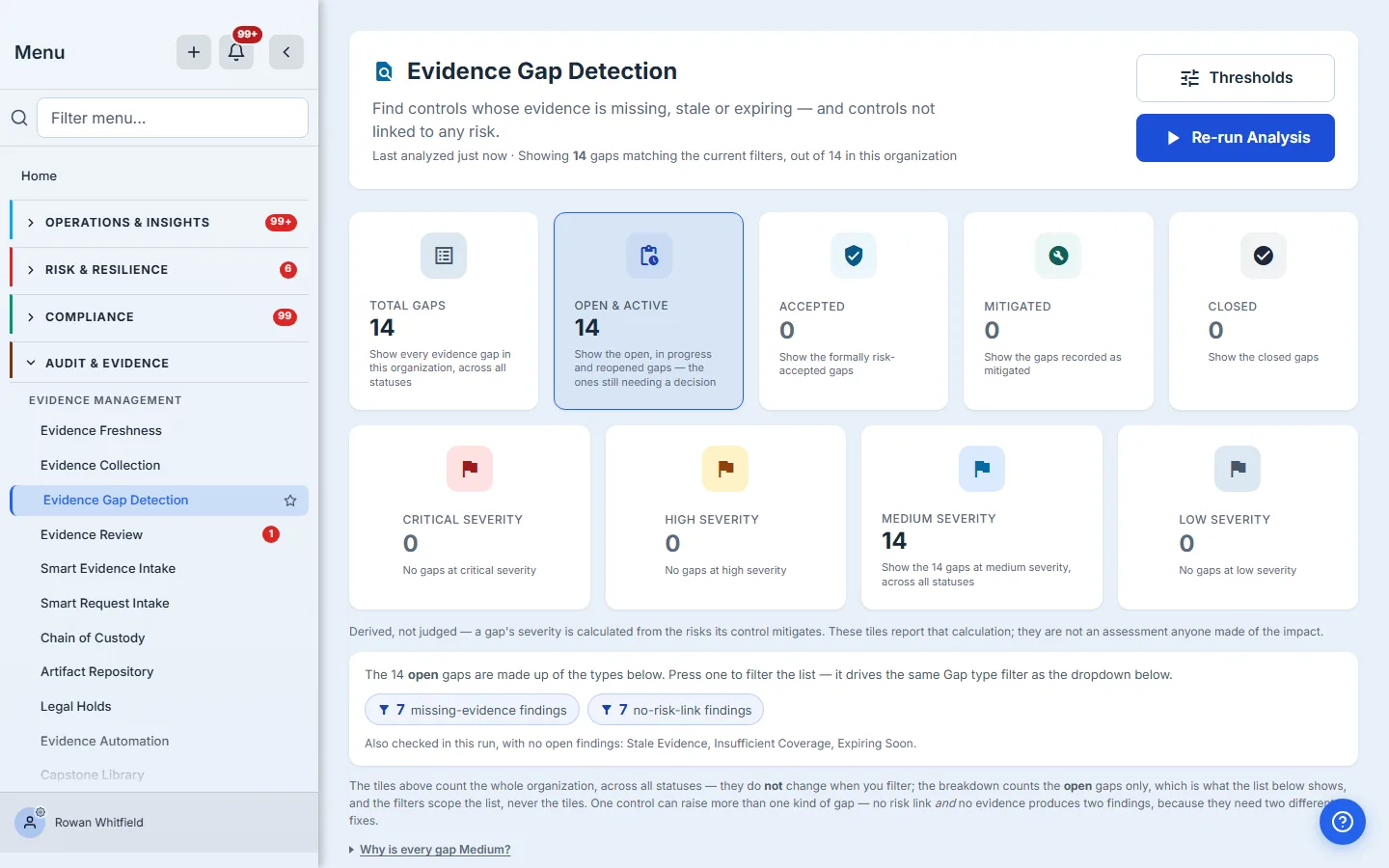
A gap inherits the worst residual score among the risks its control mitigates. On the 5×5 register that is 20 and above for Critical, 15–19 High, 8–14 Medium, below that Low. Stale and insufficient gaps then step down one level, on the reasoning that evidence exists and is merely not current enough. Expiring and not-linked-to-a-risk gaps are Medium by rule. One hand-set value can lower any of this: a per-control severity cap, which the finding records as “severity capped from X to Y by control override”, so the reason travels with the number.
So severity is a statement about business impact, routed through your risk register. Which means a control that mitigates no risks has nothing to inherit, and its gaps fall back to Medium — and the page tells you so rather than leaving you to wonder why everything is the same colour.
That is also why “control not linked to a risk” is a gap type at all. It looks like a housekeeping complaint next to “no evidence attached”. It is not: it is the finding that explains why the rest of your severities are uninformative. Clear those, and the numbers underneath start meaning something.
Thresholds resolve by scope, never by severity
A common misreading is that critical controls get checked more often. They do not. Severity and thresholds are two independent mechanisms.
Talarity resolves a control’s thresholds by taking the most specific setting that applies: an individual evidence item’s own override, then the control, then the framework, then the control type, then your organization-wide setting, and finally the platform default of 90 days to stale with a 30-day warning lead. Severity never enters that chain. If you want your critical controls checked every 30 days, you set a 30-day threshold at the control or framework scope — the severity of the resulting gap will still come from the risks it mitigates.
The warning lead is worth reading carefully, because it counts back from two different dates depending on the evidence. An item carrying its own expiry date raises an expiring gap that many days before that date. Evidence with no expiry date is measured by age instead, and the freshness monitor opens its warning band that many days before the stale line.
Working the list
The analysis runs nightly at 04:00 UTC for every organization, so the page is current whether or not anyone presses anything — though a per-org failure inside that sweep is logged rather than surfaced, so “Last analyzed” tells you when the page last changed, not that every run succeeded. The button — Re-run Analysis, once a run has happened — is for when you want the answer now — straight after attaching evidence, for instance, to confirm a gap has actually closed.
Each finding carries the one action that resolves it, and the link goes to the screen that performs the fix rather than to a summary. A missing-evidence gap routes to the control’s Evidence tab; a not-linked-to-a-risk gap routes to its Implementation tab, where the risk link is made. Gaps at Critical or High also raise a remediation work item automatically, so the serious ones enter the same queue as everything else your team is working — they appear in My Work as unclaimed items anyone can pick up. Worth knowing the boundary: Talarity does not put a due date or an owner on a work item it raised itself, so nothing will chase it on your behalf. If a gap needs a deadline, set one on the work item once you claim it.
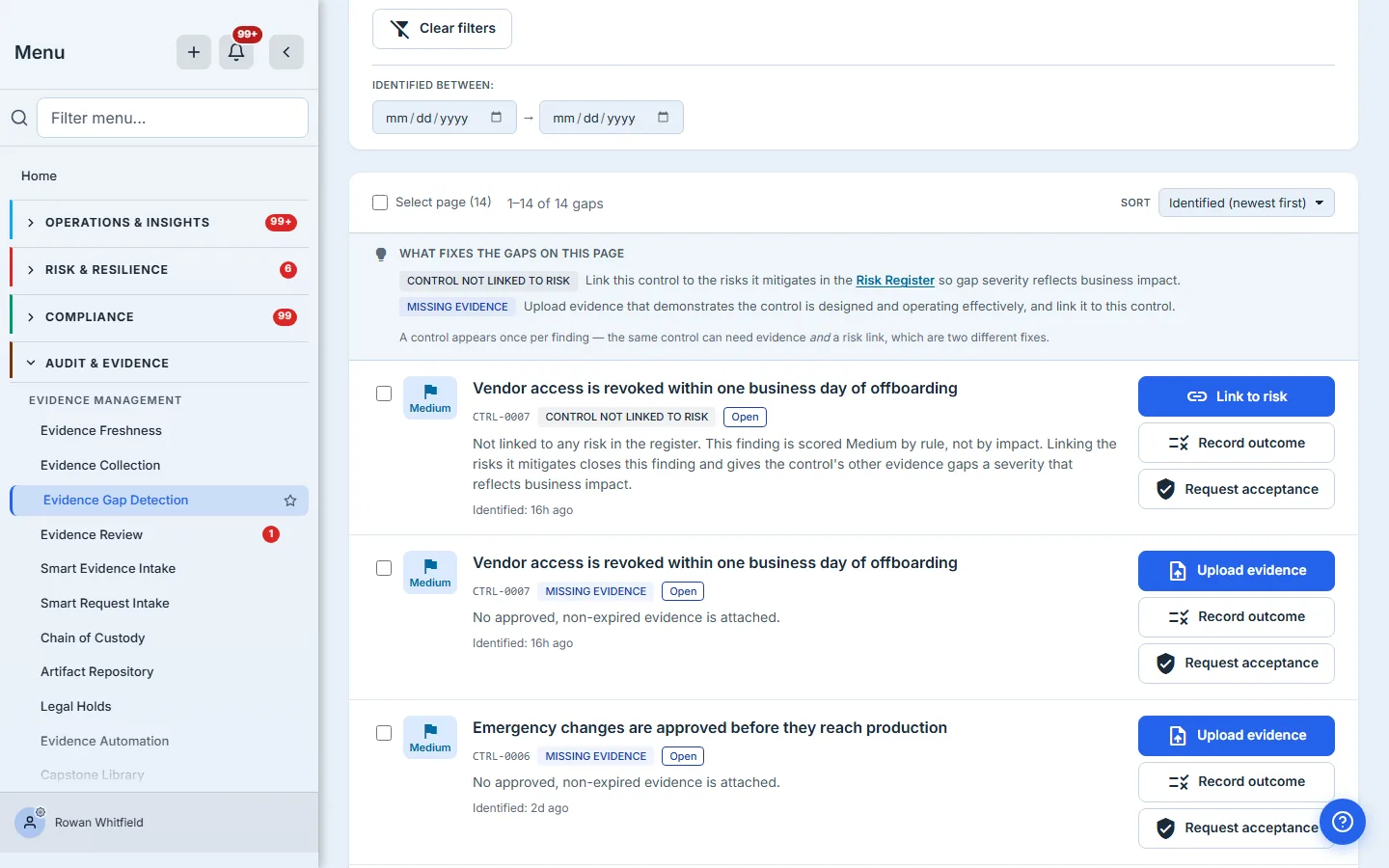
When you are not going to fix something, say so on the record. Record outcome writes Mitigated or Dismissed with a justification. Request acceptance routes the gap through your approval chain, so a consciously-accepted risk carries a named decision and a date rather than living in somebody’s memory. Worth knowing before you rely on it for segregation of duties: if your organization has no other eligible approver, the request routes back to you and is recorded as self-approved — the decision is still on the record, but it is your own. Naming an approver group does not guarantee a second pair of eyes on its own: if the eligible pool comes back empty the request still returns to you. The setting that guarantees it is turning OFF the self-approval fallback in your task approval policy, which refuses the request instead.
Working a list that is bigger than a screen
Fourteen findings you can read. Four hundred you cannot, and that is the normal case for an estate of any size — every control that has ever gone a quarter without a refreshed artefact is on this page.
The filter rail narrows by status, severity, gap type, framework and the date a finding was identified, and the composition strip doubles as a filter: pressing “no-risk-link findings” scopes the list to exactly those. Two things are worth knowing about how that behaves, because they are easy to misread. The tiles across the top count the whole organisation and do not move when you filter — they are the estate, not the query. And the breakdown counts open findings only, which is what the list beneath it shows.
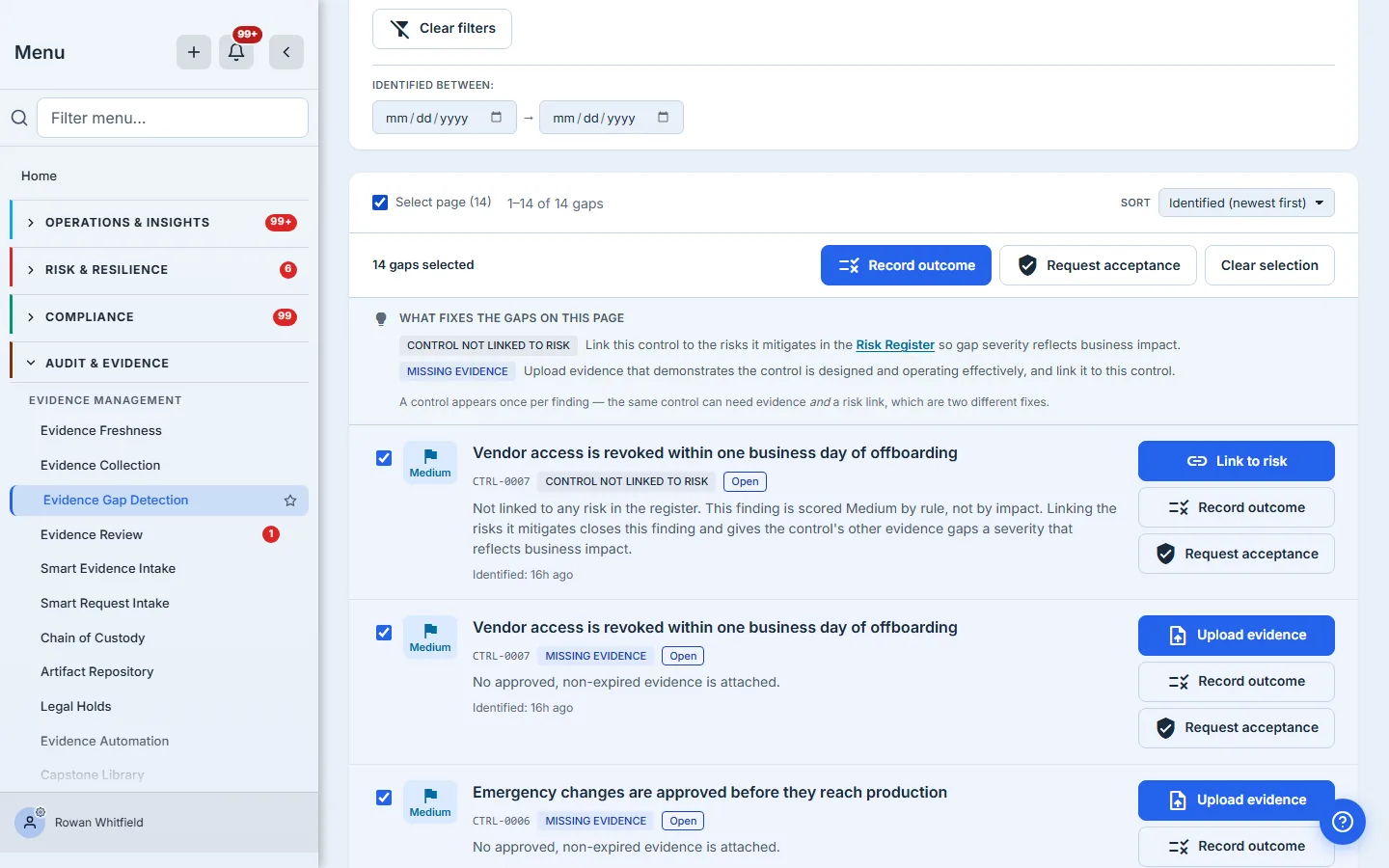
Selection is page-sized, and the page is 25. Ticking the header checkbox selects the actionable findings in front of you — not the several hundred behind them — and the bar states the count it actually holds. When your filters match more than one page, a Select all matching control appears beside it, and that is the one that reaches the whole result set. One hard edge before you rely on it: a single response carries at most 500 findings, and when it clamps, the page says so and the control switches from “matching” to “loaded” — because past that line it can no longer honestly claim to reach everything. From there Record outcome and Request acceptance apply to every selected finding — issued one call each, a few at a time, with any that fail listed afterwards rather than quietly dropped — the two decisions that dispose of a finding without fixing it. The two actions that genuinely close a gap, attaching evidence and linking a risk, stay per-row, because each one lands on a different control and needs a different artefact. That asymmetry is deliberate rather than an omission: bulk is for deciding, not for fixing.
Recorded outcomes are final. A later run will not quietly reopen a finding you closed deliberately — only findings that Talarity closed by itself come back, if their conditions return. If the underlying condition still holds and you want it watched again, fix the cause; the next run raises a new finding.
What you walk away with
- A standing, deterministic answer to “what would an auditor ask for that we cannot produce today”
- Severity that reflects business impact, because it is derived from the risks each control mitigates rather than assigned by hand
- A named next action per finding, pointing at the screen that performs it
- An on-the-record decision trail for the gaps you are consciously living with