Ask an auditor how a control works and you will get an answer. Ask them how they know, and the good ones will tell you they watched someone do it, and wrote down who, when, and what they said.
That second part is the whole job. Inquiry — asking a person — is one of the four ways audit evidence is gathered, alongside inspection, observation and re-performance. It is also the weakest of the four on its own, because a conversation leaves no trace. A control tested by inspection has a document behind it. A control tested by inquiry has whatever the auditor remembered to write down.
The four ways you know, and why this one needs help
Audit evidence comes from inspection, observation, re-performance and inquiry. They are not interchangeable, and the differences are practical rather than academic.
Inspection is reading the artefact — the approval, the ticket, the log line. It is strong evidence about the specific item and says nothing about the ninety-nine you did not read.
Observation is watching the control happen. It is strong evidence that the control can run, and weak evidence that it always does, because people behave differently when watched.
Re-performance is doing the control yourself and comparing answers. It is the strongest of the four and the most expensive, so it is reserved for the controls that matter most.
Inquiry is asking. It is the cheapest, the fastest, and the only one that can tell you why — why the exception was approved, why the process changed in March, why the documented control is not the one anybody follows. That is exactly what the other three cannot give you, and it is why inquiry is where most fieldwork starts.
It is also the one a reviewer can most easily dismiss, for a simple reason: a conversation produces nothing. If the record of it is a paragraph in someone’s notebook, then what reaches the file is one person’s summary of what another person said, months after both have forgotten. Standards are blunt about this — inquiry alone does not provide sufficient appropriate evidence about the operating effectiveness of a control. It has to point somewhere.
So a walkthrough record has two jobs. It has to state what was said and by whom, and it has to name what the conversation touched, so that the inspection or re-performance that corroborates it can be traced back to the inquiry that prompted it.
What a walkthrough has to survive
A walkthrough is a particular kind of interview: you take one transaction or one process and follow it end to end, asking the person who actually performs it to show you what they do. It is how an auditor learns whether the control that exists on paper is the control that runs on Tuesday.
The output has to survive three readers, and they want different things.
A reviewer, next week. They want to know the conversation happened, with someone who would know, and that the auditor asked about the right things. “Spoke to IT” is not that. “Spoke to the person who approves privileged access requests, about how they verify the requester’s manager approved it first” is.
An external auditor, next quarter. They want the inquiry corroborated. Inquiry alone rarely supports a conclusion; it points at what to inspect. So the record has to say which controls the conversation covered, or the corroboration cannot be traced back to it.
Someone reconstructing the work, next year. The auditor has moved on, the interviewee has changed roles, and a regulator is asking how a conclusion was reached. This is the reader most interview notes fail, because they live in a document nobody can find, in a folder nobody remembers.
The register
Every interview conducted for the organisation sits in one place, with its date, who was in the room, the format, its status, and the audit it belongs to.
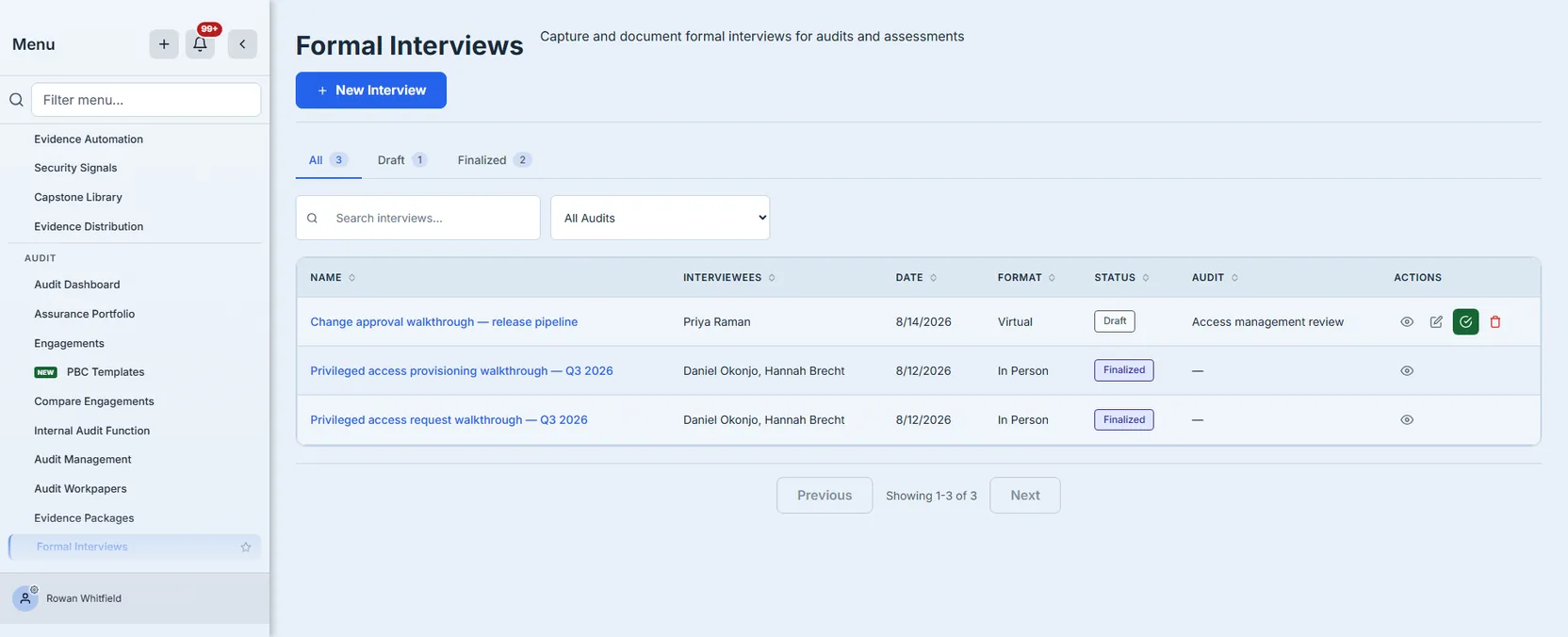
Draft and Finalized are the only two states, and the distinction is the point of the feature rather than a workflow decoration. A draft is a working document — you are still writing up what was said. A finalized interview is a signed record: it names who signed it and when, and it can no longer be edited or deleted by anybody, including the person who wrote it.
That is a deliberate one-way door. An audit record that can be quietly revised after the fact is not evidence of anything, and the most common way that happens is not malice — it is someone tidying up a note six months later and not realising the conclusion rested on the original wording.
Finding one again
The register is searchable across the things you would actually remember — the interview’s name, its description, the topics it covered, and the names of the people who were in the room. Topics matter more than they sound: six months on you are far more likely to recall “the conversation about contractor onboarding” than whatever the record was titled.
The tabs carry live counts of the whole register, not of the page you are looking at, so All / Draft / Finalized tells you how much inquiry work is still unfinished at a glance. Where a count cannot be computed it is hidden rather than shown as zero — a register holding twenty interviews should never render “Finalized 0”, because a confident wrong number is worse than an absent one.
When the organisation has audits, the register also filters by audit, which is how you assemble the inquiry record for one engagement. The filter hides itself entirely if there are no audits to filter by, rather than offering an empty dropdown that implies you have none when the truth is that nothing could be loaded.
Running the walkthrough
The software cannot do this part, and the quality of the record depends almost entirely on it.
Talk to the person who does the work, not their manager. The manager describes the control as designed. The person performing it describes the control as it runs, including the workaround everybody uses when the system is slow. Those are frequently different controls, and the gap between them is usually the finding.
Send the topics in advance, not the questions. Giving someone the areas you want to cover lets them bring the right screen and the right examples. Giving them the exact questions invites a rehearsed answer, and you learn what they prepared rather than what they do.
Follow one real item end to end. “Walk me through how you approve a privileged access request” is a description. “Show me this request from last Tuesday” is a walkthrough. The second one surfaces the steps people skip when describing their own process, because they are looking at the evidence of what actually happened.
Ask what happens when it goes wrong. Most controls are documented for the happy path. The interesting question is what the person does when the approver is on leave, when the system rejects a valid request, or when something needs to go through today. That is where compensating controls live, or where they turn out not to.
Write it up the same day. This is the least glamorous rule and the one that decides whether the record is worth anything. Detail decays fast, and a walkthrough written from memory a fortnight later is a summary of a summary.
Writing one up
The record has the fields the conversation actually produces.
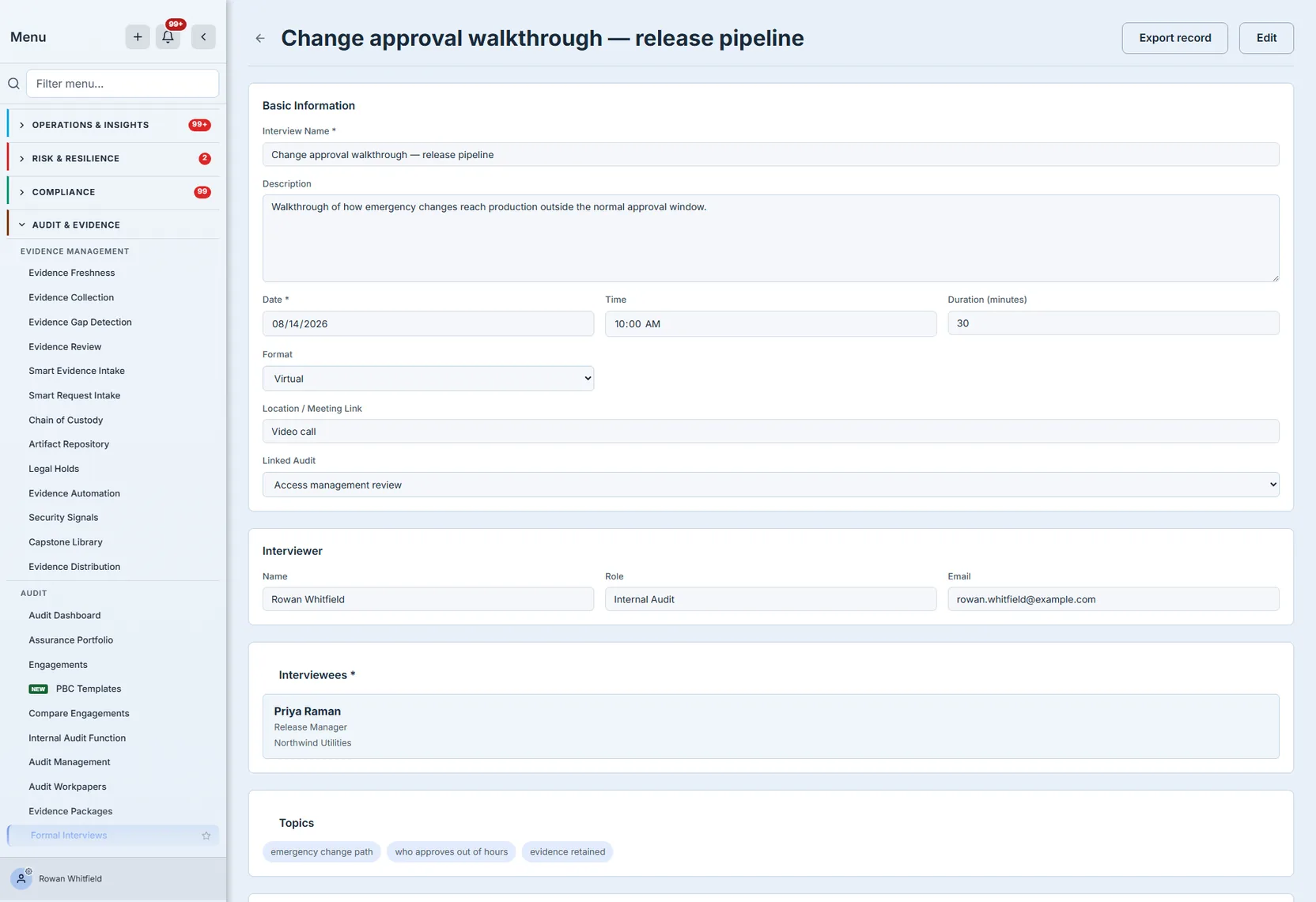
Who was in the room matters more than it looks. Each interviewee carries a name, a role and optionally their organisation — because “we asked the team” is the phrasing that gets a finding overturned. A record cannot be saved at all without a name, a date and at least one interviewee: three things, and they are the three that make a walkthrough attributable. Everything else is optional, because everything else varies by engagement.
Topics are what you set out to cover. Recording them separately from the notes is what lets a reviewer see the scope of the conversation without reading all of it, and lets you notice the thing you meant to ask and did not.
The format and the date are recorded because they bear on weight. A walkthrough conducted in person, watching someone work through a live transaction, is stronger evidence than the same questions answered by email — and a reader six months out cannot tell the difference unless the record says.
The audit it belongs to is what stops a walkthrough being an orphan document. The register can be filtered down to a single audit when you are assembling that audit’s file, and the audit dashboard counts interviews alongside the rest of fieldwork. The link is a filing relationship rather than a workflow one: attaching an interview does not put it on the engagement’s own page, and nothing about the engagement changes when you do.
Linked controls name which controls the conversation covered. This is what turns “we talked to the team” into a statement about specific controls: the record, and the file it exports, say which ones — so a reviewer holding the walkthrough can see exactly what it does and does not support. The link runs one way, from the interview outward; a control does not list the walkthroughs that described it, which is the next thing this feature should do and does not do yet.
Findings and follow-ups are different things
A finding is something the conversation revealed. A follow-up is something you now have to do about it. Keeping them apart matters because they have different lifetimes — the finding is part of the permanent record of what you learned, and the follow-up is work that gets closed.
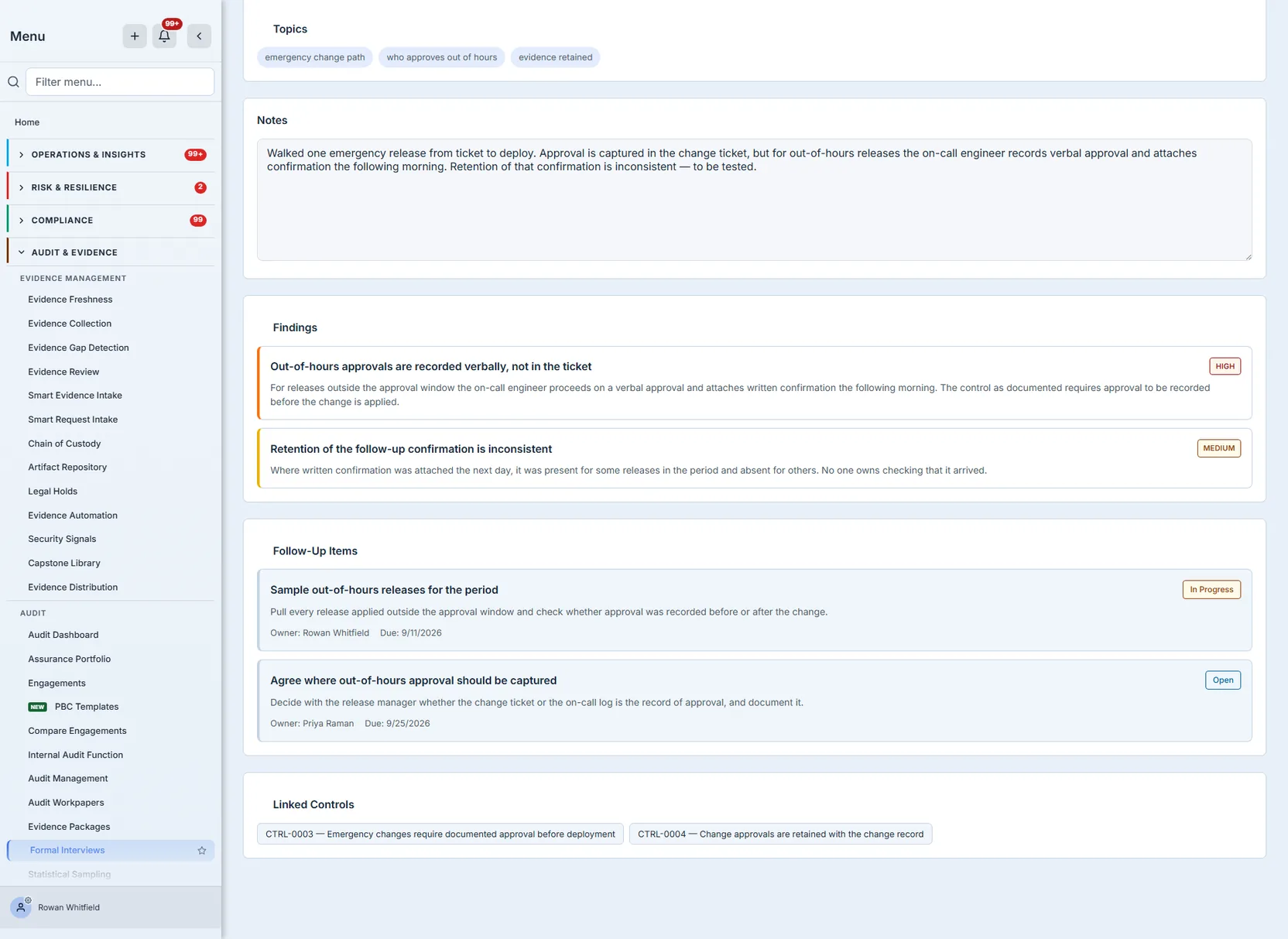
Findings carry a severity, so a reviewer scanning the record can see what mattered. Follow-ups carry an owner, a due date and a status you move as the work progresses — Open, In Progress, Completed.
It is worth being plain about the limits of that tracking. The owner is a name you type, not a user the system notifies: nothing lands in anybody’s queue, no reminder fires when the due date passes, and closing an item is something a person does on this record rather than something the platform chases. It is a record of what was agreed and where it got to, and it is honest about being exactly that.
Sign-off
When the write-up is done, you finalize it. The record freezes, and it records who froze it.

Finalizing saves everything on the form first, then seals it. That ordering sounds obvious and is the thing most worth getting right: a sign-off that captures a partial version of what the signer had on screen attests to a document that never existed.
After that, the record is genuinely immutable. Edits are refused. Deletion is refused — not “refused unless you pass a flag”, refused. A signed audit record with a name and a timestamp on it is not something a delete path should be able to reach, and if a walkthrough was wrong the answer is a new interview that says so, not a quiet disappearance of the old one.
Getting it out of the product
An audit file cannot hold a URL. Whatever a reader needs has to be in the bytes you hand them.
Every interview exports as a Markdown document carrying its own provenance: the date, the format, the duration, where it happened, who conducted it, who was present and how to reach them, the audit it belongs to, the controls it covered, the topics, the notes, every finding with its severity, every follow-up with its owner, due date, status and full description, and the sign-off block naming who finalized it and when. What is on the screen is in the file — a record that exports less than it displays is a record you cannot hand over.
Two details in that document are deliberate. It states the sign-off status explicitly rather than leaving it blank, so a reader can tell “this was never signed” apart from “the signature did not make it into the file” — and drafts export too, saying plainly that they are drafts, because a walkthrough often has to be circulated for correction before anyone signs it. And the linked audit appears by name rather than by id, because an identifier is a dead reference to someone reading outside the product.
Where this fits in the audit
The audit dashboard counts interviews by status alongside the rest of fieldwork, so a head of audit can see how much inquiry work is written up and how much is still sitting in somebody’s notebook. The count is organisation-wide rather than per engagement, and the drill-through opens the whole register — to see one engagement’s interviews, filter the register by audit.

That count is the integration that exists today, and the boundaries below are worth reading before you build a process on this.
The whole thing, once through
Concretely, with a control most teams test every year.
The control is “privileged access is granted only with documented approval from the requester’s manager”. You have inspected ten grants and found approvals on all ten, which tells you the artefact exists and nothing about how it comes to exist.
Arrange it. You ask for thirty minutes with the person who processes access requests, and tell them in advance that you want to cover how requests arrive, how approval is confirmed, and what happens when it is urgent. You do not send the questions.
Walk one item. You pick a real request from the previous week and ask them to show you what they did with it. They open the ticket, point at the approval, and mention — unprompted — that when the manager is unreachable they accept approval from anyone in the manager’s team, because access requests block onboarding.
Record it while it is fresh. The interview names them and their role, the date, that it was conducted in person, and the two controls it covered. The topics list what you set out to ask. The notes carry what they said, including the workaround, in their words rather than your paraphrase.
Separate what you learned from what you will do. The finding is that approval can be given by someone other than the requester’s manager, recorded at high severity because it defeats the control as designed. The follow-up is to test how often that happened over the period — owned by you and due before fieldwork closes.
Close the follow-up before you sign. Finalizing freezes the whole record, follow-up statuses included, so an item left at In Progress stays at In Progress permanently. Run the sample, move the item to Completed, and only then sign. If you need the signature earlier than the work finishes, sign the interview and track the remaining work somewhere that can still change.
Sign it. You finalize the record. It names you, timestamps the sign-off, and stops being editable. Whatever the sample later shows, this is the account of what was said on the day.
Hand it over. The export goes into the audit file next to the sample results, so the reader who picks it up in a year has the conversation and the corroboration side by side — and can see that the inquiry came first and prompted the test, rather than being written afterwards to justify it.
Where the feature ends
There is no scheduling. The date on the record is when the conversation happened, not when it is booked. Talarity sends no invitation and no reminder — arrange the meeting however your team normally does, and record the agreed date here.
Nothing links back from a control or an audit. An interview names the controls it covered and the audit it belongs to, and those links run one way. Opening a control does not show you the walkthroughs that described it, and opening an audit does not list its interviews. If you want that today, the register filters by audit.
Findings do not become register entries. A finding recorded here is part of the interview record. Raising it in the findings register is a separate, deliberate act — which is arguably correct, since not every observation in a conversation is an audit finding, but it is a step somebody has to remember.
Follow-ups do not become work items. See above: an owner is a name, not an assignment.
A finalized interview cannot be reopened, and that includes its follow-ups. There is no amend, no supersede and no version history on screen. Finalizing freezes every part of the record, so a follow-up still open when you sign stays open permanently — close the work first, or accept that the signed record shows where things stood on the day. If something in a signed record is wrong, the remedy is a new interview documenting the correction; nothing links the two records, so say which one you are correcting in the new record’s description.
Attachments are not supported. You cannot attach the memo, the screenshot or the recording to the record; the notes field is where the substance goes.
Interviews are not in global search. You can search the register by name, description, topic or interviewee, but typing an interviewee’s name into the platform-wide search will not find the interview. There is also no tagging on an interview, so organise by name and topic rather than planning around labels.
What you walk away with
A conversation that produced a record instead of a memory. A named person, a named role, and the controls the conversation covered. Findings separated from the work they generated. A signature that freezes the account of what was said. And a file that still explains itself when everyone who was in the room has moved on.