A due-diligence readout is not a report in the ordinary sense. It is a document an investment committee signs, and its numbers get quoted in a paper that decides whether money moves. SOC 2 requires an entity to select, develop and perform ongoing and/or separate evaluations to ascertain whether the components of internal control are present and functioning, not merely to describe them (CC4.1); and ISO 27001:2022 A.5.35 requires an independent review of information security at planned intervals or on significant change. Both ask the same underlying question about the artefact you produce: where did this number come from, and can you still say so six months later?
Most firms answer that question with a spreadsheet and the memory of whoever ran the fieldwork. The instrument lives in one file, the interview notes in another, the recommendations in the deck, and the costed programme in a fourth. Each hand-off is a place where a rating stops being traceable, and by the time the deck is in front of the committee there is nobody in the room who can say whether the “3” beside Cybersecurity was computed from forty answers or typed in on a Thursday. Talarity treats the engagement as one record with one spine: instrument to maturity to recommendations to deliverable, with the provenance of each number carried the whole way.
Who’s involved
- The engagement lead (partner) — scopes the engagement, chooses the instrument, owns the deliverable and moves the engagement through its states.
- The assessor — answers the instrument, runs interviews, records evidence quality and forms the maturity judgement for each scope area.
- A second reviewer at the firm — approves the answers to the key questions. The person who wrote an answer cannot approve it; the control is disabled for them with the reason on screen.
- The client sponsor and their contacts — receive PBC requests, accept handed-over recommendations, and see exactly the milestones the firm chose to share and nothing else.
- Auditor — pulls the deliverable and the case file behind it, and can tell of any rating whether an assessment computed it, a person entered it, or its source predates the record — with the engagement’s own run and the audit trail behind each answer.
Step 1 — Open the engagement and declare its scope
An engagement starts as a name, a type and a client, and it may carry a codename. Where there is one the codename is the primary label wherever the engagement is listed or opened, because diligence work is frequently confidential before it is anything else. The one exception is the report generator’s engagement picker, which shows the real name — picking from a list of aliases is how a readout gets generated against the wrong engagement.
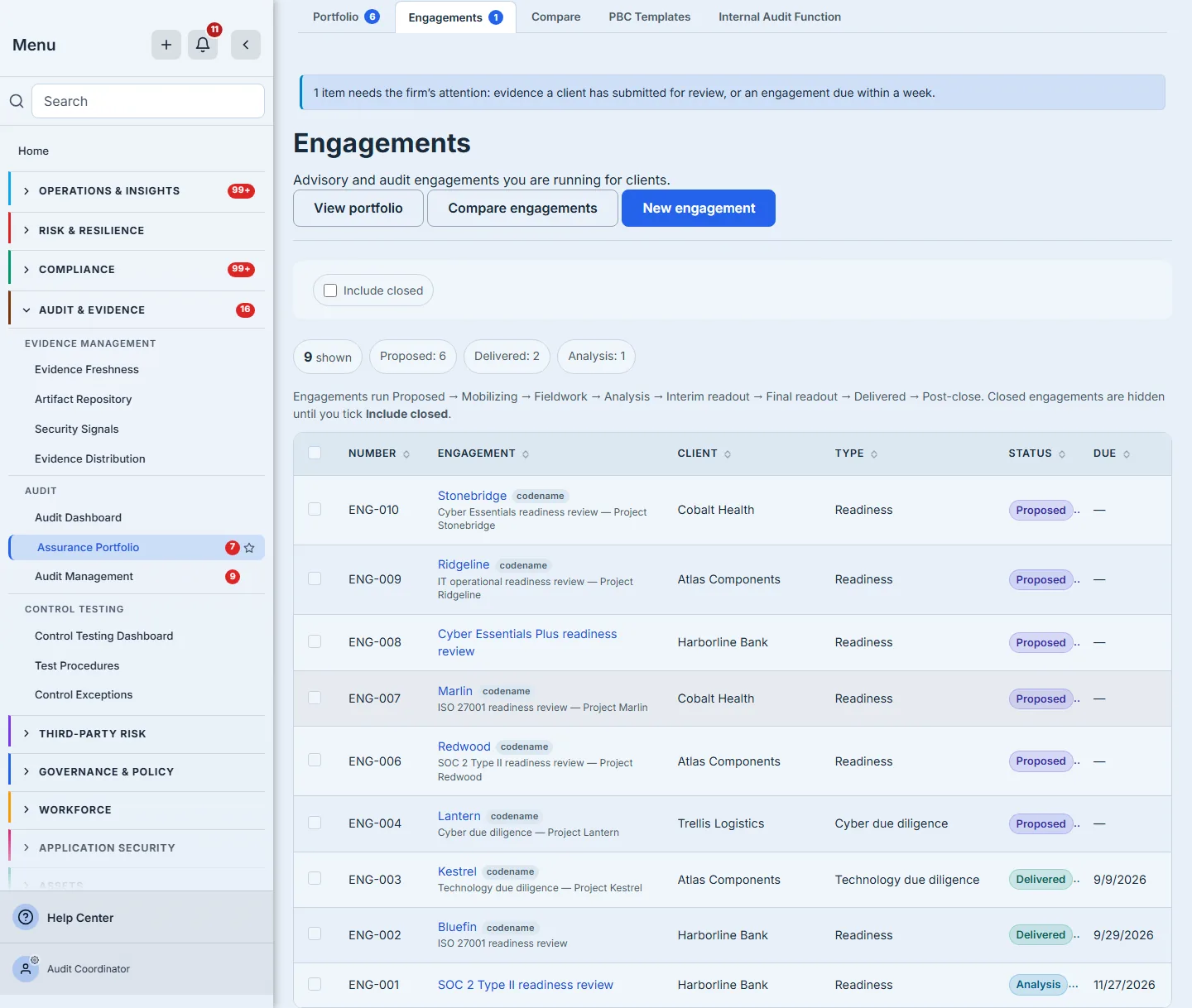
The list is deliberately not a dashboard. It is a work list, and the chips across the top are drill-throughs rather than decoration — clicking “Fieldwork” filters the table to it. Closed engagements are excluded by default and the empty state says so in those terms, because a firm whose engagements are all closed should not be told it has none.
Step 2 — Scope areas are the spine, and they are declared before anything is measured
The case file opens on Overview: the completion chips first, then the team, the milestones and the quality-of-evidence bar, and beneath them the scope-area table. The scope areas are the spine. Everything after this point attaches to one: interviews cover them, questions cite them, evidence requests are filed against them, recommendations are drawn from their shortfalls, and they are the rows the deliverable’s scope-and-evidence section is built from.
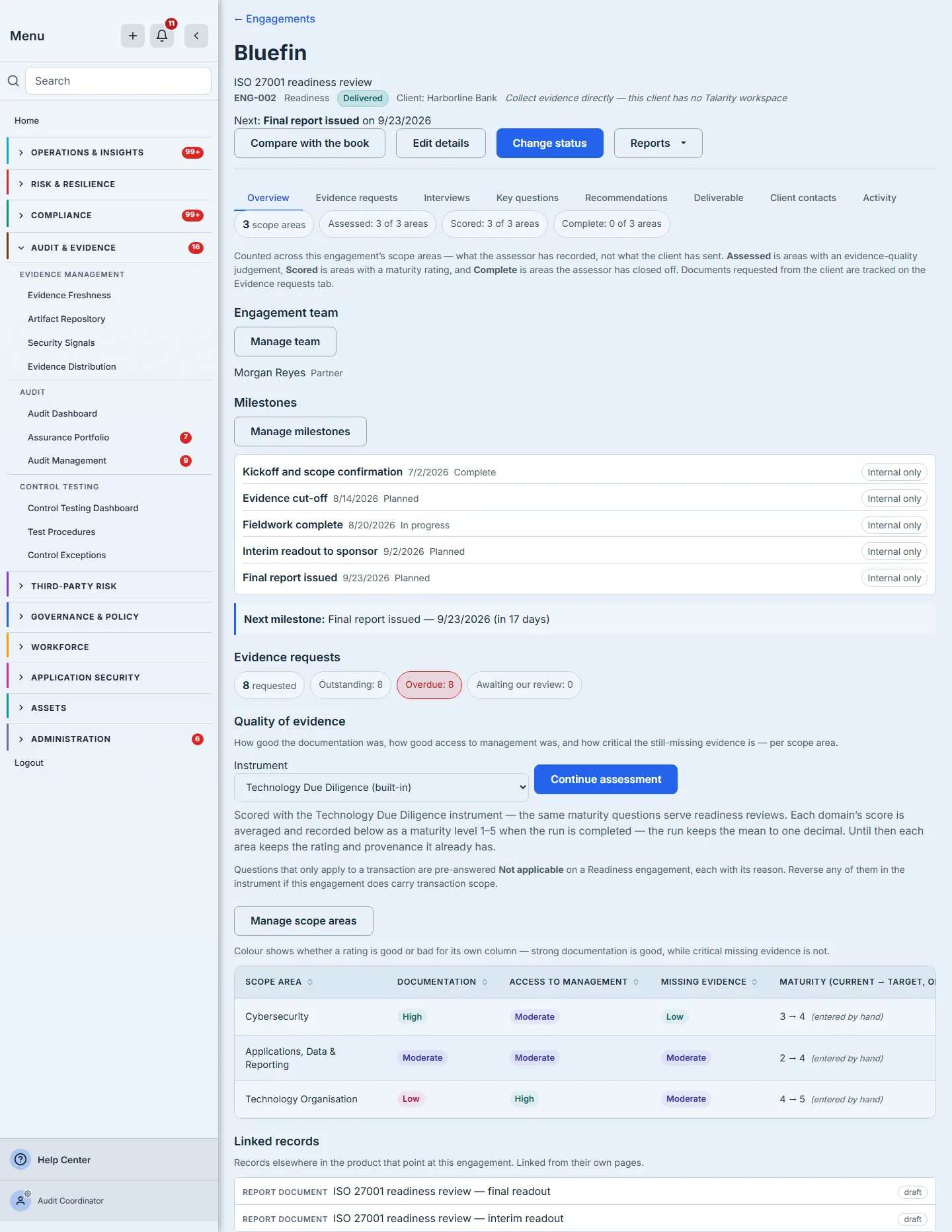
The three counts above the table are three different questions and the product says so rather than collapsing them into one progress bar. Assessed is the areas that carry an evidence-quality judgement; Scored is the areas that carry a maturity rating; Complete is the areas the assessor has closed off. They are counted independently against the same denominator, and each is stated as a count against it — 3 of 7 areas — rather than as a bare percentage, so the figure always arrives with what it was measured over. An engagement that has no scope areas yet shows an em-dash instead: there is nothing to divide by, and no scope declared is a different state from nothing done.
Step 3 — Choose the instrument, and let the engagement decide what does not apply
The instrument is chosen on the case file, not inside the assessment. Talarity ships the Technology Due Diligence instrument, and the same maturity questions serve a readiness review — which is why the instrument picker also lists your own custom instruments.
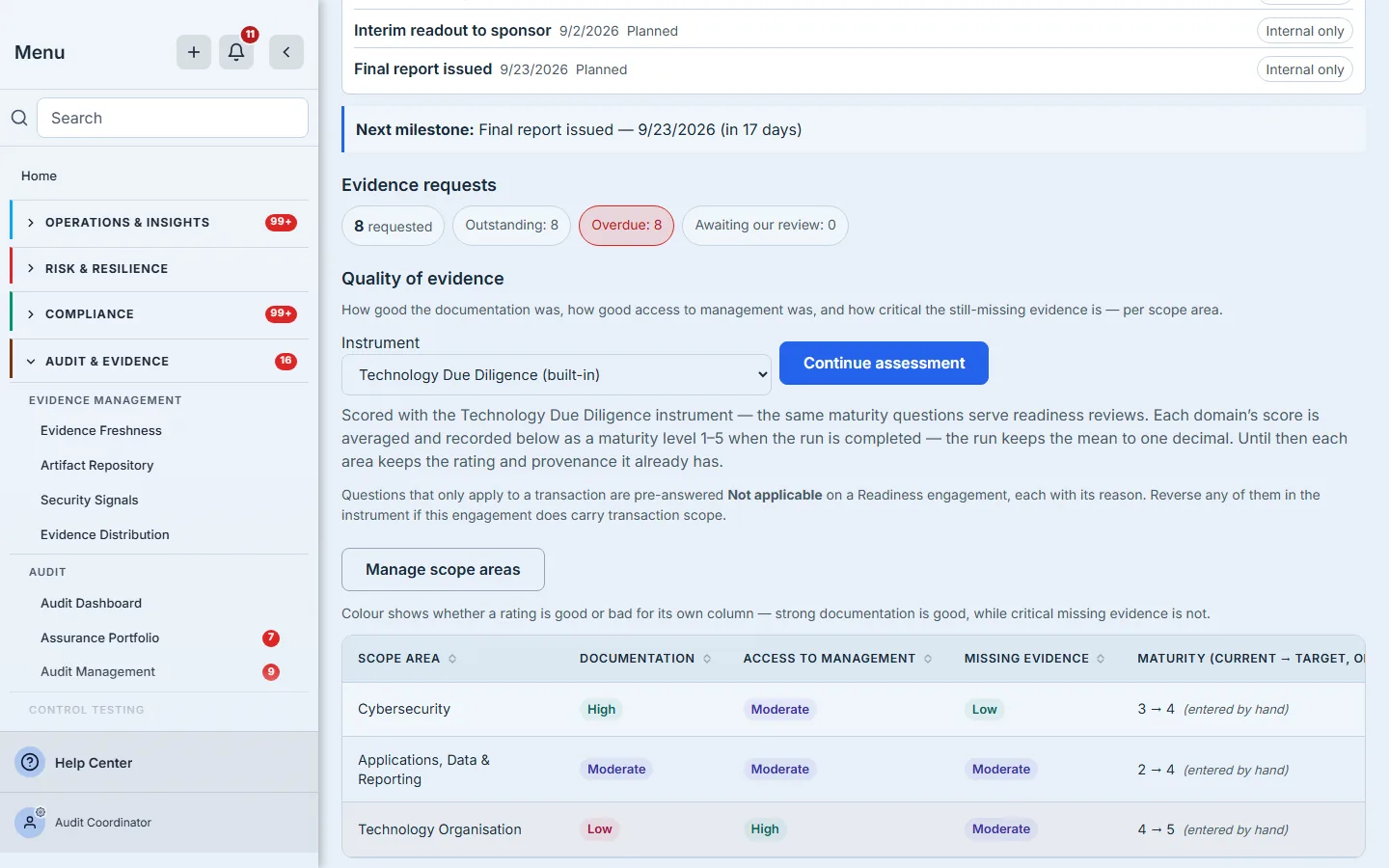
The engagement type does real work here. On a readiness, audit or advisory engagement running the built-in instrument — work with no transaction behind it — every question that only makes sense in a deal is pre-answered Not applicable, with the reason written into each answer, at the moment the run is created. They are seeded as visible answers rather than filtered out of the instrument, so an assessor who disagrees can reverse any of them in place. On a deal engagement — technology or cyber due diligence, or post-close work — nothing is seeded, because those questions are the whole subject.
Step 4 — Answer the instrument
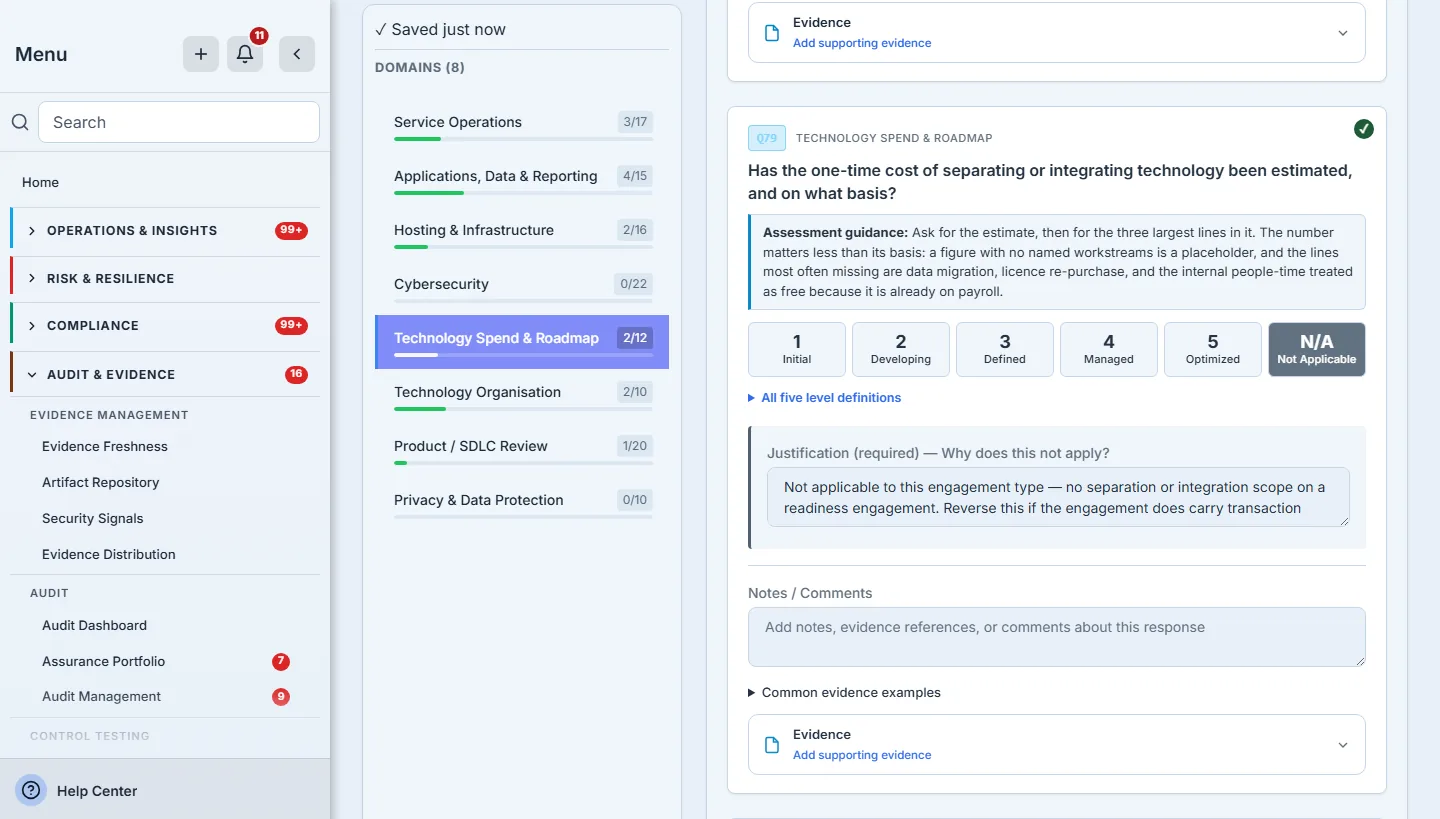
Behind the scenes the run is an ordinary assessment run with the engagement stamped on it, which is what makes the next step possible: the engagement carries the run id and the run carries the engagement id, so either one resolves to the other without a search. The two stamps are written separately, after the run exists, and either can fail on its own. When the run does not get the engagement stamped on it, Talarity says so at that moment rather than logging it and moving on: the run is real and still usable, but completing it would not write maturity back to any scope area, and an assessor is told that before they spend a session answering the instrument.
Step 5 — Completing the run writes maturity back, and tells you what it could not write
This is the join that makes the rest of the engagement worth doing, and it is the step most firms do by retyping. When the run is completed, each domain’s answered mean is recorded on the matching scope area as a maturity level, stamped with its provenance and the moment it was computed.
The match is domain key to scope-area key, exact. A domain with no matching scope area is never attached to the nearest one — filing cybersecurity findings under infrastructure is worse than not filing them — and a domain the run scored nothing in is left alone rather than written as a zero, because an unassessed area and an area assessed as ad hoc are different findings.
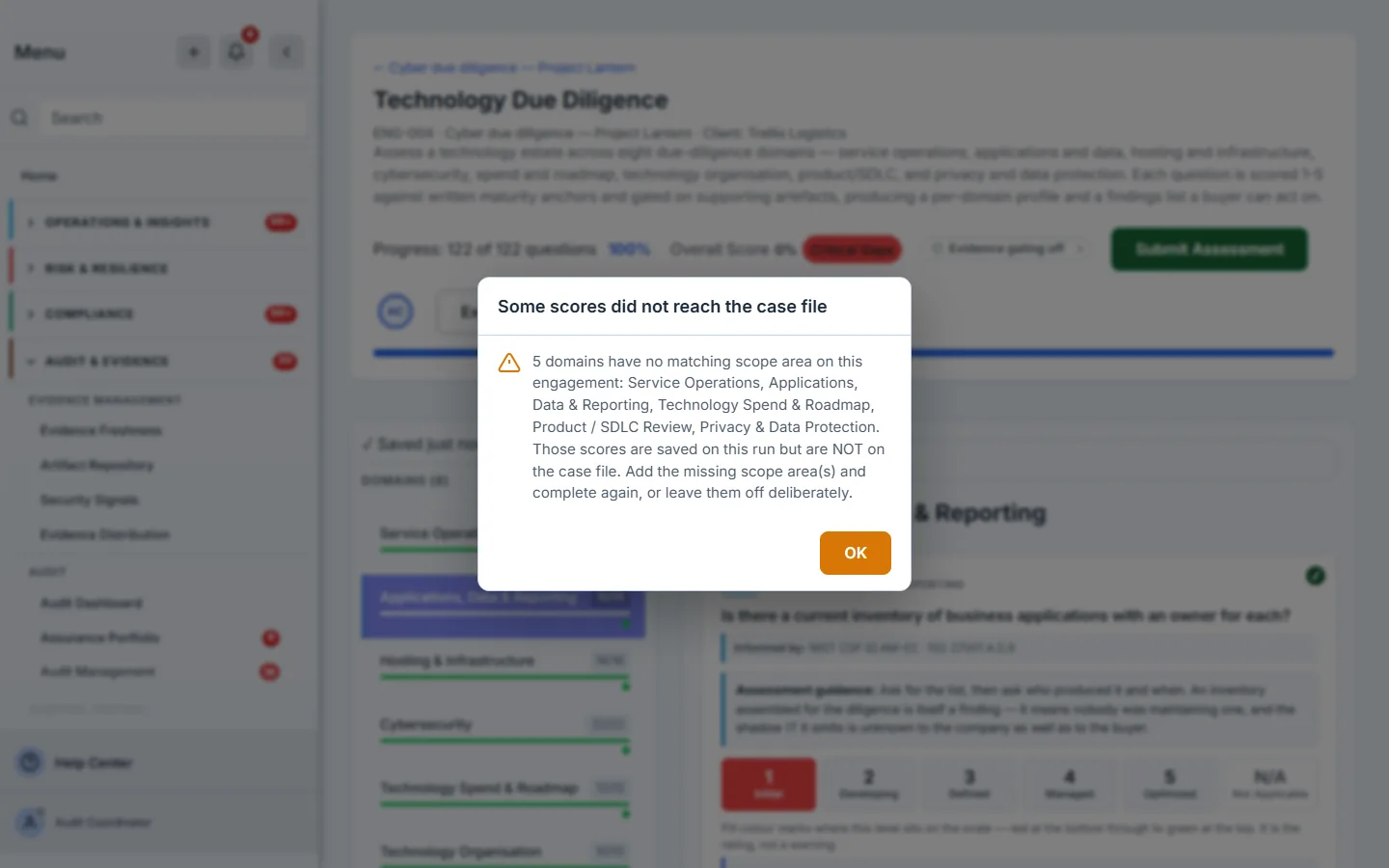
The instrument always runs all eight domains; your engagement may have opened three. That asymmetry is normal and it is also how a session’s work quietly goes missing elsewhere. Talarity names the domains it could not place, on screen, at the moment it happens, and it separates them by what you have to do about it: a domain with no matching scope area is fixed by scoping the engagement, a domain a custom instrument maps nowhere is fixed in that instrument’s own mapping and not by adding a scope area, and a domain the write refused is named with the reason it gave. If the case file could not be updated at all, that is said outright rather than reported as nothing missing. Four different sentences because they are four different fixes — a refusal that names the wrong remedy costs you the second attempt as well as the first. A scoping mistake you are told about is a two-minute fix; the same mistake discovered when the deck is being assembled is a re-run.
Step 6 — The maturity column says where every number came from
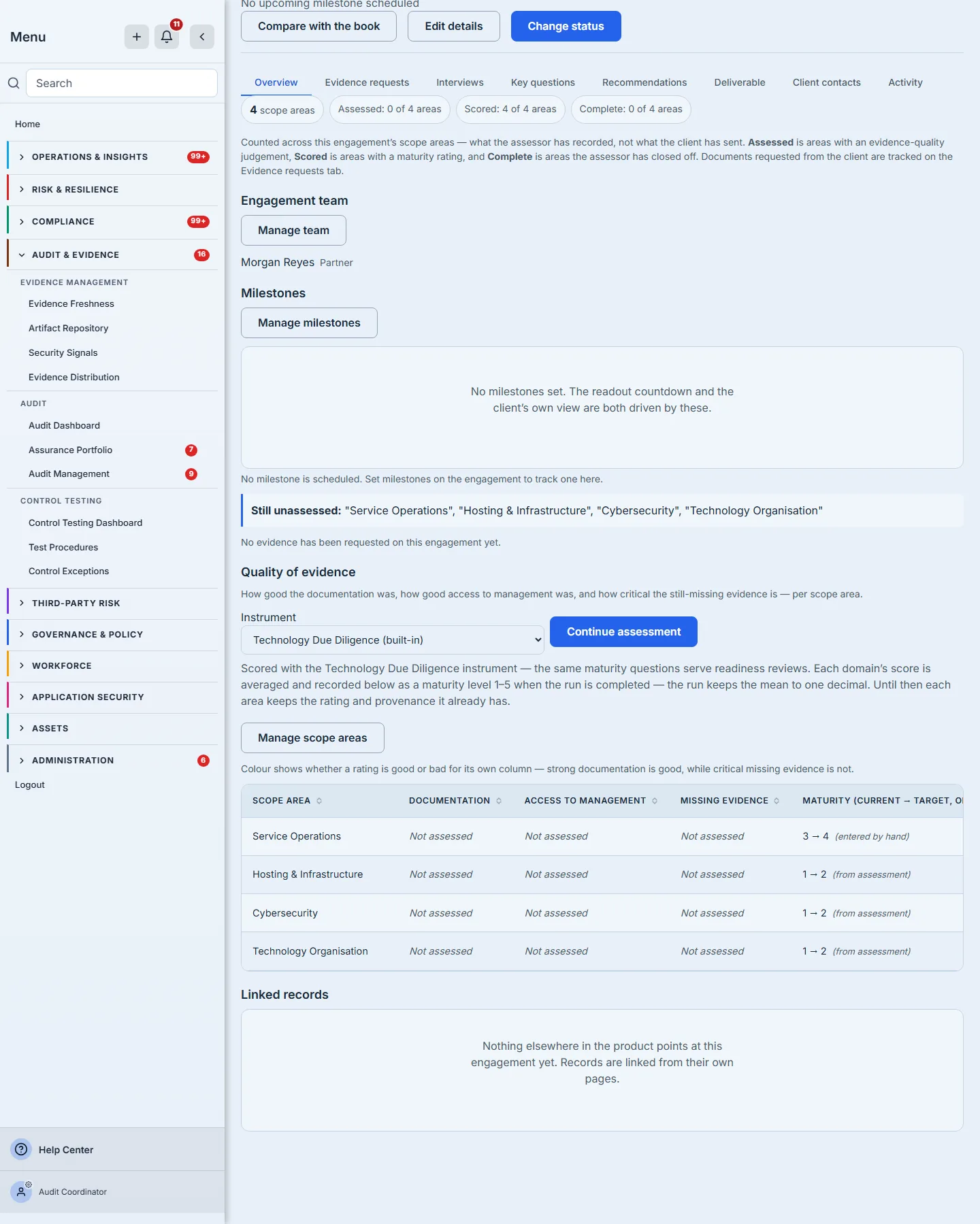
Every rating carries one of three provenances, and the third is the honest one: from assessment means a completed run computed it, entered by hand means a person recorded it directly, and source not recorded means the score predates the platform tracking its source. A null provenance renders as the third rather than defaulting to either of the first two, which is the whole point — an inherited provenance is the most authoritative-looking way for a record to be wrong.
The stamp is deliberately narrow. Editing the target — a partner’s judgement about where the client ought to get to — does not restamp the current score’s provenance, because the target says nothing about where the score came from. Only setting the current score restamps it.
Step 7 — Fieldwork: interviews, questions, and the second pair of eyes
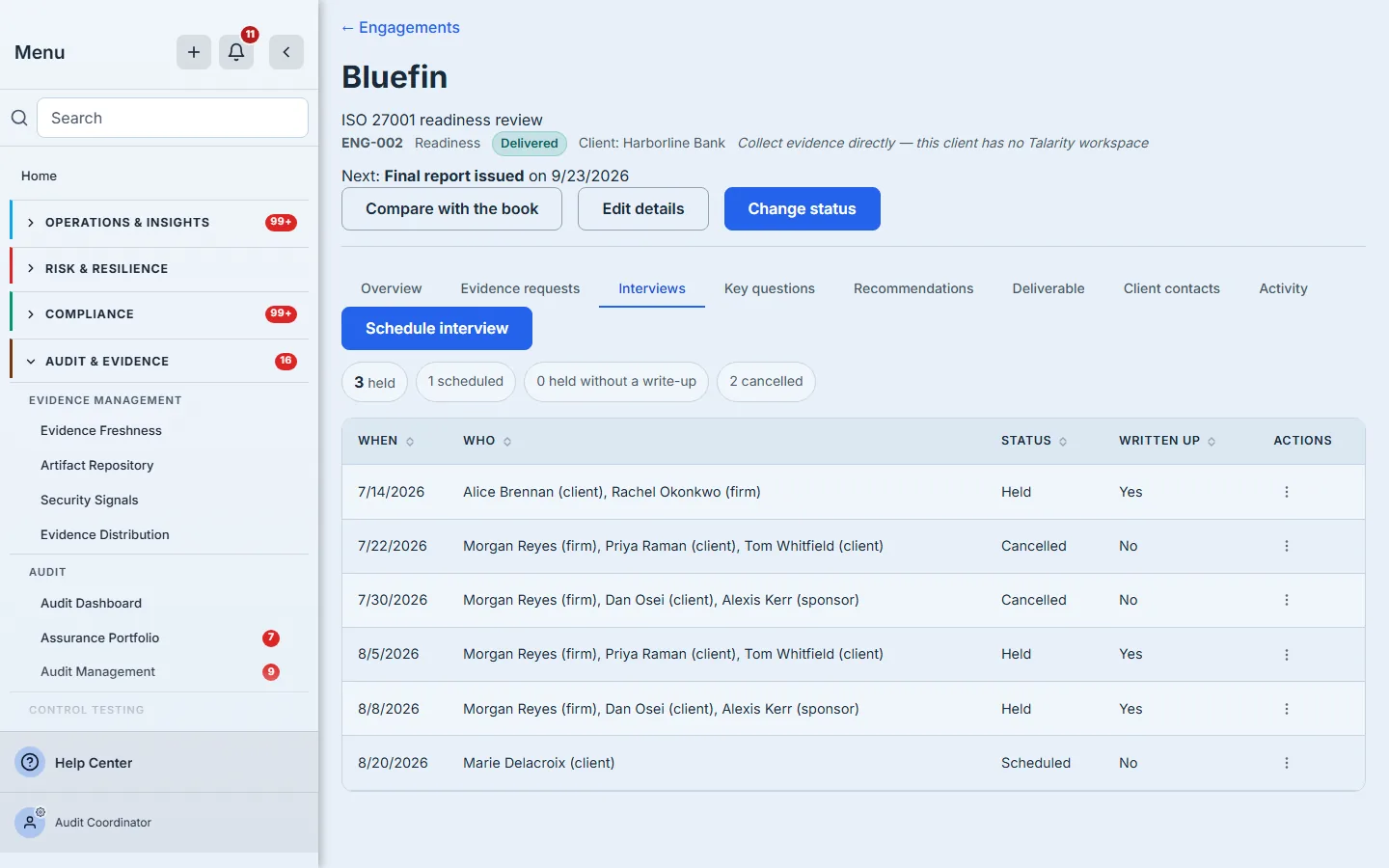
Attendees are attributed individually — firm, client or sponsor — and that attribution is what the case file shows back when someone asks who was in the room. It stays inside the firm: attendee names and interview notes are never projected to the client, who sees that a call is scheduled, when, and how long it is booked for, and nothing else.
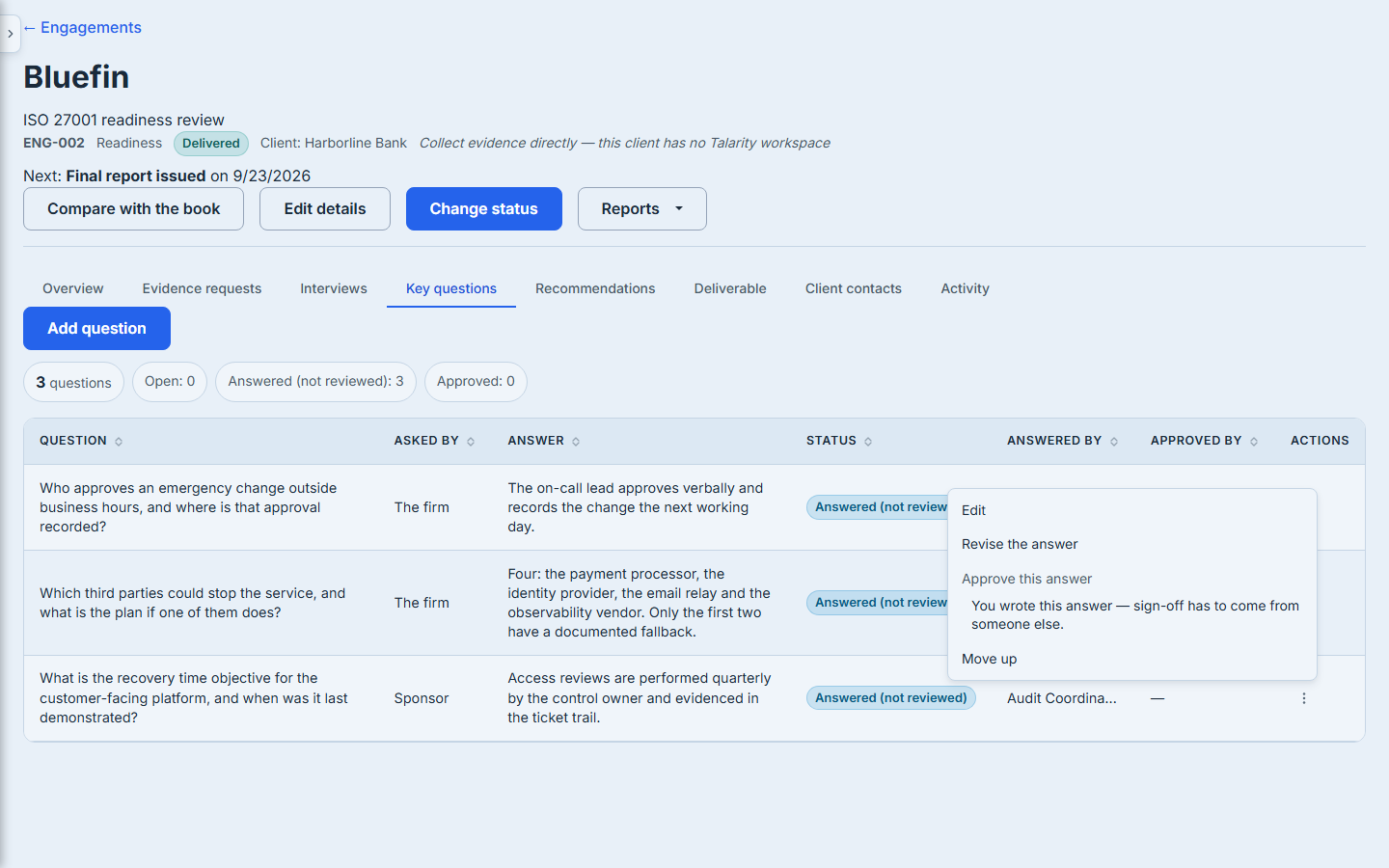
The separation of duties on key questions is enforced at the handler, not just in the interface: the server refuses an approval from the same account that wrote the answer, and refuses an approval of anything that is not in the answered state. The control is rendered disabled with its reason rather than hidden, because a control that vanishes teaches nobody why.
Step 8 — Shortfalls become costed recommendations
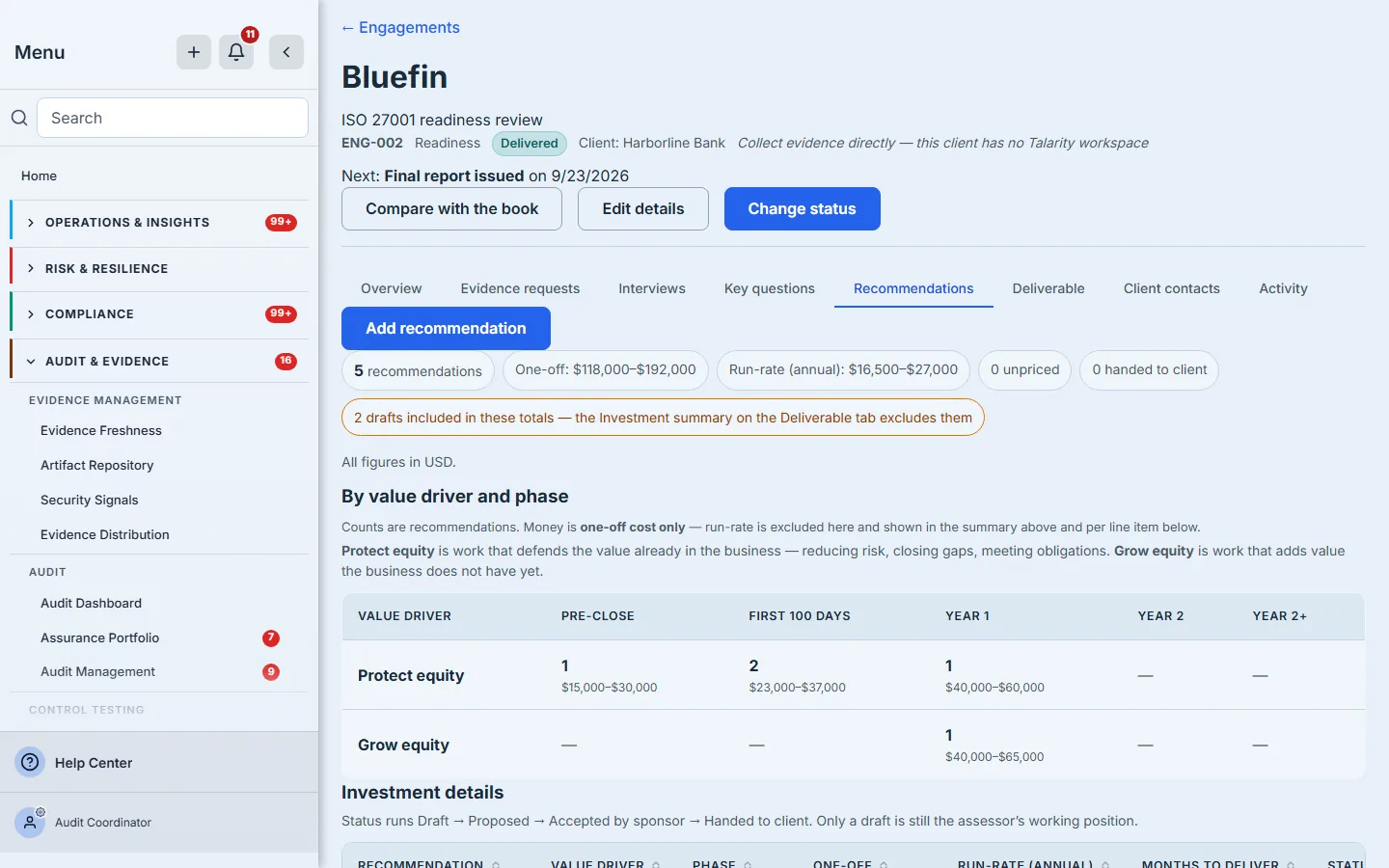
Every recommendation carries a value driver, a phase, and three independent ranges: one-off cost, annual run-rate, and duration in months. The grid sums one-off cost only and says so on the grid, because a cell that silently mixed capital and run-rate would be the single most quotable wrong number in the document.
Cost ranges are stored as ranges. An empty field is null, never zero — an unpriced recommendation and a free one are different claims, and the charts in the deliverable will not plot the first as the second.
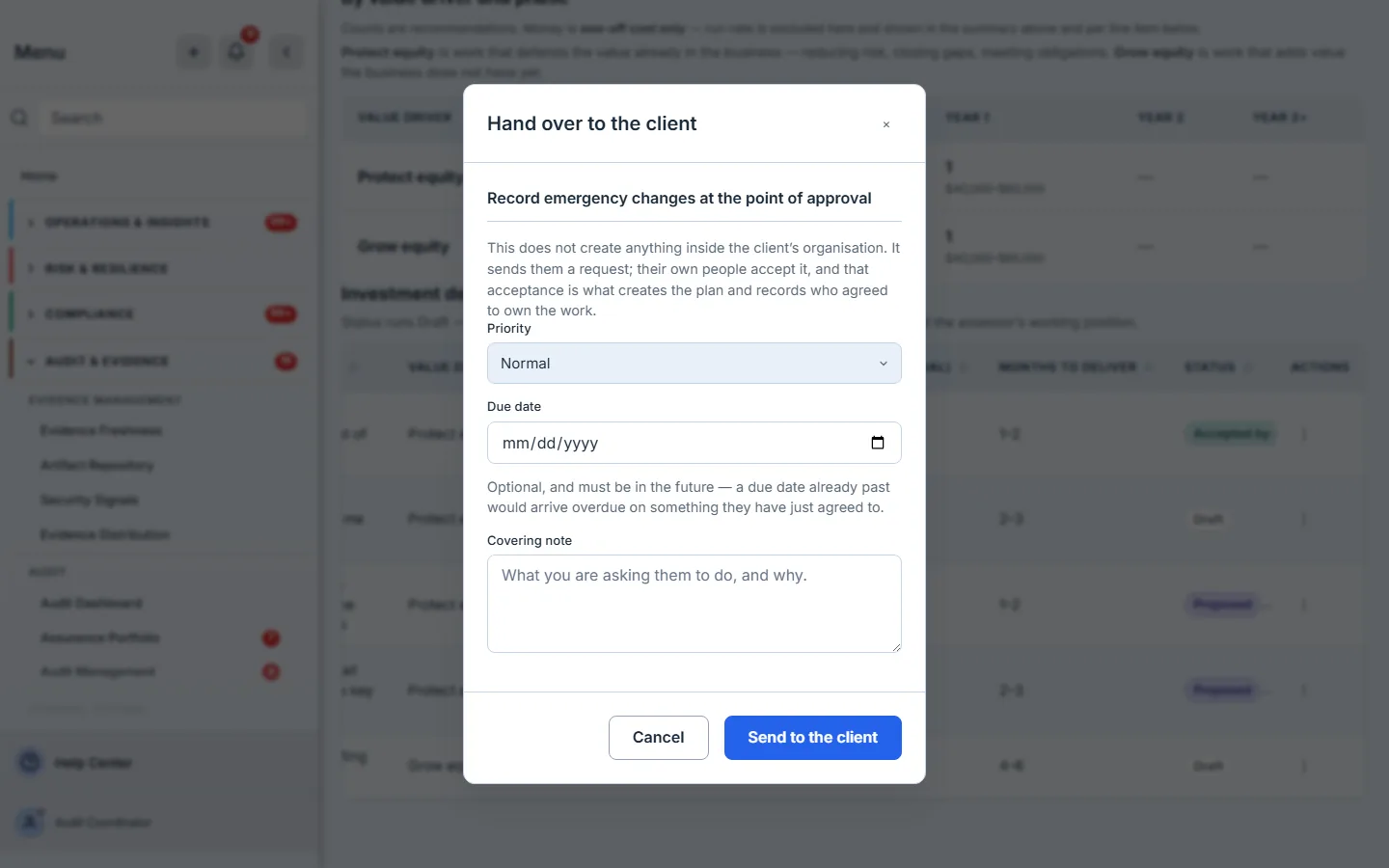
Handing over does not reach into the client organisation and create work there. It sends a request, which their own people accept, and only then does a plan appear in their tenant. The modal says exactly that, because the alternative — a firm believing it has assigned work the client has not accepted — is a dispute waiting to happen.
The client’s contacts are emailed when it happens, through the same rule that decides who may be mailed for evidence requests: contact seats only, revoked contacts excluded, guests never. The mail announces a request and is careful not to imply the work is agreed, because it is not yet. And if the mail did not fully go out, the firm is told on the spot — either that nobody was notified and why (no contact has been invited into the client’s workspace yet, this engagement has no linked client workspace, their contact list could not be read, or the send itself failed and with what error), or how many of the contacts actually received it. A confirmation that cannot distinguish “they know” from “nobody was told” is the kind of small dishonesty that surfaces weeks later as “we never heard about this”.
Step 9 — Compile the deliverable
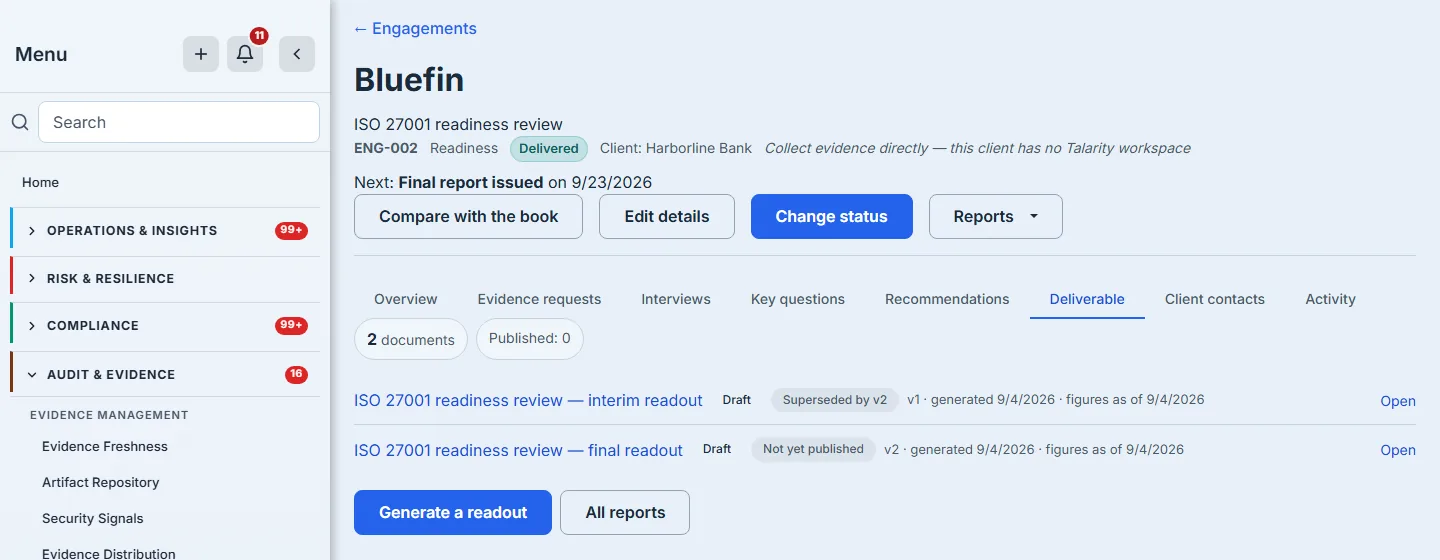
The readout is a real report document, generated from a template bound to the engagement’s own datasets — the engagement, its scope areas, its evidence requests, its questions and its recommendations — plus the de-identified peer cohorts behind the benchmark appendix, which are deliberately not the engagement’s own data. It is linked back to the engagement, so the Deliverable tab lists every version and marks which one is current and which is superseded by which. A document the engagement records but that no longer resolves is counted and disclosed, not silently dropped: the tab says how many could not be found, and tells you to check the retention policy before assuming they were never produced.
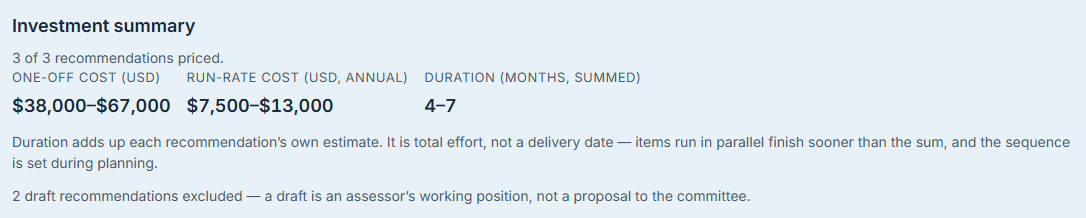
The investment summary is computed over its own row set — drafts filtered out — by the same summing code the working grid uses, so the two can differ in scope but never in arithmetic, and it says how many drafts it excluded. Duration is labelled total effort, not a delivery date, with a note saying so, because items that run in parallel finish sooner than the sum and a committee will read a month count as a date unless told otherwise.
Step 10 — Read the book of work, not just the engagement
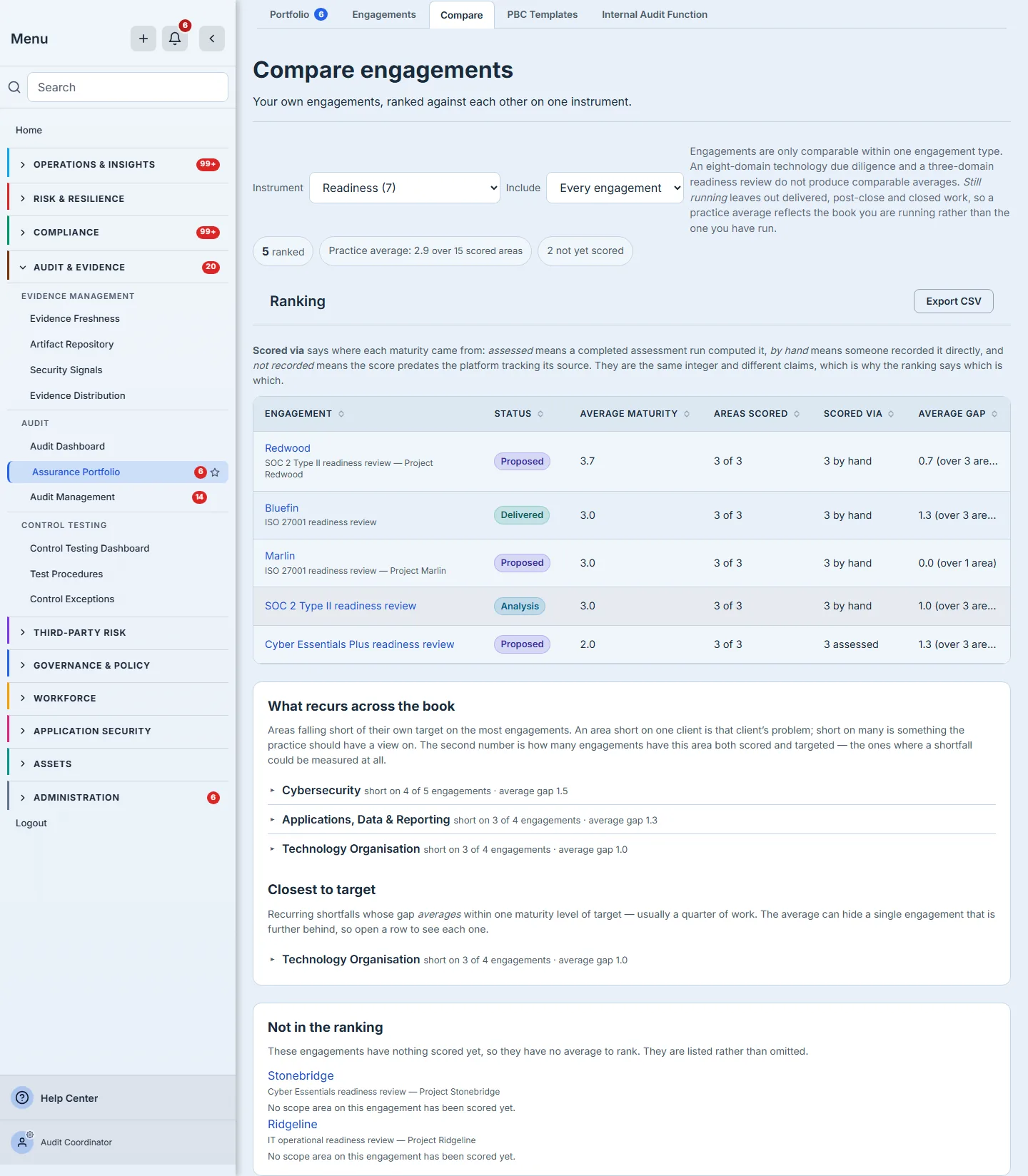
A scope area weak on one client is that client’s problem. The same area weak on most of your clients is a fact about the market you sell into. The comparison ranks your own engagements of one type against each other, and separates the shortfalls whose average gap is within one maturity level of target — the ones a quarter of work would close.
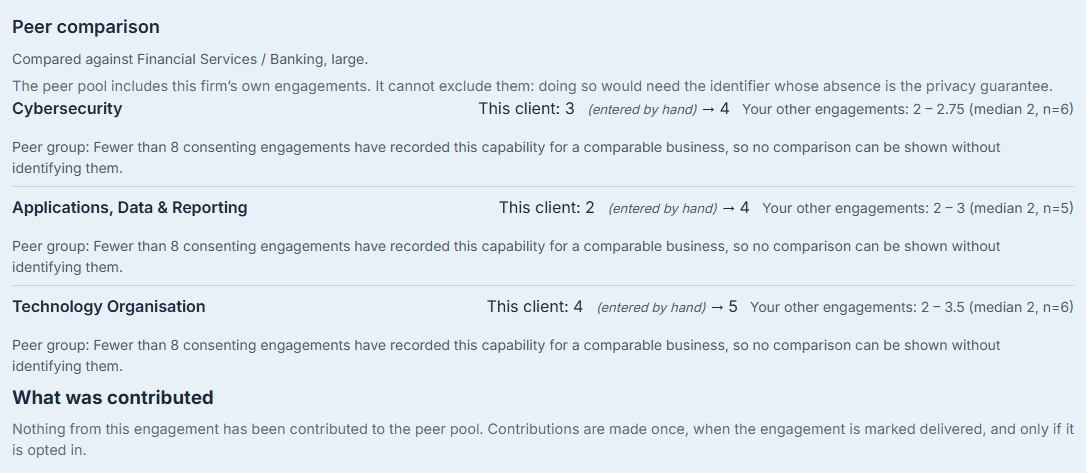
Peer benchmarking is opt-in per engagement and contributes only at delivery. What is pooled carries no organisation, engagement or actor, and its timestamps are coarsened to the month so that no set of rows can be regrouped into the engagement it came from — which is exactly why the consent copy says that turning it off stops future contributions and cannot withdraw past ones. A cohort of fewer than eight engagements is suppressed including its size, so the absence of a number cannot be differenced against a later presence of one.
What you walk away with
- One record for the engagement, in which the instrument, the maturity, the fieldwork, the recommendations and the deliverable are the same object rather than five files.
- Every maturity rating a scope area carries can say where it came from — computed, typed, or honestly unknown — months after anybody remembers; an area the run scored nothing in stays visibly unscored rather than being given a number nobody chose.
- A written refusal instead of a silent gap: domains that could not be placed are named on screen, and documents that no longer resolve, requests that never reached the client’s tenant, and contacts that were not emailed are each counted and stated rather than quietly omitted.
- Recommendations that carry capital, run-rate and duration as separate ranges, and totals that cannot transpose one into another.
- A deliverable whose numbers are traceable to the rows that produced them, and a book-of-work view that turns your engagements of one type into one observation about your practice.
Six months after the readout, somebody will ask where the 3 beside Cybersecurity came from. That is not a hostile question and it is not a rare one — it is what happens when a number written by an advisor starts being used by an owner. The firm whose case file already answers it — an assessment computed this on that date, or a person entered it and the audit trail says who — is selling something different from the firm that has to reconstruct it from a spreadsheet and a memory. The deliverable is the same document either way. What changed is whether it can still be defended after the engagement has closed.