An auditor’s hardest question is not “is this control working?” It is “what did this look like on the first of April?”
Your GRC platform is very good at the present tense. It will tell you which controls are in scope today, which policies are current today, which risks sit in the register today. Ask it about a date eight months gone and it has nothing to say, because every one of those records has been edited since — legitimately, by people doing their jobs. The control that failed in April passes now. The policy the auditor sampled is on version four. The register has twelve risks it did not have then.
Nothing is wrong. There is simply no longer any record of what was right.
Most teams answer this with a folder. Someone exports a control list to a spreadsheet at period start, drops it in a shared drive, and hopes nobody edits it. That is not evidence — it is a file with a date on it, indistinguishable from one produced last week, and every auditor knows it.
An audit engagement snapshot is Talarity’s answer: a point-in-time freeze written into tables the database refuses to let anyone change afterwards, carrying a fingerprint you can recompute at any point in the future to prove it has not moved.
What actually gets frozen
A snapshot captures six record sets, each into its own typed table:
| Record set | What it freezes |
|---|---|
| Controls | Every control in this engagement’s scope, with its test status, result, criteria and owner as they stood |
| Policies | Your organisation’s current policies, with version string and approval state |
| Attestations | Who acknowledged which policy version, and when |
| Evidence links | Which artefact was attached to which control, policy or risk, and its validity window |
| Framework mappings | How each in-scope control mapped to each framework requirement |
| Risks | The live risk register — inherent and residual scores, treatment, owner |
It is worth being precise about the scope, because “snapshot of the engagement” is the natural shorthand and it is only a third right. Only controls are engagement-scoped: the snapshot freezes the population you put in scope for this audit. Policies and risks are captured organisation-wide — every current policy, and every risk in the live register — not a subset the engagement selected. Attestations follow the policies, and evidence links and framework mappings are narrowed to what those in-scope controls and policies actually reach.
Nothing is filtered by the audit period either. The period is recorded on the snapshot; it is not used to choose what goes into it.
That is the right design for the question being asked (“what was true when we captured this”), but it means a snapshot taken mid-period reflects the estate on that day, not a reconstruction of the period’s start. If you want a period-start baseline, capture one at period start.
The boundaries within each set are deliberate. The risk set is the live register, so closed risks and watchlist entries are excluded — a watchlist item is not in the register yet, and freezing it would make the snapshot disagree with every other number Talarity shows for the same period. Policies are captured at their current version, not their whole supersession chain; version history is a different question from current state. Evidence links are captured with their validity windows, which is what later lets a readiness check tell you that evidence has expired rather than merely changed.
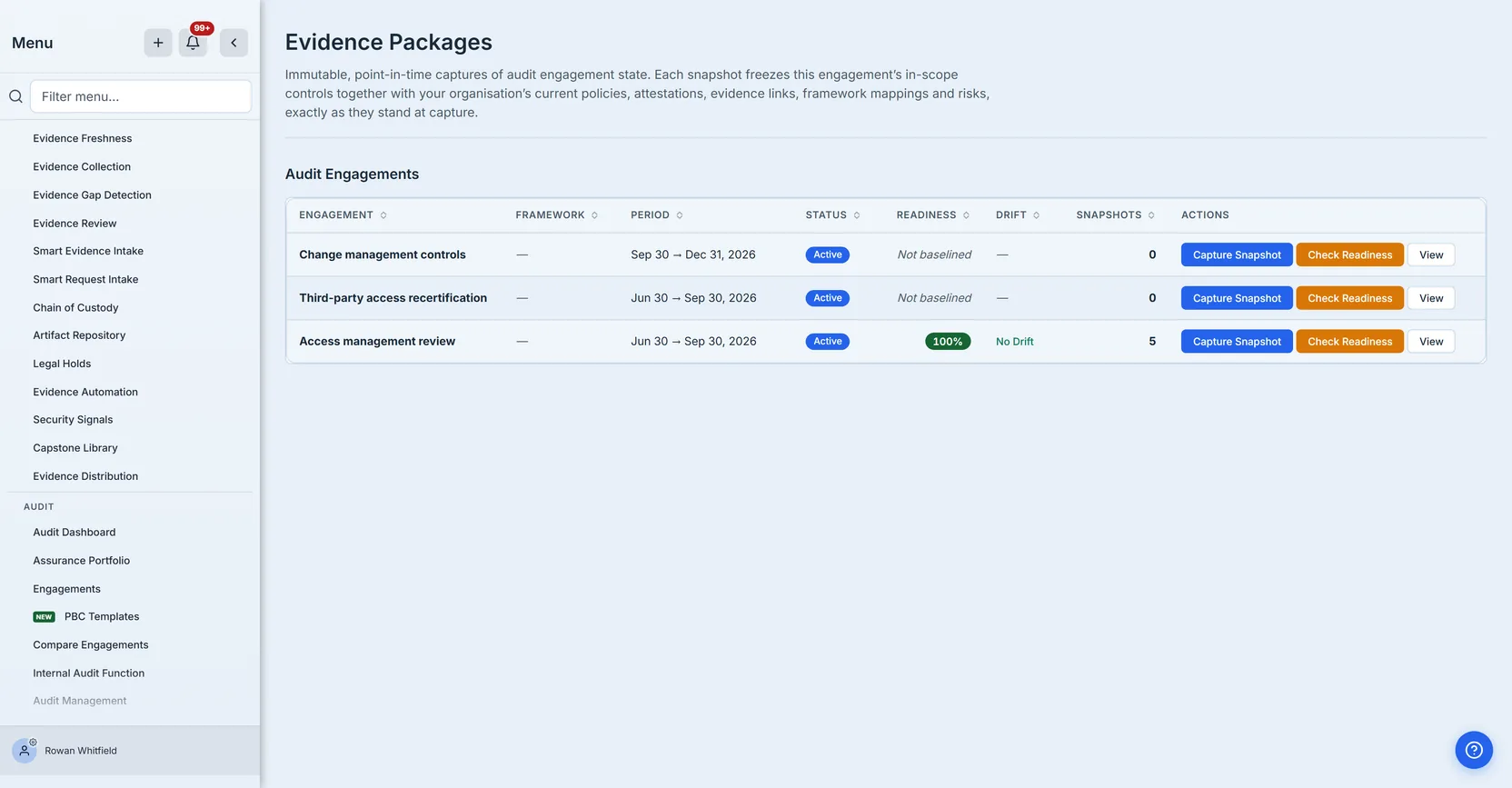
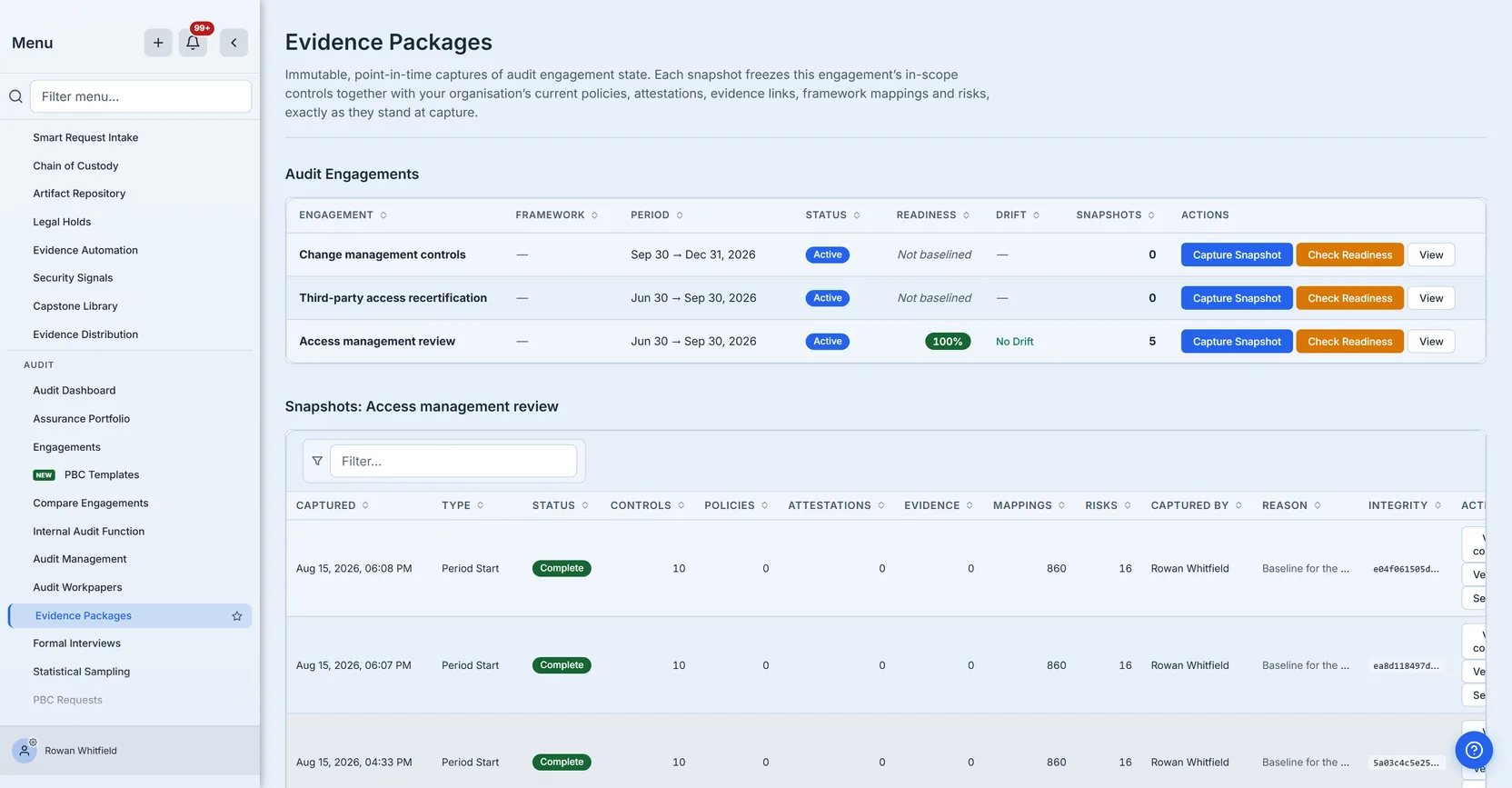
The engagements themselves are not created here — they come from Audit Management, and this page is where you freeze and measure them. The period tells you which window the engagement covers. The Framework column is descriptive only, and it is empty on all three rows above because these engagements carry no framework — which is worth knowing precisely because it changes nothing about what gets frozen. Mappings are not scoped by an engagement’s framework: capture reads the platform mapping catalogue and filters it by the in-scope control ids alone. That is why an engagement with no framework at all still freezes 860 mappings spanning both PCI DSS and CIS Controls, as the Mappings section further down shows.
Note the two rows reading Not baselined. Readiness is a comparison against a baseline snapshot; with no baseline there is nothing to compare, so the page declines to give a number.
That is a deliberate distinction and it is worth dwelling on, because it is the kind of thing that separates a number you can act on from one you learn to ignore. “Never measured” and “measured and scored zero” look identical if you print them the same way. A zero in an audit context is a claim — it says this engagement is maximally unprepared, which is a serious thing to tell a team that has simply not captured a baseline yet. A dashboard that cries wolf on engagements nobody has started is one people stop reading, and then it is worth nothing on the day it is right.
There is a third state, and it is the one that hides. Not baselined means we looked and there is no baseline. Not checked means there is a baseline and nobody has run a comparison. Not loaded means the read failed and we know nothing at all. The first two are facts about your programme; the third is a fact about the page. Collapsing any of them into a dash — or worse, into each other — turns the column into something that cannot be acted on, because you can no longer tell whether the silence means “fine”, “not yet” or “the number you are looking at is missing”. These are three different next actions: none, capture a baseline, and reload.
Capturing one
Capture is a single action on the engagement row. You choose a type and you write down why.
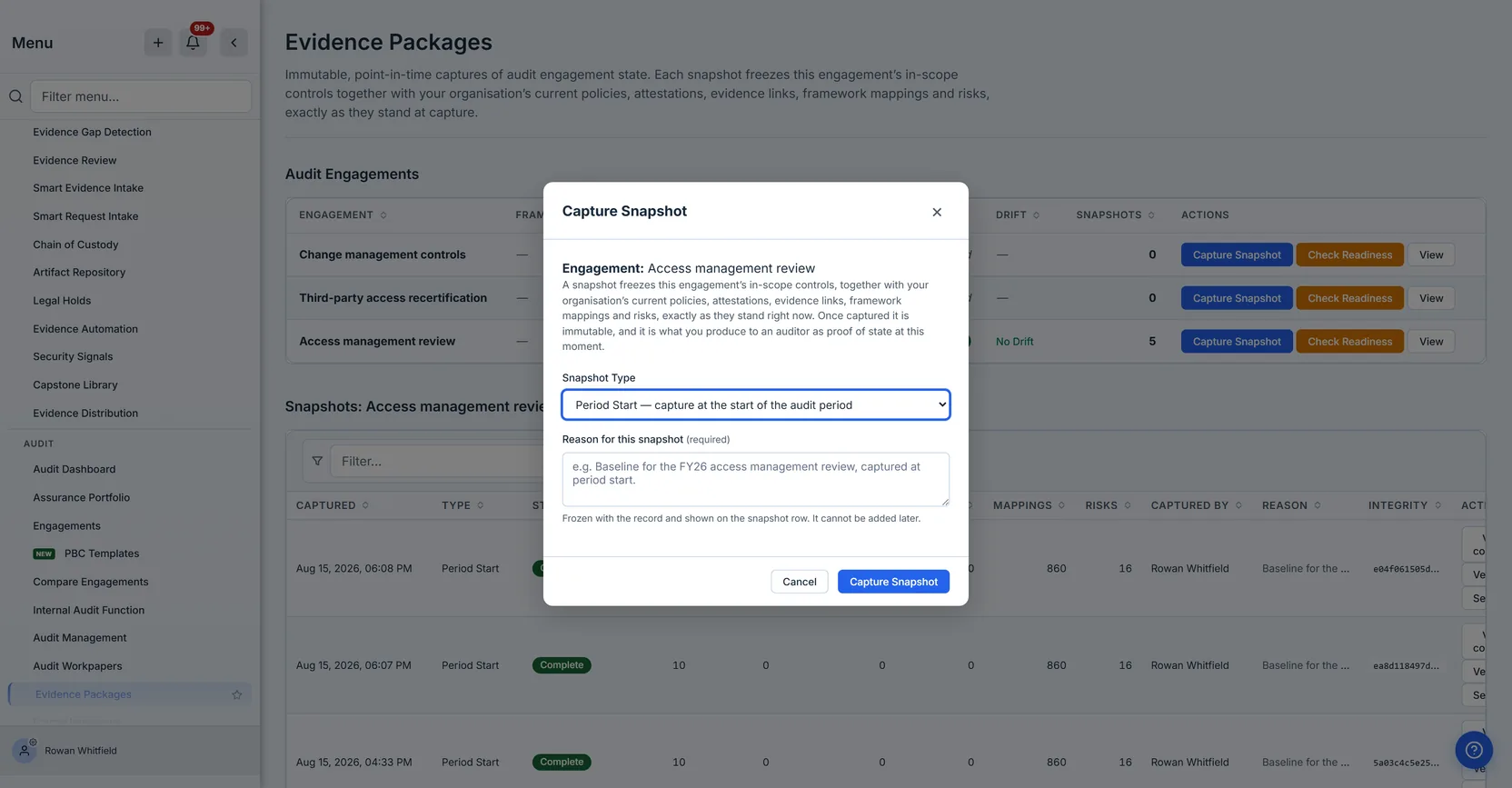
The four types are Period Start, Mid-Period, Period End and Manual, and they are not decoration. A period-start snapshot is the baseline every later readiness check measures against. Mid-period captures give you a trail through fieldwork. Period end is what you hand over at closure. Manual is the ad-hoc capture you take because something significant just changed and you want it on the record.
The reason is required, and that is a deliberate piece of friction. It is the first thing anyone asks about a frozen record eight months later, and if it lives in somebody’s memory rather than on the row, the answer by then is a guess. More to the point, a snapshot is write-once: there is no edit, so a reason not given at capture can never be added. An optional field on a permanent record is a field that turns out to be empty exactly when it matters. It travels with the snapshot and is shown on the row rather than buried.
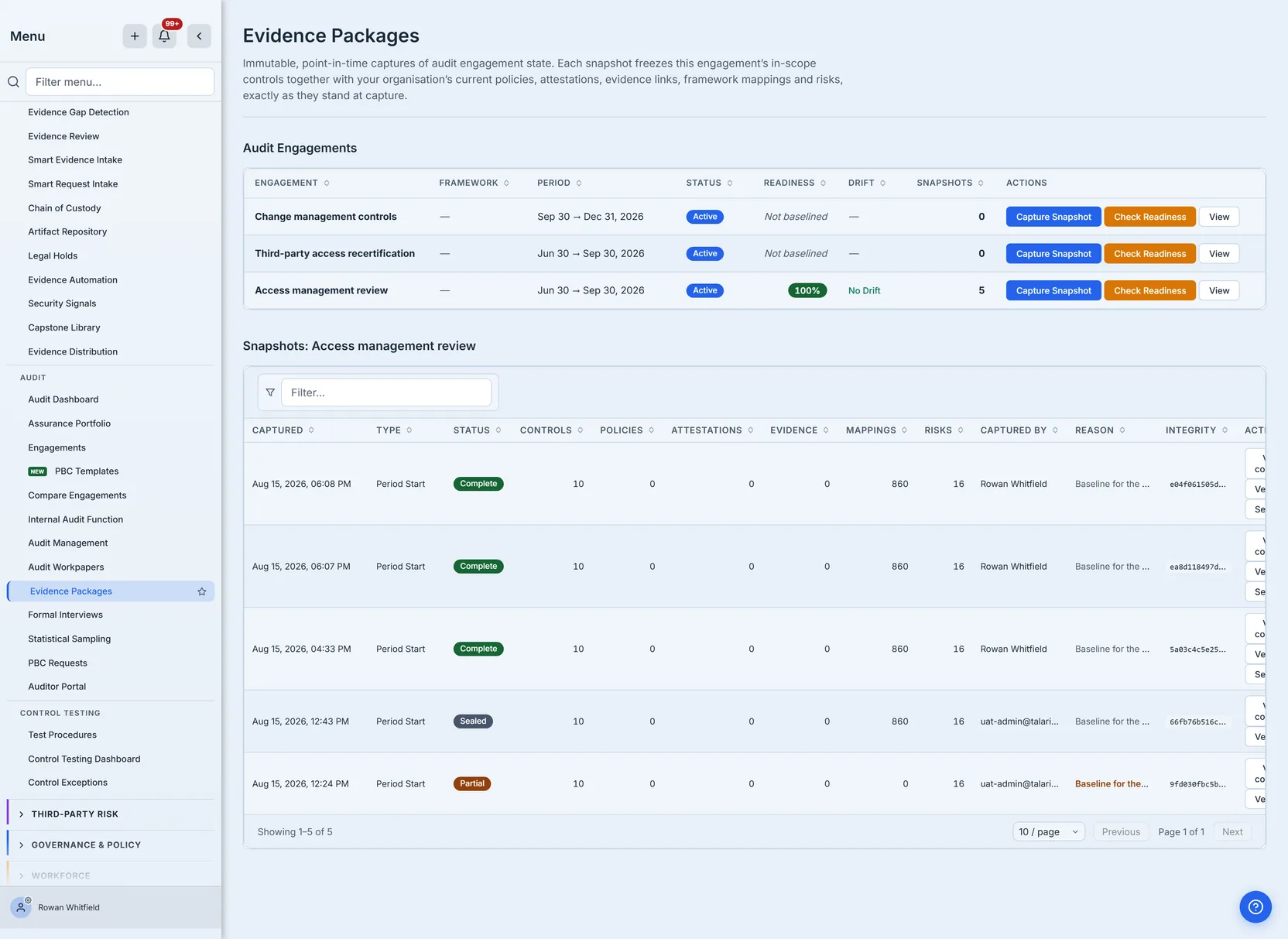
Who captured it is recorded the same way, and as a person rather than an account. The name is resolved once at capture and frozen with the row — deliberately, because a name looked up later is the current name, or nothing at all once that person has left, which is precisely the drift a point-in-time record exists to prevent.
The older rows in that table show the account instead, and they are worth looking at rather than tidying away: they were captured before the name was resolved at all, so there is nothing frozen for the column to show and it falls back to the identity that did the work. That is the argument in one screenshot. A record written before a decision was made cannot be improved by a later one — you cannot go back and freeze a name onto a row that is, by design, no longer writable — which is why the decision has to be right at capture rather than at the point somebody asks. The same applies wherever the snapshot records a human: the risk owner and the person who accepted a risk are stored as names, and a frozen attestation says who acknowledged the policy rather than carrying an account identifier the auditor cannot resolve.
The counts are the honest shape of this engagement. Not every section will be populated, and a zero is information rather than a gap: a snapshot with no attestations tells the auditor this organisation had not run an attestation campaign in that period. That is a finding about the programme, not a defect in the tooling — and it is exactly the kind of thing that is much harder to establish a year later without a dated record saying so.
When a capture is only partly successful
A capture reads six sets from six places, and any one of those reads can fail. When that happens the snapshot is marked Partial rather than Complete, and the reason is recorded alongside it.
This state exists because the alternative is worse in both directions. Discarding the whole capture throws away five good record sets because the sixth was unavailable. Marking it Complete would hand an auditor a record that is quietly missing a section, which is the single most damaging thing an evidence system can do. Partial says: this is real evidence of what it holds, and here is what it does not hold.
A Partial snapshot cannot be sealed. Sealing is permanent, and making a knowingly incomplete record permanently unfixable — while it presents as the final word — is not a state anyone should be able to reach by clicking a button.
Partial captures and outright failures are each recorded as their own event in the audit log, distinct from a clean capture and naming the sections that could not be read. That distinction is the whole value: months later, “we took a baseline on the first” and “we tried and it did not work” are the same absence of evidence unless one of them was written down at the time.
Reading it back
A record you cannot produce is not evidence, whatever the counts say. Every snapshot opens into its contents, one section at a time.
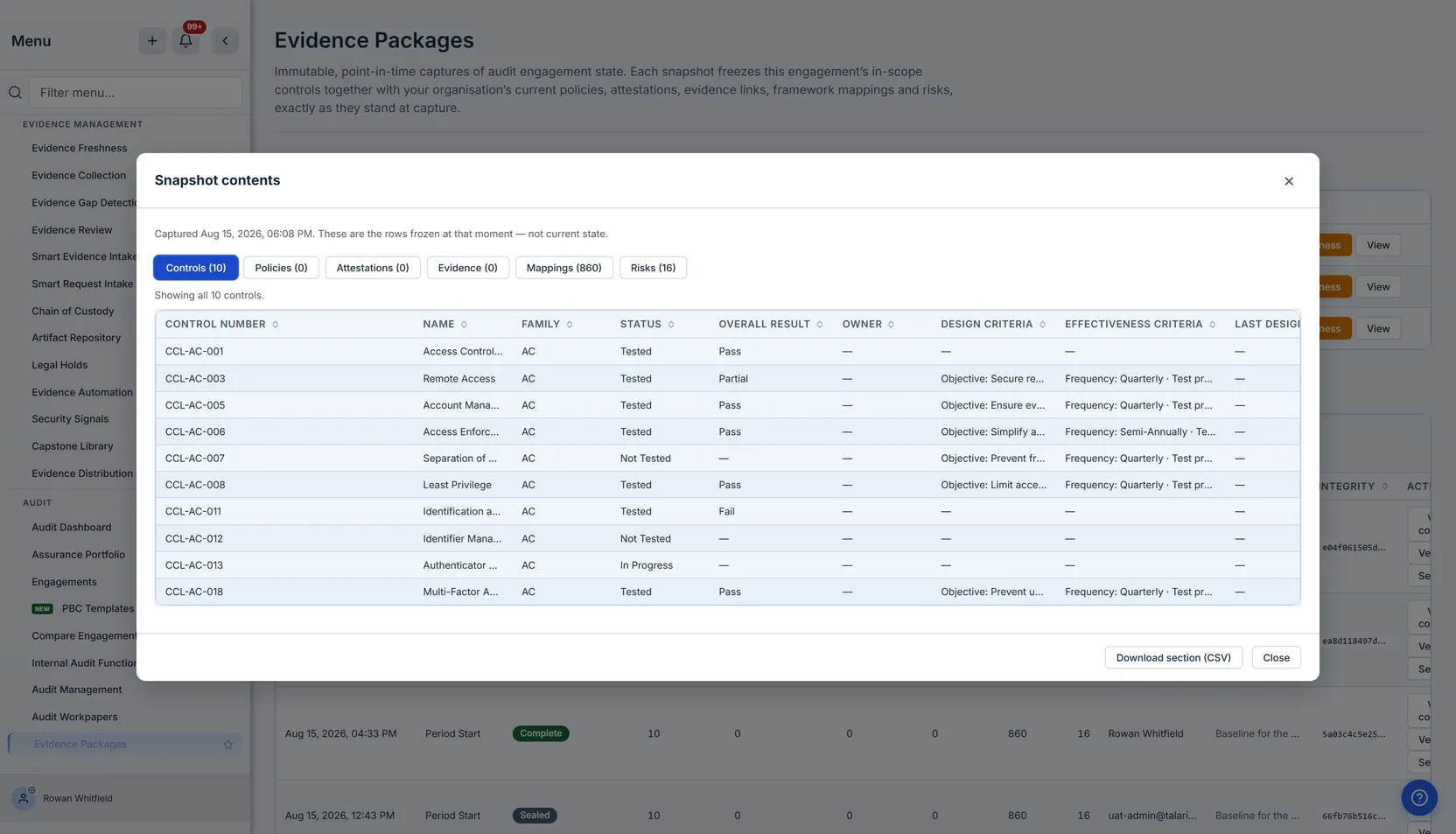
The dialog states plainly that these are the rows frozen at that moment — not current state, because the distinction is the entire point and the two are otherwise indistinguishable on screen. Everything here will look like an ordinary table of controls; what makes it evidence is that it cannot have changed.
The columns are chosen, not derived. Each section presents the fields an auditor works with — control number, name, family, test dates, results, owner, the reason it was in scope — under authored headers. That sounds like a small thing. It matters because the alternative, showing whatever fields the underlying row happens to carry, puts internal storage details in front of a customer and makes the column set change depending on which row came back first.
Two columns above are empty on every row — Owner and Last Design Test — and it is worth saying why rather than leaving you to wonder. Both come from your organisation’s own implemented control: the record you keep for a control you have adopted, with an owner assigned, your own criteria written against it, and your test dates recorded on it. This engagement’s controls are scoped straight from the catalogue and have not been implemented in the register yet, so there is no owner to freeze and no test date to freeze, and the criteria shown are the catalogue’s rather than this organisation’s. Four of the ten rows show an em-dash for criteria too, for the same reason: the catalogue does not carry them for every control. That is the honest answer for a programme at this stage, and it is one half of a distinction the rest of this section turns on: here the cell is blank because the fact is genuinely absent, not because the pipe is broken. The snapshot cannot tell you which of those two you are looking at — only the source can — which is why it is worth checking once, at the point you design the capture, rather than at period end.
Choosing the columns also creates a specific failure worth naming, because we shipped it. A chosen column set is a promise about what the record holds, and a column can keep that promise visually while holding nothing — the header renders, the cell is blank, and a blank cell reads as absent data, not as a broken pipe. The Owner and Treatment columns on the frozen risk register did exactly that: they were populated from field names the risk table does not use, so every row printed empty, and an auditor reading the export would have concluded the programme had no risk owners rather than that the snapshot had failed to record them. Nothing threw, no count read zero, and the header still said the capture was complete. It is the quietest way for an evidence system to be wrong, and the only reliable defence is to check the written row against the source table’s real column list rather than reading the code, which looks correct either way.
Running that check across every column the dialog declares found two more, and they are worth naming because they failed differently. The mappings section promised a Requirement Title and a Mapping Strength that nothing in the product can supply — across 6,420 mapping records, neither field is present on a single one. Those two columns are now gone rather than left to render a dash forever: “we never captured this” and “your programme does not have this” are different statements, and a column that can only ever make the second one is making a claim about your compliance programme on no evidence. Confidence, which every mapping does carry, already says how strong a mapping is.
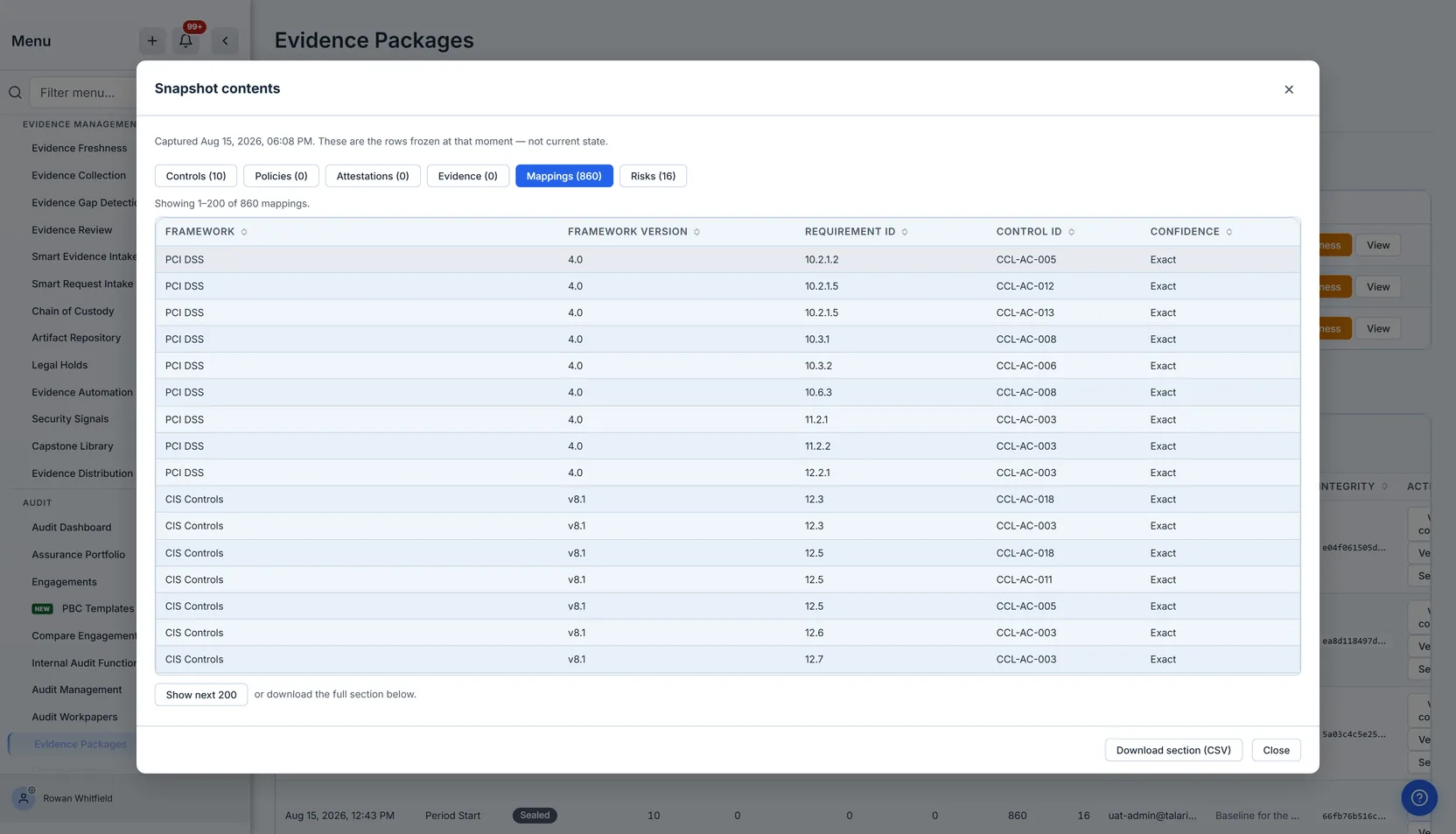
Sections are paged, and the position is stated as a range: the frame above reads Showing 1–200 of 860 mappings, and the second page would read 201–400 of 860. Not “showing 400 of 860”, which reads as though you had reviewed four hundred when you are looking at the second two hundred. On an audit record that difference is the difference between a complete review and a false one, and it is the sort of wording nobody notices until it has misled someone.
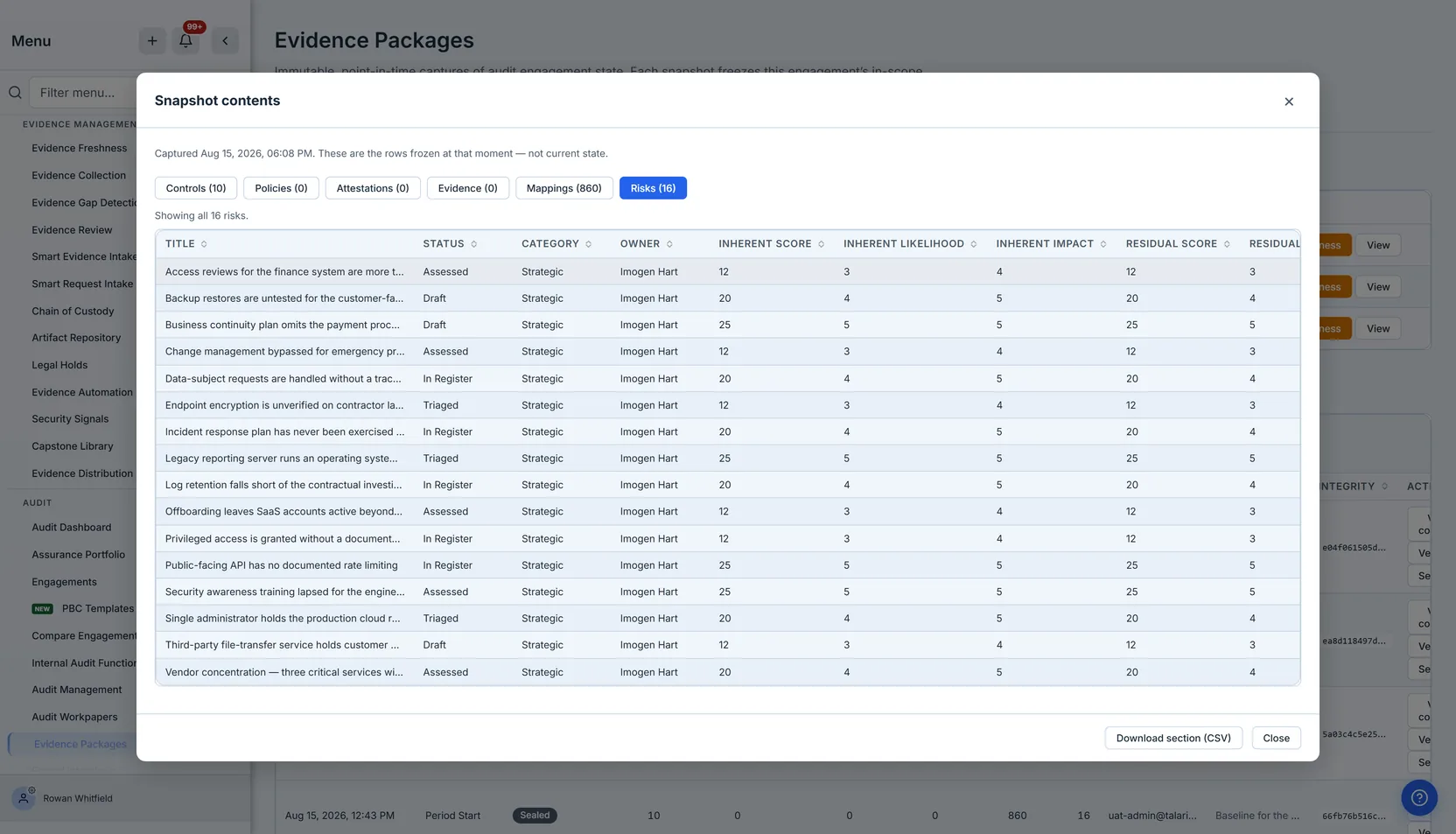
The risk section is the one that most often surprises people. Risks are re-scored constantly and legitimately; a residual score of 6 today may have been 12 at period start. Without the frozen copy, “has our risk posture improved?” is a question with no evidence behind it. With it, the readiness check can tell you precisely which risks moved and by how much.
Proving it has not moved
Every snapshot carries an integrity hash: a SHA-256 fingerprint computed over the frozen rows. A fingerprint is only worth having if you can recompute it, so Verify does exactly that — it reads the stored rows back out of all six tables, rebuilds the fingerprint, and compares.
It is worth being exact about what it covers, because we got this wrong and the wrongness was invisible. The first recomputable scheme hashed the six record sets and nothing else — while the database trigger that makes a snapshot immutable only refuses changes to its summary row once the snapshot is sealed, and sealing is a manual step most snapshots never receive. So the capture reason, the snapshot type, who took it and the six counts printed directly beside the fingerprint were all still editable, and Verify answered “verified” afterwards. The digest now covers them too. Sealing itself is deliberately left out of it: a fingerprint that the product’s own final action invalidated would report every sealed record as altered, which is the fastest way to teach someone to ignore the one control that matters. And because the scheme is stamped on each snapshot, records captured under the older one are still checked under the older one, rather than being reclassified as unverifiable by an improvement they had no part in.
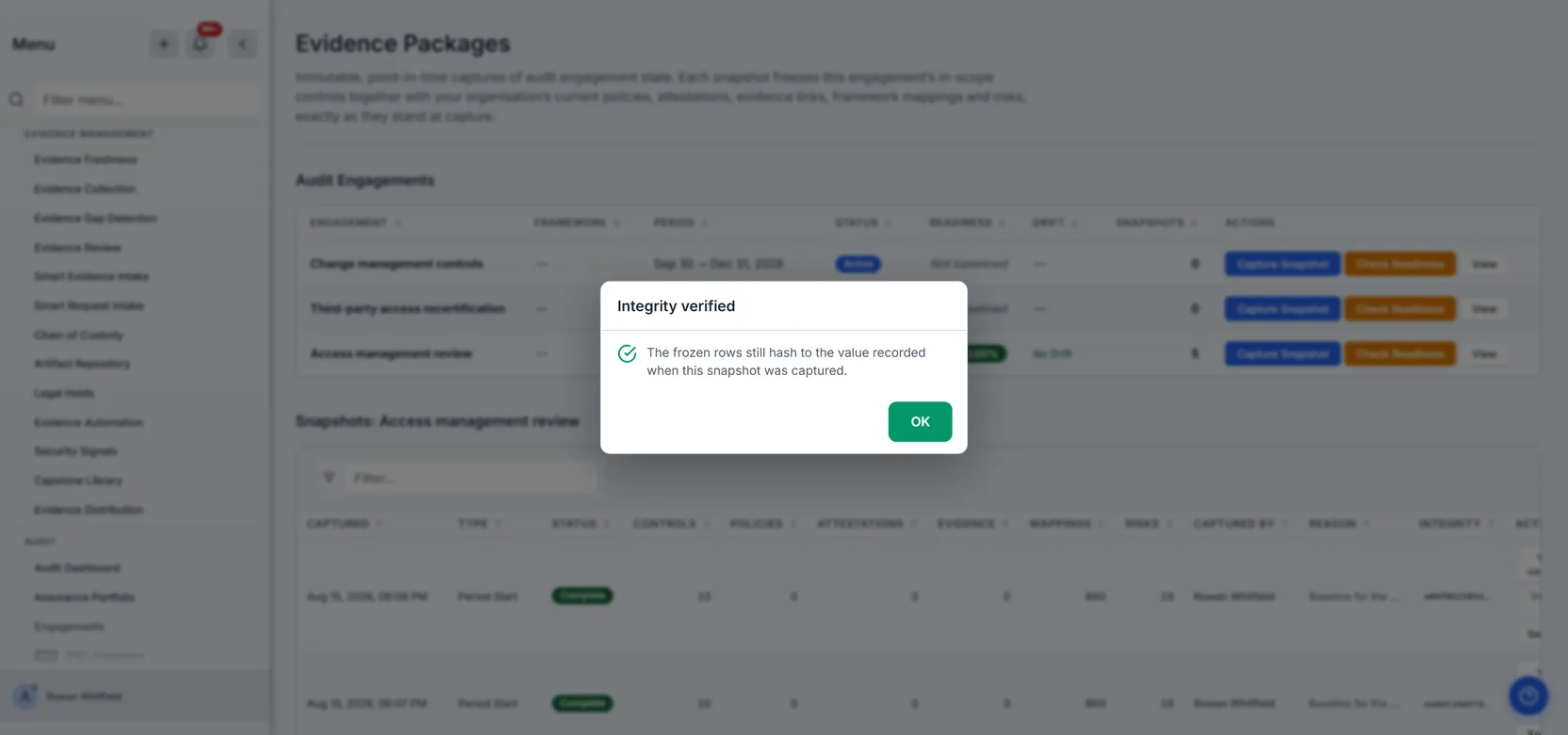
There are three possible answers, and the third is the one that matters most:
- Verified — the frozen rows still hash to the value recorded at capture.
- Does not match — they do not. Every one of the six child tables carries a trigger that refuses
UPDATEoutright, with no exception for any application path, so a frozen row cannot be rewritten through Talarity at all. A mismatch therefore points outside it — a direct write, a restore from a doctored backup, a migration that rewrote a column. That is precisely why it is worth checking. - Not verifiable — the fingerprint cannot be recomputed: either the snapshot predates the current scheme, or it carries no recorded hash at all. Each says so specifically. This is not a failure of the snapshot, and it is never reported as one.
(Deletion is the one narrow exception, and it is deliberate: the same triggers refuse DELETE too,
except while an entire tenant is being erased. A customer who exercises their right to have their
data deleted must not be blocked by their own audit evidence. Nothing on that path can alter a
row — only remove the tenant wholesale — so the integrity guarantee is untouched.)
That last verdict is a design decision worth being explicit about. It would be easy to collapse it into “does not match” and have two states instead of three. It would also be a lie — and telling an auditor their evidence was altered when it merely predates the checker destroys exactly the trust the control exists to create.
Every verification is written to the audit log, and a mismatch is written under its own event type so the trail can be searched for it rather than filtered. Recording the passes matters as much as recording the failures: a log that only ever contains alarms cannot tell “checked, and fine” apart from “never checked”, and those are very different answers to give an auditor. A control whose alarm reaches only the person who happened to press the button is not yet a control.
The general principle is worth more than the specific case: a verifier that cannot say “I don’t know” is not trustworthy when it says “verified” either. Any check that collapses “I could not measure this” into a negative verdict has stopped reporting on the world and started reporting on its own coverage. Once a team learns that a red result sometimes means “the tool was confused”, they stop treating red as meaningful, and the control is finished as a control even though it still runs every night.
Handing it over
An auditor does not want a screen. They want the rows, in something they can keep, annotate and tie out.
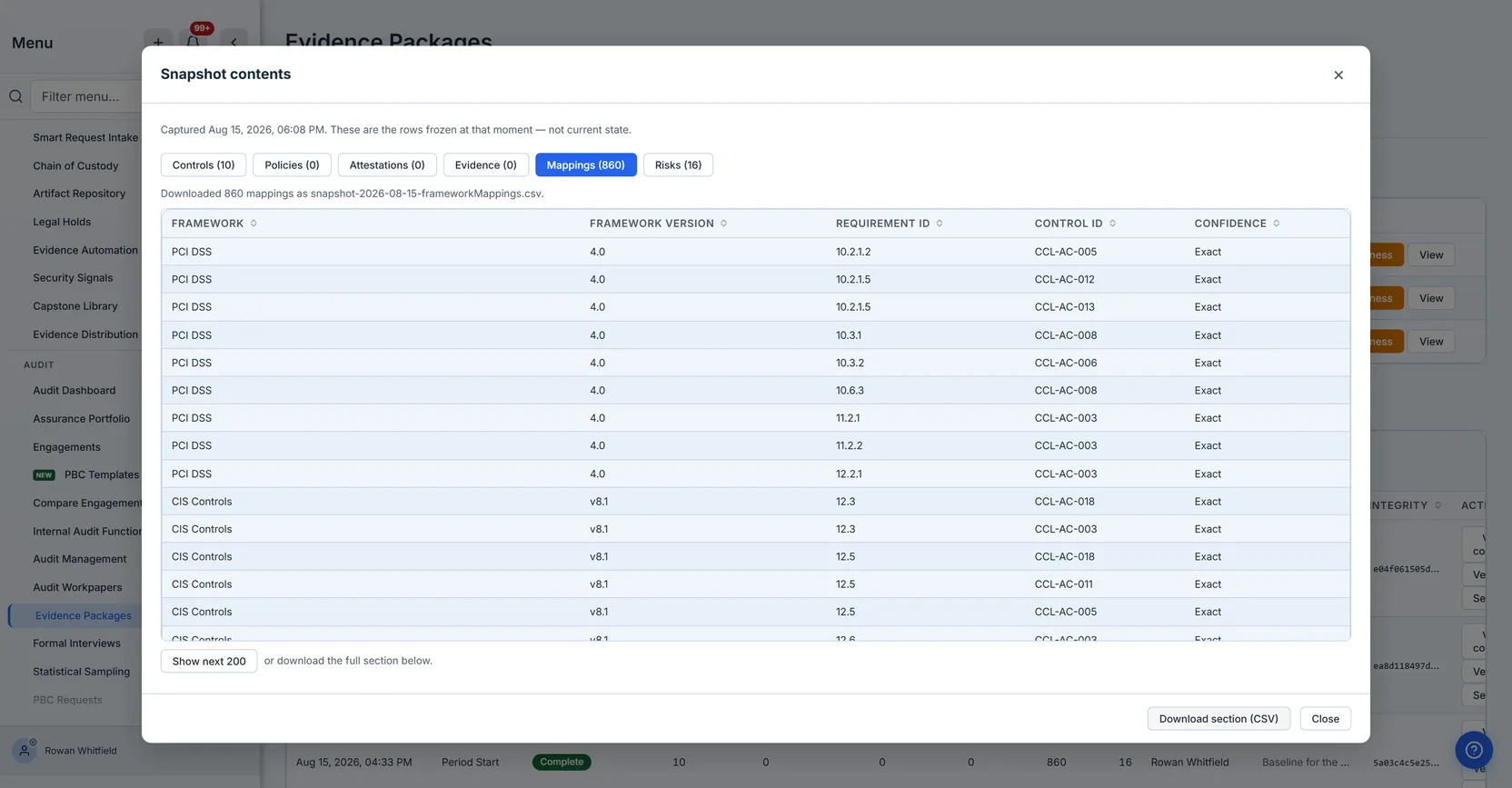
Download section (CSV) produces the complete section. The export pages through the whole set on the server before it returns anything, and if a section held more than 25,000 rows it refuses — naming the count and the ceiling — rather than handing back a short file.
That refusal is the interesting part. A truncated export of an audit record is worse than no export at all: it is a document that misrepresents the record while carrying its authority, and nothing about the file tells the reader it is short. Given the choice between a silent partial answer and a loud refusal, an evidence system has to choose the refusal every time.
The export itself is recorded. Downloading a section writes an entry to the organisation’s audit log — who, which snapshot, which section, how many rows — because this is the moment the evidence stops being inside the system and becomes a file somebody can keep and forward. A custody chain that documents capture and sealing but not the handover is complete everywhere except the point where custody actually changes.
The file carries that section’s substantive columns — for controls, fourteen of them: number, name, family, status, overall result, owner, the design and effectiveness criteria, the date and result of the design test and of the effectiveness test separately, the reason the control was in scope, and its description. The columns are fixed rather than derived from whatever the first row happens to contain, so this year’s export and last year’s line up when an auditor diffs them. They are also literally the same list the dialog renders — one definition, imported by both — so what you reviewed on screen and what you handed over cannot drift apart.
The two test pairs are worth noticing. Design and operating effectiveness are different questions — whether the control is built right, and whether it actually ran — and an auditor tests them separately. The snapshot freezes them separately, from the two dates and two results your control record holds, rather than printing one value into both columns and implying evidence you do not have.
Sealing
When an engagement closes, Seal makes the snapshot permanently immutable.
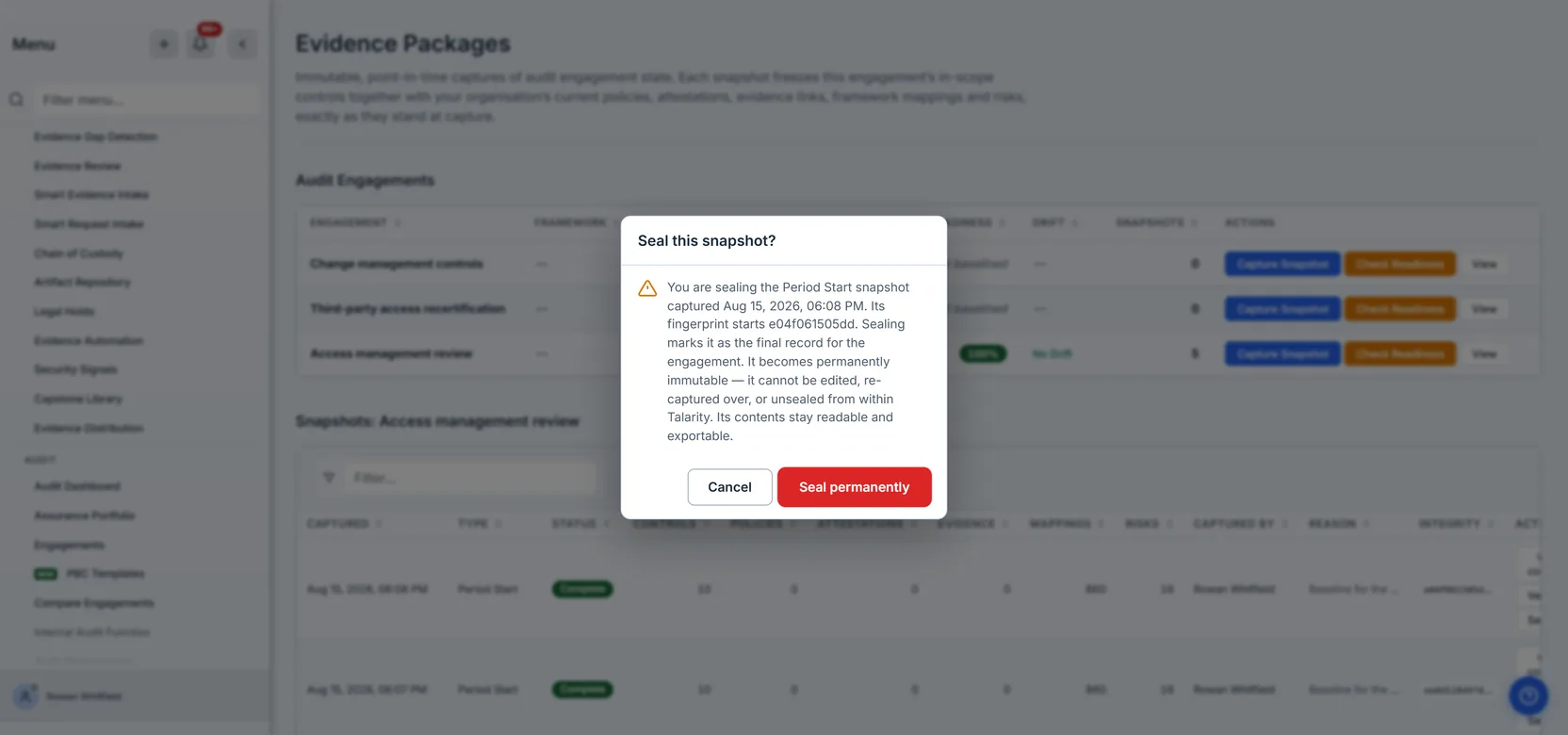
This is not a status label. The header row already rejects deletion; sealing extends that to every update, enforced by a database trigger rather than by application discipline. After it, no handler, no script and no direct database write under the application’s own role can alter that row.
There is deliberately no unseal. A seal that can be lifted by whoever finds it inconvenient carries no more assurance than a flag in a spreadsheet, and the guarantee is the whole point. Reversal is a database-administrator action, and it leaves a trail.
Because it cannot be undone, it also cannot be done by accident. The confirmation will not accept a stray Enter — the sort that arrives from whatever you were typing when the dialog appeared — and requires you to press the button. That distinction matters only for irreversible actions, which is exactly where it is applied: everywhere else, Enter still confirms, because there the cost of a misfire is one undo.
Sealing is offered only on a snapshot that completed cleanly. A capture still in progress cannot be sealed — that would freeze a half-written record permanently. A failed one cannot, because there is nothing usable to preserve. A Partial one cannot, for the reason given earlier. Each refusal explains which case it hit rather than sharing one generic message, because the reader’s next action differs in every one: wait, re-capture, or investigate.
Watching the drift
Between the baseline and the close, the estate moves. Check Readiness compares current state to the engagement’s period-start snapshot and scores the distance.
Which snapshot it compares against is not a detail. If readiness measured against the most recent capture, then taking a mid-period snapshot would move the comparison point forward and the score would jump back towards 100% — the drift accumulated since period start erased by the act of collecting more evidence. A team doing the right thing would get a progressively less honest number. So the baseline is the period-start capture; if an engagement has none, the earliest snapshot it does have stands in, and the result says which one it used rather than leaving you to assume.
It counts controls added, removed and re-tested; policies that changed version or status; attestations that have gone missing or appeared; evidence links removed or expired; risks re-scored or closed; and framework mappings changed.
The score is a ratio — the proportion of frozen records that have not drifted — and it counts the same record sets in the numerator and the denominator. That sounds too obvious to state. It is worth stating because getting it wrong is quiet: count attestation churn in the drift total while leaving attestations out of the population, and ordinary business growth manufactures a critical drift warning against a snapshot from which nothing has actually gone missing.
The same symmetry has to hold on both sides of every comparison, and it is easiest to break while fixing something else. When capture was corrected to freeze a risk’s lifecycle state — the column the register actually fills — the comparison was still reading the empty one it had always read, so the first baseline captured after that correction reported all sixteen risks as re-scored within seconds of freezing them. Nothing had moved. While both sides read the empty column they had agreed, and the disagreement only appeared once one of them was right; half a correction is its own defect, and this one arrived wearing the alarm colour, because the drift band it produced is the band that sends mail.
A comparison reads a bounded page of each record set, and if any of them comes back full it says so rather than scoring as though it had seen everything. The reason is specific to how drift is computed: “removed” is inferred from absence — a frozen row with no current match. That inference is only sound if the current-state read was complete. Truncate it, and every unread row presents as a deletion, which is the most alarming thing this page can report and would be entirely an artefact of the page size. An inference from absence is only as good as the completeness of what you looked at, so the honest move is to say the look was partial.
Severity is a separate judgement from the score, and it is only ever a statement about drift that
actually happened. An engagement with nothing to compare, or with nothing changed, is not
“critical” — it is none. This matters because drift severity is what triggers the nightly alert;
a threshold that can fire on an empty comparison sends mail about a catastrophe that did not occur,
and the second time that happens the recipients build a filter rule.
The alert fires on the crossing, not on the state. Drift reaching high or critical sends one notification; staying there does not send another every night until someone fixes it. A daily reminder of a condition you already know about is how a real signal becomes something people filter to a folder, and then the one that mattered arrives in that folder too.
What this is not
It is not the PBC request tracker. That is a separate page, for the back-and-forth of asking your own organisation for documents. The two get confused because both live under audit and both involve evidence; a snapshot is a record of state, a PBC request is a task.
It is also not Evidence Distribution, which lives under Evidence Management and assembles a set of artefacts to send to a named recipient. That page is about distribution: who receives which documents. This one is about time: what was true on a date. They are worth telling apart deliberately, because the names are close enough that our own permission model confused them — a group scoped to one page was granted the other’s permissions, so the buttons rendered and every click was refused. If two features are easy to mix up in a sentence, they are easy to mix up in a configuration, and the second mistake is the expensive one.
It is not a live view. Everything here is deliberately stale, and that is its value.
And it is not a copy of the evidence itself. The snapshot freezes the links and their validity windows — which artefact was attached to which control, and until when — not duplicates of the files. If a linked artefact is later deleted from the library, the snapshot still records that it was attached and valid at capture, which is usually the fact under dispute.
Where the feature ends
Worth knowing before you build a process on it, and the list is longer than it is comfortable to print.
Capture is manual. There is no scheduled capture at period boundaries, so a period-start baseline happens because someone remembers — and nothing reminds them: an engagement that has never been baselined reads “Not baselined” on this page and tells no one. Sealing is per-snapshot rather than bulk.
Every record set is read up to a cap, and a very large estate will meet it. Each of the six record sets is assembled from bounded reads, nine of them, each with a row ceiling — 5,000 for the three control reads, for policies, for policy versions and for risks; 10,000 for attestations, evidence links and the platform mapping catalogue. Two of those ceilings have nothing to do with the size of your estate: the platform control catalogue and the platform mapping catalogue are shared across tenants, so growth there would begin marking captures Partial for everyone at once. A read that comes back at the cap is treated as truncated rather than complete: the code uses “at or above”, on the reasoning that a read returning exactly the ceiling is indistinguishable from one cut off at it, and that a false Partial costs a re-capture while a false Complete is a lie an auditor relies on. That is the right call, and it has a consequence worth stating plainly: a snapshot marked Partial cannot be sealed. So an organisation whose register crosses those thresholds will find that captures come back Partial and that the final, sealed record the whole feature is built around cannot be produced at all. This is the limit most likely to matter at real size, and it is the one the page gives you no warning about in advance.
A mistaken capture is permanent. There is no delete, no void and no supersede marker. The same triggers that make the record trustworthy make a wrong one — wrong engagement, wrong type, captured over an empty scope — a row you can only capture beside, never correct. Nothing distinguishes the authoritative baseline from the discard afterwards, so if you take one by accident, write the reason on the replacement.
Export is per-section. Each file now carries its own provenance block — the snapshot it came from, when it was captured, why, and the fingerprint with its scheme version — so a CSV separated from the product can still be tied back and re-checked. What does not exist yet is a single archive binding the six together, and above 25,000 rows in one section the export refuses rather than truncating.
Comparison only reaches forwards. Readiness measures a baseline against current state. There is no snapshot-to-snapshot comparison, so “what changed between the period-start baseline and the one we took at close” — the natural question at the end of an audit — cannot be answered here. The nightly check also stores its result every night and only the latest is readable; a year of drift history is in the database with nothing to show it. And a readiness check you run yourself alerts nobody: only the scheduled job notifies.
A snapshot is not reachable from the external auditor portal, so producing one to an outside auditor means sending the exported files rather than granting scoped access to the record in place. This one is worth stating precisely, because the file tree suggests otherwise: the portal does have a snapshot endpoint, and it serves the Evidence Distribution package’s snapshot — the confusably named other feature this article’s previous section is about. The engagement snapshot is the one audit artefact the portal cannot see.
And there is no reverse index — the gap we would most like closed. You can go from an engagement to its snapshots, but not from a control, policy or risk to the snapshots that froze it. “Which baselines included this control?” is a question an auditor asks, and the identifiers are captured while the index over them is not. The honest version of the workaround is narrower than “open them one at a time”: each snapshot’s contents are readable and pageable, so you can answer it for the snapshots in front of you, and the engagement’s own list shows its most recent captures — so on an engagement with a long history the oldest baseline, which is exactly the period-start record readiness measures against, is the hardest one to reach from this page.
None of that changes what a snapshot is or what it proves. It does change how much of the work around it you will do by hand, and it is better to know that at the point you design the cadence than at period end.
What you walk away with
A dated, immutable record of what your control environment looked like at a moment that matters, which you can produce in full, hand over as a file, and prove has not changed since — eight months later, to somebody who has every reason to check.
The part that is easy to underestimate: the value is not in capturing it. It is in being able to answer, without qualification, when someone asks whether it has been touched.