An auditor asks a question that sounds simple: which of your repositories enforce branch protection?
It is not an idle question. SOC 2 CC8.1 and ISO 27001 A.8.32 both want evidence that changes are reviewed and approved before they ship, and branch protection with a CODEOWNERS file is how that is enforced in a source repository rather than promised in a policy. NIST SSDF (SP 800-218) asks the same of your toolchain, and CMMC assessors ask it of anyone in a defence supply chain.
Most teams cannot answer it. The information exists — it is in GitHub, or GitLab, or Bitbucket, one repository at a time, behind a settings page per repo. With forty repositories that is forty tabs and an afternoon, and the answer is stale the moment you finish. With four hundred it is not an afternoon, it is a project.
Talarity’s Repositories register turns that into a standing inventory: what each repository is, how sensitive its data is, who owns it, what its SDLC controls actually do — recorded, dated, attributed, exportable — and when each of those claims is due to be made again.
The idea that carries this page is smaller and more important than the feature list: it records what you have not checked. An unattested control reads Unknown, not blank. A repository nobody has scanned raises a banner of its own rather than a dash in a column. That is the difference between a register that reports your program and one that flatters it.
Step 1 — Start from the inventory
Open Application Security → Source Control & Pipelines, and take the Repositories tab — Pipelines sits beside it, because a repository and the pipeline that builds it are different objects with different controls.
Each row is a repository; beneath it, a detail line carries the facts that qualify it — provider, account, data sensitivity, the CODEOWNERS and signed-commit states, when it was last scanned and when it was last attested. The row itself keeps the four you scan by: the name, the classification, branch protection, and the date the next attestation is due.
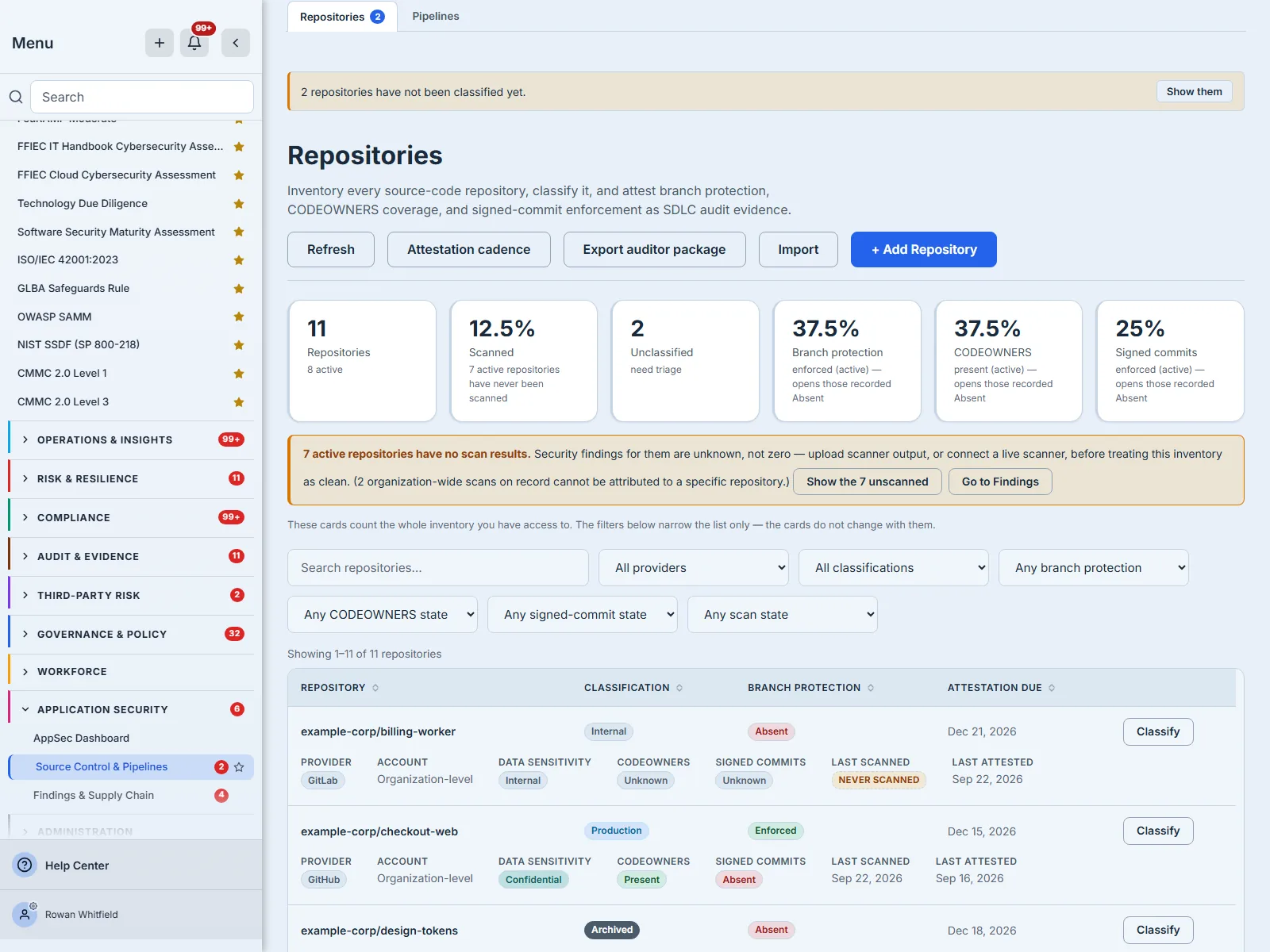
Every column that names a fact you would triage by — the repository, its classification, its branch protection and the date its next attestation is due — sorts the whole inventory rather than the page you happen to be looking at. The register pages at fifty rows, and every filter and page is in the URL, so a narrowed view is a link you can send to the person who owns it. The table is taller than the window at eleven rows, which is why the frames in this article show the first two or three and the count above them rather than all of it.
Two kinds of empty, and the page says which
A list that comes back empty is ambiguous, and the ambiguity is expensive: “we have no repositories” and “nothing here matches what you asked for” are opposite facts, and a register that shows one component for both teaches you to distrust it.
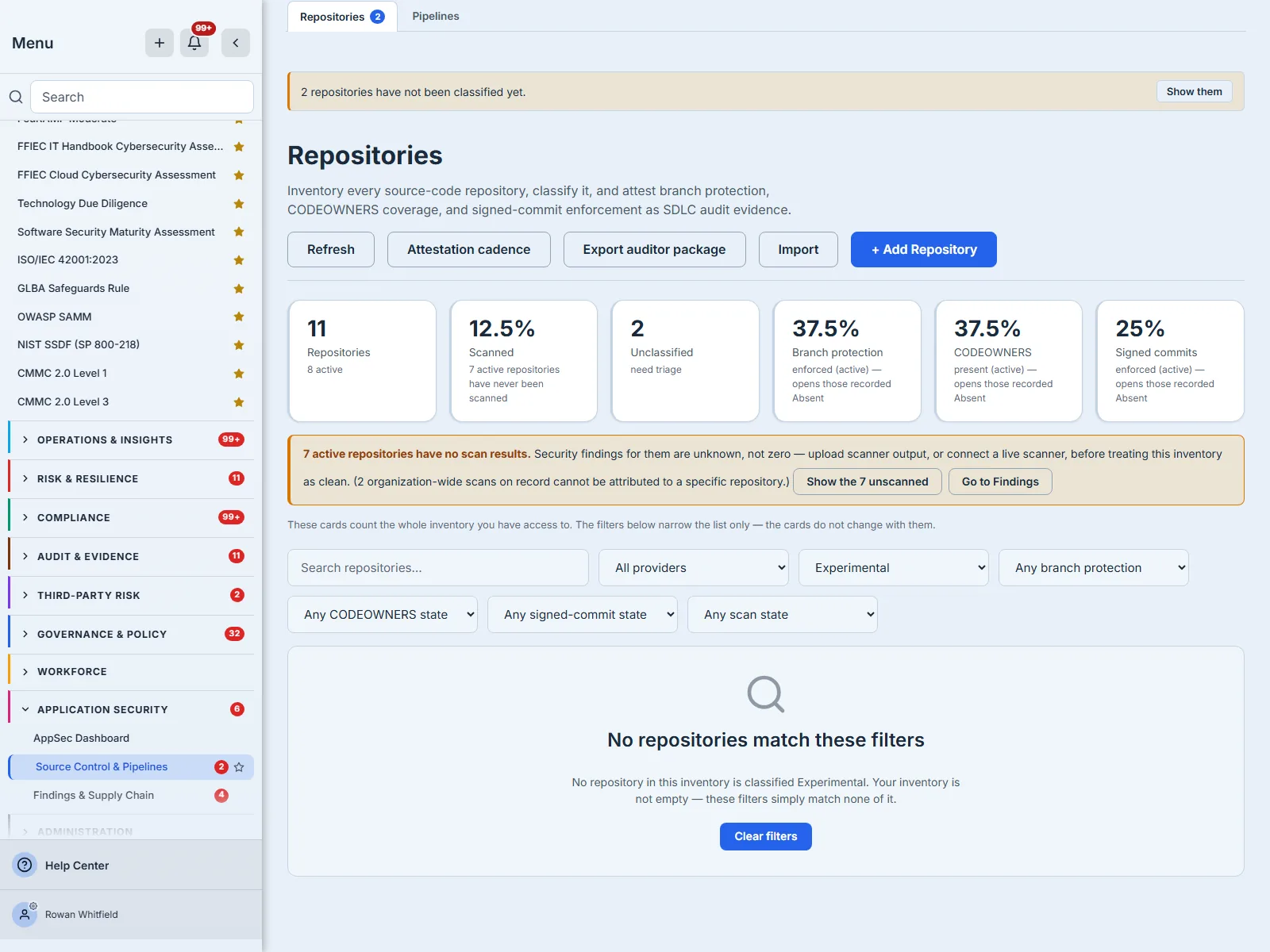
An organisation that genuinely has no repositories gets a different screen, headed No repositories yet, offering the two ways in rather than a filter to clear.
Step 2 — Import the estate, not one repository at a time
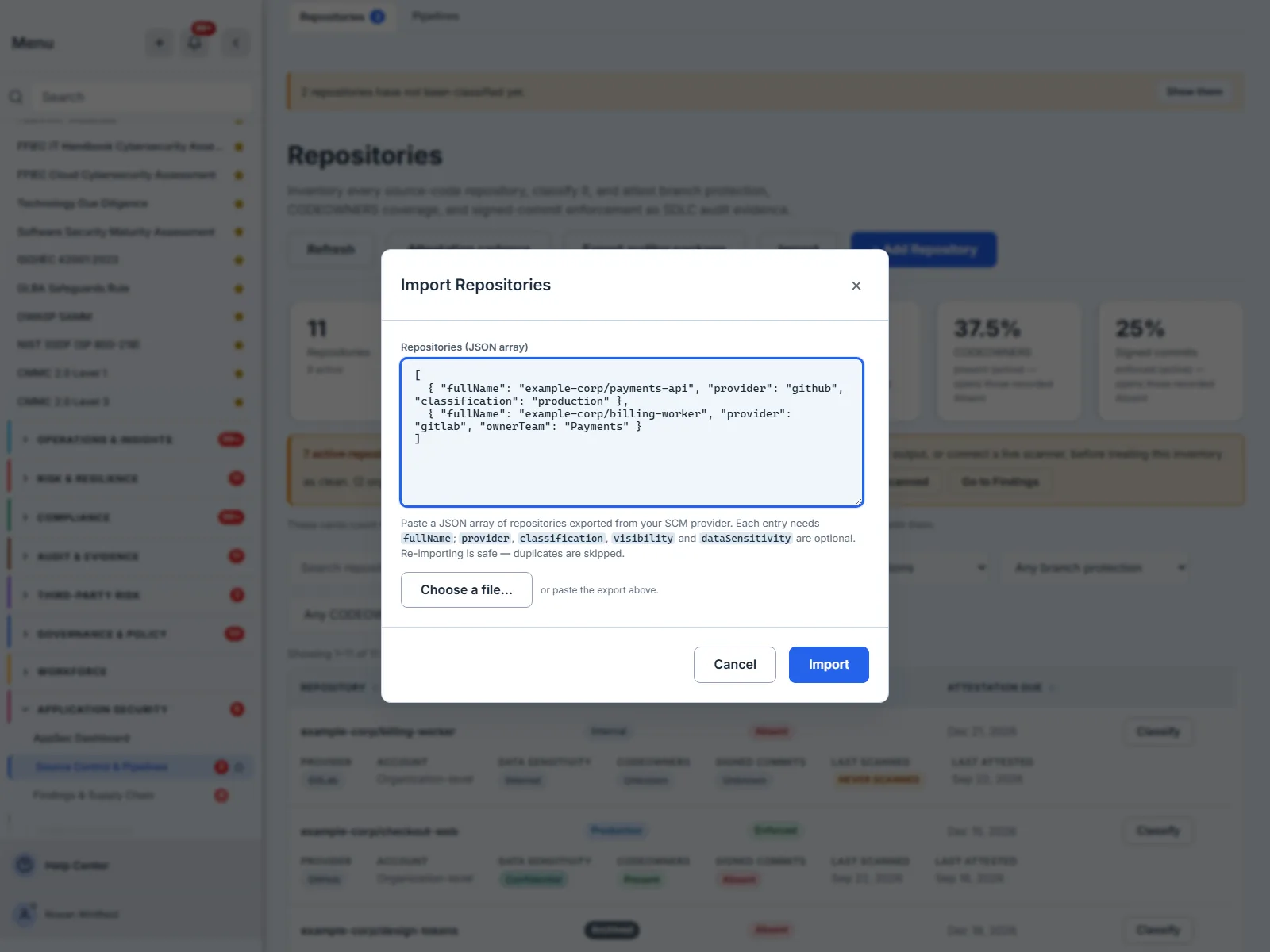
Import takes a JSON array — the shape every SCM provider’s API already gives you. Paste it, or choose the file: an export from your SCM arrives as a file on disk, and requiring you to open it and copy its contents first would be asking you to do the one step a computer is better at.
Each entry needs a fullName. The modal’s help text names provider, classification, visibility and dataSensitivity as the optional ones; the importer also accepts ownerTeam, a default branch and an external id, so an export that already knows who owns each repository does not have to forget it on the way in.
Two properties make this safe to run more than once:
- It is idempotent. Re-importing the same list skips the duplicates rather than creating second copies, and says so rather than reporting a success that did nothing — so a nightly export from your SCM can be pasted in repeatedly without curating it first.
- It is bounded, twice. Up to 2,000 rows in one import, and up to 200,000 characters in the box. A large export usually meets the character bound first, and the refusal says so rather than importing a silently shortened inventory.
Step 3 — Or add one, and say what you do not know
Import is the right tool for an estate. + Add Repository is the right tool for the repository that was created this morning — it takes the same decisions the bulk path does, owning team included — and it is worth opening once even if you never use it, because of the sentence at the bottom.
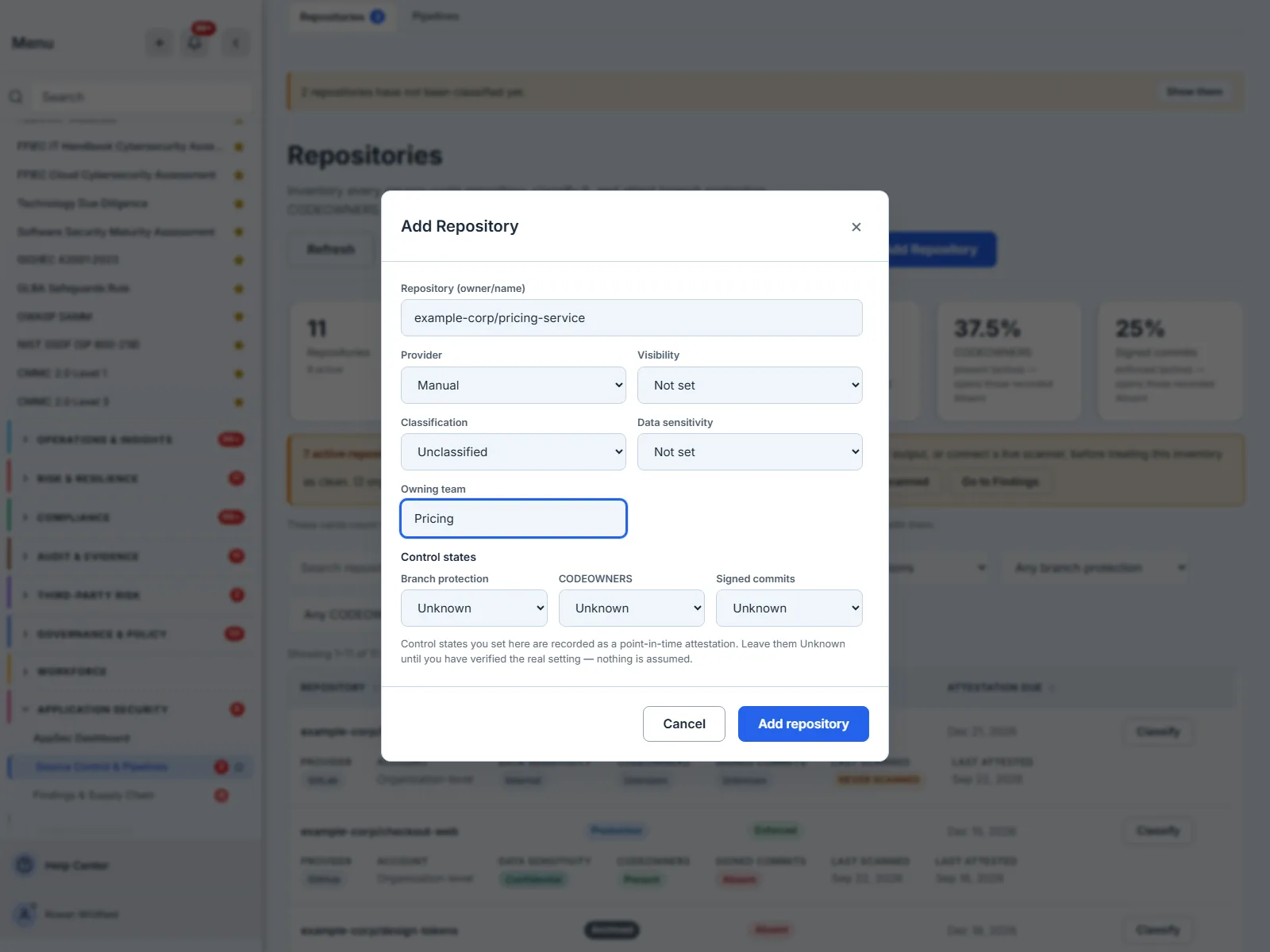
Leave them Unknown until you have verified the real setting — nothing is assumed. Registering a repository is not a claim about its controls. If you do set one here, that is an attestation and it is recorded as one, dated and attributed, from the moment the repository exists.
Neither this dialog nor the import in the previous step was saved for these screenshots, which is why the count stays at eleven throughout: every frame in this article is a read of a real organisation, not a walkthrough that quietly reshapes it.
Step 4 — Read the six cards, and start where they point
The KPI strip answers “how big is this, and how much of it do I know about?” — repositories, how many have been scanned, how many are still unclassified, and the coverage of each of the three controls. The cards count the whole inventory you can see; the filters below them narrow the list only, and the page says so in as many words rather than leaving you to discover it.
Those figures are over active repositories, which is eleven minus the three classified Archived: 12.5% scanned is one of eight, and 37.5% / 37.5% / 25% are three, three and two of eight.
A card that names an actionable subset is a control, not a label. Pressing Unclassified filters the register to exactly those repositories, and the URL follows.
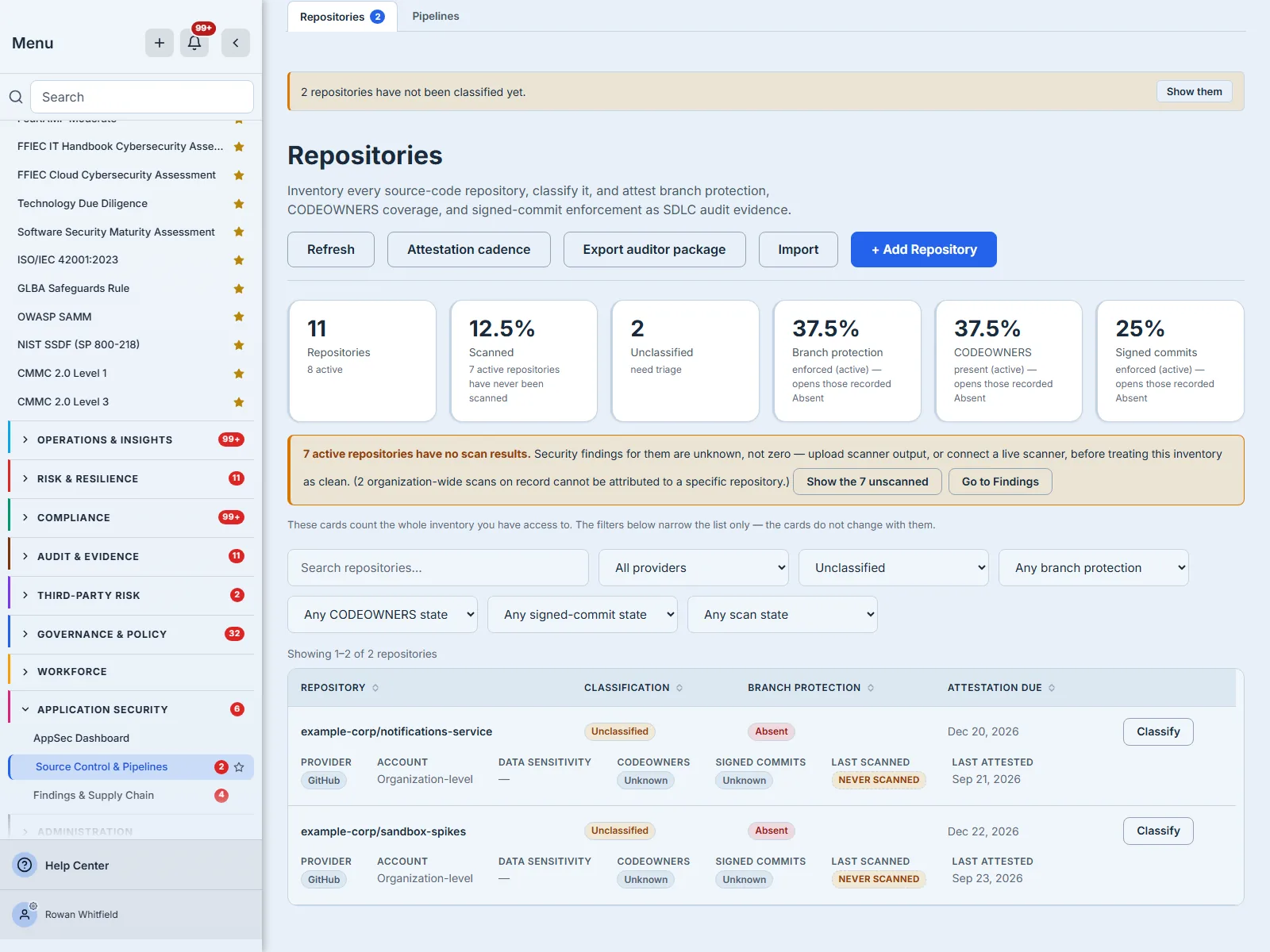
Two things about those cards are worth knowing before you press them. A card whose count is zero has nothing to filter to, and renders as a plain figure rather than a control. And the three coverage cards report the positive and open the negative: 37.5% Branch protection enforced (active) opens the repositories recorded Absent. The card says which it will do, on its face — worth reading, because Absent is not the whole of the other 62.5%: a repository recorded Partial, or still Unknown, is in neither list.
Step 5 — Say what each repository is
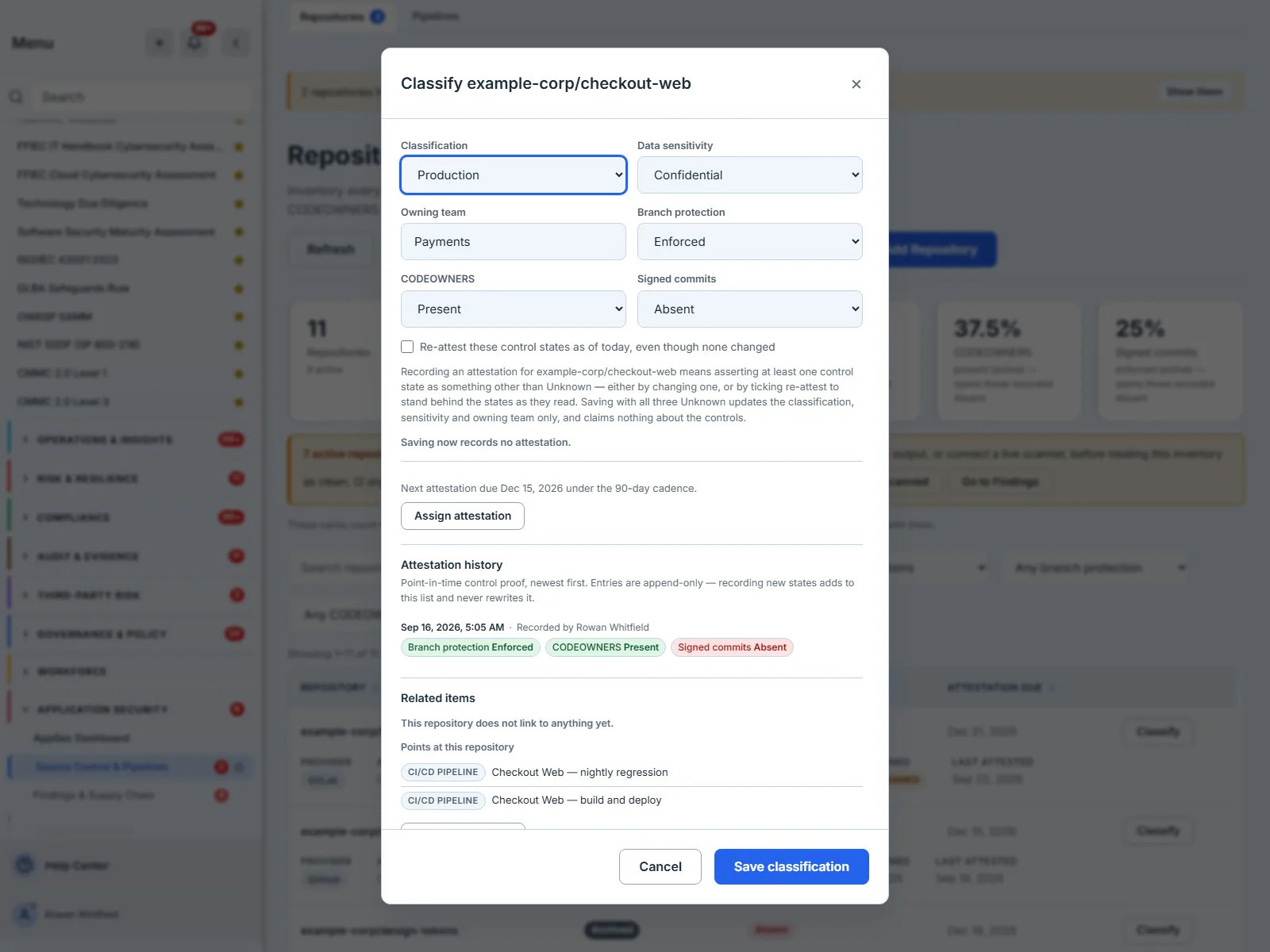
Classify is where a repository stops being a name and becomes a governed object. Three decisions:
- Classification —
Production,Internal,Experimental,Archived, orUnclassified. A closed vocabulary, because an auditor’s question is a comparison and free text cannot be compared. - Data sensitivity —
None,Internal,Confidential,Regulated, or leftNot set. Also closed, and for the same reason. - Owning team — free text, deliberately. It is the one field whose vocabulary is your organisation chart rather than ours.
The classification is not decoration. You cannot hold a repository to a production standard until somebody has said it is production, which is why Unclassified is a state the page chases — with a banner and a card — rather than a default it tolerates.
Where the line between Internal and Experimental falls is yours to draw, and it is worth drawing deliberately: Experimental is the honest answer for a repository you are not yet willing to be held to, and it is visibly different from Internal on every screen. Archived is the one with a mechanical consequence — an archived repository keeps its history and drops out of every coverage denominator, because holding a retired repository to a live standard makes your percentages worse for no reason anybody can act on.
Step 6 — Attest the three controls, including the ones you do not know
Below the classification sit the three controls an auditor will actually ask about. The values the register stores, and the words the screen shows for them:
| Control | States |
|---|---|
| Branch protection | Enforced · Partial · Absent · Unknown |
| CODEOWNERS | Present · Invalid · Absent · Unknown |
| Signed commits | Enforced · Absent · Unknown |
Two things about that table are deliberate.
Unknown is in every one of them, and it is the default. A control you have not checked is not “absent” — absent is a finding, and claiming it would be as wrong as claiming enforcement. The page distinguishes we looked and it is not there from nobody has looked, and it will not invent the first from the second.
CODEOWNERS has a fourth state, Invalid. A CODEOWNERS file that does not parse is worse than none, because the repository looks governed and no review is actually routed. A binary present/absent would have recorded that as a pass.
Branch protection is the one where the middle state earns its keep. Partial is the right answer when the rule exists but does not bind everyone — protection on main and nothing on the release branches, or a rule administrators can bypass. Recording that as Enforced overstates the control and recording it as Absent understates the work already done; either way the remediation list you build from it is the wrong list. If you are choosing between the two, ask whether somebody with commit access could merge without review today. If they could, it is Partial.
What “attest” means here, exactly
This is a self-declared, append-only record, and both halves matter.
Self-declared — Talarity is recording what you assert about your own estate, not reaching into your SCM and reading it. That is an honest description of a control statement, and it is why every row carries a date and a name.
Append-only — every attestation is a new row. No control state is ever rewritten: nothing in the product edits or deletes the branch-protection, CODEOWNERS or signed-commits values on a row once it is written, and nothing deletes a previous row. (The one write that touches an existing row is the evidence link being stamped onto the row just inserted, inside the same transaction — the claim itself is already immutable.) So the question “what did we claim in March, and who claimed it?” has an answer, and the answer cannot be edited after the fact.
An attestation is something you do, not something a save implies — and the rule is narrower than “you pressed Save”. A save records an attestation only when it asserts at least one control as something other than Unknown. Changing a control state does that. So does re-confirming states that have not changed, which is a box you tick — Re-attest these control states as of today — and which the trail marks Reviewed — no change so it never reads as a change. Editing only the classification, sensitivity or owning team records nothing about the controls, and neither does a save that leaves all three Unknown: asserting that nothing is known is not an assertion. The dialog tells you which of those you are about to do, before you save.
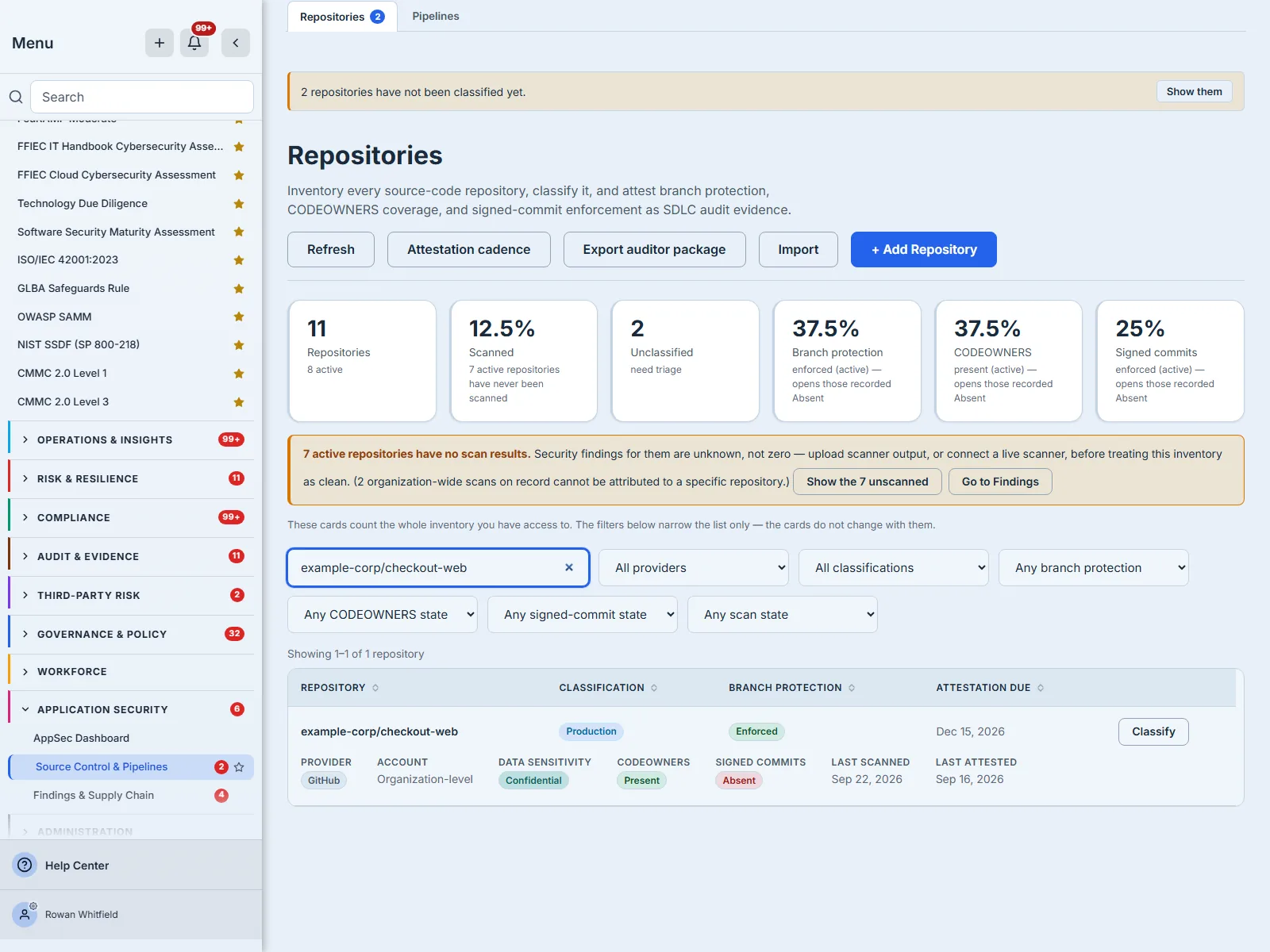
One repository, eleven facts across the row and the detail line beneath it — each of them something somebody either asserted or measured. One of them, signed commits: Absent, is a finding rather than a gap, precisely because a person went and looked.
Step 7 — Read the history, not just the current value
The Classify dialog shows the attestation trail for that repository, newest first, each entry dated and attributed by name. This is the part an auditor asks for second, immediately after the current state: how long has it been that way, and who says so?
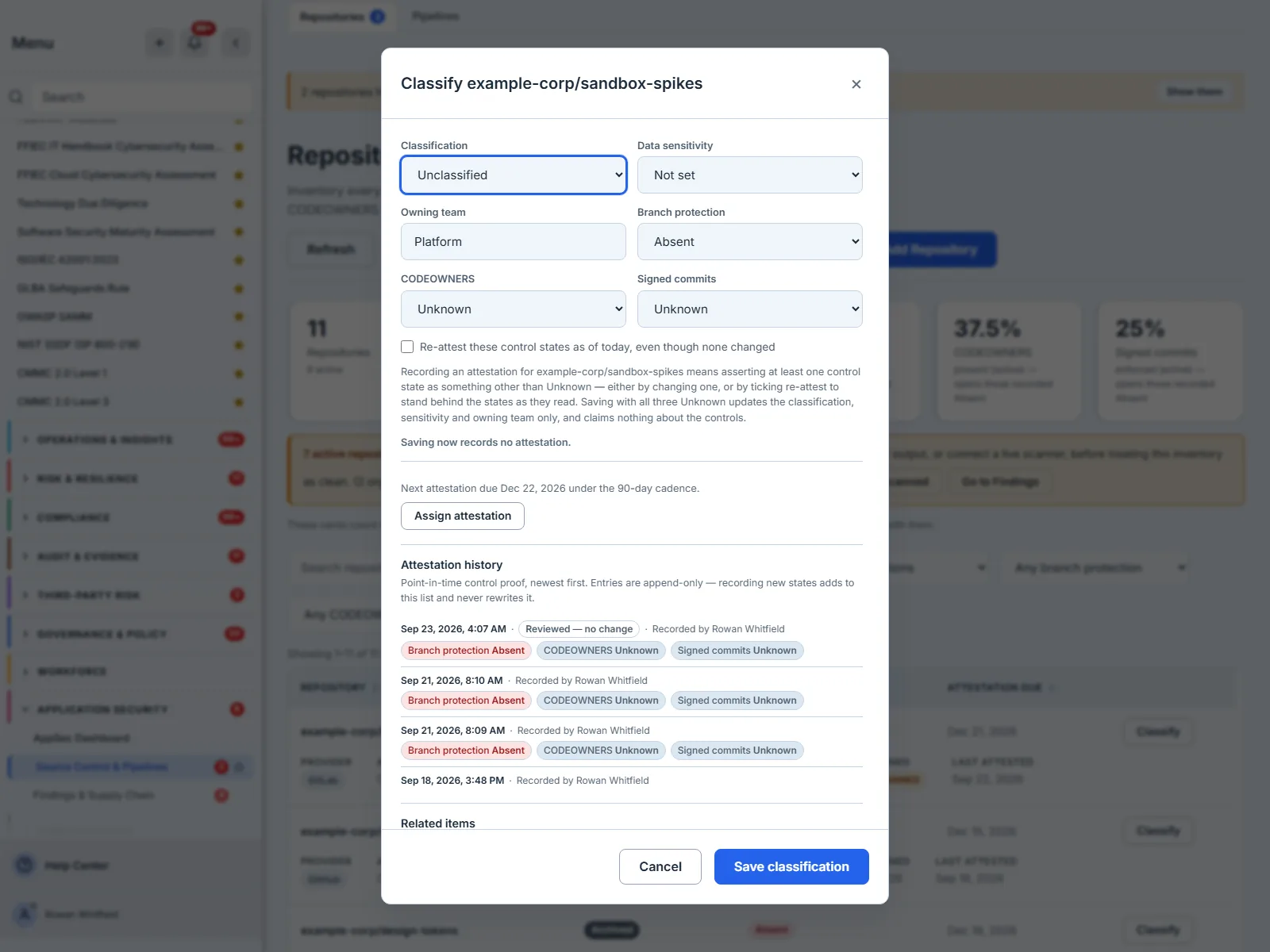
That marker is the whole point of the distinction. Four entries, identical control states, and only one of them says a human re-read the controls and stood behind them on that date; the others are the moments a state was first asserted. Without the marker an auditor cannot tell a fresh claim from a re-confirmation, and a register that cannot tell them apart is one where re-attesting looks like churn.
Beneath the trail, Related items is what keeps the register from being an island: the risks, controls, vendors and assets a repository bears on, linked in both directions. The second direction is the one that matters most and the one most registers skip — Points at this repository, which is where the pipelines that build it show up, as in the frame two steps above.
Step 8 — Set the cadence, so the register chases you
A control state asserted in March is a fact about March. Attestation cadence is what turns the register from a record into an obligation: one interval for the organisation, from which every repository’s Attestation due date is computed — and it is the reason that column exists at all.
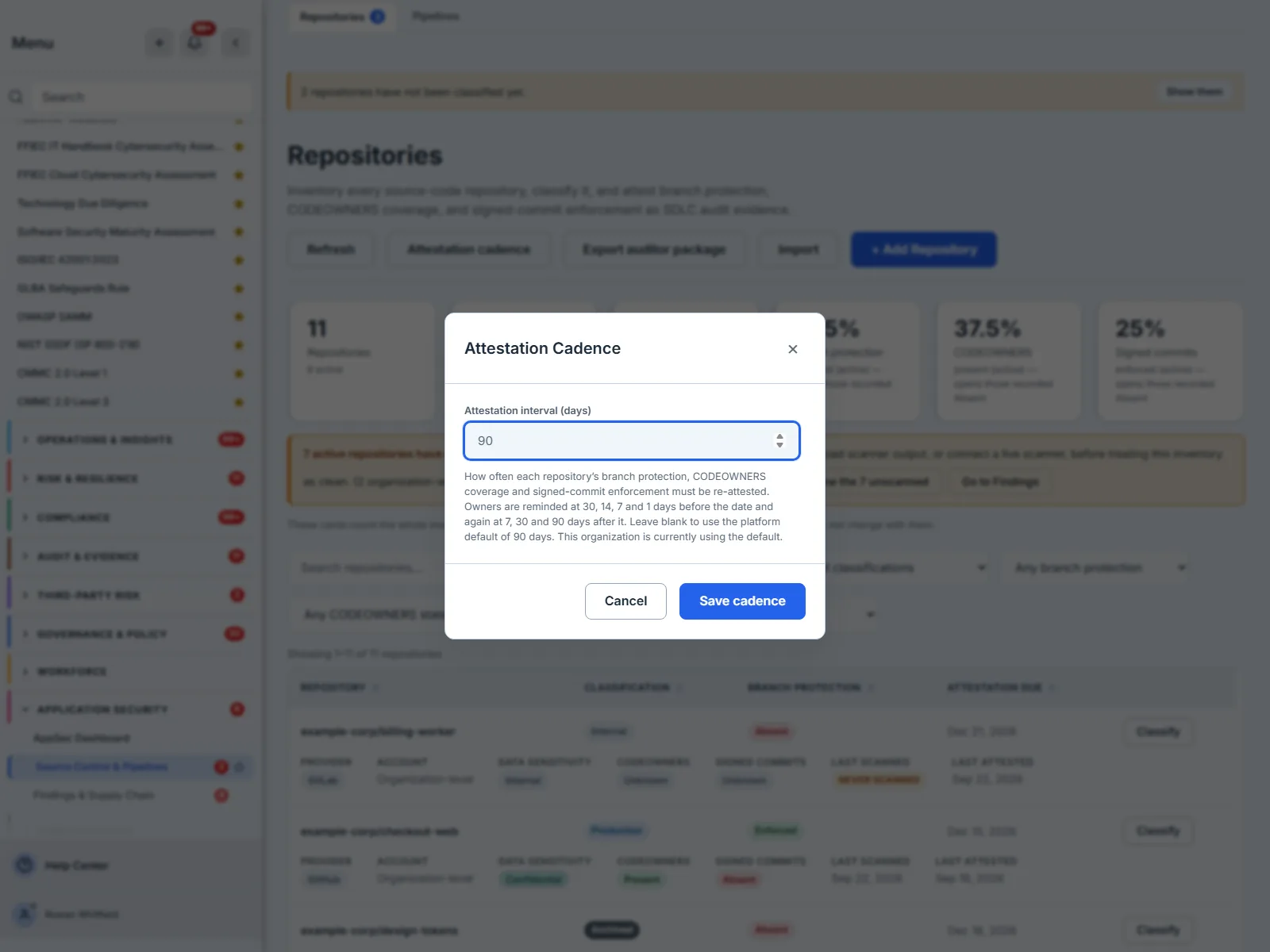
The field is blank here, and the sentence beneath it says what that means: this organisation has not set an interval, so the platform default of 90 days applies. Every due date in this article is exactly ninety days after that repository’s last attestation — checkout-web, attested 16 September, is due 15 December.
The reminder schedule is the part worth reading twice: four reminders before the date and three after it. An obligation that stops reminding you the day it is missed is one you will miss quietly.
Ninety days is a defensible default: short enough that a control statement is never more than a quarter old when an auditor asks, and long enough that owners are not re-confirming the same three states every fortnight. Shorten it if your estate changes quickly or your framework names a period — some assessors expect quarterly, some annual — and lengthen it only if you can say what else is telling you when a control moves. The cost of a long interval is not the paperwork; it is the window in which the register is confidently wrong.
Step 9 — The banner that refuses to say “clean”
If any active repository has never been scanned, the page raises a scan-coverage warning — and it is worded as what it is, down to the population it counts: 7 active repositories have no scan results, and findings for them are unknown, not zero. The estate here holds eleven repositories and ten have never been scanned; the seven are the active ones, which are the only ones any coverage figure on this page is about.
This is the most valuable sentence on the page. An empty findings register and a clean one look identical on every tool that reports a count, and only one of them means you are safe. The banner also takes you somewhere: it filters the register to the unscanned repositories, and it links to Findings, so the disclosure has a next action instead of being a fact you are left holding.
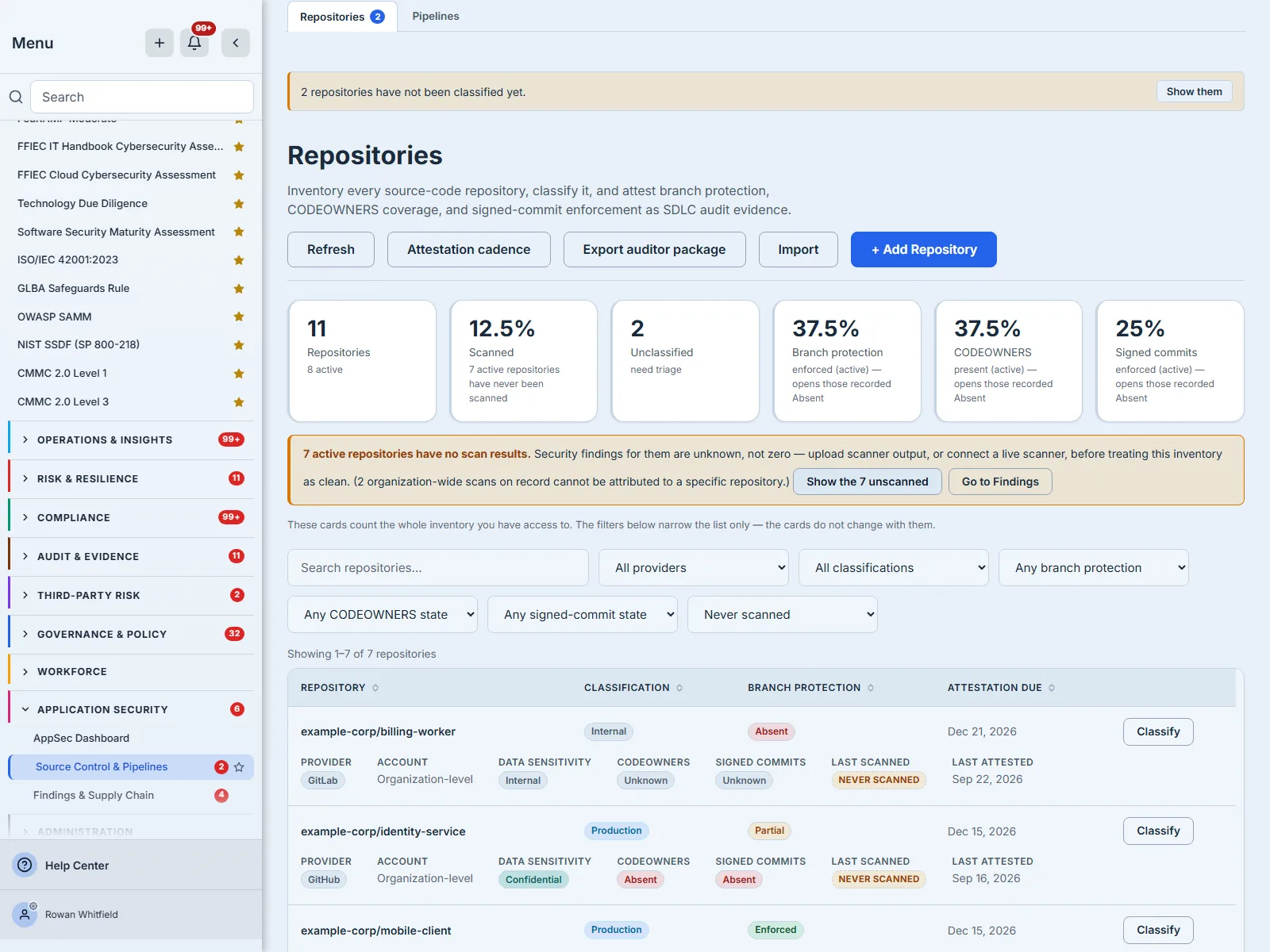
The parenthetical in that banner is doing quiet work too: 2 organization-wide scans on record cannot be attributed to a specific repository. Scans you have run that nobody can tie to a repository do not count towards per-repository coverage, and saying so is the difference between a coverage figure and a comforting one.
Step 10 — Export the package that answers the question
Export auditor package produces the document the original question deserved, as a PDF: every repository you can see with its classification, its three control states and the date it was last attested; the findings posture; and the scan-coverage position. It is built from the whole inventory within your access — not from whatever the register is filtered to — and capped at 2,000 repositories, with the truncation stated in the document if you exceed it.
The export carries the same disclosure the page does. An auditor package that quietly dropped the “findings are unknown, not zero” statement would be a more confident document than the data supports — which is exactly the failure this module exists to prevent.
It arrives as a download rather than a screen, so there is nothing on the page to photograph: pressing the control disables it and sets it to Generating… until the file is ready.
Where this page stops, on purpose
- Scanner output does not arrive here. Importing SARIF, Trivy, Grype and the rest, and triaging what they produce, is the findings register. Repositories tells you what is governed; Findings tells you what is wrong.
- Pipeline controls are attested next door. Branch protection on a repository and signed builds in a pipeline are different assertions about different objects; CI/CD posture has its own page.
- The states are asserted, not read. Nothing here connects to your SCM and verifies a setting. That is what makes every row a control statement with a name against it, and it is why the cadence and the reminders exist.
What you walk away with
A repository estate you can answer questions about: every repository classified, its data sensitivity recorded, its three SDLC controls attested with a date and a name, a cadence that says when each of those claims goes stale and reminds the owner on both sides of the date, a scan-coverage position that says “unknown” where it means unknown, and a one-click package that hands all of it to an auditor in the shape they asked for.
And a record that is honest in the direction that costs you: Unknown until somebody checks, never scanned as a state worth a banner, and a history that cannot be quietly rewritten once it has been written.