The APIs you expose are the part of your estate an attacker reaches first and your governance reaches last. Code gets scanned, dependencies get an SBOM, pipelines get attested — and the API surface is usually a spec file in a repository that nobody has read against a security question.
Talarity’s API Inventory takes that spec seriously as evidence, and is equally clear about where it stops being evidence. It gives you two OWASP API Top 10 pictures, deliberately kept apart: one the product computes from what your spec declares, and one a person asserts. Neither is allowed to stand in for the other, and only one of them becomes audit evidence.
Step 1 — The register, and what the cards are counting
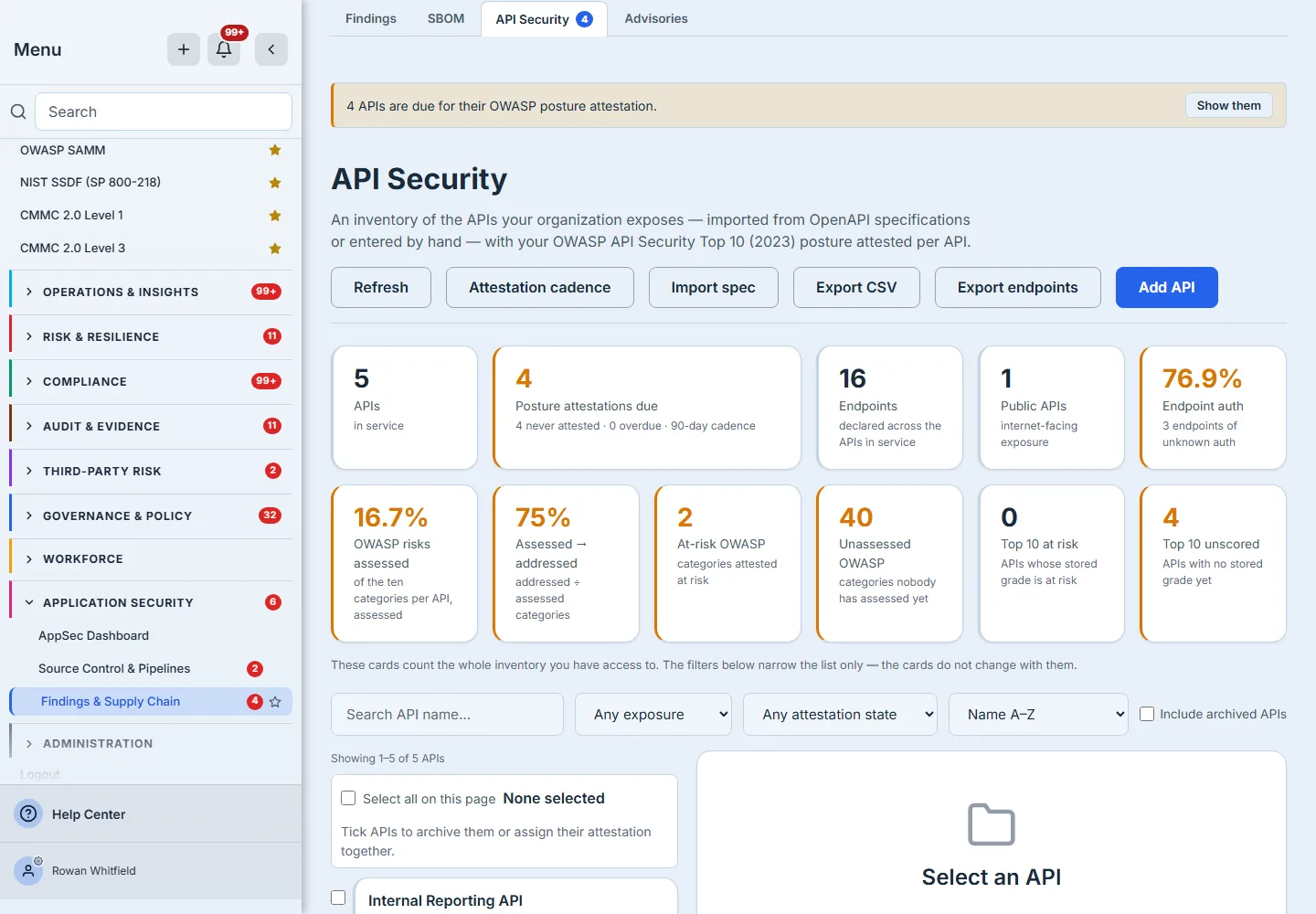
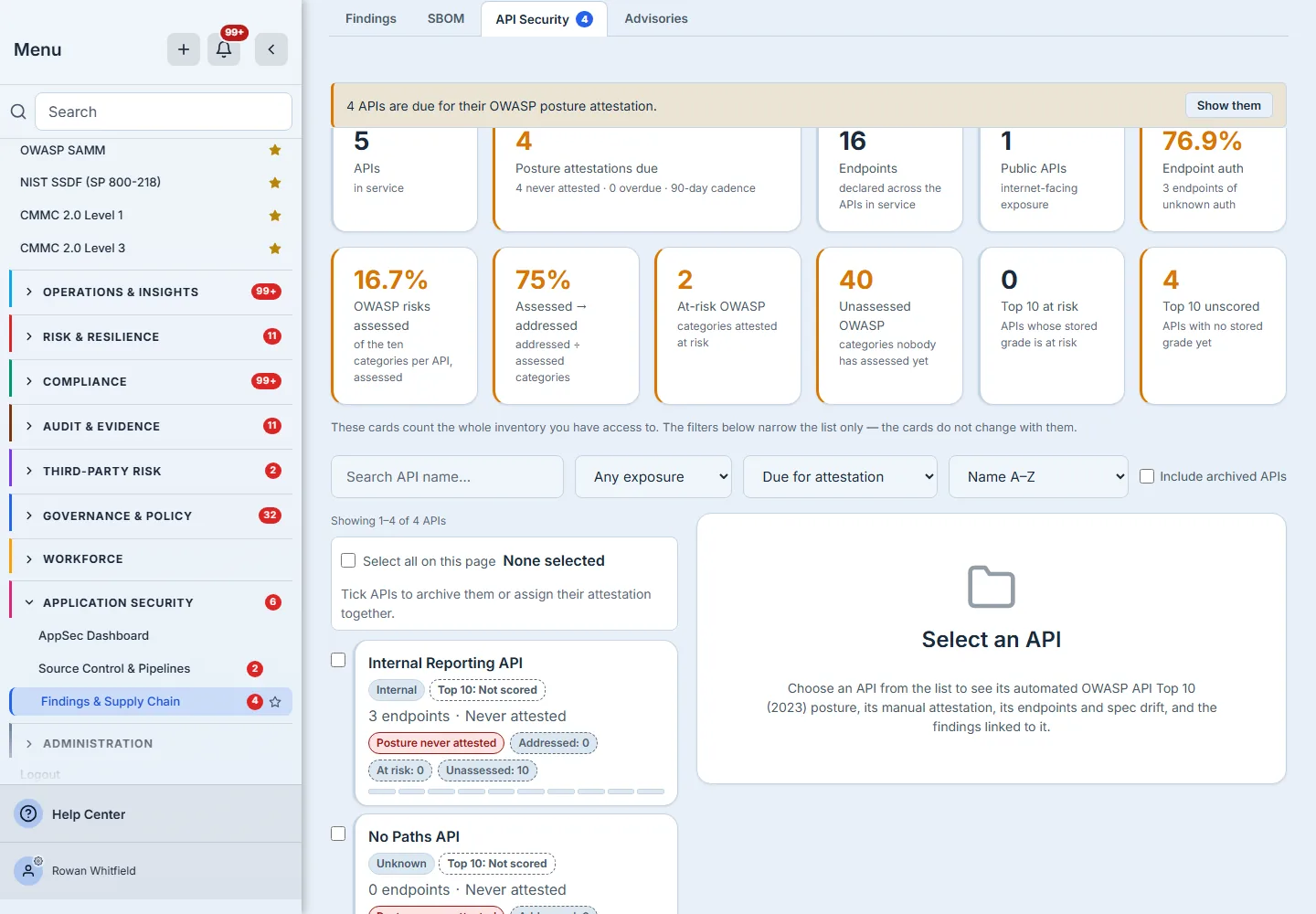
The register opens on every API you have access to, with the summary cards above it and the list below.
The distinction those two halves draw is what makes the page readable: the cards count the whole inventory; the filters below narrow only the list, and the page says so in its own words rather than leaving you to discover it. A page that quietly recomputes its headline figures every time someone types in a search box teaches its readers to distrust both.
Six actions sit on the header — Refresh, Attestation cadence, Import spec, Export CSV, Export endpoints and Add API. Add API is the hand-registration path for a service you know about before anyone has published a spec for it: it takes a name, an exposure, a data classification and an owner, and seeds the ten OWASP rows unassessed, exactly as an import does.
Step 2 — Import the spec, get the endpoints
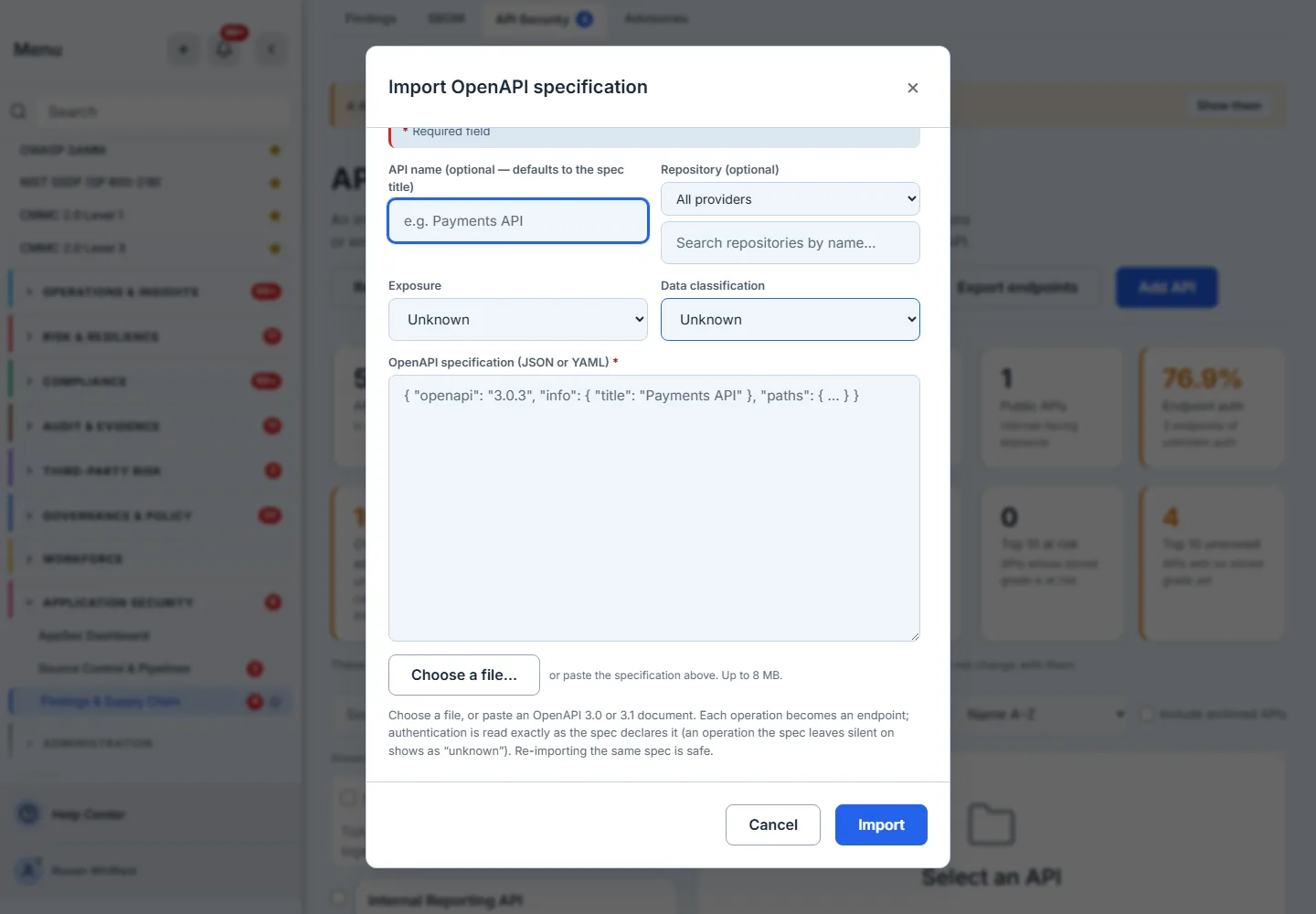
Import spec takes an OpenAPI 3.0 or 3.1 document, pasted or chosen from disk, up to 8MB. The import upserts the API, batch-inserts its endpoints, and seeds the ten OWASP API Top 10 rows at unassessed — so the manual attestation starts as an honest blank rather than an implied pass. Re-importing the same document is safe: it updates rather than duplicates.
A specification declaring no paths at all is refused, with the reason said out loud. That is not pedantry. A well-formed spec with an empty paths object imports silently as “an API with nothing in it”, and an API with no endpoints grades insufficient_data — a real state that would then be indistinguishable from a failed import. Operations the parser cannot use are reported back as a skipped-entry notice on the API rather than dropped quietly, for the same reason.
Step 3 — Read the endpoint table, and the three auth states
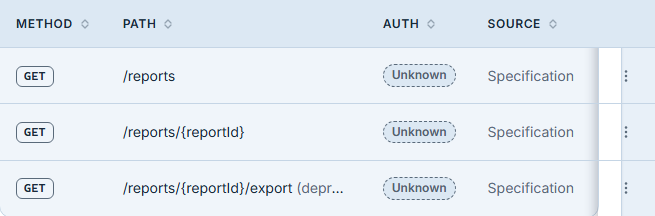
The endpoint table lists every path and method the spec declared, with the authentication position for each. It has three states, and the difference between two of them is the whole point.
- Required — the spec declares a security scheme for that operation.
- None — the spec explicitly declares the operation open. That is a decision somebody made and wrote down.
- Unknown — the spec declared no security at all for that operation. Not “we could not tell”, and not “unprotected”: an absence of documentation.
Unknown is deliberately never rendered as insecure, because an endpoint may well be protected by a gateway the spec says nothing about. What the page will not do is guess in the direction that looks better or the direction that looks worse, and it does not quietly fold the unknowns in either: the Endpoint auth card on the register counts Required against Required + None and reports the unknowns beside it as their own number, because a percentage over endpoints nobody has classified would be a made-up one.
All three travel into the CSV as three states, for the same reason — rendering the unknown as “None” in an export would turn an absence of information into a finding, in the artefact with the longest half-life.
Step 4 — The automated Top 10, and the grade that does not exist
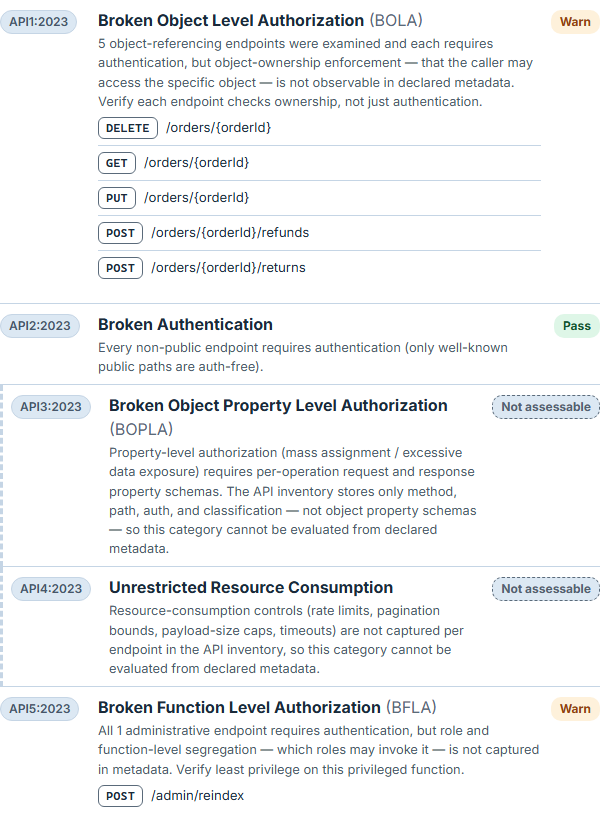
The engine evaluates the ten OWASP API Top 10 (2023) categories against the metadata your spec actually declares, and returns a verdict per category — including not assessable, with the reason stated.
That state is not a hedge. Four of the ten categories cannot be judged from a spec at all:
| Category | Why the spec cannot answer it |
|---|---|
| API3 Broken object property level authorization | needs request and response schemas, which the inventory does not store |
| API4 Unrestricted resource consumption | needs rate limits, pagination bounds and payload caps |
| API6 Unrestricted access to sensitive business flows | needs business-flow annotations and anti-automation signals |
| API10 Unsafe consumption of APIs | is about the APIs you consume, which this inventory does not track |
So the assessable ceiling is six, not ten.
The grade scale is a closed set of three, and the best one is “Needs review”
needs_review · at_risk · insufficient_data. There is deliberately no “good”.
That is not modesty, it is arithmetic. Of the six assessable categories, only three — API2, API8 and API9 — have a passing branch at all. API1, API5 and API7 top out at warn by design: object ownership, role-to-function segregation and SSRF parameter semantics are not observable in metadata, so the rule may say “authentication is present, ownership is unproven” and must never say “this is safe”.
A “good” grade required no fails, no warns, and at least five categories assessed. With no warns and no fails, assessed equals pass — and pass tops out at three, so the condition could not be met. An exhaustive sweep of the engine’s input space confirms it rather than assuming it: over every combination of paths, methods, authentication positions, exposures, classifications and spec states, the highest number of passes ever observed is three, the highest number of categories ever assessed is six, and the “good” condition is satisfied by nothing at all.
The tempting fix is to lower the threshold until “good” appears. That would have been the wrong one: it would manufacture exactly the all-clear the engine was correctly declining to give — three hygiene checks passed and seven categories unknown, reported as fine. The grade was removed from the vocabulary instead, and needs_review is the ceiling, which is the honest summary of what a spec file can prove about API security.
A fail or a warn, by contrast, is a real observed problem and is never suppressed behind a coverage floor. The engine is permitted to find things; it is not permitted to clear you.
Step 5 — Recompute to persist the position
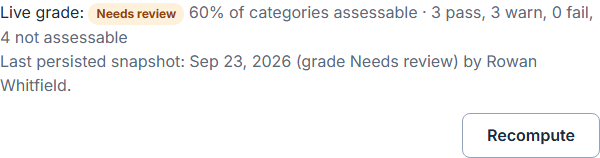
The automated grade is computed on demand; Recompute persists a snapshot. That matters because an auditor’s question is usually historical — what did this look like at the end of the quarter? — and a figure recomputed live cannot answer it. The snapshots are appended, not overwritten, and the panel head reports the most recent one with its date and the person who ran it. When the endpoints have changed since that snapshot was taken, the row carries a grade out of date marker rather than letting a stale grade pass as current.
The head is also where the article’s arithmetic meets the product: it states the share of categories that can be assessed at all, and the pass, warn, fail and not-assessable counts behind the grade.
Step 6 — Read the drift, in both directions
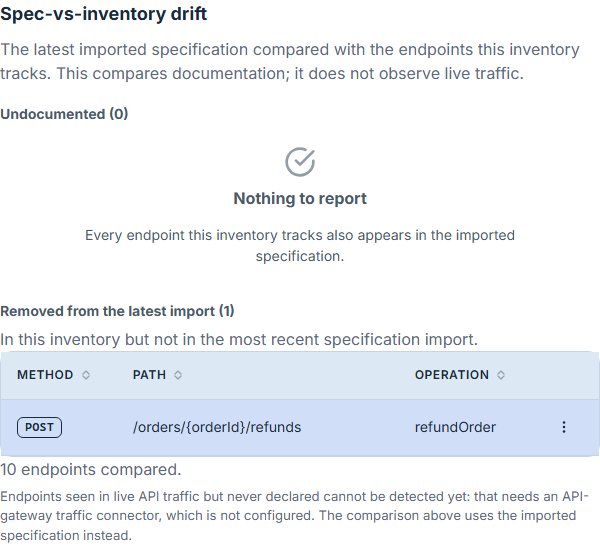
Spec-vs-inventory drift is reported as two distinct buckets, because they are two different problems:
- Undocumented — endpoints this inventory tracks that the imported specification does not declare. Something is being tracked that your published documentation does not describe.
- Removed from the latest import — endpoints in this inventory that the most recent import no longer declares. Either they are genuinely gone, or the spec is ahead of the deployment. Each row carries a Remove action, because retiring the endpoint is the one remedy that bucket has.
Collapsing those into one “drift” number would have made both unactionable. Each bucket renders its own count, and a bucket at zero says so in its own words rather than leaving you to infer it from silence.
What the page does not claim is live-traffic discovery. Comparing the spec against endpoints actually serving traffic needs a gateway integration this inventory does not have, and the page says so plainly rather than presenting an empty bucket as an all-clear.
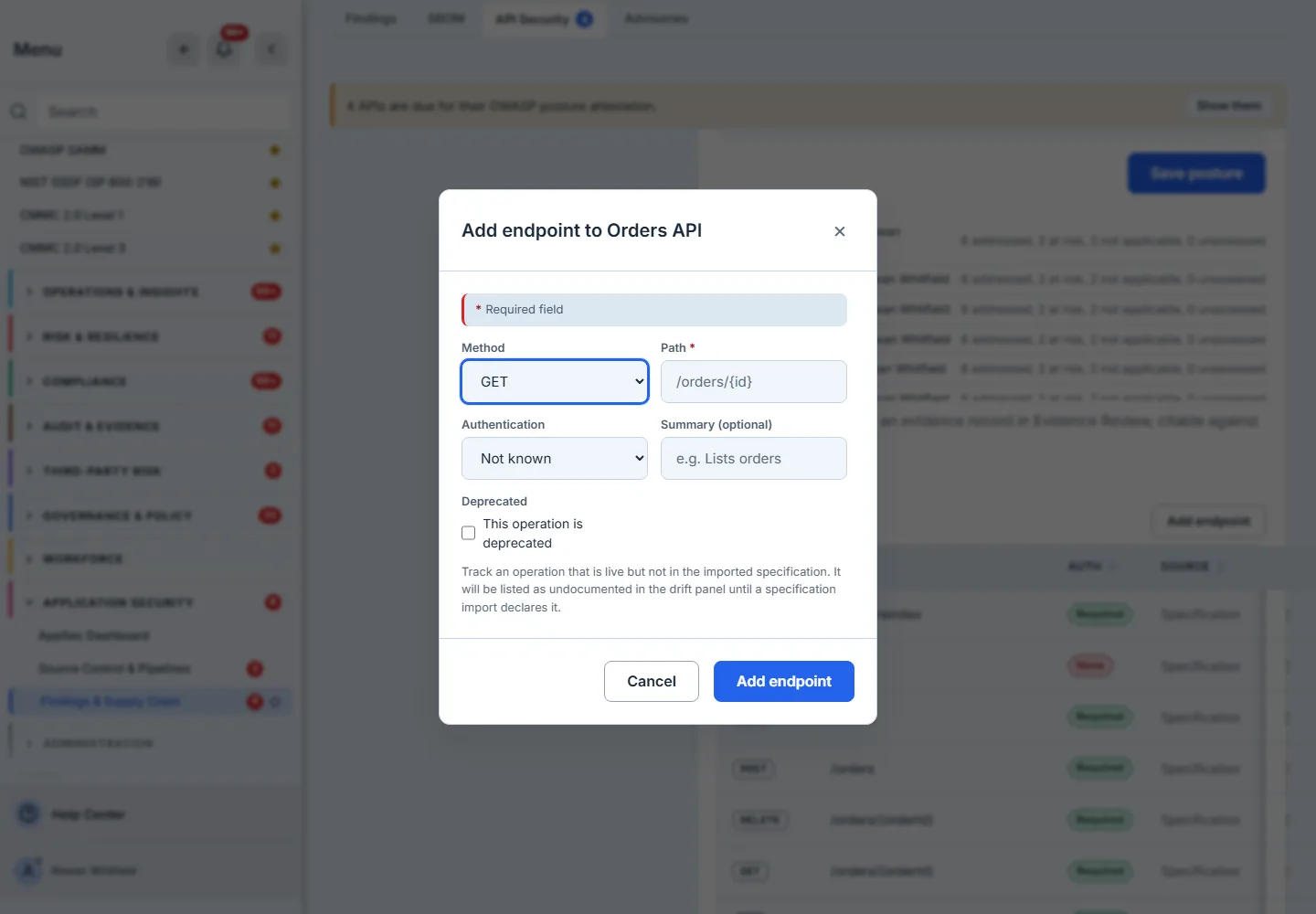
Step 7 — The endpoint the spec never declared
The Undocumented bucket exists because an endpoint can enter this inventory without coming from a specification. Add endpoint records one by hand, and it is stored with its provenance — the row remembers that a person put it there, not an import. Edit endpoint can correct the summary, the authentication position and the deprecation marker afterwards; it is the way a mis-declared auth flag gets fixed, which matters because that flag is what Step 4 grades.
What edit will not change is the provenance. A surface that let you re-label a hand-entered endpoint as “specified” would let a drift bucket be emptied by relabelling rather than by publishing, and the dialog refuses it by name rather than ignoring it.
It is also the honest half of a feature that could have been dishonest. A drift bucket with no way to fill it is a heading that is always empty and always reads as an all-clear — which is the shape this page spent a review round removing everywhere else.
Step 8 — The manual attestation, and why it is kept separate
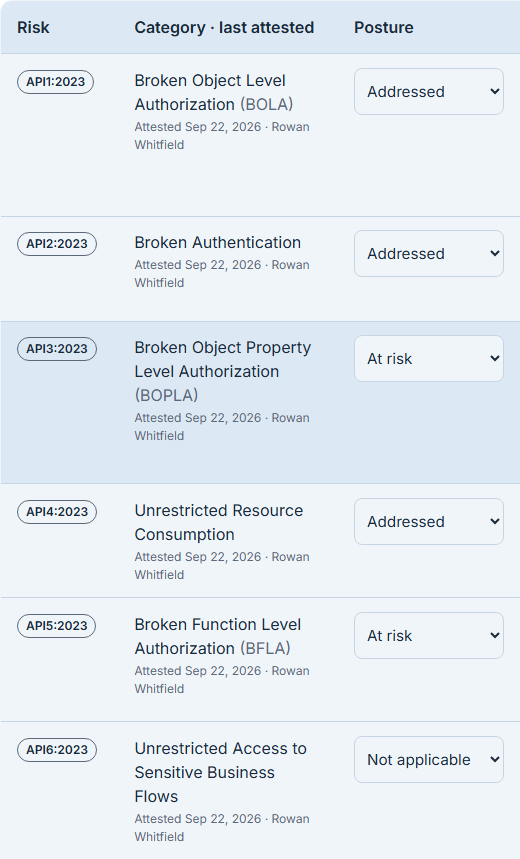
Beside the automated panel sits the manual OWASP attestation: the ten categories, each marked by a person as addressed, at risk, not applicable or unassessed, with a note, and each carrying the date and name of whoever last attested it.
These two pictures are never merged, and that is the design. The automated verdicts are what your spec declares; the attestation is what your team asserts after looking. A single blended score would let a clean spec paper over an unexamined category, which is precisely the failure the split exists to prevent.
Two cards report it, and the split between them is the point:
- OWASP risks assessed — how many applicable categories you have looked at at all. An unassessed category counts against you here. Silence is not a pass. Categories you have marked not applicable leave the denominator, because a category you have judged inapplicable is one you have looked at.
- Assessed → addressed — of the ones you did assess, how many came out addressed — and it says so in its own subtitle, because a high number there means nothing without the first card beside it.
An earlier single “coverage” percentage computed addressed over addressed-plus-at-risk, which quietly dropped unassessed categories from the denominator and could show a confident 100% to a team that had assessed one category out of ten.
An archived API is refused an attestation outright. It has left every coverage denominator and the reminder sweep by the product’s own definition, so a posture asserted against it would be an assertion about something the product says is not in service.
The matrix is floored at 700px inside a detail pane that is narrower than that on a 1440-wide screen, so it scrolls horizontally rather than compressing: ten rows of a legally meaningful record must stay reachable at any pane width. The frame below ends at the Posture column for that reason — the notes and the last-attested column sit to the right of it.
Step 9 — The history, and the evidence a save writes
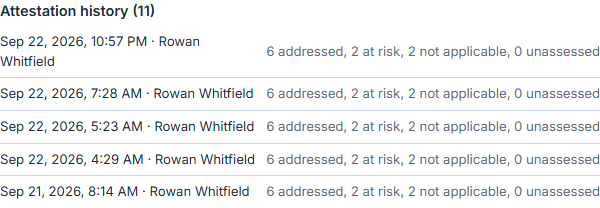
The posture table is overwritten on every save — it holds the current assertion. So a save that asserts something also writes one append-only evidence row carrying the full posture as asserted, with its provenance edge back to the API, and the history below the editor lists them newest first with a count.
That is the difference between a control picture and audit evidence. Without it, last quarter’s attestation survives nowhere an auditor can open; the only artefact is the current state, which is precisely the state the auditor is not asking about.
A save that asserts nothing writes no evidence row. Ten “not assessed” lines dated today would be a record of an event that did not happen.
Step 10 — How often it has to be said again
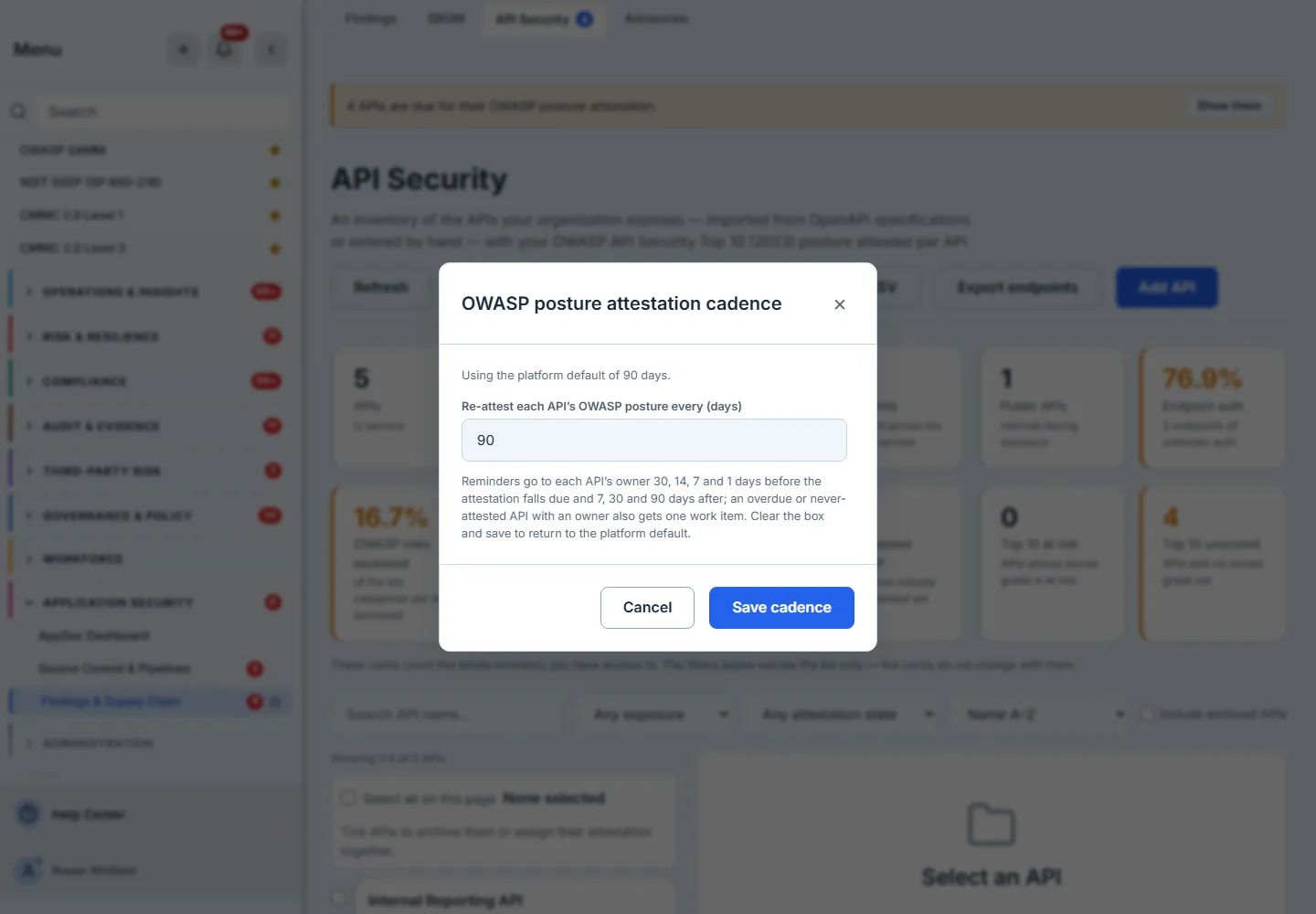
An attestation with no expiry is a one-off. Attestation cadence sets how often an API’s manual OWASP posture must be re-asserted, org-wide: a platform default of 90 days, overridable to any whole number of days from 1 to 3,650, and cleared back to the default by emptying the box and saving.
The dialog distinguishes using the platform default from your organisation has set, and it states the reminder ladder it drives rather than leaving you to discover it. A reader who cannot change the cadence can still open it and see it — an API owner needs to know the cadence they are held to whether or not they set it.
Step 11 — Who gets chased, and by what
A cadence that nothing enforces is a number in a settings dialog. This one drives four things, in order of how insistent they are:
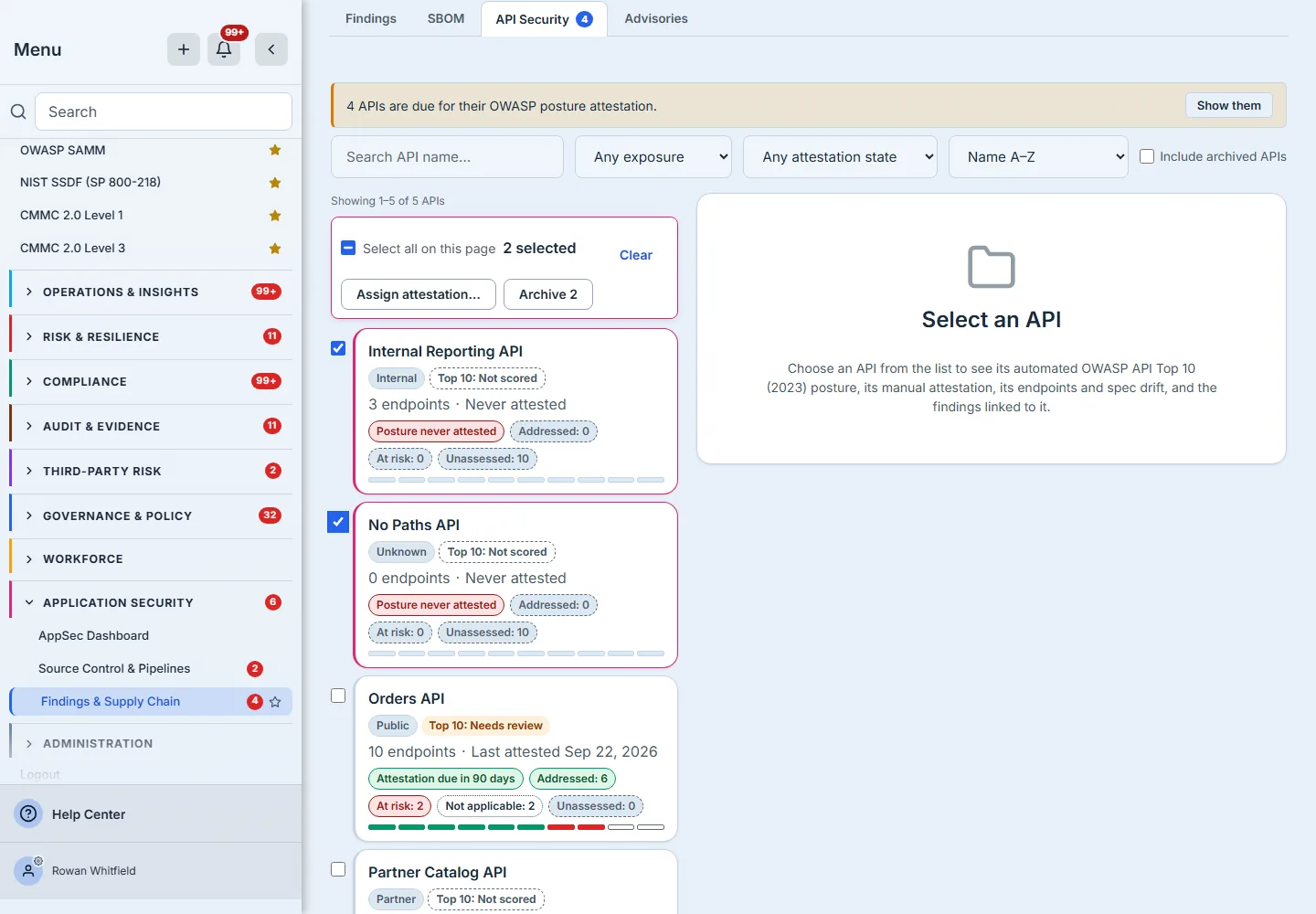
- The filter and the card. The register narrows to due, overdue, never attested or current, and the “Posture attestations due” card carries the never-attested and overdue counts with the cadence beside them.
- The nav badge, so the obligation is visible without opening the page.
- An in-app notification to the API’s owner, raised by a daily sweep at the points the cadence dialog names — 30, 14, 7 and 1 days before it falls due, then 7, 30 and 90 days after. An API that has never been attested is chased on how long it has been in the inventory instead, because there is no previous attestation to count an interval from.
- A work item, but only for an obligation actually missed — overdue, or never attested — and only where there is an owner to give it to. Attesting closes it; archiving the API cancels it.
All four need an owner, which is set on the API’s Edit dialog or handed out with Assign attestation — singly from the detail pane, or across a selection from the bulk bar. APIs that are due with no owner are counted and reported by the sweep rather than silently skipped, and the API’s own detail says so in as many words: no owner is named, so nobody is reminded when this falls due. A reminder system that drops the unassigned work is a reminder system that reports success.
Step 12 — Link the findings that belong to the API
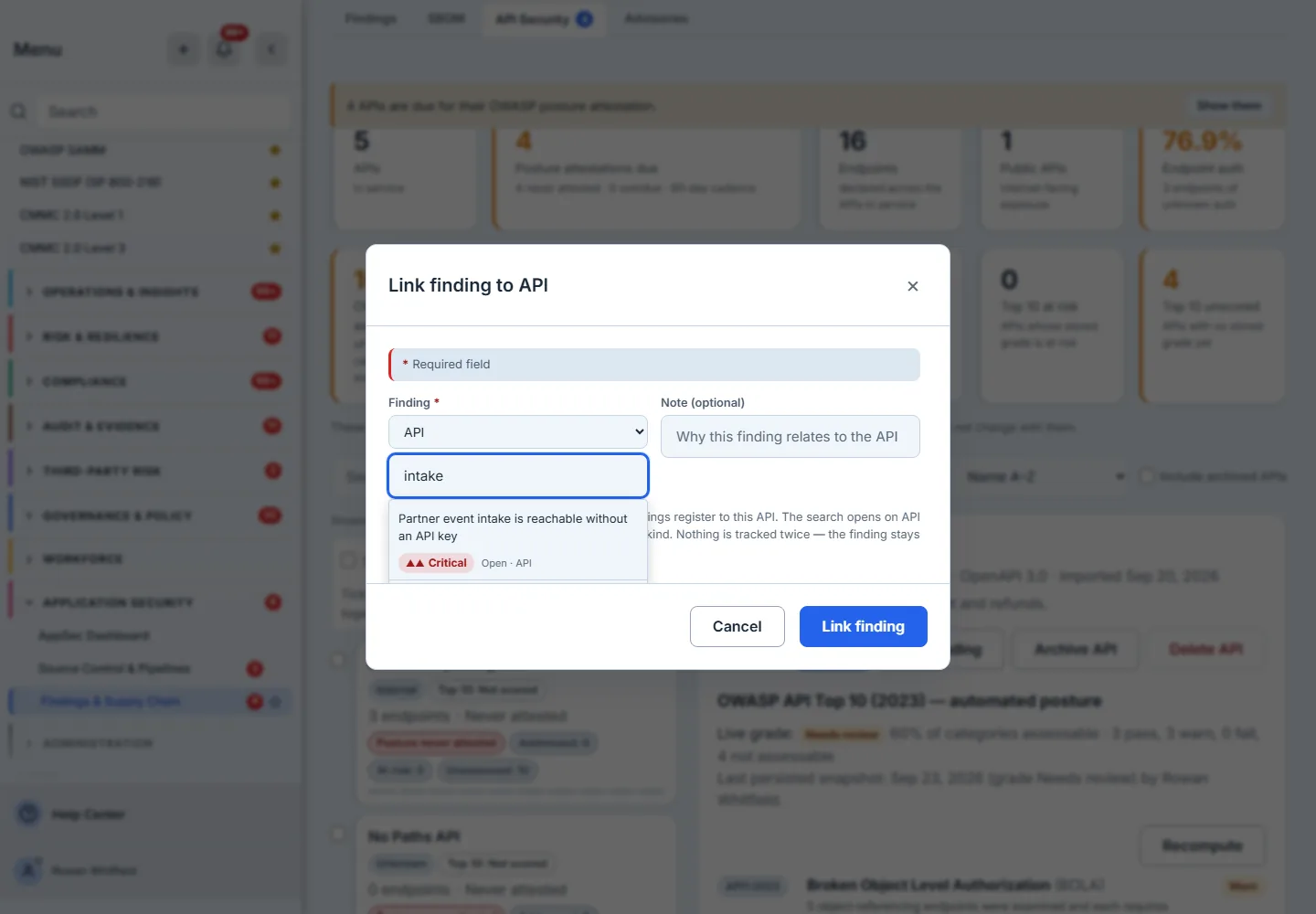
Link finding attaches a finding from the shared AppSec register to this API. The picker searches by title, package or file path, and opens filtered to the api finding class — but “All classes” is one selection away, because a container or secret finding can legitimately belong to an API and the backend imposes no class restriction. An optional note records why the finding relates to this API, which is the part worth having six months later.
An org with no findings at all is not left staring at an empty box: the picker says so and offers a link to the findings register, and a failed search says something different again, with a Retry. The two are distinguishable, which is the difference between a dead end and a starting point.
Step 13 — …and the edge is readable from both ends
A link you can only see from one end is half a link. The API’s detail lists the findings attached to it, with the severity and status they carry in the register and a deep link into it; the finding lists the APIs it affects. The same edge, read from whichever end you arrived at.
That matters because the two ends are reached by different people. Whoever triages the findings register is not usually whoever owns the API, and an edge visible only to the person who created it is an edge the other one will not know about. The link is removable from the API’s side, and an API is reachable from the app’s global search, so an inventory entry is not something you have to be on this page to find.
Beneath the findings sits Related items, which does the same job for the rest of the estate: the risks, controls, policies and incidents an API bears on, listed in both directions — what this API points at, and what points at it.

Step 14 — Retire what is no longer in service, and get the data out
Two things every inventory needs and most demos skip:
- Archive retires an API that is real but decommissioned — singly, or for a whole selection in one call rather than a loop. Archived APIs keep their endpoints, attestations, Top 10 snapshot and linked findings, and leave every coverage denominator, the reminder sweep and the badge. Without it, a service you turned off two years ago drags your posture figures down forever. Restore brings it back, and the register discloses how many archived APIs the default view is hiding, so a count never quietly reads as the whole history. Delete exists for the other case — an API nothing has ever been asserted about, usually a typo in a spec’s title — and it refuses anything else up front, naming Archive instead rather than inviting a press it already knows it will reject.
- Export produces two CSVs, because one row per API is not the inventory. Export CSV is the register — name, exposure, owner, last attested, grade and the OWASP rollup. Export endpoints is every operation of every API in scope, with the auth, deprecation and provenance metadata the rules actually grade. Both reuse the register’s own predicate rather than re-spelling it, so an export can never show you a set the page would not, and both carry the scope disclosures into the file.
The list itself is built for more than a demo’s worth: search, an exposure filter, an attestation-state filter, a sort that orders the whole inventory server-side rather than the page you are holding, and a pager that says which slice you are on.
Where this page stops, on purpose
- Triaging findings is the findings register. This page links them; it does not work them.
- The dashboard’s API section summarises this page — reading the AppSec dashboard covers that view; this article is the one that goes deeper.
- Live-traffic discovery is not here. Comparing your spec against what is actually serving needs a gateway integration, and the page says so rather than leaving an empty bucket to be read as an all-clear.
What you walk away with
An API surface under the same governance as the rest of your code: every endpoint inventoried from the spec you already publish, plus the ones you record by hand; an automated OWASP position over what that spec actually declares, persisted as dated snapshots rather than recomputed and lost; a manual attestation recorded beside it rather than blended into it, on a cadence that chases its owner and writes evidence an auditor can open; drift reported in both directions with a remedy on the row; findings and related records linked from the shared registers and visible from both ends; and a retirement path and two exports, so the numbers describe the services you actually run and can leave the product when somebody asks for them.
And a grading scale that will not tell you that you are fine. Needs review is the best grade this engine can give, because six of the ten categories are the most a spec can speak to and only three of those can ever pass. A tool that offered you “good” on that evidence would be telling you something it cannot know.