Every team knows their pipelines should scan for secrets, sign their builds, and protect their main branch. Far fewer can answer the question an auditor actually asks: prove it — for every pipeline, prove it was true last quarter, and prove somebody has looked since. The evidence is scattered across CI settings pages, screenshots in a shared drive, and someone’s memory.
Talarity’s Pipelines page is an inventory of your build pipelines and their security posture — one record per pipeline, tied to the repository it builds — secret scanning, signed builds, branch protection, required reviews, and SLSA build level — captured as append-only, point-in-time attestations on a cadence you set. It is an honest attestation model, not a live scanner: you record the controls you have observed, every save writes a new dated attestation, and the register keeps track of which pipelines are overdue for another look.
The register at a glance
Open Application Security → Source Control & Pipelines, on the Pipelines tab. Six cards answer the leadership questions immediately: how many active pipelines you track, and what share of them have secret scanning enabled, signed builds enforced, branch protection enforced, and a SLSA build level of 2 or higher — plus how many carry any SLSA attestation at all.
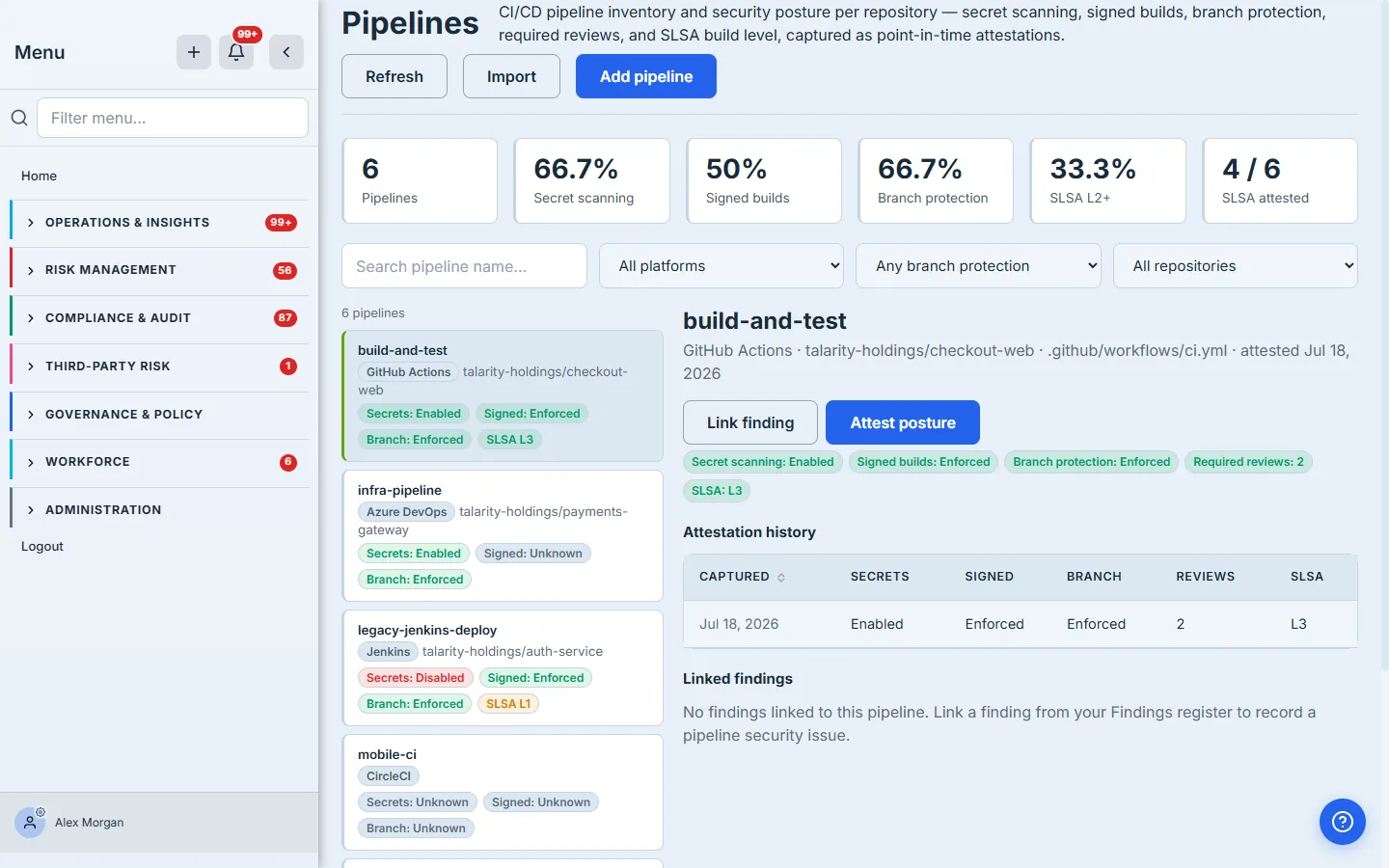
Every card names its own divisor, and the note beneath them says plainly what is being counted. That matters more than it sounds, because the cards are honest about the unknown in the direction that costs you rather than flatters you: every percentage divides by the total number of active pipelines, so a pipeline you have not yet assessed counts against the score exactly as a failing one does. Silence is not a pass. Two of the four pipelines here have never been attested, which is why every percentage reads “2 unknown” beside it — and why none of them can reach 100% by ignoring the gaps. A metric with nothing at all to measure reads ”—”, never a fake zero.
The filters narrow the list only; the cards do not move with them, so a filtered view can never make your coverage look better than it is. Selecting a card does the opposite of filtering — it lists the pipelines that card is counting against.
One practical note, because the frame above shows it: on a 1440×900 laptop the six cards, the scope note and the two-row filter toolbar fill the screen, and the pipeline list starts just below the fold. Scroll once and the register is there — the cards are the summary, and the list is what you came to work in.
If your organisation has linked accounts, your view of this page may be narrowed to the ones you can see, and a band under the header says so. When it is there, every figure below it means “of the accounts you can see” — and when it is absent, nothing is being withheld.
Record a pipeline and only what you’ve observed
Click Add pipeline. Give it a name, pick the platform, choose the repository it builds by name — optional, but it is what ties the pipeline into your repository inventory — and record the controls you have actually confirmed: secret scanning, signed builds, branch protection, required reviews, and SLSA build level. Anything you leave as unknown is exactly that; the platform never assumes a control is in place, and the modal says so.
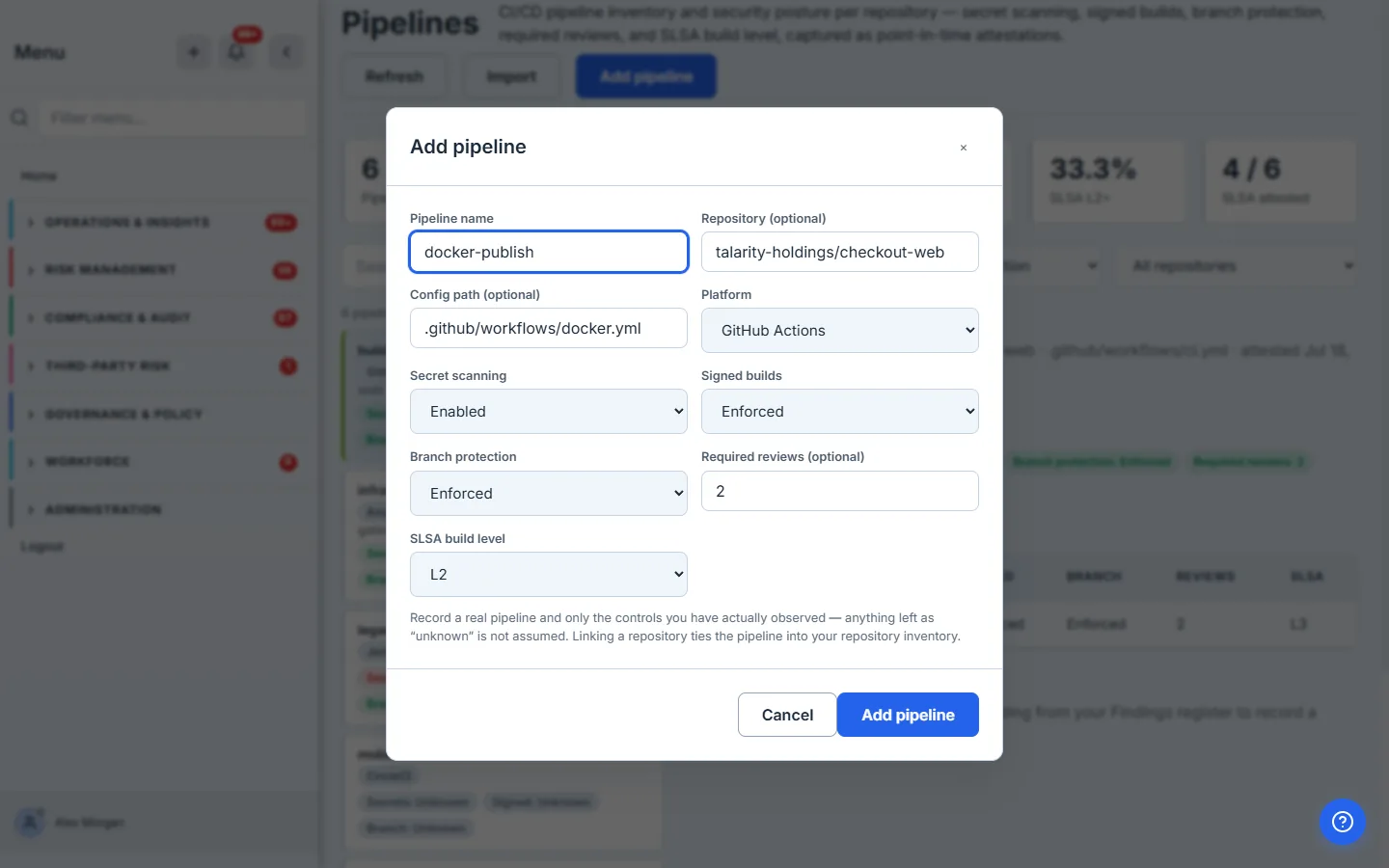
Recording a pipeline with any control state set writes its first attestation at the same time, so its history starts from day one.
Set the cadence — because posture rots quietly
An inventory tells you what you believed once; a cadence is what tells you whether anyone has looked since. Click Attestation cadence and set the interval at which every pipeline’s controls must be re-attested; leave it blank to use the platform default of 90 days.
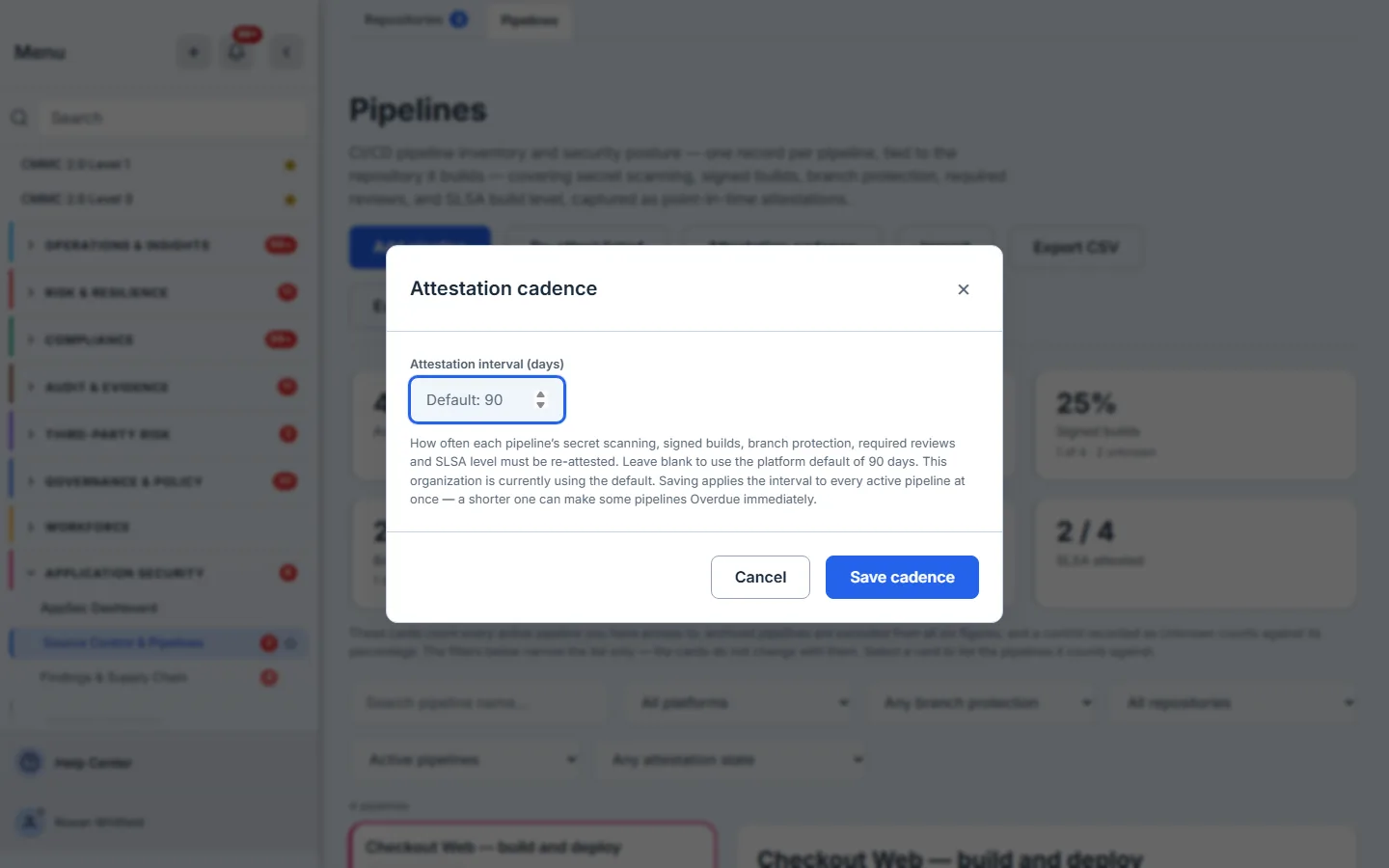
The dialog is explicit that the interval applies to every active pipeline at once, and that shortening it can turn pipelines Overdue immediately. That is the right warning to give before the button rather than after it. Once a cadence exists, the register can answer a question no inventory can: what is late? The Any attestation state filter offers Due, Overdue, Never attested and Current, and pipelines that have never been attested carry a Never attested badge on the card itself.
Be clear about what that does and does not do. The register reports what is overdue whenever somebody opens it or filters for it; it does not chase anyone. A pipeline has no assigned owner here, no reminder goes out when its interval lapses, and nothing lands in anybody’s work queue — so the cadence is a standing question the register will always answer, and asking it stays a human’s job. If you want it asked on a schedule, put the Overdue filter in somebody’s calendar.
The attestation trail — posture over time, not just today
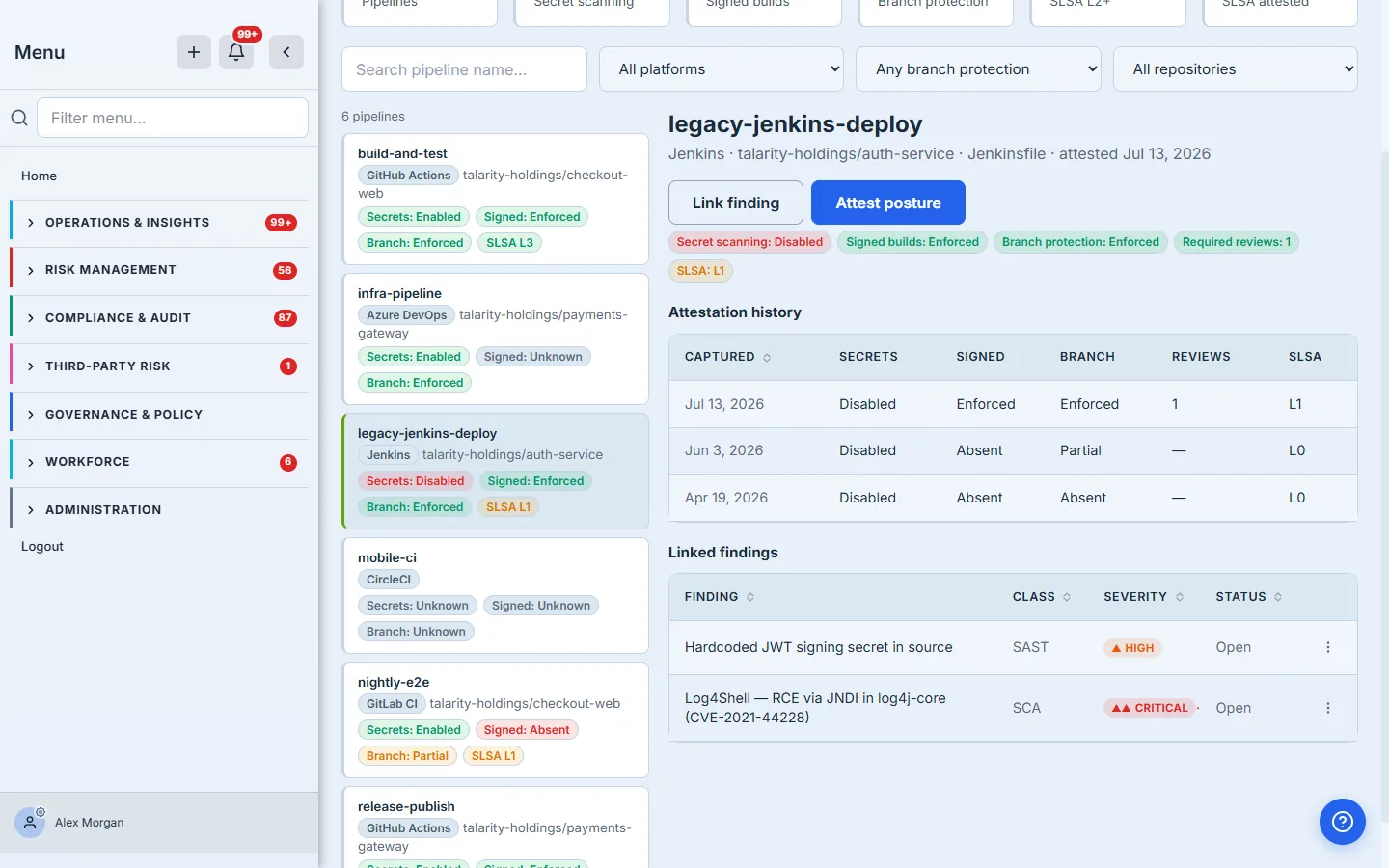
This is what separates an inventory from an audit record. Every save appends a new point-in-time attestation rather than overwriting the last one, and the result is a dated trail you can hand an auditor.
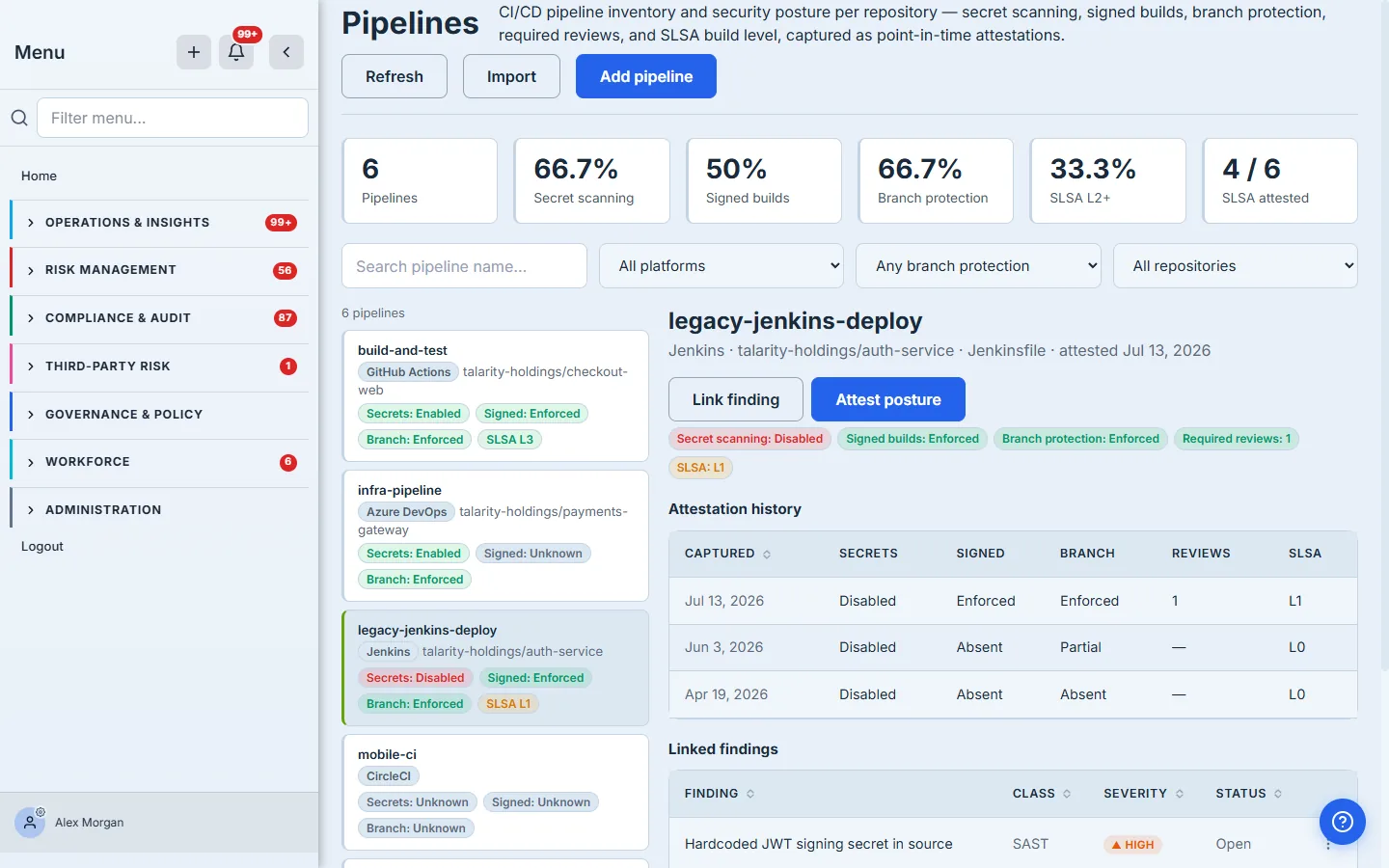
Read those two rows carefully, because between them they carry the whole model. On 18 September someone recorded this pipeline’s five controls. On 20 September someone looked again and nothing had changed — and the trail says so, in those words, rather than leaving a second identical row that reads like a change. Each date carries the name of the person who stood behind it, directly beneath it: an attestation is a claim somebody made, and a claim with no claimant is worth very little to an auditor.
Re-attest as the posture changes — and when it doesn’t
When a control changes — you turn on secret scanning, raise the SLSA level, enforce required reviews — click Attest posture. The form is pre-filled with the pipeline’s current controls, it names the pipeline it is about to attest, and it states both of the rules that decide what gets written.
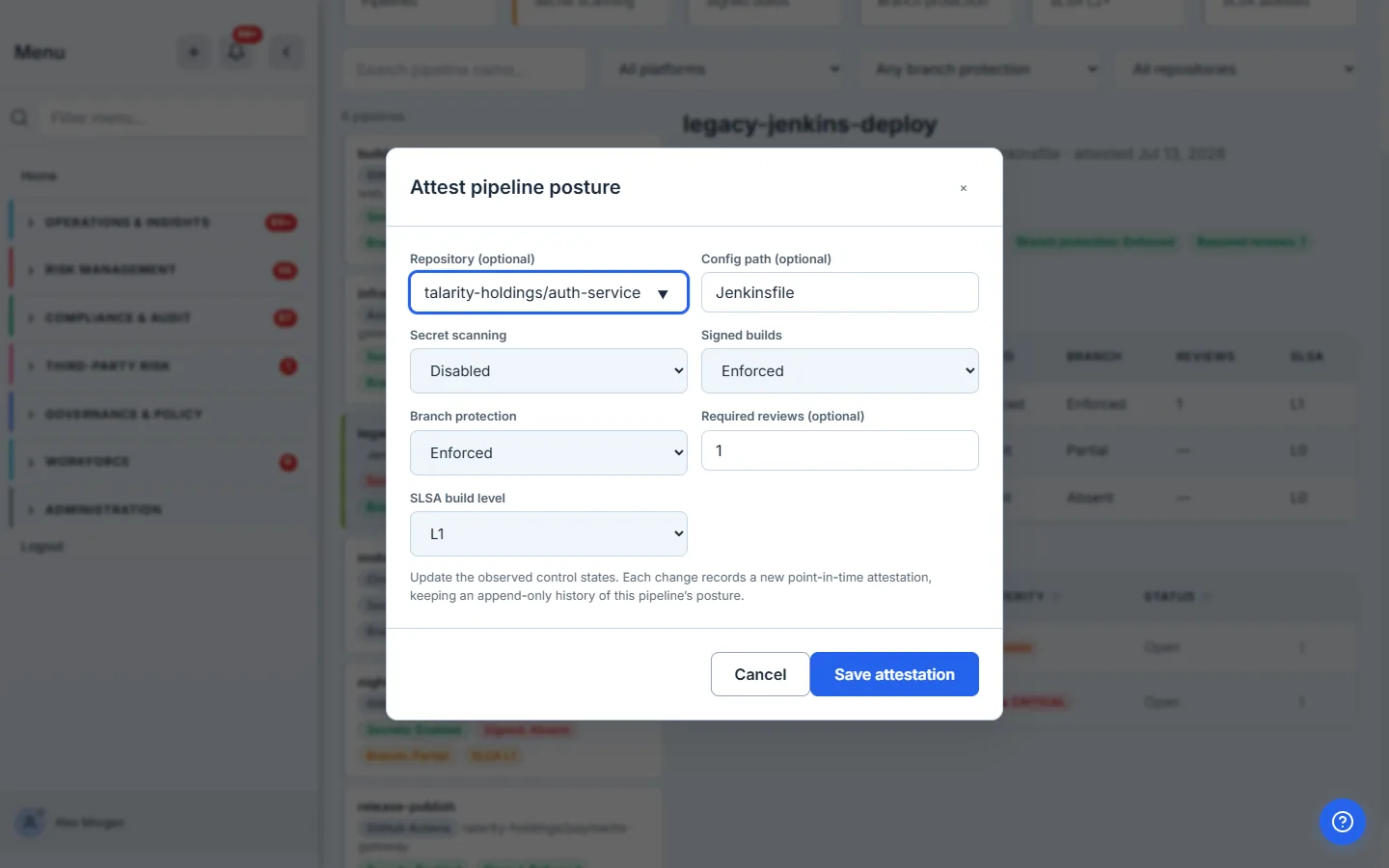
The two rules are worth stating plainly, because the intuitive guess is wrong about one of them:
- A save that changes nothing still records. “I looked on this date and it is still enforced” is exactly what an auditor asks for, so it is written down — flagged as a reaffirmation, and rendered as Reviewed — no change.
- A save that leaves every control Unknown records nothing. Asserting nothing is not an assertion, so it writes no attestation and moves no deadline.
The distinction is not pedantry; getting it wrong breaks the cadence. If only a change counted, a pipeline whose controls are correct and never move could never satisfy its own interval — it would go Overdue on day 91 and stay Overdue for ever, however diligently anyone reviewed it, because diligence produced nothing to record. The better-run the pipeline, the more permanently delinquent it would look. Separating reaffirming from asserting nothing is what fixes that, and the two bullets above are the two halves of that separation.
Re-attest a whole list at once
A cadence you can only satisfy one pipeline at a time is a cadence nobody keeps. Re-attest listed records a review against every pipeline in the current filtered list — never the whole register, because “re-attest all” would be an assertion about pipelines nobody looked at.
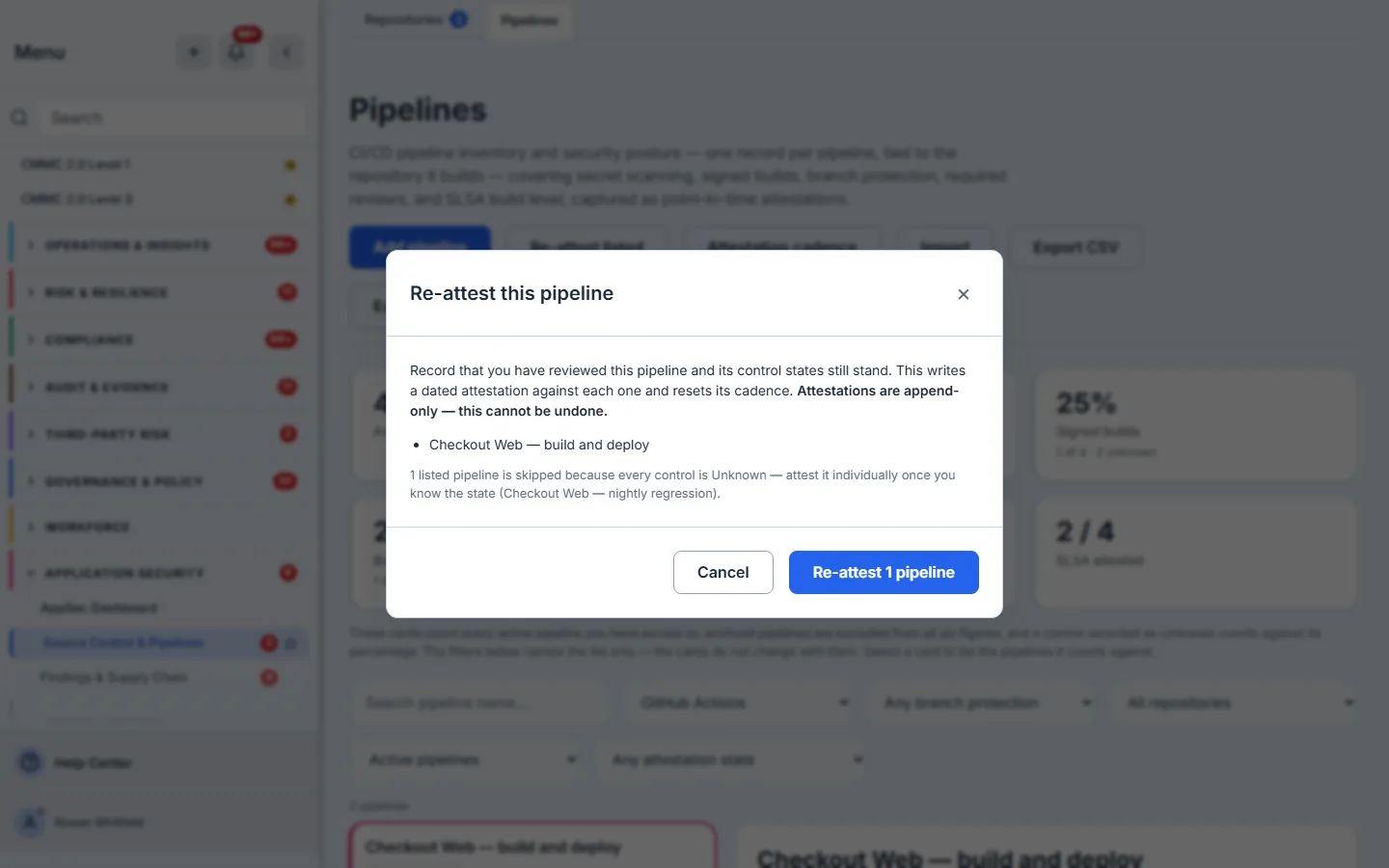
Read the numbers across that frame, because they are the whole argument. The register holds four pipelines; the GitHub Actions filter narrows the list to two; the dialog offers to re-attest one, and says plainly that it is skipping the other because every one of its controls is Unknown — naming it. A pipeline nobody has ever attested has only Unknown to reaffirm, and a bulk reaffirmation of Unknown would assert nothing at all, so it needs a first, individual attestation from somebody who has actually looked. And the count follows the list in front of you, never the register: narrowing first is how you keep a bulk attestation to the pipelines you genuinely reviewed.
Pipeline issues are findings — not a second backlog
A pipeline’s security problems belong in the same register your scanners already feed. Click Link finding and pick an existing finding by title from your AppSec findings register — nothing is tracked twice, and there is no parallel pipeline-issue list to keep in sync.
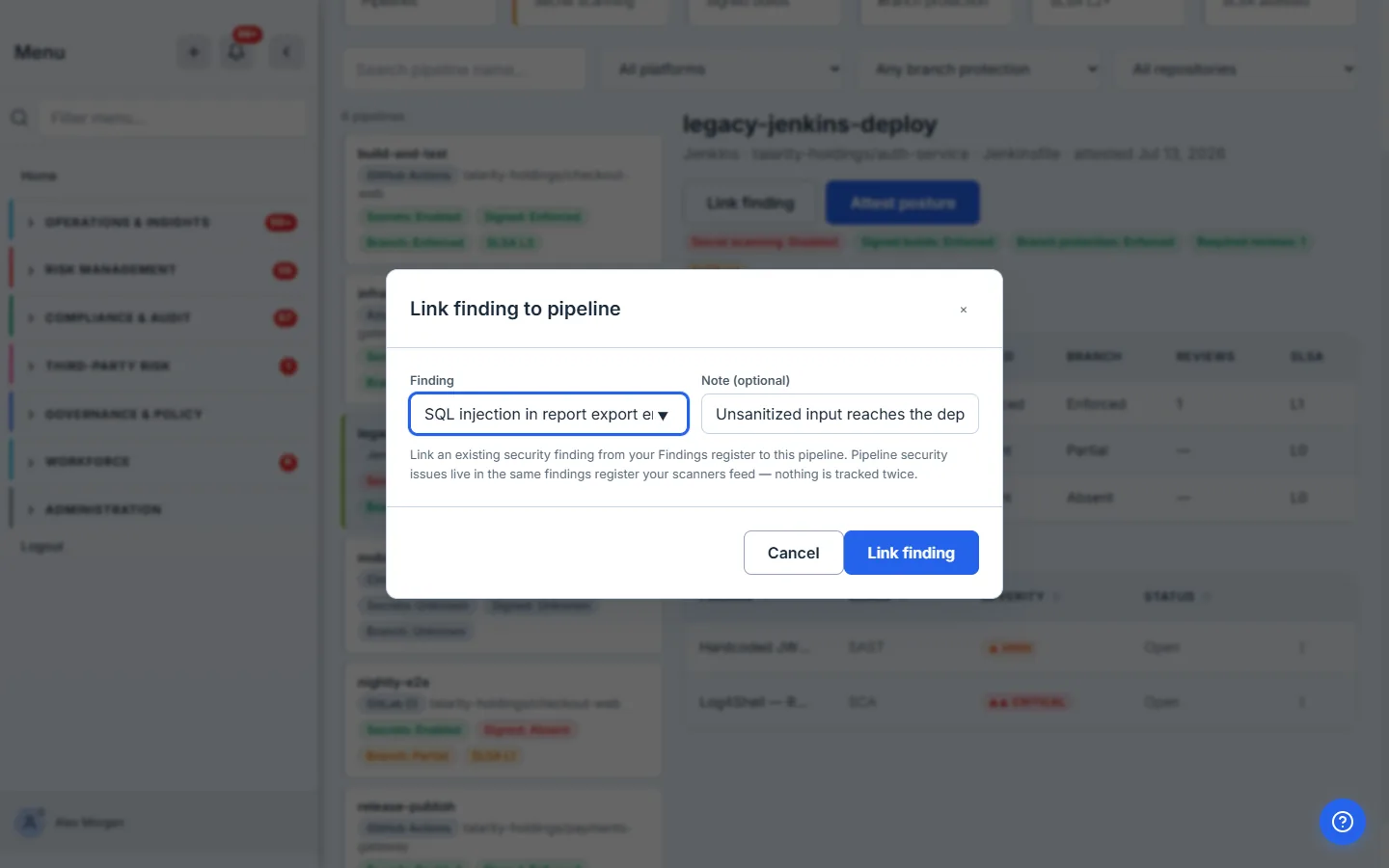
The linked findings then show inline on the pipeline, each with its class, severity and status, opening into the finding itself — and a row action to unlink if you correlated the wrong one.
Import an inventory you already have
You do not have to enter pipelines one at a time. Click Import and paste a JSON array exported from your CI provider or a maintained inventory, or choose a file. Each row needs a name and platform; control states default to unknown, and up to 2,000 pipelines come in per import.
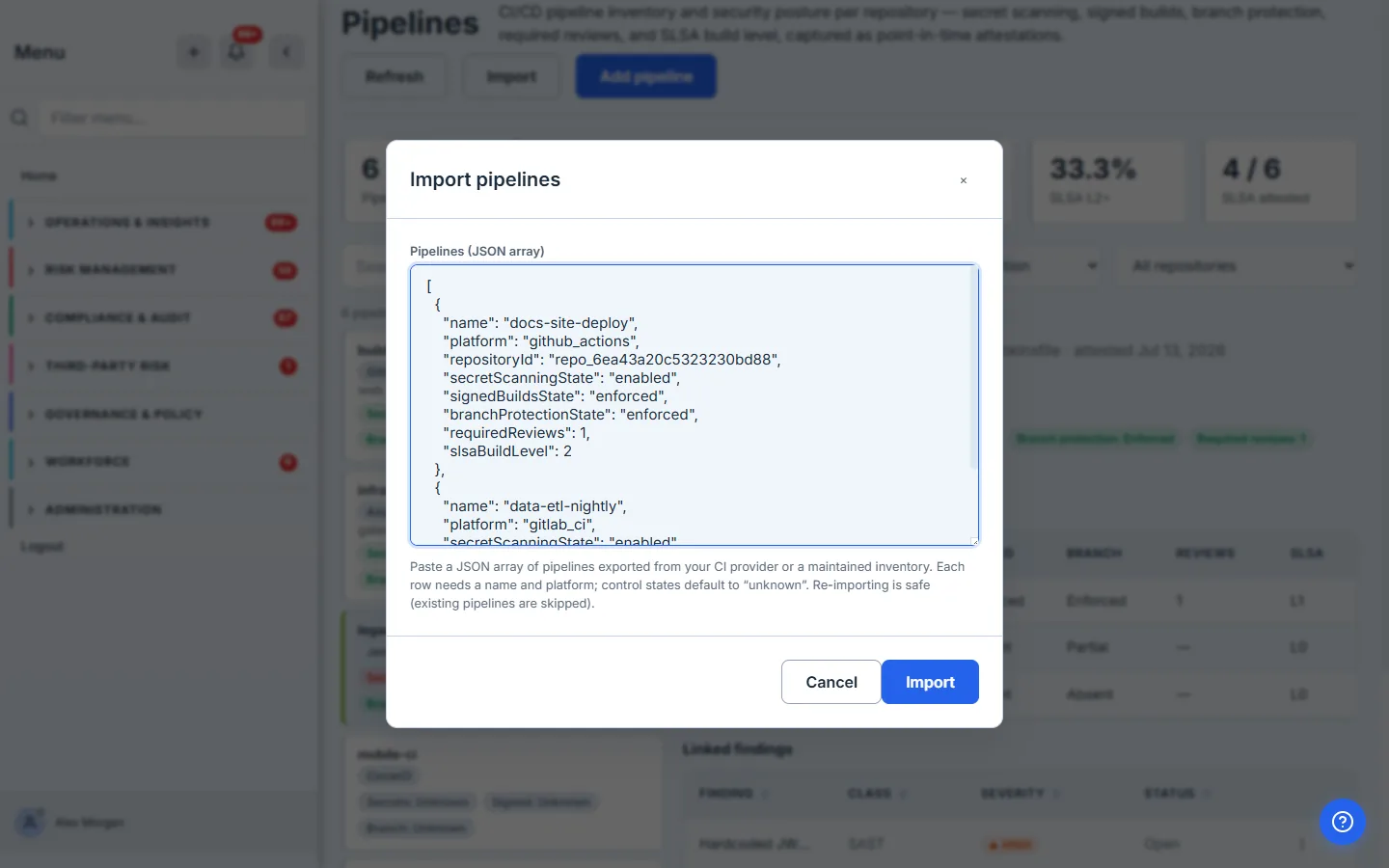
Re-import to re-sync: a pipeline you already have is updated in place from the row you supply, and any control you send as unknown leaves the state you attested by hand alone — so a partial inventory export can never erase what a person actually observed. Archived pipelines are never updated by an import; restore one first if it is back in service.
Find the pipelines that matter
A real estate of pipelines needs to narrow fast — by name, by platform, by branch-protection posture, by repository, by archived state, or by what is overdue. Filter by platform to scope a review to one CI system; because that filter is also readable from the address (?platform=…), the AppSec Dashboard’s by-platform bars open this page already narrowed.
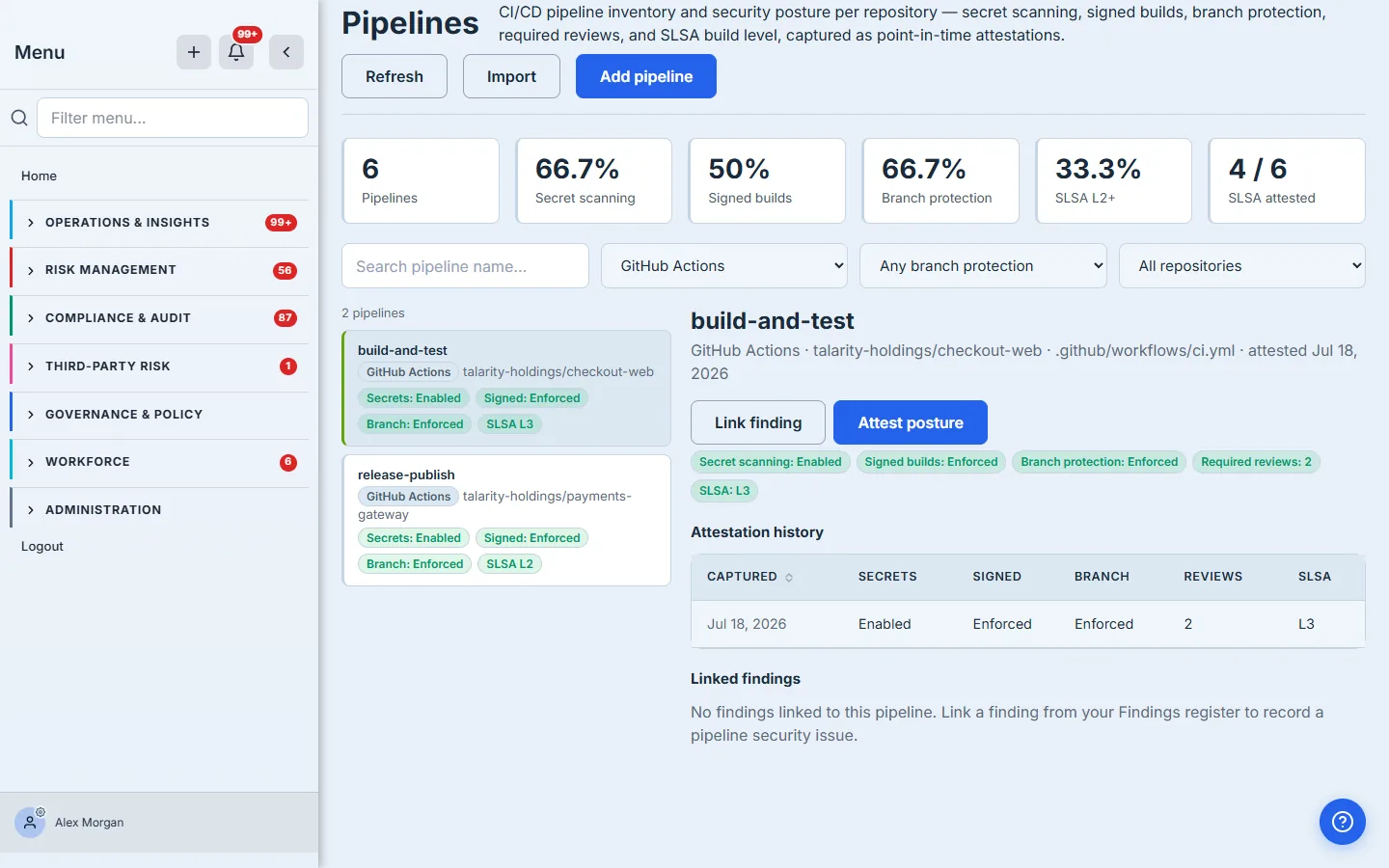
…or filter by branch protection to run posture-gap triage — pull the pipelines whose main branch is only partially protected, which is the state that looks safe on a dashboard and is not.
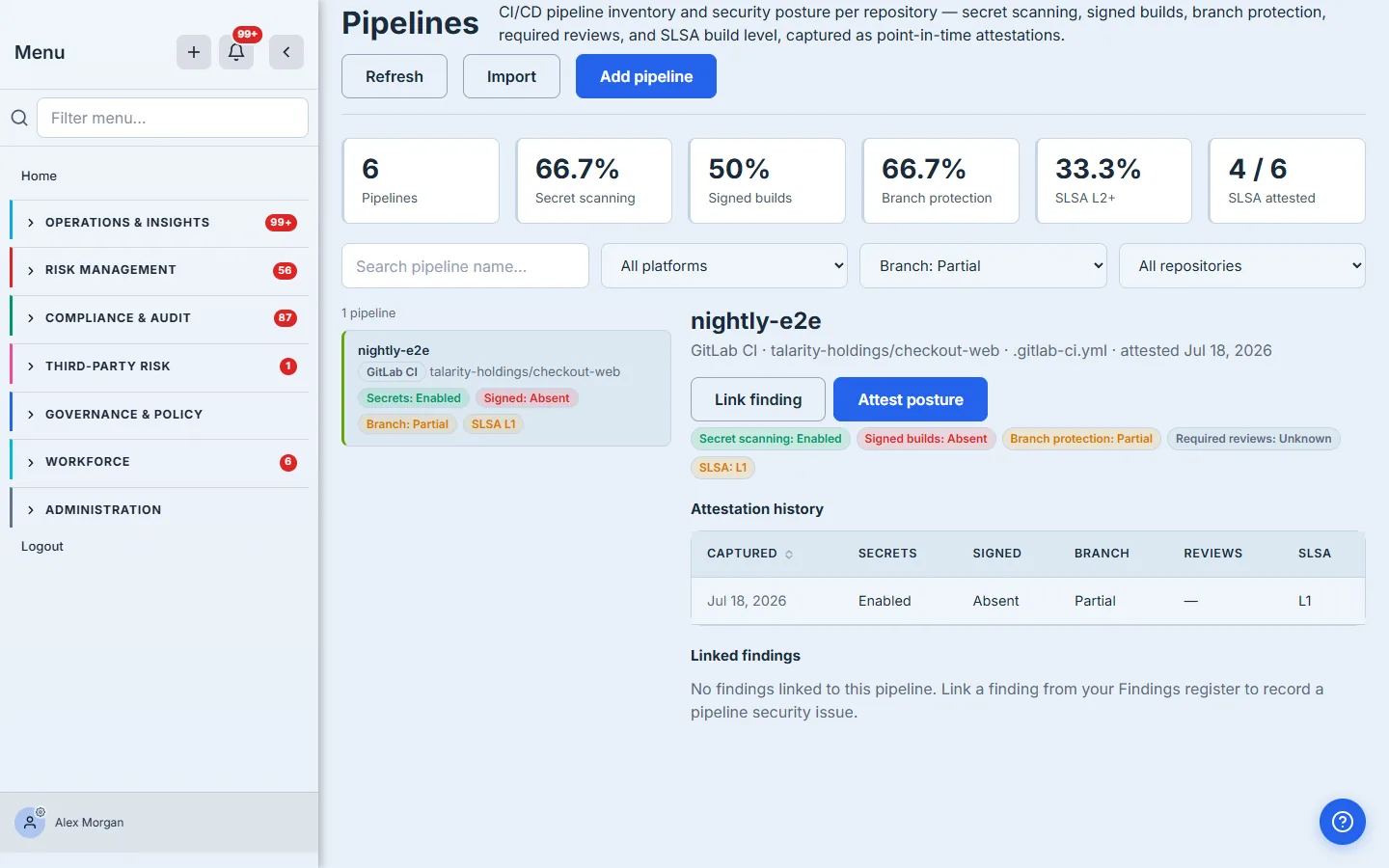
Retire what you have decommissioned
Coverage that divides by the total has one hard requirement: you must be able to take a pipeline out of the total honestly. A mistyped or decommissioned pipeline that cannot be retired drags on every percentage for ever. Archive is that escape hatch, and the confirmation says exactly what it costs.
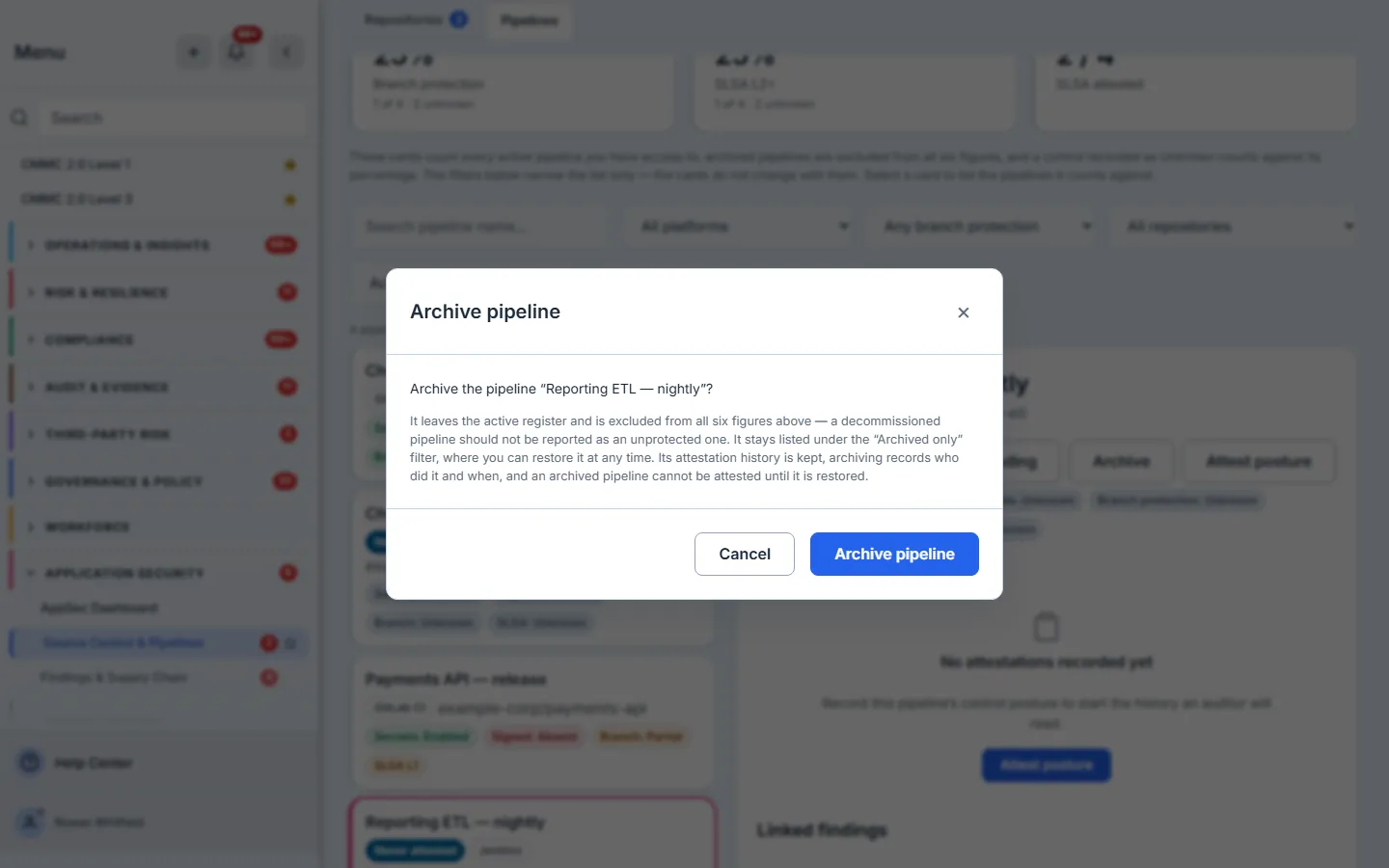
The example is deliberate: Reporting ETL — nightly has never been attested, so every one of its controls is Unknown and it is dragging four of the six figures down without telling anyone anything. Retiring it is the case this section is about — and note that retiring a pipeline you had hardened would move those figures the other way, which is why archive is for decommissioning rather than for tidying a score.
Note what archiving does not do: it does not delete the trail. The attestations a pipeline accumulated while it was in service stay exactly where they are, because “we decommissioned it” is not a reason an auditor stops asking what it did last year.
Getting it out again
Two exports sit in the header, and both are reads, so an auditor with view-only access can take them. Export CSV gives you the register’s current state — every pipeline, its platform, repository and five control states. Export attestation trail gives you the history itself, which is the one that answers “prove it was true last quarter”, and it is also how you read past the 100 most recent attestations the detail pane shows.
What you walk away with
A pipeline-by-pipeline inventory where every security control is an attested, dated fact — not a claim — and where the register itself tracks whether anyone has looked lately. The coverage cards answer “how hardened is our build estate?” without letting the unassessed hide; the attestation trail answers “prove it, and prove it last quarter, and prove who said so”; the cadence turns that from a one-off audit into a programme; and a pipeline’s real security issues live in the same findings register as everything else your scanners surface.
Posture maps to the standards auditors reference: SLSA v1.0 Build track levels 0–3 — Level 2 is where provenance is generated and signed by a hosted build platform, so it cannot be altered after the build; SLSA reserves non-forgeable provenance for Level 3 — branch-protection and required-review change-management controls (SOC 2 CC8.1), secret scanning, and signed-build provenance, the supply-chain integrity practices that Executive Order 14028 put on every software vendor’s roadmap.
Talarity is honest about the boundary, and it is a real one: this posture is attested, not live-scanned, and no signature is cryptographically verified here. A pipeline recorded at SLSA L2 is one your team has asserted reaches L2 — the register’s job is to make that assertion dated, attributed, append-only and hard to let go stale, which is a different and more auditable thing than a scan.