A test procedure is a small, unglamorous document: pull this population, inspect these attributes, here is what a pass looks like. Writing the first one is easy. Writing forty is a quarter’s work that most teams do once, well, and then never revisit — and that is where the trouble starts, because a procedure is a claim about a control, and controls move.
The failure is quiet by construction. Nothing breaks when a procedure goes stale. The tester opens it, follows it, and records a result. The steps still make sense; they are just answering a question about a system that was decommissioned, an approval chain that was reorganised, or an access review that moved from quarterly to continuous. The test passes. The workpaper looks clean. The only signal that anything is wrong is the absence of a signal — nobody asked, in the last two years, whether this procedure was still the right one.
That is a different problem from “we need a procedures library”, and it is the reason the library alone does not solve it. A shared library fixes consistency: two testers evaluating the same control now do the same work, and their results are comparable. It does nothing about currency. A library of forty procedures with no owners and no review dates is forty documents that are all, silently, somebody’s problem and therefore nobody’s.
The Test Procedures Library (/app/grc/test-procedures) is built around that second problem. Each
procedure carries an owner and a review cadence, the library reports how many are due and how many
are overdue, and the owners get told before the date passes rather than after. This article walks
through writing one, and pays particular attention to the three fields most teams skip.
What a procedure actually is here
A procedure is a named, numbered, versioned set of steps with an expected result for each step, plus the metadata that says where it applies: a category (design testing, effectiveness testing, or both), a procedure type (inquiry, observation, inspection, reperformance, walkthrough, or documentation), the control types it suits, and an estimated duration.
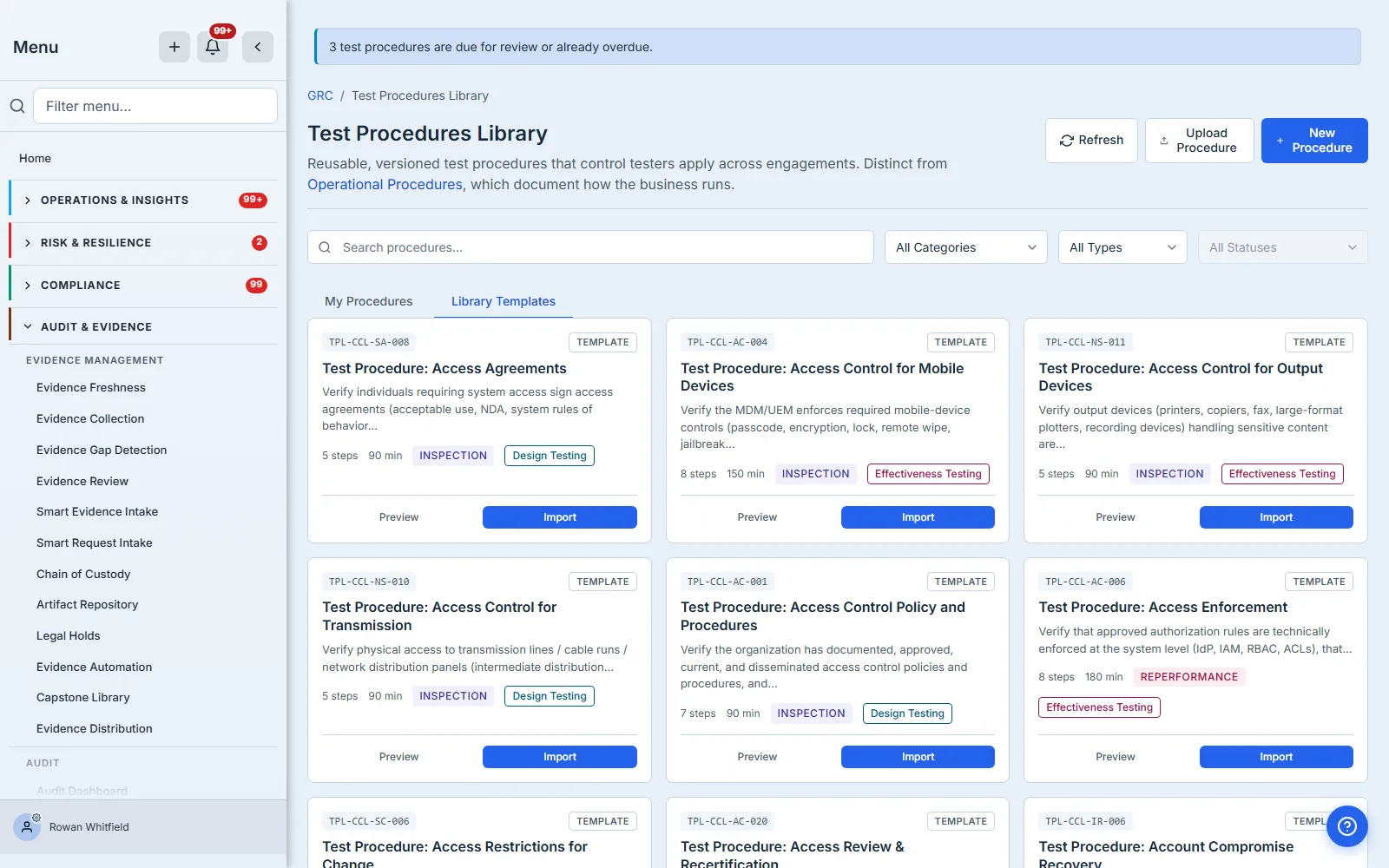
Two tabs organise the page. My Procedures is what your organisation has written or adopted. Library Templates is the platform-provided set you can import from and then edit freely — an imported template becomes yours, with your numbering, and diverges from the original the moment you change it.
The distinction that trips people up is category versus type. Category is what question the procedure answers: does the control exist and is it designed to work (design testing), or did it actually operate over the period (effectiveness testing)? Type is how you answer it. An access review can be tested by inspection (read the completed review), by reperformance (independently re-derive the entitlement list and compare), or by inquiry (ask the reviewer what they did) — and those three produce very different grades of evidence for the same control.
Two ways in, and when to use each
Not every procedure needs authoring from a blank form, and one of them should not be authored at all.
Import from a template is the fastest honest start. The Library Templates tab carries a platform-provided procedure for every control in the canonical control library — several hundred of them, one per control, from access review and recertification through change restrictions to account management. Each arrives with its own steps and expected results already written, typically five to eight steps, hand-authored per control rather than generated. Read them before you adopt one anyway: they are written for the control in general, and the system names, sample sizes and thresholds that make a procedure testable in your environment are yours to supply. Importing one copies it into My Procedures with your own procedure number, and from that moment it is yours: edit the steps, change the sample size, add the system names your environment actually uses.
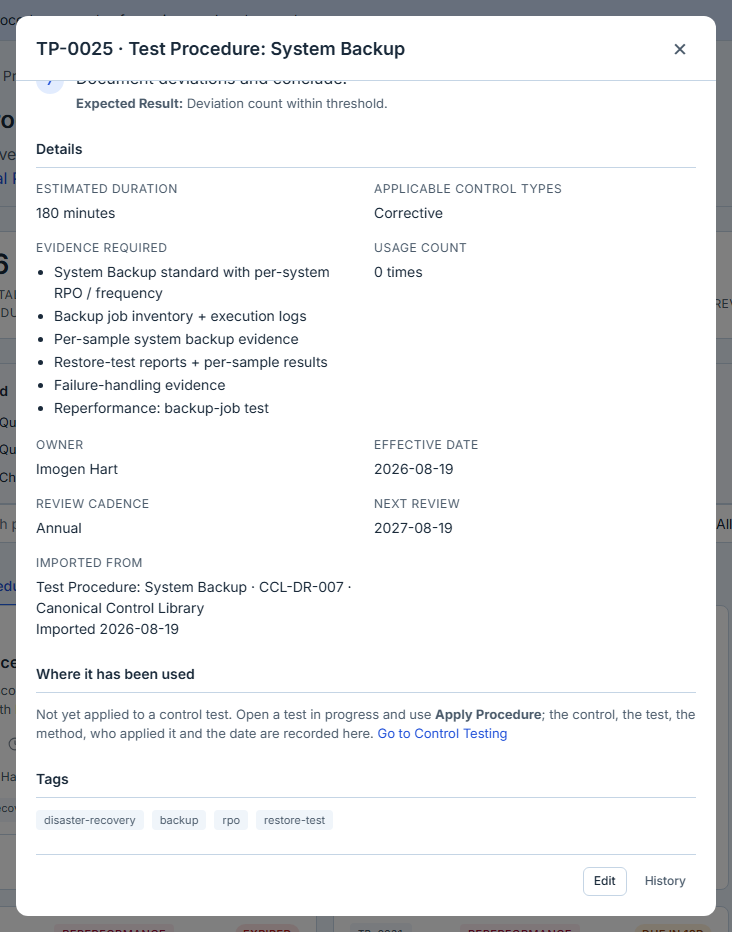
The copy records where it came from — the detail view names the template, the control it derives from and the date you imported it — but it does not follow it. Provenance without subscription is the right shape here: an auditor gets to ask “did you write this or adopt it, and from what”, while a template revised next year cannot silently change a procedure that a completed test already cites.
Upload a document is for procedures that already exist as finished documents and are not going to be re-typed: a methodology your firm has used for a decade, a procedure a regulator publishes, an audit programme handed over by a predecessor auditor. The file is stored in the Artifact Repository as a Test Procedure Document and tracked here with a title and description. An uploaded procedure carries an Uploaded badge, and the status filter can show you just those.
The trade-off is real and worth stating plainly. An uploaded document has no steps — the platform does not read them out of a PDF — so applying it to a test records which methodology was used without giving the tester a checklist to work through. That is a reasonable thing to want when the methodology is a firm standard the tester already knows; it is not what you want for a procedure your team runs every quarter. The picker says which is which, so the choice is made before the attachment rather than discovered after it. If it is one you run often, it is worth the half hour to author it properly and get per-step completion, results and notes.
Uploading also gets you the thing this article is mostly about: an uploaded procedure carries the same owner and review cadence as an authored one, so a decade-old firm methodology is tracked for currency exactly like the procedures you wrote last month.
Writing the steps
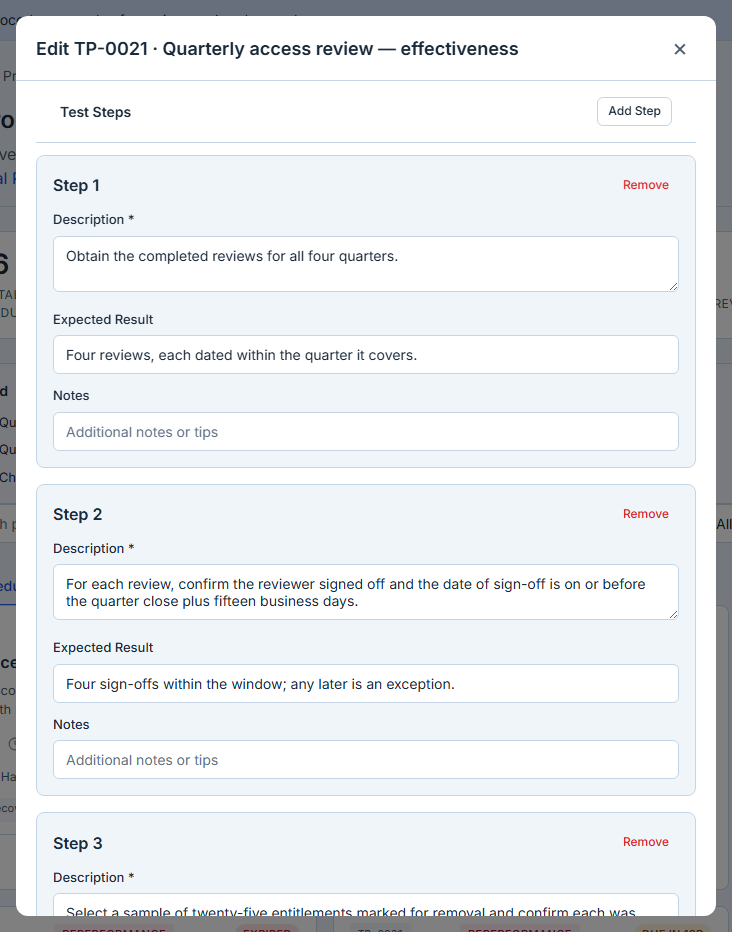
Each step has a description and an expected result. The expected result is the half people leave out, and it is the half that makes the procedure usable by someone who did not write it.
“Verify that terminated users were removed from the application” is an instruction to think. “For each terminated employee in the sample, confirm the application account shows a disable date on or before the termination date; a disable date after the termination date is an exception” is an instruction to test. The second one produces the same answer regardless of who runs it, which is the entire point of writing it down.
Keep steps atomic. A step that contains an “and” is usually two steps, and when a tester marks it complete you no longer know which half they did.
Beneath the steps, Evidence required lists what a tester must attach for the procedure to count as performed — the access export, the approval ticket, the reviewer’s sign-off. It is deliberately a procedure-level list rather than a per-step one: what an auditor asks for is the evidence behind the conclusion, not a receipt for each instruction. The list travels with the procedure when it is applied, so it sits on the tester’s checklist while the work is being done rather than surfacing at review. It is a statement of what the test requires, not a lock: the platform does not refuse to close a test whose evidence is thin, because that judgement belongs to the reviewer.
A worked example
Take a common control: access to the finance system is reviewed quarterly by the system owner, and inappropriate access is removed. Two procedures come out of that sentence, not one, because design and effectiveness are different questions.
The design procedure asks whether the control, as constituted, could work. Its steps read like this:
- Obtain the documented access-review procedure and confirm it names a reviewer, a frequency, and a defined action for inappropriate access. Expected result: all three are specified in writing.
- Confirm the named reviewer is independent of the provisioning function. Expected result: the reviewer does not hold an administrative role in the same system.
- Confirm the review covers all entitlement types, including service accounts and privileged roles. Expected result: the review population is the full entitlement list, not the interactive-user subset.
The effectiveness procedure asks whether it actually happened, over the period:
- Obtain the completed reviews for all four quarters. Expected result: four reviews, each dated within the quarter it covers.
- For each review, confirm the reviewer signed off and the date of sign-off is on or before the quarter close plus fifteen business days. Expected result: four sign-offs within the window; any later is an exception.
- Select a sample of twenty-five entitlements marked for removal and confirm each was removed. Expected result: each sampled entitlement shows a removal date on or before the review sign-off plus five business days.
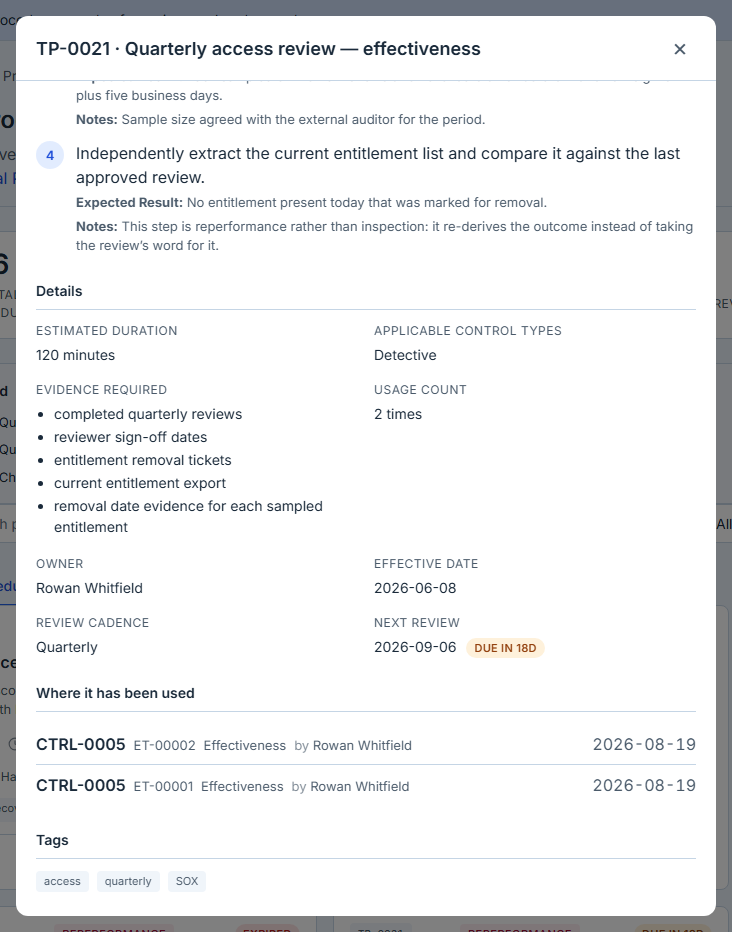
- Independently extract the current entitlement list and compare it against the last approved review. Expected result: no entitlement present today that was marked for removal.
Note what step 4 does. It is reperformance rather than inspection — it does not take the review’s word for the outcome, it re-derives the outcome. That single step is usually the difference between a procedure an auditor accepts as strong evidence and one they supplement with their own testing. Recording the type on the procedure is how the library lets you find every procedure that reaches that bar, and every one that does not.
Why the frameworks care about the procedure, not just the result
The reason this metadata is worth keeping is that most control frameworks assess your process for testing, not only your conclusions.
PCAOB AS 2201 requires an auditor of internal control over financial reporting to evaluate both the design of a control and its operating effectiveness — the two questions the category field separates, and the reason a single “did we test it” flag is not enough. ISO/IEC 27001:2022 clause 9.2 requires an internal audit programme that considers the importance of the processes concerned and the results of previous audits, which is an argument for keeping a procedure’s version history and its usage record rather than overwriting it. And any SOC 2 engagement will ask how you concluded what you concluded, which is a question about methodology.
None of those frameworks demand the specific fields on this page. What they demand is that you can show your testing was deliberate, current, and consistently applied — and an owner, a cadence and a version note are the cheapest durable evidence of all three.
The three fields most teams skip
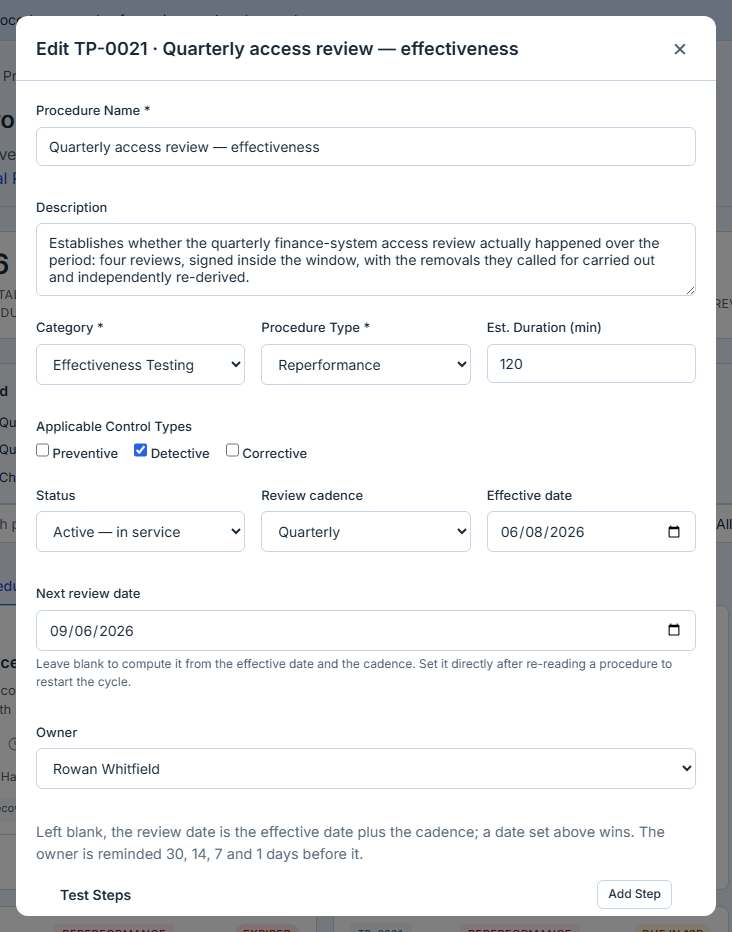
Above the steps sit the fields that decide whether this procedure is still trustworthy in two years: the owner, the review cadence, and the effective date.
The owner is a person, not a team. Teams do not read reminder emails. The cadence is how often the procedure should be re-read — monthly, quarterly, semi-annual, annual, or biennial — and the effective date is what the cadence counts from. Set those three and the library computes the next review date; leave the cadence empty and it falls back to your organisation’s default.
You can also set the review date directly, and an explicit date always wins over the cadence. That matters for a procedure inheriting a date from somewhere else — a regulation with a known revision cycle, a control reassessed on a fixed schedule — and it is also how you answer a reminder. When you re-read a procedure and conclude it is still correct, set the next review date forward. That is the whole action: there is no separate “mark as reviewed” button, and you should not restart the clock by editing the effective date, because the effective date is a statement about when the procedure came into force, not about when you last looked at it.
These fields are what the rest of the page is built on. It is the review date that everything keys on: a procedure with one appears in the Due for Review and Expired counts, matches the two renewal filters, shows a renewal pill on its card and contributes to the navigation badge — whether or not anybody owns it. The owner is what turns all of that into a message. Without one the procedure still goes amber and then red on a page somebody has to open; with one, it generates reminders at thirty, fourteen, seven and one days before the date. The difference between an owned and an unowned procedure is not whether the system notices. It is whether anybody gets told.
Every way of creating a procedure now supplies all three — authoring, uploading a finished document and adopting a platform template all default the owner to you and the review date to your organisation’s cadence, so you cannot accidentally make one that nothing will ever ask about again. That is deliberate, and it is recent. The fields still deserve your attention rather than the defaults: the owner should be the person who actually knows whether the procedure is still right, and the cadence should match how fast the control underneath it moves. A default owner is a placeholder, not an answer.
Draft, active, archived
A new procedure can be saved as Draft — written but not yet endorsed, so a tester browsing for something to apply does not pick up a half-finished methodology. Drafts still carry review dates and still generate reminders, deliberately: a draft that has been sitting for eight months is exactly the thing a review date should surface.
Archived is what you do when a procedure is superseded. It stays in the library marked Archived, drops out of the review cadence, and stops appearing as something to apply — but the control tests that already applied it keep their copy of the steps and their record of who ran them, which is why it is archived rather than deleted. If you archive one by mistake, or a control comes back, Restore returns it to service and puts it back in the review cycle.
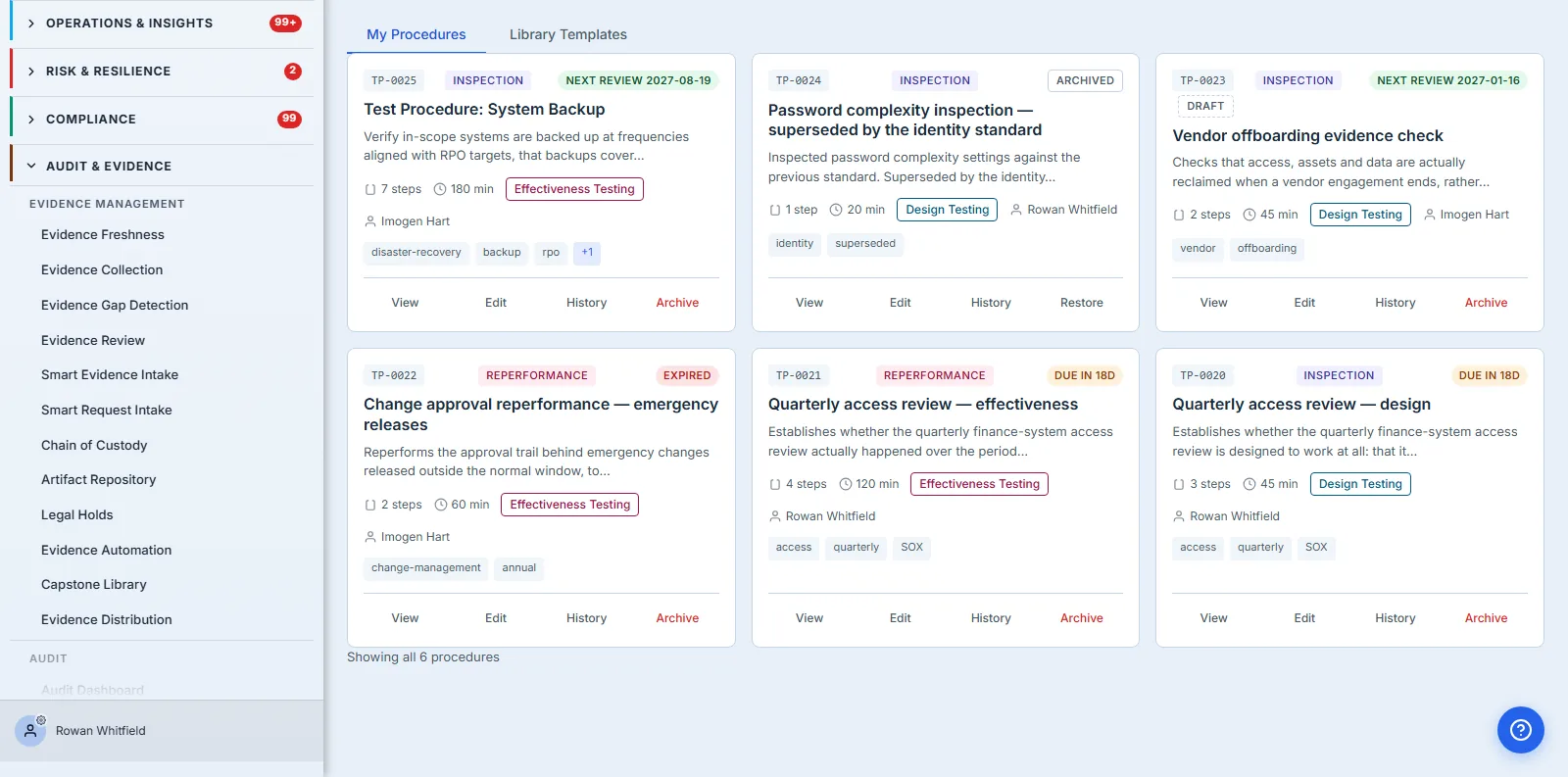
Reading the library
Seven figures sit above the list: total, active, draft, archived, due for review, expired, and average steps per procedure. The two that matter for currency are Due for Review and Expired — the pair to read first, and the pair to quote when someone asks whether the testing programme is being maintained.
Five of the seven are buttons. Clicking Expired filters the list to the expired procedures, clicking it again clears the filter, and the status picker moves with you so you can always see what you are looking at. It is a small thing that decides whether a number is an answer or a prompt to go and find one: “four expired” is only useful if the next click tells you which four.
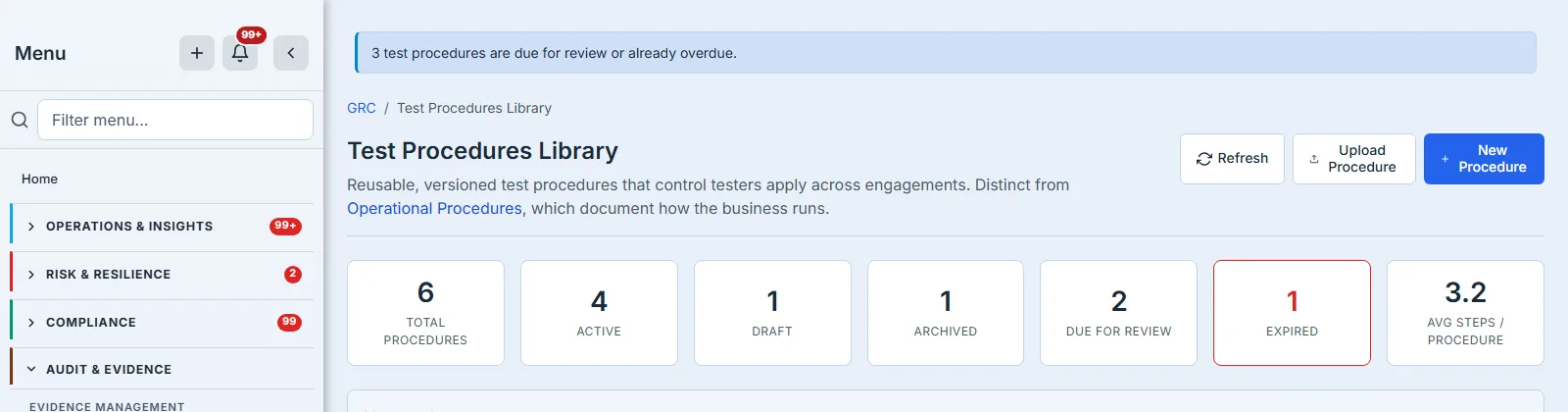
The filters run against the whole library rather than the page you are looking at, which matters once you have more procedures than fit on one screen. So does the sort, and on this page the sort that earns its place is review date, soonest first — the order that puts whatever is closest to going stale at the top. A library of five hundred procedures ordered by creation date will tell you what you wrote most recently, which is the one thing you already know. Alongside the three lifecycle states, the status filter offers three derived ones: due for review within thirty days, already expired, and uploaded documents. “Expired” here means the review date has passed — a procedure due today is due, not overdue. Set the status filter to Expired and the six procedures above narrow to the one whose review date has passed — the annual change-approval reperformance — with the count beneath the list reading one of six rather than all six. That count is worth watching: it is the difference between a filter that found nothing and a filter you forgot you had set.
Most used ranks the five procedures applied most often across your tests. It is a smaller number than it looks: a library where three procedures carry every engagement and thirty have never been applied is telling you something, either about the thirty (they were written for controls nobody tests) or about the three (they are being stretched to cover work they were not designed for).

Finding one procedure among forty
Search runs across procedure numbers, names and descriptions, and — like the filters — it runs against the whole library rather than the rows currently on screen. That distinction stops mattering at small scale and starts mattering the moment the list pages, which it does at twenty-five.
Combine the filters rather than scrolling. “Effectiveness testing” plus “reperformance” is the set of procedures that independently re-derive a result, which is the set an auditor asking for your strongest evidence wants to see. “Expired” on its own is your remediation queue.
Every procedure is also directly linkable. Opening one puts its id in the address bar, so the URL you copy reopens that procedure rather than the library — worth knowing when the reason you are sending it is that something in it needs to change. The same link is what an ownership notification sends, and it resolves to the procedure whether or not it happens to be on the first page of your library.
What one procedure looks like from the inside
Opening a procedure shows the steps with their expected results, the metadata, the renewal state, and Where it has been used — the tests this procedure has actually been applied to, with the control, the test number, whether the test was of design or of effectiveness, who applied it, and when. It is a short list and an unusually informative one.
A procedure with a long usage history is load-bearing: changing it changes how a control has been tested for years, and the version note you write matters more than usual. A procedure written eighteen months ago with an empty usage history is a different conversation — either the control it covers is not being tested, or testers are not finding it, and both are worth knowing before you spend a review cycle keeping it current.
Version history
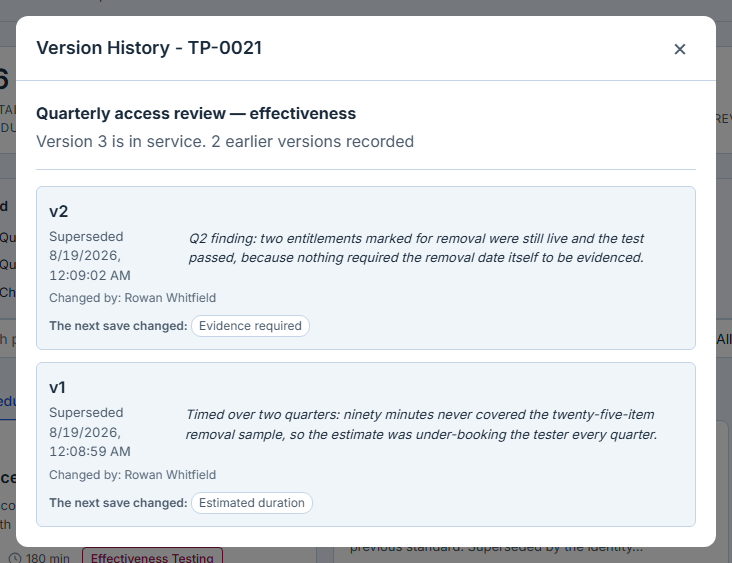
Every save snapshots the previous version. The History panel lists each version with its date, its author, the note the editor wrote in the “What changed?” field, and which fields actually changed — so the record answers both what moved and why.
Write the note. “Updated sampling to 25 items following the Q3 population growth” is a sentence that will still be useful to an auditor in three years. The history records which fields moved, not what they moved from and to — so with an empty note, “Steps changed” on a date is the entire account of why a procedure is different from the one an earlier test cited.
Applying it to a test
From a control test in progress, Apply Procedure copies the procedure’s steps into the test as a working checklist, with per-step completion, result and notes. The copy is a snapshot: editing the library procedure afterwards does not rewrite tests already under way, which is what you want — a test documents the methodology as it stood when the work was done.
Applying also records the use, which is what feeds the usage count and the Where it has been used list shown earlier. If you apply the wrong procedure and remove it, that record is undone too — the count, the row and the link back to the test all go together — so the library’s usage figures reflect work that actually happened rather than work that was started and abandoned.
Where the library shows up elsewhere
A procedures library that only exists on its own page is a filing cabinet. This one reaches three other places.
Control testing is the obvious one: procedures are applied to design and effectiveness tests from the test itself, and the copied checklist stays with that test — per-step completion, result and notes — so the methodology and the evidence of following it live in the same record.
Worth knowing where this stops: audit workpapers author their own procedures for an engagement, and do not import from this library. The two are deliberately separate populations — this library is the standing methodology for testing your controls, a workpaper is the record of one engagement’s fieldwork — but if you run both, expect to write the steps twice.
The navigation badge counts procedures at or past their review date — due within thirty days and already overdue together — without anyone opening the page, which is the difference between a currency problem you find and one you are told about. The stat cards split the same population in two, because when you are on the page the distinction between “due” and “missed” is the one that decides what you do next.
Reminders go to the named owner at thirty, fourteen, seven and one days out. They are sent once per threshold, so a procedure that sits overdue does not generate a daily nag that trains its owner to filter the sender — and archiving a procedure takes it out of the cycle immediately.
That last mechanism is the one worth arguing for internally, because it is the only part of the system that acts without being visited. Everything else on the page rewards someone who thinks to look.
What you walk away with
A procedures library is not an archive; it is a set of standing claims about how your controls should be tested. Claims need owners and expiry dates, or they quietly become folklore.
The practical version is short. Write the expected result, not just the instruction. Give every procedure a named owner and a cadence, because a procedure without them cannot be reviewed by any mechanism on the page. Archive rather than delete when something is superseded. And treat a rising Expired count as what it is — not a housekeeping backlog, but a measure of how much of your testing is currently being done from documents nobody has read in over a year.