Producing reports is the part everyone plans for. Finding one again eighteen months later, when an auditor asks for “the risk pack you took to the board in Q3”, is the part that quietly decides whether any of it was worth doing.
Report history is built for that question. Not for browsing — for finding.
Who’s involved
- Anyone who produced a report — needs their own back, and needs to know which are still unfinished.
- An approver or signer — needs the much narrower list of reports that cannot move without them.
- An administrator — retires what the organisation has outgrown, and finds out what may not be destroyed yet.
Five states, and archived is not deleted
Every report sits in exactly one of five lifecycle states: draft, in review, approved, published, archived. They are not decoration — each one changes what you may do with the report, and the list shows them as distinct badges rather than as one status word in five colours. The Status filter names all five; the list below it shows whichever ones your organisation currently has.
Signing runs on a second axis, and this is worth understanding before you read the list, because the two are easy to conflate. A report can be a draft and awaiting a signature at the same time: the lifecycle state says where the report is in its approval journey, and the signing state says whether the people named on it have put their names to it. The row shows both — the lifecycle state as its filled badge, and beneath it an outlined pill for anything outstanding: “Awaiting signature” while the round is open, “Partly signed” once some have answered, “Signing declined” if somebody refused. The two are deliberately different KINDS of mark rather than two chips in two shades: one is where the report is, the other is what it is waiting on, and a reader who cannot separate two ambers should still be able to separate those. A list that showed only the first would tell you a report is a draft and leave you to guess why it is waiting on you.
Be precise about what that outlined pill means, because it is not the signing state as such. It is the condition row, and signing is only one thing that can appear there — “2 to review” and “3 to write” are drafted narrative sections waiting on a person, and they wear exactly the same mark. That is on purpose: a condition renders as an outlined amber pill, and the distinction a reader is asked to make is between filled and outlined rather than between two shades of amber. The corollary is worth stating too — a report whose round is finished, or that never needed one, shows no pill at all. Absence here means nothing outstanding, not nothing known.
There is exactly one exception, and it is the one worth learning. A condition reading Incomplete is drawn as a filled pill — a red tint behind red text, inside a red border — rather than an outlined amber one, because it is not saying the report is waiting on somebody — it is saying the document itself may be missing sections, which is a statement about the artifact rather than about its turn. It is the only condition that survives publication and archiving, for the same reason: “this report may be unsound” does not stop being true once the report has settled. So the row’s grammar is three marks, not two — the filled lifecycle badge, the outlined condition, and the one filled pill that says read this before you cite the thing.
A row can carry one more thing, and it is deliberately not a mark. Under a report that is genuinely mid-turn, a plain grey line states how long it has been there — waiting since today, waiting 1 day, waiting 9 days — and it deepens to the same amber the outlined conditions are set in once the wait passes the point at which the product starts sending reminders — the register keeps red for the one mark that means do not cite this yet. When the wait is a review routed to a named person, the same line says who — waiting 9 days · Imogen Hart — because “how long” and “on whom” are the two halves of one question, and a register that answers only the first sends you into the report to find the second. It stays silent about the name in the two cases where naming one would be a guess: an unclaimed review waits on whoever can pick it up, and a report waiting on a signature waits on a turn in the signing order rather than on a person the row can point at. It is a clock rather than a status, which is why it is set as text instead of a pill: the three marks say what state this is in, and the clock says how long that has been true. Rows that are not waiting on anyone do not show it at all.
The third of the signing pills — Signing declined — is the one that had to be added, and the omission is instructive. The list announced both states that were still moving and stayed silent about the one that had stopped — so a report somebody had refused to put their name to sat among the drafts looking exactly like them, while its publication was blocked. The states that progress on their own need the least announcing; the one that will not progress without a person needs the most.
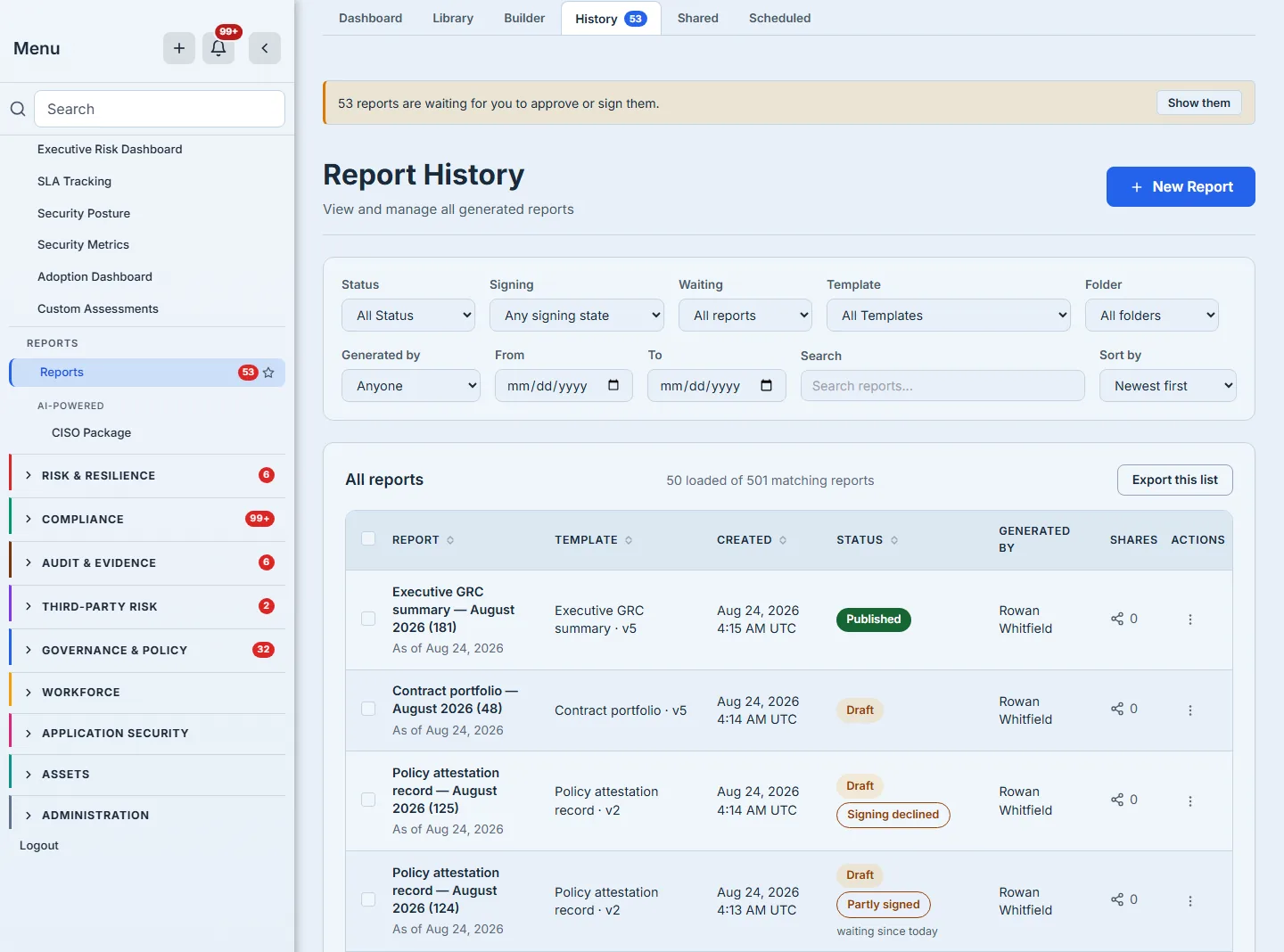
Archiving is how you retire a report you no longer want in the working set. It is not deletion: an archived report keeps its content, its hash and its history, and it can be restored to a draft. Deletion is a separate act with a separate control, separate wording, and — as below — a set of refusals of its own, none of which stands in archiving’s way.
The states also decide what you may DO with a row, and the list says so rather than leaving you to infer it from a changing set of icons. A draft can be renamed. A published report can be shared but not renamed, because its content hash has been cited by then. An archived one offers the way back beside a plain view, and no second exit — there is no Archive on a row that is already archived. Everywhere short of that, archiving is available and is the verb that actually retires a report.
A row that is waiting on you offers the thing it is waiting for. Where the banner counts a report as needing your approval or your signature, that row carries Approve report, or Sign report and Decline to sign — the same verbs the document page offers, on the list the banner sends you to. It is a small thing that decides whether a reviewer with a full queue works through a list or opens every report in it one at a time. Signing is admitted by the signing order rather than by edit rights, so a named signer who cannot otherwise change a report still gets the verb they are there for.
Deleting is available on a draft, and stops being available the moment you publish. Publishing is what turns a report into a record: from then on it is citable, it can be filed as evidence, its content is frozen, and it is held under a retention floor — three years unless its template asks for longer — that nothing can cross until the window closes. Before that it is work in progress, so the attempts you made while getting a parameter right can be removed like any other draft. That is the line worth learning, because it is the same line everywhere else in the platform: a capstone is held from the moment it is finalised, not from the moment somebody started it. The rule is stated in a sentence under the table, because a reader watching the actions column change between two rows will otherwise read it as a defect — and because pressing a control that was never going to work is a worse introduction to a governance product than being told the rule.
What is waiting on you
The most useful filter is the narrowest one. “Waiting on me” is not a saved search over statuses; it asks the specific question could this report move if I acted — and it answers on three counts, which is worth spelling out because only the first two are obvious.
The first is review: a report in review that you did not produce, and that is either routed to you or routed to nobody at all. That second case is deliberate and it is the one people miss — an unclaimed review is waiting on whoever can pick it up, so it appears for everyone eligible rather than sitting invisible until somebody is assigned. A report routed to a colleague who has since left the organisation is treated the same way, because otherwise it would wait forever on an account that no longer exists. The second count is signing: your turn in the order, not merely your presence in it. The third is the one that runs backwards — a report whose signing round was declined waits on its own author, because starting the fresh round is theirs to do, and a refusal that nobody is told about is just a stall.
So the number in the banner is not “reports assigned to me”. It is “reports I could move”, which is a slightly larger and considerably more useful set.
Those two halves are deliberately not symmetrical. A report routed to you for review excludes one you wrote yourself: you cannot approve your own report, so a review request sitting with its own author is waiting on nobody. A report waiting on your signature does not exclude you, because being named on the signing order is a different fact from having produced the document — and a report’s author is often exactly who the order names first.
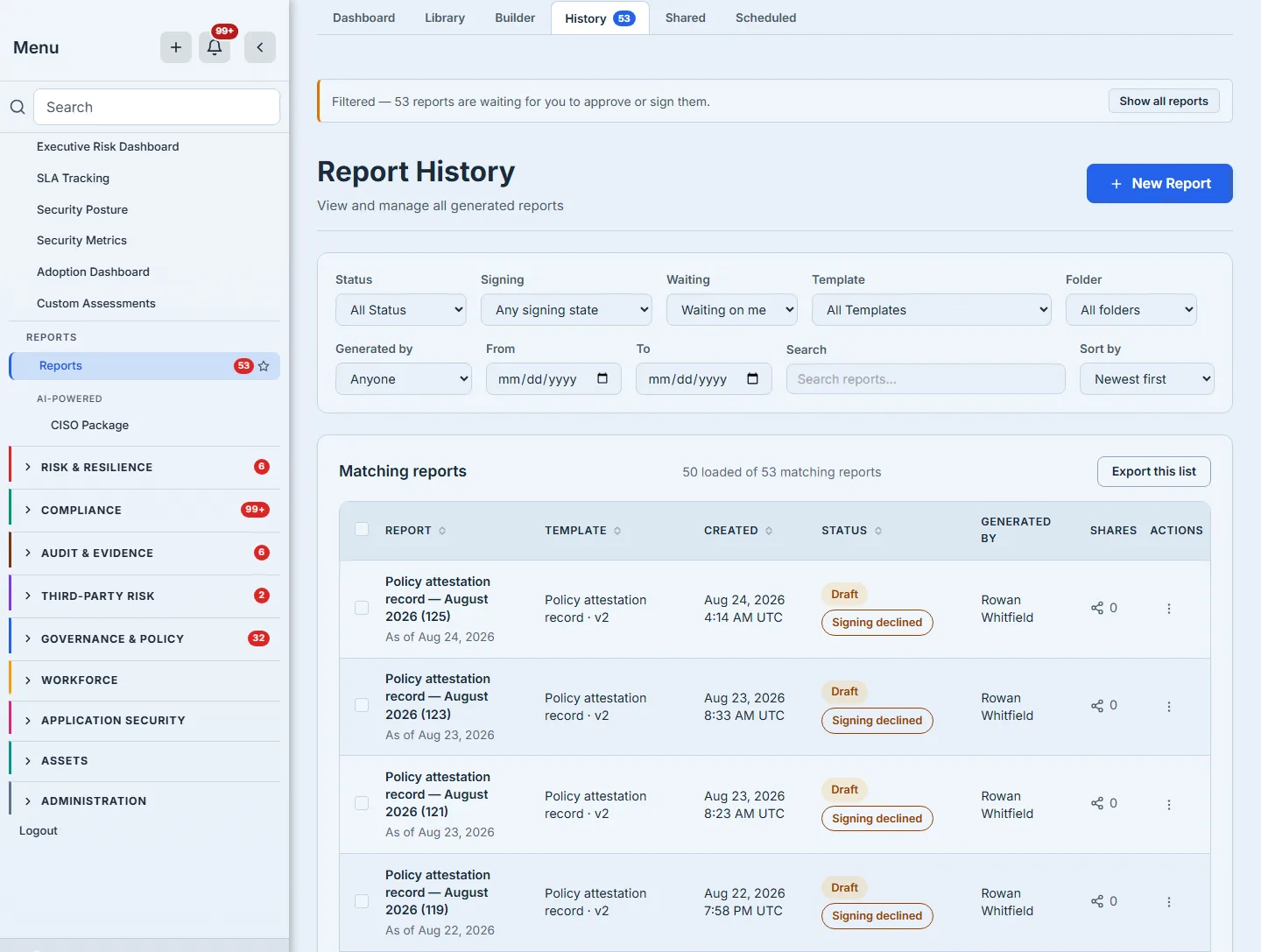
The banner, the number in the navigation badge and the rows in this list come from one predicate with three callers, so they cannot disagree. A badge that says three over a list that shows five is a small thing that destroys trust in every other number on the page — and it is the kind of disagreement that only appears at real volume, months after anybody would connect it to the code that caused it.
The banner also knows when the filter it offers is already in force. It prefixes itself with Filtered, and its button becomes Show all reports — naming the place it will take you rather than offering, a second time, the thing you have already done. A control that re-applies the filter already applied is a control that does nothing, and the reader who presses it learns to distrust the rest.
Narrowing it — all of it, at the server
Status, signing state, template, folder, who generated it, date range and free text all narrow the query before it is paginated. Folder and author are worth naming separately, because they are the two questions a register is usually asked and a search box cannot answer: what is in the board folder — the folder being what decides who may read a report at all — and what did this person produce, which free text cannot reach because it matches a report’s name or its template’s, never a person. Both option lists are built from the whole history you can read rather than the page in front of you, so a folder with nothing on this screen is still offered rather than appearing not to exist. That sounds like an implementation detail and is not: filtering the fetched page in the browser means the date filter silently cannot see report two hundred and one, and its failure looks exactly like an empty result.
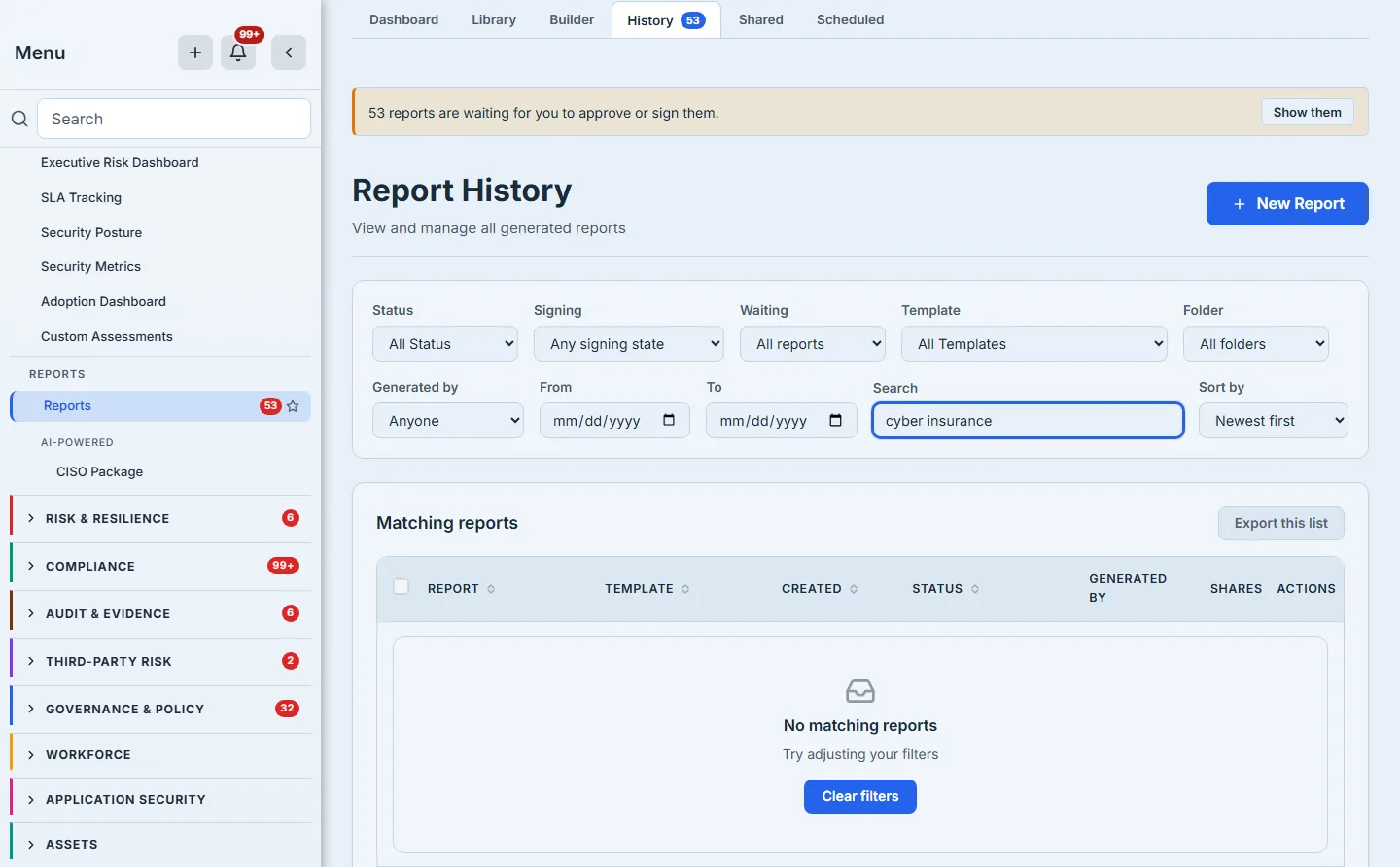
Which raises the state a list of this kind most often gets wrong. A filter that matches nothing is indistinguishable, on screen, from a filter that is broken — and from an organisation that has no reports at all. All three render as an empty table unless the page takes the trouble to tell them apart. This one does: a filtered miss says so, keeps the filters visible above it so you can see what you asked for, suppresses the count rather than announcing “0”, and offers the way out at the blockage rather than expecting you to walk back through six controls. The unfiltered case gets different words and a different button — “No reports yet” and an invitation to generate the first one — because offering “Create Report” to somebody whose filter matched nothing is answering a question they did not ask.
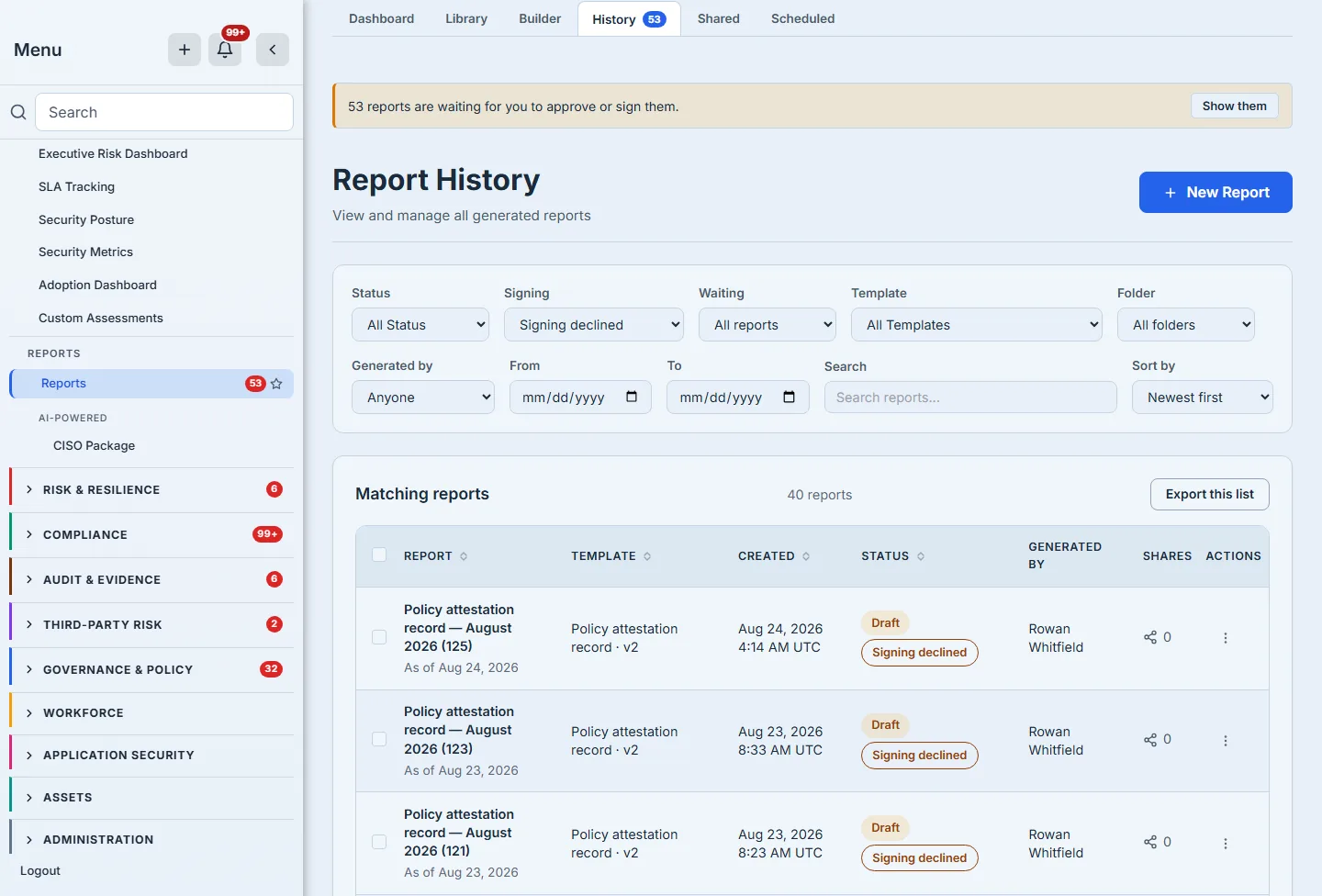
Signing sits in its own control rather than inside Status, and the separation is the same one the five states rest on. Approval and signing are two machines running at once: a report can be an approved draft waiting on a signature, or a draft whose signing round somebody refused. Folding “declined” into a list of lifecycle states would ask you to choose between two facts that are both true, and it is exactly the mistake that once made five reports awaiting signature all display “Draft” — the page rendering one machine and staying silent about the other.
It matters most for the one signing state that stops rather than progresses. A decline is terminal and it blocks publication, so “which reports did somebody refuse to sign?” is a question with consequences — and until there was a filter for it, the answer arrived when a publication was refused rather than when somebody went looking.
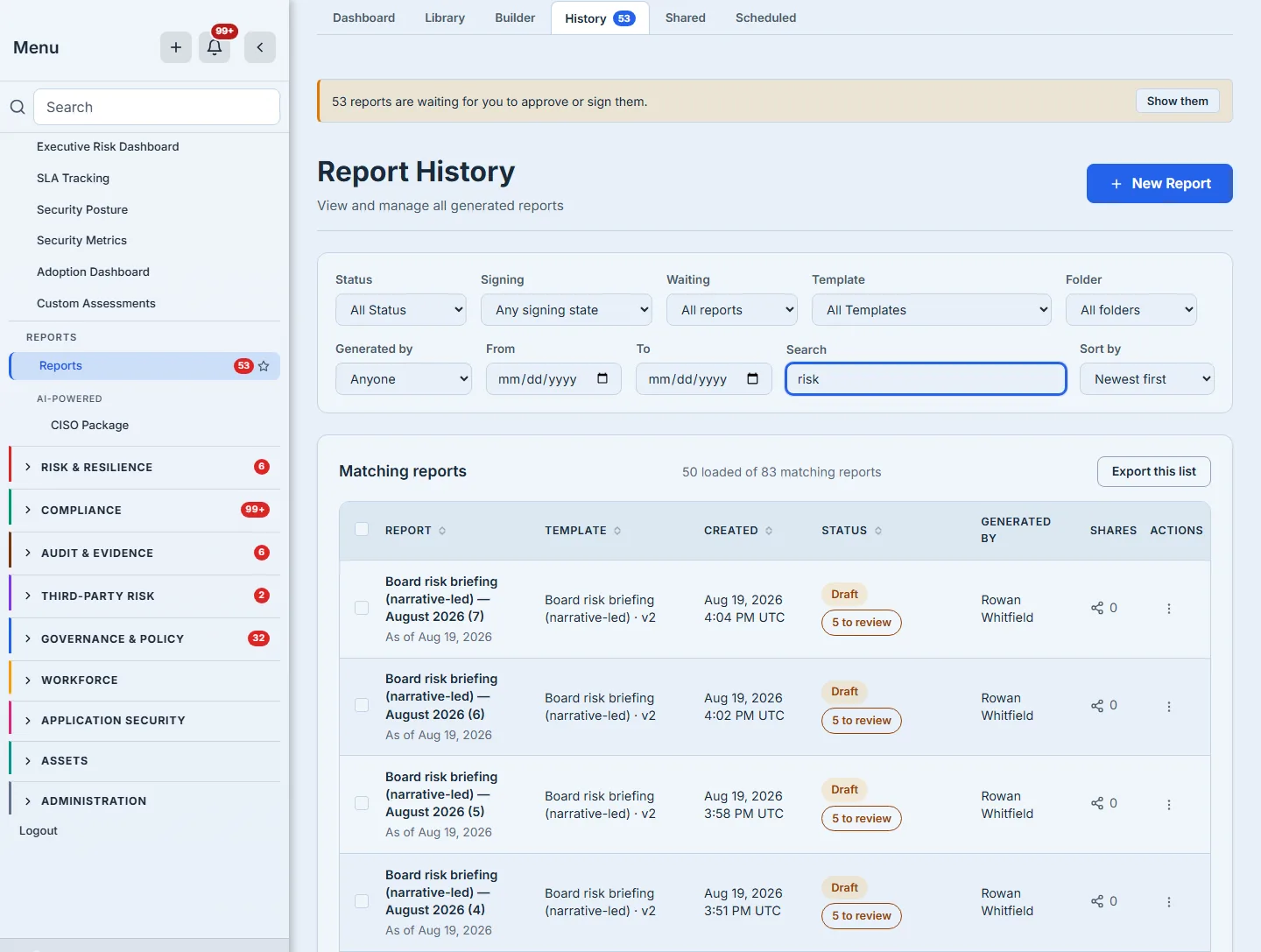
The counts are careful in a way worth pointing out, because a count is where a list usually starts lying. The page distinguishes how many reports MATCH from how many are LOADED, and whenever those two differ it keeps them in one sentence — “50 loaded of 111 matching reports” — so the gap between them is never something you have to work out. Press “load more” and the first number moves; the second only moves when the filter does. Once everything matching is on the screen the sentence drops to the plain count, “8 reports”, because at that point there is no gap left to state.
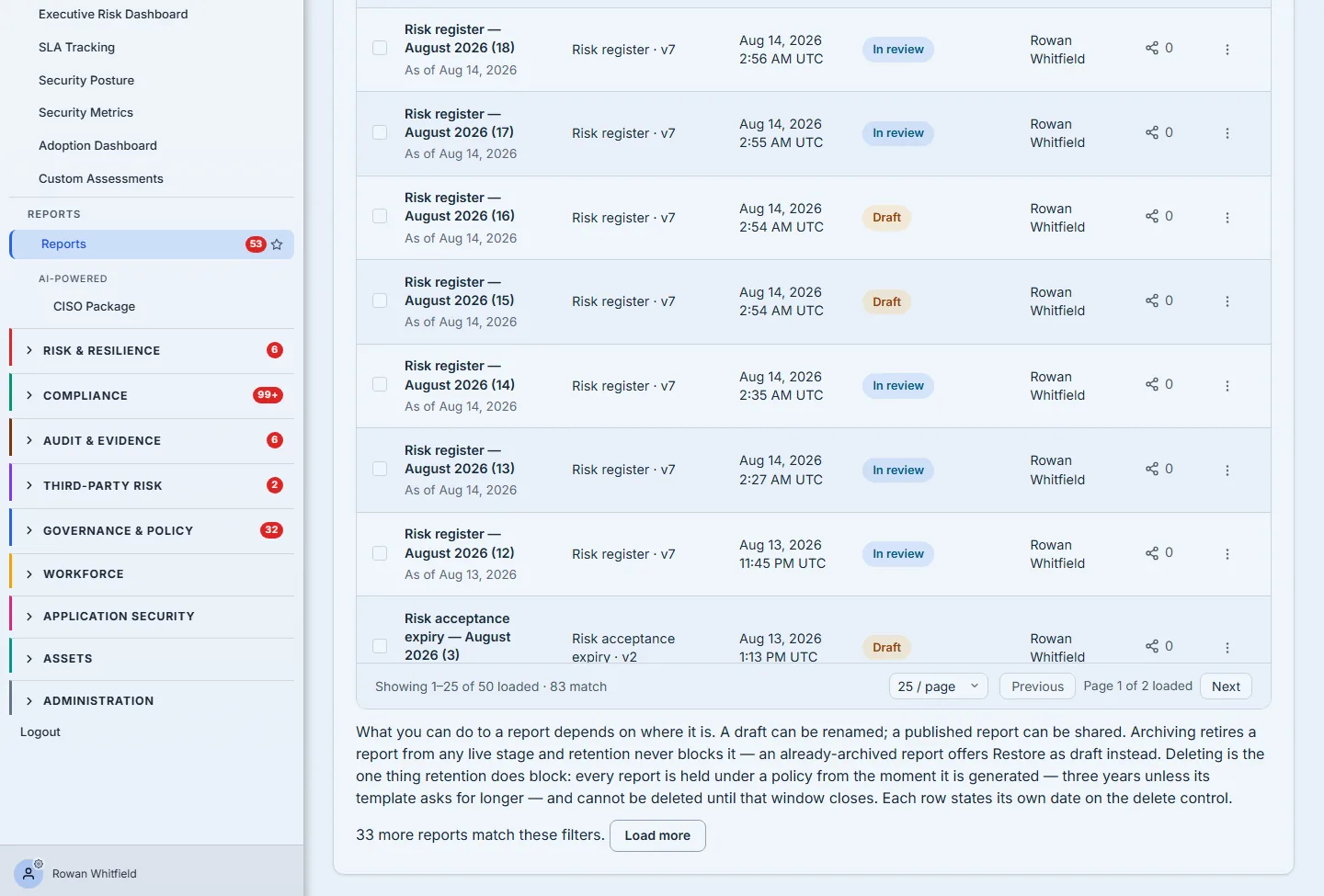
Three numbers sit at the bottom of that frame, and every one of them says which quantity it is counting: “Showing 1–25 of 50 loaded · 111 match”, “Page 1 of 2 loaded”, and “61 more reports match these filters”. The pager walks the rows already fetched, which is why two pages of twenty-five is fifty rather than the whole matching set — paging to a page that exists only in the server’s count would put an empty table under a live Next button. Both of those labels were once shorter and worse. The sentence read “Showing 1–25 of 111”, and the pager read “Page 1 of 2” beside it, so a reader could do arithmetic that would not come out and a paragraph like this one had to explain why. A label that needs a paragraph is a label that should be changed, so both were — and “loaded” is the same word the select-all control uses two lines up, on purpose. “61 more reports match these filters” is the rest, and Load more is what reaches them. The rule sentence above it is the page stating the thing the row menus enforce, in one place, rather than leaving you to infer it from which items happen to be greyed out.
That distinction is what makes bulk actions safe. The moment more reports match your filter than are loaded, the page offers to extend the selection to everything matching — the offer keys on that gap, not on how many rows you have ticked, which is why the frame below shows it beside a single selected row. And it offers it only when it can genuinely fetch them all. Past the ceiling the server’s own list action will honour — two hundred — the offer is simply not made: the wider link is not rendered at all, rather than promising a set the server cannot hand over. What remains is “Select all N loaded”, which was always there and is always exactly true. A select-all that quietly means “the fifty I happen to have” is the single most expensive button in a list like this.
“Export this list” sits in the card header, and it answers the request this page exists for that none of the controls above can: give me every report issued this year, with its status and who produced it, in something an auditor can keep. It exports what you are looking at — the same filters, unchanged — and then does the one thing the screen cannot, which is to stop being a page. The browser holds the rows it has loaded; the export walks the whole matching set at the server, two hundred at a time, up to five thousand.
That is a deliberately different ceiling from the two hundred that bounds select-all, and the reason is worth stating: exporting is a read and a bulk action is a write. A selection that quietly means “some of them” produces the wrong archive; a selection that quietly means “some of them” and then archives them produces the wrong archive and the wrong data. So the wider limit is offered where the consequence is a file, and withheld where the consequence is a change.
If the set is larger than that, the file says so inside itself — a final line naming how many of how many it covers — rather than only in a dialog the reader dismissed on the way to saving it. A truncated export that looks complete is worse than one that refuses, because it is the version that gets attached to an audit and opened six months later by somebody who never saw the warning. For the same reason a report whose name begins =, +, - or @ is neutralised before it is written: those are formula characters, report names are customer-supplied text, and this file’s whole purpose is to be opened in a spreadsheet.
Be clear about what that ceiling costs, because it is a real limit and not only a virtue: an organisation with hundreds of reports cannot select them all in one gesture from an unfiltered list. It has to narrow first. The design bet is that a filter which has not narrowed below two hundred is itself the thing worth noticing — but a reader who wanted one click across the whole archive should know they will not get it.
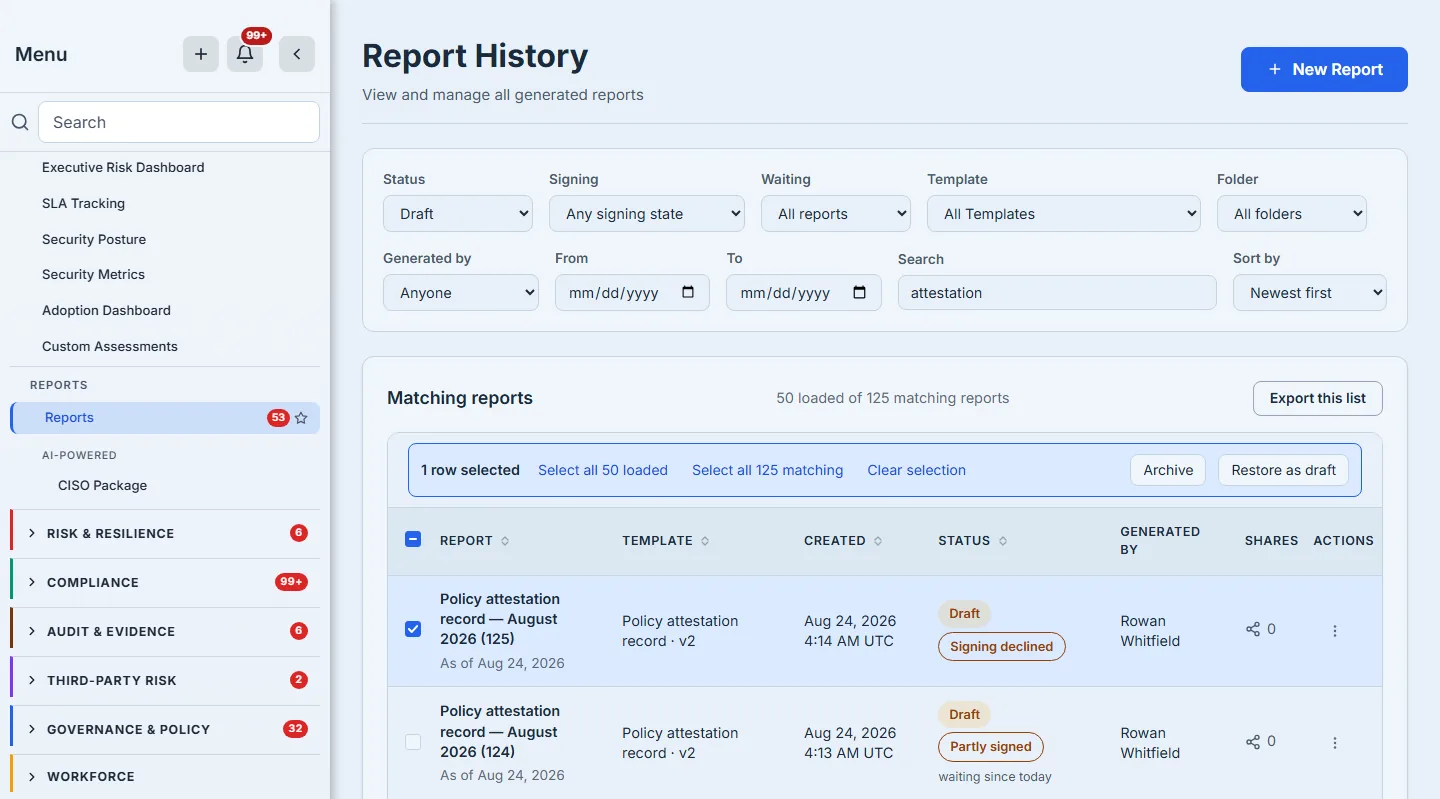
The middle link is the one worth reading twice. It offers 70 because 70 is a set the server will actually hand over; past the ceiling that action honours, the offer is not made and the selection stays what is loaded. A select-all that quietly meant “the fifty I happen to have loaded” would archive fifty reports while telling you it had archived 70, and you would find the gap during an audit rather than at the click.
And bulk archiving reports what actually happened rather than what was asked. If a report moved between your selecting it and the server acting on it — somebody else published it, somebody else archived it — that report is named in the result with the reason, instead of being counted among the successes. A bulk action that returns “24 archived” when it archived twenty-three is not a convenience; it is a discrepancy somebody will find during an audit.
What stands between a report and publication
An approved report is not necessarily a publishable one. If it carries commentary that nobody has accepted, or prose carried forward from the previous period that nobody has confirmed, or a section a person still has to write, publication refuses — and those are three different jobs with three different owners, not one “unreviewed” bucket. The row says which, and in the words of the job: “2 to review” is an AI draft somebody must read and accept, “1 to confirm” is last period’s analysis somebody must check still holds, and “1 to write” is a section no model drafted and a person has to sit down and write. Sending all three to a single “review” control would send two of those three people to a button that refuses them.
The list surfaces that as a count on the row, so a reader can see which reports have work left before opening any of them. That matters most at the end of a quarter, when the question is not “is this one ready” but “which of these nine is not, and why”.
Archiving, and getting back
Archiving asks for confirmation and says plainly what will happen: the report stays in the list, marked archived, and keeps its content hash. Restoring it to a draft is one action on the same row.
Delete, and the five ways it refuses
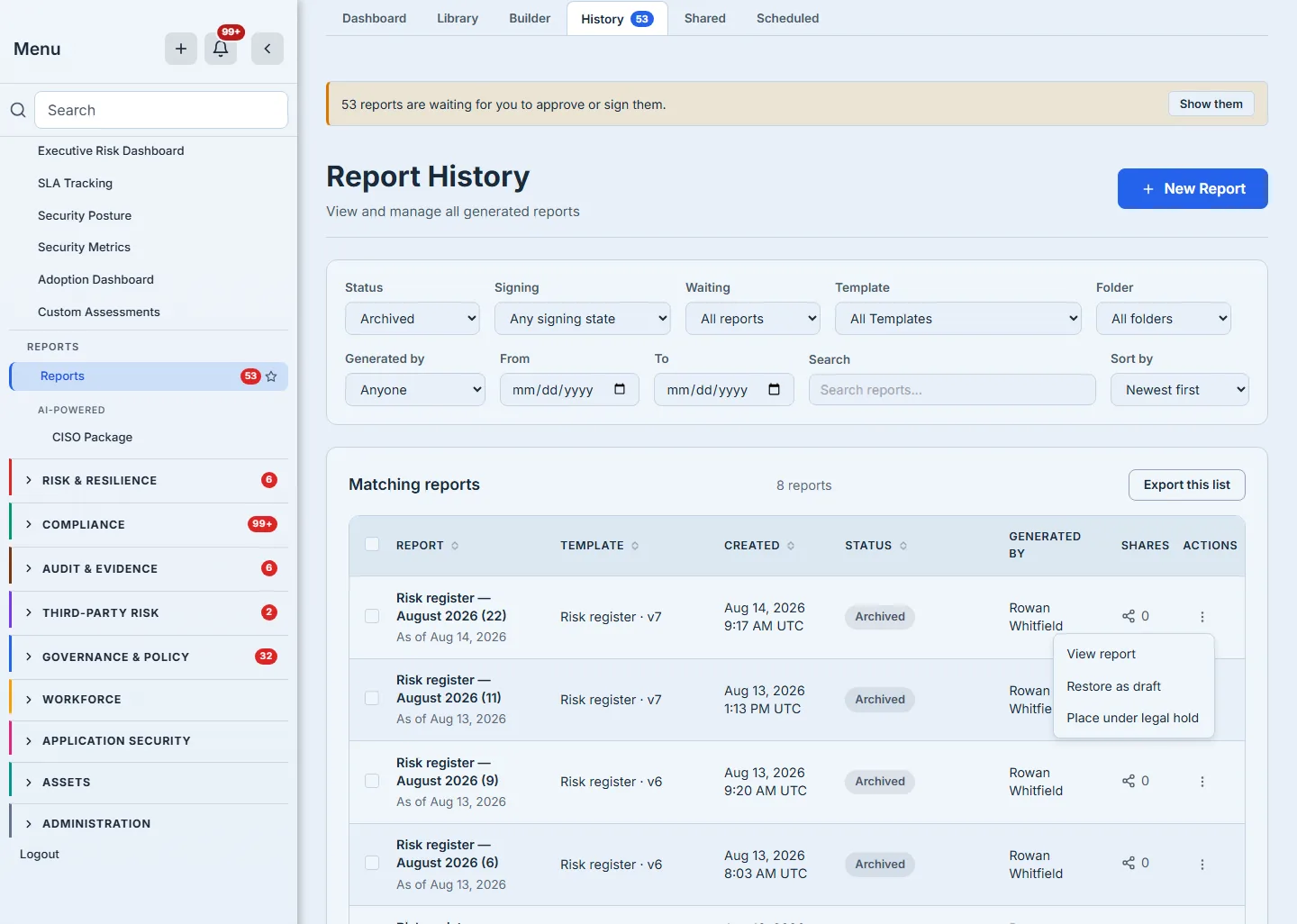
Delete is offered on drafts, and on a draft it usually works. When it is refused, the refusal is the useful part.
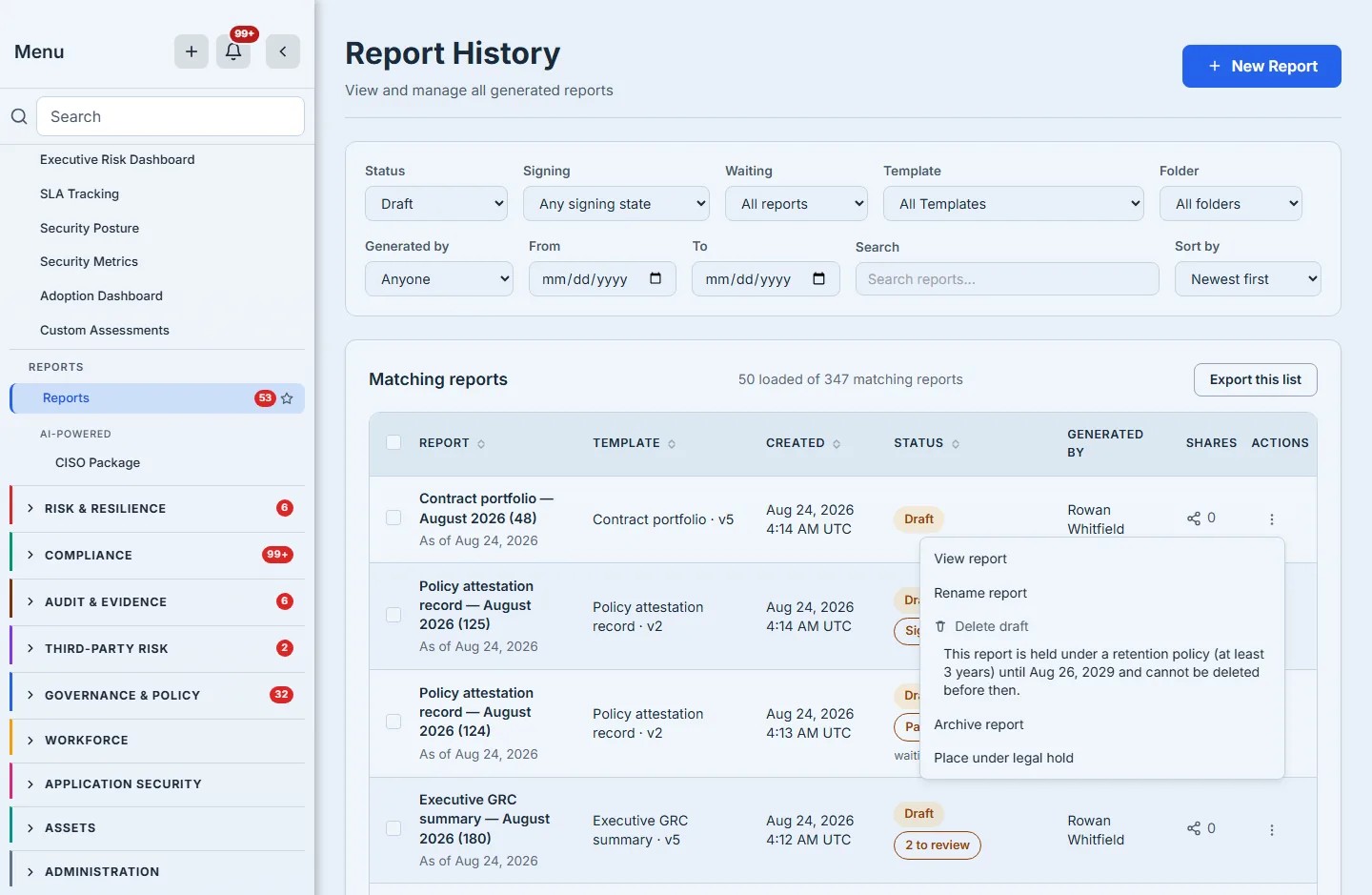
The reason names the retention period, the date it runs to, and why the two together mean no. There are five refusals, and the order matters because you are given the first one that applies rather than the worst. A legal hold on the whole organisation comes first: when one is open over reports, nothing in the category deletes, and releasing it is a decision for whoever manages data retention rather than for you. A legal hold on this one report is next, and reads the same way for a single document. Published: a published report’s content hash has been cited by then, so it is retired by archiving rather than removed. Retention: the floor described above, which starts when the report is published. That makes it the rarest of the five to meet at a control, and the frame above is the shape it takes when you do. Delete is offered on drafts only, and an ordinary draft has no floor at all — but a floor, once incurred, is never given back, so a report that was published, archived, and then restored as a draft is a draft carrying one. It offers the verb its state entitles it to and refuses it with the date. Signed: a report anybody has signed cannot be deleted at all, because its signatures are evidence about that exact document and deleting it would leave them attesting to something that no longer exists.
Underneath those, the retention check itself fails closed four more ways — a published report with no retention period recorded, a date that cannot be read, and two paths where the current time cannot be established — each with its own sentence. You should never see one. They are there because “cannot delete” and “cannot work out whether you may delete” are different problems with different people to talk to, and a gate that cannot tell the time must say so rather than guess in either direction.
A greyed control with a tooltip is not an explanation — it is a support ticket somebody has not filed yet. A tooltip is invisible on a phone, invisible to anyone who does not hover, and invisible in the screenshot somebody pastes into the ticket. The sentence is rendered on the screen at full strength: the action is unavailable, the reason for it is not, and dimming the two together would make the one line worth reading the hardest to read.
The same refusal is enforced by the same function on the server. The row does not decide whether you may delete a report; it asks, and shows you the answer it got. A deletion the server would refuse cannot be reached by any other route into the product either.
What the row cannot do is see the future. Its answer was computed when the page was fetched, so if a colleague signs the report while you are looking at the list, the menu will still offer “Delete draft” until you reload — and the click will be refused, by the same function, with the same sentence. That is the right way round: the list is an optimisation over the server’s answer, never a substitute for it, and the refusal you meet at the click carries the actual reason rather than a generic failure. A page that could only ever be stale in the safe direction would be a nice property to claim; this one is honest instead.
What you walk away with
A list that answers where is it, what is stopping it, what am I not allowed to do with it, and how do I hand the whole set to somebody who asked — without you having to know the answer before you search.