Anyone can produce a PDF. The question an auditor actually asks is narrower and much harder: how do you know this document says what it said when your CFO signed it?
Most tools cannot answer. They render on demand, so the figures move; they attribute nothing, so the prose has no author; and they treat approval as a status field somebody set. Talarity’s report document is built around the opposite assumption — that a report is only useful if every claim on it can be traced to something that happened, and if the parts that could not be established say so plainly instead of rendering a confident blank.
This walkthrough opens generated reports and goes through them in the order the product does. Several of them, because the things worth showing cannot all be true of one document at one moment: a report out for signature, a report whose signers are still being chosen, a report waiting on somebody else’s approval, a report whose commentary is still an unread draft, and a report whose signing round somebody refused are different states of the same lifecycle. Each frame below is the state it describes rather than a staged approximation of it. Where three of them are the SAME document at different moments — the in-review, approved and published frames all are — the captions say so, because a reader comparing two frames deserves to know whether they are looking at one report or two.
Who’s involved
- Report author — generates a version, clears whatever is blocking it, and routes it to somebody else.
- Reviewer — a colleague who did not write it. The product enforces that, rather than trusting a convention.
- Signers — named by the template’s signing order. Being on the order is what admits you; authoring the report is not.
- Auditor — the reader all of this exists for, and the one who writes nothing.
These are roles in a workflow, not job titles, and two of them are enforced rather than assumed. A reviewer being somebody who did not write the report is a property of the transition itself: the product refuses to let an author approve their own work, whatever permissions they hold, and publishing is reachable only from approved. So two people are structurally required for every report — not by policy, by arithmetic. Publishing additionally carries its own permission string, checked by the server on that transition alone — so the act of publishing is separately named in the audit trail and separately refusable, rather than riding along with whatever let the report be written. It travels with report authoring in the standard page-based grants, so the separation an organisation actually gets is the structural one above: not a permission you withhold, but a second person the lifecycle requires.
Step 1 — Readiness: what had to be true before it ran
A report that renders is not the same as a report that means something. Before a figure exists, the data behind it has to exist, the reader has to be allowed to see it, and the template’s own preconditions have to hold.
The readiness panel states each gap as a sentence rather than a red dot, and — this is the part that matters — it distinguishes between there are no records of this kind and we could not measure whether there are. Those look identical on a dashboard and mean opposite things: the first is a finding, the second is a failure to look.
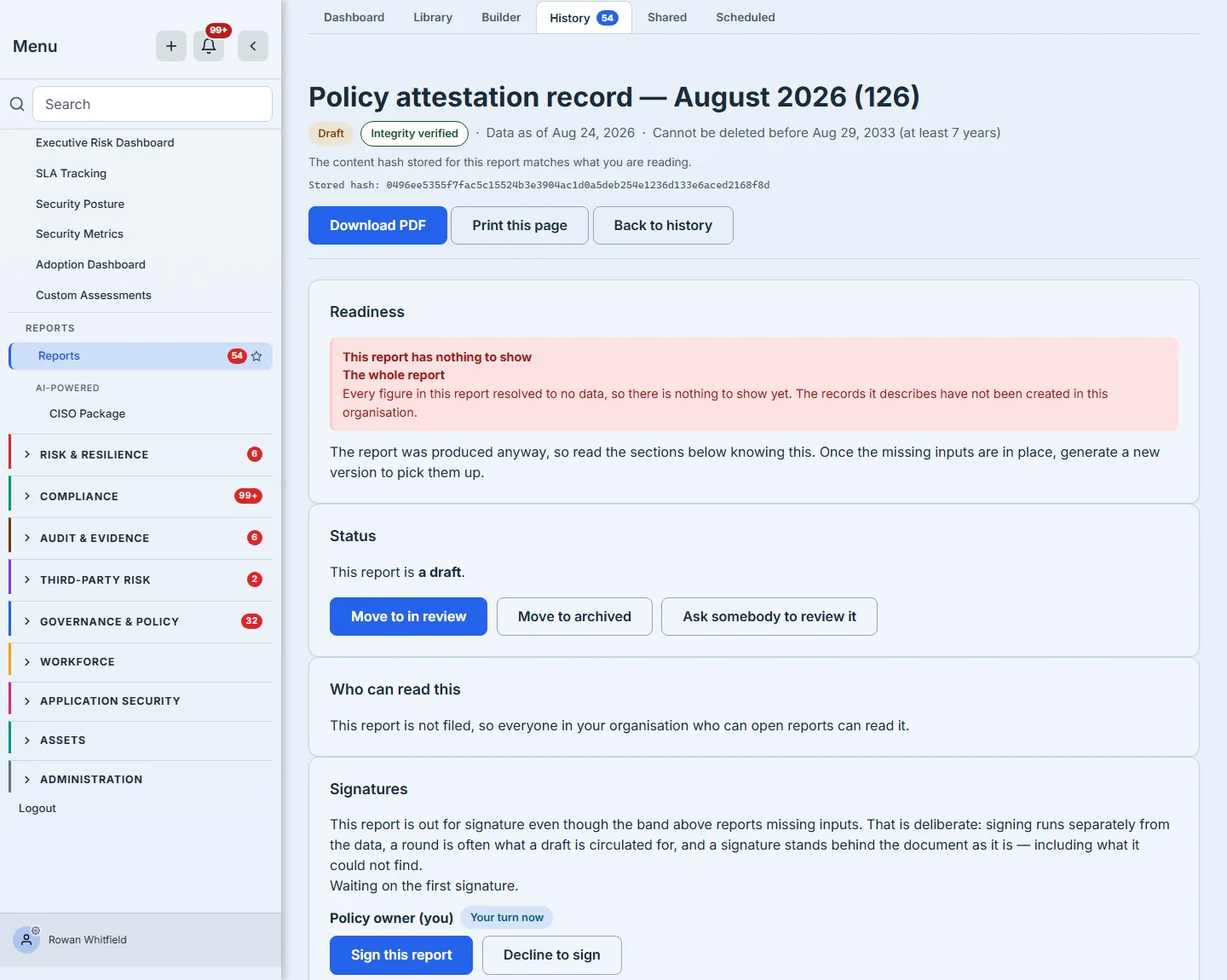
The report in that frame is the uncomfortable case on purpose: every figure on it resolved to no data, and it says so at the top rather than presenting a page of confident zeros. That is the band doing the only job it has.
Twenty-nine of the eighty delivered templates treat certain gaps as blocking and refuse to generate at all — an unmet precondition raises rather than producing a thinner report. That is deliberate: a pack assembled from inputs nobody has established is worse than no pack, because it will be filed. The disclosure templates reach that same refusal by a different route, and it is the opposite of leniency: the SEC 8-K cyber disclosure declares no preconditions about its subject, and instead sets its readiness policy to block — one of only three templates in the library that do. A missing input stops the document being produced rather than annotating it, so on an 8-K there is no readiness band to read, because there is no document. The report in the frame above leaves that policy unset, which is why it rendered and carried a band naming what was thin. One regulatory template does declare one, and it is a different kind of condition: the submission cover sheet asks only that the submission it covers exists, which is a statement about its SUBJECT rather than about whether the data behind it is complete.
Step 2 — Integrity: is this what was published?
Every generated report stores a hash of its rendered content. Opening it re-renders from the stored snapshot and compares — on every read, not once at generation.
There are three honest answers, and the page gives whichever one is true — verified, never stamped (the report predates content hashing), and does not match. The badge and the hash in the header of the frame above are that check having just run, on that read. A mismatch is reported and never repaired. Reading a report never re-stamps it: silently re-hashing on the way past would erase the only evidence that something changed while the document went on looking authoritative. The stamp moves in exactly one circumstance — an authorised change that the product itself made to the rendered document, recorded in the same write as the change. Nothing else touches it.
The same discipline runs through the version comparison. When Talarity cannot produce a clean before-and-after — because the earlier version predates content hashing, or because the render context was not kept — it says which of those it is, and it says explicitly that this is not evidence of a change. A comparison tool that quietly shows “no differences” when it simply could not look is the most dangerous thing in a governance product.
Step 3 — Provenance: where each figure came from
Every bound figure carries its own provenance: the dataset it read, the filters that narrowed it, the moment it was taken, and — where the answer was capped — the fact that it was capped.
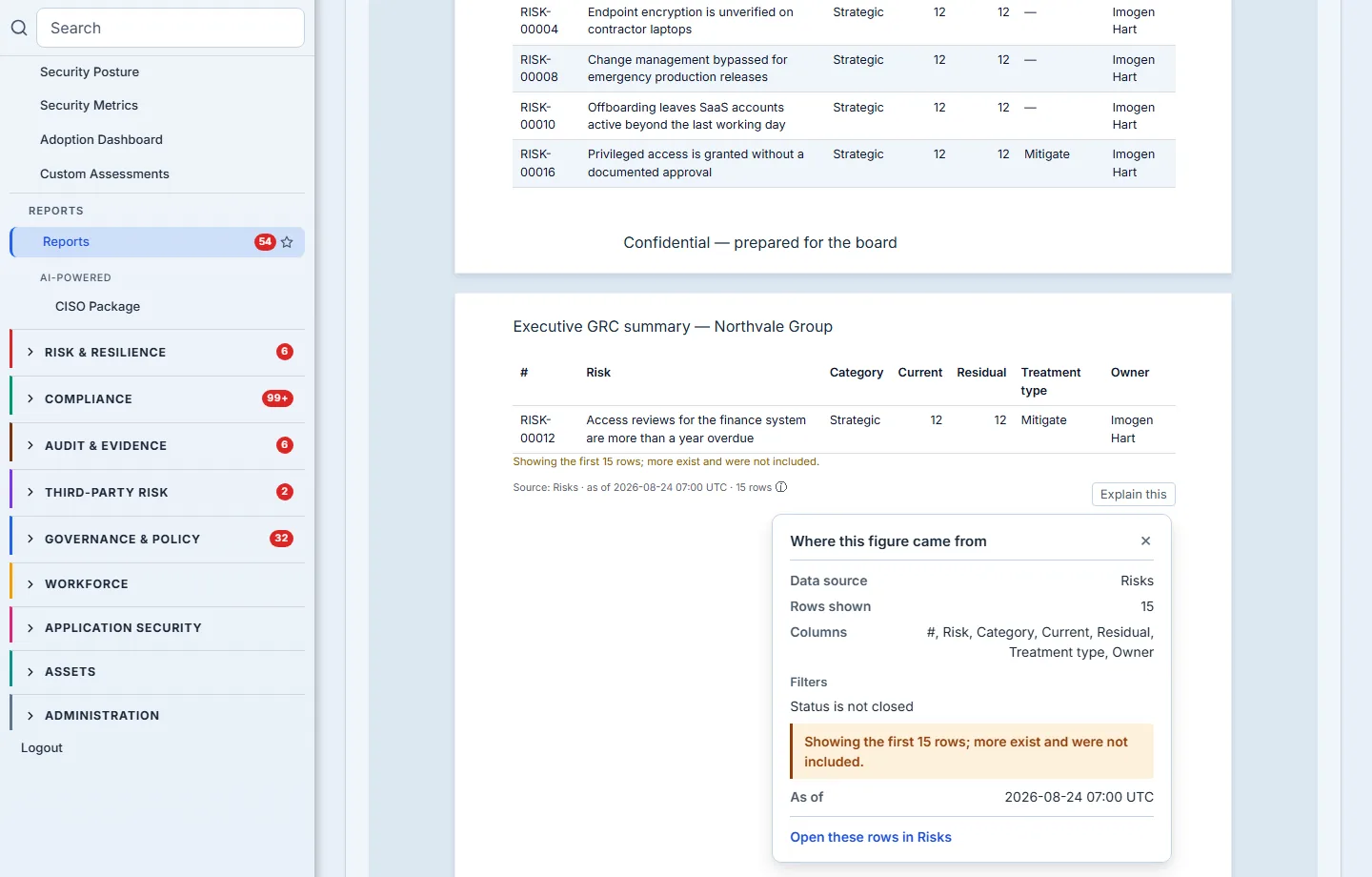
That last line is the one people underestimate. A table that shows the first fifty of two hundred matching rows is correct and misleading at the same time unless it says so. The disclosure is part of the figure, not a footnote somebody might add.
One boundary worth stating plainly, because the frame shows it and it does not yet generalise: the “Open these rows in Risks” link — the step from a figure back to the live records behind it — exists today for six of the datasets a report can bind to, Risks among them. Every other figure still carries its full provenance, which is the part that matters for defending a number; what it does not yet carry is the one-click return to the register it came from. The panel is honest about what it knows either way, and it is the link, not the provenance, that is still being extended.
The page break in that frame is worth a second look for a different reason. When a table runs past the bottom of a page, the column header is drawn again at the top of the next one — so a row read on page four still has “Residual” and “Owner” above it rather than seven unlabelled columns. It is a small thing that only matters in the format this product is for: nobody scrolls a PDF back to page one to find out which column they are reading.
Step 4 — Commentary: who stands behind these sentences
Reports carry prose, and prose has an author. Talarity keeps three states apart, because they carry different obligations:
- Drafted by a model, not yet accepted. A person has to read it and take responsibility for it. Until somebody does, the report cannot be published.
- Carried forward from the previous period. The words are last quarter’s. They may still be true — but somebody has to say so. Confirming it still holds is a real act, and it is recorded as one.
- A section a person must write. Some sections a model must not draft at all. Those arrive empty and say why.
All three block publication, and the publish control names which one is holding it. That is the whole point of separating them: “bring it up to date”, “accept it”, and “write it” are three different jobs, and a single “unreviewed” count would send everyone to the wrong one.
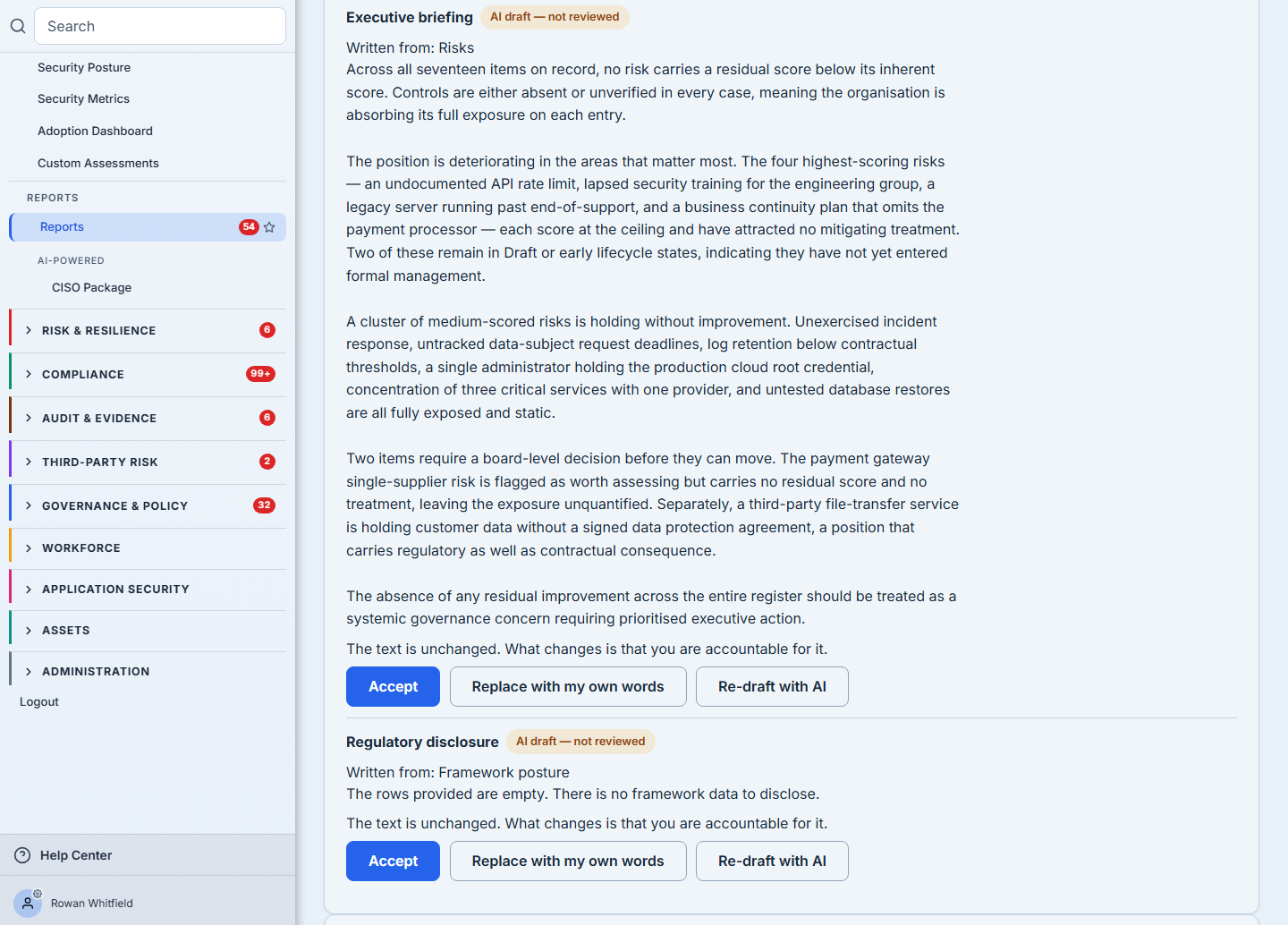
The frame below is the first of those three, on a report generated moments before it was taken. It shows both of the report’s drafted sections, each with its own three controls, and both sections behave identically. The section carries an AI draft — not reviewed badge, the drafted text sits under the badge where it can be read, and it offers the three things a person can do about it: accept the draft and take responsibility for it, re-draft it with the model again, or replace it with their own words. Nothing here is a preview of a feature — the prose behind those badges was written by a model against this organisation’s own figures, and the report cannot be published while it sits unread.
That the words are on the card at all is a recent correction, and it is the kind of gap worth naming. The card used to show each section’s title, its state and its two buttons — and not a line of the draft. The text was on the page, further down in the report body, but a reviewer at the top of a forty-page board pack had the section’s name and no way to reach it, while the Accept button’s own tooltip told them they were becoming accountable for it. Asking someone to stand behind prose you have not shown them is not a review step; it is a signature on a blank page. If you replace a section instead, the box opens with the existing words in it, so amending last period’s analysis is an edit rather than a retype from memory.
There are two further states the card handles, and they are easy to confuse because both render as “this report has no commentary”. One is a section for which nothing was produced at all, because the organisation has not enabled AI. The other is a report whose TEMPLATE asks for no commentary, which the card says in those words and answers with “Open this template on the canvas”, because commentary is authored into the template rather than into a report that already exists. Neither state is photographed here, because neither arises on the reports this walkthrough generates. They are worth knowing about because they are where most products render a blank — this one names the cause, names the remedy, and offers the way there. A section nobody wrote and a section nobody COULD write look identical on a page and mean opposite things, and only one of them blocks publication.
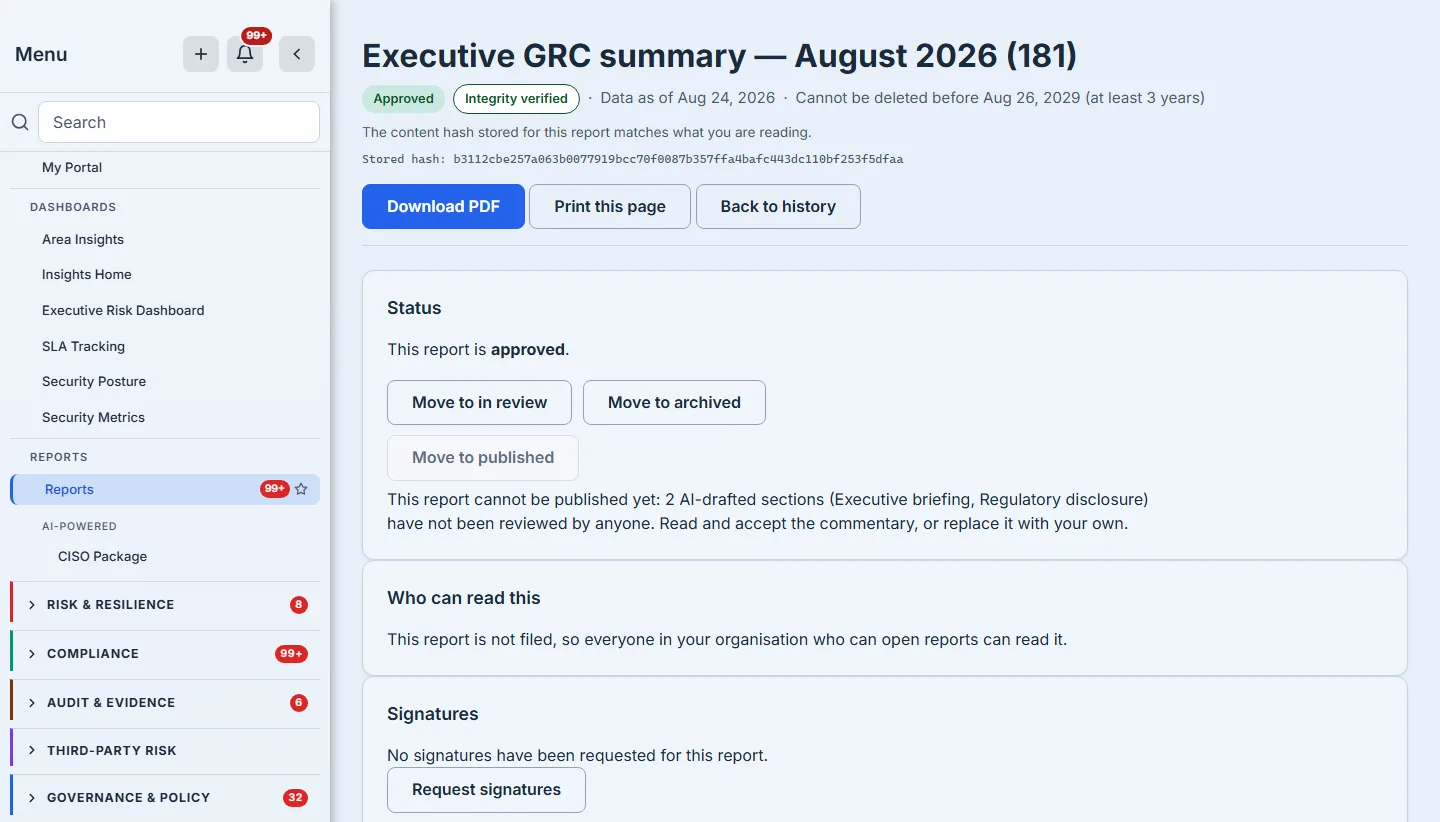
And the refusal is not a policy the reader is asked to remember — it is printed on the control that would otherwise perform the step, naming the sections responsible.
Step 5 — Approval: not by the person who wrote it
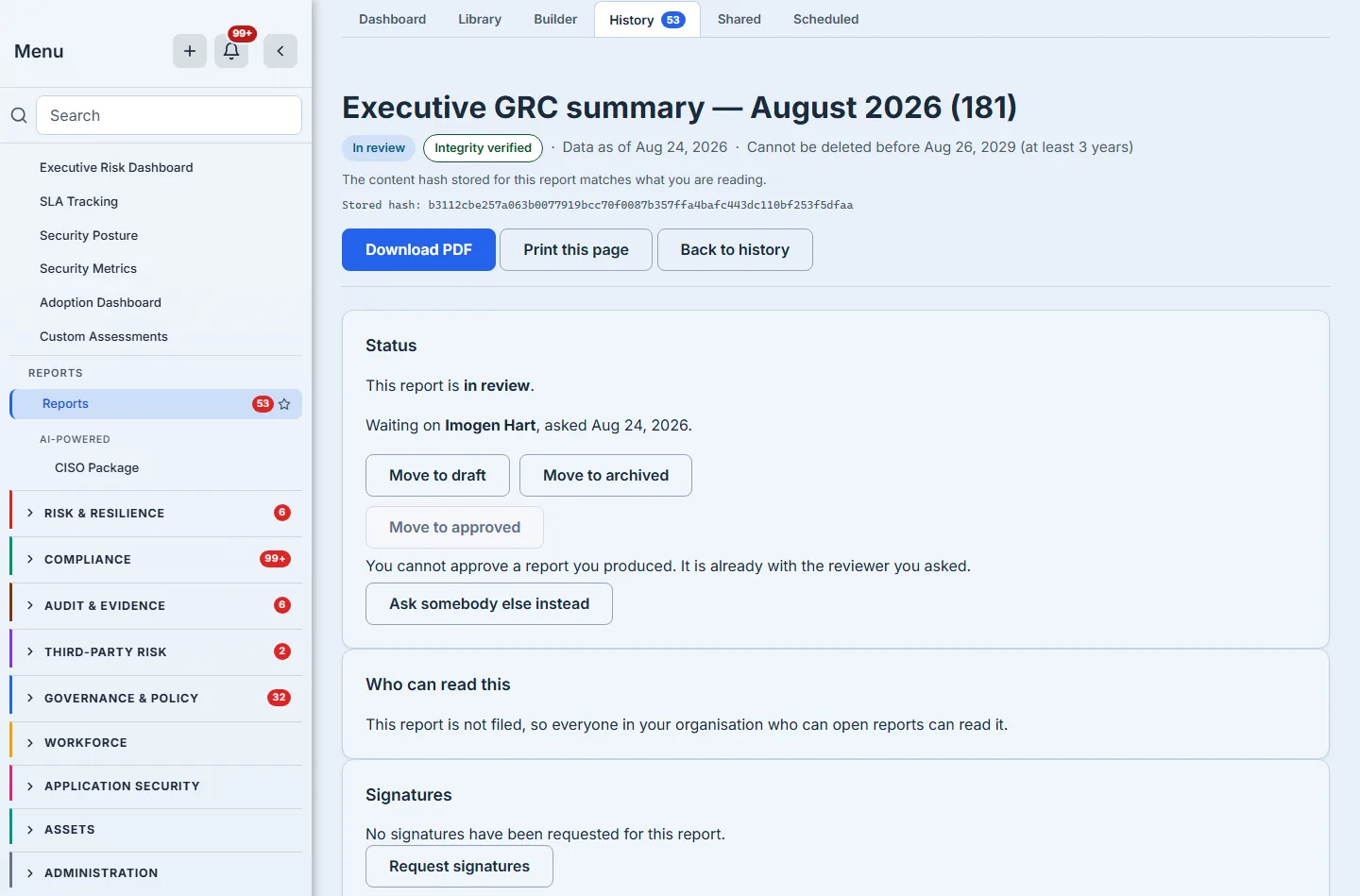
The author of a report cannot approve their own report. The product does not ask you to observe that as a policy; it refuses the transition and names the reason.
Routing it to a colleague records who was asked, by whom, and when — and the page then says who it is waiting on, by name. If that person has left the organisation, it says that instead of printing an identifier.
Step 6 — Signatures: an order, not a checkbox
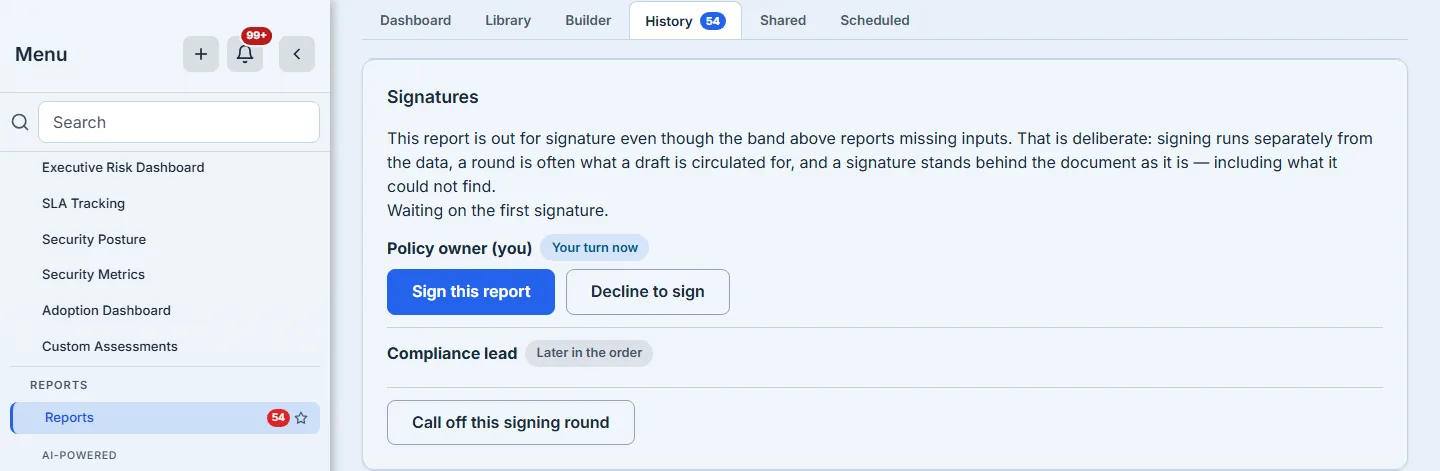
Twenty-five of the delivered templates declare who should sign them, by role — Compliance lead, CISO, Board Risk Committee Chair. When signatures are requested, the product resolves each of those roles to whoever holds it in your organisation today, and stores the resulting order on the document.
The card then shows the reader the ROLES, and marks which one is theirs. That is deliberate and it is not an omission: publishing colleagues’ identities into a status line costs something and buys nothing a reader can act on. A row reading “Compliance lead” beside a pill reading “Their turn now” tells you where the report is; a list of names does not.
Two things make this a signing order rather than a set of tick boxes:
It has turns. A signer third in the chain is told it is not their turn yet, rather than being offered a control that would fail. Backups are admitted for the slot they back, because a deputy who cannot sign is not a deputy.
Being on the order is what admits you. Not a role, not a permission bundle — the stored order for this document. A report’s own author, if they are not named on it, is refused. That is stricter than any role could express, and it is why signing is not bundled with the ability to edit or delete reports.
The other fifty-four templates name nobody, and that is the ordinary case rather than the exception — an executive summary or a risk register is not a document with a fixed signing panel. For those, you choose the signers yourself: colleagues from your organisation’s own directory, placed in the order they should be asked, each with the role you are asking them to sign as. The role is an editable field on every row, and it is what the record keeps, deliberately, because who holds a title changes and the question an auditor asks two years later is which role attested, not which employee number. In the frame below both rows still read the default, Signer — that is what an untouched picker looks like, and it is worth saying plainly rather than staging. A role can never be missing: every person arrives carrying “Signer”, and the request control refuses to send while any role box is empty. What it can be is unconsidered, which is a softer failure and a real one — a round sent in a hurry records two people as Signer, and two years later that is precisely as informative as it sounds.
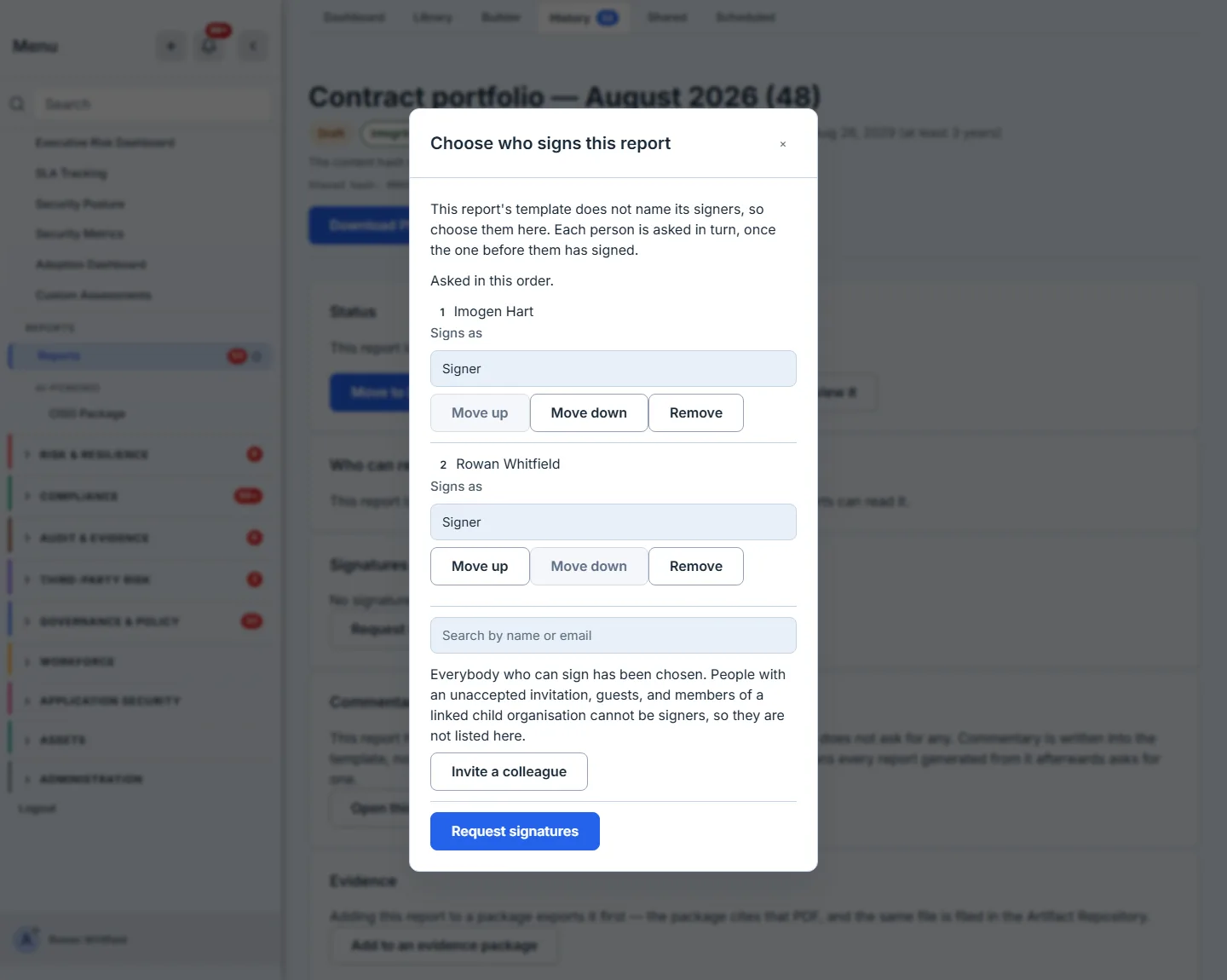
Two things the picker will not do are worth naming, because both are refusals you would rather meet before the click than after it. It does not offer people who could never complete the request — a pending invitation with no account behind it, a disabled member, a guest, somebody in a linked child organisation — since routing a signature to any of them produces a report that waits for ever on a person who cannot move it. And it does not offer the same person twice, because each is asked once and a duplicate would collapse into one entry in the order without saying so. What it will not do, it says, and then it offers the way past it: when everyone eligible is already on the order, the picker names who was excluded and why, and puts an Invite a colleague control in the same box. That matters more than it sounds. A picker that reports an empty list and stops is indistinguishable from a broken one, and the person reading it has no way to know whether the answer is “nobody else exists” or “something went wrong” — so they leave the report where it is. Naming the exclusion turns it into an ordinary state, and the control turns it into one you can act on without abandoning the report you were part-way through.
When a round has to stop
Three things can go wrong with a signing round, and the product answers them differently on purpose.
It was sent by mistake, and nobody has signed. Call it off. The report goes back to needing no signatures, and everyone who was asked is told there is nothing to do — because they were told to sign, and a request that vanishes without a word leaves somebody chasing a document nobody is waiting on. Until this existed, every way out wrote something untrue: asking a signer to decline records a person refusing to attest, on a chain built to be permanent, for a round nobody meant to open; archiving retires a report whose only fault was being sent early.
Somebody has signed, and the round cannot finish. Now it cannot be called off, and the refusal is a correctness rule rather than a caution: a captured signature is evidence about this exact document and this exact order, and clearing the order under it would leave that signature attesting to a round that no longer exists. The route is a new version, which starts a fresh round and leaves the first one intact on the record.
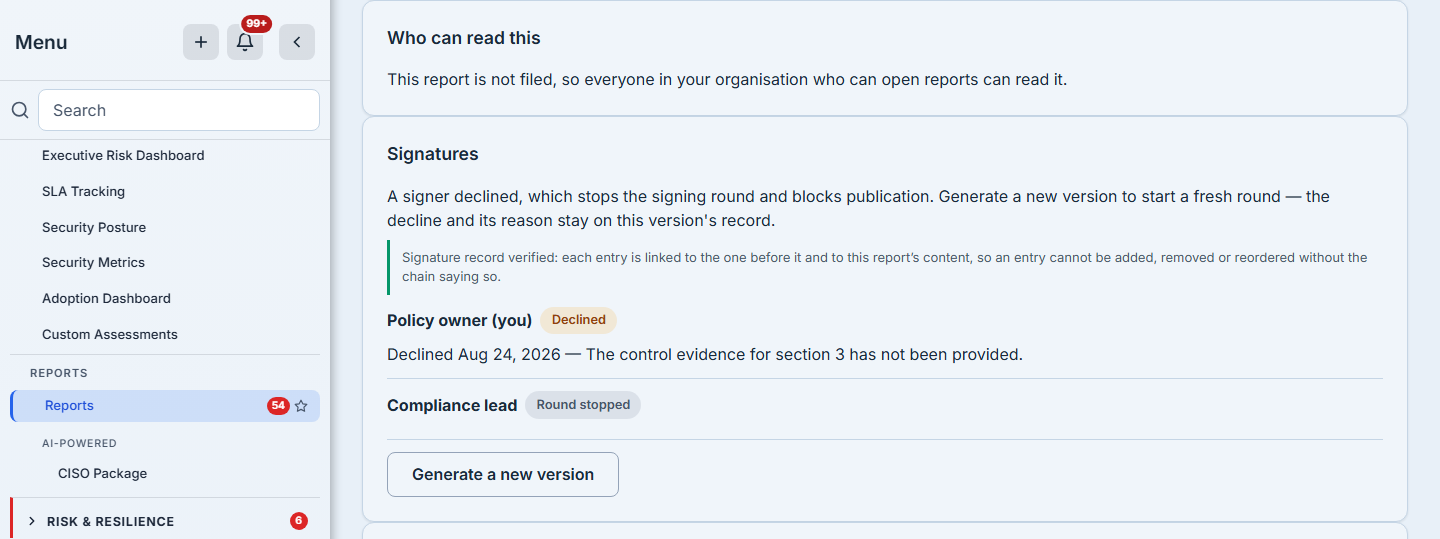
Somebody declined. The round stops there — publication is blocked, and the decline and its reason stay on that version’s record permanently. The way forward is the same new version, and the reason it is not a re-request is the point of recording a decline at all: you do not reopen a signing round on content people have already decided against.
In all three cases the report keeps its own history, and the report register can be filtered by signing state — so “which reports did somebody refuse to sign?” is a question you can ask, rather than something you find out when a publication is blocked.
One thing to notice in the frame below, because it looks like a contradiction and is not: the report being signed is still a draft, and its readiness band says every figure resolved to no data. Signing runs on its own axis, independent of the approval lifecycle. That is deliberate — a signing round is often what a draft is circulated for, and requiring approval first would mean approving something nobody had yet put their name to. What the two axes share is the content hash: sign a report, regenerate it, and the chain reports that the signatures were taken against an earlier version rather than pretending they still describe the page. The order in which you approve and sign is your organisation’s to choose; what the product refuses to do is let either act quietly detach from the document it was performed on.
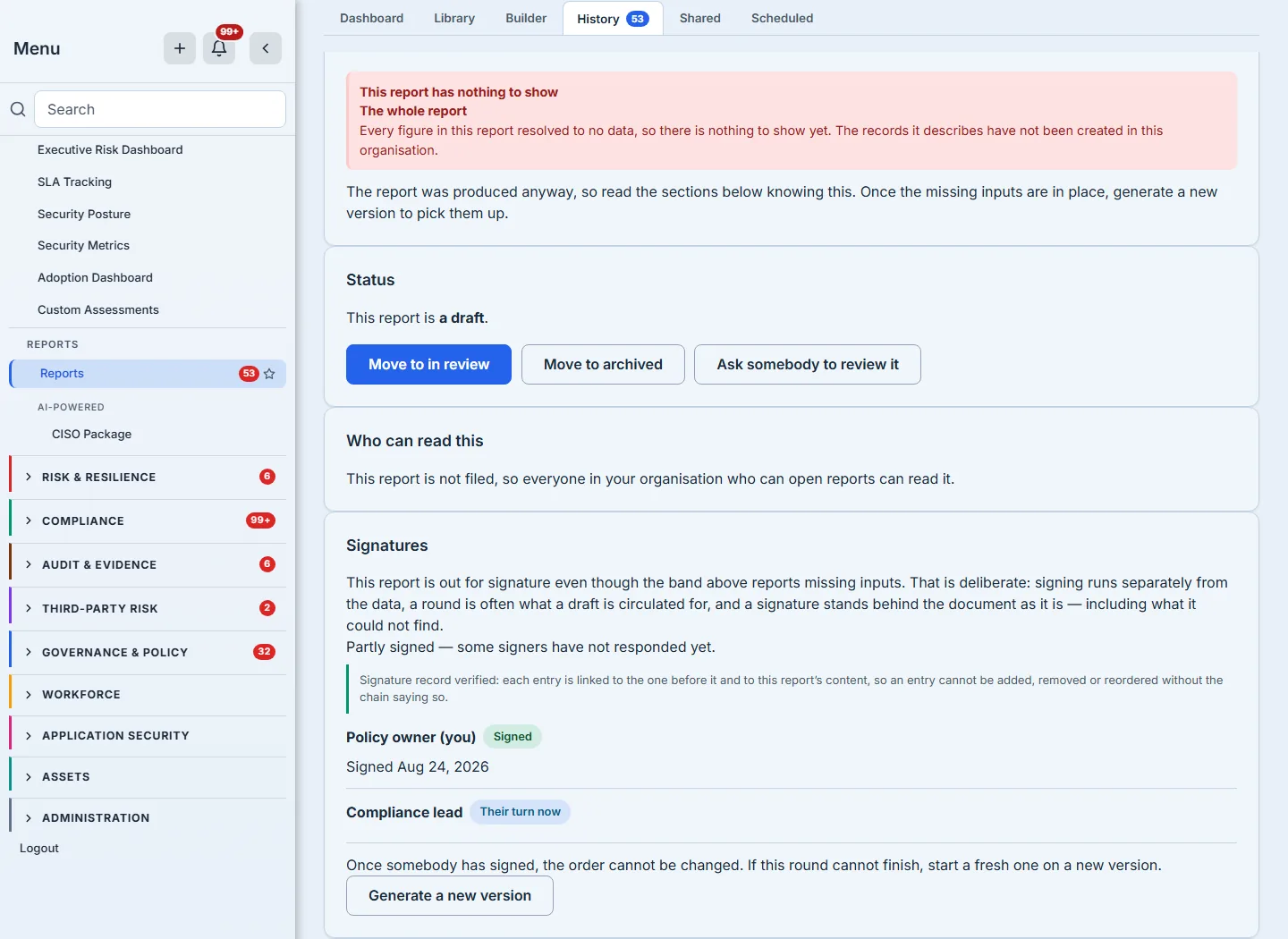
Each signature is written into a hash chain that binds the document’s content hash, the slot, the signer, the moment of the decision and the previous link. Declining is a first-class outcome, recorded with a reason and taking its place in the same chain — a signing process where the only recordable answer is “yes” is not a control.
And the chain is verified on every read, not on request. Opening the report re-links it end to end and reports one of three things, which are deliberately kept apart:
- Verified — each signature links to the one before it and to this report’s content, so a signature cannot be added, removed or reordered without the chain saying so.
- Taken against an earlier version — the signatures are genuine and no longer describe what the page says. That is what regenerating a report does, and it is not tampering; calling it tampering would cry wolf at an ordinary act.
- Does not verify — and every break is listed, not just the first.
A verification that only runs when somebody remembers to ask it has not run. It is checked on the way in, for the same reason the content hash is.
Step 7 — Publication, and what it freezes
Publishing is what makes a report citable, and it is deliberately one-way in the ways that matter. A published report’s commentary cannot be edited, it cannot be renamed, and it cannot be deleted. Those refusals come from one rule the whole surface shares, so a route that reaches the document from somewhere unexpected gets the same answer.
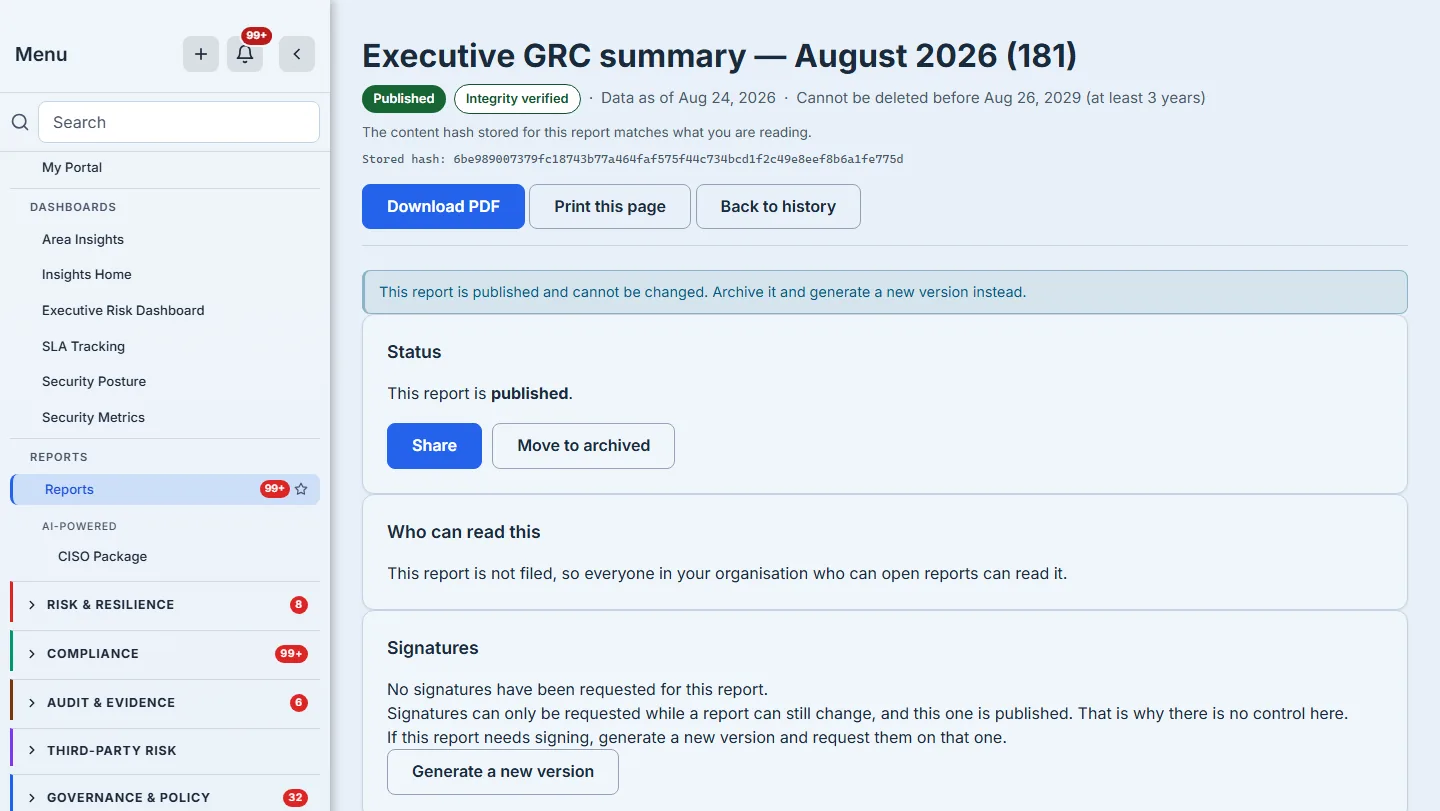
The Signatures card in that frame is doing something small and worth naming. There is no “Request signatures” button on a published report, because the request would be refused — and rather than leave a reader to work out whether the button is missing, disabled, or was never there, the card says which, and offers the one route that does exist. A control withheld without explanation and a feature that does not exist look identical from the outside, and only one of them is true here.
The integrity line above is the part worth pausing on. Accepting the commentary changes the rendered document — the product prints who stands behind each section — so the stamp is re-taken at the same moment, in the same write. You can watch that happen across the frames in this article rather than take it on trust: the in-review frame and the approved frame carry the same stored hash, character for character, because moving between those two states changes nothing a reader sees — and the published frame carries a different one, because accepting the two AI-drafted sections in between changed what the document says. A stamp that never moved would be the suspicious thing. A report that recorded its hash at generation and never moved it would accuse itself of tampering on the one screen an auditor is most likely to be shown, and a false alarm there is worse than no alarm, because it teaches the reader to disregard the real one.
Step 8 — Afterwards: evidence, filing data, and the retention floor
A published report is an artifact other parts of the product can cite. It can be added to an evidence package, and for the templates that carry a regulatory form — a GDPR Article 30 record, an SEC Item 1.05 or Item 106 pack — the underlying values can be downloaded as filing data rather than re-keyed off a PDF.
That export is careful in a way worth spelling out, because it is the difference between a convenience and something you can file. A field the report cannot supply is written as an explicit null and listed by name, rather than being left out. An omitted key reads to a filing agent as not applicable — which is a claim about your organisation — while a null is an absence, and the list tells you which absences you are about to file.
And it has a retention floor. The product will refuse to delete a report that is held under one, and it will tell you how long the report must be kept, the date that period runs to, and that the two together are the reason. Five of the frames above are of a document header — the first two, the approval, the approved and the published — and four of them carry that pair legibly for the report they show; on the second the header sits behind the signer dialog’s backdrop, which dims it to the point where the retention line is there but not readable; the other five are crops of a panel, a card or a dialog and do not reach the header at all. The five that do disagree with each other on purpose: the policy attestation record is held for at least 7 years, the executive summary for at least 3. Each header prints the date its own period runs to, counted from the day that report was generated — and counted deliberately long. A year is taken as 366 days rather than 365, so a three-year floor is 1,098 days and a seven-year floor is 2,562. The reports in the frames above were generated on 23 August 2026, which puts their dates at 25 August 2029 and 28 August 2033 rather than the 23rd, and the few days are the point: a retention floor that lands a day short because of a leap year is a floor that failed. This is why the label reads “at least” rather than naming an exact term. The floor arrives with the report rather than being chosen after the fact: it is stamped at generation from the template the report came from, so nobody has to remember to apply it and nobody can shorten it afterwards. Forty-nine of the eighty delivered templates name their tier outright — twenty-eight at seven years, fourteen at three, seven at six — and the remaining thirty-one inherit a three-year default, which is where the executive summary’s own floor comes from. On a template your organisation writes, the floor is yours to set: the builder’s settings pane carries a How long reports must be kept control, and it offers the same four periods in the same words the refusal will later use. It applies from the next report onwards — reports already generated keep the floor they were created with, because a retention period you can shorten retroactively is not a retention period. Note what the header does not print: the storage tier’s internal name. A reader needs the rule and the date, not a bucket identifier. And when the floor finally expires, nothing happens on its own — disposal is something an organisation turns on, not a thing the product does to your reports by default. What it does then is not a deletion: the report’s row survives, carrying the date its content was disposed of and a record of which parts went, and the stored hash is kept. That last part is the whole reason the sequence above was worth reading — somebody holding an exported copy years later can still check it against what we say was published, long after the content itself is gone. A legal hold outranks all of it, checked both on the report and on the organisation.
That refusal fails closed in four separate ways — no retention period recorded, an unreadable retention date, and two paths where the current time cannot be established — each with its own sentence. The reasoning is written into the code: “you cannot delete this” sends someone to support. A refusal a person cannot act on is a support ticket wearing a button.
What you walk away with
A report whose figures name their source, whose prose names its author, whose approval names somebody other than the author, whose signatures are an ordered chain rather than a set of flags, and whose deletion is governed by a floor that explains itself.
None of that is visible in a PDF. All of it is what an auditor is actually asking about when they ask whether the document can be relied on.