Every reporting tool eventually asks you the same question: do you want the report we wrote, or the report you meant? Most answer it badly. Either the delivered templates are read-only forever and you rebuild from scratch the first time one is nearly right, or they are editable and the next release quietly overwrites the version your audit committee has been reading for a year.
Talarity answers it by making the copy explicit. The one hundred and nine templates we deliver cannot be edited in place, by anyone. Copying one is a deliberate click, the copy is stamped with the template and version it came from, and — this is the part most teams care about once they have more than one author — the copy is yours alone until you say otherwise.
Who’s involved
- Analyst — finds a template that answers the question and generates. Most reporting never goes further than this.
- Report author — copies a delivered template, reshapes it, decides when it is good enough for colleagues to rely on, and can clear away their own false starts.
- Administrator — retires templates the organisation has outgrown, without breaking the reports already produced from them, and is the only person who can permanently remove a shared template somebody else created.
Step 1 — The library, grouped by the work it supports
/app/reports/templates opens on the whole catalogue, grouped by area, with the split stated in the header rather than left for you to count: how many templates exist, and how many of them are ours. Both figures are live — the count of ours opens the ones it counts, and if anything is archived the line says how many it is leaving out.
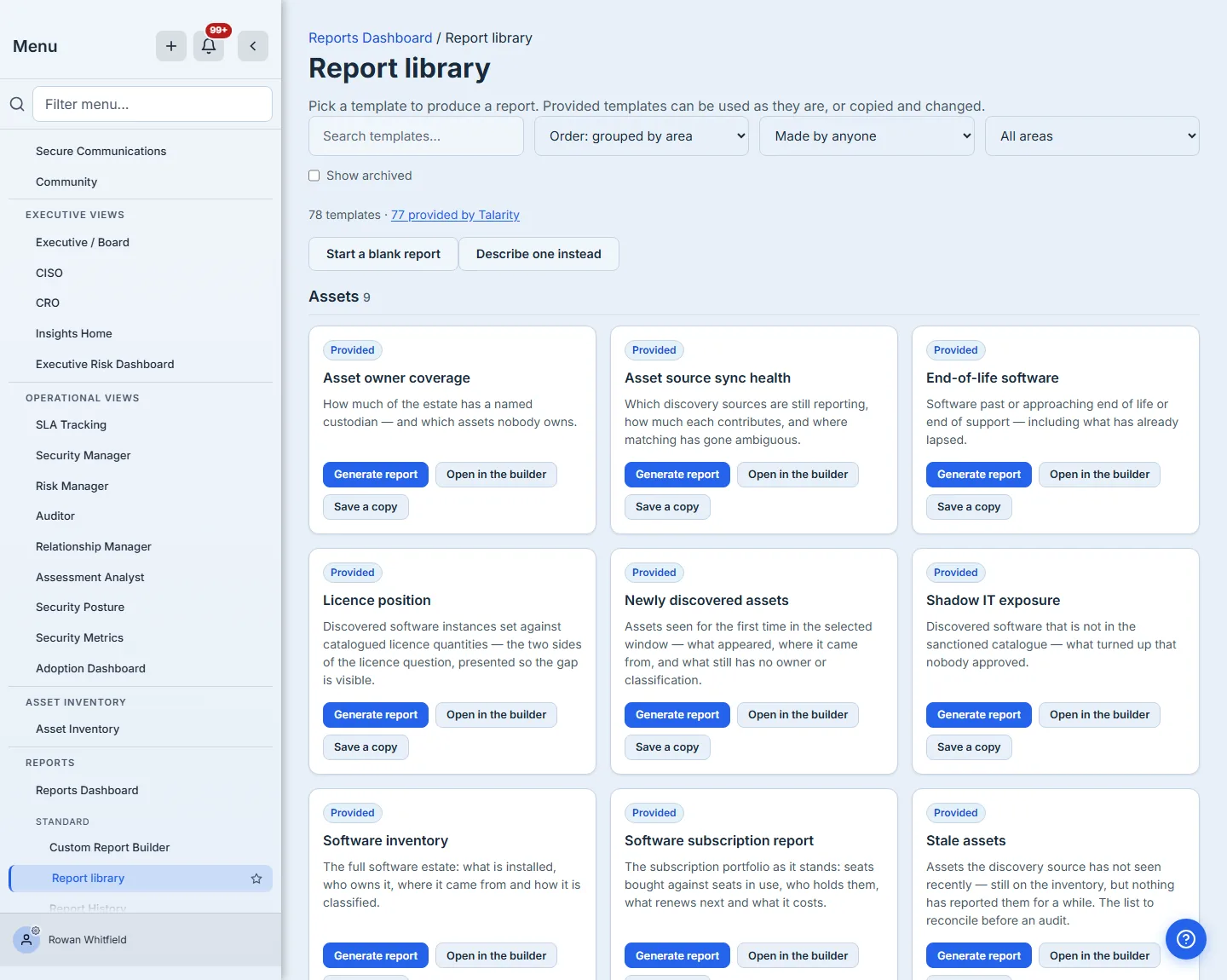
Every card carries a plain-English line describing what it answers — “What is being done about the risks that matter: treatment type, how far the score has actually moved, and which risks have a treatment recorded but no measurable reduction.” — because a template called “Risk treatment plan” tells you its subject and not its content.
The four actions do different jobs, and they say so. Generate report runs the template against your live data now. Customize opens the layout in the builder so you can read it, preview it, and print-preview it before deciding whether you want a copy — and it carries the way back, so leaving to look is a round trip rather than a one-way door. Save a copy takes it straight into a draft of your own — the subject of Step 4. Export definition downloads the template’s structure as a file you keep — the layout and which data each block reads, none of your actual data.
Step 2 — Finding one, at one hundred and nine
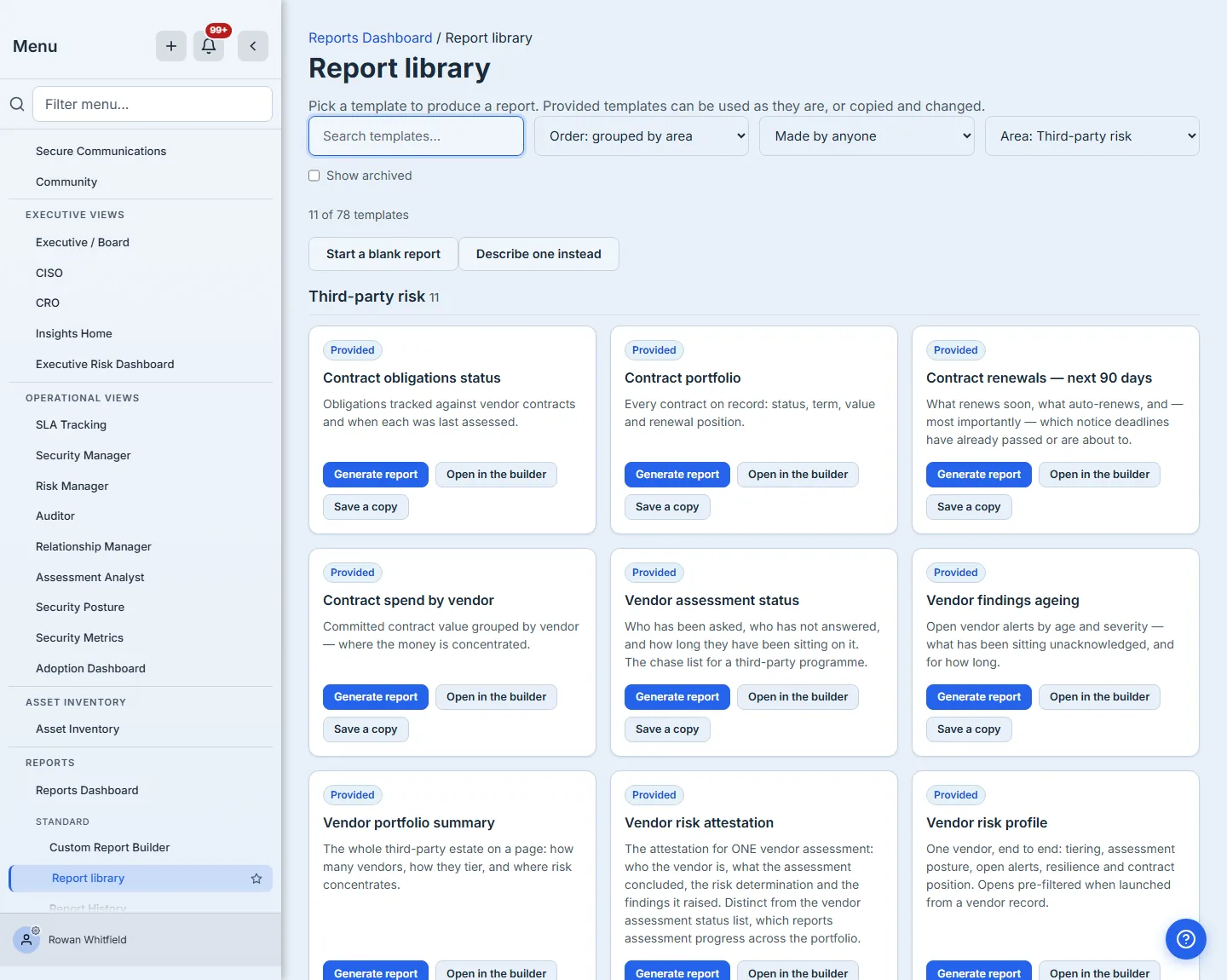
Search narrows on the template’s name and its description together, and the area filter narrows by the part of the programme it serves. The counts beside each group are the product’s own, recomputed as you filter — including the count of how many are ours, which describes the templates you are looking at rather than the catalogue behind them. That last figure is stated only when it actually divides what you are looking at: filter to an area where everything is ours and it stands down rather than telling you eleven of eleven.
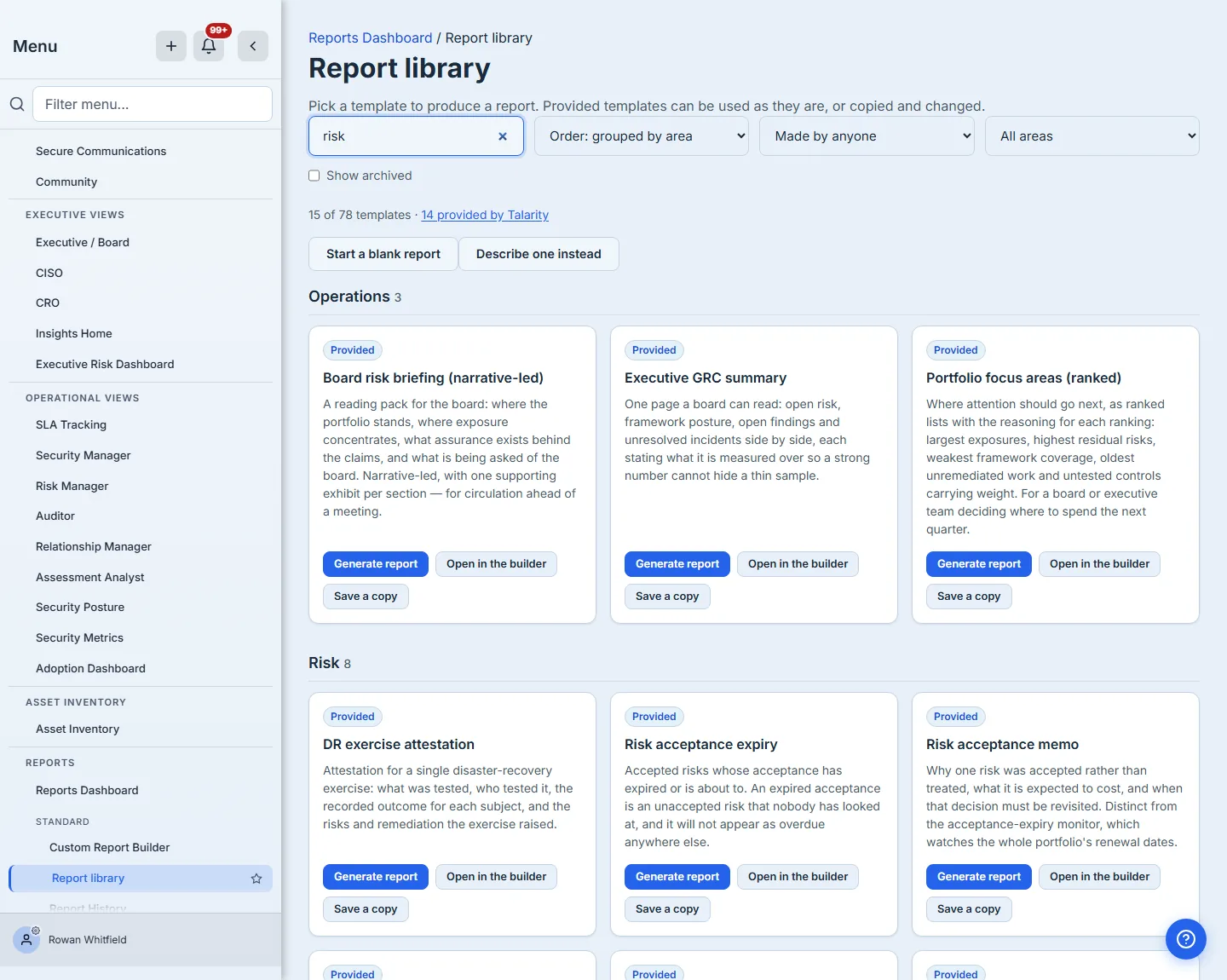
The area filter is the other half of that, and it answers a different question: not “where is the template I remember” but “what does Talarity deliver for the part of the programme I work in”. Filtering to one area leaves that group and its count, so a thin area is visible as a thin area rather than hidden inside one hundred and nine.
Beside them sits a filter for who made a template — Talarity, your organisation, or you — because a library that tells you one hundred and nine of them are ours should be able to show you the one that is yours. And the order is yours to choose: grouped by area, straight down by name, or by what changed most recently, which is the view you want when you are coming back to something you were part-way through. There is also Show archived, which matters more than it sounds: retiring a template does not delete it, and the reports already produced from it keep their name and their link back to it. Archived templates are out of the working library, not out of the record — and they say so, carrying an Archived badge so a retired template is never mistaken for a live one.
Step 3 — When none of them is the report you meant
A library of one hundred and nine is still a library of somebody else’s questions, and the honest answer to “none of these” should not be “go and find the builder in the nav”. Both ways to start something of your own sit beside the count, where that thought occurs.
Start a blank report does what it says: an empty canvas, yours from the first block.
Describe one instead is for the case where the report you want is easier to say than to draw: one sentence — “a vendor risk report covering our critical vendors, with open findings and contract renewals” — comes back as a draft with sections, blocks and data bindings already chosen, on the canvas, with everything editable. It needs AI enabled for your organisation, which an administrator does under Settings → AI, either with your own provider key or a purchased allotment.
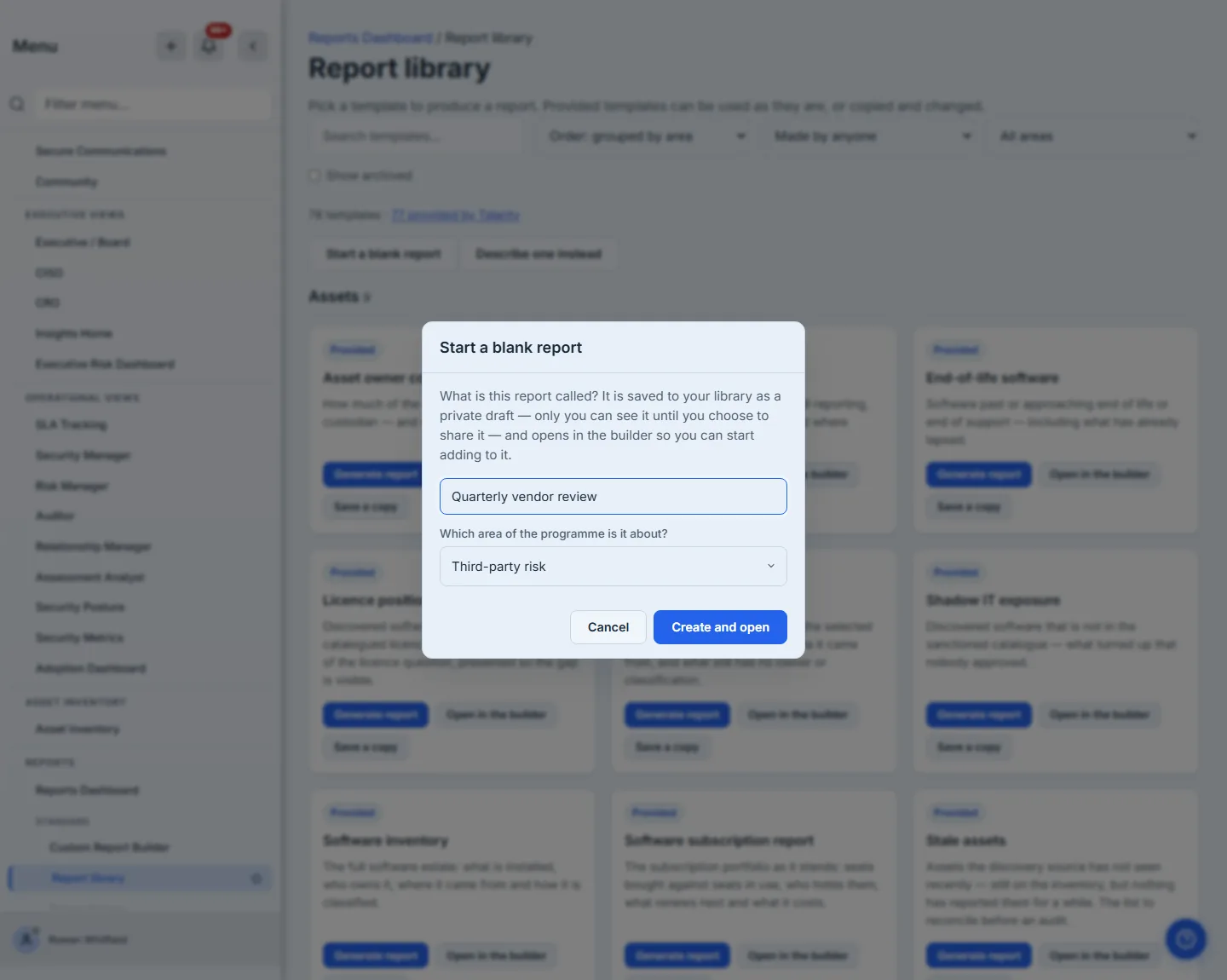
Both dialogs ask two things rather than one: what the report is called, and which part of the programme it is about. The second matters more than it looks. The library’s grouping and its area filter are how anyone finds anything here, and a report filed nowhere is one those tools can never reach — so the question is asked once, at the point where you already know the answer.
Whichever way you start, what you get is a draft and not a decision — the model, if you used one, chooses a starting point and you keep the pen. None of it is permanent either: Report settings in the builder holds the report’s name, its description and the area it is filed under, so a name you typed before you had written anything is a name you can change afterwards.
It is also a private draft from the moment it exists, which is the subject of the next step: nothing you start this way appears in a colleague’s library until you decide it should.
Step 4 — A copy is a private draft
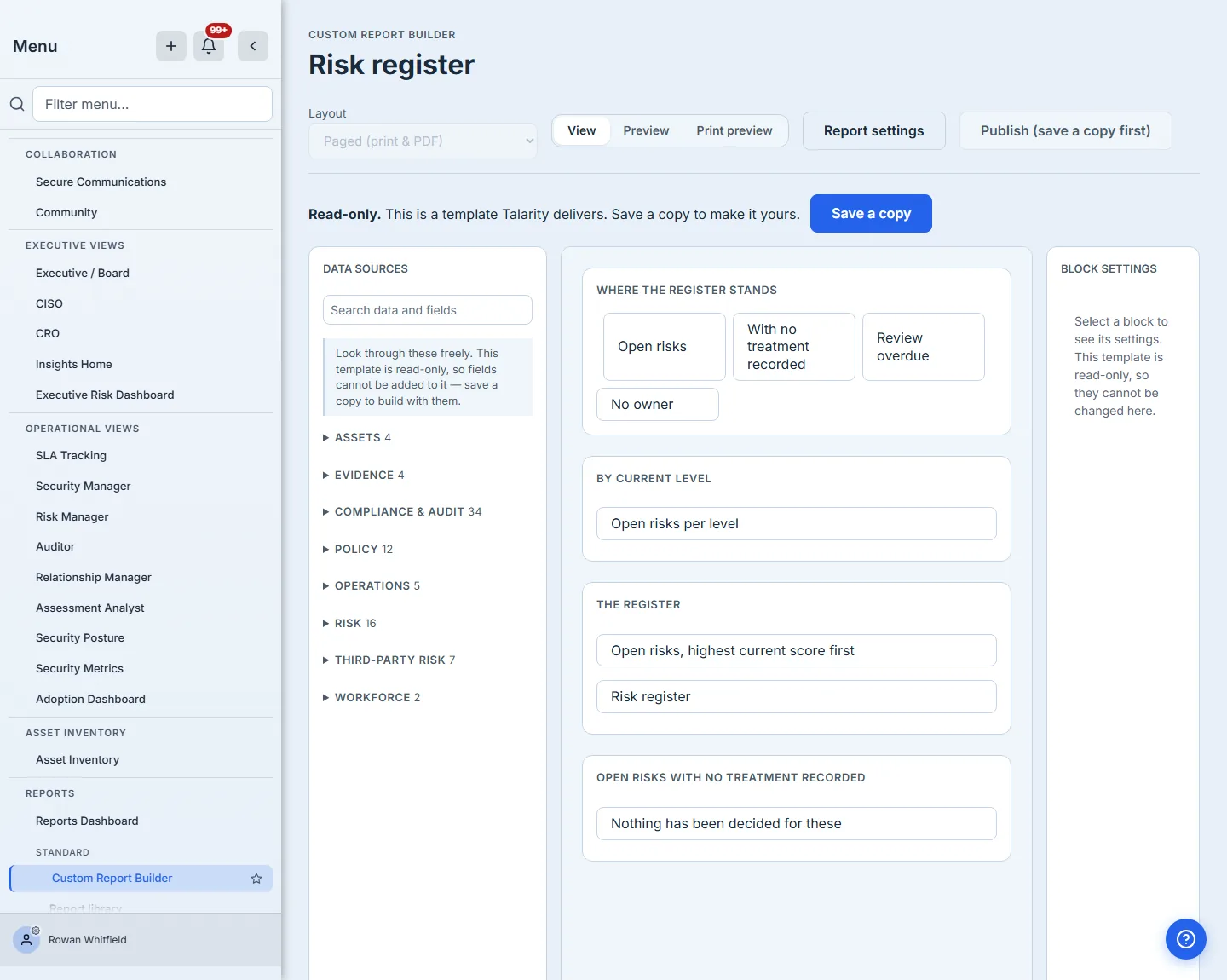
Save a copy sits on every delivered card, so the answer to “this one is nearly right” is one click from the shelf you found it on. The same button is in the builder too: open a delivered template there and it opens read-only, saying so — you can read it, preview it and print-preview it, and the one thing you can change is whether you have a copy. The whole surface agrees on that rather than leaving you to find out by clicking: the layout control and the publish button are both refused with their reason on them, the settings pane says its fields cannot be changed here, and the data panel invites you to look through every field the template draws on while telling you plainly that none of them can be added until you have a copy. Nothing you do can alter the original, which is why copying costs nothing to change your mind about.
The copy belongs to you and to nobody else. It does not appear in your colleagues’ library, it does not sit beside the templates Talarity delivers, and it is marked so that you can tell your own work-in-progress from the shared library at a glance.
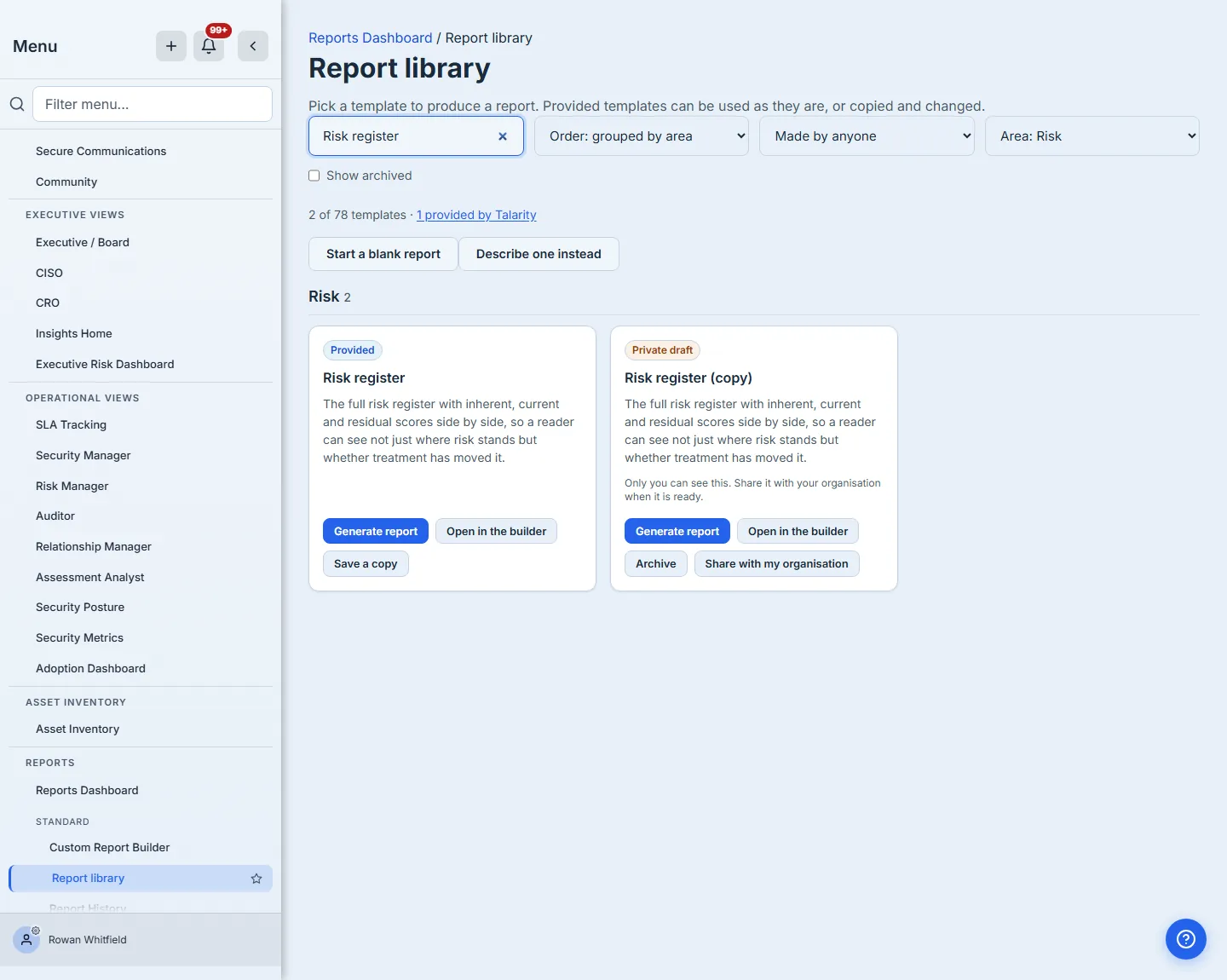
That default is deliberate. A half-finished board pack has no business sitting next to the delivered templates while you are still deciding what belongs in it, and the alternative — every experiment appearing instantly in everyone’s library — is how a catalogue becomes unusable. The copy is stamped with the template and version it came from, which is what lets us tell you later that the original has improved and diff it against the exact version you started from rather than guessing.
Yours also means yours to rename. Open the copy in the builder and Report settings holds the three things the library finds it by — its name, its description, and the area it is filed under — all editable, and saved under the same lock that protects everything else you change on the canvas.
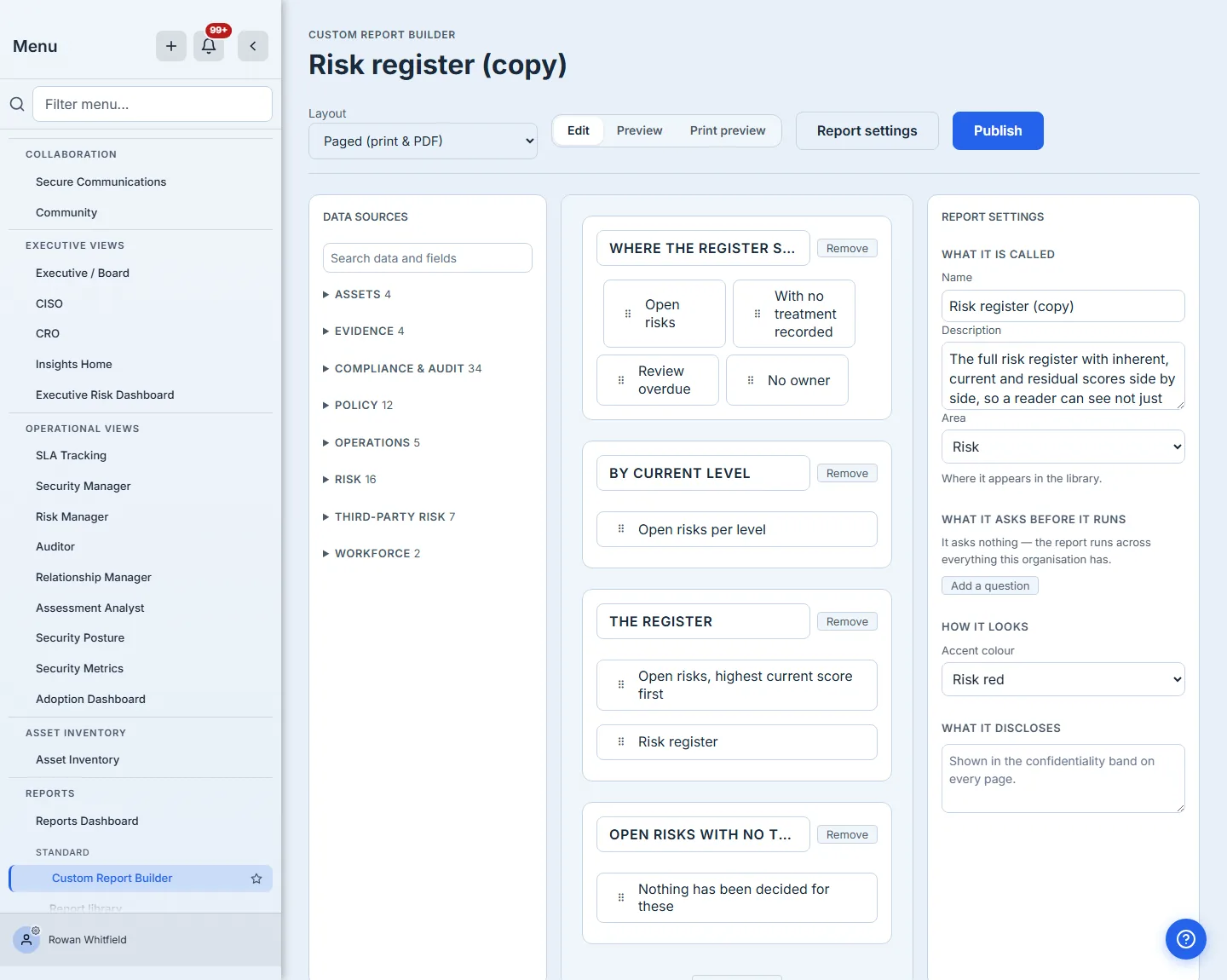
That matters more than a convenience. “Risk register (copy)” is a name the product chose for you, and the area decides which group the template appears under and whether the area filter can ever reach it — so a report filed wrong is a report mislaid. Both are corrections you can make at any point, on your own copy, without touching what Talarity delivers.
Step 5 — Sharing it is deliberate, and one-way
When the draft is worth relying on, Share with my organisation moves it into the shared library. The confirmation says what will happen and what cannot be undone, before you do it.
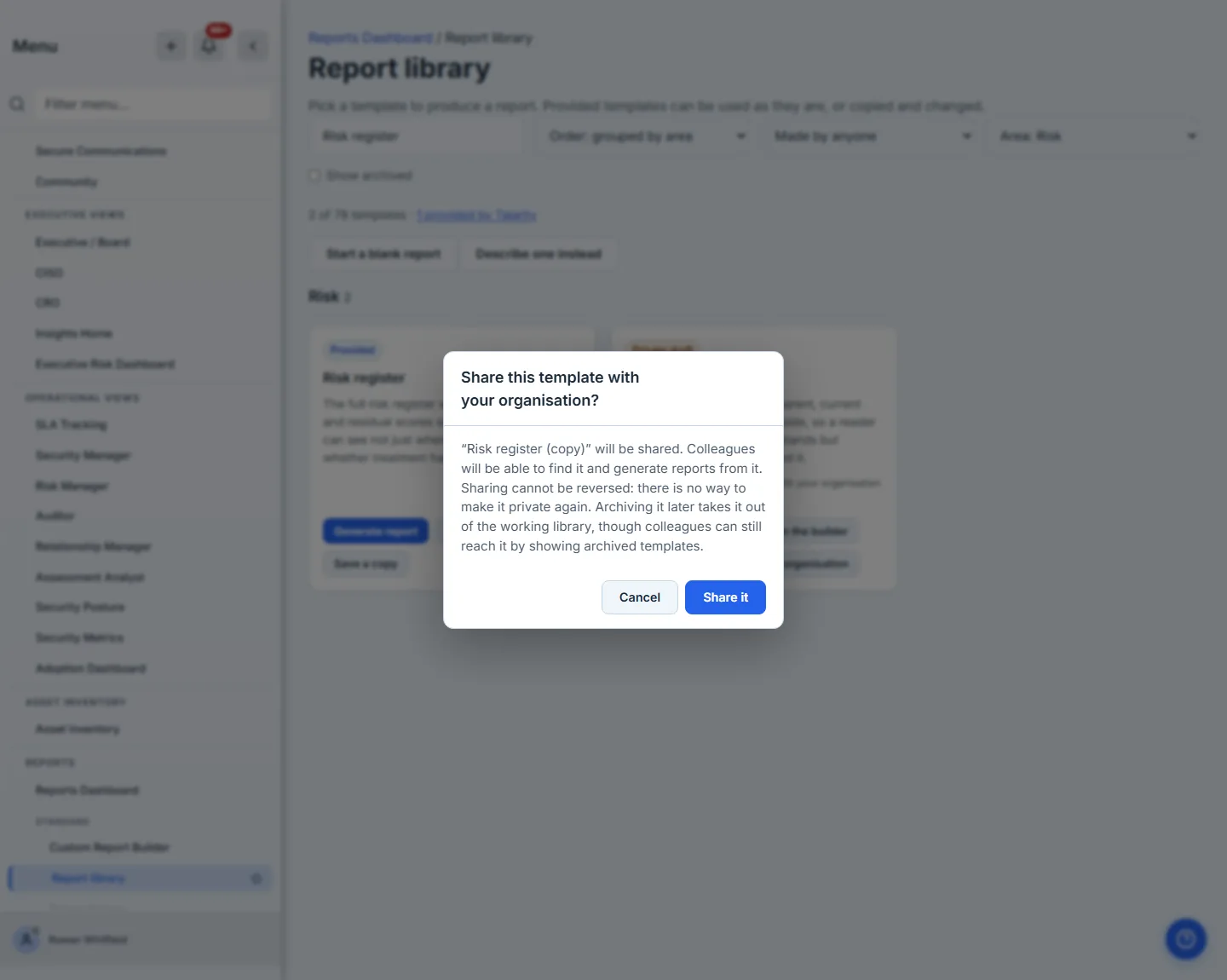
It is worth reading that second sentence carefully, because it is precise rather than reassuring. Sharing is genuinely one-way — there is no un-share — and archiving is not a way back to private: it takes the template out of the working library for everybody, and everybody can still tick Show archived and find it. That is the true shape of the decision, so it is the shape the dialog states.
The move is genuinely irreversible, and the reason is other people. Un-sharing would silently remove something colleagues had already started generating from — a report that worked last quarter and cannot be found this one, with nothing on screen explaining why. Retiring it is the honest alternative, and it leaves the reports already made from it intact.
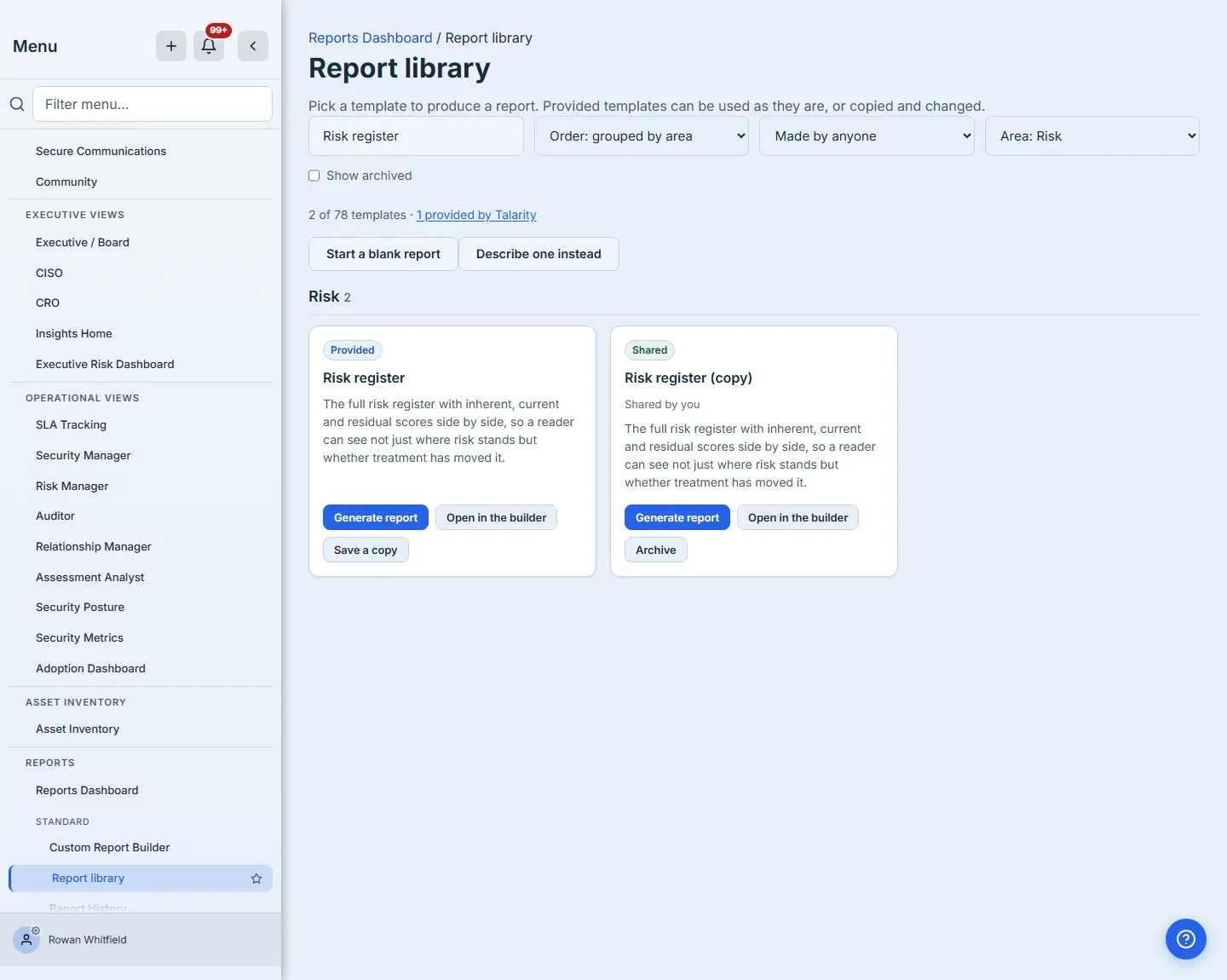
Every card in the library says which of the three it is — Provided by Talarity, a Private draft of your own, or Shared with the organisation — and a template your organisation owns records who put it there: a colleague’s name when it was theirs, and Shared by you when it was yours. That last detail is not decoration: it is the same question the rules about retiring one turn on.
Step 6 — Retiring what the organisation has outgrown
Archived templates leave the working library and stay in the record. Show archived brings them back into view, and Restore returns one to the state it was in when it was archived. That matters for a template that was published: it comes back published, rather than as a draft somebody has to publish a second time — which would stamp a new version number onto a report that had not changed a word, in the very history you would consult to answer “which version did we send the board”. Retirement is real while it lasts: an archived template will not generate, so nobody produces a report from something the organisation has decided it no longer stands behind. The button stays where it was, visibly unavailable, and the server refuses the same thing if it is ever reached another way — “This template is archived. Restore it before generating a report from it.”
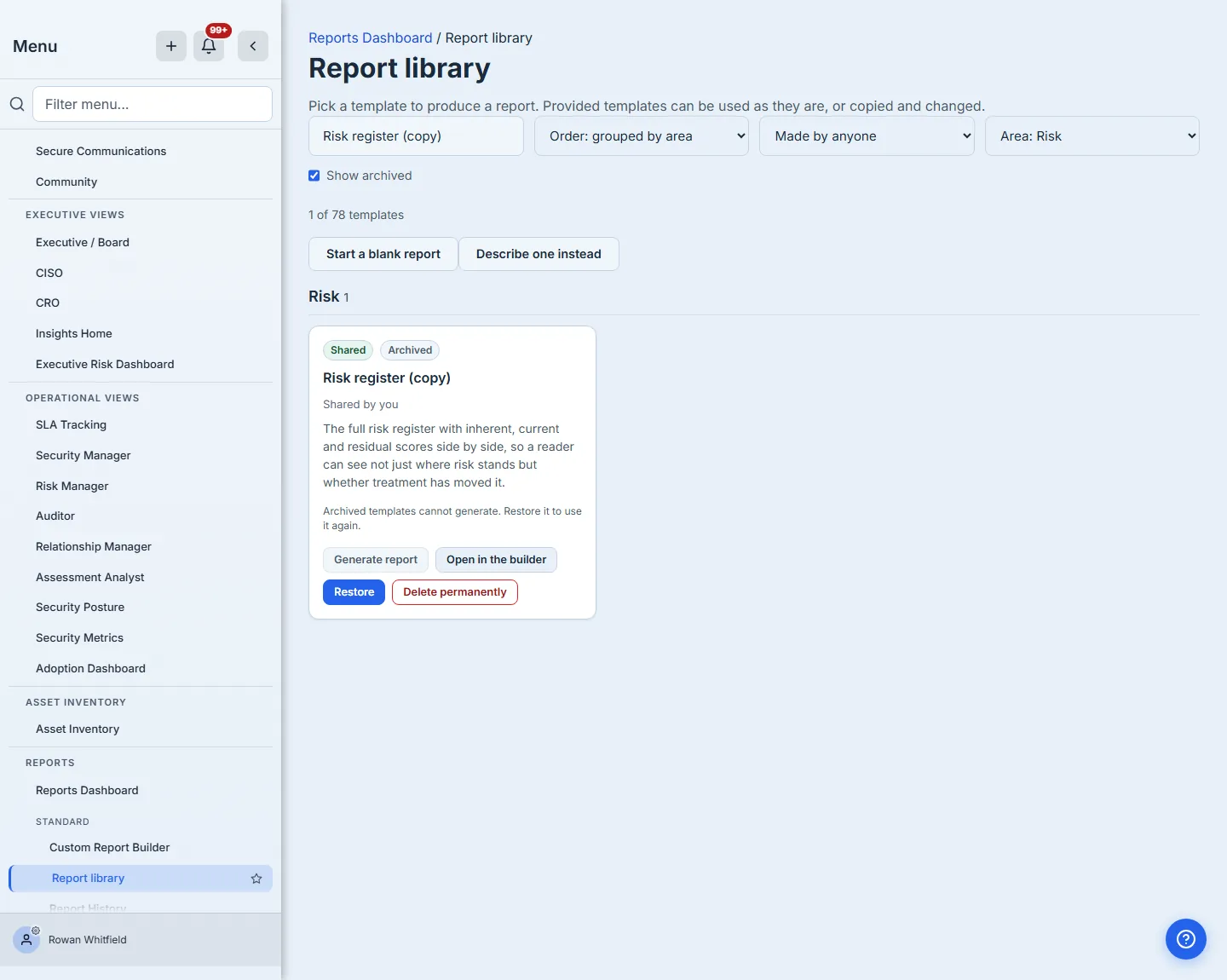
Retiring a shared template is not something any colleague can do to another’s work. Archive, Restore and Delete permanently all ask the same question — is this yours, or do you administer the organisation? — because archiving is what stops the organisation generating from a template at all: every schedule pointing at it stops, and every colleague’s Generate button goes quiet. The buttons appear only where they will work, so nobody meets that rule as a refusal after pressing.
A template that has produced reports stays archived for good, because those reports still name it — that is what “archived, not deleted” is protecting. A template nothing was ever generated from is different: a false start, an experiment, a duplicate nobody used. Those can be removed outright with Delete permanently, which appears only on archived templates that no report cites — and only to the colleague who created it, or to an administrator. Nobody quietly destroys somebody else’s shared work, and everything that has produced a report keeps its history.
Delivered templates cannot be archived. They are Talarity’s, and retiring one inside a single tenant would make the library differ per customer with no record of why — so the server refuses, and says which door to use instead: “This is a template Talarity delivers and it cannot be archived. Save a copy to make one you own.”
When the original improves
Because your copy records the template and version it was taken from, we can tell when the delivered original has moved ahead of it. The library surfaces that as an Update available badge on the copy, and the badge is a control rather than a notice: opening it shows the changes block by block, and you choose what to take.
You do not have to go looking for it. A waiting decision is counted on Reports in the sidebar — Report library is a tab there — so it reaches you where you already are rather than sitting on a page you had no reason to open.
Nothing is applied on your behalf. A delivered improvement never overwrites a template your organisation owns — the choice is yours, it is made per block, and the version you were on stays available to diff against. The badge appears only once a delivered template has actually moved ahead of your copy, so a library where every copy is current shows none.
What you walk away with
- One hundred and three delivered templates that answer the questions frameworks actually ask, none of which you had to write.
- A copy mechanism that cannot damage the original, for you or for anybody else in your organisation.
- A private drafting space, so an unfinished report is not a colleague’s problem.
- A copy you can rename, re-describe and re-file at any point, so the name the product chose for you and the area it was first put in are both corrections rather than commitments.
- A sharing decision that is deliberate, stated, and one-way — with retirement as the honest way back out.
- Upgrades you are told about and choose, rather than upgrades that happen to you.
- Two ways to start something the catalogue does not contain — a blank canvas, or a sentence.