Every framework asks the same question in a different accent. SOC 2 wants to know that policies exist, are communicated, and are reviewed (CC1.4, CC2.3, CC5.3). ISO 27001:2022 puts it in A.5.1 — policies approved, published, and reviewed at planned intervals. FFIEC’s IT Handbook devotes whole sections to policy ownership and cadence. But underneath all of them sits a harder question that no framework spells out: which of your controls does a given policy actually govern, and how completely?
Most teams answer it with a spreadsheet. One column of control ids, one column of policy names, and a lot of remembering. It is the single most tedious artifact in a compliance program, it goes stale the moment a policy is revised, and when an auditor asks “who decided that this policy fully covers this control, and when?” the honest answer is usually a shrug.
Talarity answers it twice. When you import a policy, a free keyword pass immediately narrows the Common Control Library to the controls the document plausibly touches — no AI, no credits, milliseconds. If your organization has the AI module, a second pass reads the document against each of those controls and grades what it finds, quoting the policy back at you. Then both stop, because neither of them gets a vote. A machine can propose; only a person can confirm.
Who’s involved
- Compliance lead — imports the policy, reviews the recommendations, and decides what each one is worth.
- Control owner — the person who actually knows whether the policy’s wording meets the control, and who gets asked when the grade is arguable.
- Auditor — asks which policy covers a control, on what basis, and who said so. Gets a graded claim with the sentence it rests on, the reviewer’s name, and the date.
What “coverage” means here, precisely
A coverage claim is one row saying this document covers this control, to this degree. There are three grades a person can assert:
- Full — the policy states a requirement that satisfies the control.
- Partial — it addresses the control but leaves something out, and you name what.
- Insufficient — it mentions the topic without meeting the control.
There is a fourth state, and it is the important one: Not yet graded. That is what a keyword match produces, because a word match is not an assessment. It is the honest description of what the machine actually knows.
Only Full, confirmed by a person, satisfies anything. Partial coverage is shown with its gaps and is never offered as a met requirement. Insufficient is a record that you looked. An ungraded recommendation counts for nothing anywhere in the platform — and it is not a convention, it is a constraint: the database rejects any attempt to confirm one without choosing a grade first.
Step 1 — Import the policy
Open /app/grc/governance and click Import Policy. The form is the usual one — file, title, version, category, effective date, owner — with two things worth pausing on.
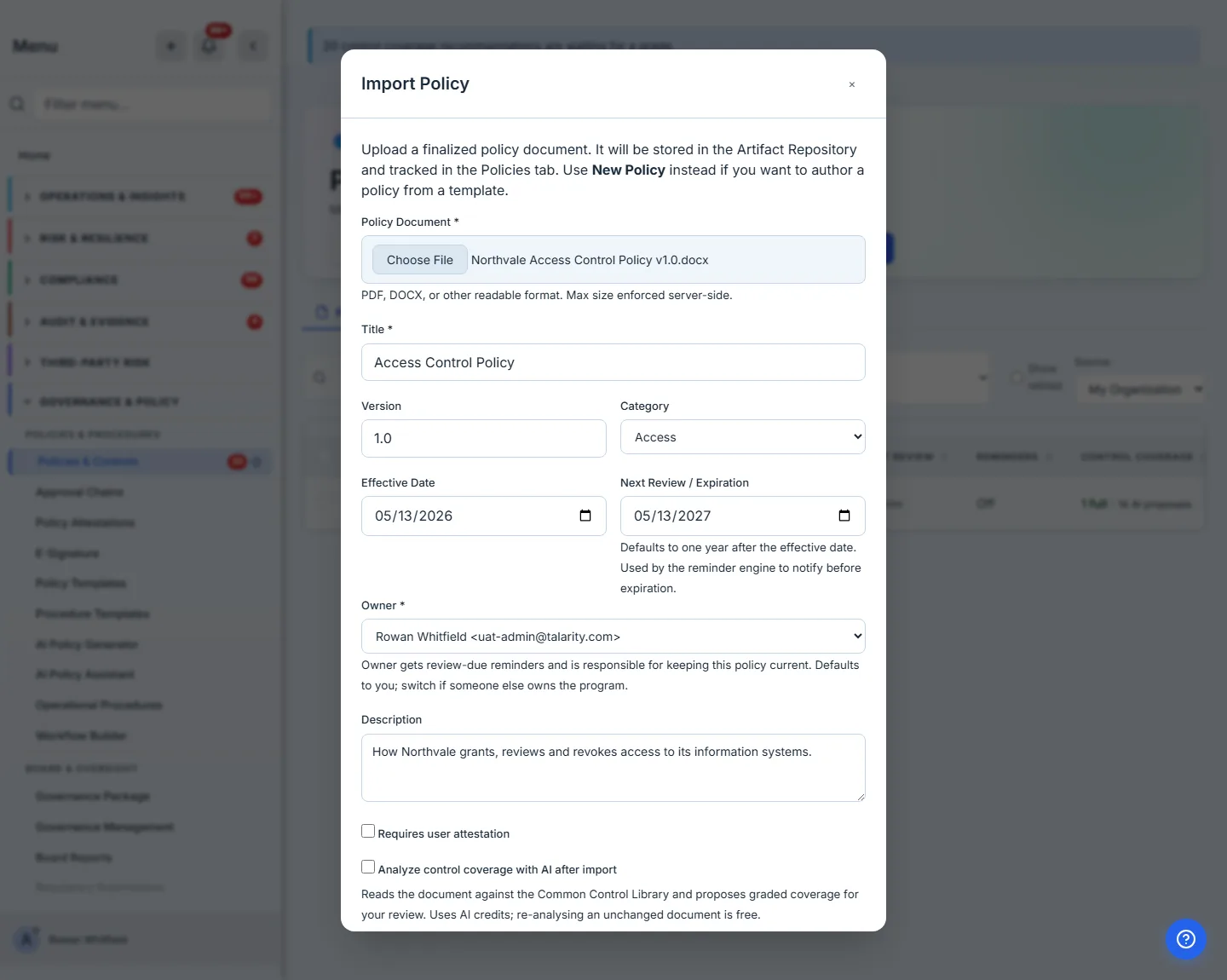
Next Review fills itself in. Set the effective date and Talarity proposes the same date a year on, because an annual cadence is what almost every policy actually runs and typing it again is how it ends up blank. Change it if your cadence is different; it drives every reminder downstream.
The AI checkbox only appears if you have AI. If your organization has no AI module, no provider key, or a key that is currently unhealthy, the option is not offered — and the page says which, rather than showing a control that would fail.
Step 2 — The free pass has already run
Submit, and the dialog does not close. It shows you what the keyword pass found.
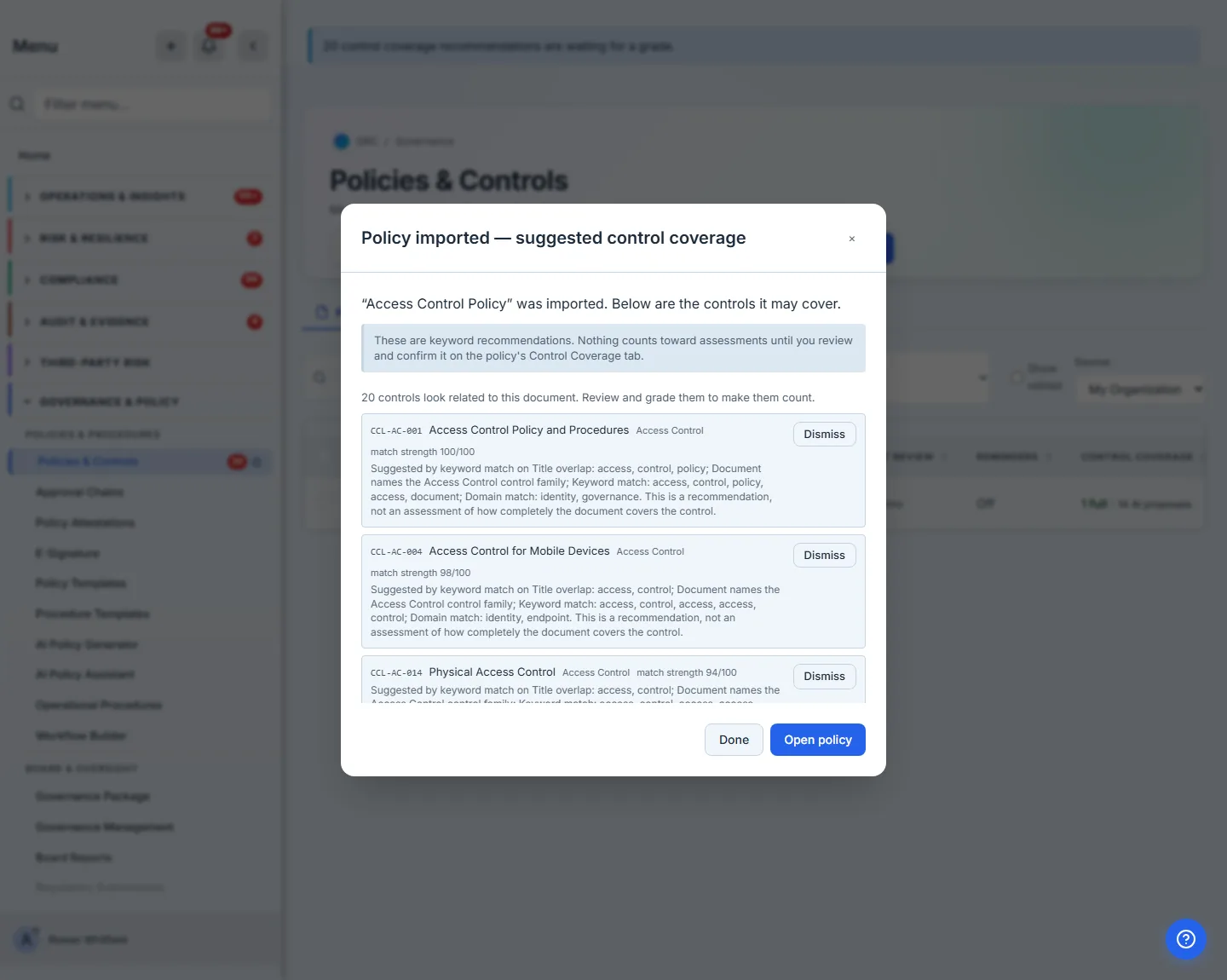
This pass costs nothing and needs nothing. It scores every control in the library against the words and phrases the document actually uses, plus its title, category and framework tags, and keeps the ones that clear a floor. On a real access-control policy of about 2,600 characters — a tight two pages — it reduced 369 active controls to 86 above the floor, and filed the top of that list as recommendations.
And the top of the list is right. The highest score was CCL-AC-001 — Access Control Policy and Procedures at 100, which is exactly correct: the document is one. Session Lock, Access Enforcement, Privileged Access Management and Access Review all followed.
Behind the scenes, each of those becomes a row stamped keyword, unassessed, proposed — a recommendation with a provenance, not a grade.
Step 3 — Read the recommendations sceptically, because the machine did not read the policy
Open the policy and go to Control Coverage.
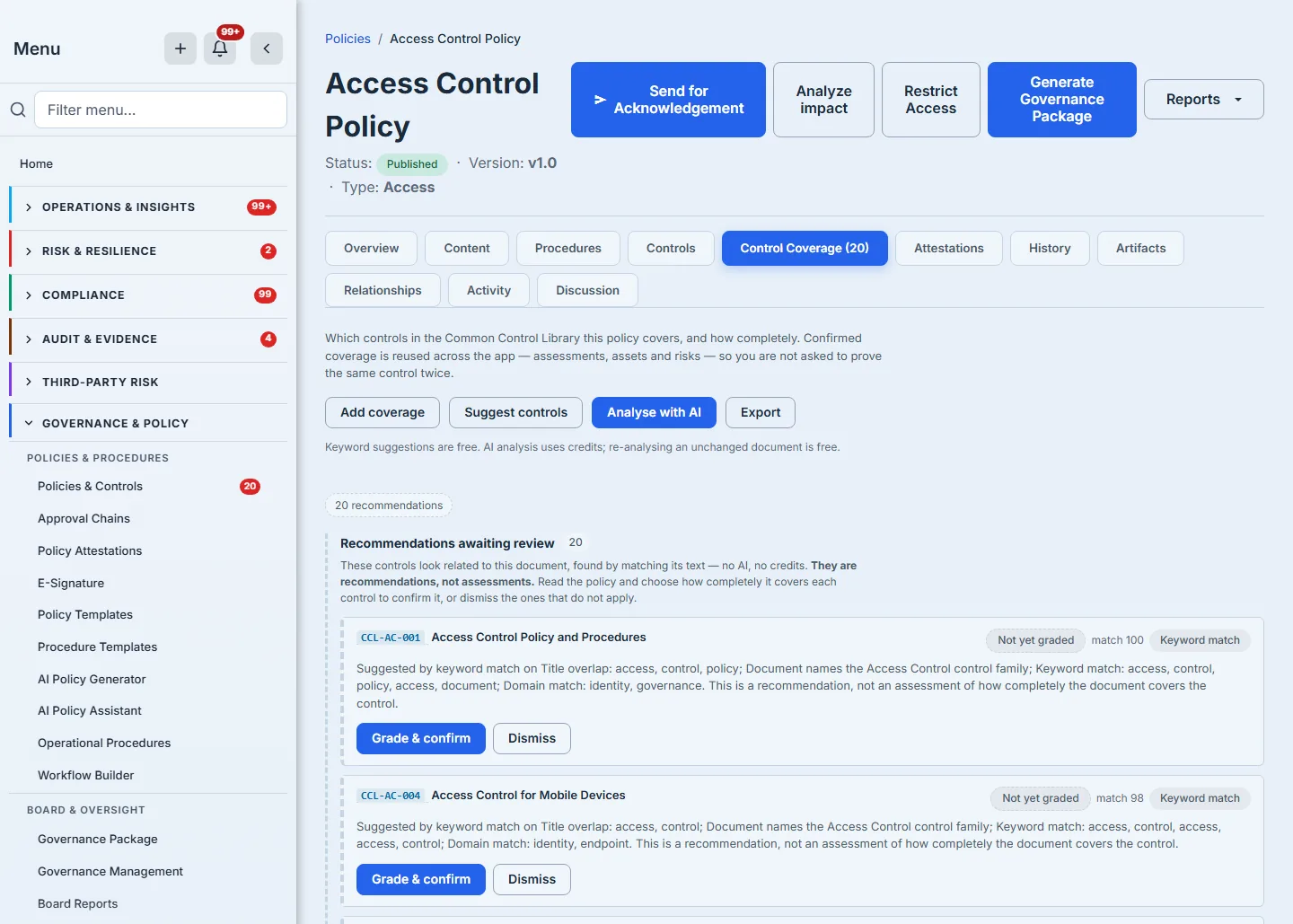
Here is the part most products would rather not show you. On that same policy, the third-highest match, at 94 out of 100, was CCL-AC-014 — Physical Access Control — on a document that establishes no physical controls whatsoever. The word “facilities” appears in it exactly once, in the sentence defining who the policy applies to. The words “physical”, “badge”, “door”, “premises” and “visitor” do not appear at all.
The scorer is not hiding why. Its own stated reasons for that match were “Title overlap: access, control” and “Keyword match: access, control, access, access, control”. It matched the word. That is all a word match can do.
It is not an isolated miss, either. Half of the top twenty were the word “access” attached to something the policy never addresses — physical doors, network ports, output devices, removable media, change control. A word match cannot tell “access control” the discipline from “access control” the door.
This is not a defect to apologise for; it is the reason the state is called “Not yet graded”. A free, instant, zero-cost pass that narrows 369 controls to a couple of dozen candidates is genuinely useful — as a shortlist for a human, which is exactly what it is filed as. The failure mode this product refuses is the one where that shortlist quietly becomes your compliance position.
Step 4 — Grade one, and watch what changes
Pick a recommendation and choose a grade.
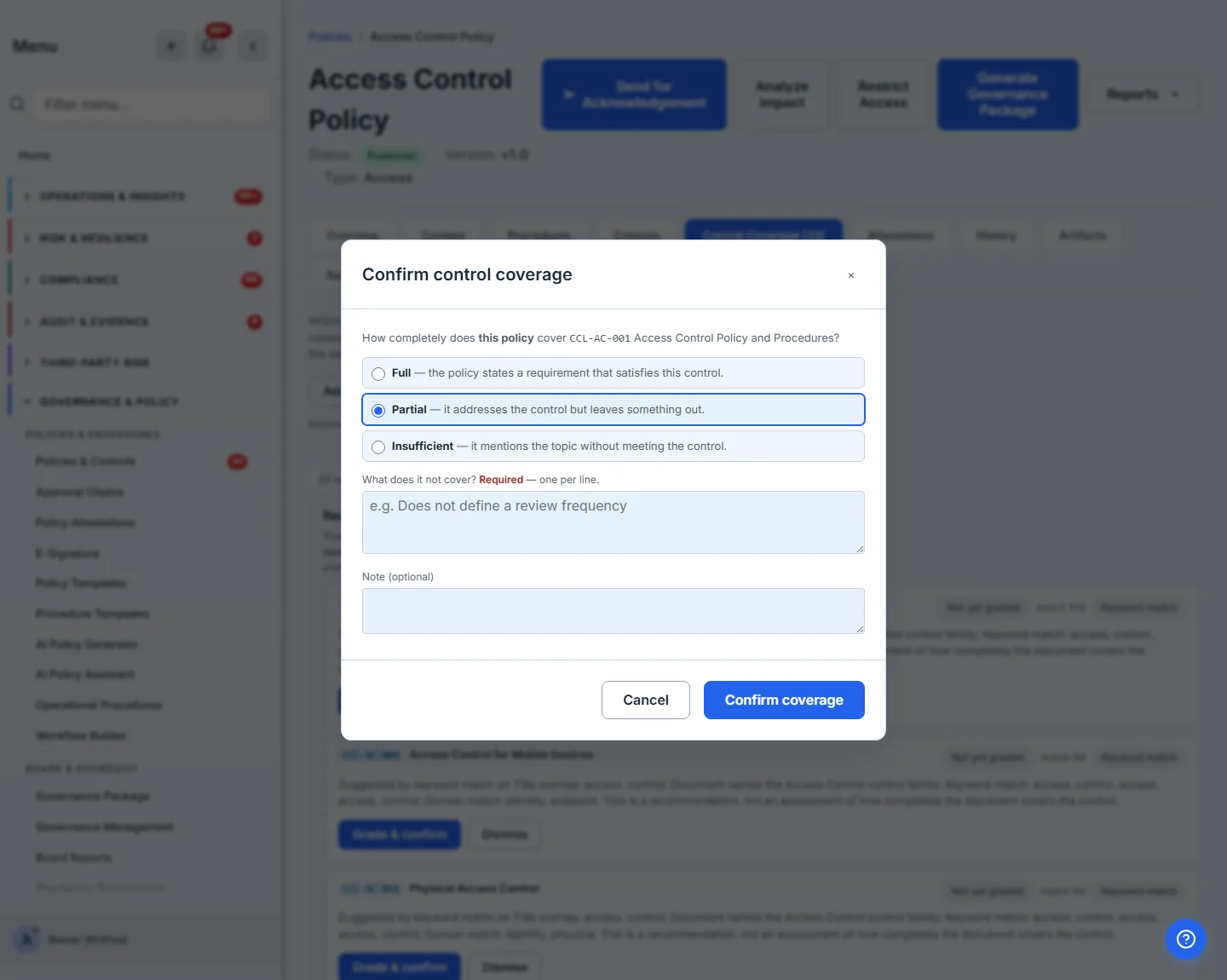
Three deliberate details:
- Nothing is pre-selected. Full is the strongest compliance assertion in the product and it is not going to be the answer you get by pressing Enter twice.
- Partial and Insufficient require you to name the gap. A downgrade without a reason is not a finding, it is a mood.
- Your note is kept, and a later decision on the same claim will not silently overwrite it.
Confirm, and the claim stops being a recommendation. Now — and only now — it counts.
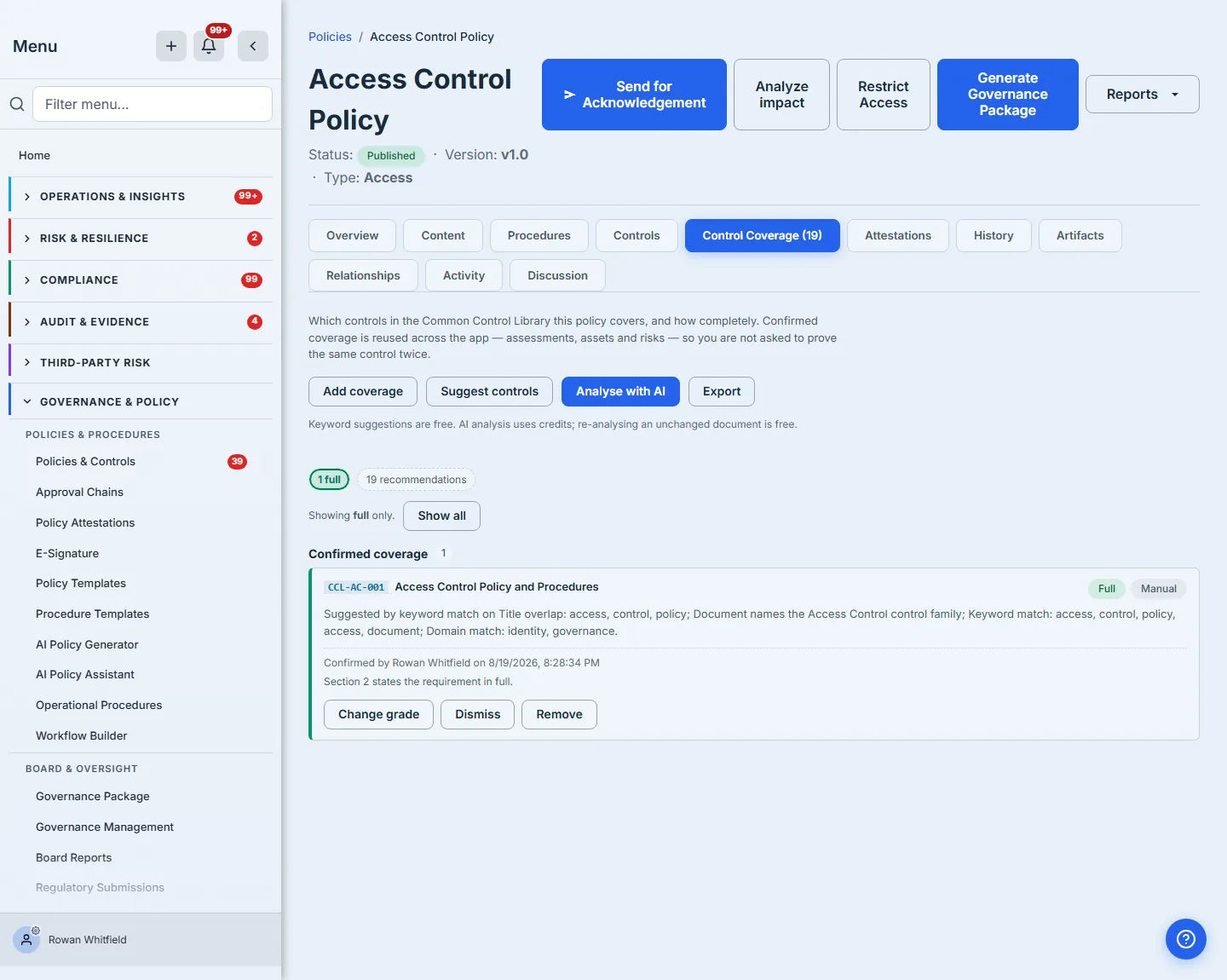
The row records who confirmed it, when, and what they wrote. That is the answer to the auditor’s question, and it is on the screen rather than buried in a log.
Step 5 — Now ask a reader
Everything so far worked with no AI at all. If your organization has the AI module and a healthy provider key, Analyse with AI does the thing a word match cannot: it reads the document against each shortlisted control and forms an opinion. Worth knowing where that shortlist ends: the free pass shows you its top twenty, and the reading considers its top forty — so the analysis can reach controls the word match scored and never put in front of you.
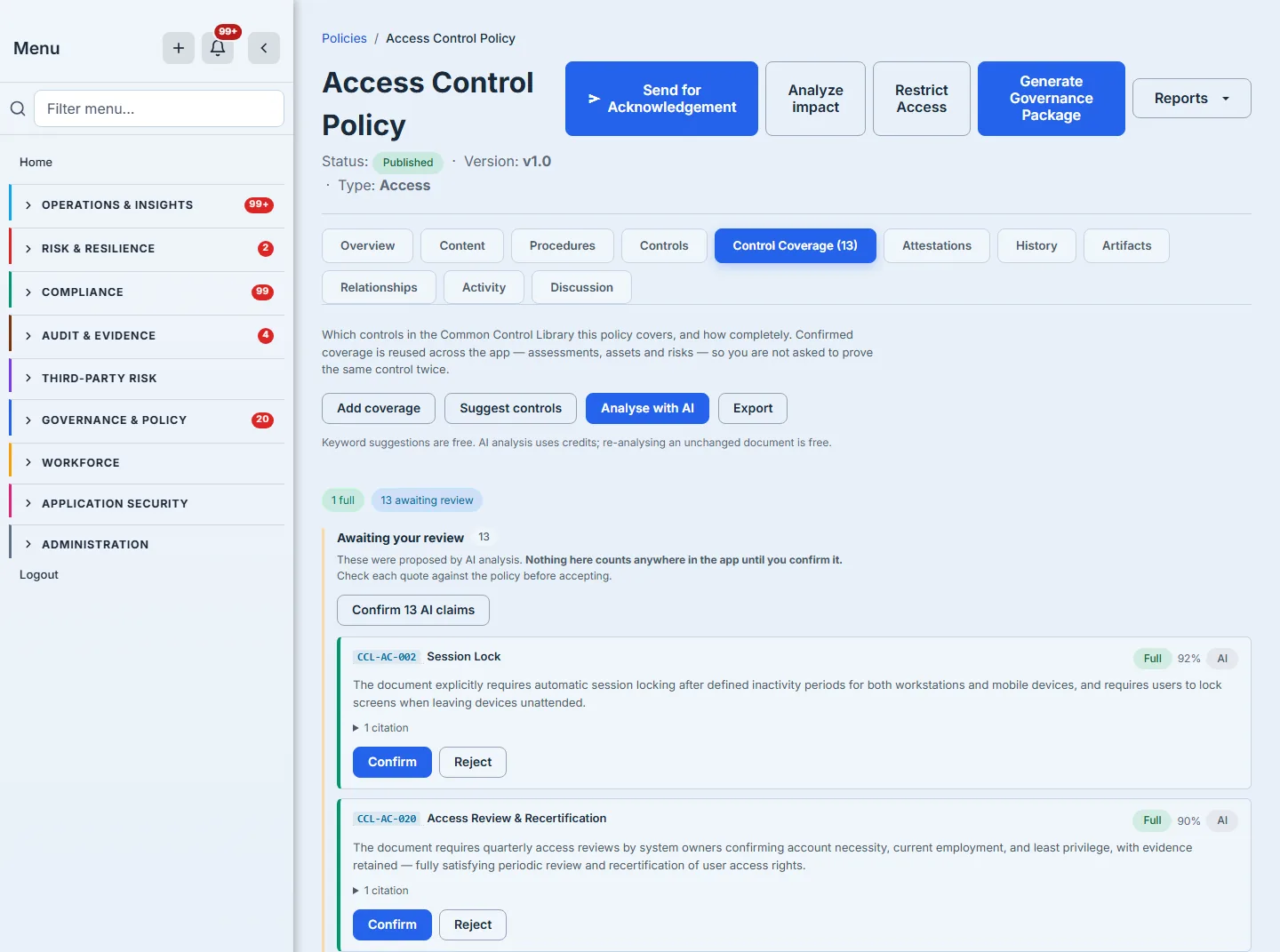
On the same policy, that pass returned thirteen claims — seven Full, five Partial and one Insufficient — and the difference from the keyword list is the whole point:
- It claimed seven of the nineteen recommendations still on the list and stayed silent on the other twelve, including Physical Access Control. It considered the control, found nothing in the document to say about it, and said nothing. Silence is a result.
- It reached down the shortlist for six the word match had scored but never displayed —
Personnel Termination(graded Full, 90% confidence),Personnel Transfer(Full, 85%) andAccount Management(Full, 88%) among them. All three are covered squarely by the policy’s joiners-movers-leavers and account-provisioning sections, and none shares much vocabulary with its control’s title. Meaning, not words. - It also graded one claim Insufficient — the document mentions the topic without meeting the control. That is a third answer the word match has no way to give, and it is the one worth reading twice.
Every claim carries the sentence it rests on.
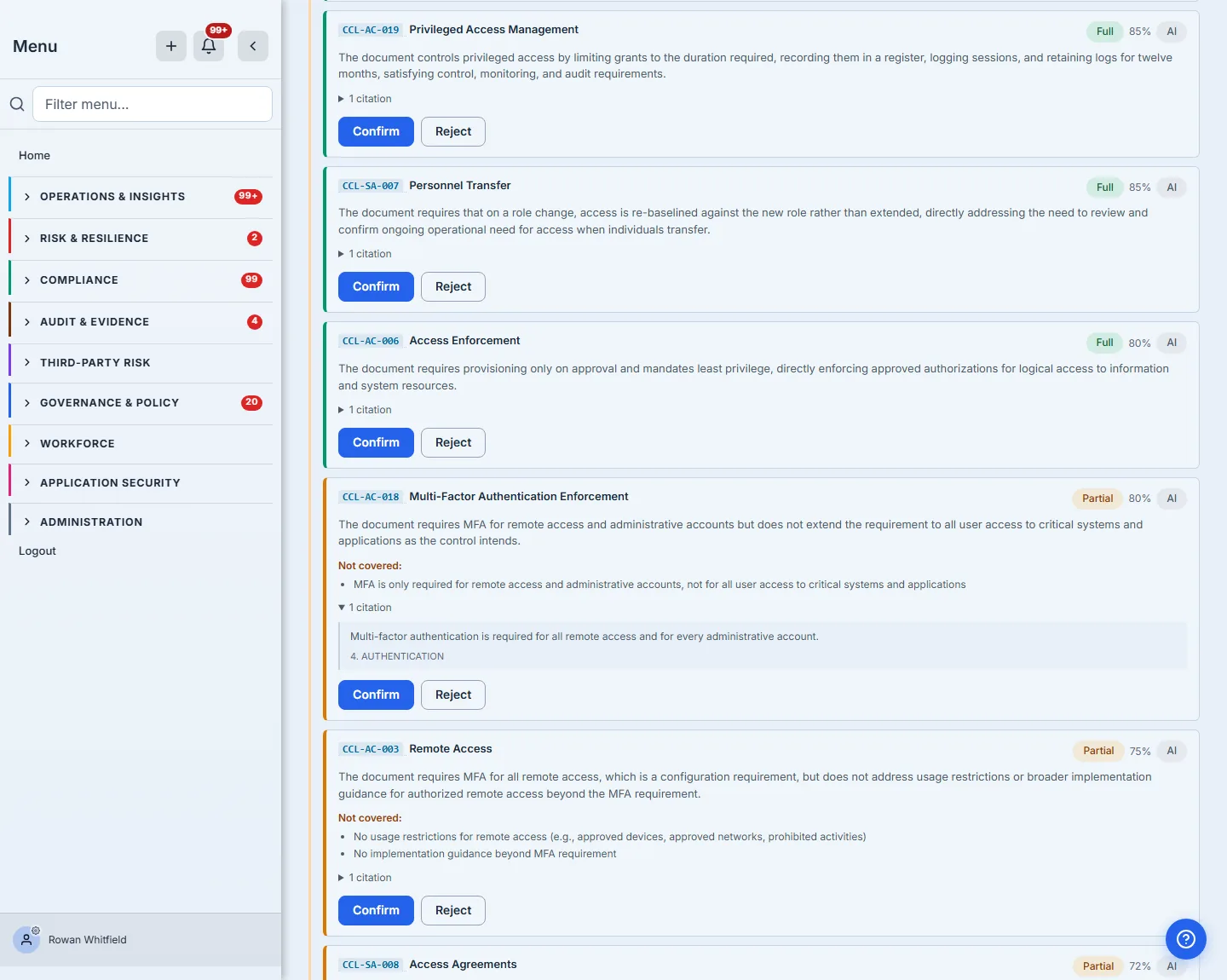
Every quotation is checked against the document before you ever see it. A claim whose evidence cannot be found in the text it cites is discarded, and the number discarded is reported to you rather than swallowed — because the rate at which a model invents evidence is the only signal you have about whether to trust the rest of it.
That analysis cost 0.29 credits: 3,248 tokens in, 1,737 out. It is metered per call and recorded against your organization, and re-analysing a document whose text has not changed makes no call at all.
Step 6 — The recommendations the reading answered are retired
Go back to the list, and it is shorter — the tab counter that read Control Coverage (20) before the analysis reads (13) after it, which you can see for yourself between the two screenshots above.
When the AI pass completes, any keyword recommendation it considered and did not claim is retired. CCL-AC-014 — Physical Access Control, the 94-out-of-100 match, is simply gone: something read the policy and had nothing to say about physical access, which is a better answer than the one the word match gave.
Two exceptions, both deliberate. If the document was too long to read in one pass, nothing is retired — a pass that did not read a section has not earned the right to answer for it. And if a claim’s quotation failed verification, its recommendation is kept, because a dropped citation means the analysis is less certain, not more.
Step 7 — Where confirmed coverage shows up
A confirmed Full claim is not a note on a tab. It is reused everywhere the question comes up again.
When an assessment question’s maturity level requires a policy, Talarity offers the document that already covers that control instead of asking you to find it again. The same signal reaches risks and assets. Partial coverage appears with its gaps and is never offered as satisfying anything — the distinction survives all the way to the surfaces that consume it, because the read that feeds them keeps satisfying (Full only) separate from contributors (everything) rather than leaving each caller to remember the difference.
A claim graded against text that has since changed is marked stale and withdrawn from use until it is re-checked, so revising a policy cannot silently keep unlocking a maturity level on the strength of a sentence you deleted.
Step 8 — The work does not sit unnoticed, and it leaves with you
Two things make this a program rather than a page.
The count follows you. Ungraded recommendations show as a badge beside Policies & Controls, so fifty pending decisions are visible from anywhere in the product rather than waiting on a tab nobody opens.
The record exports. One click produces every claim for the policy — control, grade, source, confidence, gaps, the quotations, the reviewer’s name, the date, the note, and the document version each claim was graded against.
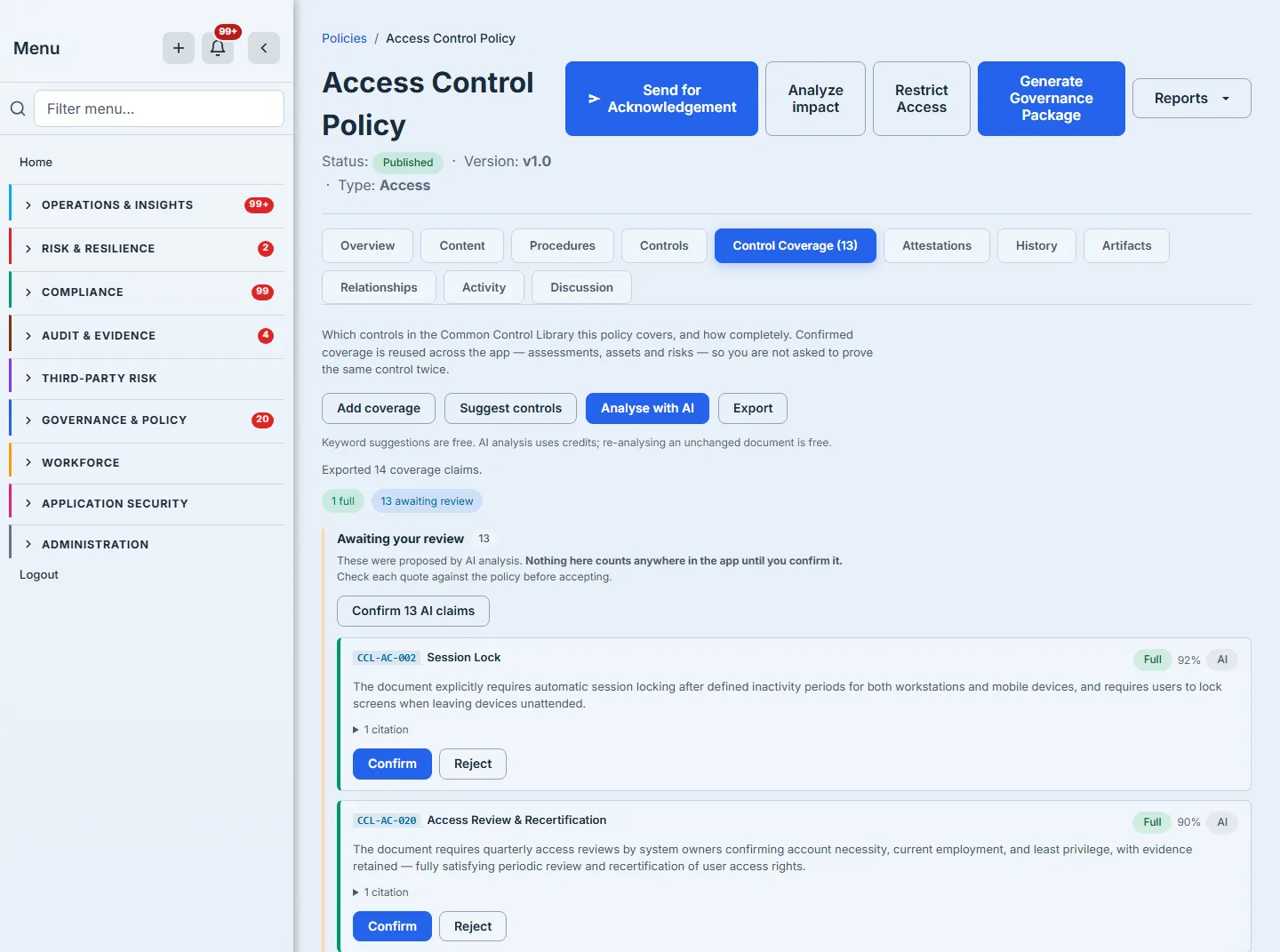
Note the count in the confirmation: 14 claims, from a tab showing one confirmed claim and thirteen awaiting review. The export is the whole record, not the part that already counts — a reviewer can hand an auditor what was proposed and rejected alongside what was accepted.
The export is deliberately wider than the screen. The tab shows you what you need to make a decision; the export contains what an auditor needs to check one you made nine months ago.
What you walk away with
- Every imported policy shortlisted against 369 controls for free, in milliseconds, with no AI and no credits — and filed honestly as recommendations rather than findings.
- An optional AI reading that grades what it finds, quotes the policy for every claim, names what is missing, and drops its own evidence when it cannot be verified.
- A hard floor: nothing counts until a person grades it, enforced by the database and not by convention.
- Confirmed coverage reused automatically in assessments, risks and assets — and withdrawn the moment the text it was graded against changes.
- A full record of who decided what, when, and on what evidence, on screen and in an export you can hand to an auditor.
Import your access-control policy this afternoon. Open /app/grc/governance, hit Import Policy, and look at what comes back before you agree with any of it. The first pass is free, the second one is a choice, and the last word is yours.