An engagement lives in half a dozen places at once. The scope is in a proposal document, the request list is in a spreadsheet, the evidence is in an inbox, the interview notes are in someone’s notebook, the findings are in a deck, and the only thing tying them together is the partner running it. That works, in the sense that the work gets done. It stops working the moment somebody leaves, a client asks what is still outstanding, or next year’s engagement needs to start from what last year’s found.
This is the shape of the alternative: an engagement record that carries the whole job, and a client boundary the firm sets deliberately rather than by what it remembers not to send.
Who’s involved
- The engagement partner or manager — owns the engagement record, its scope and its lifecycle.
- Assessors — do the fieldwork: score the scope areas, hold the interviews, write the findings.
- The client — sees what the firm is waiting on from them, and nothing else.
- The investment committee or buyer — reads the recommendations and what they cost.
The engagement is a record, not a folder
Open Engagements (/app/engagements). Each row is one piece of work for one client: a technology or cyber due-diligence review, a readiness assessment, an audit, or post-close remediation support.
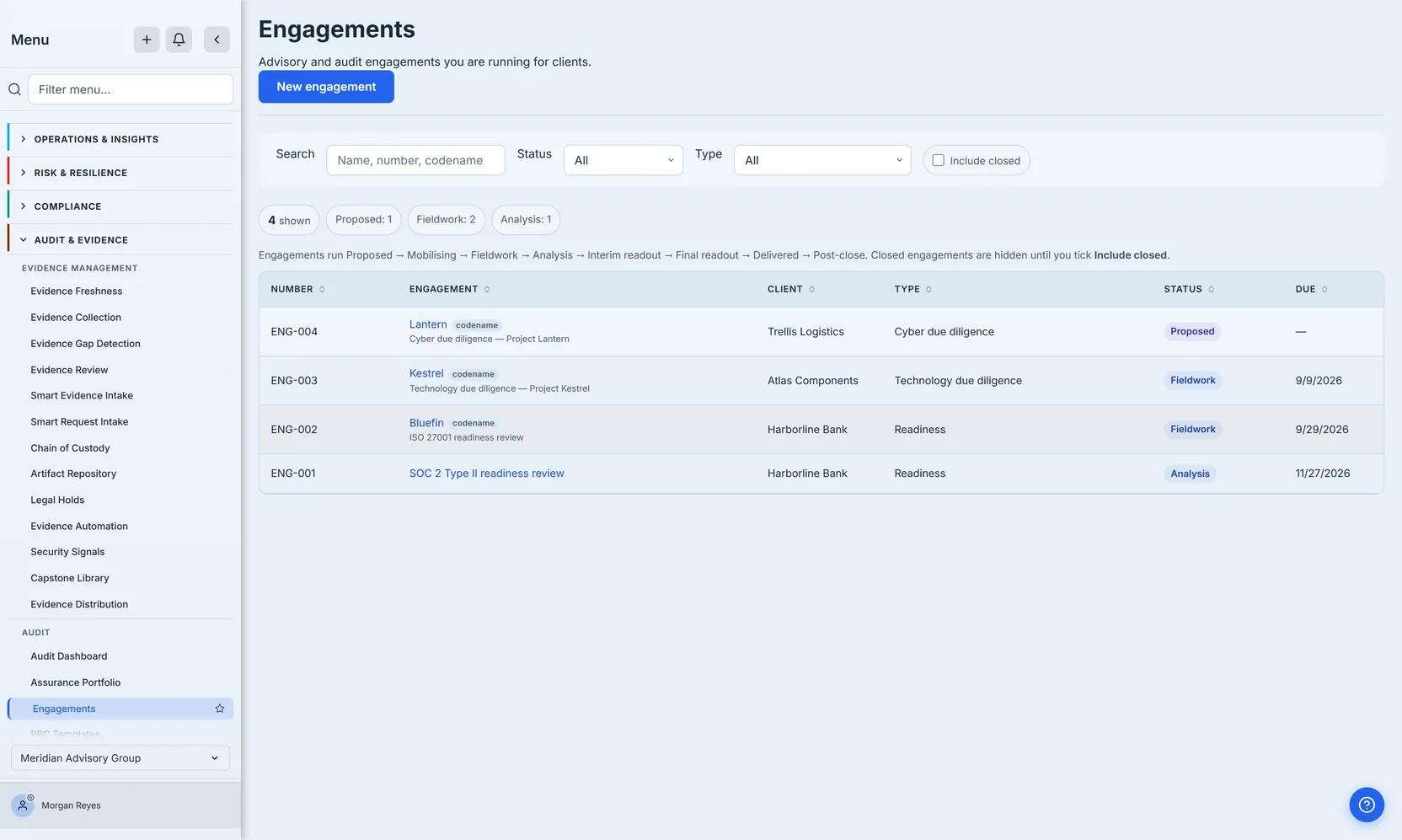
Two details matter more than they look.
Codename-first labelling. Where a codename is set, it leads wherever the engagement itself is named — the list above and the case file header. On a transaction — a buy-side technology or cyber due diligence — that is a confidentiality control for everything that leaves the firm: an email subject line, an exported file name, a calendar invitation. Inside the platform the codename and the client name sit side by side, which is the correct trade-off — the deal team has to know whose diligence this is — so the control is about outbound artefacts, not about hiding the client from your own staff. On readiness and audit work it is simply the firm’s own shorthand. The list shows all three conventions at once: ENG-004 and ENG-003 are due diligences and lead with Lantern and Kestrel, ENG-002 is a readiness review that still takes a codename and leads with Bluefin, and ENG-001 has none and leads with its name.
Refusals are not-found, not forbidden. An assessor scoped to one client who asks for another client’s engagement by its identifier gets “not available” — the same answer they would get if it did not exist. In this business, confirming that a client relationship exists is itself a disclosure, and a system that distinguishes “not yours” from “no such thing” is an oracle for your client list.
Step 1 — Create the engagement, and let the methodology scope it
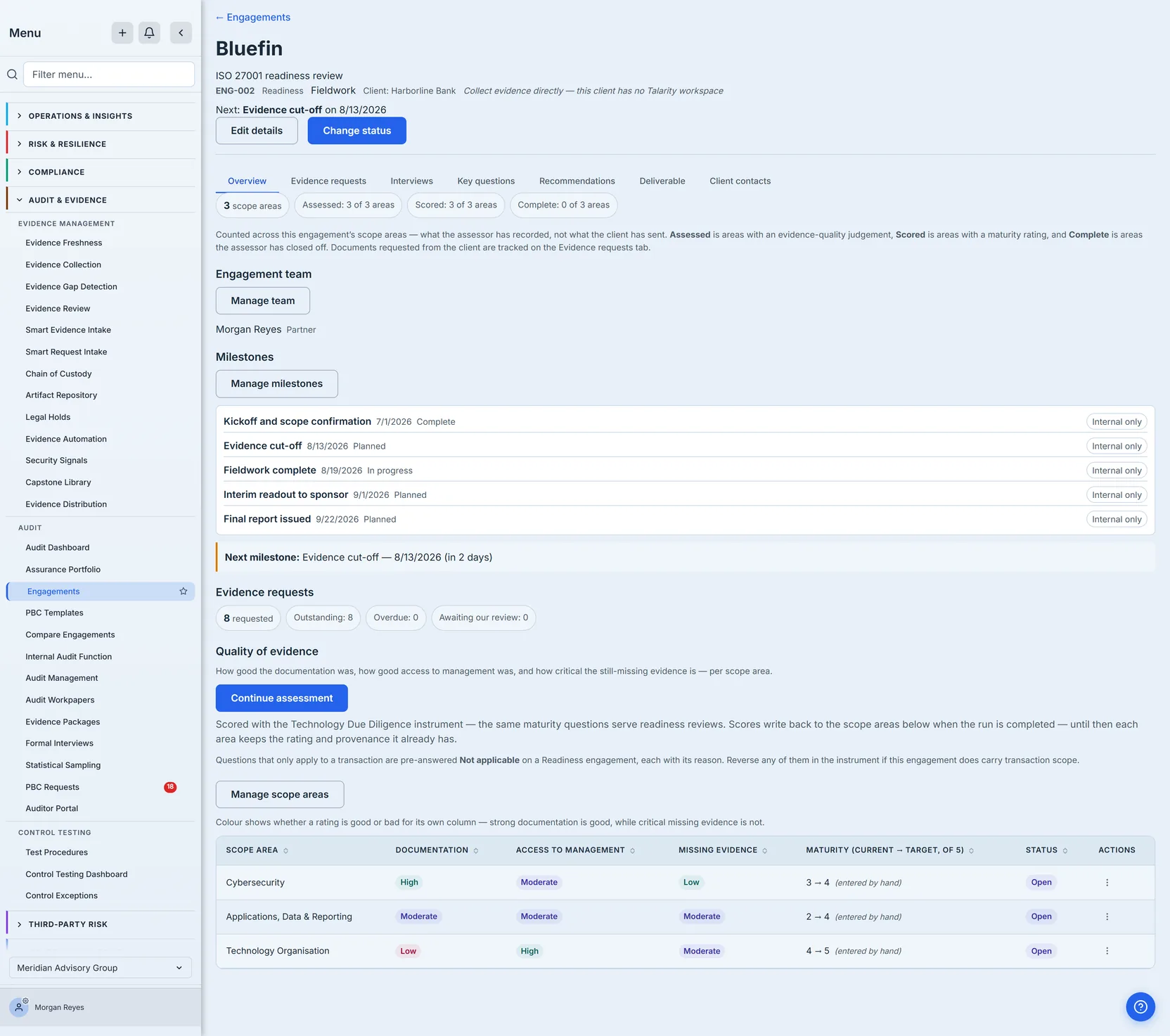
Pick the client and the engagement type. The scope areas seed themselves from the type. A technology due diligence opens all eight: Service Operations; Applications, Data & Reporting; Hosting & Infrastructure; Cybersecurity; Technology Spend & Roadmap; Technology Organisation; Product / SDLC Review; and Privacy & Data Protection. A cyber-only diligence opens three of them — Cybersecurity; Hosting & Infrastructure; Technology Organisation — and a readiness review opens a different three: Cybersecurity; Applications, Data & Reporting; Technology Organisation. That last one is the engagement pictured below, which is why its case file reads 3 scope areas rather than eight.
That default is deliberate. An unassessed area is not free: it shows up as an unanswered row on the evidence-quality view, and eight open areas on a job that was only ever going to look at three makes the deliverable read as incomplete rather than focused.
Step 2 — Issue the request list
Apply a PBC template — provided-by-client, the standing name for the list of documents an engagement asks for — and the whole ask list is created at once, each item carrying a due-date offset dated from the engagement’s period start (set on the engagement record, not shown on the screens here) rather than from today — or from today when no period start is set, and left with no due date at all when the template item names no offset. Add the one-off requests the template could not know about.
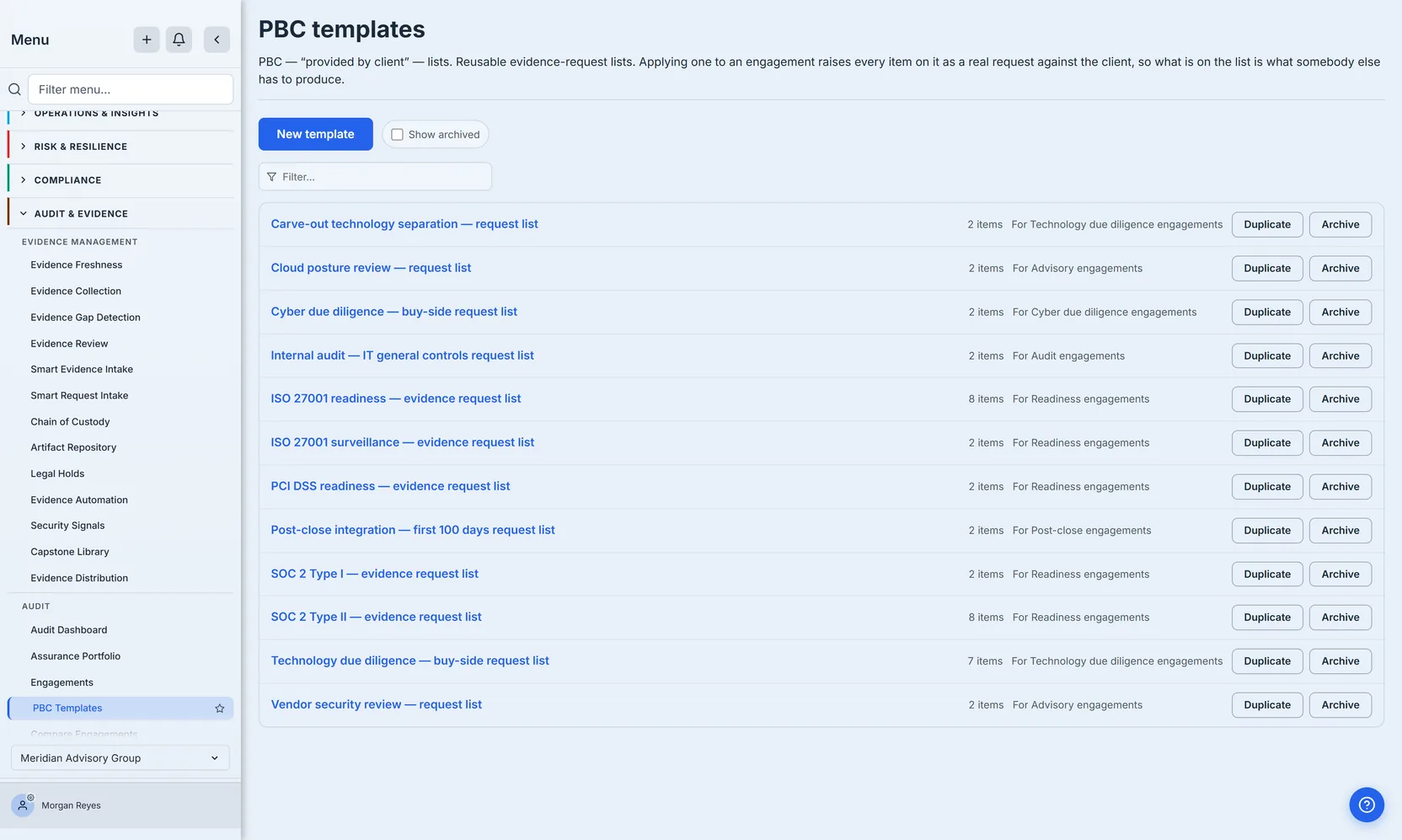
Applied to an engagement, the template becomes that engagement’s own request list, with every item attributed to the scope area it evidences. That attribution is what lets “what is still outstanding” be answered per area rather than as one number.
The list below is a different engagement from the readiness one above: a technology due diligence, where the buy-side template was applied. It is shown here because a technology DD opens all eight scope areas, so the per-area rollup has a full set of rows to demonstrate — the readiness engagement carries an issued list too, but across only three.
The two numbers are worth reconciling before you read the next screenshot, because they do not match on their face: the technology due diligence buy-side template above holds seven items, and this engagement shows ten requests. The extra three are one-off asks added after the template was applied — exactly the case the previous step described. A template is a starting point, not a ceiling, and nothing about applying one prevents an engagement from asking for more.
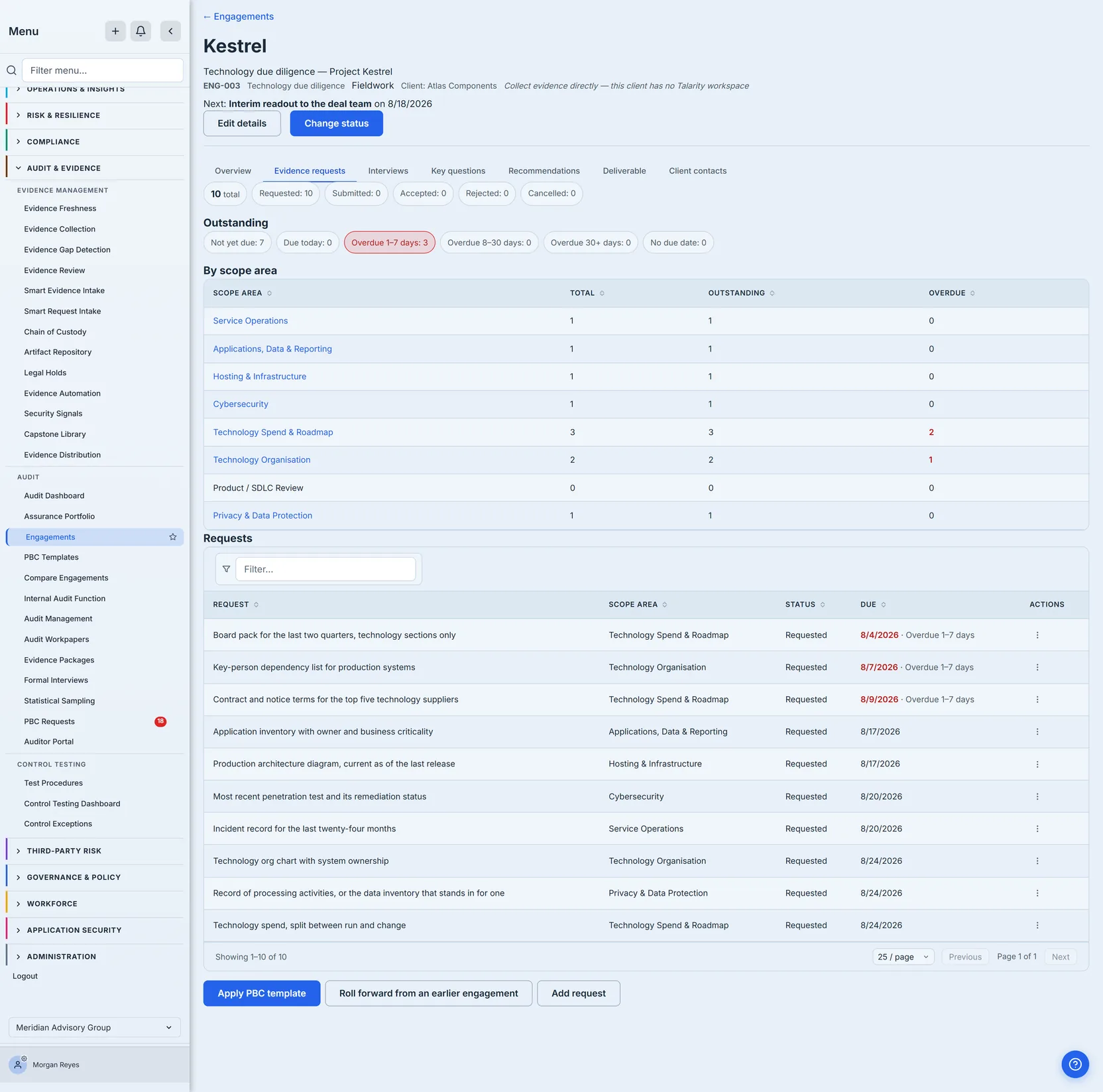
The aging breakdown is the part worth reading. Seven are not yet due; three are already past their dates. “Outstanding” as a single number would have said ten and meant nothing — what a partner needs to know is which three are late and whose area has to chase them, and the tab answers both: the per-area table says which areas they sit in, and the request list beneath it names the individual asks, late first, with each overdue date called out on the row.
The Product / SDLC row reads zero because the template that was applied carries nothing for it — which is the point of showing the rollup per area rather than a single total. An area with no requests against it is a gap you can see.
Where the client has their own tenant, the requests land in their product as one batch rather than as a dozen unrelated tasks. Where they do not — a contact-only client, which is perfectly normal — the platform says so plainly: the requests are collected directly by your team, rather than quietly creating nothing and letting you assume the client was notified.
Template items name a scope area by key; an engagement has scope-area rows. When a template built for a broader engagement names an area this one did not take, those items are still created — the work is real — but attributed to no area, and the unmatched keys come back so you can add the area or re-point them. Dropping them would silently shrink your own request list.
Step 3 — What the client sees
Every engagement whose case file is pictured in this article is for a contact-only client — the header on each of those screenshots says so: “Collect evidence directly — this client has no Talarity workspace.” That is the common case, and it is worth being plain about what it means before describing the other one: the firm collects evidence itself, and there is no client-side page at all.
Where the client does have their own Talarity tenant, they open My Engagements (/app/engagements/mine) and see the engagement, the dates you chose to share, and how many of your requests are still waiting on them.
What they do not see is the point. Interview notes, key-question answers, recommendations and internal narrative never cross that boundary. It is a projection, not a filtered view of your page — the difference matters, because “filtered” implies the rest is merely hidden and could leak with a query-string change. Milestones are private to the firm unless you explicitly mark one client-visible. (No screenshot here: none of the engagements shown has a client tenant, and a screenshot of an empty client view would prove nothing about the boundary.)
Client contacts are free. A person at the client answering your requests does not consume one of your seats, and they are bound to the single engagement they were invited for — a contact on one job cannot see another engagement you are running with the same company.
Step 4 — Run the instrument
The due-diligence instrument is not only for deals, and it is worth being exact about what “runs it” means. The instrument is always the whole instrument: eight domains, 122 questions, whatever the engagement’s scope areas are. A readiness review does not get a shortened version.
What it does get is a head start. Fourteen of those questions only make sense on a transaction — separation cost, transitional service readiness, day-one asset ownership, the acquirer’s own product overlap. On a readiness, audit or advisory engagement the platform marks all fourteen Not Applicable the moment the run is created, each with the reason recorded, so an assessor is never asked what the carve-out plan is for a company nobody is buying.
Start the assessment from the case file. When the run is completed, each assessed domain’s maturity is written back to the scope area with the matching key, so the areas and their scores cannot drift apart.
Matching on the key is the whole mechanism, and it cuts both ways: a domain you answered that the engagement never opened has no area to write to, and its score is reported back as unmatched rather than attached to some other area. That is the right refusal — a Hosting score does not belong on a Cybersecurity row — but it does mean the scoping decision you made in Step 1 determines which of your answers reach the case file. Scope the engagement for the work you are actually doing.
The instrument scores each question 1–5 against written maturity anchors — descriptions of observable states, not grades. “Backups run on a schedule but have never been test-restored” is an anchor. “Adequate” is not.
A scope area can also be rated by hand before the instrument has run, which is what an assessor does after a first walkthrough. That is what the chips on the case file count, as counts rather than percentages — and they count three different acts, which is why they routinely disagree. Assessed is the areas carrying an evidence-quality judgement: how good the documentation was, how good access to management was, how critical the still-missing evidence is. Scored is the areas carrying a maturity rating, which is a separate act — an area can be judged on the quality of its evidence long before anyone puts a number on its maturity. Complete is the areas the assessor has closed off. On this engagement all three areas happen to carry both a judgement and a rating, so the first two chips read the same; on a half-worked engagement they will not.
With all three areas rated from the walkthrough, the case file reads Assessed: 3 of 3 areas, Scored: 3 of 3 areas and Complete: 0 of 3 areas. That is exactly the state of an engagement mid-fieldwork, and it is the reason the provenance stamp matters more than the count.
Every maturity carries its provenance — from assessment or entered by hand — because a computed 4 and a typed 4 are the same integer and different claims, and a report that cannot tell them apart presents an opinion as a measurement.
The engagement pictured above is exactly that case, and it is worth reading the two halves together. Its case file offers Continue assessment, while all three of its scope areas still read entered by hand — which is why from assessment appears in none of the screenshots here: no run on this engagement has been completed yet, so nothing has earned that stamp. Both are true at once: opening a run changes nothing about existing ratings, because maturity is written back only when a run is completed. So for as long as the assessment is being answered, the stamp keeps telling the truth about where each number came from — which is the whole point of stamping it.
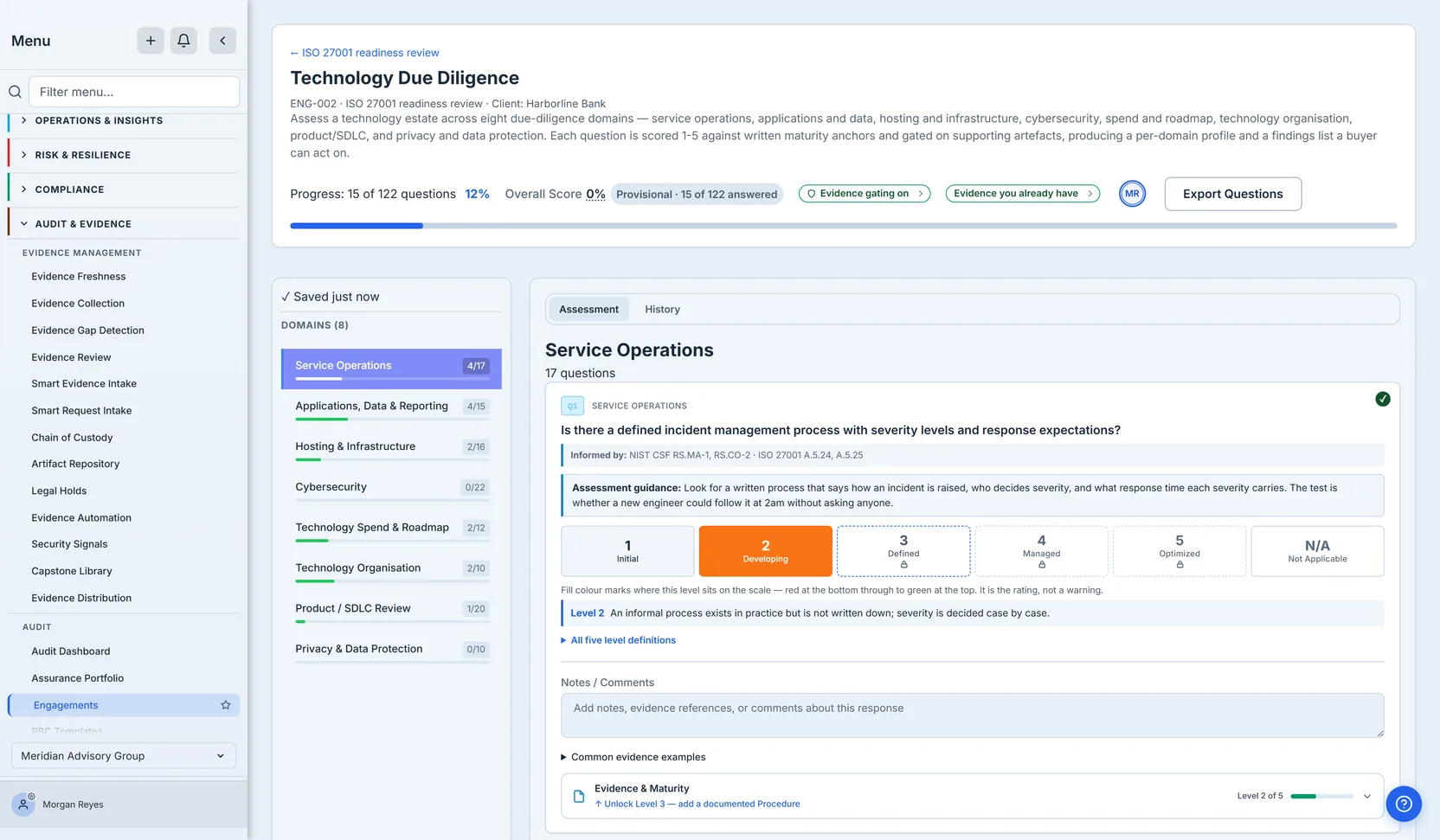
The anchors are what make a rating defensible. A 1–5 with no anchor is one assessor’s opinion; the same number against a written definition is a judgement a second assessor can check and a buyer can challenge.
The shot above shows the instrument itself rather than any one engagement’s case file. Q1 is answered at Level 2, and the anchor for that level is printed under the buttons — “an informal process exists in practice but is not written down”. Levels 3 and above carry a padlock, and the Evidence & Maturity strip at the foot of the question names what would lift it: Unlock Level 3 — add a documented Procedure. Gating starts at the middle of the scale, not above it. A score of 3 or better has to be earned against an attached artefact; 1 and 2 describe states that, by definition, have no document to point at.
The header reads Provisional · 15 of 122 answered, and the overall score beside it reads 0%. Both are correct, and worth reading together: fourteen of those fifteen answers are the transaction-only questions the run marked Not applicable, which score nothing at all, so exactly one question of the hundred and twenty-two carries a rating. A score is an average over the whole instrument, and one answered question cannot move it off zero. That is why the badge says Provisional — the number is real, it moves as the work is done, and no rating is published until the instrument is complete.
Once the instrument runs, its scores are artefact-gated: the higher levels require supporting evidence, and a claim without its artefact is reported as unsubstantiated rather than accepted. That is the difference between the walkthrough rating above and a scored run — a hand-entered rating is an assessor’s judgement on the record, while an instrument score above the middle of the scale has to be earned against an attached document.
That distinction survives all the way to the deliverable, because “we could not verify this” and “this is absent” are different findings and only one of them is a remediation item.
Step 5 — Fieldwork
Interviews record who was in the room and on whose behalf. Each attendee carries a side — firm, client, or sponsor, the party commissioning the work, which on a transaction is the buyer rather than the company being assessed — because the same conversation reads very differently if everyone present worked for the firm.
Notes and summary are separate fields, and only the summary reaches a deliverable. Notes are what was said; the summary is what an assessor judged it to mean. Collapsing them puts raw minutes in front of a buyer, or an opinion into the record as though it were testimony.
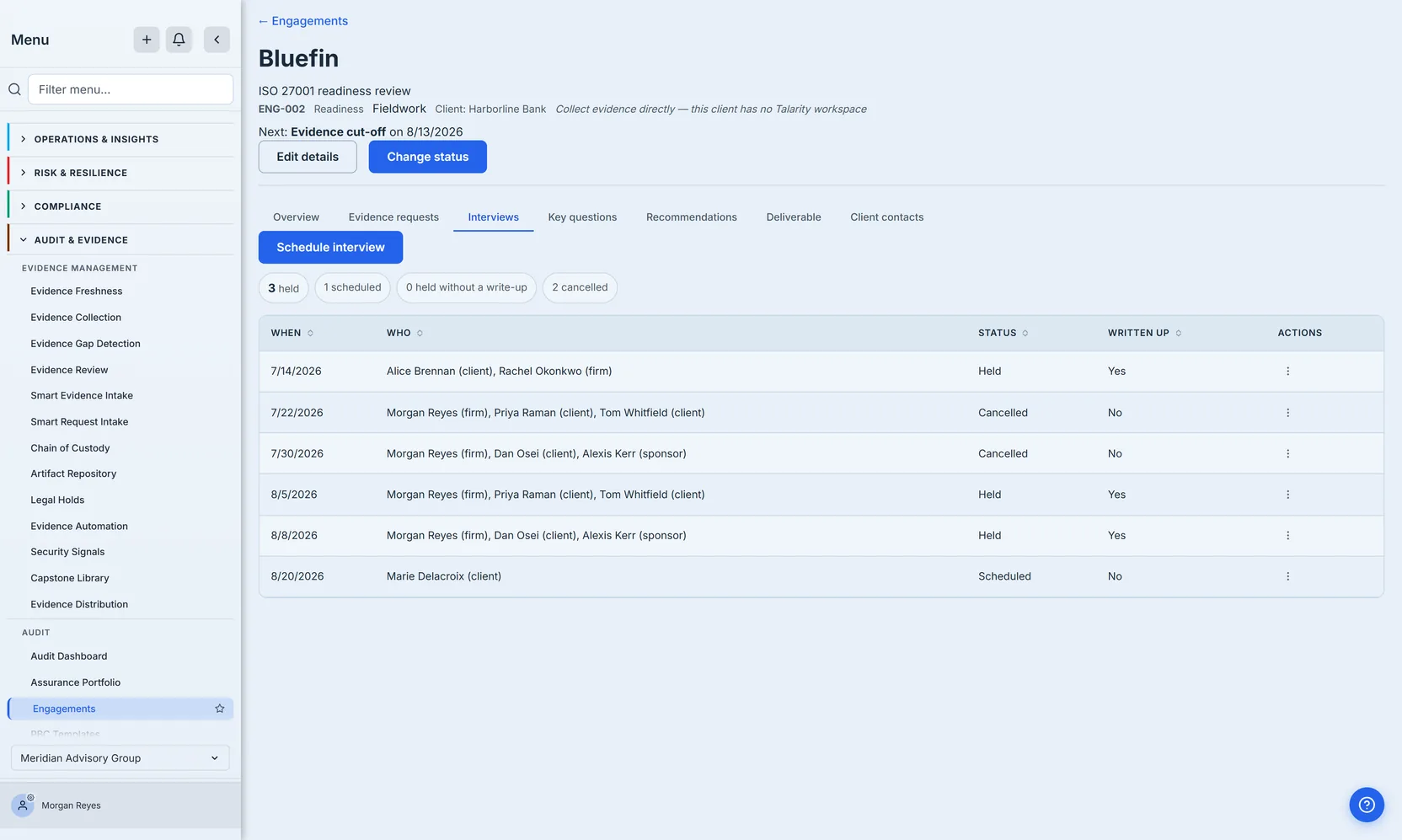
A cancelled interview stays on the record rather than disappearing. A reader asking why a scope area is thinly evidenced is owed the answer that the session was booked and did not happen — deleting the row would turn a scheduling problem into an apparent gap in the assessor’s work.
Key questions are the questions the engagement exists to answer.
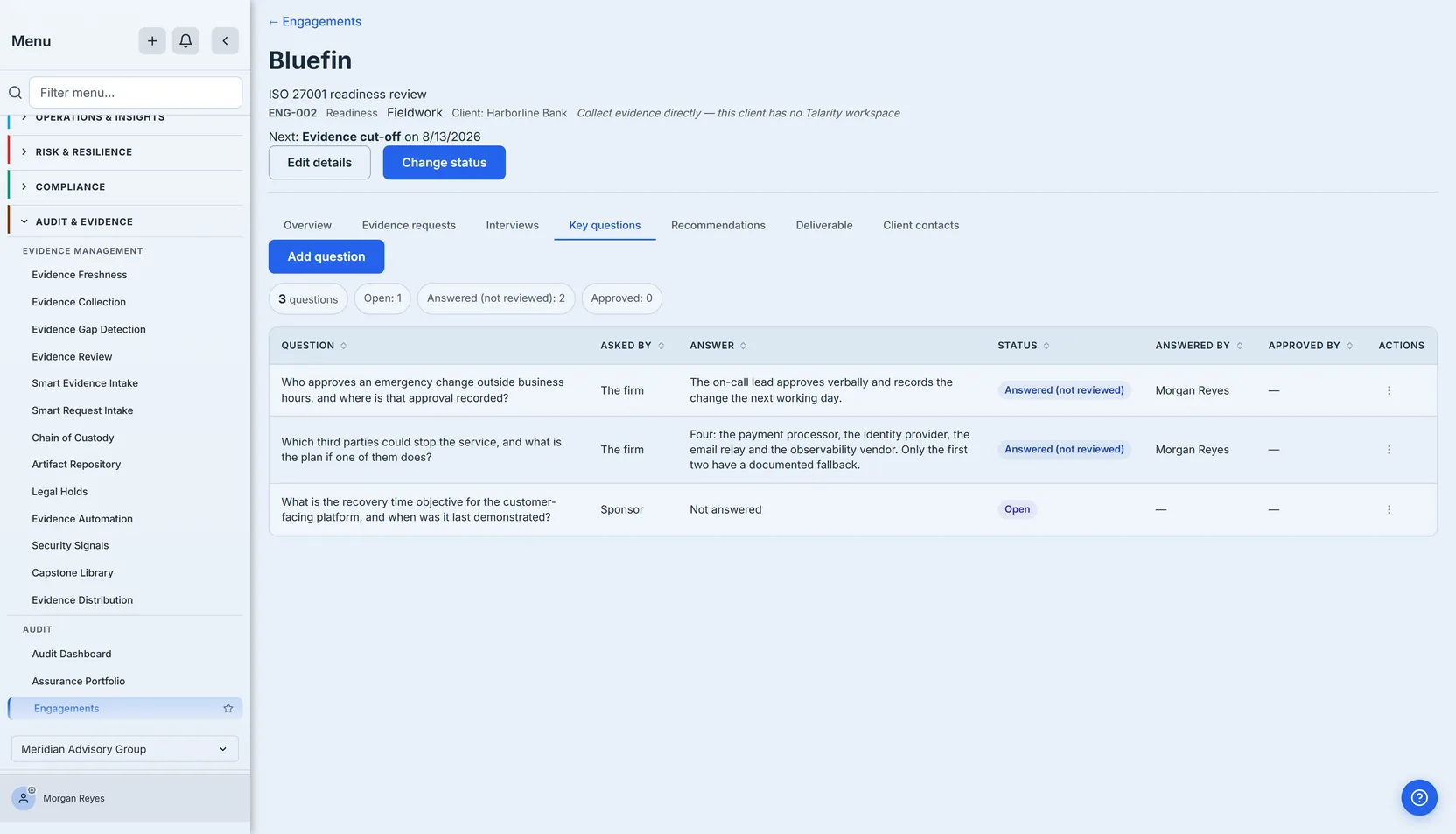
Answering and approving are separate acts, and the platform enforces it: the person who wrote an answer cannot approve it. Read the chips above together and they say something precise. Answered (not reviewed): 2 is a fact about the work — two of the three questions have been answered. Open: 1 is the third, with “Not answered” against it. Approved: 0 is the control: this engagement has a single person on the platform — the other names in its interview record are attendees, not people with a login — so the approvals are somebody else’s to give, and the platform will not let one person approve their own work to clear the queue. An APPROVED BY column that stays empty is that rule holding, not a gap in the record.
Re-answering an approved question is refused outright rather than quietly changing what an approver put their name to. Correcting it is a deliberate act: reopening withdraws the approval, returns the question to review with its answer intact, and records who cancelled whose sign-off, and why.
Step 6 — Findings in money terms
A recommendation carries a value driver, a phase and a cost as a range, split between one-off and run-rate (annual) — the two cost column headings on the tab.
The vocabulary is the transaction one, because that is where the model came from: value drivers are protect equity and grow equity, and the phases run pre-close, first 100 days, year one, year two, and year two onwards. It transfers to non-transaction work with a small translation — on the readiness engagement pictured below, “pre-close” is the work that must land before the audit window opens and “protect equity” is the work that stops something getting worse. A firm running both kinds of engagement gets one way of pricing findings rather than two. On this engagement every finding lands in the near-term phases; the year-two columns are empty because a readiness review of this size produced nothing that far out, and an empty column says so rather than hiding it.
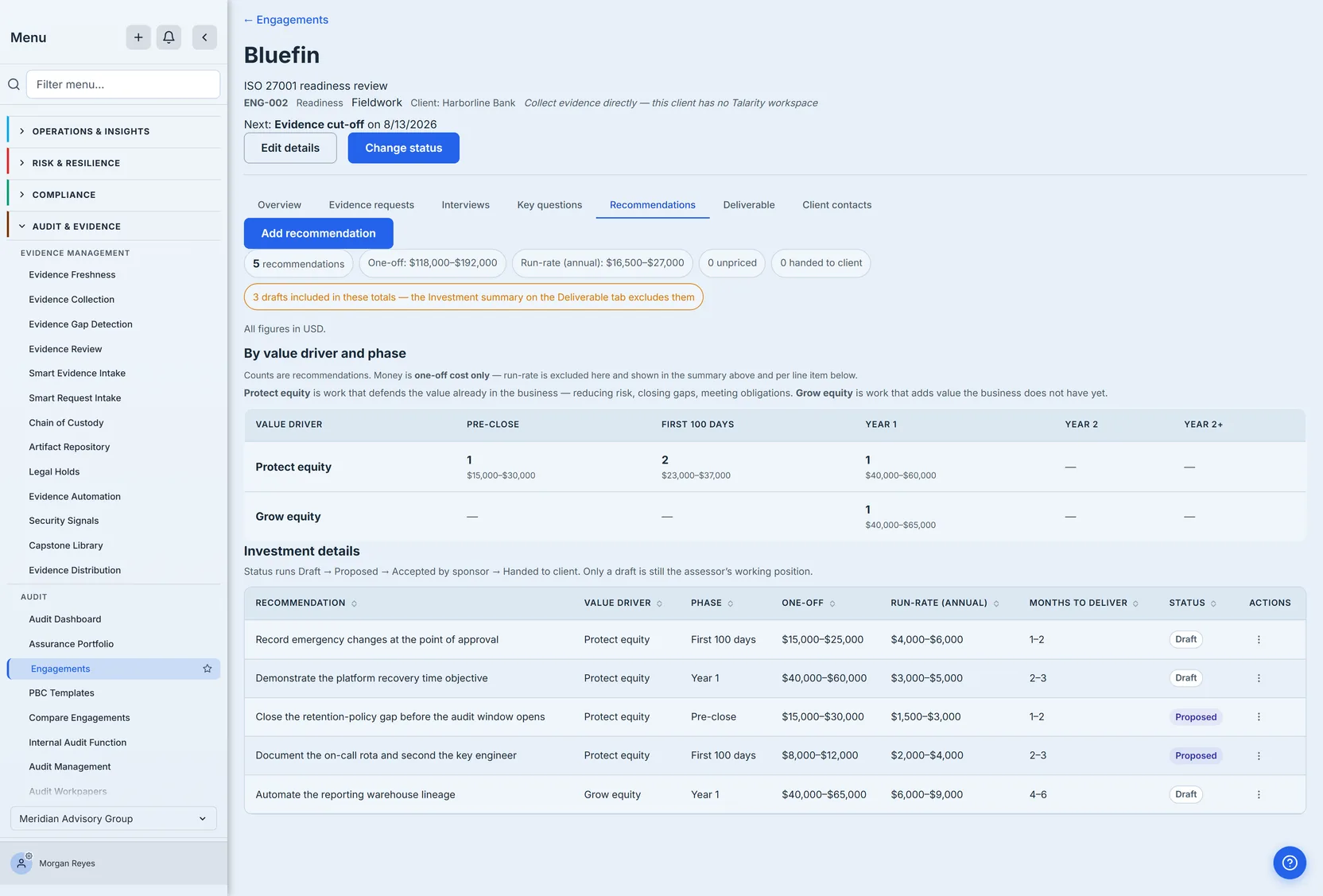
Leave a cost blank and it stays blank. Unpriced and free are different claims, and both views count how many recommendations carry no cost rather than summing them as zero — the chip above reads “0 unpriced” because every recommendation on this engagement has been costed. A committee told the run-rate is nothing, when the truth is that nobody has priced it, is being misled by arithmetic.
Two totals, and the difference between them is deliberate. The recommendations tab above is the assessor’s working view: it totals everything, drafts included, and says so — the amber chip sitting under the figures reads “3 drafts included in these totals — the Investment summary on the Deliverable tab excludes them”, because a working total that quietly omitted rows would be worse than one that counts them openly, and a warning that did not say which total it was describing would be worse still.
The investment summary on the deliverable is the committee’s view, and it excludes drafts by default — a draft is an assessor’s working position, and summing it puts a number in front of people that nobody proposed. It prints how many it dropped rather than showing a smaller figure without explanation. Neither screen hides what it is doing, which is the only way two different totals over the same engagement can both be trusted.
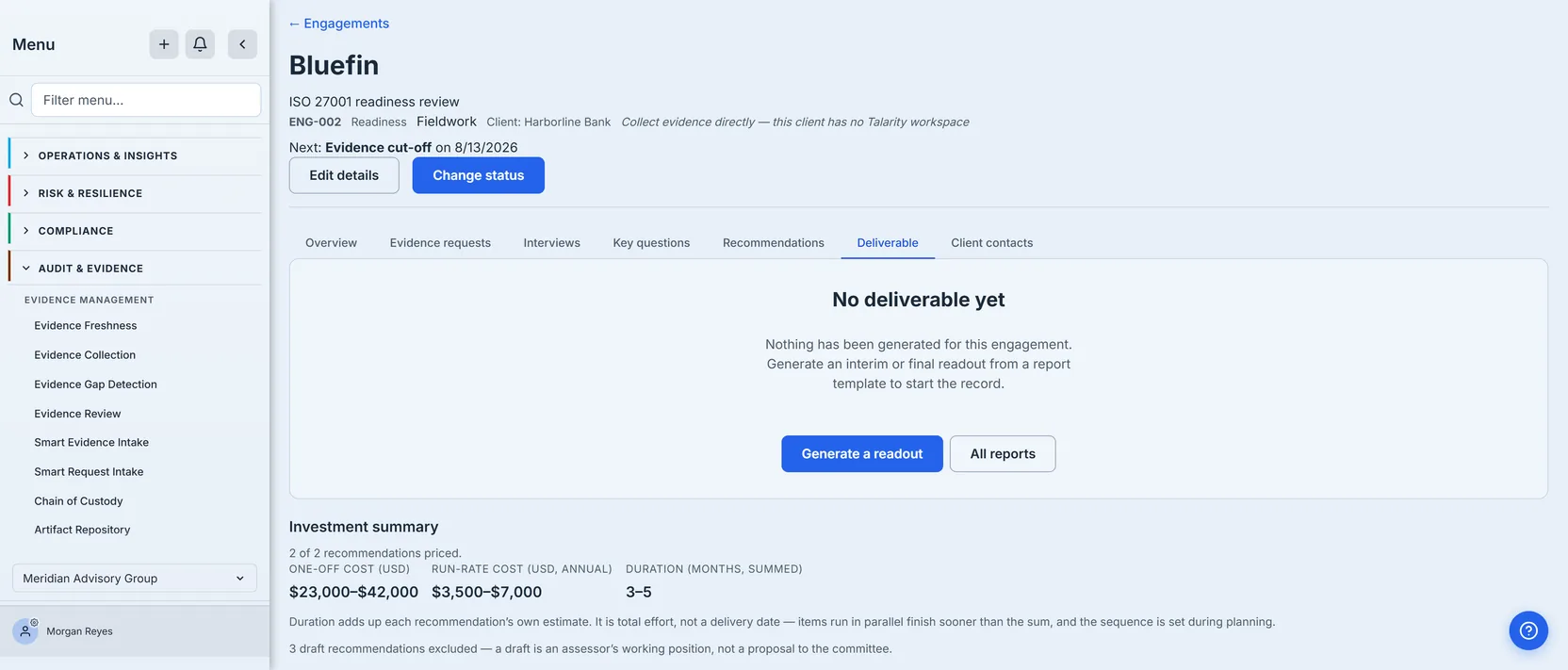
The two totals are worth reading against each other. The working view above sums all five recommendations to $118,000–$192,000 one-off; this one sums the two that have been proposed to $23,000–$42,000 one-off, and says why the other three are missing. Both carry run-rate alongside them — $16,500–$27,000 and $3,500–$7,000 a year respectively — so neither figure is the engagement’s whole cost on its own. Both are correct, and neither is meaningful without the sentence that qualifies it. The summary also renders whether or not a readout — the written report an engagement issues, interim or final — has been generated. The engagement pictured has none yet, which is the ordinary state mid-fieldwork and does not stop a partner seeing what the programme currently costs.
Step 7 — Hand the work over
Where the client has their own Talarity tenant, a recommendation can become a remediation plan inside it, with their consent. The engagement ends; the client keeps a working programme rather than a PDF.
Where they do not — the engagement pictured through this article is one of those, and its header says so — the recommendations stay with the firm and travel as the deliverable.
The counter on the recommendations tab reads 0 handed to client, and on this engagement two separate things would each be enough to make it zero. The client is contact-only, so there is no tenant to hand anything to. And every row is still Draft or Proposed: only a recommendation the sponsor has accepted can be converted, because a draft is the assessor’s working position and a proposal is still under discussion — neither is something to ask a client to own. The zero is the product declining twice, and saying so, rather than showing a number that implies work has moved when it has not.
Step 8 — Next year
Roll last year’s PBC list forward onto the new engagement — the Roll forward from an earlier engagement control on the request list above. What carries is the ask: title, description, kind, and the scope area re-resolved against the new engagement’s own areas.
What deliberately does not carry is every trace of fulfilment. Status returns to requested; evidence, submissions, reviews and dates are all cleared. Carrying them would be the most dangerous thing a roll-forward could do — a request would show as satisfied before the client had sent anything, and an auditor could sign off this period against last period’s documents.
Compare engagements ranks your own engagements against each other on one instrument. A partner can tell you how any single engagement is going; what is hard to see is the pattern across them. A control area that falls short on most of your clients is a fact about the market you serve, and possibly about the advice you are giving. That pattern is invisible one case file at a time, and it is the reason the comparison exists at all.
What this replaces
Not a tool. A habit — the one where the shape of a job exists only in the head of the person running it, and every question about status, scope or history is answered by asking them.
What you walk away with
- One record that carries the job — scope, request list, interviews, key questions, recommendations and the deliverable against a single engagement, so “what is outstanding” is a query rather than a conversation.
- A client boundary you set, not one you remember — the client view is a projection built from an allowlist, so interview notes, key-question answers and internal narrative cannot cross it by accident.
- Ratings that say where they came from — every maturity carries from assessment or entered by hand, because a computed 4 and a typed 4 are the same integer and different claims.
- Findings priced honestly — costs as ranges, unpriced left unpriced rather than counted as zero, and two totals that each say what they include.
- Next year that starts from this year — roll the ask list forward and every trace of fulfilment is cleared, so nothing shows as satisfied before the client has sent it.
Open /app/engagements, create one engagement for a real piece of work, and apply a PBC template to it. The next time a client asks what you are still waiting on, the answer is a list with dates on it rather than a search through an inbox.
The engagement record answers them instead, and it is still there next year.