An audit firm’s worst week rarely starts with something going wrong. It starts with something that did not happen: a document requested in March that nobody chased, a client who has not been asked for anything since the engagement closed, a readout that slipped a fortnight because the evidence arrived late and nobody noticed it had.
None of those are visible on a client’s page. They are visible only across clients, and until you look across clients they are not visible at all.
That is an awkward shape for software, because every other surface in a GRC product is scoped to one organisation at a time — deliberately, since mixing two clients’ data is the one thing an assurance firm must never do. A firm holding twenty client relationships gets twenty correct, well-isolated views and no twenty-first view that shows the book.
The Assurance Portfolio is that twenty-first view.
Two failures, opposite in shape
The page is built around two things going wrong, and they fail in opposite directions.
The first is a request sitting unanswered. It is somewhere in the product — on the client’s page, in the Data Sharing Hub, in a list — and it is buried under newer rows. Nothing is broken. Nobody decided to stop chasing it. It simply aged out of the top of a list, and the list is sorted the way lists usually are, newest first.
The second is a client nobody is looking at. This one is harder, because it produces no rows at all. A client with no engagement, no request and no monitoring generates nothing to appear in any list, anywhere. You cannot scan for it. You cannot sort by it. An absence has no row, and the only shape that can carry it is a count.
Most portfolio dashboards answer the first and are silent about the second. This page names both.
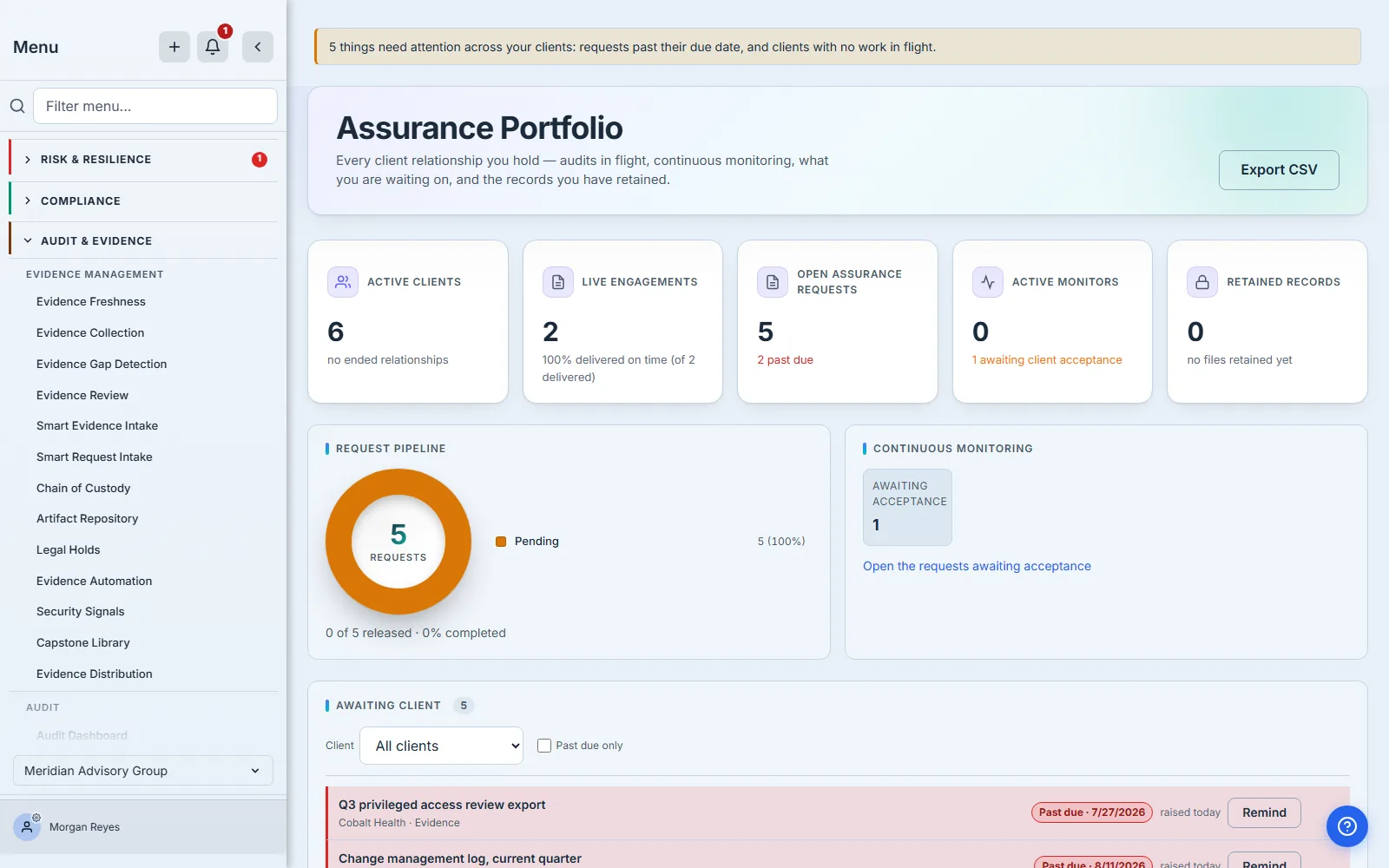
What it answers in one read
The strip across the top is deliberately five numbers and no more: active client relationships, live engagements with their punctuality beside them, open assurance requests with any past-due count, active monitoring channels, and the number of client records you still hold. Each one is a link to the surface that holds the underlying rows, because a number a reader cannot open is a number nobody checks.
Two of those numbers deserve a note, because they are easy to state carelessly and we have.
“Live engagements” and “past due” count the same set. An engagement that has been delivered is not live, and it is not chaseable either — so it appears in neither. That sounds obvious and was wrong here for a release: the card excluded post-close engagements from its headline number and included them in the “past due” line underneath, so a firm could read 4 live · 5 past due on one card. Both figures now derive from a single definition of “no longer in flight”, shared with the CSV export and with the badge on the Engagements item beside this one, so the three cannot drift apart again. (This page’s own badge counts something different — overdue requests and clients with nothing in flight — which the last section comes back to.)
“Delivered on time” is a punctuality rate, not a completion rate. The distinction matters: a firm that delivers everything six months late has a completion rate of 100%. The figure is the share of delivered engagements that landed on or before their due date, with the count it rests on beside it — 62% delivered on time (of 13 delivered). An engagement with no due date counts as on time, because there was no date to miss: a firm that sets none reads 100%, and the figure is only as meaningful as the dates behind it.
It is also the fourth thing this card will say rather than the first: overdue engagements and engagements due soon both outrank it, because a punctuality rate is history and a deadline is not. A firm with delivered work and one overdue engagement sees the overdue count here, not its percentage. And it appears at all only once there is delivered work to measure. Until then the card says so in words — none delivered yet, or no engagements yet before the first one exists — rather than showing a zero. That is deliberate, and it replaced something worse: the card used to fall back to a delivery rate in exactly this branch, and that branch is only reachable when nothing has been delivered, so its numerator was made up entirely of engagements that had CLOSED. Ten engagements, four dead deals, nothing delivered, and the card read 40% delivered to date. A firm mid-first-engagement has no punctuality record at all, and 0% is not an empty result — it is a claim about them.
One honest limit, since the card carries its basis in a tooltip and this article should say it in the open: completion is measured from the engagement record’s own last-updated stamp, in UTC. An engagement finished just after midnight UTC on the day after its due date scores late even where your own clock still said the deadline day. If that matters for a particular client, the engagement record has the dates.
The pipeline, and why two adjacent numbers must count the same thing
Under the strip sit two charts: the request pipeline by status, and the continuous-monitoring channels by theirs. The word matters, and getting it wrong on this page is easy: an engagement is the piece of work you are running for a client, and a request is one ask inside it. The pipeline counts requests. The Live Engagements card above counts engagements. They are different tables and they were briefly given the same name here, which is exactly how a partner comes to count one and report the other.
Both charts open onto their rows, by slightly different means. The pipeline donut is drawn as one element and has no per-slice hit area, so it is the legend row beneath it that carries the link; the monitoring panel has no legend, and each status row is itself the anchor. The monitoring panel drops the chart entirely when there is only one status to show: a full-width bar meaning “1” is a picture that has to disclaim itself, and one number needs no comparison. Requests land on the Data Sharing Hub’s outbound view. Standing channels land on its subscriptions view, with one deliberate exception: a channel still awaiting the client’s acceptance opens outbound instead, because that is the tab the Hub keeps pending agreements on, and sending a reader to the subscriptions list to look for a row that cannot appear there is the kind of helpfulness that wastes an afternoon.
They sit on one page rather than two because they are two ways of getting the same thing. A request is a single ask: you raise it, the client releases what it names, you hold the result. A monitor is standing access: the client accepts once and the data keeps arriving without anyone asking again. A firm reviewing whether a client is genuinely covered needs both in view, because a client with no engagement but an active monitoring channel is not a blind spot, and a client with neither is.
There is a discipline here that is invisible when it works and embarrassing when it does not. The “open requests” figure in the strip counts four kinds of assurance work a firm raises against a client. For a while, the chase queue below it counted thirteen — every kind of cross-organisation request the platform has, including policy acknowledgements and assigned tasks. Both numbers were correct about their own population and the page showed them within an inch of each other, so a firm could see a queue longer than the number of open requests it supposedly had. Nothing errored. Nobody could have told which was wrong by looking.
The four kinds are now named once, in one place, and every panel that counts assurance work reads that list. It is a dull fix and it is the whole difference between a dashboard and a set of numbers that happen to share a page.
The chase queue, which is now a queue you can work
Below the charts is the queue of assurance work sitting with a client: what was asked for, which client, when it was raised, and whether it has gone past its due date. It holds the same four kinds the Open Assurance Requests card counts — two document requests and two kinds of assessment sent to a client. (Evidence requests raised on an engagement are the next panel down, counted separately — a firm asks for things both ways, and the page keeps the two counts apart rather than adding them into a number that means neither.)
It is ordered oldest first, which is the opposite of most lists and the entire point. A request pending forty days is the one a partner needs to see; sorting newest-first is precisely how it became forty days old.
The two dates on a row measure different things, and it is worth knowing which is which before you read the queue. The age is time since you raised it; the pill is the date you asked for. A firm picking up a PBC list from a prior period raises those asks today against deadlines that have already passed, so its first morning on this page shows rows that are simultaneously new and overdue — which is exactly what the firm below is looking at. Nothing about that is a mistake in either column; they are two clocks, and the queue names both rather than quietly reconciling them into one number that would be wrong for somebody.
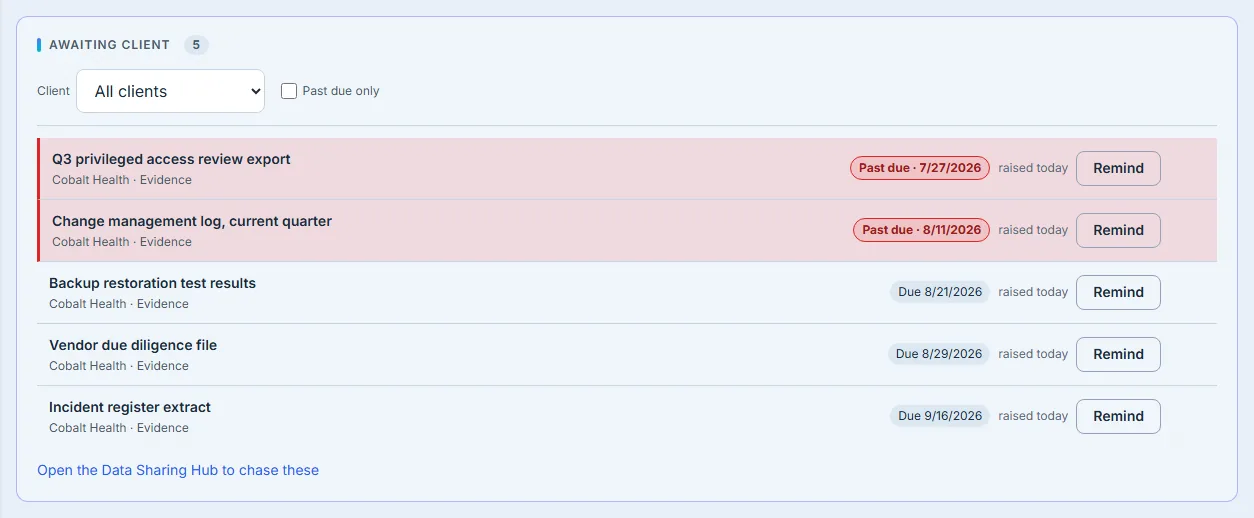
Rows that can be chased carry a Remind button. It sends the same reminder the Data Sharing Hub sends — literally the same action, so the per-request cooldown that stops a client being nagged twice in an hour is one rule, not two that have to be kept in step. Before this, the panel could tell you what was late and the only thing you could do about it was go to another page and find the row again by eye. A chase list you have to re-find your place in is a chase list nobody works.
The button appears only where a reminder can actually be sent, and it is worth being plain about how narrow that is. It needs four things at once: the request must still be pending rather than accepted or in progress; it must be a data or upload request, since neither kind of assessment sent to a client can be reminded this way; it must not be a child of a larger request, because those are chased through their parent; and your firm must be able to reach the Data Sharing Hub, since that is where the reminder is sent from. A firm without it sees the queue and no buttons at all.
The first of those is the one to watch. A request a client accepted three weeks ago and never returned is arguably the most chaseable row on the page, and it carries no button. Nor does the Hub offer one: the same rule hides it there, and the send would be refused if you got past it. Chasing an accepted-but-unreturned request is a conversation, not a button — which is a real gap, and one worth naming rather than papering over with a link to a screen that cannot do it either.
That the two screens agree is not luck. The page asks the reminder handler for the rule rather than keeping its own copy: the handler exports the very test it applies before sending, and both the queue and the Hub call it. Only the child-request condition belongs to the queue, and it is applied visibly beside the shared rule rather than folded into it. There is one thing the button cannot know, and it is honest to say so: the per-request cooldown depends on the state at the moment you click, so a row can still answer that a reminder went out recently. The button means this can be chased, not this will send.
The panel opens on the twenty-five oldest and says so — the count beside the heading is the real total, and the pager beneath reads 1–25 of 300, so a firm with three hundred open requests never has to wonder whether twenty-five means twenty-five or means “at least”. Above the list are two controls, a client filter and a past-due-only switch, and below it a pager — which appears once there is a second page to reach, and stays out of the way of a firm whose whole queue fits on one.
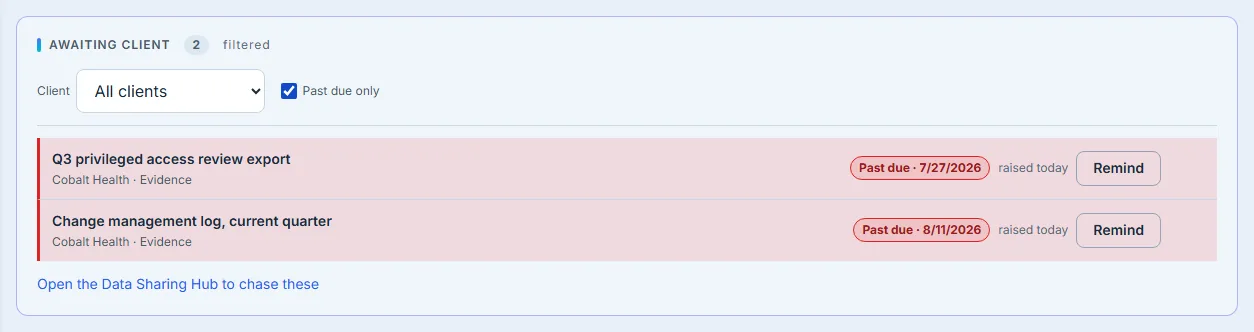
That combination is the part worth insisting on. A disclosed cap with no way past it is honest and useless: it tells you there are two hundred and seventy-five more and leaves them reachable nowhere. The pager reports the filtered total, so narrowing to one client changes the count beside the rows rather than leaving a number describing a different set — which is the failure this page has had to fix in three separate panels.
Who actually answers you
The panel below it is the one most firms cannot build for themselves, because it needs both sides of every request counted together.
For each client: how much of the evidence you asked for has come back, how much is still outstanding, and — stated separately — how much they have already delivered that nobody at your firm has reviewed yet.
These are the evidence requests raised on an engagement, which is a different list from the data requests in the pipeline above: two mechanisms for asking a client for something, and a firm uses both. The panel says so under its own heading, because two “request” counts that do not reconcile read as one of them being broken.
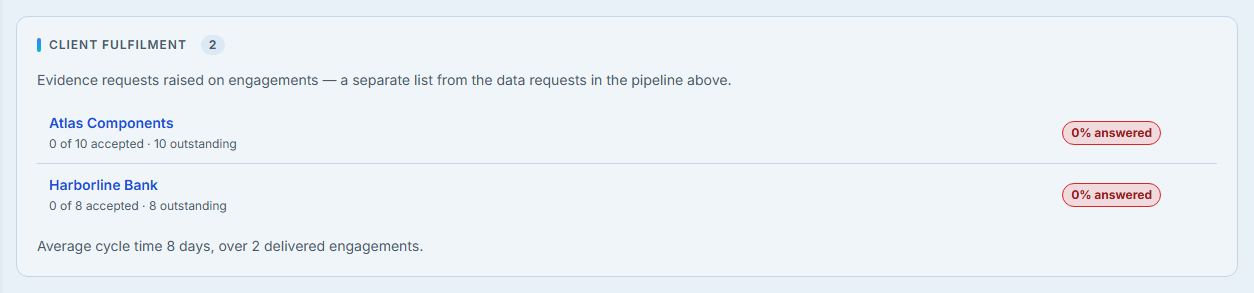
In the firm above, that third number is absent from every row — nothing has been delivered that someone still owes a review on, so the panel does not print a clause claiming otherwise. It is the number worth dwelling on all the same, because of what it means on the day it is not zero. Every other view of “outstanding” looks at the client’s end of the list. A client who answers within a day and then waits three weeks for someone at the firm to look at it appears, on every one of those views, as work in progress — indistinguishable from a client who has done nothing. Talarity’s own weekly chase is careful here: it writes to clients about requests still sitting with them and deliberately says nothing to a client whose evidence is already on our desk. That restraint is only possible because something counts the difference, which is what this number is for.
Separating the two is the difference between “they are slow” and “we are slow”, and a portfolio page that cannot tell them apart will confidently report the wrong one.
Beneath the ranking sits the average cycle time of delivered engagements, with the number of engagements it averages over. A mean of one is not a cycle time, and a reader cannot tell without being told.
The ranking is bounded at a hundred clients, ordered by who owes you the most, and says so when it bites.
A caveat about every capped list on this page
Three lists on this page are bounded: the chase queue at twenty-five, the fulfilment ranking at a hundred, and the blind-spot list at twenty-five. That is not a limitation anyone should have to discover.
The reason for the bounds is straightforward — this page must not get slower as a firm’s book gets bigger, and an unbounded list on a dashboard is how that happens. But a bounded list has a specific failure mode that is worse than being slow: it looks complete. Twenty-five rows and no note reads as twenty-five requests, not as the twenty-five oldest of three hundred.
So each of them carries its real total and says what you are seeing. Two are ordered so that the rows worth acting on survive the cut — oldest first for the chase queue, most-owed first for fulfilment — because an alphabetical slice of a hundred clients would technically be a hundred clients and would be useless. The blind-spot list is the exception: it names clients alphabetically and says so, because a client with nothing happening has no activity to rank by. That is the honest ordering for it and the reason its export matters more than the other two.
The one thing a cap note must never do is send you after a control that does not exist. If it says “narrow the list”, there had better be a filter. The chase queue’s own note was retired the moment it got a pager, because a note explaining a limit is the wrong thing to show beside a control that removes it. The other two say what they are showing and link to the export, which is the surface that holds every client including the ones they cap away.
What you hold, and where you are blind
The last row of the page is two panels that answer questions a regulator asks in that order.
Retained Records is what you are still keeping: records, how many source organisations they came from, the file count, the stored volume, and how many are under legal hold. Working papers outlive the relationship that produced them, which is why ended relationships are counted on this page rather than hidden — a firm still holds obligations for clients it no longer serves.
That panel is also where a subject-access request runs into the limits of erasure, and it is worth being precise about what happens then. Retained working papers are deliberately not surfaced to a requesting subject as their own personal data — they are a client organisation’s records held under a professional obligation, not a profile of a person — but the erasure question still has to have an answer, and it does. A client’s working papers are not deletable on request: they are held under a professional retention obligation, and frequently under an explicit legal hold, which is exactly the lawful basis the GDPR provides for refusing erasure. What is erasable is the identity of a named individual attached to an engagement — a client’s sponsor, say, whose name and email address the firm typed in. Those two facts have to be separable, and separating them is a decision recorded per table rather than a judgement made in the moment by whoever handles the request.
The panel counts what is under legal hold as its own figure for the same reason. “How much are you holding” and “how much of it are you not allowed to delete even if asked” are different questions, and the second is the one a regulator follows up on.
No Coverage is the blind-spot list, and it is worth stating its test exactly, because a loose version of it is what made this panel look like it was arguing with its neighbour: active client relationships with no live engagement, no open assurance request, and no monitoring channel. Work already delivered confers no cover, and evidence requests raised on an engagement are not part of the test — which is why a client can owe you ten documents on a finished engagement and still be a blind spot. That is the right answer: the engagement is over, and nobody is auditing them. This is the absence that produces no rows, rendered as the only shape an absence can take.
All three have to be in that test, and leaving one out fails in a direction worth naming. For a while the check asked only about requests and monitors, so a client the firm was actively auditing — a live engagement, no outstanding requests — was reported as a blind spot. A safety panel that raises false alarms is not merely noisy; it is the fastest way to teach a partner to stop reading it.
It also used to require that the client had a connected organisation of their own, which quietly excluded the clients most likely to be forgotten: the ones recorded as a name and a contact, nothing more. That restriction could only be lifted once engagements counted, because an engagement — unlike a data request — needs nothing on the client’s side at all.
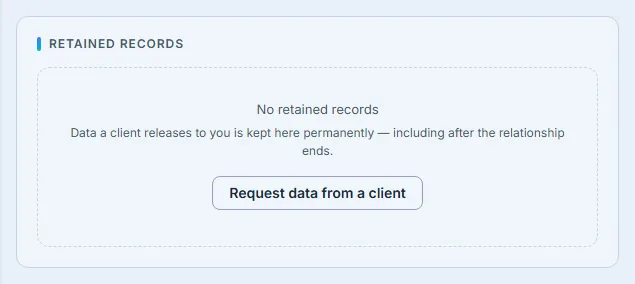
A firm that has not yet had a client release anything sees the other half of that panel, and it is worth showing, because an empty retention register is the state every firm starts in. Retained records are not something you create here — they are what remains after a client answers a request and releases the data. So the empty panel says exactly that, and links to the request that would produce the first one. That is the difference between a panel that is empty and a panel that looks broken.
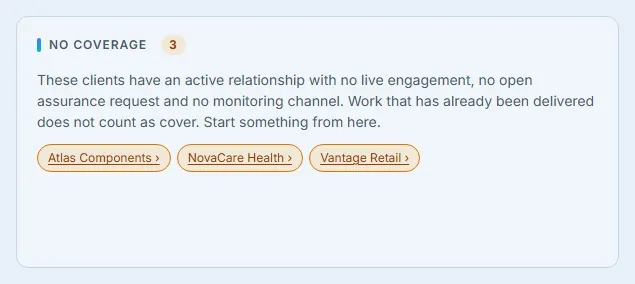
For a long time that panel was a list of names and nothing else — which is a safety panel whose entire output is a reminder to go and do something somewhere else. Every name is now a link that opens a new engagement with that client already selected.
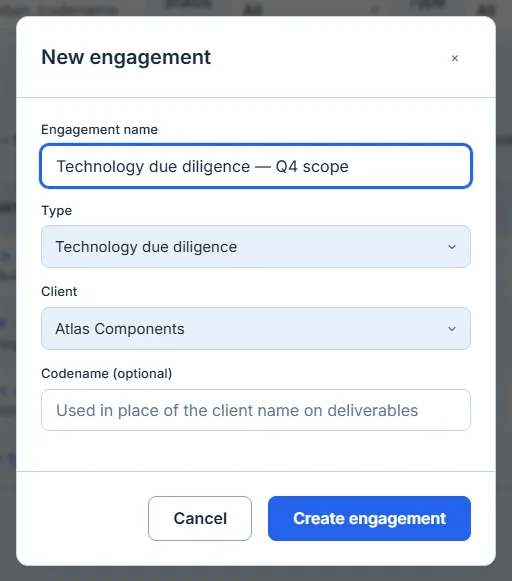
It is a small thing and it is the difference between a panel that reports a problem and a panel that starts the work. The intent is lost in the gap between reading a name and finding it again in a dropdown.
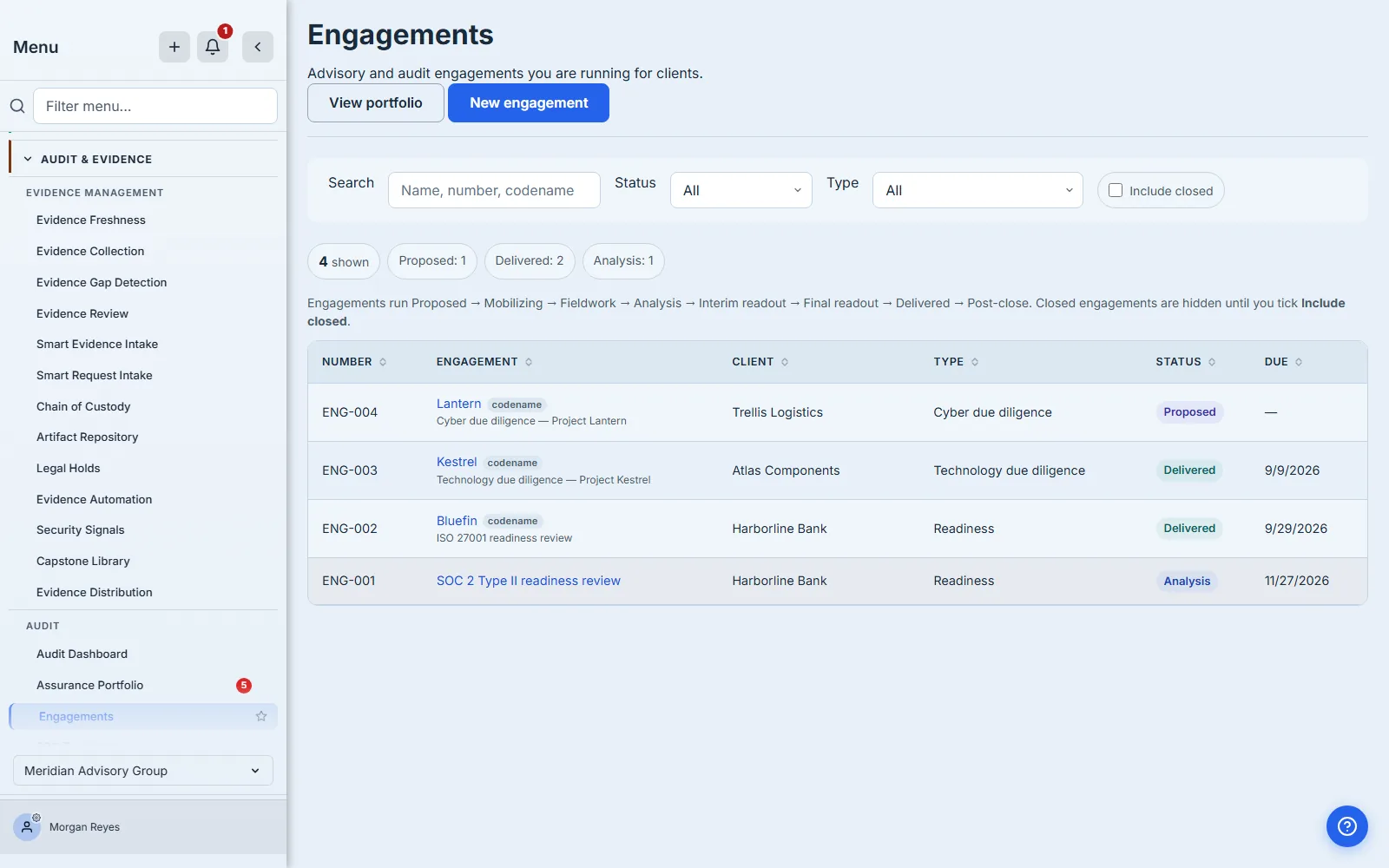
The form above is filled and not submitted, deliberately: creating that engagement would give Atlas Components live work, and the blind-spot panel in the previous frame — which lists Atlas precisely because it has none — would no longer say what it says. The two frames are one moment apart, and the second one would have invalidated the first.
Taking it out of the app
Everything above is a screen, and the meeting where it matters is usually not in front of one.
Export CSV gives you the whole book: one row per client, with engagements, past-due counts, request fulfilment, monitoring channels, retained holdings, the coverage verdict, and who owns the relationship. It is deliberately not bounded the way the page is — the fulfilment ranking shows a hundred clients and the blind-spot list twenty-five, and a firm past those caps is exactly the firm that needs the rest. Above a ceiling it refuses and says so rather than handing back a short file: a truncated portfolio export is a document that misrepresents the book while carrying the authority of a report.
Taking it is recorded. The file carries every client you have, their retained-record counts and their legal holds, and it leaves the product as a download — so the export writes an audit entry naming who ran it, when, and how many rows went with it. Not the rows themselves: a register of what left should not become a second copy of it. A firm that is itself audited on how it handles client data should be able to answer “who exported the client book” from the product rather than from memory.
The page also prints without the application chrome around it, which is the other way this screen leaves the building.
What reaches you when you are not looking
A dashboard only works on the days somebody opens it. Three things carry parts of it outward — and deliberately not the same parts, which is worth knowing before you rely on any one of them.
The sidebar badge counts requests already past their due date together with clients that have nothing in flight — the two things on this page that are actually actionable. The blind-spot half matters most, for the reason it always does: it is the number that cannot reach you any other way.
It is worth saying what that badge was doing until recently, because it is the same failure this page was built to catch, committed by the page itself. The count was computed correctly on every load — and rendered nowhere. The identifier that wires a count to a nav item had been declared on the route rather than on the sidebar entry, and only the sidebar entry draws the badge, so the answer was calculated and written into an element that did not exist. Nothing errored. A badge with no element and a badge reading zero look identical from the outside, which is exactly why it survived: the failure mode of an absence is that it looks like good news. The check written afterwards — every computed count must be declared where it can actually render — found a second one immediately, on the Engagements item next door.
My Work now includes the engagements you are on, as lead partner or as a member of the team. Every other module in the product puts its obligations there; a firm’s own engagements were the one kind of work that did not appear, so a manager running four of them saw an inbox that said nothing about the four things on their desk.
A weekly digest goes out each Monday to lead partners who have something waiting, covering evidence a client has already delivered that is waiting on their review, engagements overdue or falling due inside the week, and — added after this page shipped — the clients with nothing in flight at all, named, with the relationship owner beside each one where the firm records one. That last part is the reason the digest exists in the form it does now: a blind spot has no engagement, so it has no lead partner, so a digest built the obvious way around engagements could never have mentioned it. A firm whose engagements have all been delivered — the one most likely to have blind spots — was the exact firm that received nothing. It arrives an hour before the reminders that go out to clients — a partner should see their own backlog before their clients are chased about theirs, particularly in the case where the thing “waiting on the client” is actually sitting on our desk.
A Monday morning, in order
The three outward routes are not three notifications about the same thing, and the order they arrive in is deliberate.
At 08:00 UTC the digest reaches each lead partner: what their clients have delivered that nobody has reviewed, and what is overdue or falls due this week. At 09:00 UTC the reminders go out to clients about what they still owe. (Both are dispatched on UTC, so a firm further west receives them earlier in its own morning than the clock here suggests.) An hour apart, in that order, because a firm that chases a client for a document while the same client’s previous submission sits unopened on its own desk has made itself look disorganised in the only way a client actually notices.
When the partner opens the app, the badge on the portfolio already carries the count worth acting on — one number summing the two things you can do something about, with the banner beneath naming both, and My Work already lists the engagements they are on. By the time they reach this page, nothing on it should be a surprise — the page is where they act, not where they find out.
That is the intended shape: the dashboard is the workspace, and everything else is a route into it on the days nobody thought to open it.
What it does not do yet
The chase queue filters and pages; the other panels do not. The fulfilment ranking shows the hundred clients who owe you most and the blind-spot list the first twenty-five, both disclosed, and neither has a control to reach past it — for those, the CSV is the answer, and it carries the coverage verdict for every client including the ones the panel caps away. There is no free-text search anywhere on the page and no date range.
Chasing is one row at a time. Twenty-five overdue requests are twenty-five clicks, and there is no select-all and no “remind everything past due” — which is the obvious next thing to want on a page whose entire argument is that the queue should be workable from here.
Nothing about it is configurable. The thirty-day due-soon window, the twenty-five and one hundred row caps, the Monday times the digest and the chase go out at, and the rule that an engagement with no due date counts as on time are all fixed for every firm. A filter you set is not remembered either: come back tomorrow and the queue is unfiltered again.
And every member of the firm who can open this page sees the whole book. There is no per-client scoping on this surface, so a practice with independence restrictions on a particular client — a team that must not see that client’s work — cannot use it as it stands. That is the constraint most likely to matter first at a firm large enough to have one.
It also answers “now” rather than “are we getting better”. There is no trend on any figure. A portfolio page that could show this quarter against last would answer a different and better question, and it does not yet.
What you walk away with
One page that answers the question an assurance firm actually opens a dashboard to ask: across every client relationship I hold, what is the state?
A chase queue ordered by what has waited longest, where chasing is a button on the row rather than a trip to another screen. A fulfilment ranking that distinguishes a client’s delay from your own review backlog. A blind-spot list where every name starts an engagement. A complete export that does not inherit the screen’s limits. And three routes out of the page — the badge, My Work and a Monday digest — carrying between them what a partner needs before they next open it. They do not carry the same things, and it is worth knowing which is which: My Work brings you the engagements you are on, the digest brings the queue and the blind spots, and the badge brings the two counts you can act on, as a single figure rather than a split. The blind-spot number reaches you by two of the three, and until recently it reached you by none.
The client nobody is looking at is the one this page exists for. It is the only one that cannot appear in a list.