An external auditor does not get a Talarity seat. They get a link.
That link opens one engagement, expires on a date you choose, and can be revoked at any moment. It costs you nothing in licensing and it does not put another person inside your tenant. Those are the easy parts, and they are the parts most people already assume.
The part worth reading is the rest: what that grant actually lets the auditor do to your engagement, and where its boundary really sits. Both answers are less restrictive than the words “scoped access” suggest, and until recently the product itself described them wrongly on fifteen customer-visible surfaces — twelve of them the boundary question, three the “what can they do” one. Fifteen rather than the six first found, because each round of checking turned up more: a heading on the auditor’s own screen reading Your requests, over a list that has never been filtered to theirs; then five sentences on that same screen crediting the engagement with a list that actually belongs to the individual grant — including the one the auditor reads on arrival; then three more, one of them the in-app help page explaining the very thing it was getting wrong, and one the refusal an auditor is shown at the exact moment that boundary stops them. That is the honest shape of a wrong idea in a codebase — you correct the places you find, twice believe you are done, and the count is a floor rather than a total. This article is the accurate version of the idea itself.
What a grant is
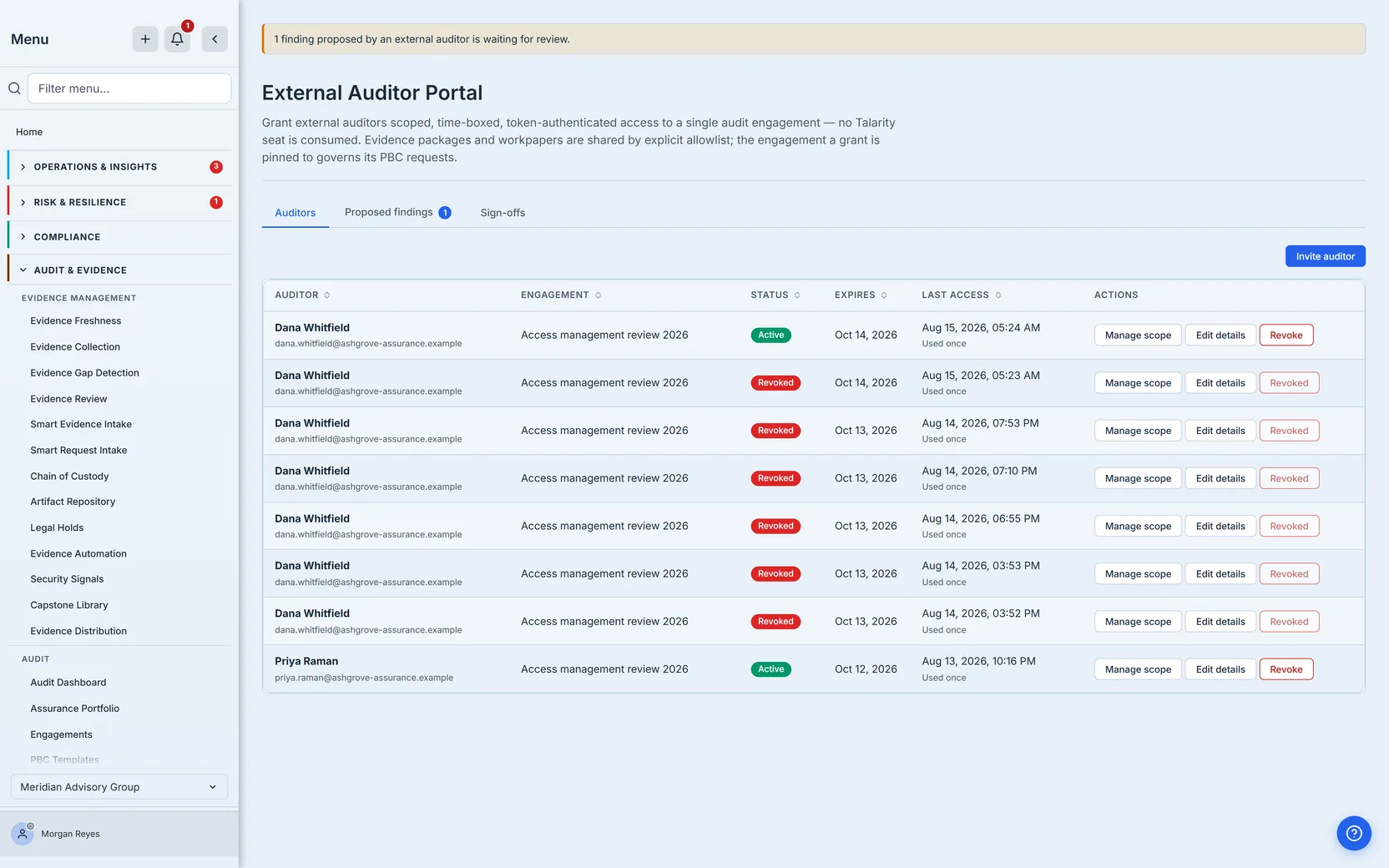
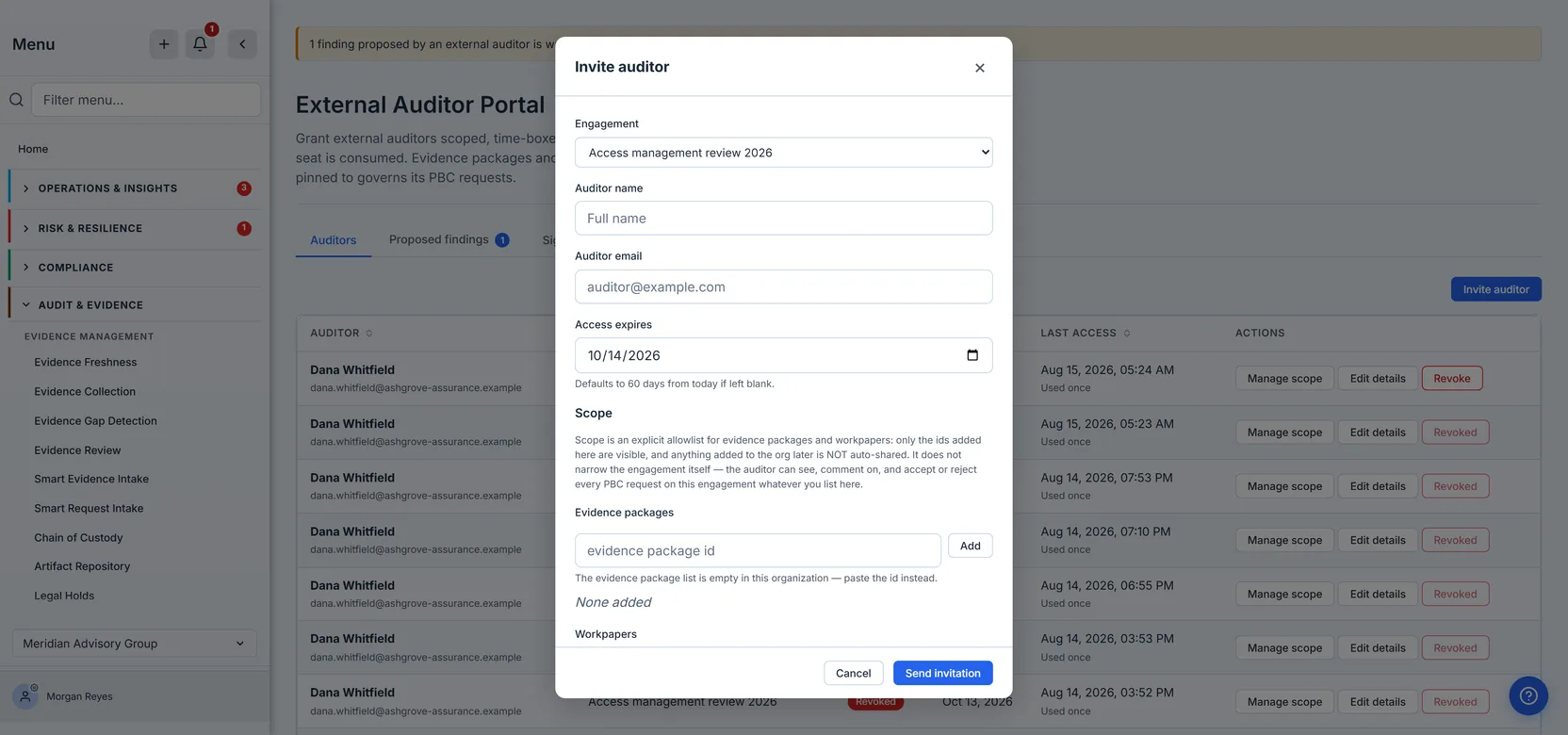
You invite an auditor from Audit & Evidence → Audit → Audit Management, on that page’s Auditor Portal tab, under Auditors. The dialog asks for the engagement, the auditor’s name and email, and an expiry — sixty days by default. (Whenever the dropdown has nothing to offer — the list failed to load, or the firm simply has no engagements yet — that first field becomes a free-text Audit plan id, and the help text underneath tells you which of the two it is: paste the id from the Audit Hub, or go and create an engagement. Either way an invite is refused against an id that does not resolve.) Saving it creates one row: a scoped, time-boxed, token-authenticated membership tied to a single engagement.
No seat is consumed. The auditor never appears in your user list, never counts against
standardMaxSeats, and never authenticates through your identity provider. They are not a user of
your tenant; they are a bearer of one link into one engagement.
The distinction worth drawing is how that is true. It is not that auditors are exempted from the seat check — an exemption is a rule, and rules get changed. The invite never reaches the seat system at all: it makes no seat assertion of any kind, because it is not creating a user to have a seat. Every path that does create one calls the same assertion helper first; this path has nothing to call it about.
The row records who they are, when the access expires, whether it has been revoked, how many times it has been used and when it was last used. That last pair matters more than it looks: it is how you answer “has the auditor actually been in yet?” without asking them.
The link is the credential — treat it like a password
When the invite is created, a token is minted: thirty-two random bytes, paired with its own sixteen-byte salt. The grant itself never holds the token — what gets stored on it is the salted SHA-256 hash and the salt, and every subsequent read strips even those before the record reaches your screen. The raw value goes to exactly two places: the URL returned to you at the moment of invitation, and the email sent to the auditor.
That second place deserves a sentence, because writing this article is what made us look at it. An outgoing email is queued before it is sent, and the queue row holds the rendered body — which for this email is the link, token and all. So the credential the product deliberately refuses to reissue was sitting in a table, readable, indefinitely: the nightly job meant to age those rows out filters on a field the mail queue never writes, so it had never matched a single one of them. The fix is that a body flagged as carrying a secret is discarded the moment the message is delivered — subject and delivery record kept, body gone. It applies to every send we could find that carries one, not just this one. Among them: password resets, vendor portal links, trust-centre grants, the identity code that proves someone is the subject of a data-access request, the link that opens a security assessment, board-report share links, work-item response tokens, disaster-recovery exercise invitations, and every invitation link — which is a credential too, because accepting one needs nothing but the id and address the email already contains. Fifty files at the last count, and that number kept growing every time we looked, which is the honest thing to say about it: the fix is mechanical and complete for everything we have found, and finding them is the part that took the work.
This has a consequence people meet at the worst possible moment: there is no resend. No “reissue link”, no “show it again”, not even for a platform administrator. The verb does not exist. If the auditor loses the email, or it lands in a quarantine nobody checks, you invite them again — and revoke the old grant first, because the lost link is still a working credential until you do. The product enforces that order: while the first grant is still live, a second invitation for the same auditor on the same engagement is refused, and the refusal names the grant standing in the way and when it expires. Revoke it and the new invitation goes through. The rule is per engagement, not per person — a grant for the same auditor on a different engagement is unaffected — and it holds on the edit path too, so renaming one grant onto a colleague’s address is refused for the same reason.
So the advice is not decorative. Treat the link like a password, because operationally it is one: anyone holding it is the auditor as far as the engagement is concerned.
Presenting a wrong token is not free either. Each membership carries its own failed-attempt counter, and ten wrong presentations lock that grant for fifteen minutes. The lockout is checked before the token is compared, so a locked grant cannot be ground down by guessing.
That sentence was true of the design and false of the running system until this article was fact-checked, which is worth saying plainly. The counter was incremented inside the same database transaction that the rejection then rolled back, so every wrong guess erased its own record: the gate was real, correctly ordered, and reading a number that could never leave zero. It had a test, and the test passed, because the test proved the increment was sent rather than that it stuck.
The first repair was wrong too, in the same way, and that is the more useful half of the story. It moved the increment onto a second database connection so the rollback could not reach it — except that this service runs with a pool of exactly one connection, so asking for a second while the first is still open waits on itself until it times out. The counter still never moved; the auditor now got a worse error; and an unauthenticated endpoint had acquired a five-second stall. It also had a test, and that test passed, because it asserted the write went to a different connection rather than that anything was written.
Four tests have now guarded these twenty lines, and the first three were confidently green while something they claimed to cover did nothing. The third was the subtlest and the most instructive: it did ask what the row holds afterwards, and it did guess wrong ten times before presenting the correct link — but the stand-in database it asked was computing the answer itself rather than running the query the product runs. Change the real comparison from ten or more to more than ten, so the lock arms a guess too late, and the test that exists to catch exactly that stayed green. The fix was to make the stand-in read the operator out of the statement under test instead of assuming it.
Three times over, then, the same lesson in a smaller and smaller room: a control you have written down, ordered correctly, and covered with a passing test can still be doing nothing — and a test is only worth what it would fail on. The one that finally holds is not more rigorous, it just stopped supplying its own answer.
Back to the door itself. Comparing the presented token against the stored hash is constant-time — whenever it happens at all — so a near-miss reveals nothing about how near it was. (It does not always happen: a locked grant, a token too short to be real, or a row carrying no hash are all refused before any comparison, which is the point of checking them first.)
And the grant’s state is re-checked on every single action, not once at sign-in — which is what makes revoking it meaningful rather than symbolic. More on that at the end, where it matters most.
The two fences — and why the scope dialog is only one of them
Here is the part that matters most, and the part the product used to describe incorrectly.
You set a grant’s scope in two places, and they are the same editor: a Scope section inside the invite dialog itself, and a Manage scope dialog on the auditor’s row afterwards. Whichever you use, it holds an explicit allowlist: which evidence packages, and which workpapers, this auditor may open. It is an allowlist in the strict sense — only the ids you add are visible, and anything added to the org afterwards is not shared automatically. Add a new evidence package next week and this auditor cannot see it until you say so.
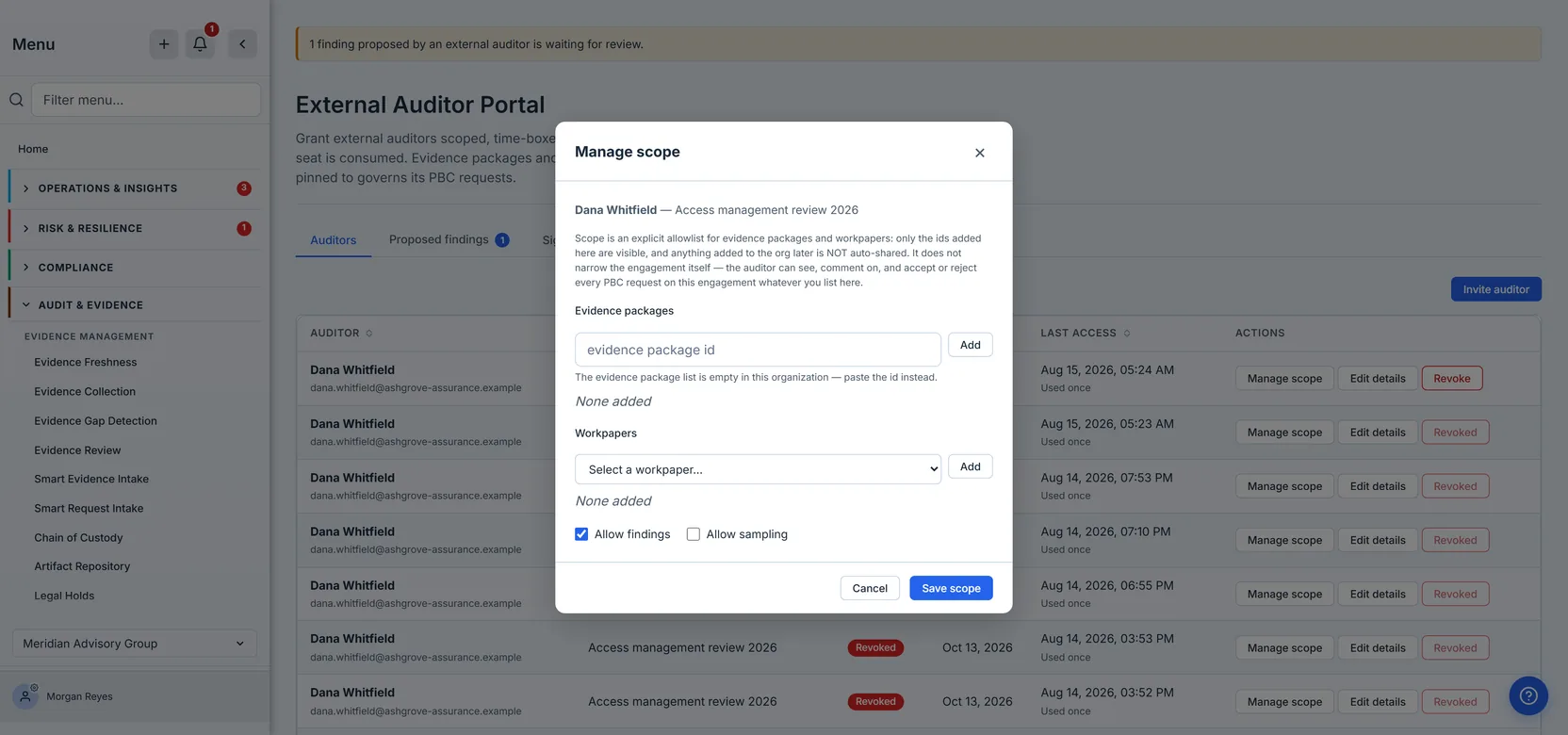
That is one fence. There is a second, and it never appears in the scope editor at all: the engagement pin. You choose the engagement when you invite — it is the dialog’s first field — but you never set it as scope, and that is the whole trouble with it.
Every grant is bound to exactly one engagement at the moment it is created, and that binding — not the allowlist — governs the entire PBC request surface. The list of requests the auditor sees is filtered by engagement. Their ability to comment on a request, and to accept or reject the evidence your team submits against it, is fenced by engagement. The allowlist is not consulted at any point in that path.
Which means the sentence a lot of people are carrying around is wrong:
“I gave them narrow scope, so they can only see the few things I listed.”
Narrow scope restricts evidence packages and workpapers. It does not restrict the request queue. An auditor with a completely empty allowlist — no packages, no workpapers — still sees every PBC request on that engagement, still comments on them, and still accepts or rejects the evidence you submit.
Here is what that looks like from their side, on a grant with nothing in its allowlist at all — the same auditor, on the same engagement, with the two capability boxes from the scope dialog above showing through into the tab strip. Allow findings was ticked there, and a Findings tab is present here; Allow sampling was not, and there is no Sampling tab. The allowlist, meanwhile, is still empty on both sides:
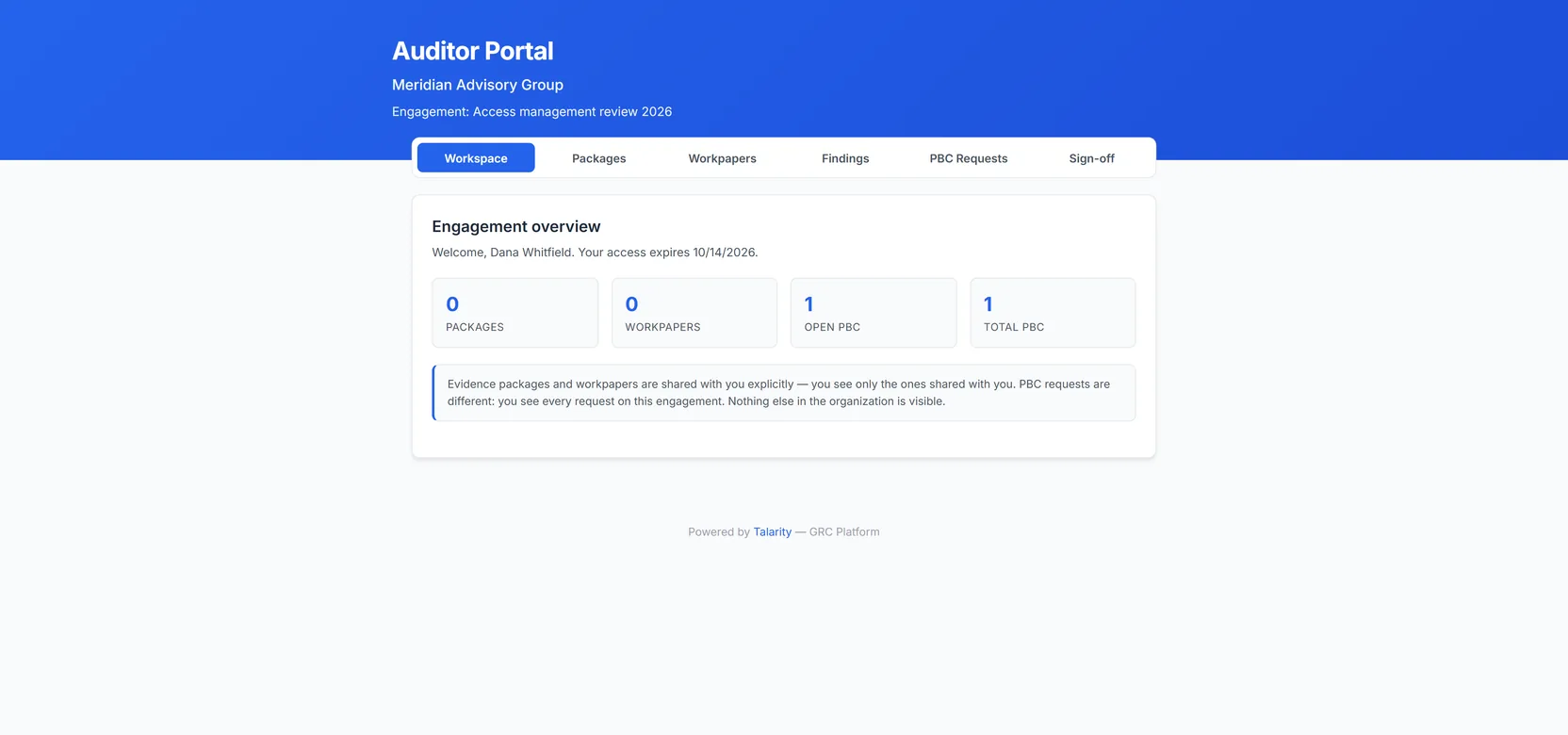
An empty allowlist beside a live request is the whole argument. The allowlist fence is doing exactly what it says — nothing has been shared, so no package and no workpaper is visible. The request queue is not behind that fence at all.
Both fences are real and both are worth having. But they cover different ground, and the scope editor — wherever you open it — edits only one of them. The product now says so in the editor itself; it did not before, and a reader of the old wording would have concluded they had restricted something they had not.
What the auditor sees, and how it is assembled
It is worth knowing how the read side is built, because it explains a state you will eventually see and might otherwise read as a bug.
The auditor’s list of evidence packages is not “everything in the org, filtered down”. It is built from the allowlist outward: the product walks the ids you added and reads only those. There is no step that fetches everything and then removes what you did not share, which means there is no filter to get wrong. The same is true of workpapers.
That has two consequences worth separating, because they look the same from your side and are not.
Taking a package off the allowlist removes it from their list. The list is built from the ids you have granted, so removing one means it is no longer built — the row is simply gone the next time they load the page. There is no tombstone for a decision you made deliberately.
A package that is deleted while still on the allowlist is different. Here the id is still granted but the thing it points at no longer resolves, and rather than failing the whole list the entry stays, and its controls simply are not there — the row is visible, and there is nothing to press. A workpaper says so by trading its View PDF button for a badge reading No Longer Shared (the portal capitalises every badge, so that is the casing on screen). A package always carries its status badge and instead loses its Snapshot and Download controls, and the badge reads No Longer Shared only in this same case — the id is still granted but the package it points at has been deleted. That case — and only that case — is not you changing your mind; it is the product telling the auditor that something they were given has ceased to exist.
A package that is simply not finalised yet is a different thing, and says so differently. Its row still arrives, carrying its own status on the badge rather than no longer shared, but its Snapshot and Download controls appear only once the package is finalized. It has not ceased to exist — it is not finished, and an auditor is handed a package only when it is.
Everything the auditor writes is recorded in your organisation’s audit log against their email address and the id of their grant, and marked as coming from an external auditor rather than from a user of your tenant — filing a request, commenting, accepting or rejecting evidence, pulling a sample, raising a finding, signing off. All six of the things they can write. Each entry also carries the engagement it happened on. To find those entries later, use the audit log’s Search Email box and type the auditor’s address: it matches the field their portal writes are recorded against, and the Export CSV button saves that filtered set — not merely the page in front of you, which is what it used to save, silently, until this article’s fact-check reached it. If more entries match than one export can return, it says so rather than handing you a quiet subset — and points you at narrowing the range, or at the bulk export, which takes up to ninety days at a time. Do not reach for the User dropdown in the same filter row — that one is built from your user list, and an external auditor is not a user of your tenant, so they will not appear in it. The separate bulk export is the fallback when a filtered set is too large to return at once, but it takes a date window and no actor filter — so it will hand you the whole period and leave the narrowing to you. Reach for it to get past the cap, not to answer this question. A proposed finding keeps the auditor’s name beyond the log entry, stored on the finding itself — as a sign-off does on its own record. The name you see beside it in the queue is resolved live from the grant — and since revoking keeps the grant row, a revoked auditor still shows by name there. The two durable records are not two copies of one field: the finding stores the auditor’s name, the log entry stores their email. The on-screen label is a convenience that happens to survive revocation because nothing in this feature deletes anything. The log entry carrying that email is new — until this was written, raising a finding was the one auditor write that recorded no email address at all, which meant the single action most likely to be questioned later was the one action an access review could not attribute. “Who did what, on which engagement” is exactly the record that matters for an unauthenticated external surface, and it is the one that survives the engagement.
Be precise about the other half, because an access review will ask. The boundary is not read-versus-write. It is enumeration versus disclosure. Listing what has been shared with a grant — the workspace tiles, the package list, the workpaper list — is not logged, because those fire on every page view and an audit trail full of them buries the entries that matter. But the moment a specific document leaves your tenant is recorded, and both halves of that are covered. Opening an evidence package runs through the same download path the rest of the product uses, which writes an entry identifying the package by its id, attributes it to the auditor by their email address, marks it as coming from outside the organisation, and increments that package’s download count. Opening a workpaper’s PDF writes its own entry naming the workpaper, the grant and the engagement.
So “which documents did this firm take, and when?” is answerable from the audit log, not only from infrastructure logs. What sits alongside it on the grant itself — a count of how many times the link has been used and the timestamp of the last use — answers the coarser question, “has this auditor been in, and when?”
What the auditor can actually do
“Read-only” is the phrase people expect, and it is wrong. A default grant — every capability box unticked, both allowlists empty — already carries four actions that write:
- File a PBC request. The auditor can raise a new request against your organisation. It becomes a real obligation somebody has to answer.
- Comment on a request. Their comments join the same thread your team is using.
- Accept or reject submitted evidence. This is the consequential one. When your team fulfils a request, the auditor decides whether that evidence counts. A rejection sends the work back.
- Sign the engagement off. The closing artefact, discussed below.
None of those four is behind a capability toggle. They are what a grant is.
Two things are behind toggles, and this is where the design surprises people:
- Propose a finding requires the
findingscapability. - Pull a sample requires the
samplingcapability, and can only sample across the evidence packages you have explicitly shared.
Read that ordering carefully. The two gated verbs are the less consequential ones — a proposed finding is a draft your team must accept, and a sample is a selection over material you already chose to share. The four ungated verbs include accepting evidence and signing the engagement off.
This is not an argument that the product is wrong. It is an argument that “scoped access” is not the same as “harmless access”, and that the person clicking Invite should know they are handing over the ability to accept evidence and close the engagement. Grant it to people you intend to let do those things.
Proposed findings: a draft, not a finding
When an auditor with the findings capability raises something, it does not enter your finding
register. It lands quarantined — recorded with a status of proposed, attributed to that
portal member by name, and flagged as having come from an external auditor. It stays out of the
register, out of My Work, and out of the claimable-work pool until somebody on your side decides —
so nobody can pick it up as a task before it has been accepted as a finding at all.
The third of those was not true until we wrote this article, and the reason is worth a paragraph because it is the shape a lot of quiet bugs have. Every finding carries a shadow task, and the pool of unclaimed work is filtered on a role — is this task open, done, cancelled — which the product resolves by looking the task’s status up in the workflow vocabulary each organisation configures for itself. No organisation has a word for proposed; it is not theirs to configure, it is what the portal writes. So the lookup found nothing, and a task whose role cannot be resolved was deliberately treated as claimable — a sensible default that was exactly wrong here. An outside auditor’s unreviewed draft was sitting in the pool of work any employee could pick up. The rule now tests the status itself as well, sitting beside the role test rather than replacing it — the role test is right for every other kind of task and was left alone. The vocabulary is still consulted, and proposed is still absent from it; what changed is that the guarantee no longer depends on a list that could never have contained it.
You are told it is waiting, and it is worth being precise about what does the telling, because the obvious answer is the one that does not work. The Proposed findings tab carries a count — but a tab badge is only visible once you are already on the page you needed to be told to visit. Two other things carry the news to you: the sidebar carries a count on the Audit Management row that holds the Auditor Portal tab, so it reaches you from anywhere in the product, and raising a proposal notifies your compliance recipients directly. The tab badge is what you see when you arrive; those are what get you there. The sidebar count is not guaranteed to match the tab’s, and should not be relied on as though it were. In ordinary use they agree — a proposal is written to both tables in one operation, so below the caps they are counting the same thing. They part company at the edges: the sidebar stops at 99+ where the tab runs to 200+, and they are read from two different tables rather than one. The sidebar’s number exists to make you look, not to be the figure you work from — and being a straight count of the rows, it has no page behind it to misreport.
The tab badge is the one that has to be careful about its own arithmetic, because it does have a page behind it: when there are more proposals than the page loads, it reads 200+ rather than 200, with a tooltip reading “At least this many — more than one page of proposed findings.” It is the most glanceable number on the page, which makes it the worst place to present a page size as though it were a total.
The place you make that decision is the Proposed findings tab, and it offers exactly two verbs:
- Accept promotes the draft into a real, open finding, and it enters the register like any other.
- Dismiss closes it.
Both are one-way. Proposed is a status the API knows perfectly well — it has to be, since that is what the portal writes — but no transition in the map has it as a destination: every route out of it leads somewhere else and none leads back. Closed is terminal on top of that. Treat a dismissal as the decision it is rather than as tidying up: reviving one is not something the product offers, and getting the proposal back means the auditor raising it again as a new one.
That holds against the auditor too, which is the part worth saying out loud. If they submit the same finding again after you have dismissed it, they are told it has already been reviewed rather than quietly getting it back into your queue — and the same applies to one you accepted, which stays where your team has moved it to. Your decision is the last one, and the person who raised it cannot reopen it by repeating themselves.
Which is why the row shows you the whole thing before you choose: its work-item number (findings share one counter with every other work item, so the digits are not a count of findings) and its full title, the first two lines of its description, its severity, and the name of the auditor who raised it. There is no detail view behind this queue and no third button — what is on the row is what you are deciding on. That is why the title is never truncated, however long it runs — a finding’s title is the sentence you judge it by. The description is the one field still bounded: two lines, then it stops, with nowhere else to read the rest. For most proposals that is enough; for a long one it is the place where this queue does not yet carry everything a decision needs.
(The underlying finding model does have a third state — disputed — which is how a disagreement
gets recorded rather than silently dropped, and the model does permit a proposal to go straight
there: proposed may become open, closed or disputed. What this queue offers is the
first two. So if you want the disagreement on the record rather than resolved by a dismissal nobody
can see the reasoning for, accept the finding and dispute it in the register — not because the
model forbids the shortcut, but because this screen does not currently offer it.)
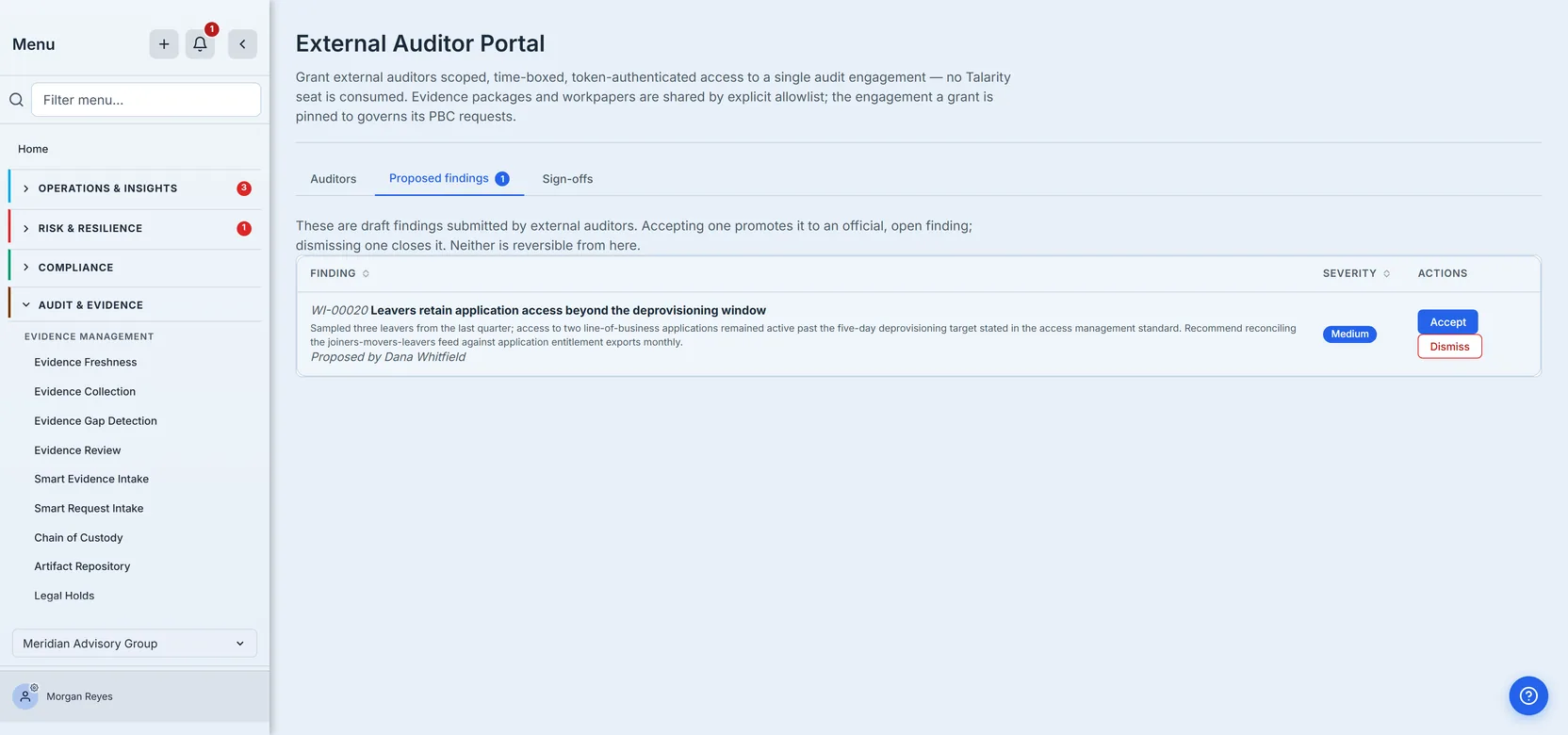
The important property is the quarantine itself. An external auditor cannot write directly into your finding register, cannot promote their own draft, and cannot skip the review. Their proposal is visible, attributed and still undecided until you decide it.
Sign-offs: the artefact that outlives the engagement
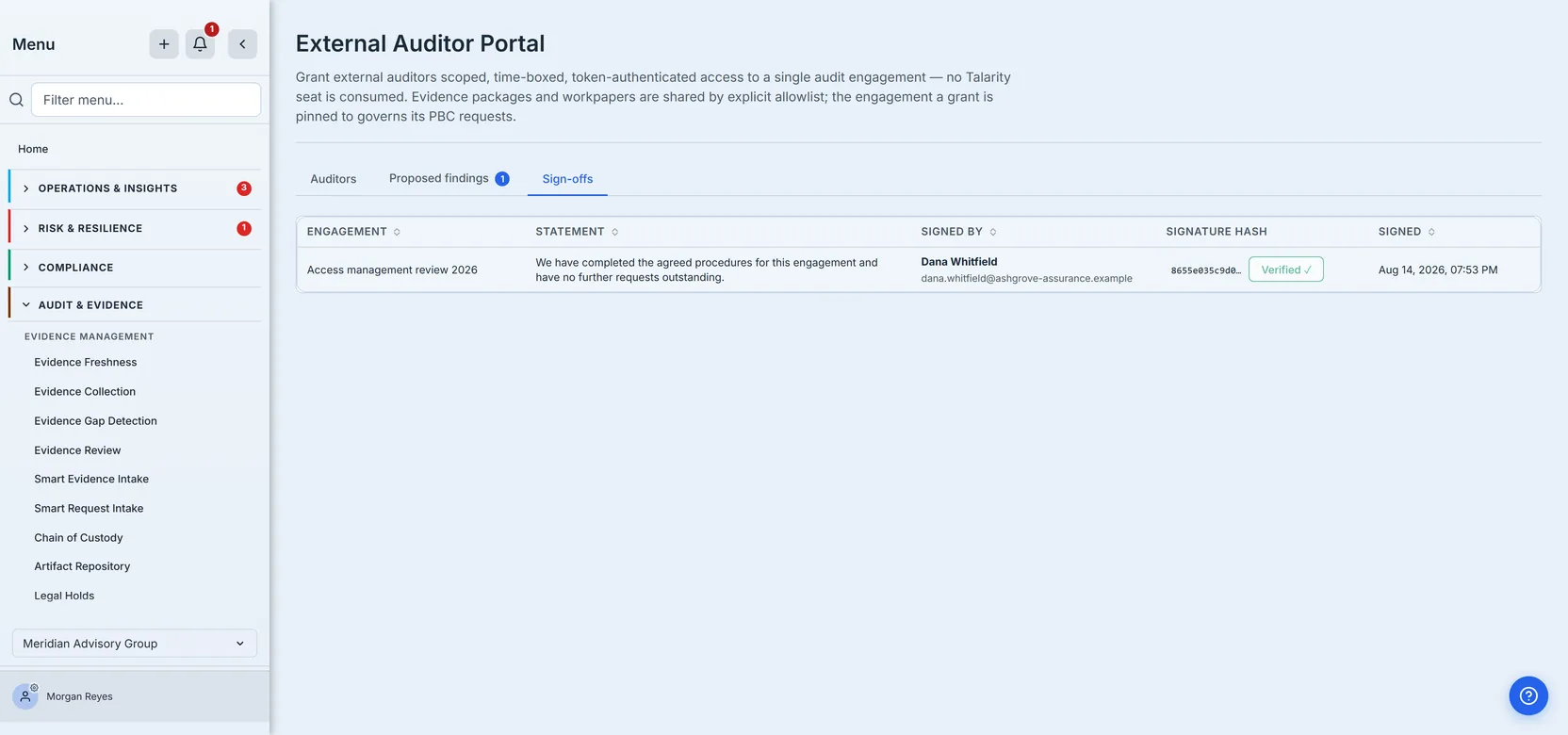
When the auditor signs the engagement off, the product writes an append-only row: the statement, the name they signed under, the engagement, the member, and the timestamp.
Three things make it more than a log line.
It is immutable at the database, not in the interface. The absence of an edit button is not the protection — a trigger rejects the write itself. An UPDATE is refused unconditionally, by anyone, for any reason. A DELETE is refused too, with exactly one carve-out: the privileged path that erases an entire tenant, which one function in the codebase can reach and nothing else. The migration that installs the trigger also checks its own work before finishing. (Read the trigger as the guarantee, not the migration’s checks: forced row-level security is verified per table, but the policy check counts across the grant and sign-off tables together and the trigger check matches on the trigger’s name alone. Those last two are weaker assertions than they look; the forced-RLS check is the sound one.) And because a check that runs once protects you once, a build-time guard now refuses a later migration that drops the trigger by name, or the table it sits on.
It is signed. The stored signature is an HMAC over a canonical form of seven fields — the
record’s kind, your organisation, the engagement, the grant that signed, the statement, the name
typed into the signature box, and the timestamp — and it is the same signing primitive the rest of
the platform uses, not a second implementation written for this one feature. Seven is worth being
precise about: the verifier originally rebuilt five of them, called every genuine signature a
forgery, and both sides now build the payload from one function so they cannot drift. That primitive is signCustodyEvent — not the sign-off payload builder, whose only product callers are the signer and the verifier themselves. signCustodyEvent also seals the evidence
chain-of-custody events (initiate, transfer, access, retention, legal hold, disposal and the
integrity check), the e-signature envelopes, the evidence-package seal, and the attestation chains
behind policy acknowledgements, BCDR plan attestations and DR-test records. An auditor’s sign-off
is sealed by the same code path that seals the custody of the evidence they signed off on.
And if the signing secret is ever missing, signing fails: it refuses to fall back to a predictable key, because a guessable key would let anyone who knows the project forge a sign-off and defeat the entire point.
And you can check it. Every row on the Sign-offs tab carries a Verify control that recomputes the signature from the row’s current contents and tells you one of three things: that it matches, that the row carries no signature at all, or that it does not match — in which case it says so in that word — MISMATCH — turns the control red, and puts a dialog in front of you, so the verdict never rests on a colour alone. (A fourth outcome exists and is deliberately not a verdict: if the check cannot run, the button returns to Verify and says so, rather than reporting a result it did not obtain.) The third answer is the one worth having; the second should be impossible, which is exactly why it is worth being able to confirm rather than infer. The register is immutable at the database, so this is not aimed at someone editing a row in the interface. It is aimed at the cases where that protection is not the one in play: a direct write, a restore from a doctored backup, a migration that rewrote a column. A signature nobody can check is decoration, and an auditor’s sign-off is the artefact most likely to be produced years later to somebody who was not there.
There is one guard the trigger cannot provide, and it is worth saying how it is enforced, because the difference matters. Immutability blocks edits, not a double insert from a reloaded page — and in an append-only register a duplicate is the worse outcome, since nothing can delete it afterwards. The screen refuses a second sign-off from the same auditor on the same engagement with a plain message, but that check reads the table and then writes to it, which two simultaneous submissions walk straight through. So the rule is now held by a unique index on the organisation, the engagement and the grant — org first, deliberately, to match how every other query on that table reaches it. The message is what the auditor sees; the index is what makes it true.
What the product will not let an auditor do
The interesting part of this list is how it is enforced. It is not a set of runtime checks that could be bypassed if one were missed. The dangerous verbs were never given to the external surface at all:
- An auditor cannot fulfil a request — including one they filed themselves. There is no portal action that fulfils.
- An auditor cannot promote their own proposed finding. No portal action promotes.
- An auditor cannot widen their own scope or invite anyone else. Those verbs are org-side only.
There is no check to bypass, because there is no verb to call. Tests guard the registration table itself, so adding such an action later fails the build rather than shipping quietly — and, since the dangerous change need not add a verb at all but could re-label an existing one, they also pin which actions are reachable without a Talarity account. The first version pinned only the names, and would have let the org-side scope editor be quietly marked unauthenticated without a word.
Reaching for something outside the allowlist fails closed, and fails as not found rather than forbidden. That distinction is deliberate: “forbidden” would confirm the thing exists, which is itself a disclosure. An auditor probing for a workpaper they were not given learns nothing about whether it is there.
Ending it: revoking removes access, not the record
Revoking is a click on the grant’s row and a confirmation — the dialog names the auditor and warns that this cannot be undone — and it is deliberately narrow: it stamps the grant as revoked, records that in the audit log, and touches nothing else. The token chokepoint re-checks that stamp on every action, so the auditor’s next click fails — mid-session, without waiting for a page reload or an expiry date.
What the auditor sees at that moment is part of the guarantee, not a detail below it. The portal replaces the workspace with the reason: This access link was revoked by the organization. It does not offer a Retry button, because there is nothing left to retry — and until this article was written it did exactly that, answering a revoked grant with “Please try again,” advice that could never once have succeeded.
The re-check on every action is worth being precise about, because it is the whole strength of the revocation claim. Fourteen handlers make up the auditor-facing surface — the workspace, the package and workpaper lists, a package read, the workpaper PDF, the package snapshot drill-down, the request list and its comments, raising a request, adding a comment, accepting or rejecting evidence, sampling, findings, sign-off — and every one of them opens its session through the same lookup, and that lookup refuses a revoked grant — then an expired one — on every single call. The order is worth being exact about: the token’s shape is checked, the grant is found, the lockout counter is consulted, the hash is compared, and only then are revocation and expiry evaluated. So a revoked grant presented with a wrong token is told the link is invalid rather than revoked, which is the right way round: an attacker guessing tokens learns nothing about which grants exist. What matters for revocation is that no handler skips the check, and none does — there is no fifteenth handler that reads the token and shortcuts it. The remaining six portal handlers — inviting, listing grants, listing sign-offs, revoking, setting scope, and verifying a sign-off’s signature — are not auditor-facing at all: they are the org’s own screens, behind the org’s own login.
What it does not do is just as important, and it is the question people actually have when an engagement closes. Nothing is deleted. There is no cascade anywhere in the portal: the sign-off stays in the register (revoking a grant cannot remove it, and neither can anyone in your organisation — the database refuses the delete outright; the single exception is erasing the whole tenant, which is a right you are owed and which destroys the record rather than editing it), the findings they proposed stay in your queue or in your register if you accepted them, their comments stay on the request threads, and the requests they filed remain requests. The grant row itself stays too, now reading revoked, with its access count and last-access time intact.
That is the right shape for an audit. The auditor’s ability to act ends immediately; the evidence of what they did outlives the engagement, which is the entire reason the sign-off is signed and immutable in the first place. Revoke as soon as the engagement closes — expiry will get there eventually, revocation gets there now, and neither costs you the record.
A short checklist before you click Invite
- Set the expiry to the engagement, not to the year. Sixty days is the default, not a recommendation.
- Decide about
findingsandsamplingdeliberately. They are the two you control; the other four come with the grant. - Remember what scope does not cover. It fences packages and workpapers. It does not fence the request queue.
- Send the link over something you trust, and tell the auditor it cannot be resent. If it goes missing, you revoke and re-invite.
- Revoke when the engagement closes. Expiry will do it eventually; revocation does it now, and it takes effect on their very next action.
The auditor portal is a good deal: an outside party works inside your evidence without a seat, without an account in your tenant, and without a copy of your data leaving it. It is worth understanding precisely what you are handing over, because “scoped” and “time-boxed” are true, and “read-only” never was.