Most reporting features end at the moment the document is produced. The capstone library begins there.
Every report you export lands in it — board packs, risk registers, access recertifications, framework readiness summaries. Exporting is the moment that matters: a report you are still editing is a working document, and a report you have turned into a file is something another person may rely on. Not files in a folder, but records — each one carrying what it was exported from, when it was produced, whether it is under legal hold, and which formats exist of it.
You do not create anything here. Entries arrive from the places that produce reports — the report library, a dashboard you exported, a brief taken to a committee — which is why a new organisation’s library is empty and stays empty until it produces something worth keeping. Almost everything that lands is already finished, and the register’s job is custody rather than completion.
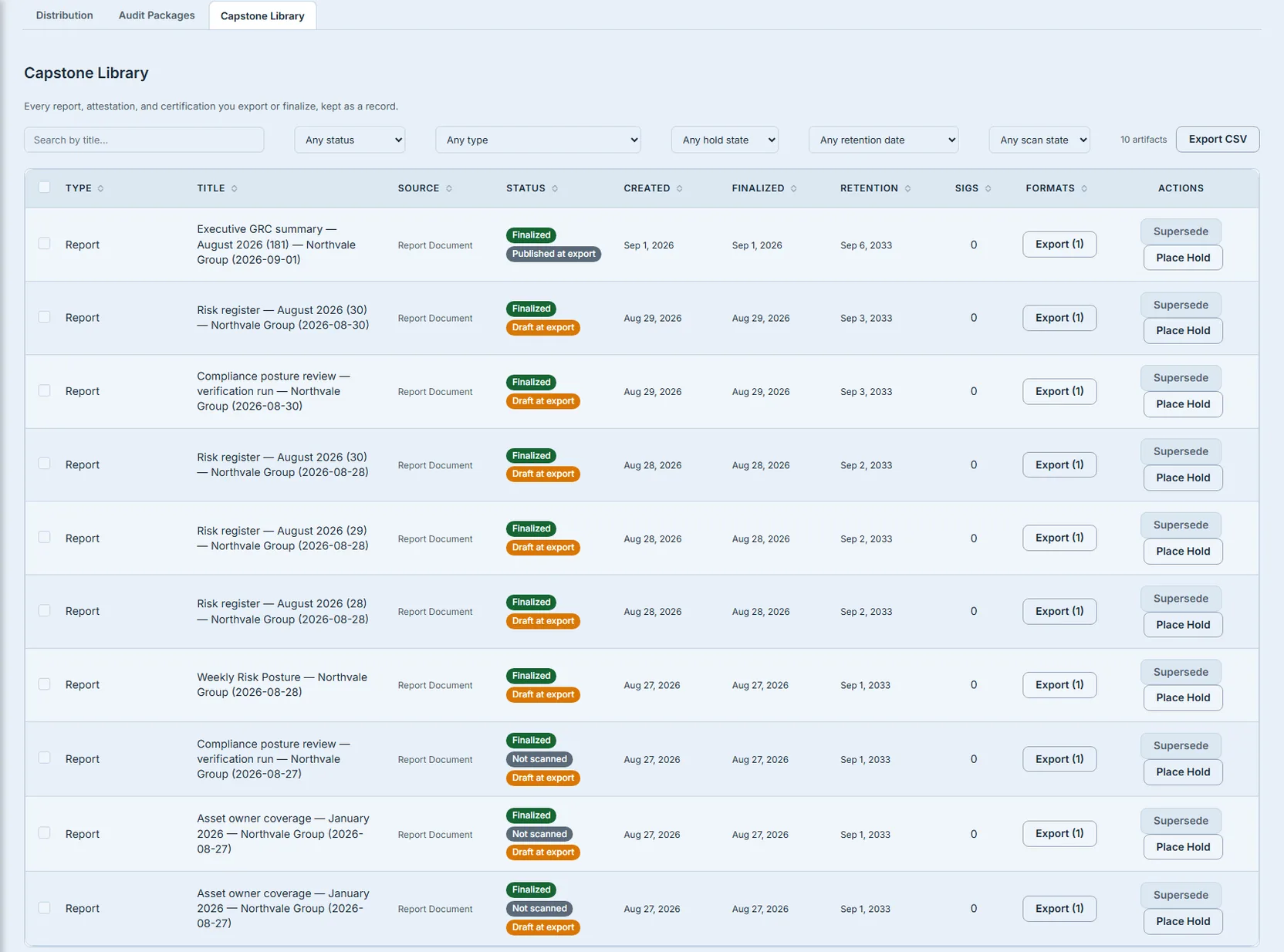
The questions asked of a report six months later are almost never about its contents. They are about whether it can be trusted.
Who’s involved
- Whoever produced the report — who needs it to stop being editable and start being evidence.
- Whoever is asked for it later — an auditor, a regulator, a board secretary — who cares about provenance, not prose.
- Whoever has to defend the answer — usually months after everyone else has moved on.
The register records what the report was exported from, not just what it is
Here is the distinction that decides whether a register is useful or merely tidy.
Two rows in the library look identical. Same type, same date, same person. One was exported from a report that had been reviewed and published. The other was exported from a draft somebody was still editing.
As artifacts they are the same thing — both finished, both immutable, both legitimately in the register. The difference is not in the artifact at all; it is in what the artifact was taken from, at the moment it was taken. And that is exactly the fact a reader needs, because a PDF pulled from an unapproved draft looks precisely as authoritative as one pulled from a published board pack.
So the row carries it: the approval state of the source report at the moment of export, stamped onto the record and shown beside the status. The status describes the artifact. This describes what was exported. Without both, a register flattens a real distinction into a shared badge.
The badge began deliberately one-sided: it appeared when the source was not published, and stayed out of the way when it was. An unbadged row was the ordinary case, and a register should not decorate the ordinary case.
That one-sidedness had a cost, and it is the same one the scan badge further down was changed to avoid. Only reports exported from the report library have an approval state to record at all; other things in the register — a dashboard exported to PDF, a brief taken to a committee — were never drafts awaiting approval. So a row with no badge was making one of two statements: this came from a published report, or this kind of document has no such state. Those are different facts and they looked identical, which meant the badge was right about the case it fired on and silent about which kind of silence you were reading.
That is fixed, and the fix is the same shape as the scan badge’s: say the reassuring case out loud rather than letting its absence carry the meaning. A row exported from a published report now carries a muted Published at export beside its status — deliberately quieter than the warning, because it is the ordinary outcome, but present, because a register that only speaks up when something is wrong cannot be read by anyone who does not already know what its silences mean. No badge at all now says exactly one thing: this kind of document has no approval state to record.
Sorting fifty rows under a pager that says eight hundred
The library is paginated on the server, fifty rows at a time. Its table used to sort in the browser.
Both of those are ordinary. Together they are a lie. Clicking a column header on a library of eight hundred artifacts reordered the fifty newest rows and left an ascending-sort arrow over a page that is not the beginning of any ascending order. The row the reader was looking for — first alphabetically, oldest retention, most formats — was on page six, and the sorted view could never reach it.
Nothing failed. The answer was simply wrong, which is why it survived so long.
Sorting is now the server’s. The column keys are the same identifiers the table already uses, so there is no second vocabulary to drift, and an unrecognised key falls back to the default order rather than reaching the query. Two details decide whether it agrees with itself: empty values sort last in both directions, because the database’s default for a descending sort is the opposite of the table’s; and every sort carries a tiebreaker, so two rows sharing a value cannot swap between the page-one and page-two queries and leave one row served twice and another never served at all.
”Latest” has to be true of the document as well as of the other exports
A report can be exported more than once, and in more than one format. The list of those exports marks which one is current.
It used to mark the newest completed export of each format. That is true only in the trivial sense that nothing newer of that format exists — it was never compared against the report itself. So an export taken before the report was last regenerated still carried the badge, and the reader downloading “the latest one” got a copy that predated the changes they were looking for.
Freshness is now measured against the document as well. An export has to be the newest completed one of its format and not predate the report’s last regeneration; the second test was added to the first rather than replacing it, so being newest of its format is still necessary and no longer sufficient. An export older than that regeneration is marked Out of date rather than Latest — as a warning, not an error, because the file is perfectly valid and downloadable; it simply is not current. Where there is no regeneration to compare against, nothing is marked stale at all, because inventing a verdict would be worse than withholding one.
The absence of a warning is not a clean bill of health
Reports are scanned for apparent personal data — a name and a national insurance number in an appendix, a spreadsheet pasted into a section. The scan is advisory: it flags, it does not gate. Its job is to make somebody look at a record before it goes anywhere, not to stand in front of a particular button.
Worth being precise about what leaving the organisation currently involves, because it is narrower than people assume. There is no control in the register for sending a record to an outside recipient by hand. External access to a capstone is granted automatically, when a signing chain completes — for the artifact types that have both a distribution list on the record and signing slots of their own. Governed report documents, which are most of what this library holds, sign on the document path described at the end of this article rather than through capstone slots, so that automatic route does not fire for them at all. Opening a record’s title takes you to its own page, and that page is where you see who holds it and take it away again. Sharing is also refused outright for artifact types that cannot be prepared for an external reader — the check runs before any recipient account is created, so a refused share leaves nothing behind.
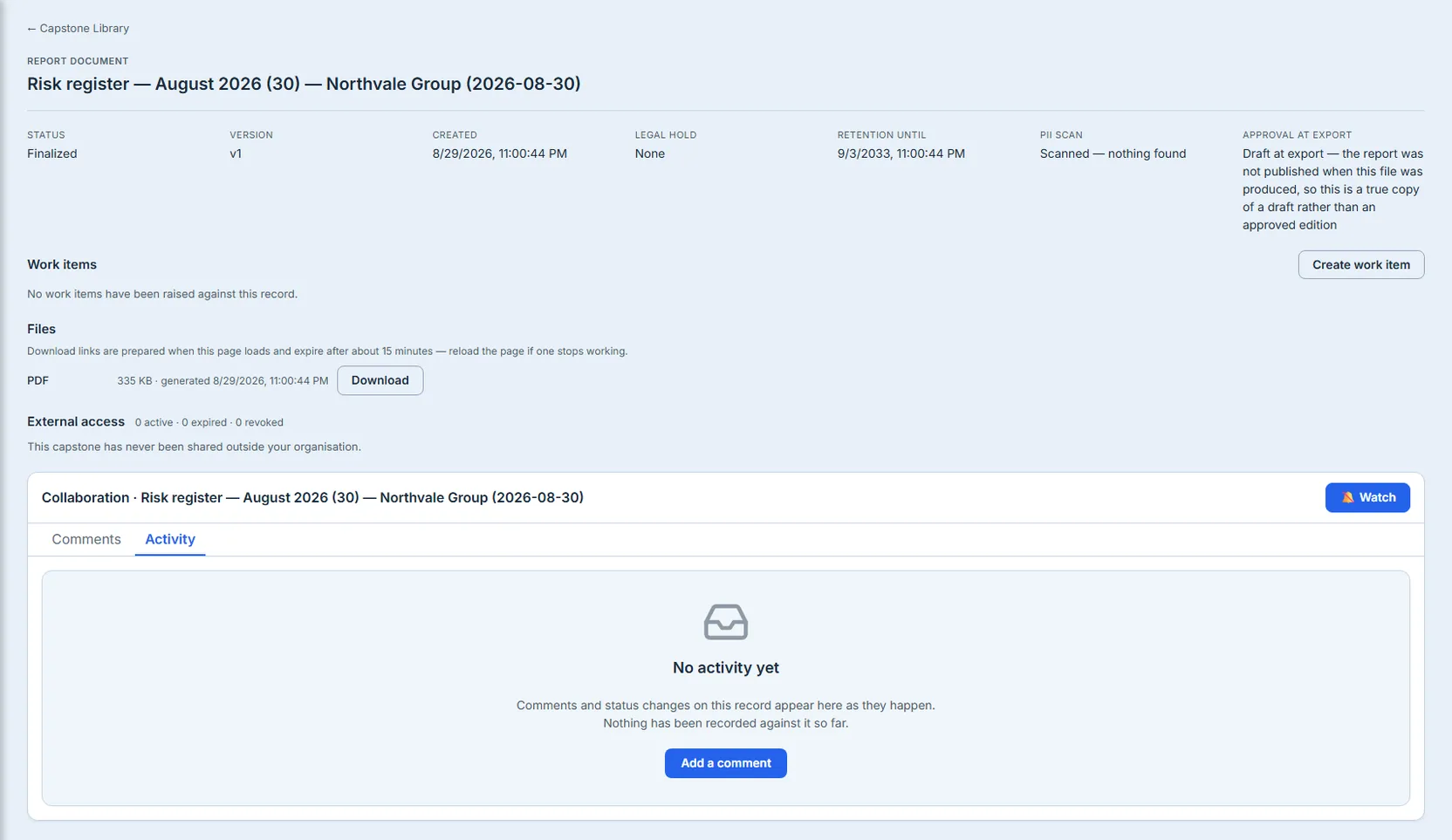
Note which sentence that panel is making. It does not say no problem; it says nobody outside this organisation can open this, and here is the count that proves it. Had the count been wrong, or the list unavailable, it would say that instead — the panel refuses to render an empty list when what it actually hit was an error.
The failure the scan badge fixed was quieter than a wrong result. A report that had been scanned and found clean, and a report that had never been scanned at all, both showed no warning. They looked identical. So the absence of a badge was doing the work of a clean bill of health, on the one indicator whose entire purpose is to make somebody check.
Only reports that go through the render pipeline are scanned, so unscanned records are a normal part of a real library rather than a rare corner. Those now say Not scanned, which is a different statement from silence. A register that cannot say “I don’t know” will eventually say something false.
Legal holds are enforced where the writing happens
Legal holds are the clearest illustration of the principle the library is built on.
A hold has to survive every path that could remove a record — superseding it, purging the organisation, expiring it under a retention schedule. A hold enforced in the place you happen to be looking is not a hold; it is a suggestion. Someone will eventually reach the record by a route that never consulted the screen you put the check on.
So it is enforced at each of those writers, not at the view. The badge in the register is the visible half of something that is actually load-bearing underneath.
Look back at the Actions column in the register above: three verbs on every row, and none of them is Delete. You can take a copy out, replace a record with a newer edition, or freeze it against removal. Supersede is offered only where a new edition can actually be produced from the register — for the governed report documents that make up most of this library, a new edition is generated from the report itself and files itself here on export, so the button is greyed out with that explanation on it rather than failing when pressed. A row in another state offers more — a draft of a type that can be finalized here offers Finalize and Edit Sections, a failed generation offers Retry, and a finalized record with an open signing slot offers Sign — and the point survives all of them: nothing anywhere on a row destroys anything. That is the whole argument of a register in one menu.
What this article does not show you
The screenshots above come from an organisation of ten records and no external recipients, which is an honest but narrow slice. Several things described here are real and simply not visible in those frames, and it is worth naming them rather than letting the images define the product:
- The pager, and sorting across it. The server-side sort matters at eight hundred rows; at ten there is nothing to page through, so the fix that section describes is invisible here.
- A legal hold in force. No record in these frames is held, so the badge is described rather than shown.
- A signature count above zero. The register’s signature column counts the older per-artifact signing path. Signing now happens on the document path, where signatures are requested per report and kept as a chained ledger, so that column reads zero on these records even though signing is very much alive elsewhere.
- “Latest” and “Out of date” export badges. These are not elsewhere in the product — they are one click from the row you are looking at.
Export (N)opens a dialog listing every format that exists of this record, and it is that list which marks each one Latest or Out of date. What the frames cannot show is the dialog on top of the register, and a library whose records have a single format has nothing for the badges to distinguish.
None of that is a limitation of the product; it is a limitation of what one small library can be photographed doing. We would rather point at the gap than stage a picture of it.
Two things used to be absent from the register rather than merely unphotographed, and both were built once writing this article made them impossible to keep quiet about. Selecting rows now raises a bulk bar, so placing a hold across a quarter’s worth of reports is one action under one matter rather than forty separate ones. And the register itself now exports: Export CSV takes the list — what exists, what it came from, its approval state at export, whether it was scanned, its retention date and whether it is held — with the filters you have on screen applied.
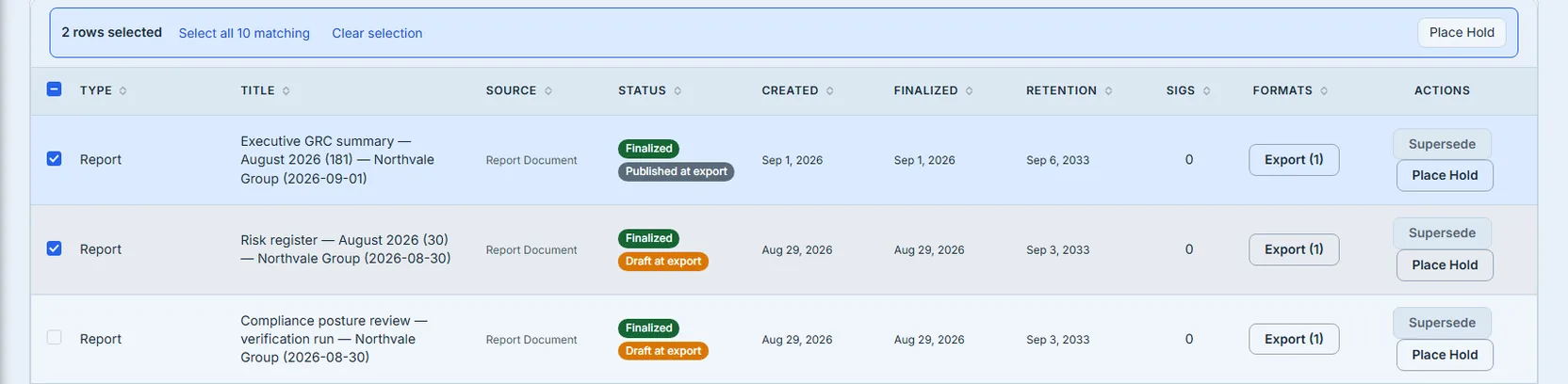
The one verb deliberately missing from that bulk bar is Supersede, and the asymmetry is the point rather than an oversight. Placing a hold is additive and reversible: it sets a flag, the records underneath are untouched, and a mistake is undone by releasing it. Superseding rewrites version chains across records whose entire value is that the chain can be trusted — in bulk, one mis-click has an unbounded blast radius and no undo. So Supersede stays on the row, where you can see the single chain you are altering.
That the CSV needs to exist at all is worth a sentence, because the obvious answer was to point people at the neighbouring Report History page, which has exported its own register for a while. The rows would have overlapped almost entirely — most of what lands here is a governed report document. Two of the columns would not. That file already carries a retention floor and whether the document is held, and it carries an approval column too — but the document’s approval state now, which is the one reading this register deliberately does not use. What it cannot carry is the approval state frozen at the moment of export, and the scan result. Those two are what make this register this register, and an export without them does not answer the question you opened the page to ask.
A note on signatures
Some reports are signed. That mechanism is currently mid-migration onto the platform’s document signing path, where signatures are requested per report rather than fixed per report type, and it is that path — not the older per-type one — that new reports use. We would rather say so plainly than describe a mechanism that is moving.
What holds it together
The same instinct runs through all of it. The row states what the report was exported from rather than letting the reader assume. The sort is computed where the data lives, so the page you are looking at is really the top of the order. Freshness is judged against the document rather than against its siblings. The scan says when it has not run.
In every case the aim is the same: the record should be able to answer questions about its own custody, correctly, long after everyone who produced it has stopped thinking about it.
That is what makes a register different from a folder.