A Data Protection Officer answers to deadlines and to auditors, often in the same week. The deadlines are statutory: a data-subject request has a clock, and the clock doesn’t care how busy the team is. The auditors ask for receipts: show me your record of processing, your consent state, your impact assessments, your breach plan. The Privacy Dashboard (/app/privacy/dashboard) puts both in one view — the DSAR pipeline and its deadlines, consent posture, the DPIA lifecycle, Article 30 register health, and breach readiness — read continuously from the records the privacy team already maintains. This article walks it section by section: what each number measures, which record feeds it, and where the page is careful to distinguish a real zero from a missing one.
Who’s involved
- Data Protection Officer — owns the whole board: DSAR clocks, DPIA sign-offs, RoPA completeness, breach readiness.
- Privacy / legal analysts — work the DSAR queue and maintain the Article 30 register and consent records.
- Auditors / regulators — read the same posture the DPO does, as evidence the program runs.
The KPI hero

Four cards, each a number a regulator might ask about. Open DSARs carries a “due within 7 days” sub-count; Overdue DSARs counts the ones already past their statutory deadline. On-Time Rate is the one to read carefully: it’s the share of resolved requests that were closed on or before their deadline, and it cites Article 12(3) — the GDPR provision that sets the one-month response clock. A rate computed over one resolved request is a fact about one request, and the card says so (“1 of 1”). DPIAs Awaiting Sign-off counts assessments submitted for DPO review but not yet signed.
DSAR pipeline
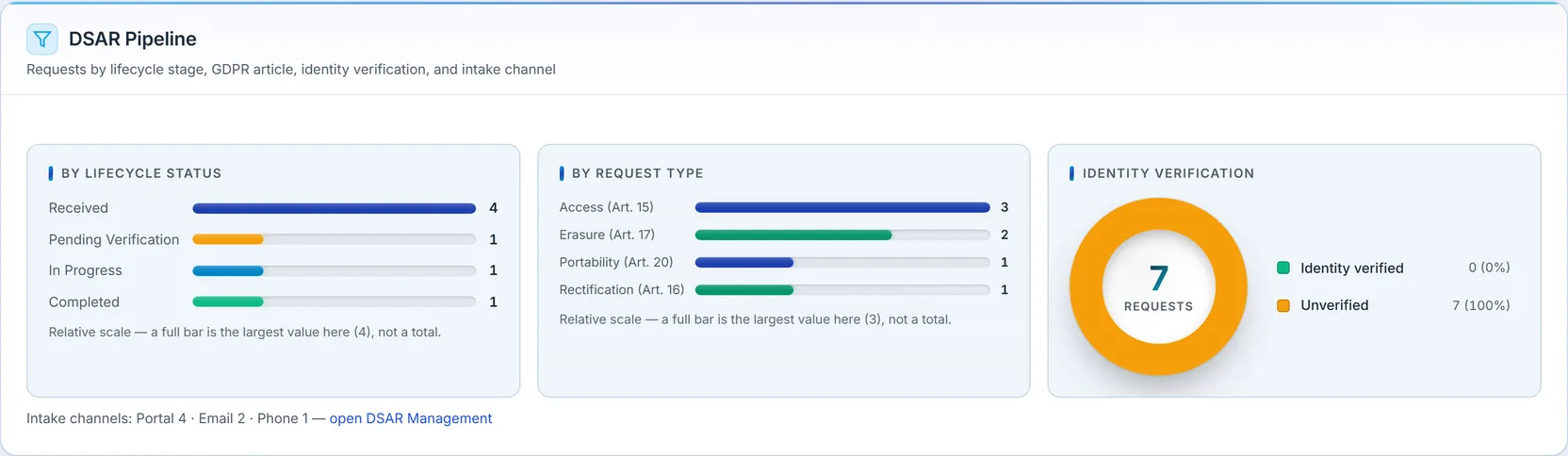
The pipeline breaks the request queue down four ways: by lifecycle stage, by GDPR article (each request type carries its article — Access is Art. 15, Erasure Art. 17), by identity-verification status, and by intake channel. The identity-verification split matters because you can’t fulfil a request you can’t authenticate — an unverified request is a clock running against a person you haven’t confirmed. The channel breakdown tells you where requests actually arrive, which is where your intake process has to be airtight.
DSAR trend
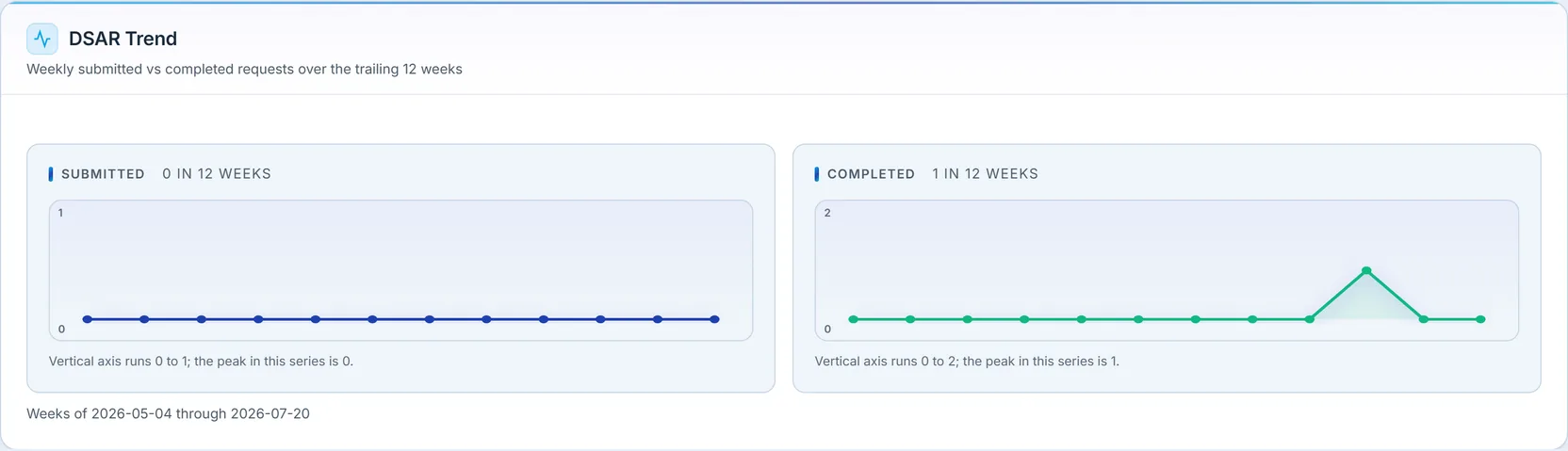
Submitted versus completed requests, week by week over the trailing twelve. It’s the inflow-versus-throughput view for the DSAR queue: when submissions outrun completions for a stretch, the backlog — and the deadline risk — is building. Both series are drawn from real request timestamps over a fixed week spine, so a quiet week is an honest zero rather than a gap the chart quietly closes.
Consent posture
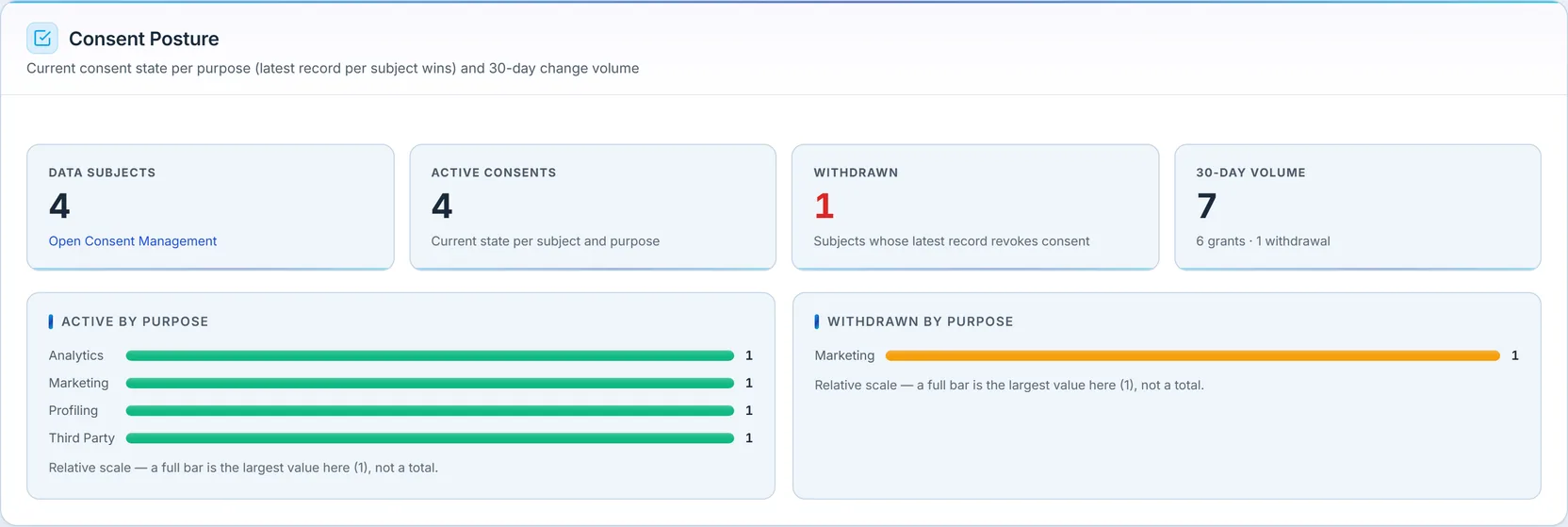
Here’s the section that’s easy to get wrong, and the dashboard gets it right. Consent is shown as current state per subject per purpose — the latest record for each subject-and-purpose wins — not as a count of consent events. That distinction is everything: a subject who granted marketing consent and later withdrew it should count as withdrawn, once, not as one grant plus one withdrawal. The active-by-purpose and withdrawn-by-purpose bars reflect where each subject stands today, and the 30-day change volume shows the recent movement separately, so you can see both the standing state and the momentum without conflating them.
DPIA lifecycle
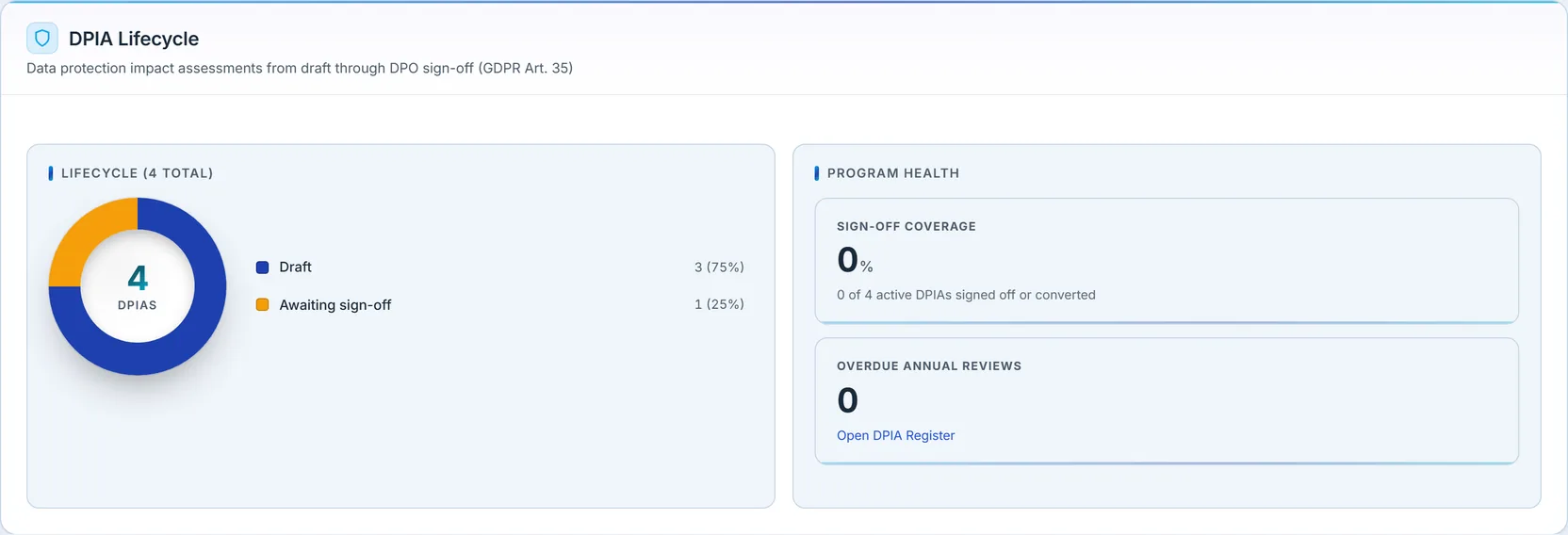
Data Protection Impact Assessments (GDPR Art. 35) move from draft, through submission, to DPO sign-off. The donut shows where the org’s assessments sit in that lifecycle. A DPIA stuck in draft is a high-risk processing activity that hasn’t been assessed to completion; one awaiting sign-off is on the DPO’s desk. The point of surfacing the lifecycle is that an unfinished DPIA is a compliance gap with a name, not an abstraction.
RoPA completeness
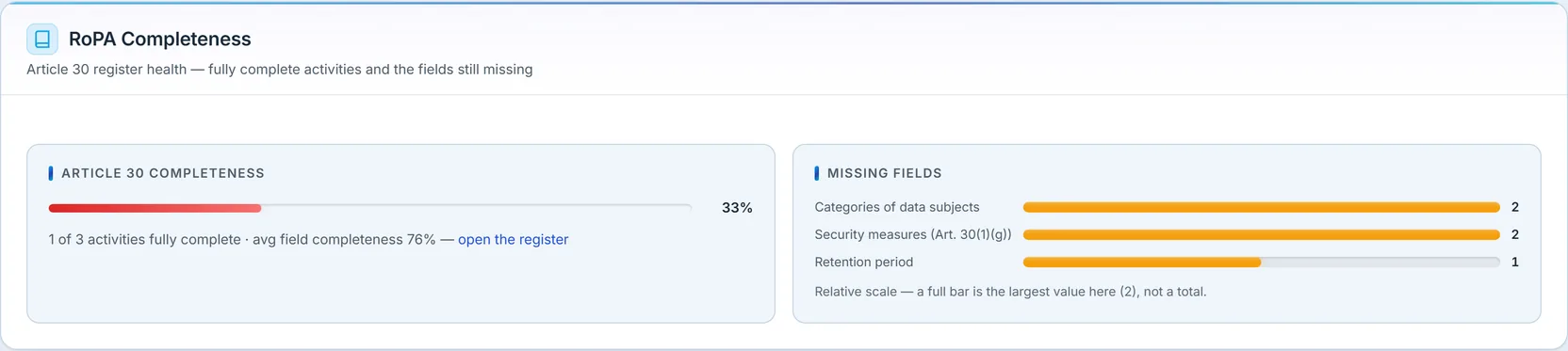
The Record of Processing Activities is the Article 30 obligation, and this section scores it two ways: how many activities are fully complete, and — more usefully — which specific required fields are still missing across the register. Completeness is measured against the actual Article 30 required-field set, so “76% average field completeness” is a real coverage number, and the Missing Fields bars name exactly what to fix (here, categories of data subjects, security measures under Art. 30(1)(g), and retention periods). A register that’s 33% fully complete but 76% field-complete tells you the gaps are scattered, not systemic — which is a different remediation than the reverse.
Breach readiness
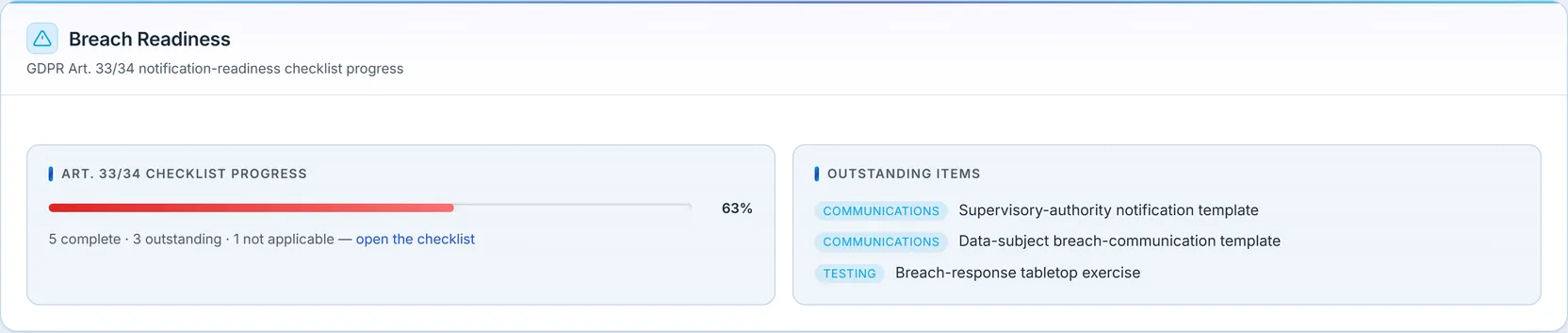
Breach readiness is the Article 33/34 question asked before you need the answer: when a breach happens, can you notify the supervisory authority within 72 hours and the data subjects without undue delay? The section scores a readiness checklist and lists what’s still outstanding. Two honesty details: an item marked not applicable is excluded from the denominator rather than counted as a failure, and an org that hasn’t started the checklist gets an honest “not started” state — never a fabricated grade. Here the program sits at 63%, with the notification and communication templates and the tabletop exercise still outstanding.
Needs attention
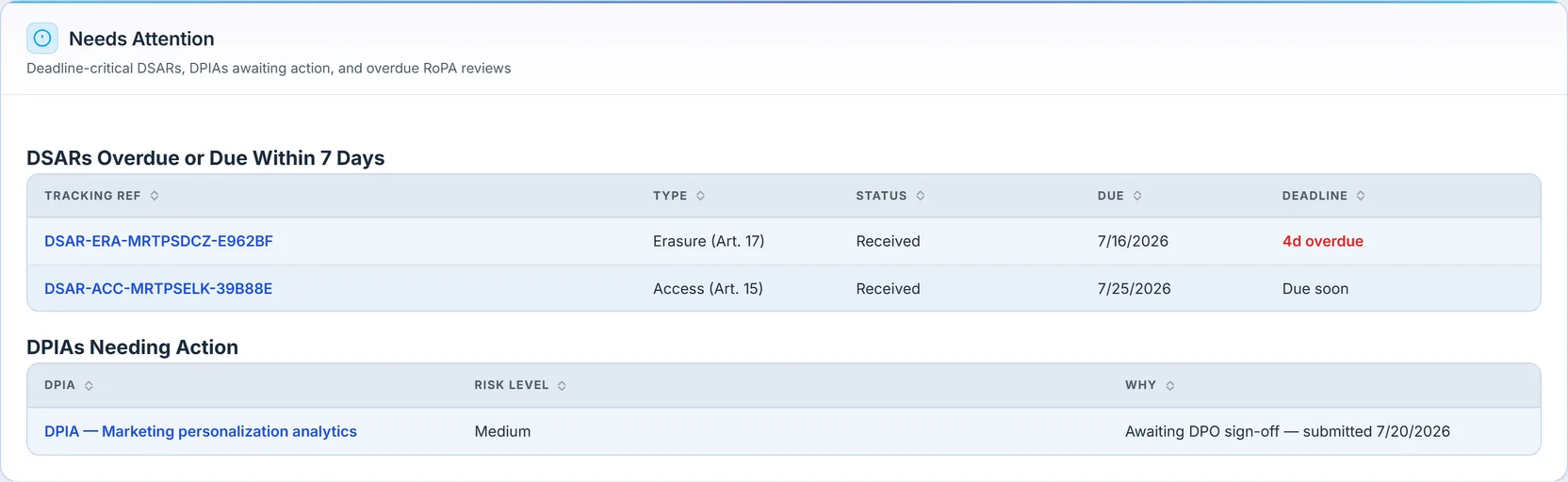
The last section is the work list: the deadline-critical DSARs — overdue or due within seven days, each with its tracking reference, type, status, and how far past due it is — and the DPIAs awaiting action. It’s what the DPO opens first thing, because everything on it has a clock or a signature waiting. Each row links straight into the request or the assessment, so the dashboard isn’t just a scoreboard — it’s the front door to the work.
One design choice worth naming: every one of these sections distinguishes a failed read from a genuine empty. If a section’s data can’t load, it shows an error with a retry — it does not render an empty state that would quietly imply “you have no DSARs” or “your breach checklist is untouched” when the truth is the query failed. On a regulatory surface, “no data” and “couldn’t load the data” are very different claims, and the dashboard never lets one masquerade as the other.
What you walk away with
- DSAR deadlines you can act on — open, overdue, due-soon, and an on-time rate that cites Article 12(3) and shows its denominator.
- Consent as current state per subject, not a misleading event tally — so a withdrawal counts once, as withdrawn.
- RoPA completeness scored against Article 30, with the specific missing fields named.
- Breach readiness where “not applicable” and “not started” are honest, never fake failures or fake passes.
- A single work list of deadline-critical DSARs and DPIAs awaiting a signature, each one click from the record.
The workflows behind these numbers — fulfilling a DSAR, recording consent, authoring a RoPA entry or a DPIA — each have their own walkthroughs in the privacy cluster; this dashboard is where all of it becomes a program you can report on. For data-retention configuration that feeds several of these sections, see Data retention settings.