Every governance framework asks the same thing of conflicts, in slightly different words. ISO 37301 puts it under compliance culture and governance — the obligation to identify and manage conflicts before they influence a decision. SOC 2 reaches it through CC1.1, integrity and ethical values demonstrated through commitment rather than assertion. Public-sector and financial-services codes are blunter still: an annual declaration, a register, and evidence that the register changed somebody’s behaviour.
That last clause is the one programmes fail. Collecting declarations once a year is easy. What is hard is the moment six months later when someone is added to an evaluation panel and has to ask “am I allowed to score this?” — and there is no way to answer without emailing the ethics lead and waiting.
Talarity’s conflict-of-interest programme is built around that moment. It has two halves: a self-service side at /app/grc/my-disclosures where people declare and check, and a reviewer console at /app/grc/coi where disclosures are triaged, decided, and turned into recusals that the first half can answer against.
Who’s involved
- Every employee, officer and director — files disclosures and answers the annual attestation. Most people only ever see this half.
- The ethics or compliance reviewer — triages the queue, asks for more information, records decisions.
- The programme owner — runs the annual campaign and watches completion.
- The auditor — wants the register, the decisions, and evidence a recusal was actually applied.
Who can open which page. Both pages live in the Governance module and are gated by the governance-hub group feature, so an organisation without Governance licensed sees neither. Beyond that the two halves separate on permission, not on job title:
/app/grc/my-disclosuresneedscoi.readto open andcoi.writeto file. This is the everyone-page: it shows only your own disclosures, attestations and recusals, and there is no view of anyone else’s from here./app/grc/coineedscoi.reviewto see the queue and record decisions, andcoi.adminfor the destructive campaign actions. A reviewer withoutcoi.admincan run a campaign but cannot delete one.
Someone with Governance licensed but no CoI permission does not see a broken page — the reviewer console simply is not in their navigation. Access is granted by group; see least privilege in practice.
Step 1 — File a disclosure
The employee side opens on your own register: everything you have declared, its status, and what the reviewer decided.
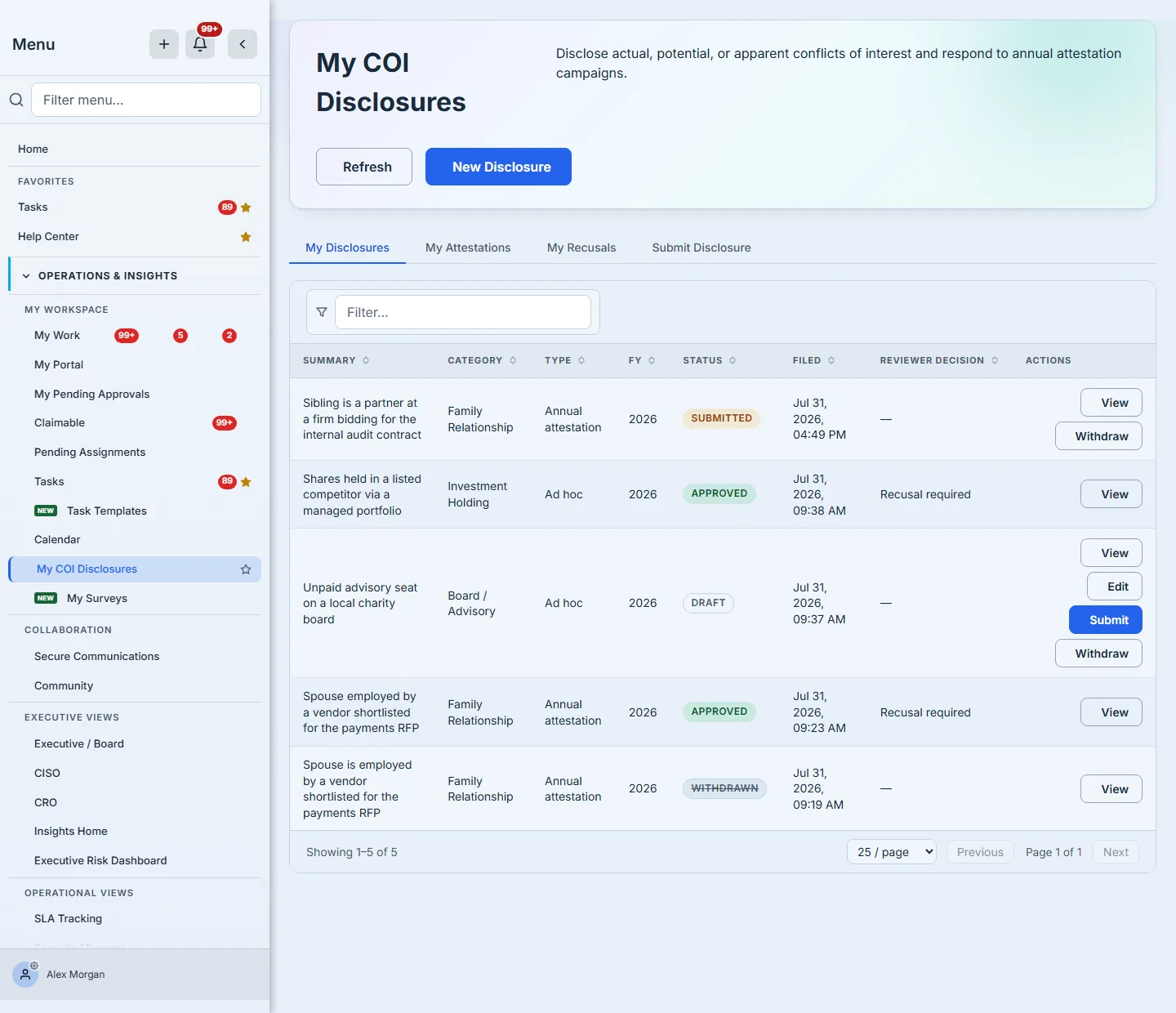
Three things are worth noticing in that list, because they are the shape of a working register rather than a form dump.
Status and decision are different columns. “Approved” with a decision of Recusal required is not a contradiction — the relationship is permitted, and the person must step back from a specific decision. A register that collapsed those into one column would lose the obligation.
A draft is a real state. You can start a disclosure, keep it, and finish it after you have checked a date or a company name. Only drafts offer Edit and Submit; a submitted disclosure is locked so the reviewer is not reading a moving target.
Withdraw is available, and withdrawn stays visible. A disclosure filed in error is withdrawn with a reason, not deleted — the register is evidence, and a gap in it is worse than a superseded entry.
Filing is a single form rather than an interrogation:
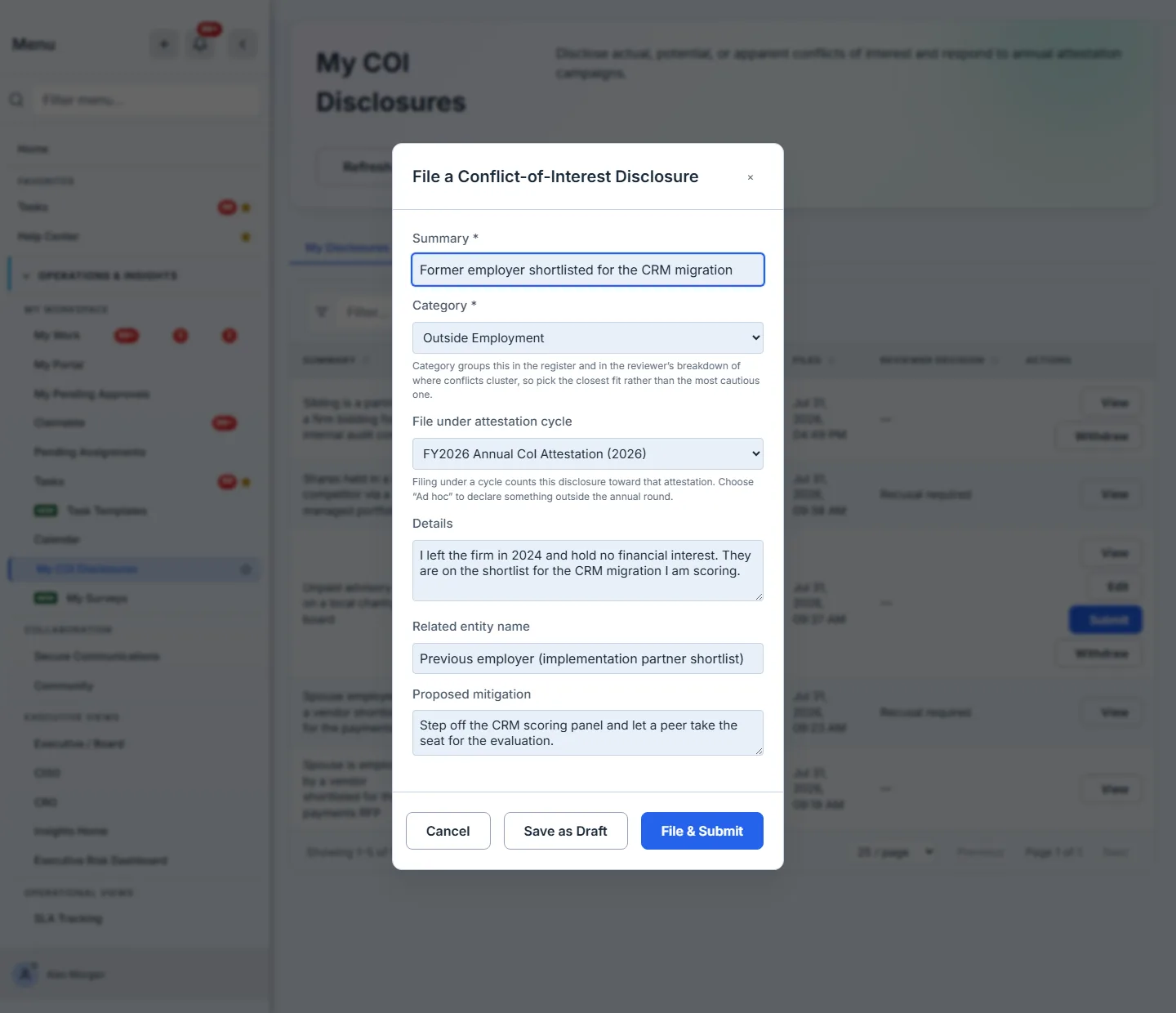
Two fields carry more weight than they look. Category drives how the disclosure is triaged and how it aggregates on the reviewer’s dashboard, so it is a closed list rather than free text. And File under attestation cycle is what connects an ad-hoc declaration to the annual cycle you were asked to complete — pick the cycle and the disclosure counts toward your attestation instead of sitting beside it.
The two ways out of the form are both buttons. Save as Draft keeps it yours and editable; File & Submit sends it to the reviewer and locks it. Neither is hidden behind a checkbox you might not scroll to — the choice between “I’m still working on this” and “this is ready to be judged” is the most consequential one on the form.
Proposed mitigation is the most useful thing you can write. A reviewer deciding a conflict they have to invent a remedy for is slow; a reviewer confirming the remedy you already proposed is fast. “Recuse myself from the evaluation and let a peer take my seat” is a complete answer.
Step 2 — Answer the annual attestation
An attestation campaign asks a population a yes/no question — do you have anything to declare? — and records the answer per person.
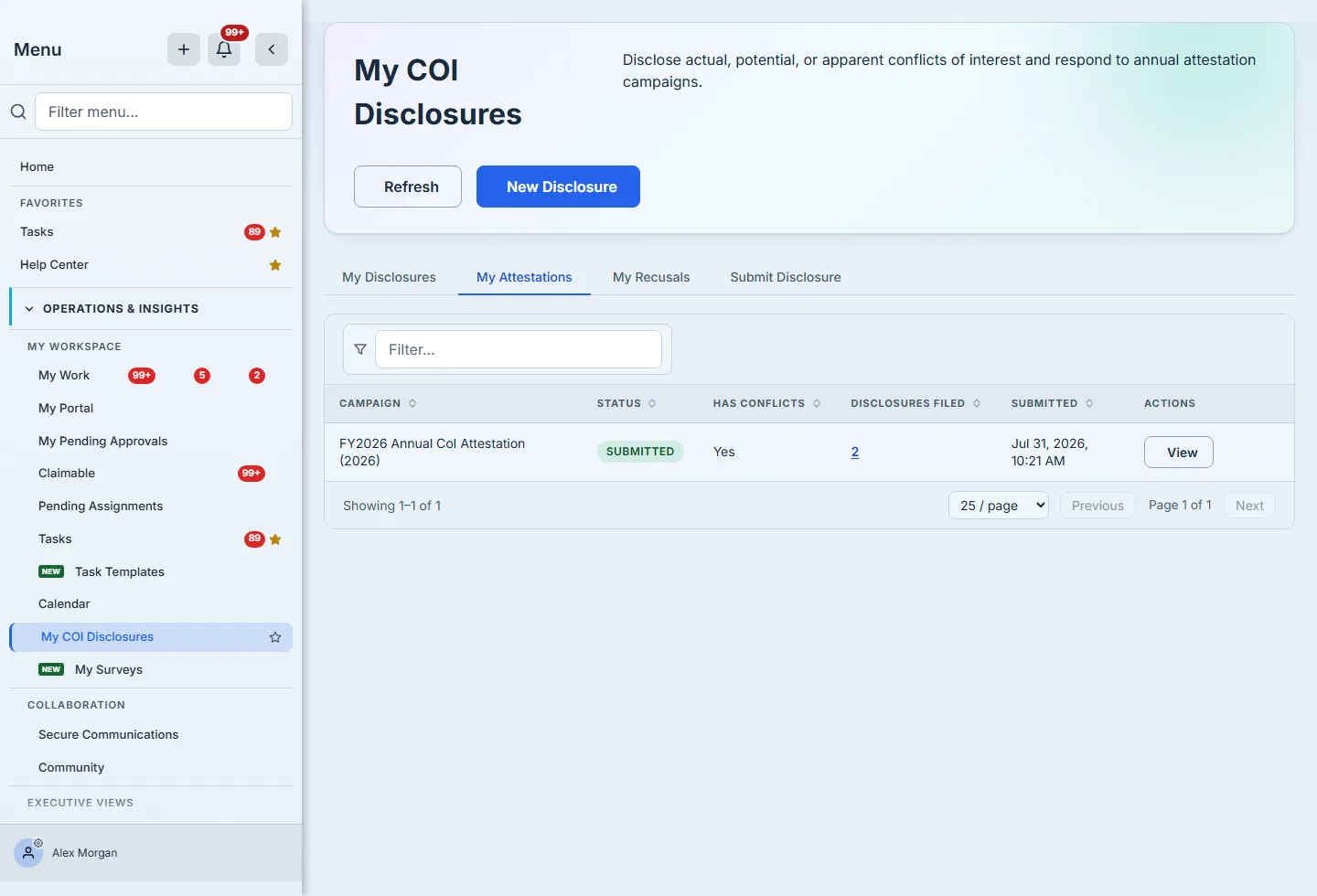
The row names the cycle and its fiscal year, not an internal identifier, and it counts the disclosures you filed under it. Answering “yes, I have something to declare” is not the end of the task — the disclosures themselves are what the reviewer acts on, which is why the count is on the row, and why it opens them. A figure whose stated purpose is “these are the things that matter” ought to take you to them.
That count is also worth reading precisely. It counts what you declared — a draft you never sent and an entry you withdrew are both out of it, on the same predicate the reviewer’s dashboard uses. Three surfaces in this programme count the same register, and they now count it the same way; a number that means something different depending on which screen you read it from is not evidence.
Submitting locks the answer. Once the response is in, Respond disappears and only View remains, the same way a submitted disclosure stops being editable. That is deliberate rather than restrictive: an attestation records what you declared at a point in time, and a conflict you discover next month is not an edit to last month’s answer — it is a new disclosure, filed the ordinary way.
Step 3 — Triage and decide
The reviewer console opens on the programme’s shape rather than a list: how much is waiting, what has been decided this year, and how the annual cycle is progressing.
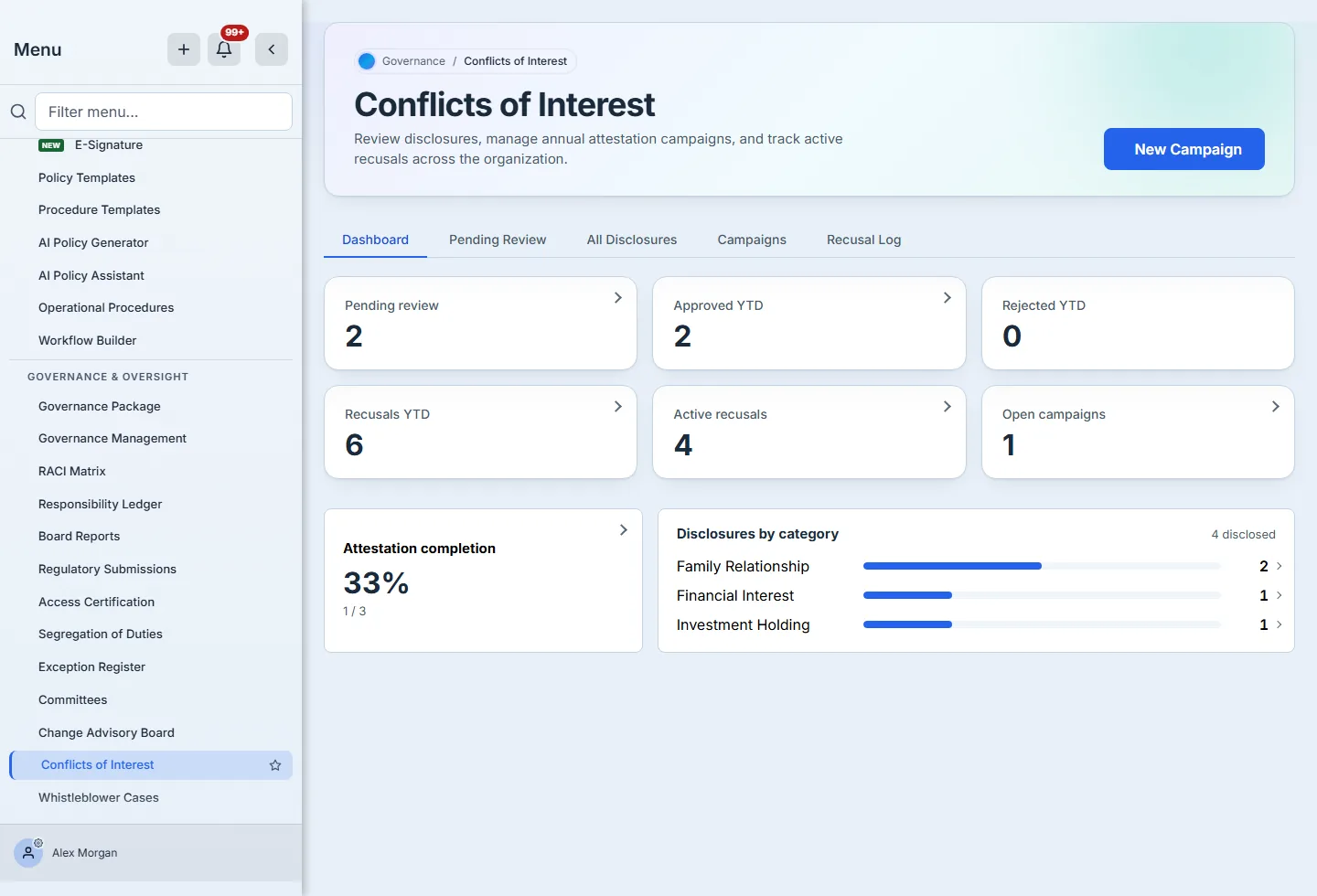
Every tile with a count is a button, and the chevron says so before you hover: clicking Pending review takes you to those rows, not to a tab you then have to filter yourself. Rejected YTD 0 carries no chevron — there is nothing behind it to open, and a control that does nothing is worse than a number.
The two cards underneath open too. The completion ratio opens the per-person responses behind it, and each category row opens the disclosures it counted — on the same predicate the count uses, so the number you clicked and the rows you land on can never disagree. A figure on a dashboard that cannot reach its records is a dead end whatever else it is called.
One number is worth reading carefully. “4 disclosed” in the breakdown is not the size of the register — it counts what a reviewer has actually been given to judge, so drafts nobody has submitted and entries that were withdrawn are out of it. The All Disclosures tab holds six. A breakdown that silently included unsent drafts would tell you the organisation declared more than it did, and the bars are shares of the stated total rather than of the largest bar, so Family Relationship reading half means exactly that.
The Pending Review tab is the working queue. Every row opens with View, and carries the three things a reviewer can do to a disclosure:
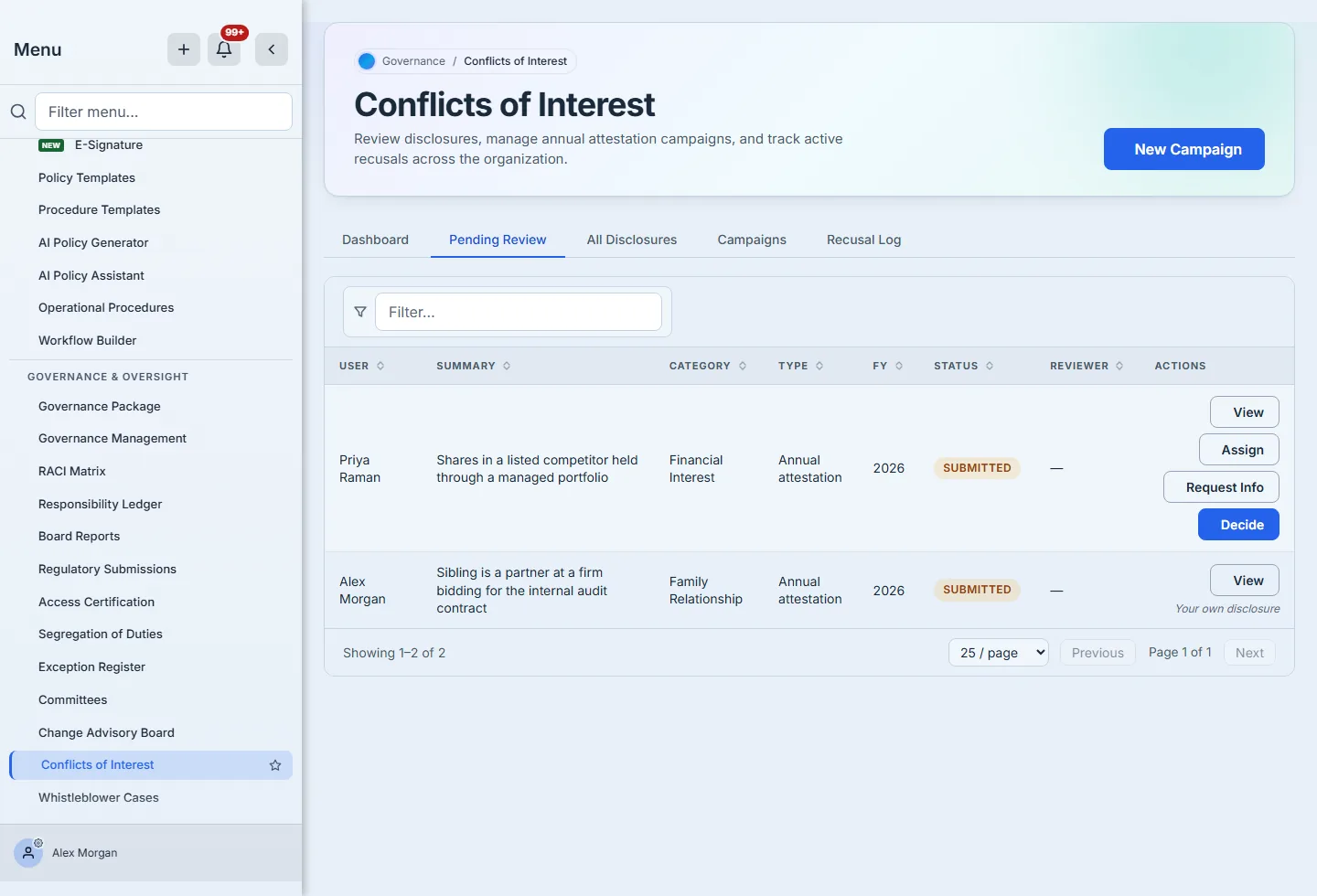
- Assign routes it to a named reviewer and moves it to Under Review. The assignee is notified. The person who filed the disclosure is not in the list — and the exclusion is not just the picker being polite. Assigning a disclosure to its author, recording a decision on your own, and asking yourself for more information are all refused server-side. That is what the second row above is showing: it is the signed-in reviewer’s own disclosure, so it offers View and nothing else, and says why rather than presenting three buttons that would fail on press.
- Request Info sends it back to the discloser with a question, and reopens it for editing. This is the right move when the summary is thin — better than deciding on a guess.
- Decide records the ruling.
Sending it back is a first-class action, not a rejection:
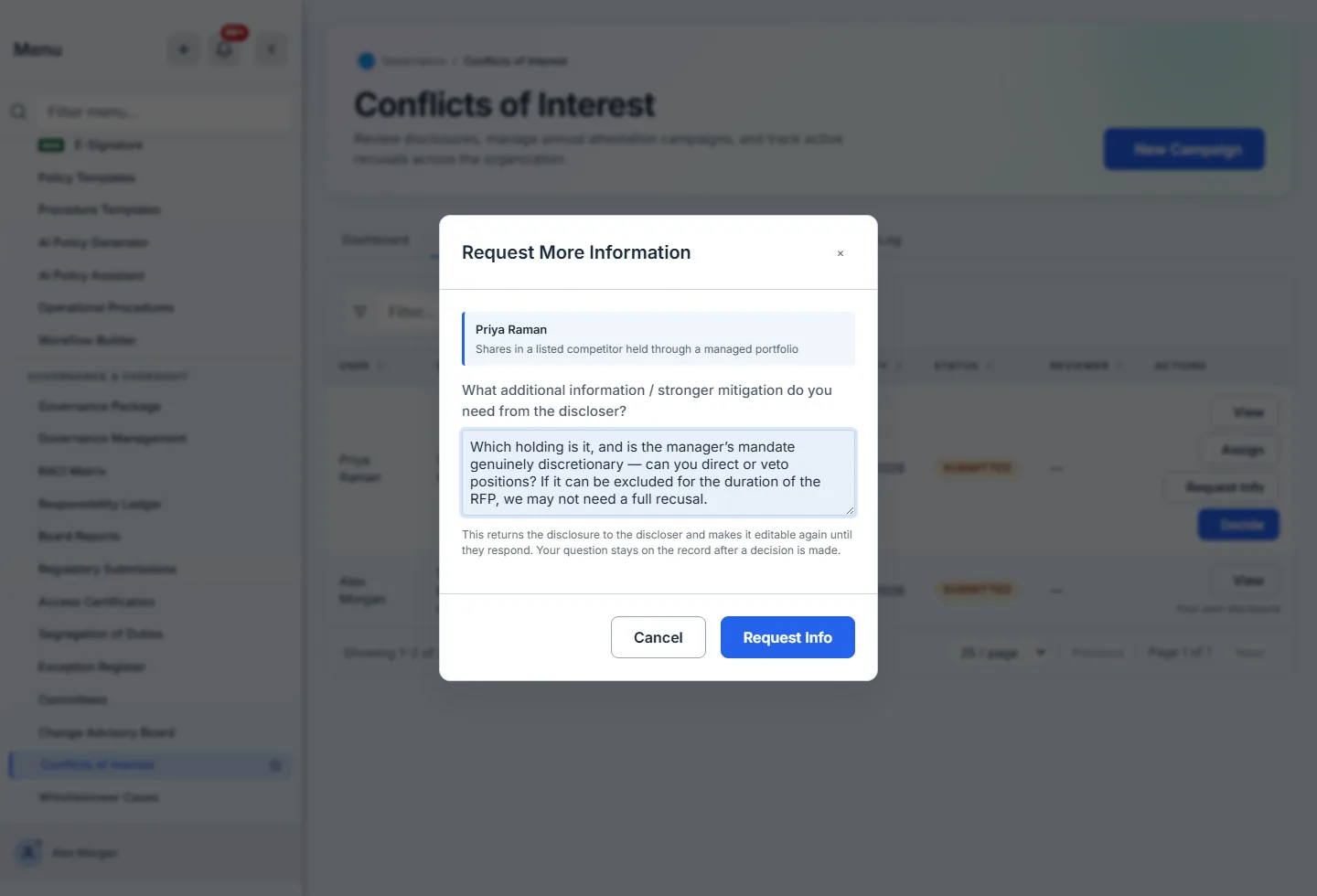
Request Info is the move that keeps a register honest. A reviewer who cannot tell whether the mandate is genuinely discretionary has two options: guess, or ask. Asking reopens the disclosure for the filer to edit and puts the specific question on the record, so the eventual decision rests on an answer rather than an assumption. The question is stored in its own right and survives the decision — open the disclosure months later and you can still see both what was asked and what was ruled, which is the pair an auditor actually wants.
Note what the modal leads with. Every reviewer action names the disclosure it concerns — who filed it and what they filed — because these dialogs are opened from a queue, and a decision dropdown with no subject is how the wrong disclosure gets ruled on.
Assignment is a person picker, not an identifier field:
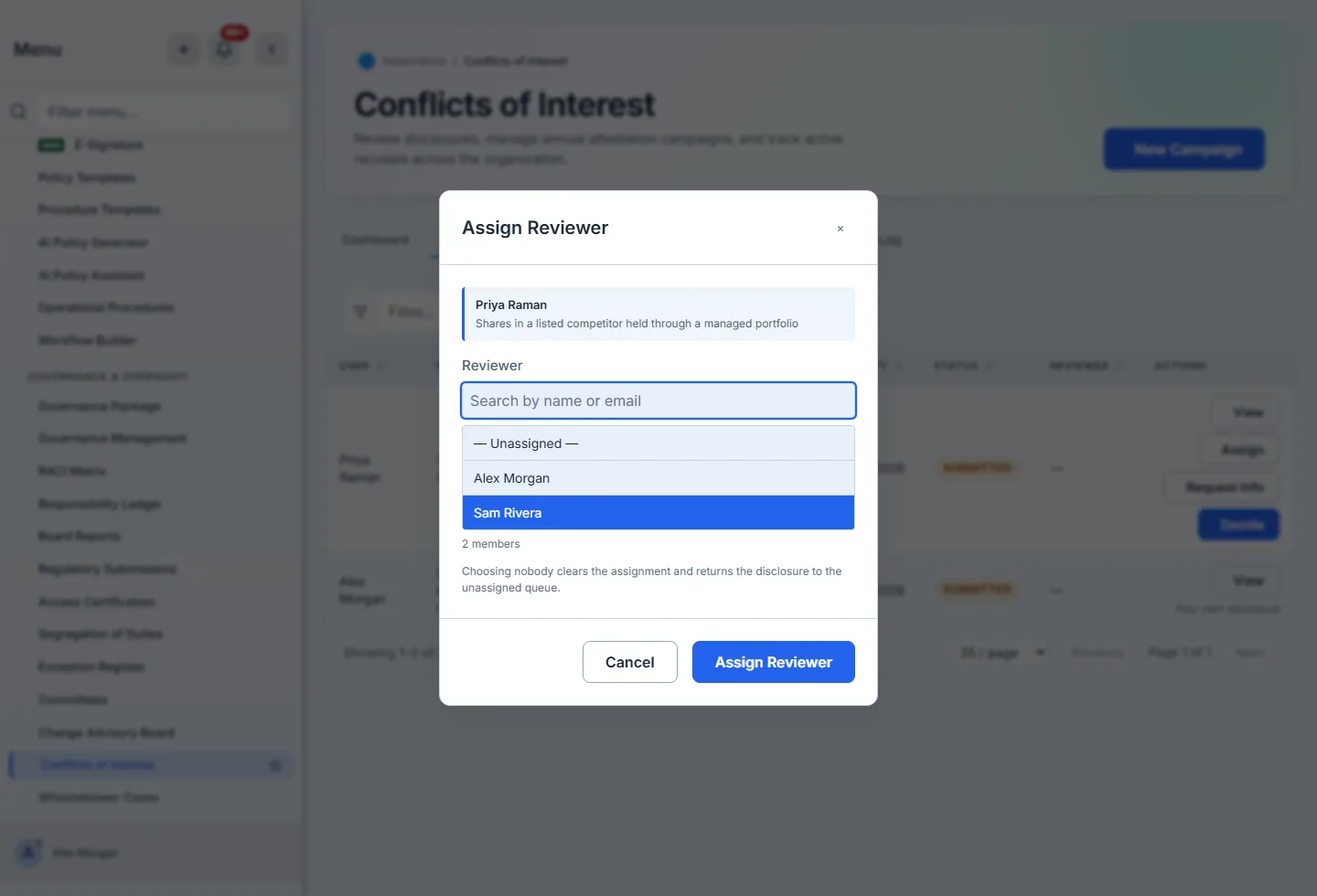
Two details matter here. Guests are not in the list — a guest account cannot hold a review obligation — and neither are pending or disabled users, so you cannot route work to somebody who cannot act on it. And — Unassigned — is a deliberate first option rather than a blank: taking a disclosure back off a reviewer is a normal thing to do, and it belongs in the same control as putting it on one.
Deciding is where the programme either produces an obligation or does not:
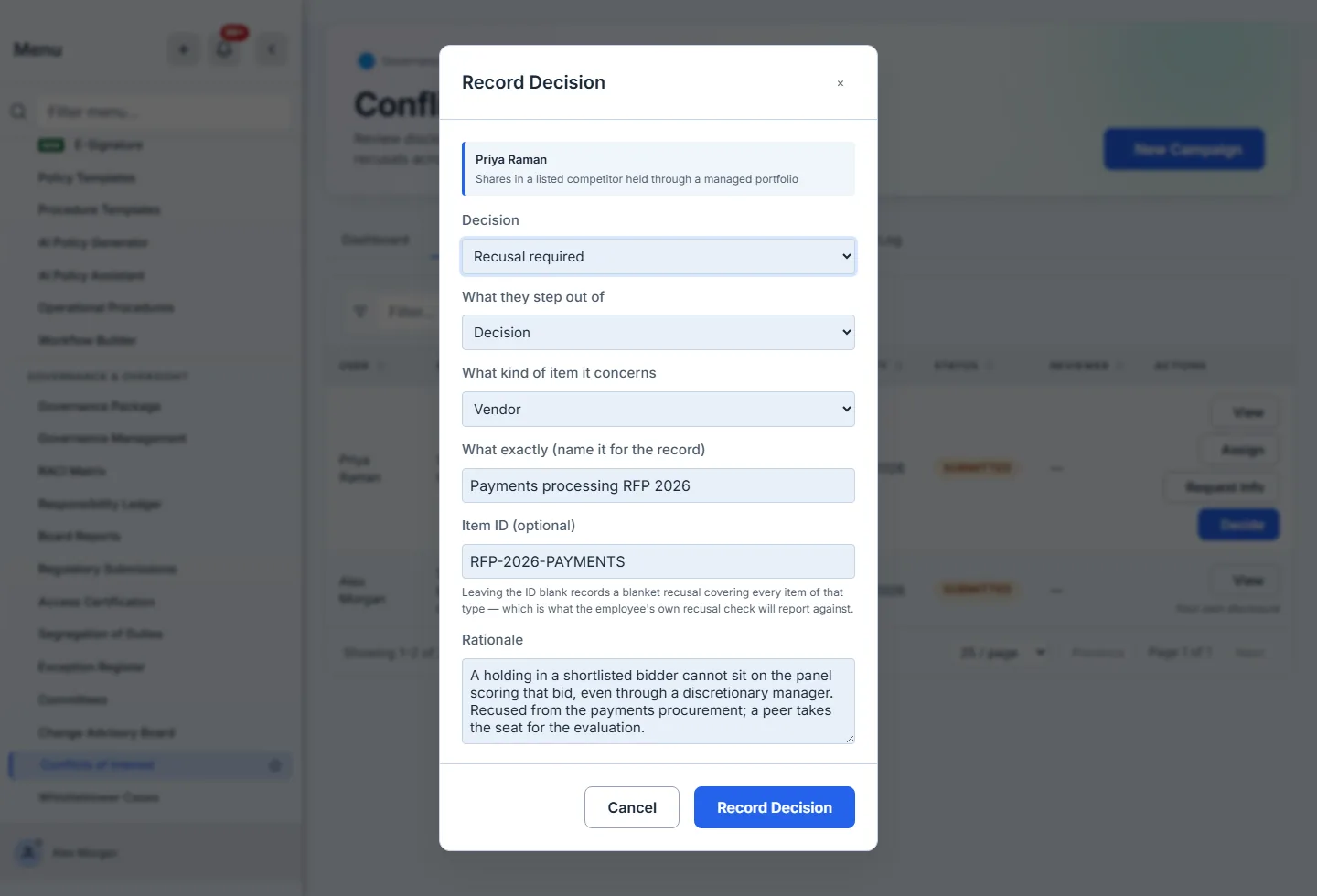
Five decisions are available, and only one of them opens a recusal. Choosing Recusal required reveals the scope fields, because a recusal that cannot say what it covers is weak evidence. Naming the item — Payments processing RFP 2026, with the id the procurement is tracked under — is what lets the person later ask about that exact thing and get a straight answer.
Leaving the Item ID blank is a real choice, not a default. It records a blanket recusal: recused from every item of that type. That is often correct — “recused from all vendor decisions involving this supplier” — and the employee’s own check reports against it.
Step 4 — The recusal that actually binds
Recusals land in a log, whether they were opened automatically by a decision or recorded by hand.
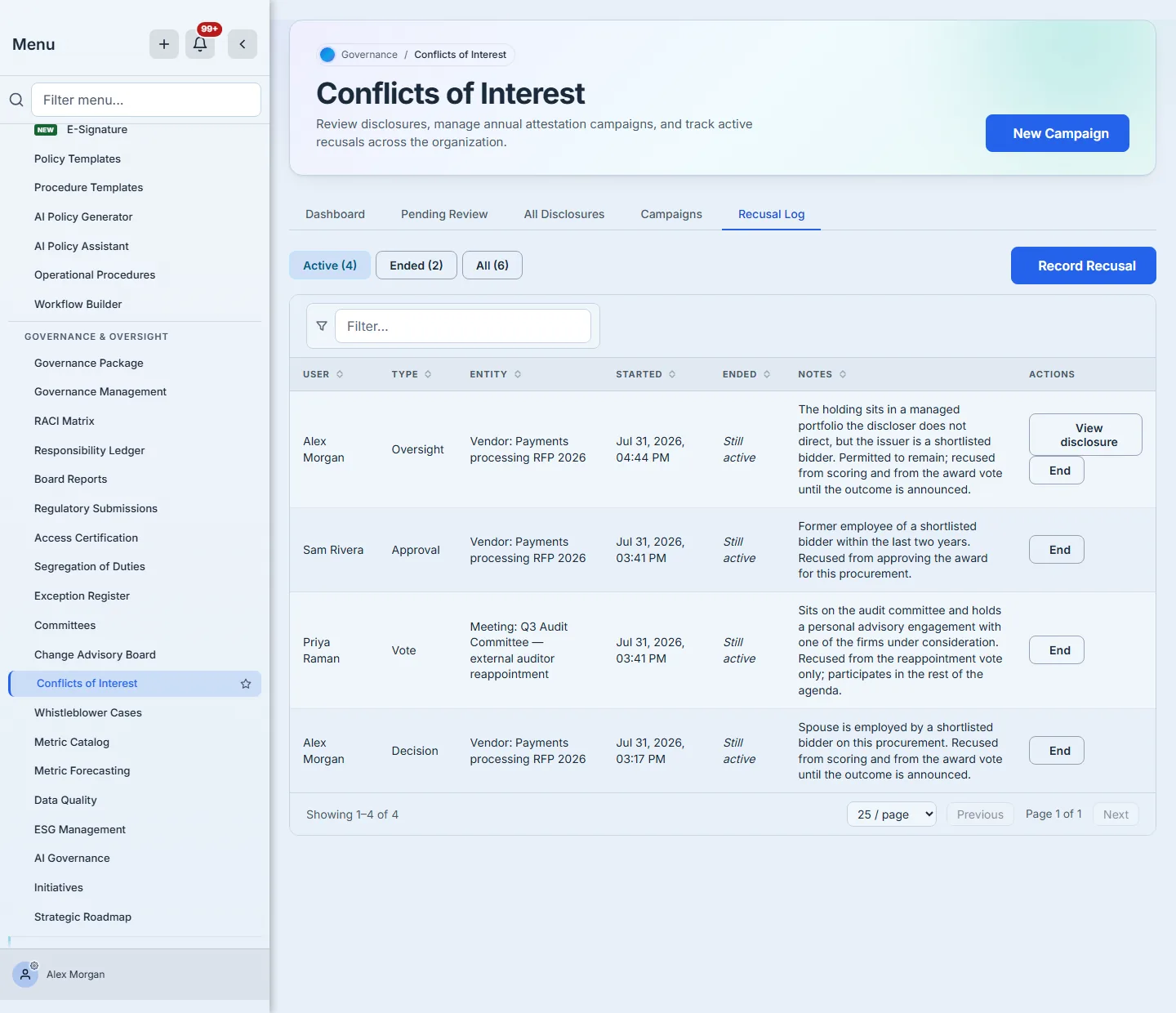
A recusal is open-ended until someone ends it. End stamps the moment it stopped binding and offers a closing note — optional, and worth writing, because the timestamp says when and only the note says why. That is what lets the log answer “was this person recused at the time?” — the question an auditor asks about a decision made eight months ago, rather than “are they recused now”.
Two things make this a piece of evidence rather than a list. The log opens on Active, because “who is recused right now” is the question it exists to answer and after a few cycles the closed rows outnumber the open ones — Ended and All are one click away, since ending a recusal never deletes it. And a recusal opened by a decision carries a link back to that disclosure. An obligation you cannot trace to the ruling that created it is an assertion; one you can is a record. Recusals recorded directly, with no disclosure behind them, offer no such link rather than a button that would open nothing.
And this is the part that makes the register a control rather than an archive. On the employee side, My Recusals carries a checker:
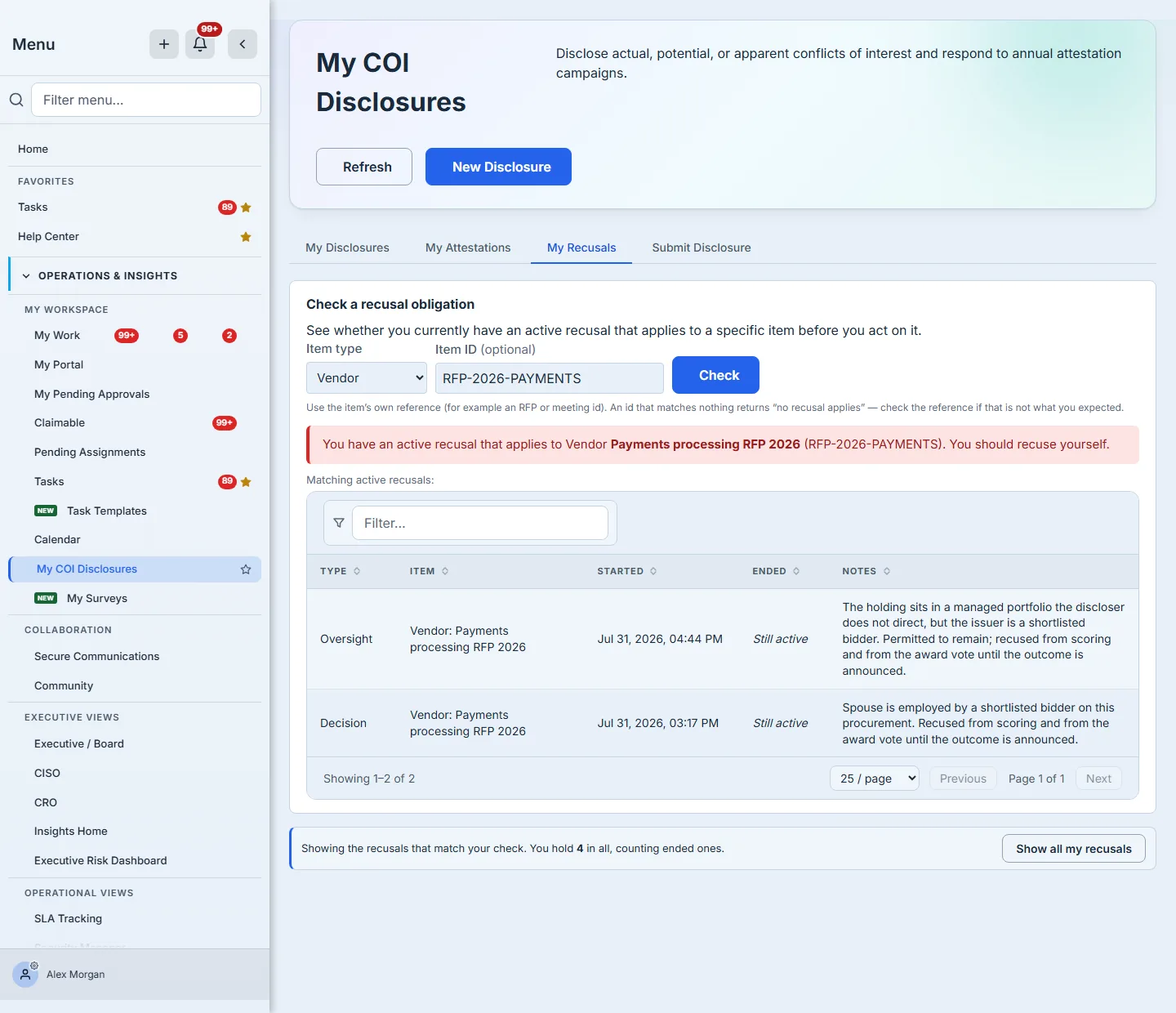
Pick what you are about to act on, paste its identifier if you have one, and the page answers. A blanket recusal answers yes to any item of its type; a scoped recusal answers yes only for its own. That distinction is the whole reason the Item ID field exists on both sides.
There is a third answer, and it is the useful one. If you ask about a type without naming an item — “am I recused from vendor decisions?” — a recusal scoped to one particular vendor does not bind that question, so the page will not turn red. But it will not tell you everything is fine either. It reports the scoped recusals you hold against that type and asks you to name the item. A green “nothing applies” to somebody who is recused from one vendor in the list would be the single most dangerous sentence in the programme.
Answer it before you join the panel, not after.
Step 5 — Run the annual cycle
Campaigns are the scheduled half of the programme.
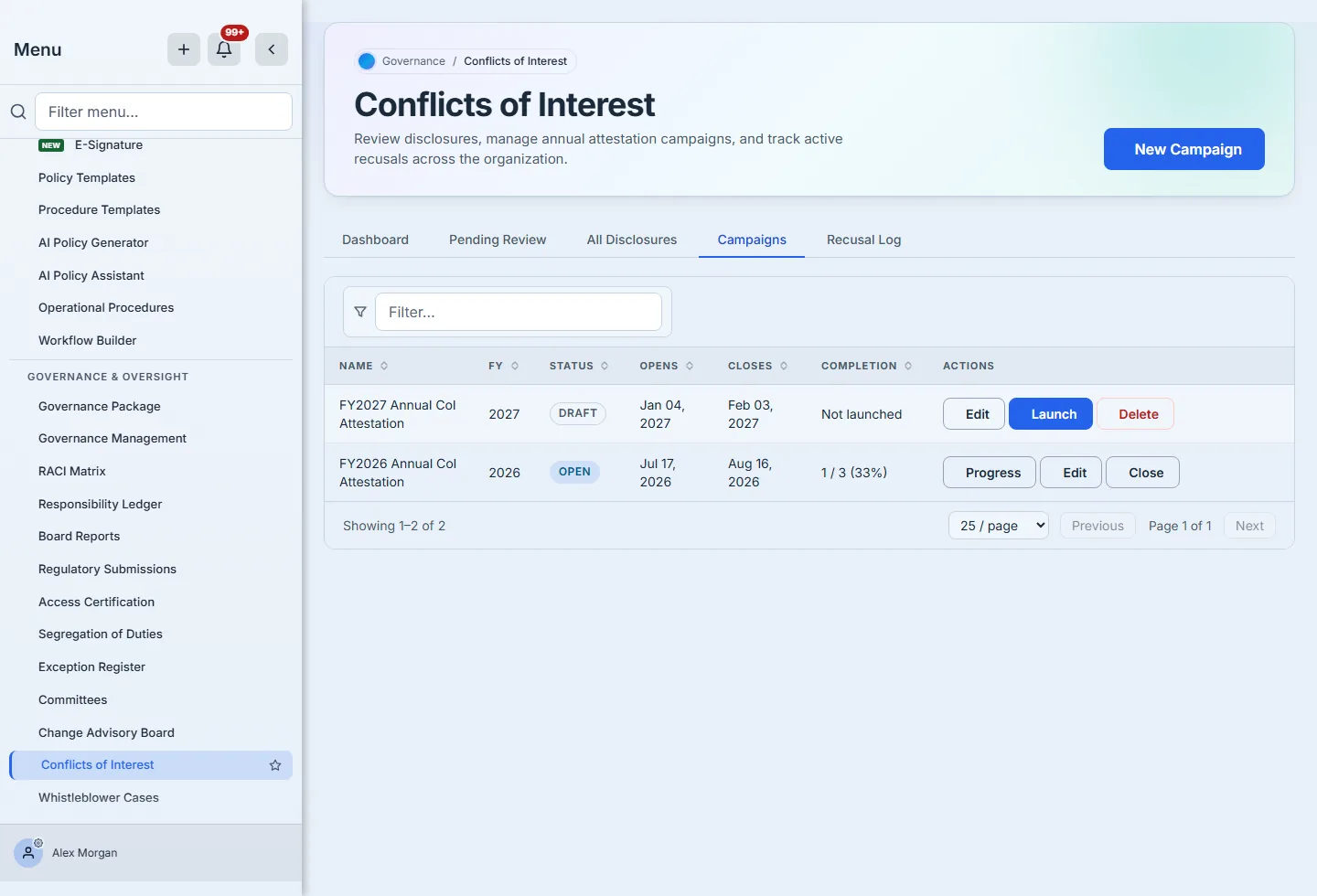
Those two rows are the whole lifecycle. A campaign is created as a draft, which is the state in which it can still be edited or deleted — note that the FY2027 row offers Delete and the FY2026 row does not. Launch materialises one response row per person in the audience, sets the denominator, and notifies everyone included. Close freezes the completion and outstanding counts into the audit trail.
Both rows offer Edit, and it means different things on each. On the draft it is a real edit. On the launched campaign the server permits exactly one change — extending the close date — and refuses the rest by name: you cannot rename it, move its opening, or change who is in the audience (“close it first”). Nor can the deadline be pulled back into the past. That is the distinction worth understanding: a live attestation is a question already asked of named people, so the only honest amendment is more time to answer it. Anything else would silently change what a completion percentage was measuring.
The draft offers no Progress either, and that is the same discipline as the “Not launched” in its completion column. A draft has no audience yet, so there is no progress to show — a button that opened a screen of zeros beside a row already saying the campaign had not started would be the product contradicting itself in the space of two columns.
The distinction matters more than it sounds: a draft holds no responses, so removing it destroys nothing. A launched campaign holds an obligation against named people, and deleting it would destroy attestation evidence. The interface enforces that difference rather than trusting you to remember it.
Launching is only half of running a cycle; the other half is knowing who has not answered.
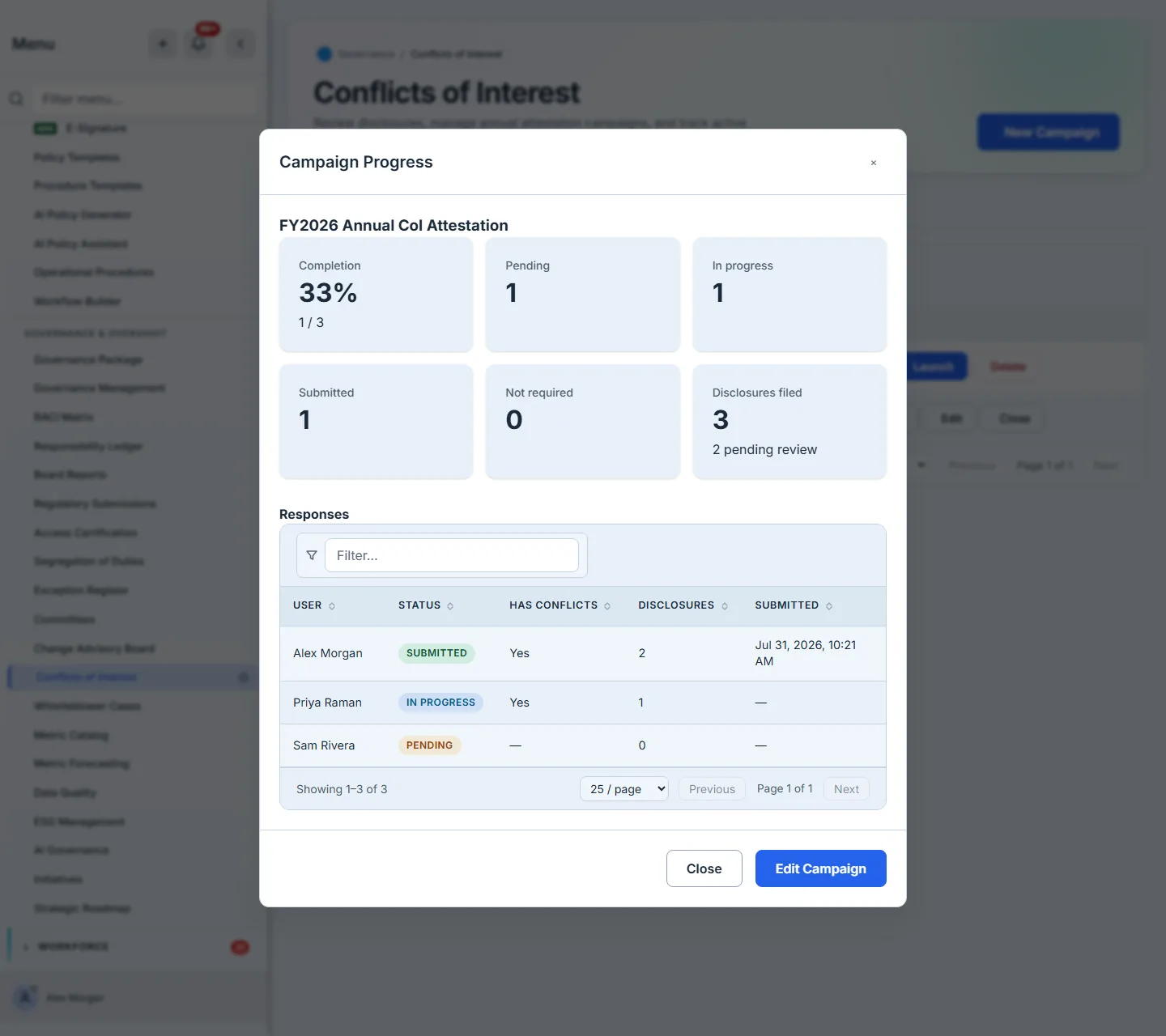
Progress is per person, not a percentage. A completion ratio tells you a campaign is at 33%; this tells you which two people to chase, what they said if they answered, and how many disclosures came with it. Chasing a number is impossible; chasing a name is a task.
The three response states are three colours, and that is deliberate. On a disclosure, “Submitted” means it has left you and is with a reviewer, so it shares the amber of everything else you are waiting on. On an attestation response it means the opposite — that person is done — while Pending is the one that still owes you an answer. Rendering both through the same vocabulary painted them the identical shade in the one column whose entire job is telling you who to chase.
And the register itself is the tab everything lands in:
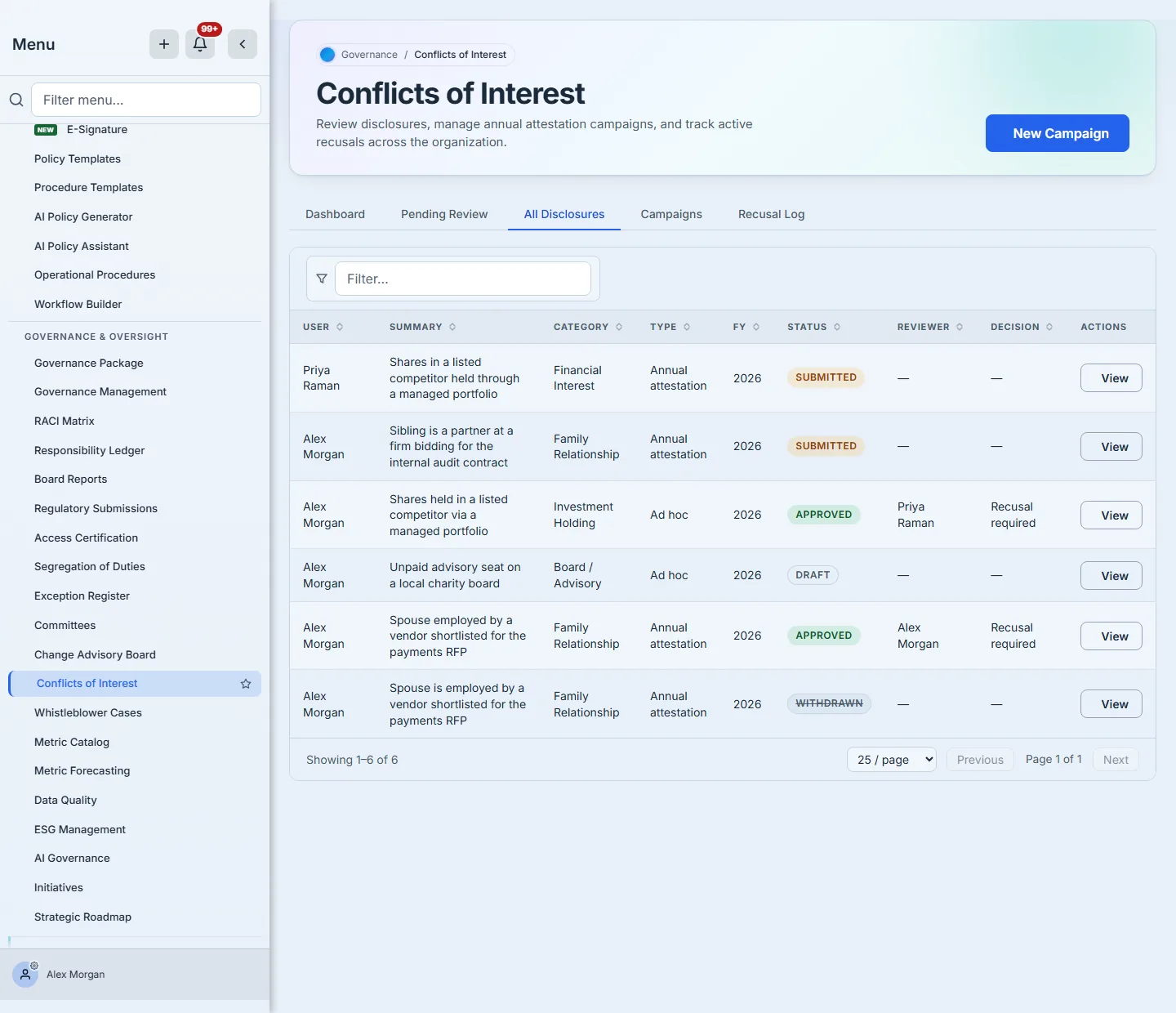
This is the view an auditor asks for: every disclosure regardless of state, with the decision that was reached beside it. Drafts and withdrawn entries stay in it — a register that quietly dropped either would be answering a different question from the one being asked.
Read the Reviewer column first. On the approved investment holding it names Priya Raman against a disclosure filed by Alex Morgan, which is the shape every row should have: the person who declared and the person who judged are not the same person.
Lower down is a row where both columns name the same person. It is there deliberately, and it is worth understanding why. It was decided under an earlier build that allowed it; the current release refuses a self-review on every path that can set a reviewer. It also cannot be tidied away — approved is a terminal status, so the row can no longer be withdrawn, reassigned or edited by anyone, which is the same property that makes this register worth trusting in the first place. A conflicts log you can go back and clean up is not evidence.
What good looks like
- Disclosure is easy and mitigation is proposed by the person closest to it. If filing is painful, people file less, and a register with fewer entries is not a cleaner organisation.
- Every decision that creates an obligation names the obligation. “Recusal required” with no scope is a note; with a scope it is a control.
- People can self-serve the question. The measure of the programme is not how many disclosures you collected, it is whether the person about to vote checked first and got an answer.
- The register survives the decision. Withdrawn entries stay, ended recusals stay dated, and closed campaigns keep their counts. An auditor asking about a decision from last March needs the state as it was, not as it is.
What this guide does not cover
This is the conflicts programme end to end — filing, attesting, reviewing, deciding, recusing and running the annual cycle. Three neighbouring things are deliberately out of scope:
- Where a recusal is actually enforced. This guide shows how an obligation is recorded and checked; exercising it in a meeting or an approval chain belongs to committees and meetings.
- The structural version of the same problem. A recusal removes one person from one decision; segregation of duties covers designing roles so the conflict cannot arise.
- Who can see the reviewer console. Group-based access is covered in least privilege in practice.
One thing worth knowing before you leave: a recusal is always scoped to a kind of thing, and the kinds are fixed — a vendor, a meeting, a policy approval, a risk decision, or a work item. That list is why the checker asks “what kind of item it concerns” rather than offering a free-text box, and it is the seam where this programme meets the rest of the platform: the recusal you record here is the obligation that a vendor decision, a committee vote or a policy approval elsewhere has to respect.