Every connector you install is a supplier you have handed a key to. ISO 27001:2022 treats that as A.5.19 Information security in supplier relationships — the risks of using a supplier’s product have to be managed, not assumed away — and the record of what is connected, at which version, and whether it is healthy falls under A.8.9 Configuration management. An auditor asking “what has access to your estate, and how do you know it still works?” is asking one question about integrations, not two.
Most platforms answer it across three screens: a docs page listing what exists, a settings page per integration, and a support ticket when something stops syncing. The Integrations hub at /app/integrations is one place for both halves of the question — a catalog of every connector Talarity offers, and the live operational record of the ones you actually run. Its Marketplace tab is the discovery half.
Who’s involved
- Platform administrator — decides what gets connected, and is the only role that can start one.
- Security reviewer — cares what credentials each connector will demand before anyone commits.
- Operations — lives on Overview, watching health, freshness and what each connection actually produced.
- Auditor — wants the register: what is connected, since when, and its current state.
Who can open this page. It sits under Integrations, and every action behind it requires organization-settings view access plus a licence covering the integrations feature. Access is granted by group rather than job title, so the cleanest route for someone who needs it is a group carrying organization-settings access — see least privilege in practice.
Four tabs, four questions
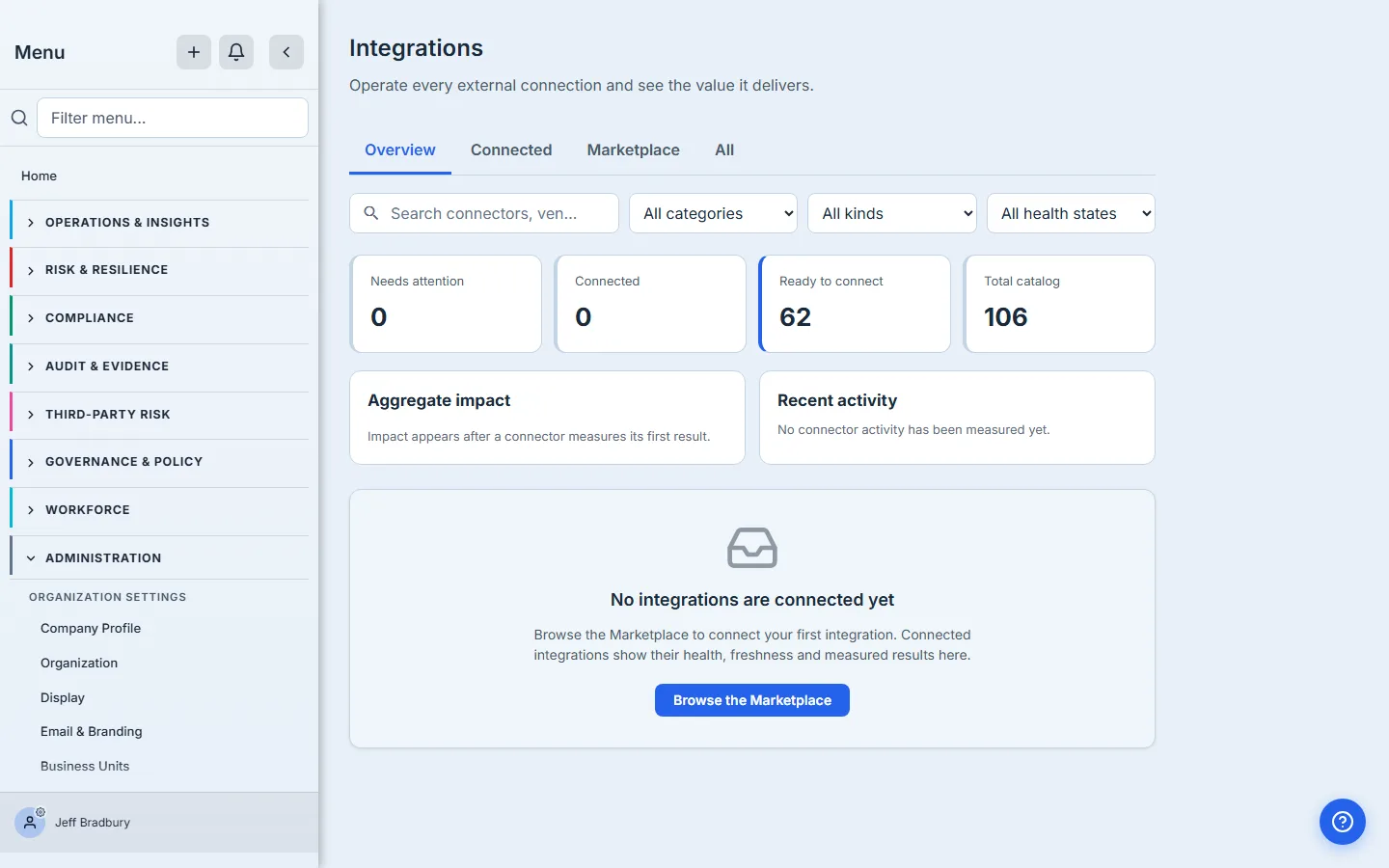
The hub opens on Overview — what you run right now, ordered so anything needing attention sits at the top. Connected is the same set without the summary: everything you have set up, including the ones that are paused or currently failing, because a connector that has your credentials belongs on the register whether or not it worked last night. Marketplace is everything you have not connected yet. All is the whole catalog in one grid.
That ordering is the point: the first thing you see is your own estate and whether it is healthy, not a shop. You go to Marketplace when the question is “can Talarity talk to X?” rather than “is the thing I already chose still working?”
Reading a connector card
Every card carries the same facts, and they answer different questions.
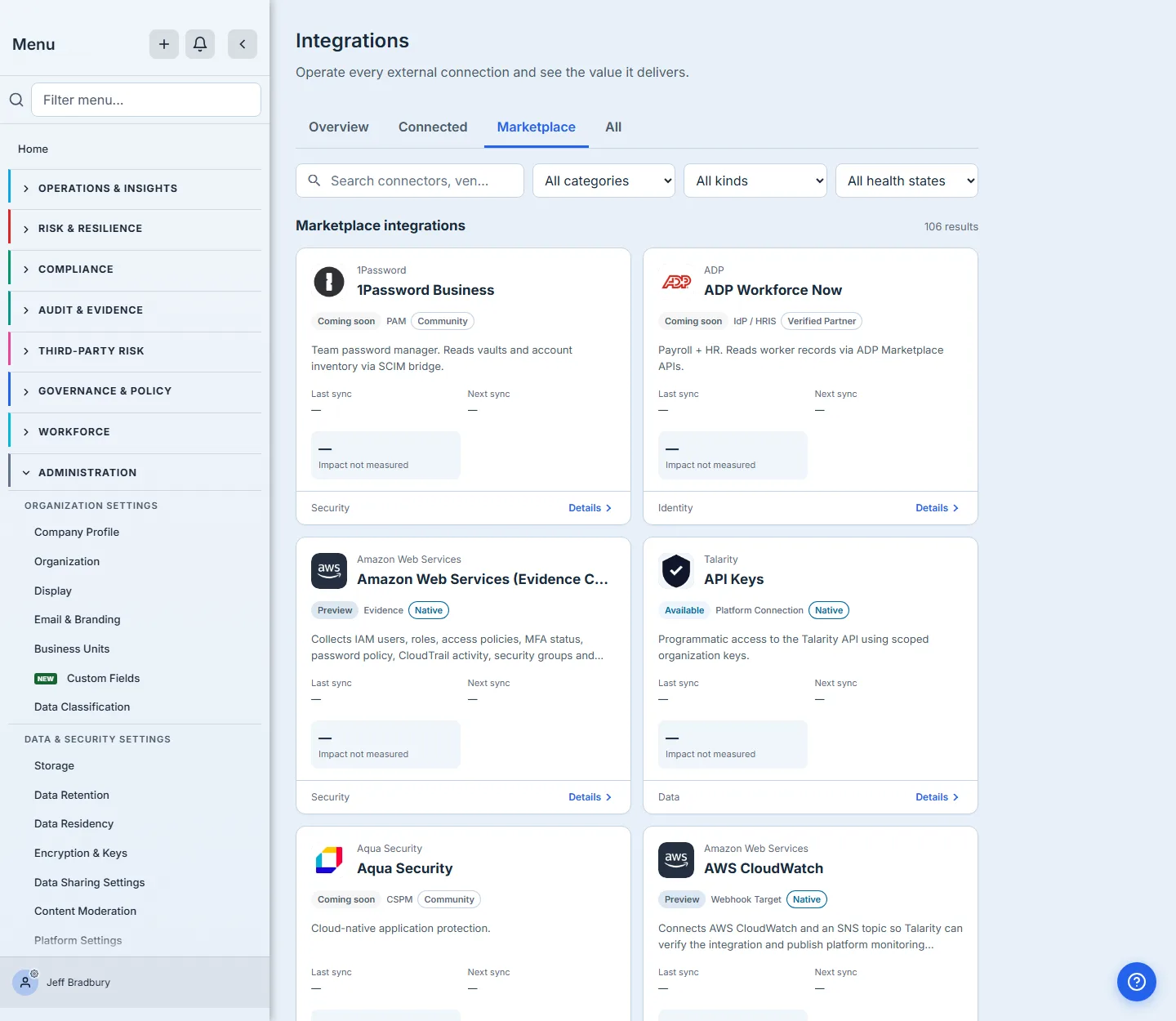
The vendor and product name sit at the top beside the brand mark, a row of badges runs beneath them, and the business category sits in the footer next to Details.
- Kind — what the connector is. Sixteen kinds carry connectors today (measured 30 August 2026): CSPM, Evidence, IdP / HRIS, Endpoint, Asset Source, Vulnerability Scanner, SIEM, Chat, Ticketing, PAM, Vendor Rating, CMDB, Storage, Data Warehouse, Platform Connection and Webhook Target. It is deliberately neutral-coloured: a classification is not a status, and it sits next to two badges that are.
- Status — whether you can have it today, and how settled it is. Available means generally available: build it into a process and expect it to stay put. Preview means it works and you can connect it now, but its shape may still move — the distinction a security reviewer should weigh before committing a supplier to a control. Coming soon means it is catalogued but not built; the card is deliberately muted so you can read the roadmap without mistaking it for product. Moved means the capability now lives somewhere else, and the detail panel names where. Once you connect something, this badge stops describing the catalog and starts describing your connection — Connected, Pending, Paused or Failed — because at that point whether it is working matters more than how settled it is.
- Support tier — the assurance signal, and the one a security reviewer should read first. Native connectors are built and maintained by Talarity, and it is the only tier that carries a colour, because it is the only one Talarity itself stands behind. Verified Partner, Community and Experimental are outlined rather than tinted: progressively less of that guarantee, and deliberately not styled as endorsements. This is the field that makes A.5.19 answerable per-supplier rather than as a blanket statement.
- Category — the business grouping, in the footer: Security, Identity, Compliance, Collaboration, Workflow, Data, Observability, Communication. Once a connector is running, the footer shows its instance count instead.
Vendor names on these cards are the real products you manage — AWS, Okta, CrowdStrike, ServiceNow, Microsoft. That is the point: the catalog describes your estate, not an abstraction of it.
Finding the one you need
Three filters — category, kind and health state — and a search box narrow the grid, and they compose. Search matches name, vendor and capability text, so “security hub” finds AWS Security Hub and “intune” finds Microsoft Intune wherever it currently lives. The Kind filter is the one to reach for when you know the job but not the vendor — it lists every kind the catalog contains, from CSPM and IdP / HRIS through to Asset Source, Storage and Webhook Target.
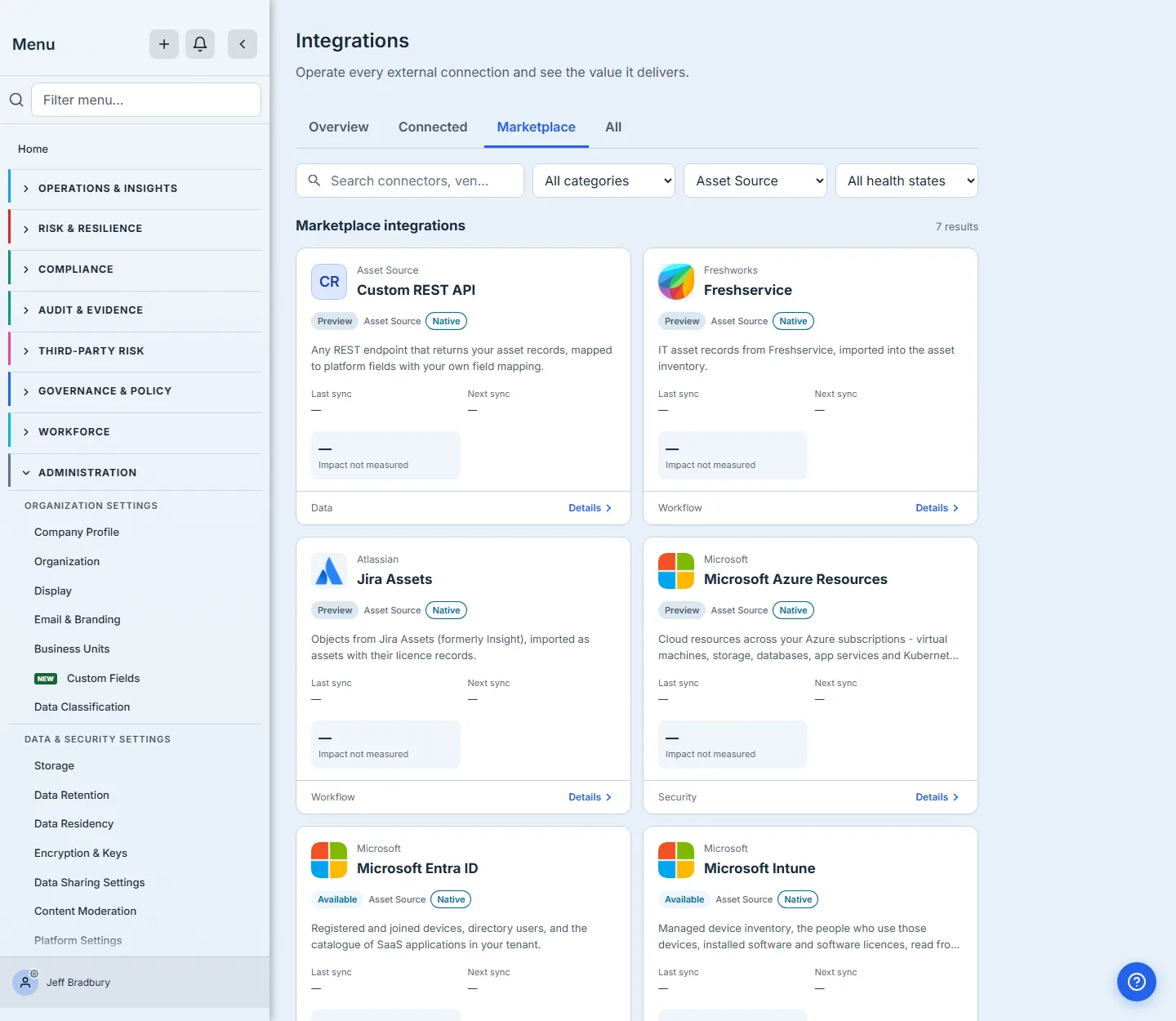
Filtering by Asset Source is a good illustration of why kind matters more than vendor. Seven connectors import inventory rather than findings — Microsoft Intune, Microsoft Entra ID, ServiceNow CMDB, Freshservice, Jira Assets, Azure Resources and a Custom REST API endpoint — and they feed the asset register rather than the posture dashboards.
It is also a good illustration of why the status badge is worth reading. Two of those seven are generally available and five are in preview — all seven will import your inventory today, but five of them may still change shape. That is a different conversation with a security reviewer than “here are seven connectors.”
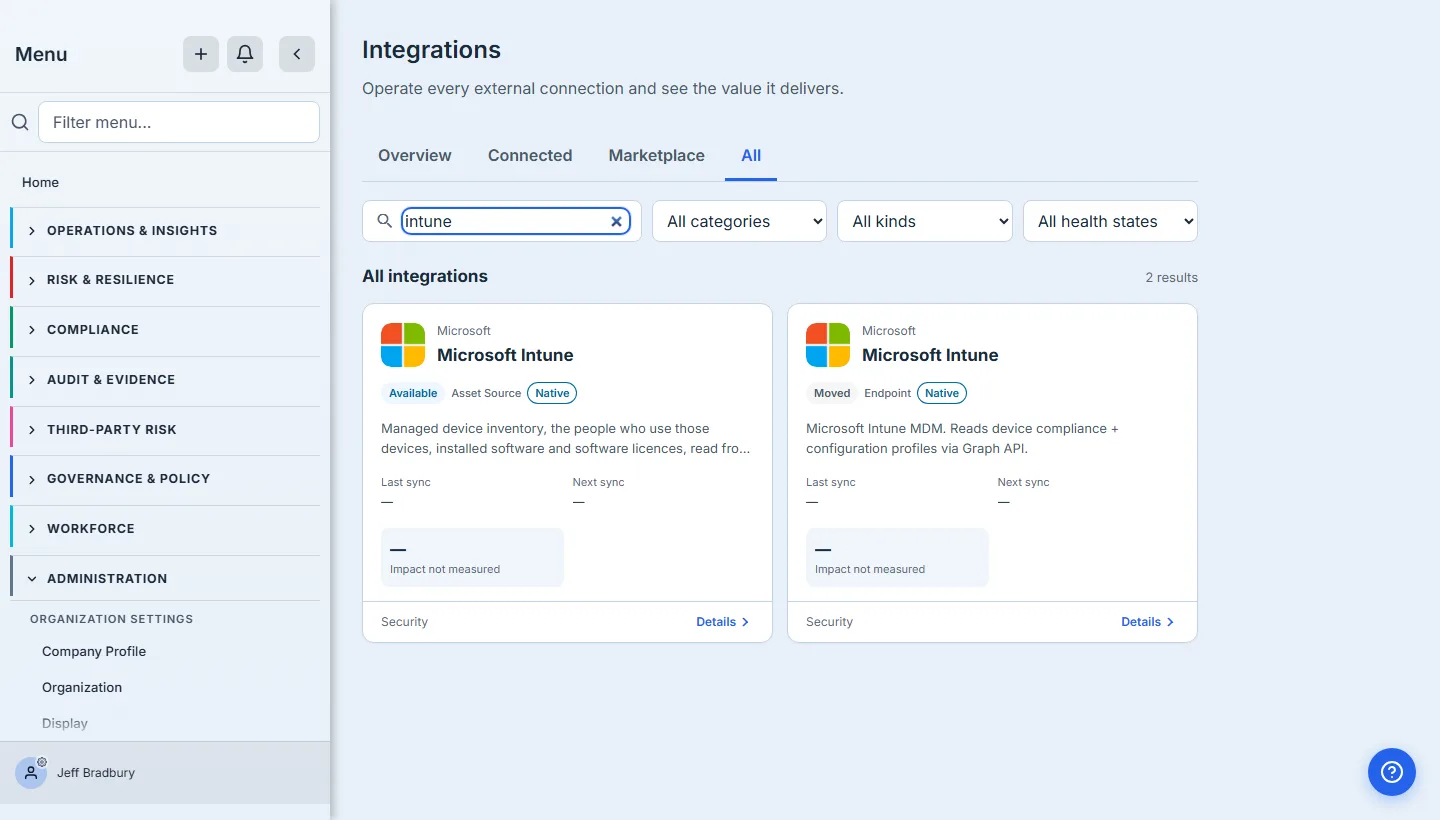
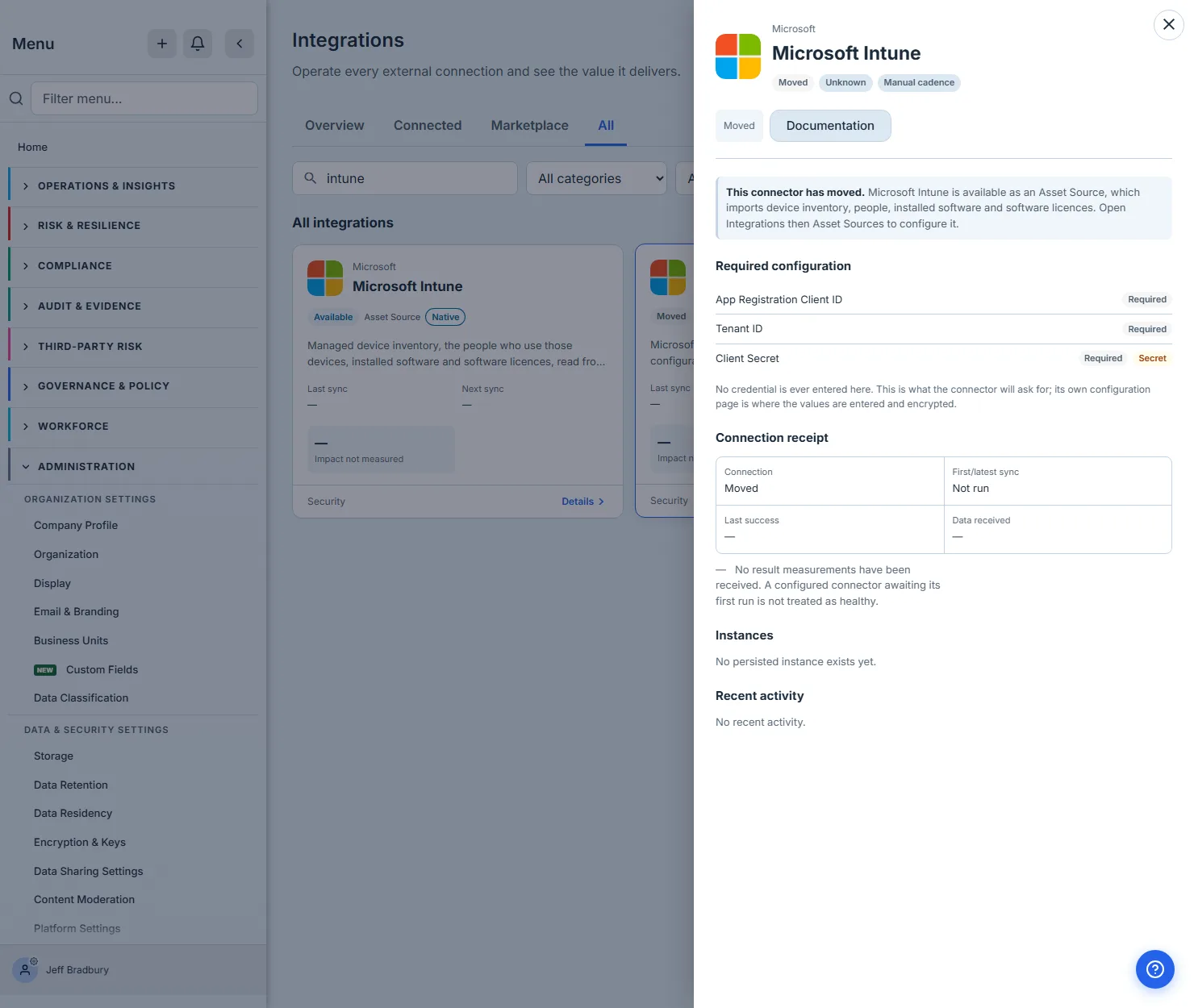
Searching for a connector that has moved is worth doing once, because the result is not what you would expect. A moved connector has not been deleted — its capability was absorbed somewhere more useful, and the catalog keeps the row so that an operator searching for it lands on an explanation rather than on nothing.
Search intune and you get two cards with the same name: the Asset Source that Intune’s capability now lives in, badged Available, and the retired Endpoint row badged Moved. That is deliberate. The name people remember still finds something, and what it finds tells them where the capability went.
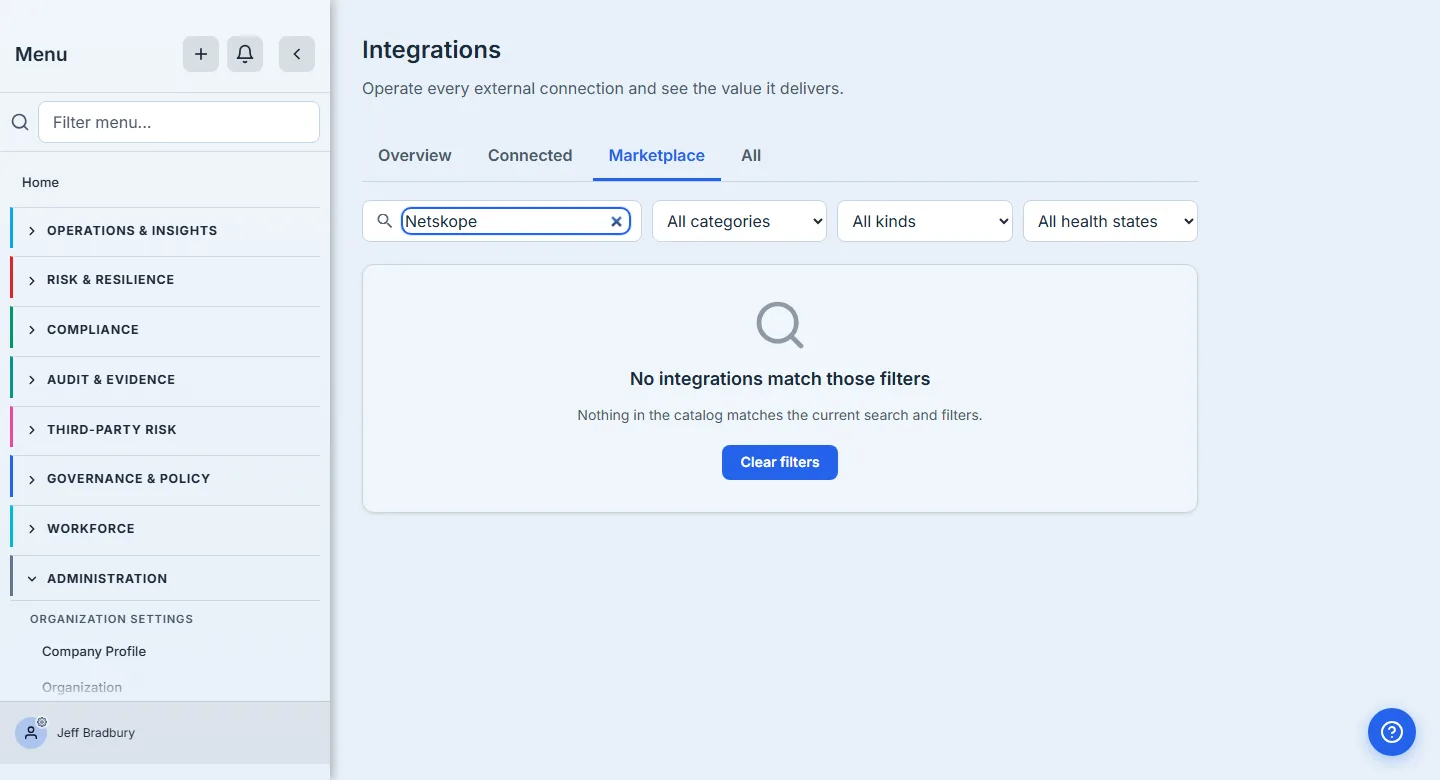
When a search or filter combination matches nothing, the page attributes it to your search and filters rather than claiming the catalog is empty — an important distinction on a page where “nothing here” could otherwise read as “this platform integrates with nothing.” Clear filters resets the search box and all three selects in one action, so you never have to remember which control narrowed you into a corner.
What a connector will need from you, before you commit
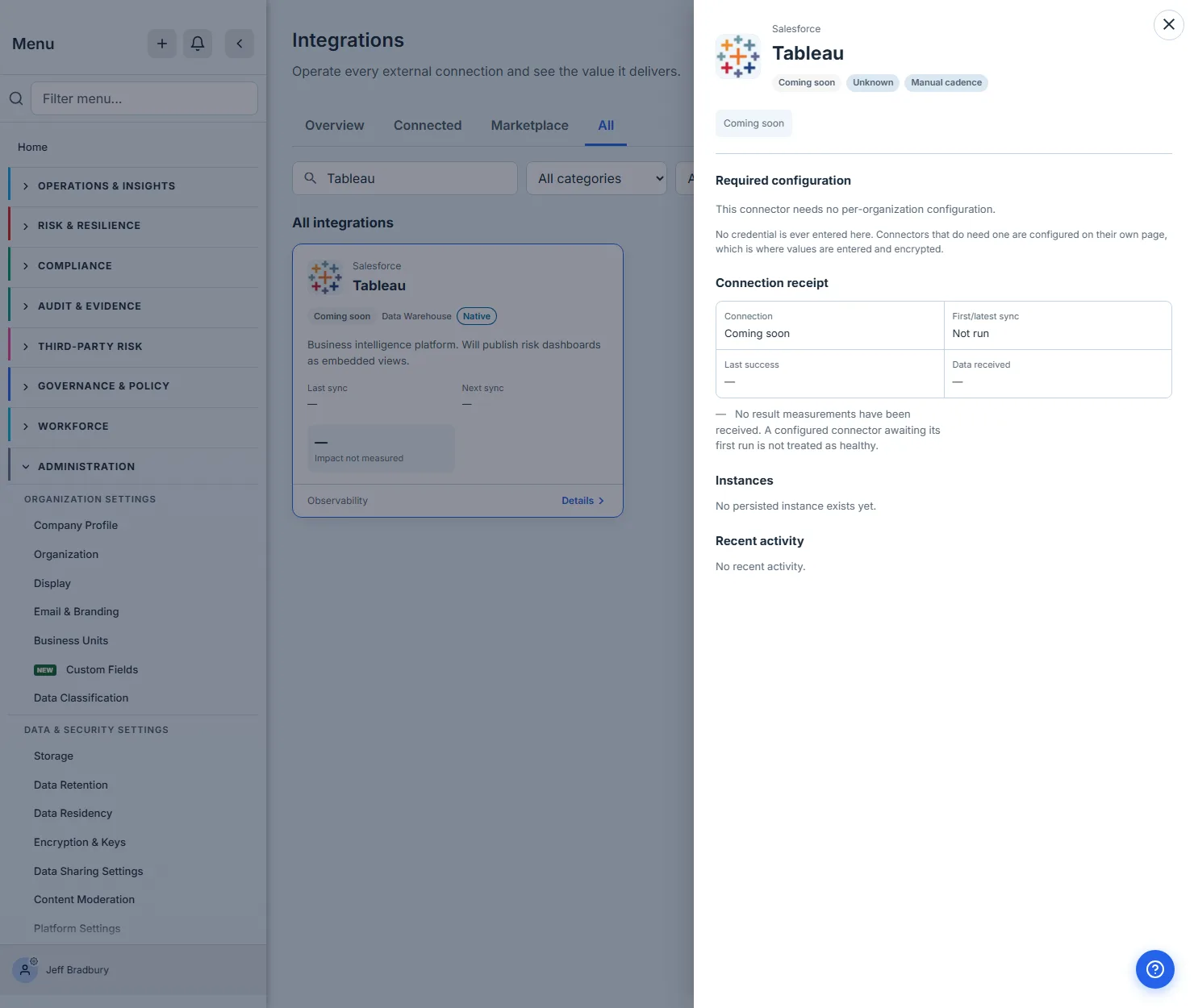
Opening any card gives the detail panel. The section that matters most is Required configuration, and it is not written by hand — it is read from the connector’s own schema, so it lists exactly the fields the integration will demand and marks which are mandatory and which are secret.
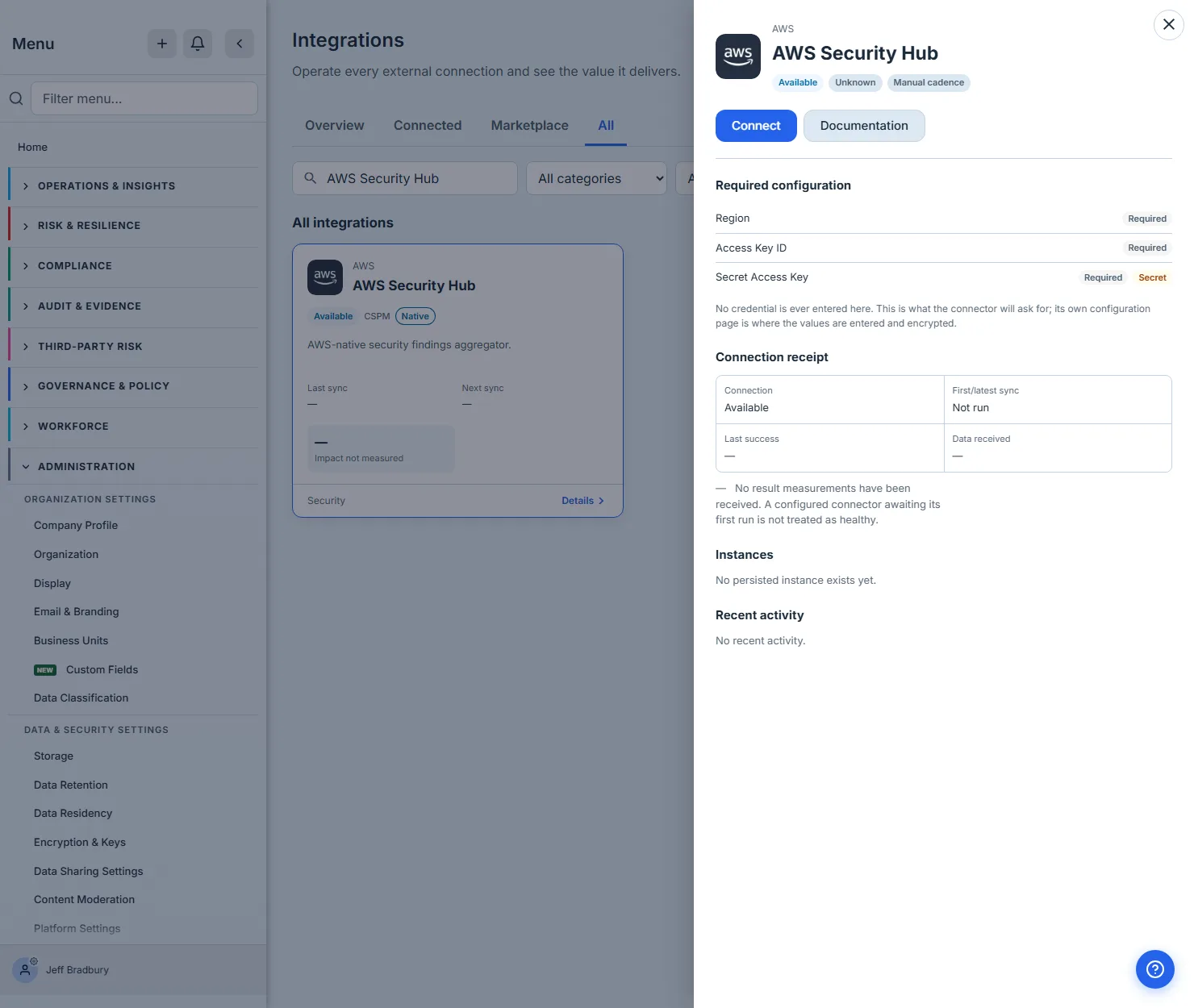
That list is the pre-flight check. Seeing that a secret access key is required, and marked as a password field, before you start tells the security reviewer what credential is about to be created and stored — a materially different conversation from discovering it halfway through a setup wizard. It is a summary of the credentials, not the whole form: the family’s configure screen adds its own operational settings, such as the sync cadence and optional role-assumption fields.
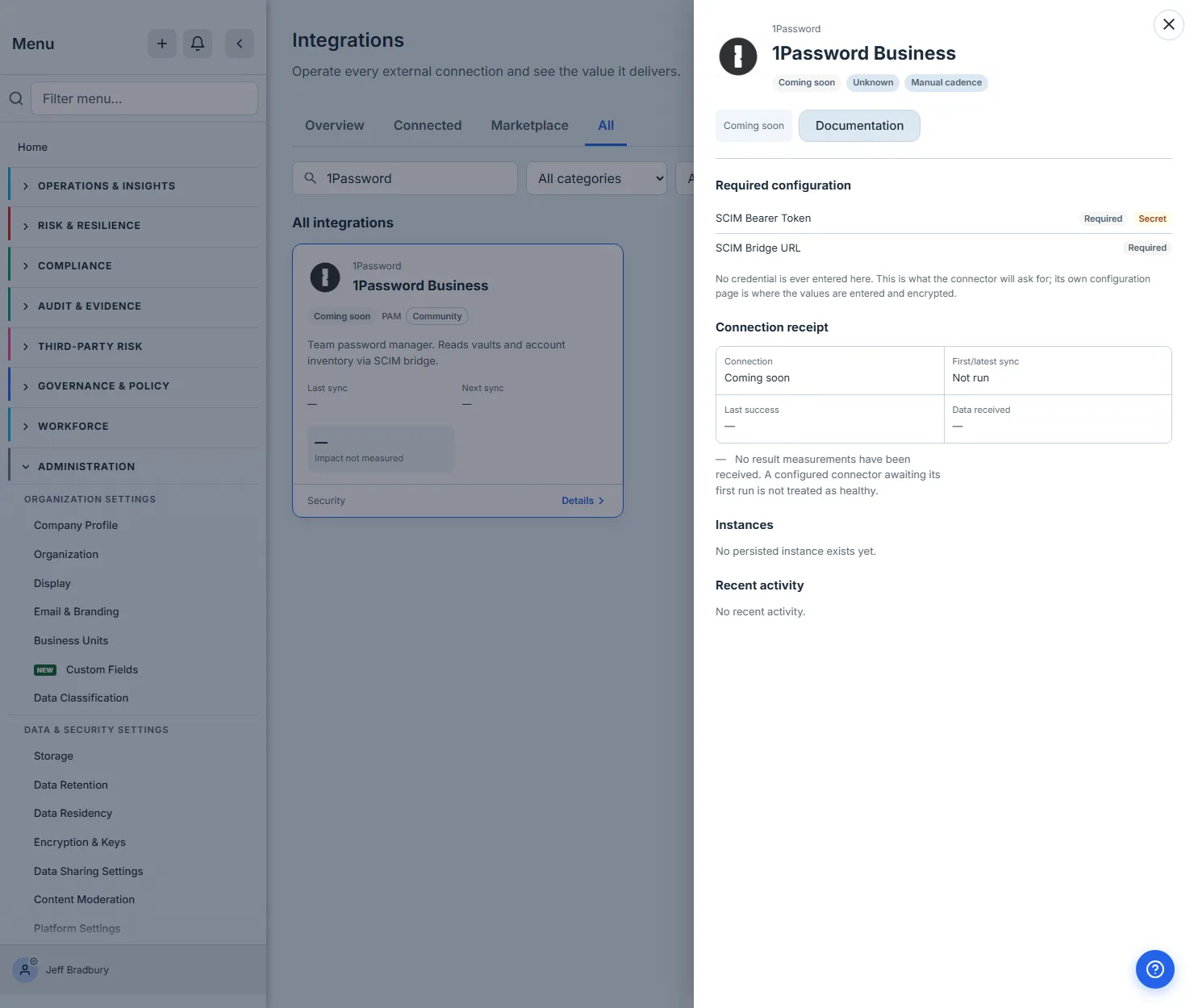
A connector that is catalogued but not yet built says so plainly — its description and vendor documentation are still readable, so you can plan for it, but the install action is disabled rather than leading somewhere that would refuse you.
A connector that has moved explains where its capability went, in the same panel, rather than leaving you to guess.
Some connectors need nothing from you per-organization, and the panel says so instead of showing an empty list — an absence you can act on, rather than one you have to interpret.
Installing
Connect does not ask you for anything in the marketplace. It takes you to where that connector is configured, carrying which connector you clicked — because the marketplace records intent, and credentials are entered and encrypted per-organization on the configuration screen.
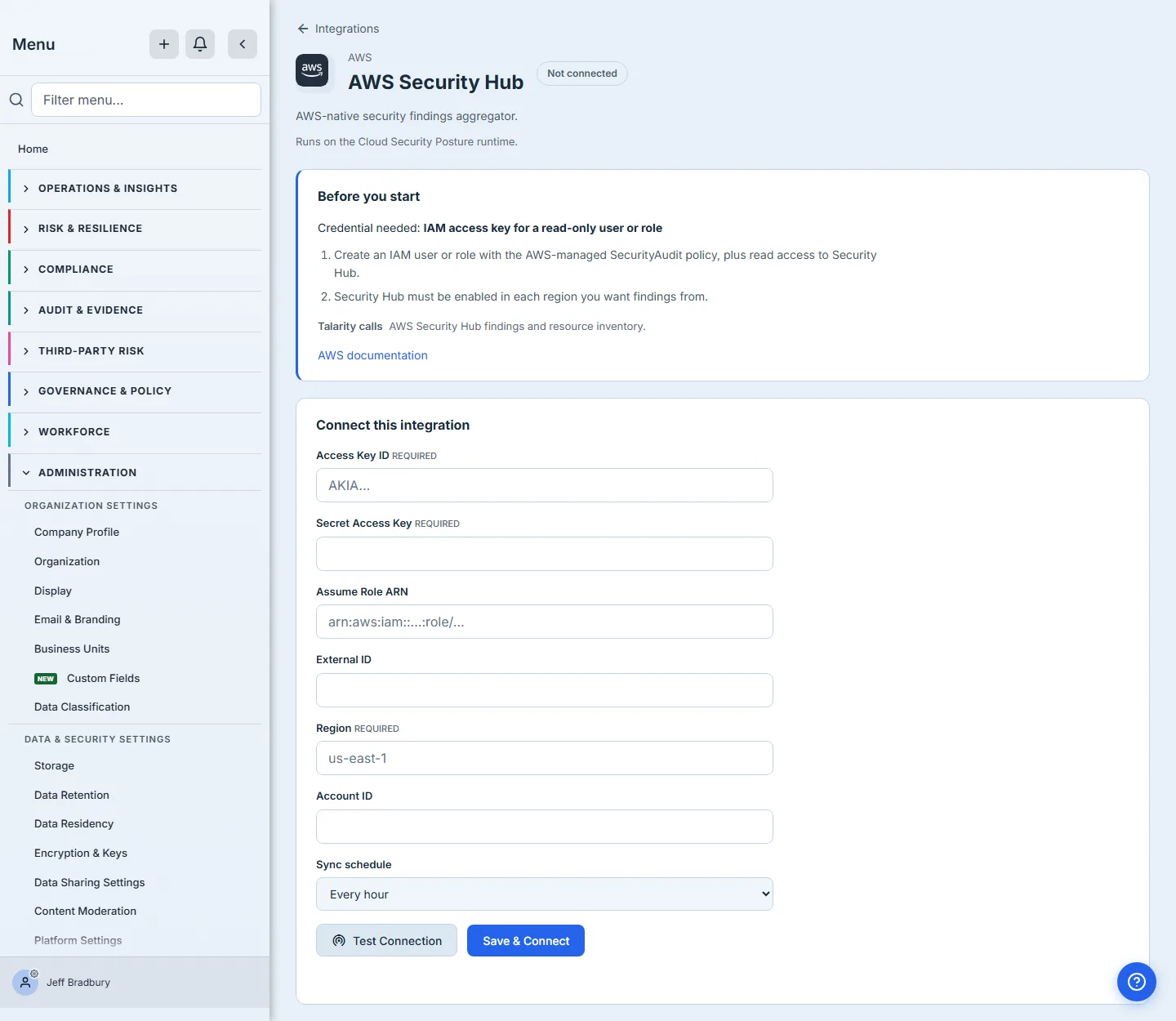
Where that lands depends on the connector. One with its own runtime adapter — AWS Security Hub is one — gets its own setup page, addressed by the connector itself. The rest are configured by their family’s page, and Connect opens that page on the connector you clicked rather than dropping you on a generic settings screen to find it again. Either way you never land somewhere that has forgotten what you asked for, which is the part that matters when the catalog runs to three figures.
No credential is ever entered in the catalog. The detail panel tells you what will be asked for; the setup page is what asks.
That page opens with Before you start, which is the part worth reading twice. It names the credential in the vendor’s own vocabulary — for AWS Security Hub, an IAM access key for a read-only user or role — and then tells you how to create one: an IAM user or role with the AWS-managed SecurityAudit policy plus read access to Security Hub, and Security Hub enabled in every region you want findings from. It also states what Talarity will call, which is what a security reviewer needs in order to approve the key at all.
Below it, the credential form marks each field Required or optional — Access Key ID and Secret Access Key and Region required, Assume Role ARN, External ID and Account ID not — alongside a sync schedule and, before you commit anything, a Test Connection button. It tests what is in the form, not what is stored, so you can find out whether a key works without first writing it down — the question a security reviewer wants answered before the credential exists anywhere, rather than after.
Testing is not connecting, and the page is careful about the difference: it carries a Not connected badge until you Save & Connect, whatever the test said. A passing test tells you the credential is good; it is the save that creates the connection.
Watching what you already run
Overview and Connected are the register — the answer to the second half of the auditor’s question. Each card carries its connection state, health, freshness, when it last synced and when it is due next, and the impact it has actually measured.
Three details are worth knowing because they are deliberate:
- Needs Attention sorts first. A failing or overdue connector appears above a healthy one, so the top of the page is your work list rather than an alphabet.
- An unmeasured value says so. A metric that has not been measured reads
Impact not measured, never
0. A connector that has genuinely counted zero shows0. The difference matters: one is an absence, the other is a finding. - A connector that has never completed a run is not called healthy. It reads Unknown until there is evidence, even if the connector reported itself healthy when it was set up.
You can see all three rules at work in the detail panels above, before anything is connected at all. Each one reports Unknown health and a Not run first sync, and states the reason in words rather than leaving you to infer it from a dash: “No result measurements have been received. A configured connector awaiting its first run is not treated as healthy.” That is the same panel you will be reading six months from now, when the question is why last night’s sync did not land.
Opening a connector gives the full picture: the connection receipt, any warnings with the action that resolves them, every instance behind it, recent runs, the complete impact list, and a link to the vendor’s own setup documentation. Where a destination needs a permission you do not hold, the hub says Ask an administrator rather than offering a link that would fail.
What you walk away with
- The catalog answers what exists — more than a hundred connectors across sixteen kinds, with availability stated honestly, including what is only previewed and what is not built at all.
- The detail panel answers what it will cost you — the exact credentials and configuration, read from the connector’s own schema, before you commit. The setup page will test them for you before you commit, too.
- Install answers where it gets configured — recording intent, then carrying the connector you chose to whichever screen owns its secrets, its own or its family’s.
- Overview and Connected answer is it still working — connection state and health as separate questions, with health written centrally after every sync and left Unknown until a run proves otherwise.
- Support tier answers how much assurance is behind it, which is what makes A.5.19 answerable per-supplier.
Where this guide ends
This covers discovery, install intent and health monitoring. It does not cover configuring any particular connector — each family has its own page and its own credential handling: Cloud Security Posture (CSPM), Chat, Identity Connectors, Asset Sources, Endpoint Connectors, Privileged Access, and Ticketing. For the four integrations that predate the connector runtime — SSO, SCIM provisioning, API keys and webhooks — see connecting Talarity to your stack. For a worked example of taking one connector all the way through to a populated inventory, see connecting Microsoft Intune.