An auditor asks a simple question: show me that you actually patch critical vulnerabilities inside thirty days.
The policy is not the answer. The policy says you will. What the auditor wants is the record of it happening — thirty tickets, opened and closed, with dates. That record already exists. It is in Jira, or ServiceNow, or GitHub Issues, and it was created as a by-product of the work rather than as an act of compliance, which is exactly what makes it good evidence.
The problem is that it lives somewhere nobody in the compliance programme is looking, and it is assembled by hand the week before an audit, by someone exporting a filtered ticket list into a spreadsheet.
Ticketing (ITSM) — the Ticketing tab on the Integrations row in the sidebar — is the bridge. It links a closed ticket to the control it demonstrates, and promotes that link into a first-class evidence artifact that sits alongside every other piece of evidence in the programme. The work stays where your engineers do it. The proof arrives where your auditor looks.
There is a standards reason as well as a practical one. ISO/IEC 27001 Clause 9.1 — Monitoring, measurement, analysis and evaluation does not stop at asking you to monitor things. It requires you to determine what is monitored, by what methods, when, and who evaluates the results — and then, in its final sentence, that the organisation “shall retain appropriate documented information as evidence of the results.” A closed ticket, attached to a control, dated, is that documented information. Under SOC 2 the same idea appears as testing operating effectiveness: it is not enough for a control to be designed, an auditor has to see that it ran during the period.
Who’s involved
- The compliance or security lead decides which controls can be evidenced by ticket activity, and authors the rules that harvest it.
- A control owner links individual tickets when the connection is a judgement call rather than a query.
- The auditor never edits anything here. They read the link: the ticket, its close date, and the control it was attached to.
The dashboard: eight numbers, read in pairs
The page opens on counters that describe the programme rather than the plumbing, and they are most useful read as four pairs rather than eight figures.
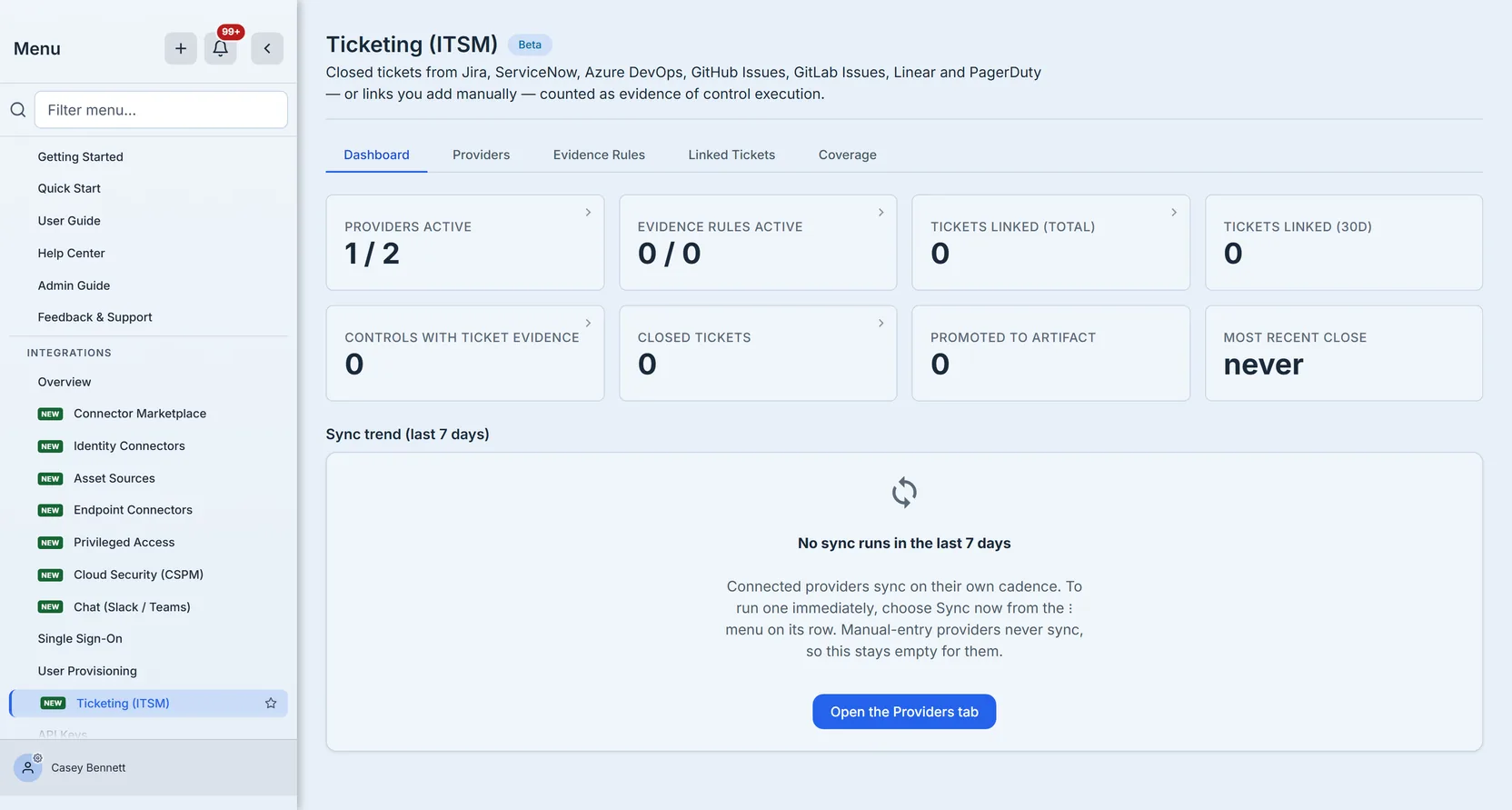
Providers active and Evidence rules active are both shown as active of total. A provider that is configured but not active, or a rule saved as a draft, is counted in the denominator and not the numerator — so the two numbers disagreeing is the fastest way to spot something set up but never switched on.
Tickets linked (total) against Tickets linked (30d) is the momentum pair. A large total with a zero thirty-day figure is the signature of a programme that connected a ticketing system once, harvested history, and has collected nothing since.
Closed tickets against Promoted to artifact is the one that matters most at audit time. A linked ticket is a claim; a promoted artifact is that claim filed where the evidence library will find it. Tickets that are closed but never promoted are work you have done and cannot show.
Controls with ticket evidence and Most recent close frame the whole thing: how much of your control set this mechanism actually reaches, and whether anything has arrived lately. Most recent close reads never until the first ticket lands, which is honest rather than showing a zero date.
Below the counters, a seven-day sync trend breaks recent runs into completed, partial and failed. Partial is the column worth understanding: a run is partial when it recorded errors and still matched at least one rule. So it is not a milder failure — it means evidence did arrive, and some of what you asked for did not, which is the state most likely to be mistaken for success. Under it, a latest run strip names the status, the scope, what triggered it, how many tickets moved and how many errors it recorded.
If no sync has run — which is the case for a programme working entirely through manual links — the trend says so plainly instead of drawing an empty chart, and tells you whether you are waiting on a scheduled sync or have simply not connected anything that syncs.
Five of the eight counters are clickable, and land you on the rows behind the number with the filter already applied: Closed tickets opens the linked-ticket list narrowed to closed, Evidence rules active opens the rules list narrowed to active. The three that are not clickable are the ones the underlying list cannot be narrowed to — a tile that jumped to an unfiltered list would be showing you a different set from the one it counted.
Start with a provider — including the one that needs no credential
Every ticket link belongs to a provider, so a provider comes first.
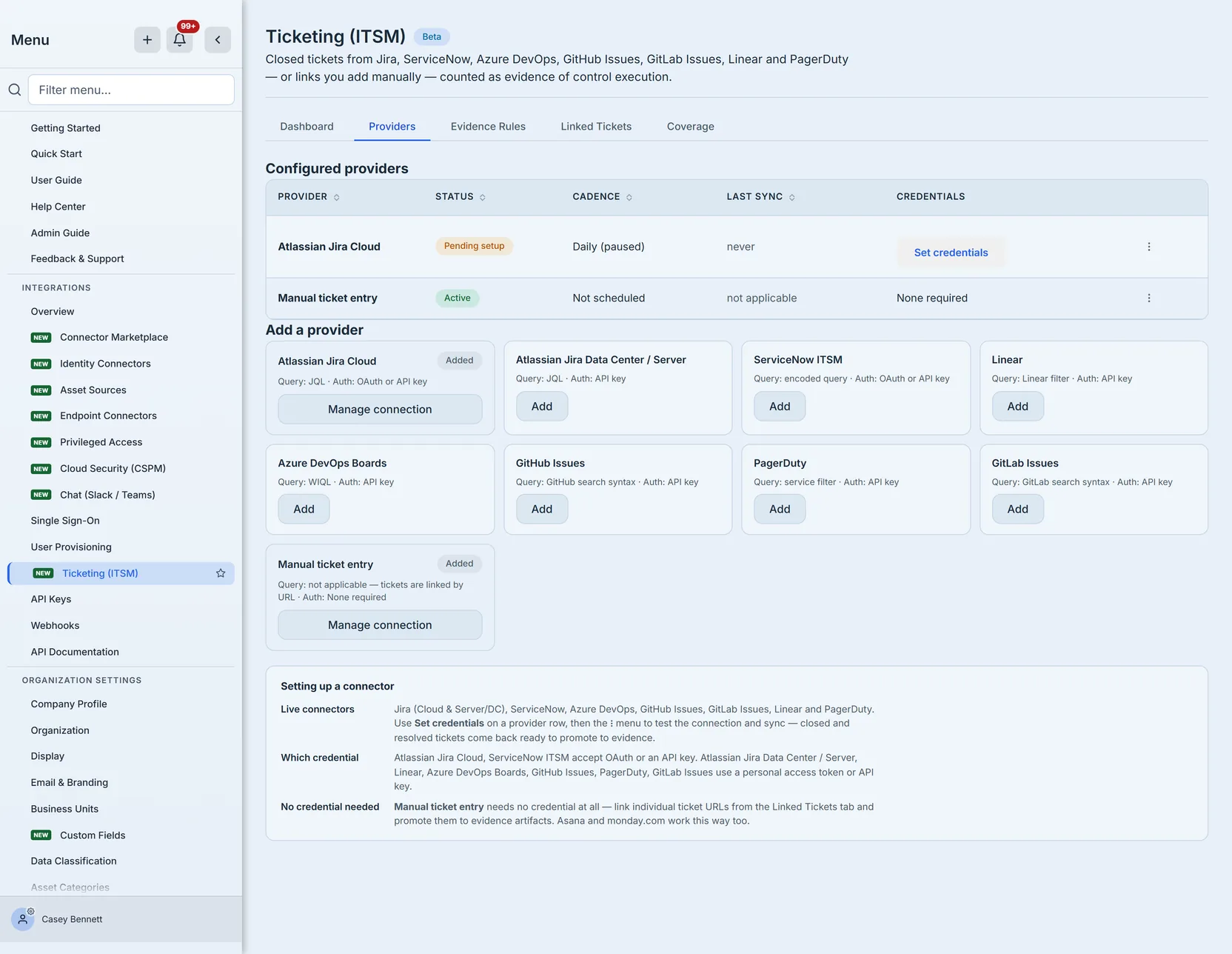
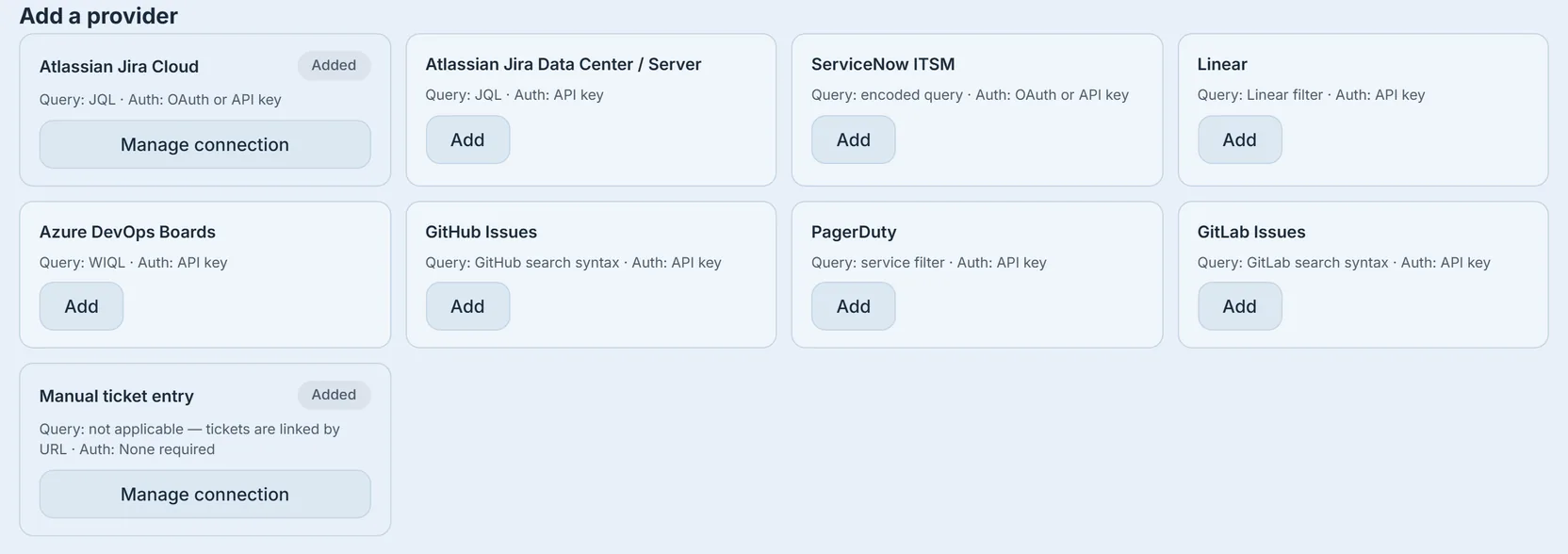
Jira (Cloud and Data Center), ServiceNow, Azure DevOps, GitHub Issues, GitLab Issues, Linear and PagerDuty all have live connectors: you add a credential, test the connection, and sync closed tickets on a cadence.
But the catalogue also carries Manual ticket entry, and it is not a placeholder. It needs no credential, no API token and no network path to your ITSM. You link tickets by URL. That matters more than it sounds: it means a programme can start counting ticket evidence today, while the connector for its actual ticketing system is still going through procurement or security review. Closing a manually-entered ticket counts exactly the same as closing a synced one.
Two names have no connector card. Asana and monday.com were retired, because their status models are configured per board and cannot be mapped onto a ticket lifecycle without a field-mapping surface that does not exist yet. Rather than offer a connector that would quietly mis-classify “Done” on half your boards, the product offers neither — those tools are manual-link only.
Credentials: two families, and neither stores your secret in our database
The credential dialog offers two kinds of value, and the distinction is a security one worth understanding before you paste anything.
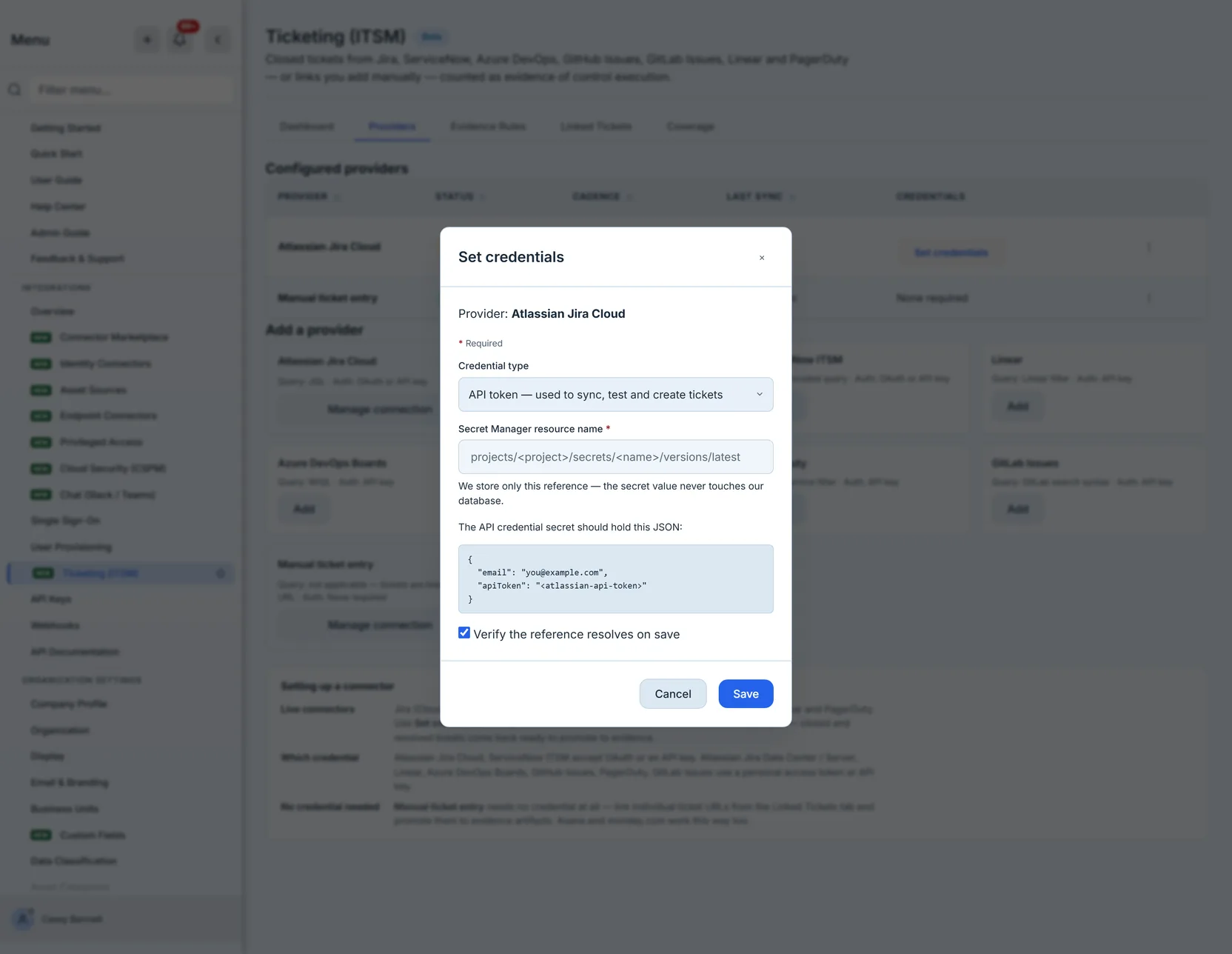
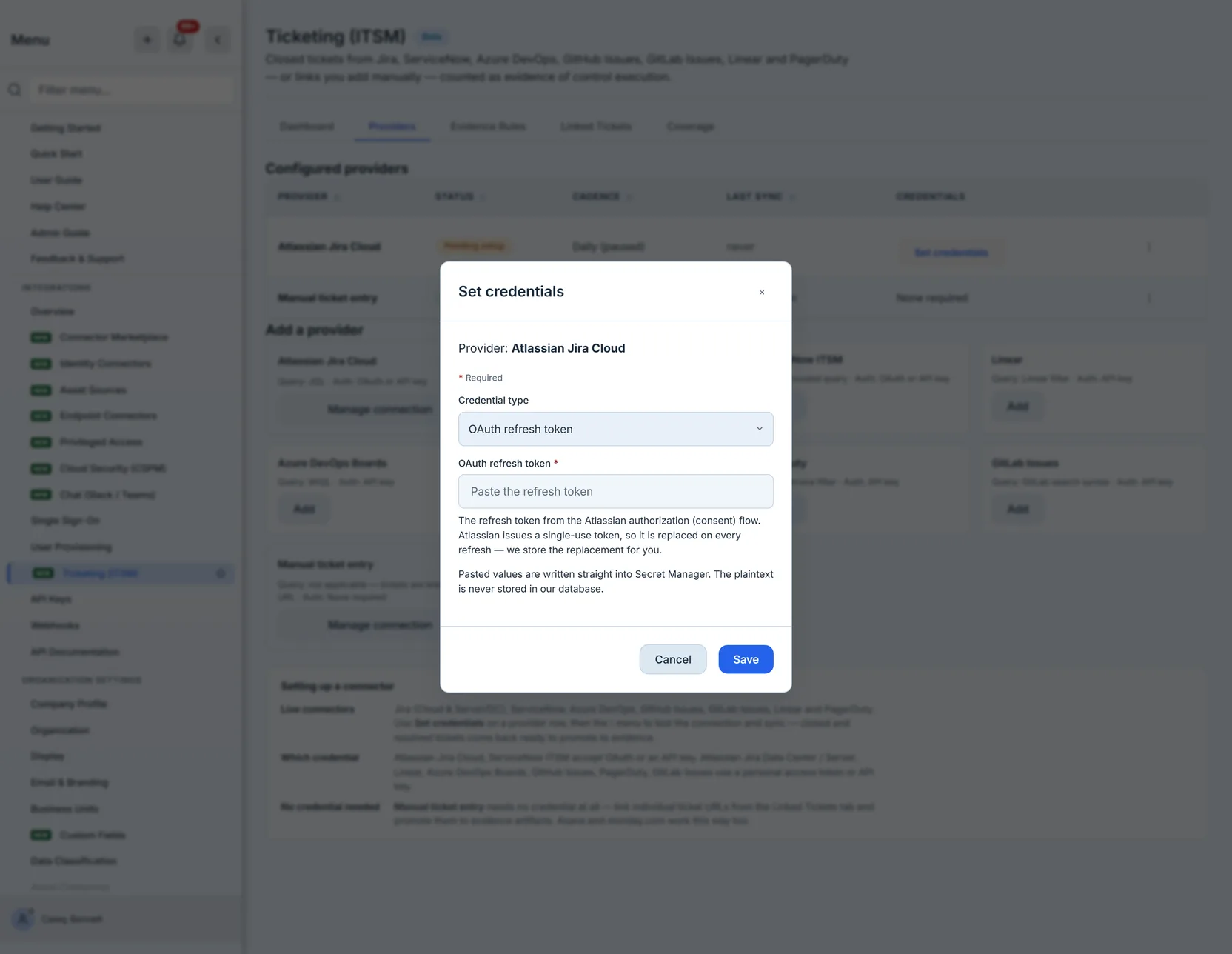
API tokens, basic-auth credentials and webhook secrets are stored by reference. You provision the secret in your own Secret Manager and paste the resource name. Talarity stores the pointer. The secret value never touches our database, and “Verify the reference resolves on save” checks we can read it before you find out at sync time.
OAuth values are stored by us — client id, client secret, refresh token. You paste the value and the backend mints it into Secret Manager. The plaintext still never lands in the database; it is written straight to the secret store.
The provider table then shows credential freshness and never the credential: which kinds are set, and — once an OAuth connector has run — whether its token is valid, expired, or has no refresh token yet.
Linking a ticket
A ticket link needs three things — the provider, the ticket’s key and the control it demonstrates — and carries its title, an https URL, its status and its close date alongside them.
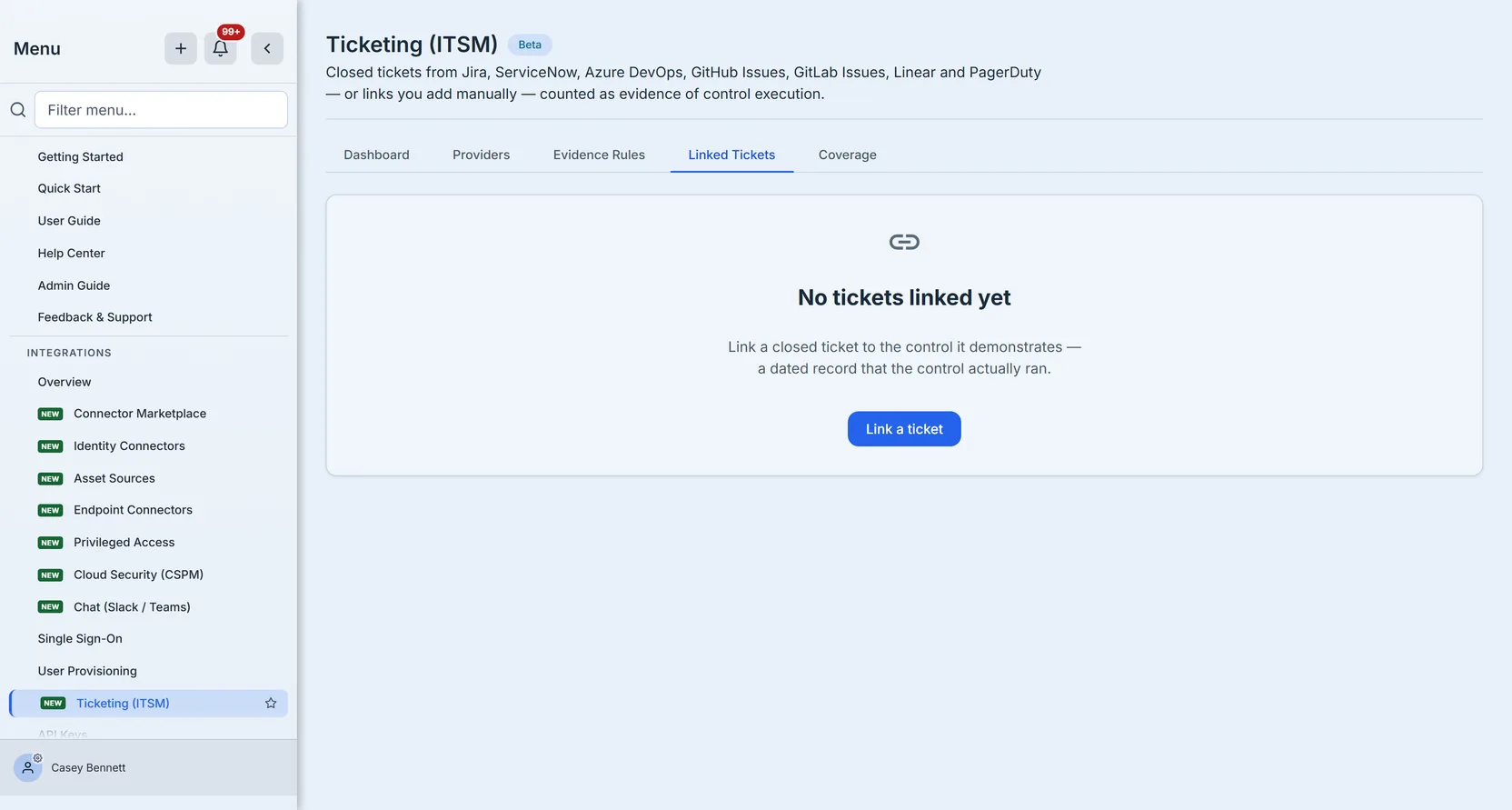
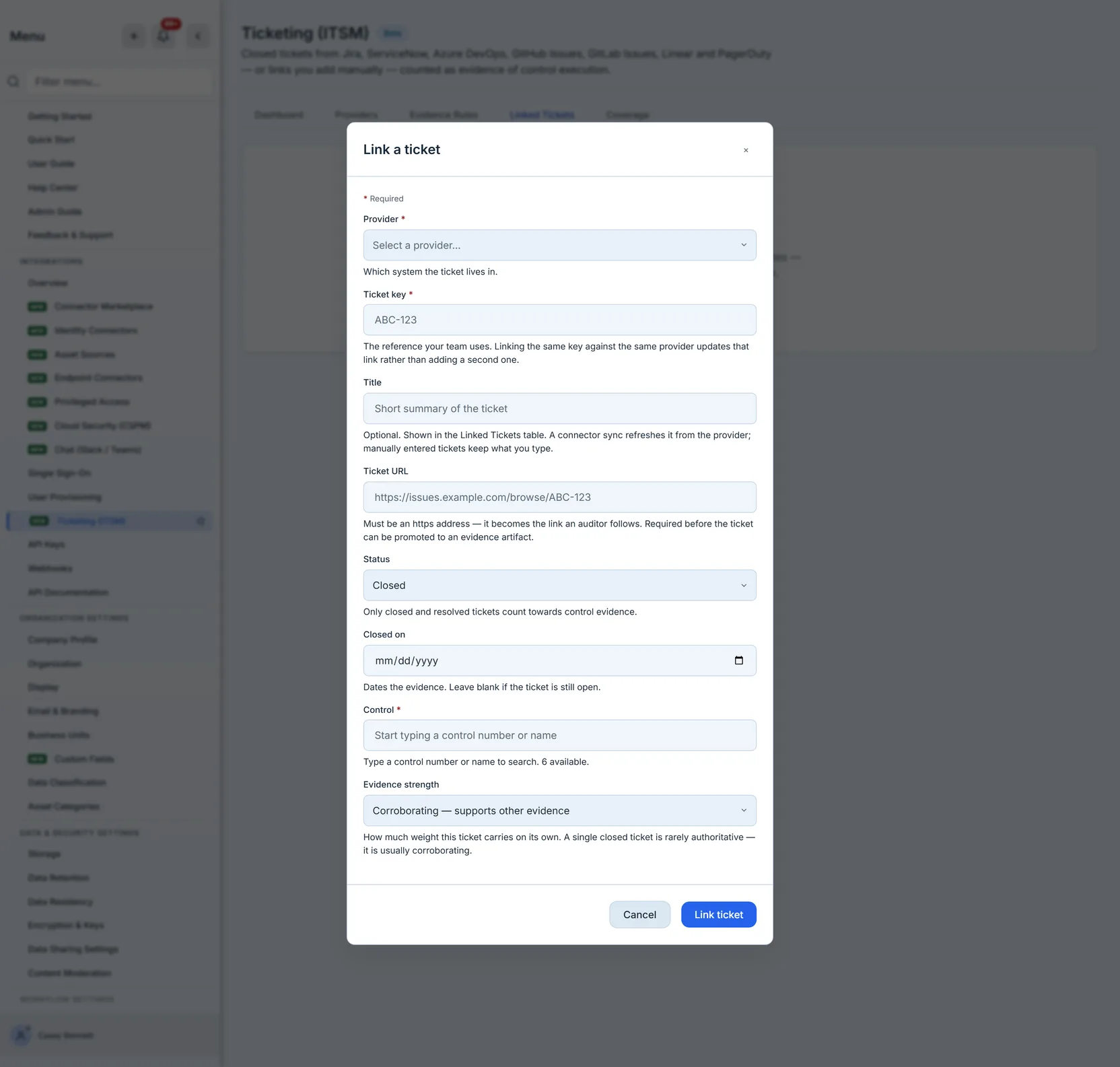
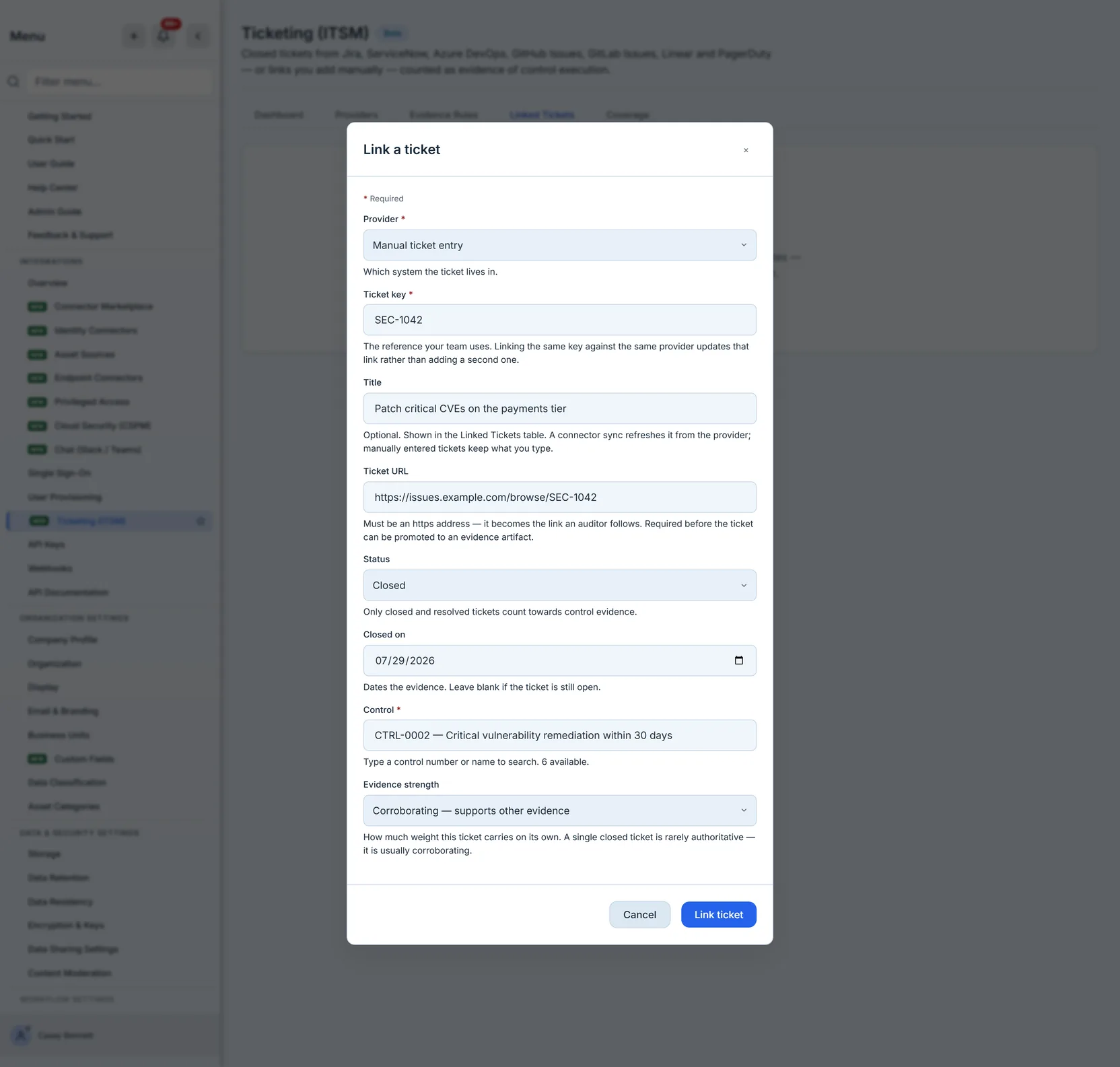
Three of those fields do more work than they look like they do.
The URL must be https, and the form says so before you save. It becomes the link an auditor follows, and it is what the evidence artifact points at — a link without a URL cannot be promoted, because there would be nothing for the evidence library to reference.
The status decides whether it counts. Only closed and resolved tickets are treated as evidence of control execution. An open ticket is work in progress, not proof.
The key is the identity. Linking the same key against the same provider updates the existing link rather than creating a second one, so re-linking a ticket after correcting its control is a correction, not a duplicate.
Pick the control from the picker rather than typing an identifier: it resolves what you type back to a real control and refuses anything that matches nothing, which is what stops a typo becoming a link that points nowhere.
Promoting it: from a link to evidence
A link says this ticket relates to this control. Promote to evidence, on the ticket’s row, creates an evidence artifact in the evidence library pointing at the ticket URL and carrying the control, the close date and the evidence strength.


Once promoted, the row stops offering Promote to evidence and the Evidence column becomes a link straight to the artifact it filed. The action is idempotent underneath as well — a second promotion of the same link returns the artifact that already exists rather than filing a duplicate.
Evidence strength is the field most programmes skip and then wish they had. A ticket is rarely authoritative on its own — one closed ticket does not prove a control operates continuously. It is usually corroborating: real, dated, and meaningful in aggregate.
This table is also where the programme stops being small. Once a rule has been running for a quarter, the answer to “did we ever link that change ticket?” is not something you find by scrolling. Provider and Status at the top of the table narrow the whole set on the server, so they still answer the question when there are more linked tickets than one screen can hold; the search box beside them filters the rows already loaded. When the list is longer than a single request returns, the count line says so explicitly — it tells you it is showing the most recent of a larger number, rather than letting you search a partial set and conclude a ticket was never linked.
Evidence rules: stop linking tickets by hand
Linking tickets one at a time is fine for a handful. It does not survive a programme.
A rule binds one control to one provider query. Every ticket the query matches is linked — and, if you turn on Promote matching tickets to evidence artifacts automatically, filed as evidence too — without anyone remembering to do it. The query is written in the provider’s own language — JQL for Jira, an encoded query for ServiceNow, WIQL for Azure DevOps Boards, and a search expression for the rest.
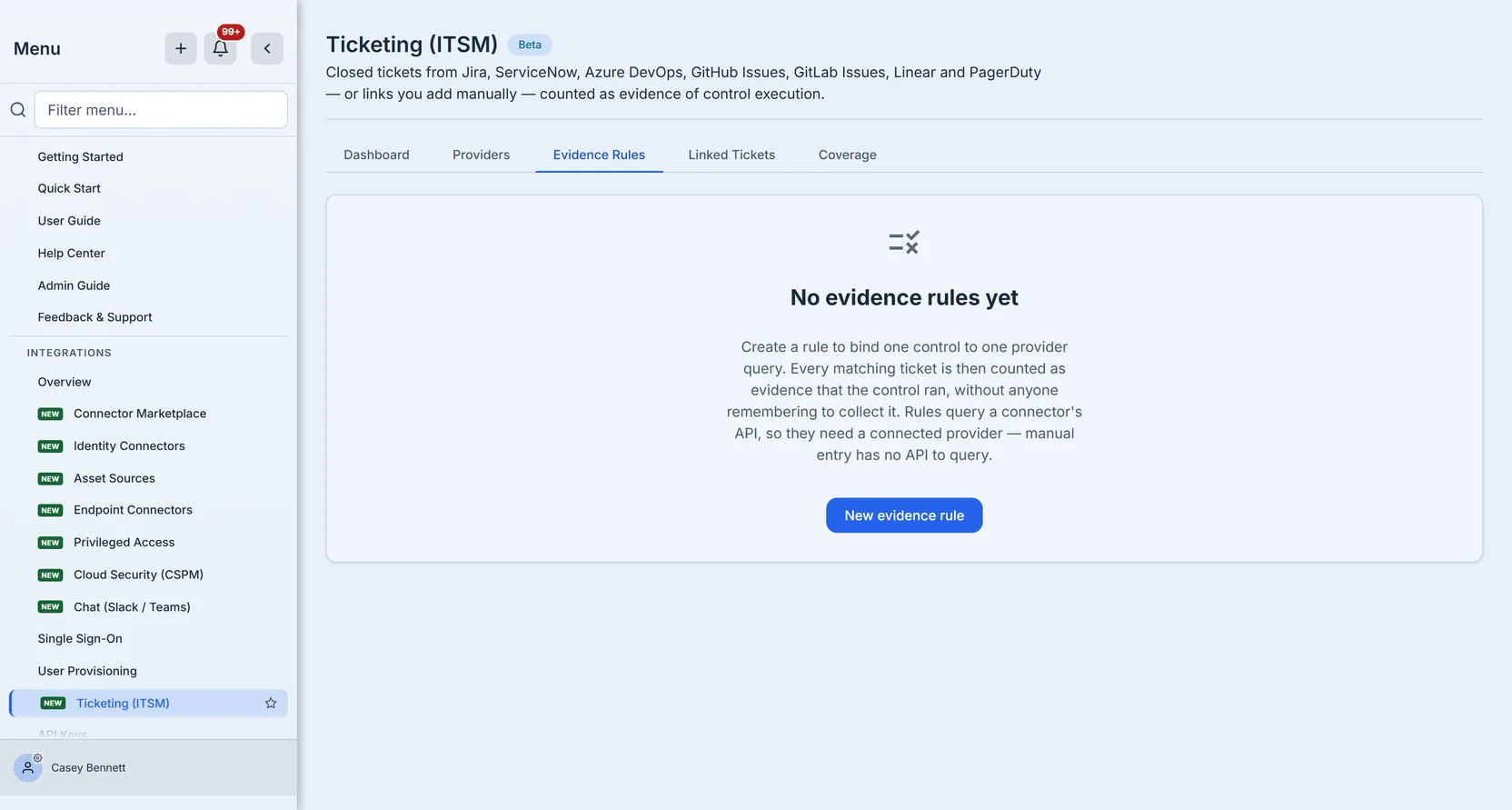
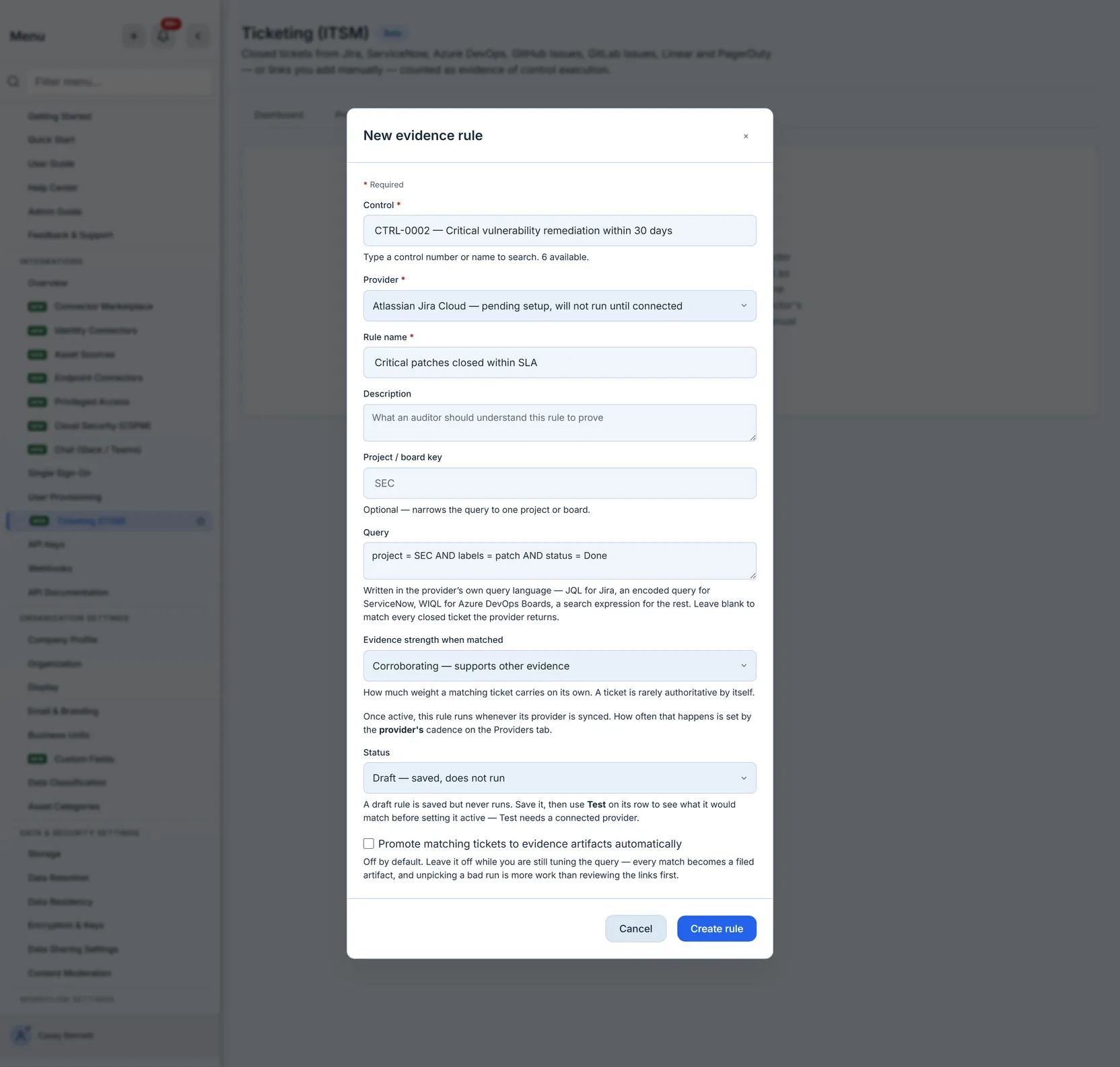
Rules are a connector feature. They work by querying a provider’s API, so they are only available for the connected systems — the manual provider has no API and is not offered as a rule’s backing provider. If you are working entirely through manual links, this section is the reason to connect your ticketing system rather than something you can use today.
Leave the automatic promotion off while you are still tuning the query. Every match becomes a filed artifact, and unpicking a bad run is considerably more work than reviewing the links first and promoting them yourself.
A rule carries a status, and it is worth understanding what does and does not control its schedule:
- A draft rule is saved and never runs. This is the default, deliberately — you write the query, test it, and only then set it active.
- A rule has no schedule of its own. It is evaluated whenever its provider is synced, and how often that happens is the provider’s cadence, set on the Providers tab. So the question “how often does this rule run?” is answered one level up: set the provider to hourly and every rule against it is evaluated hourly; set it to manual and nothing runs until you trigger a sync yourself.
That indirection is worth knowing before you write a query that is expensive to run. Cadence is a property of the connection, not of each rule hanging off it — so tightening one rule’s schedule means tightening every rule on that provider.
Reading a rule after it has run
Once a rule is active, its row becomes a feedback loop rather than a static definition. Last run and Last status record when it last executed and whether that execution completed or failed, and Matches records how many tickets it found on that run.
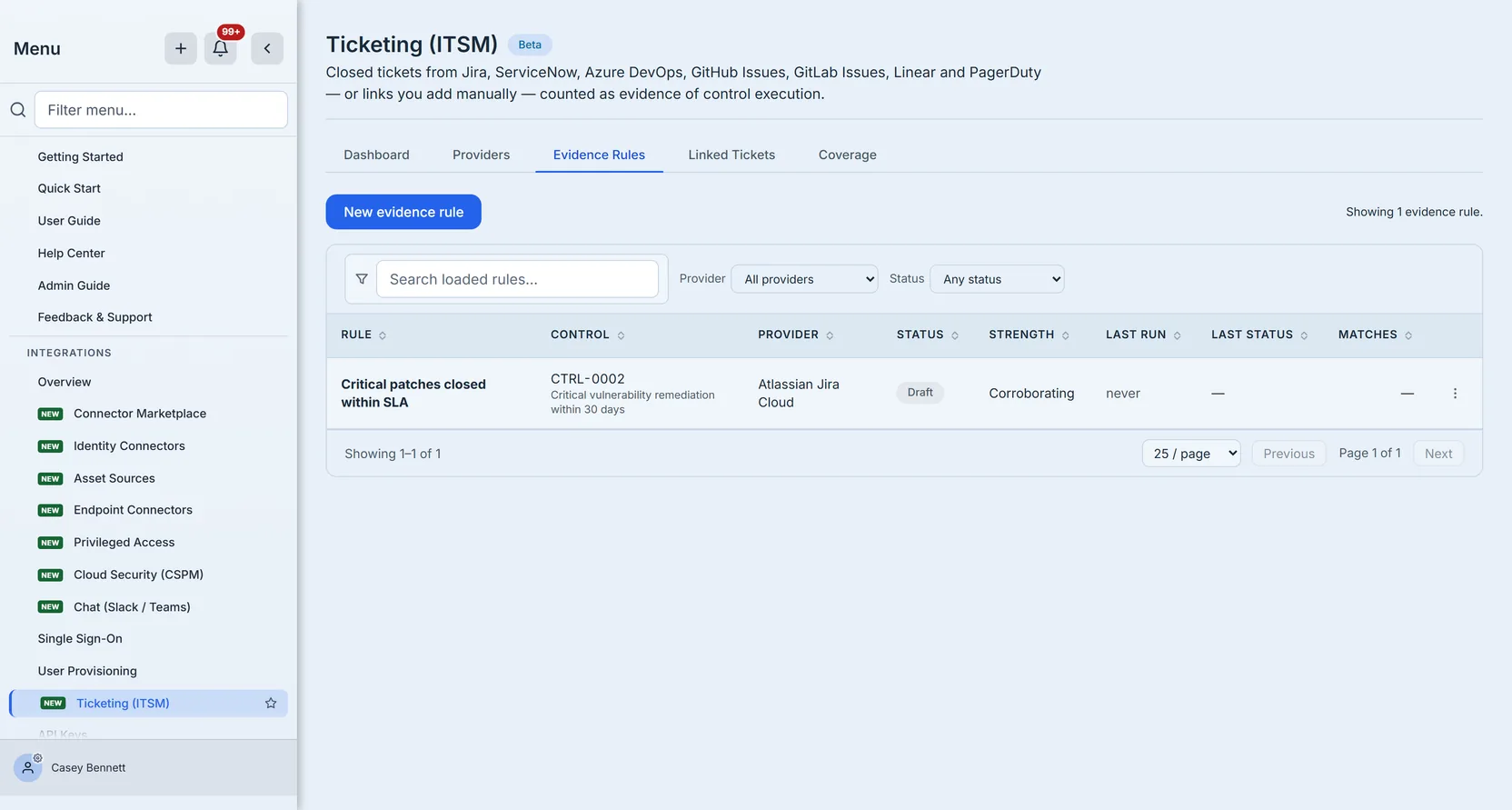
Those three columns are how you notice a rule that has quietly stopped earning its place. A rule whose last status is completed and whose match count has been zero for three months is not broken — it is watching for work that is not happening, which is either good news about the control or a sign the query no longer matches how your team labels tickets. A rule whose last status is failed carries the provider’s own error, and stops contributing evidence until it is fixed.
Pause stops a rule running without deleting it or losing its history; Activate puts it back. Pausing is the right move when a ticketing project is being restructured and the query will be wrong for a fortnight — deleting the rule would take its run history with it.
Test before you activate
The Test action runs the rule against the provider and shows what it would do: every matching ticket, whether it would promote, and whether it is already linked.
It writes nothing. That is the point of it — you can point a half-finished query at a production ticket system and see the blast radius before committing to it. The modal says so on screen, and the handler contains no write of any kind.
Two things it will refuse, both deliberately. It needs a working credential, because it makes a real API call — a provider that has not been connected yet returns a precondition error rather than an empty preview, which is the honest answer to “what would this match?” when the query never reached anything. And it refuses entirely for the manual provider, which has no API to query: rules are a connector feature, so the rule editor does not offer manual as a backing provider in the first place.
That is also the boundary of this guide. The screenshots here were taken against the credential-free manual path, so the dry-run preview is described rather than shown — demonstrating it needs a live Jira or ServiceNow connection, which is the one thing this page cannot do without a credential from your ticketing system.
Removing things, and what survives
Two destructive actions on this page ask for confirmation, and it is worth knowing precisely what each one takes with it — because in both cases the evidence you have already filed is deliberately kept.
Unlinking a ticket deletes the link between the ticket and the control. If you had already promoted it, the evidence artifact stays in the evidence library. You are severing the association, not retracting the evidence.
Deleting an evidence rule keeps every ticket it ever linked. The links stay exactly where they are and lose only their back-pointer to the rule — so the evidence survives, but the record of which rule harvested it does not. That is the reason to pause a rule you might want back rather than delete it: pausing keeps the provenance, deleting keeps only the result.
Removing a provider is the larger one: it deletes that provider’s sync history, its evidence rules and its ticket links, all at once. Anything already promoted still survives in the evidence library. That asymmetry is the point — a provider is a route by which evidence arrives, and removing the route does not un-collect what already came through it.
The practical consequence is that promoting matters more than it looks like it does. A closed ticket that was linked but never promoted disappears when its provider is removed. One that was promoted does not.
Coverage: the view that answers the audit question
Coverage is where the page stops being about integrations and starts being about assurance.
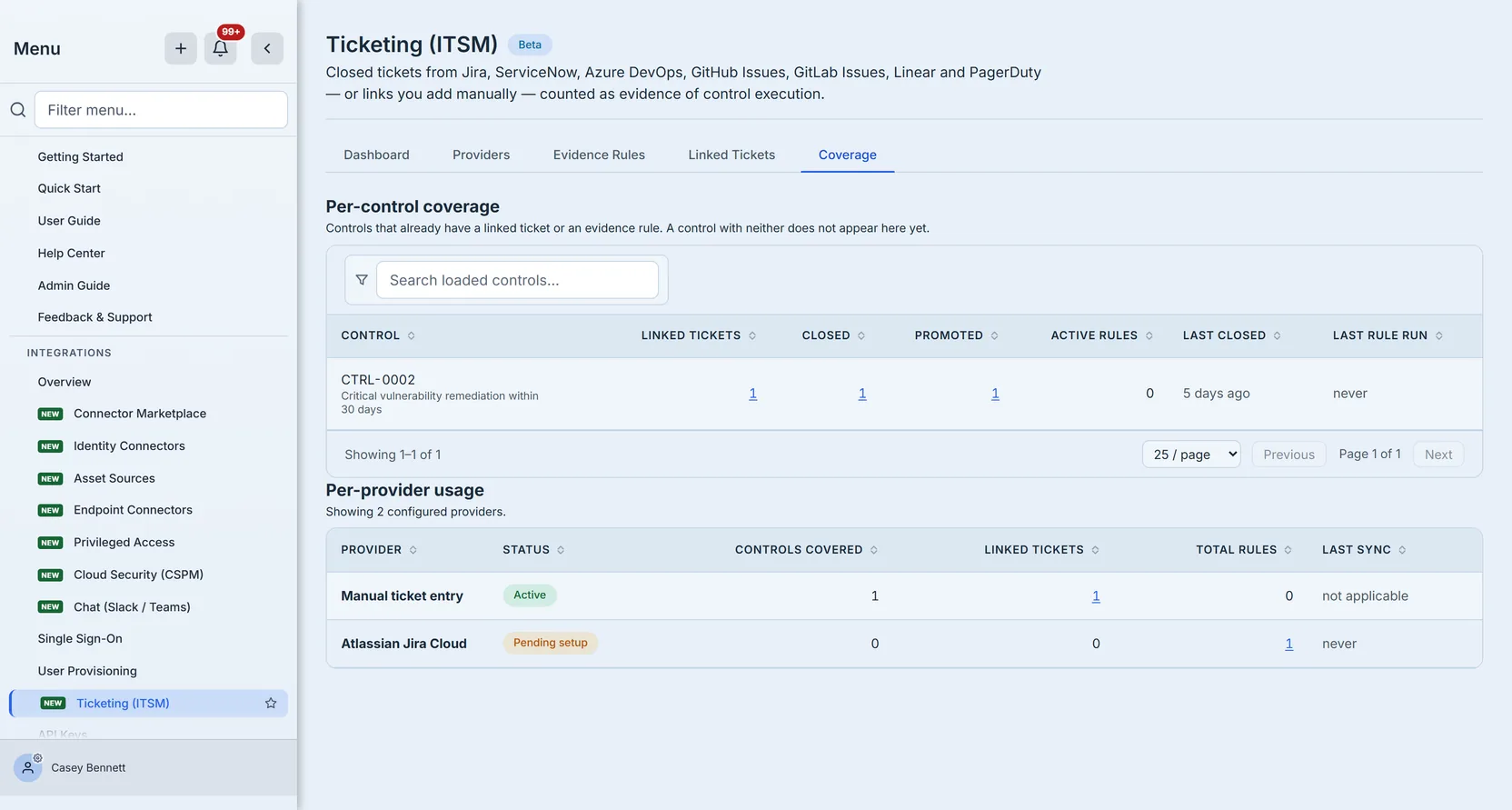
Per-control coverage lists every control with ticket evidence: how many tickets are linked, how many are closed, how many were promoted to artifacts, how many active rules feed it, when the most recent ticket closed, and when a rule feeding it last completed a run. Reading down the “last ticket closed” column is the fastest way to find a control whose evidence has quietly gone stale; reading “last rule run” beside it tells you whether that staleness is because nothing qualified or because nothing has looked lately.
The linked and closed figures are clickable. Each one opens the Linked Tickets tab filtered to that control — closed opens it filtered to closed as well — so a number you doubt is one click from the rows behind it.
The rule count here means active rules. A control whose only rule is paused or still a draft shows zero, which is the honest number — a rule that is not running is not feeding anything — but it is worth knowing before you read a zero as “nobody ever set this up”.
A mature control set runs to several hundred controls, so this table is searchable and paged rather than a single long scroll — the question you bring to it is usually about one control, and typing its number is faster than hunting for it.
Per-provider usage answers a different question: which system is actually carrying the evidence load. Each row gives Controls covered, linked tickets, Total rules — every rule against that provider, not just the active ones the per-control table counts — and Last sync. Once a connector has actually run, that column carries the run status beside the timestamp, so a provider that ran recently and failed is not mistaken for one that ran recently and worked.
That pairing is the useful part. A provider with a healthy last-sync time but zero controls covered is connected and contributing nothing; one that produces every artifact while another has produced none since it was configured is worth knowing before the auditor notices. A manual provider shows Not applicable here rather than never, which is the honest reading: it has no sync to be overdue for.
When the list is longer than the page shows, it says so rather than presenting the first page as if it were the whole picture.
Access
Ticketing (ITSM) is in Beta, and the page says so in its own header. That is not a formality: the page is gated on the ticketing-evidence platform feature, so it has to be switched on for your organisation before anyone can reach it, however their group is configured. If you cannot find it in the sidebar, that is the first thing to check rather than the permissions below.
Beyond that it is gated three ways, at three different levels, which is worth knowing before you hand someone the page.
The route requires the integrations feature on the user’s group — without it the page is not in the sidebar and the URL does not resolve. Every action additionally requires the ticketing licence. Then the permissions escalate with what you are doing:
ticketingEvidence.read— see the dashboard, providers, rules, links and coverageticketingEvidence.write— link a ticketticketingEvidence.admin— create, edit or delete an evidence rule
That escalation is deliberate. An auditor or a control owner can be given the full coverage picture without the ability to change what counts as evidence, and someone linking tickets day to day does not need the authority to author the rules that harvest them automatically.
What this guide does not cover
It does not cover running a live sync against a real ITSM — connecting Jira or ServiceNow with a real credential, and what the sync run records when it succeeds or fails. The connectors are built; this guide walks the path that needs no credential, because that is the path every programme can start on today.
It does not cover the evidence library itself — what happens to an artifact once it is filed, how it is reviewed, or how it reaches an auditor. Promoting a ticket is the last step this page owns; packaging evidence for an auditor picks it up from there.
It does not cover where controls come from. Every ticket link points at a control, and this guide assumes those already exist — the control library is where they are adopted and mapped to frameworks.
It does not cover inbound webhooks, which let a provider push ticket changes to Talarity rather than waiting for the next sync. That is a server-to-server contract and belongs with the outbound webhooks guide, which covers signature verification and delivery mechanics in full.
And it does not cover which controls should be evidenced by tickets at all. That is a programme-design question, not a product one: the rule of thumb is that ticket evidence suits controls that produce discrete, dated work — patching, access revocation, change approval, incident response — and suits continuous or preventive controls far less well.